



大家玩 Nano Banana Pro 感觉怎么样,网络上也充斥着各种各样的玩法,每一种都很惊艳。
而最近前两天,Google 竟然悄咪咪的发布了一个深度玩法指南。
我也是第一时间把这份文档啃了下来,真的太给力了,出图的效果直接翻倍!
为了让大家都能用上这份文档,重新整理了一下这份使用指南,变成了大家都能懂的文档,主打一个贴心、宠粉!
目录:
1、提示的黄金法则
2、文本渲染、信息图与视觉综合
3、角色一致性与病毒缩略图
4、通过谷歌搜索实现接地
5、高级编辑、修复与上色
6、维度平移(2D ↔ 3D)
7、高分辨率与纹理
8、思考与推理
9、一次性分镜与概念艺术
10、结构控制与布局指导
11、接下来是什么?
1、提示词的黄金法则
Nano Banana Pro 是一款“思考型”大模型,它不仅仅是匹配用户提供的关键词,还可以理解意图、物理和构图等等。
所以为了获得最佳的画图效果,我们不要再使用死板的标签,比如,狗、公园、4K、写实等等
现在就抛弃这种想法,转而尝试用设计师的眼光来看待 Nano Banana Pro。
能精修就不要重新抽卡
以前啊,我们出图不满级,基本只能重新抽卡~
但是在 Nano Banana Pro 大模型时代就不用。
这款模型在对话理解方面表现得非常出色。如果一张图片有 80%是正确的,那么就不要从头生成新的。
你只需提出具体需要的变更就行,所谓了指哪打哪。
例子:“ 很好,但是请把光线改成夕阳,文字变成霓虹蓝色。”说完整的“人话”
我们平时和同事、设计师怎么交流,就怎么和 Nano Banana Pro 交流,最重要的就是描述要清晰、完整。
反向案例:“ 酷车,霓虹灯,城市,夜晚,8 千。”
正向案例:“ 一辆未来感十足的跑车在东京雨夜街道上飞驰的电影式广角镜头。霓虹灯在湿滑的路面和汽车金属底盘上反射。”
给出详细具体的描述
我们给到 AI 的描述越模糊,AI 给出的结果也越随机
所以我们需要给出明确的描述,包括主体、场景、光线,氛围等等与绘图相关的内容。
案例: 不要仅仅说说“女人”,而是说“穿着复古香奈儿风格西装的优雅老妇人”。
描述性词语: “哑光表面”、“拉丝钢”、“柔软天鹅绒”、“揉皱纸张”。
提供背景信息
因为大模型需要“思考”,所以我们应该赋予足够的上下文来有助于它做出合乎逻辑的艺术决策。
案例:“为一本巴西高端美食食谱制作三明治图片 。”(模型会推断专业的摆盘、浅景深和完美的光线效果等等。)2、文本渲染、信息图与视觉合成
Nano Banana Pro 具备非常强的文本渲染能力,可以渲染可读性非常强的内容,而且还能制作各种风格的文本,并将复杂信息组合为为视觉格式。
这里有三个最佳实践,我们都可以去尝试
压缩: 让模型将密集的文本或 PDF“压缩”成视觉辅助。
风格: 明确你想要的是“精致的编辑论”、“技术图表”还是“手绘白板”的风格,Nano Banana Pro 几乎都支持。
引号: 明确说明你想用引号写出你想要的文本。
财报信息图
[Input PDF of Google's latest earnings reportPDF]
"Generate a clean, modern infographic summarizing the key financial highlights from this earnings report. Include charts for 'Revenue Growth' and 'Net Income', and highlight the CEO's key quote in a stylized pull-quote box."
[输入谷歌最新财报PDF]
“生成一个简洁、现代的信息图,总结本财报中的关键财务亮点。包括'收入增长'和'净收入'的图表,并在风格化的引号框中突出显示 CEO 的关键语录。”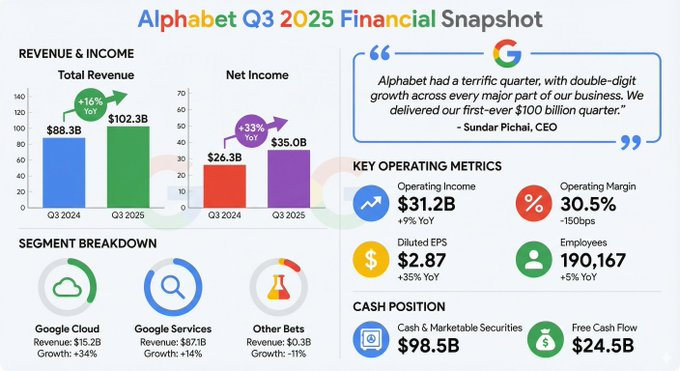
复古信息图
Make a retro, 1950s-style infographic about the history of the American diner. Include distinct sections for 'The Food,' 'The Jukebox,' and 'The Decor.' Ensure all text is legible and stylized to match the period.
制作一个复古、1950年代风格的信息图,介绍美国餐馆的历史。为“美食”、“点唱机”和“装饰”划分独立板块。确保所有文字清晰可读,并以符合当时的风格。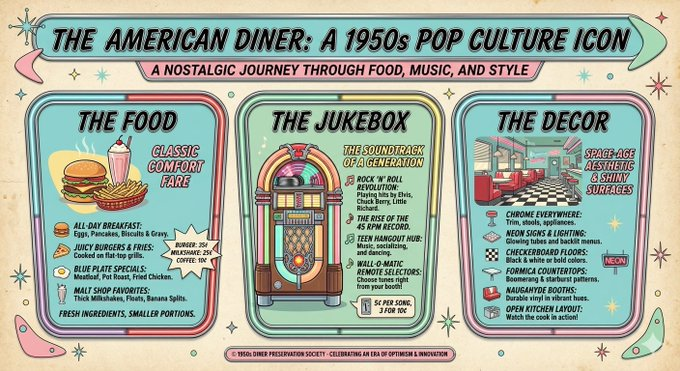
技术示意图
Create an orthographic blueprint that describes this building in plan, elevation, and section. Label the 'North Elevation' and 'Main Entrance' clearly in technical architectural font. Format 16:9.
制作一份正字蓝图,描述这座建筑的平面图、立面图和剖面。用技术建筑字体清晰标注“北立面”和“主入口”。格式16:9。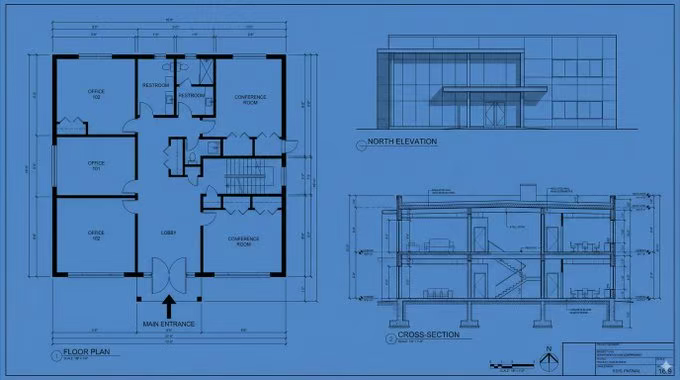
白板摘要
Summarize the concept of 'Transformer Neural Network Architecture' as a hand-drawn whiteboard diagram suitable for a university lecture. Use different colored markers for the Encoder and Decoder blocks, and include legible labels for 'Self-Attention' and 'Feed Forward'.
将'变换器神经网络架构'的概念总结为适合大学讲座的手绘白板示意图。在编码器和解码器块上使用不同颜色的标记,并标注“自我关注”和“前馈”的清晰标签。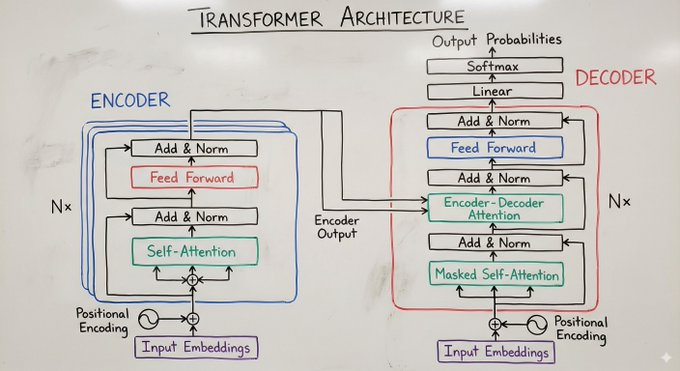
3、角色一致性与封面图
Nano Banana Pro 支持最多 14 张参考图像 ,其中 6 张可以实现为高保真。
这就让我们可以更容易的保持角色一致性,把一个人物放到不同的场景当中,还能保持五官一致,这一点非常重要,也非常强悍!
最佳实践
身份锁定: 明确说明:“保持该人的面部特征与图片 1 完全相同。”
表达/行动: 描述情绪或姿态的变化,同时保持身份认同。
构图和写作: 将主题与大胆图形和文字一次性结合。
爆款图片
"Design a viral video thumbnail using the person from Image 1. Face Consistency: Keep the person's facial features exactly the same as Image 1, but change their expression to look excited and surprised. Action: Pose the person on the left side, pointing their finger towards the right side of the frame. Subject: On the right side, place a high-quality image of a delicious avocado toast. Graphics: Add a bold yellow arrow connecting the person's finger to the toast. Text: Overlay massive, pop-style text in the middle: '3分钟搞定!' (Done in 3 mins!). Use a thick white outline and drop shadow. Background: A blurred, bright kitchen background. High saturation and contrast."

“用图片 1 中的人物设计一个病毒视频缩略图。 面部一致性: 保持人物的面部特征与图片 1 完全相同,但表情要显得兴奋和惊讶。  动作: 摆出左侧人物的姿势,手指指向画面右侧。  主题: 右侧放置一张高质量的美味鳄梨吐司图片。  图形: 添加一个粗体黄色箭头,将人物的手指与吐司连接起来。  文本: 中间叠加巨大的流行风格文字:“3 分钟搞定!”(3 分钟就完成了!)用粗白色轮廓和阴影。 背景: 模糊明亮的厨房背景。高饱和度和对比度。”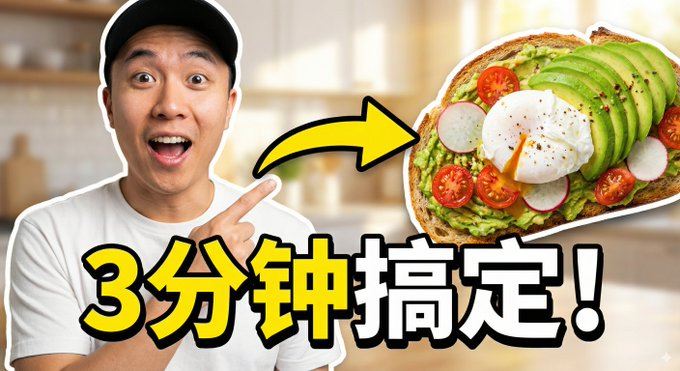
毛茸茸朋友
[Input 3 images of different plush creatures]
"Create a funny 10-part story with these 3 fluffy friends going on a tropical vacation. The story is thrilling throughout with emotional highs and lows and ends in a happy moment. Keep the attire and identity consistent for all 3 characters, but their expressions and angles should vary throughout all 10 images. Make sure to only have one of each character in each image."

[输入3张不同毛绒生物的图片]
“创作一个有趣的十集故事,讲述这三个毛茸茸的朋友去热带度假。故事贯穿始终令人振奋,情感起伏,最终以一个幸福的时刻收尾。 保持 3 位角色的服装和身份一致 ,但他们的表情和角度应在 10 张图片中有所不同。确保每张图片中每个角色只放一个。”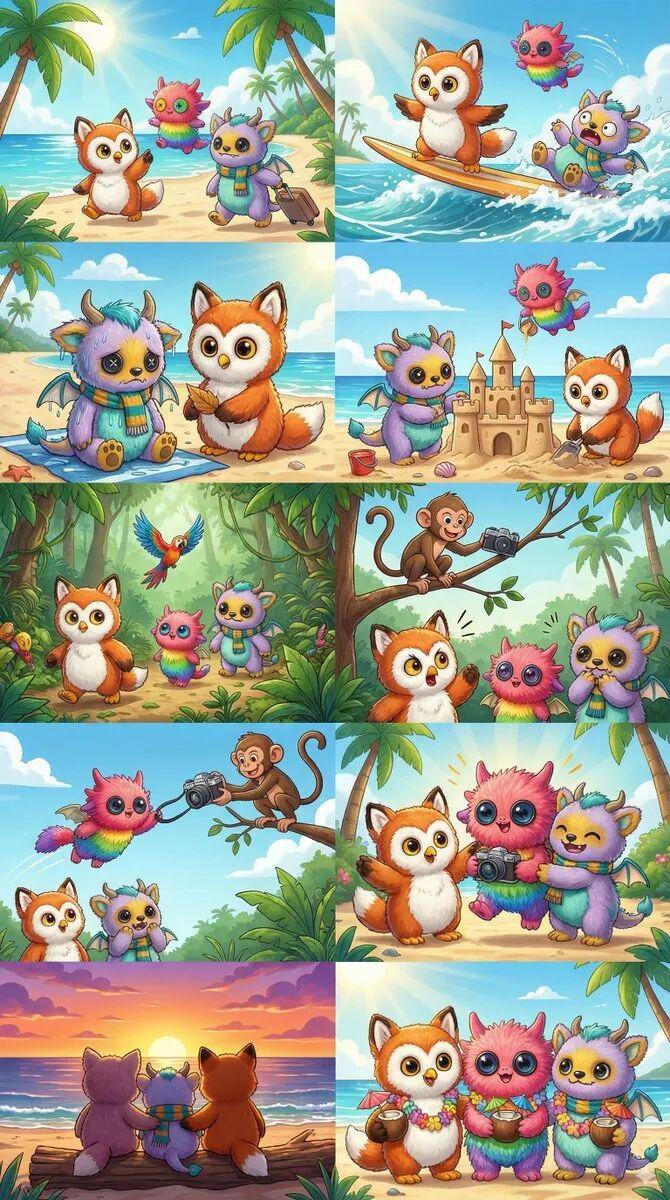
品牌海报
[Input 1 image of a product]
"Create 9 stunning fashion shots as if they’re from an award-winning fashion editorial. Use this reference as the brand style but add nuance and variety to the range so they convey a professional design touch. Please generate nine images, one at a time."

[输入1张产品图片]
“创作9张令人惊叹的时尚照片,就像取自获奖时尚专题一样。将这个参考作为品牌风格,但为系列增添细腻和多样性,以传达专业的设计风格。请一次生成九张图片。”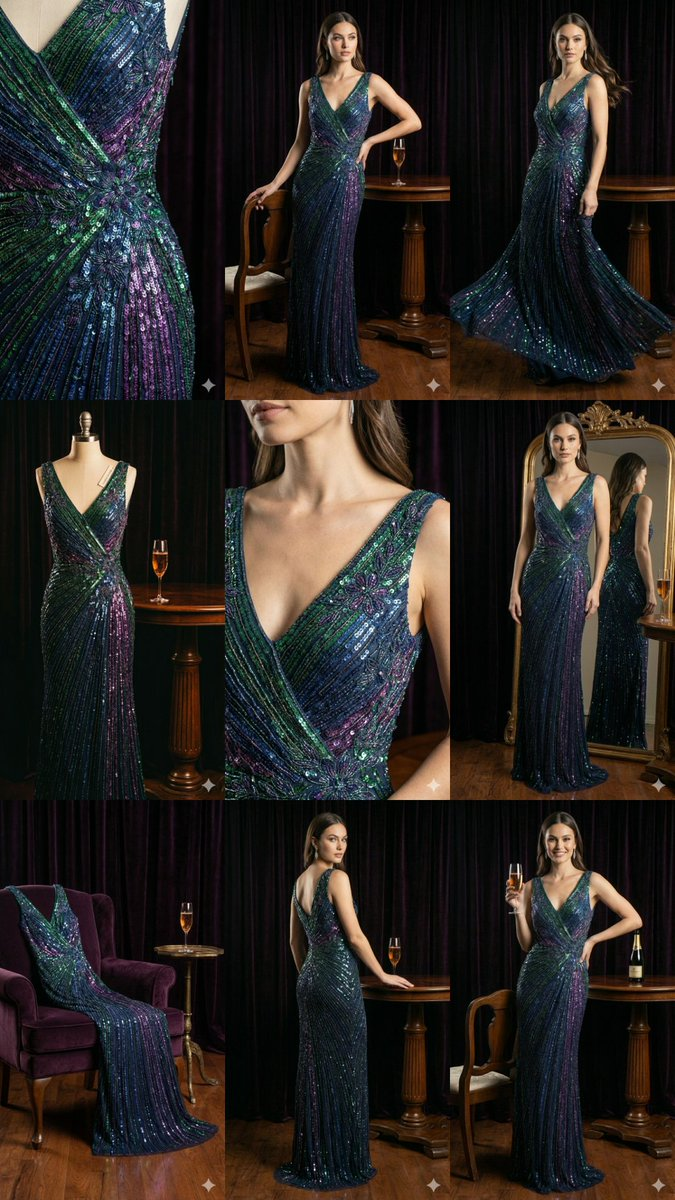
4、通过谷歌搜索实现信息检索
Nano Banana Pro 可以直接访问谷歌搜索,并且能够生成基于实时数据、时事或事实验证的图像。
比如实时股票信息,天气情况等等,都能直接获取。
这,也太方便强大了吧~
事件可视化
"Generate an infographic of the best times to visit the U.S. National Parks in 2025 based on current travel trends."

“根据当前的旅行趋势,生成2025年美国国家公园最佳游览时间的信息图。”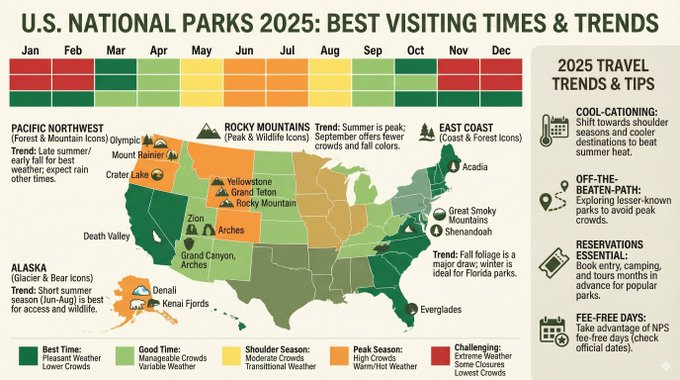
5、高级编辑、修复与上色
Nano Banana Pro 擅长通过对话提示来处理复杂的编辑活动。
比如对物体进行移除或者添加、修复旧照片、漫画/黑白照片上色和风格切换等等。
这个过程不需要手工进行任何标注,只需要告诉大模型你想要修改哪里即可。
物品移除和修改
"Remove the tourists from the background of this photo and fill the space with logical textures (cobblestones and storefronts) that match the surrounding environment."

“把游客从这张照片的背景中移除,用与周围环境相匹配的合理质感(鹅卵石和店面)填充空间。”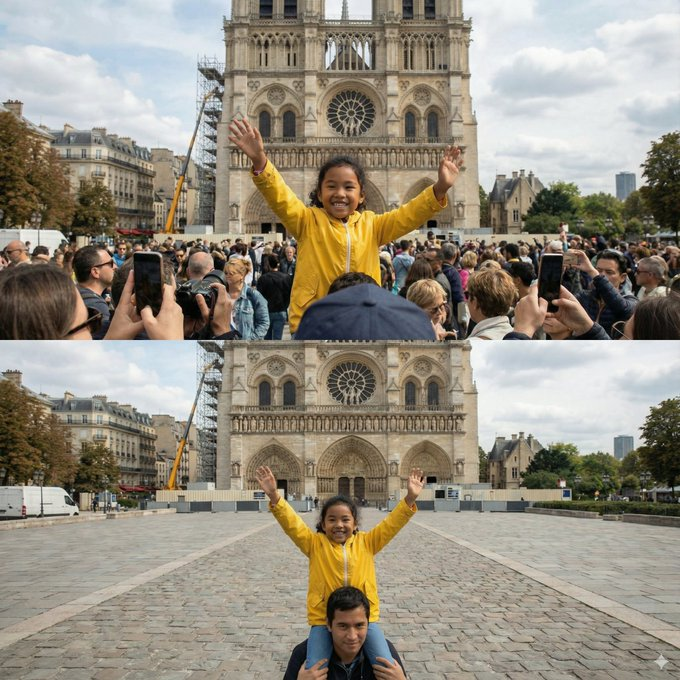
漫画/漫画上色
[Input black and white manga panel]
"Colorize this manga panel. Use a vibrant anime style palette. Ensure the lighting effects on the energy beams are glowing neon blue and the character's outfit is consistent with their official colors."

[输入黑白漫画格]
“给这格漫画上色。使用鲜艳的动漫风格调色板。确保能量光束的光影效果是荧光蓝的,角色的服装也符合官方颜色。”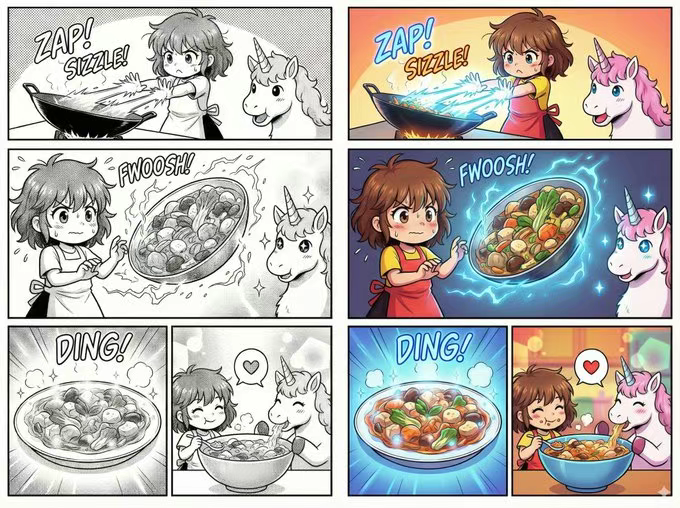
本地化内容展示
[Input image of a London bus stop ad]
"Take this concept and localize it to a Tokyo setting, including translating the tagline into Japanese. Change the background to a bustling Shibuya street at night."

[输入伦敦公交车站广告图片]
“把这个概念本地化到东京背景,包括把标语翻译成日语。把背景换成夜晚熙攘的涩谷街道。”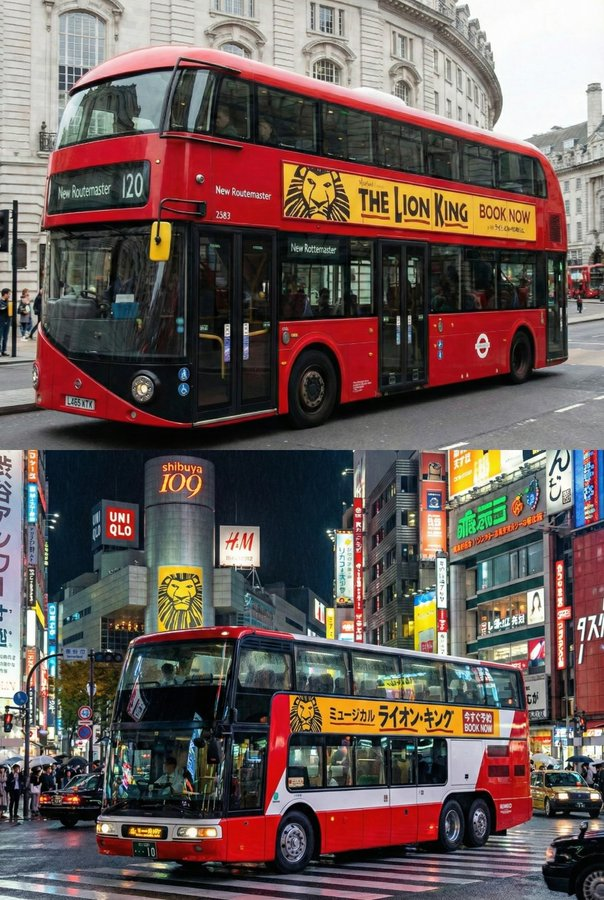
照明/季节控制
[Input image of a house in summer]
"Turn this scene into winter time. Keep the house architecture exactly the same, but add snow to the roof and yard, and change the lighting to a cold, overcast afternoon."

[输入夏季房屋图片]
“把这场景变成冬天。保持房屋建筑风格一模一样,但屋顶和院子里加点雪,灯光改成寒冷阴沉的下午。”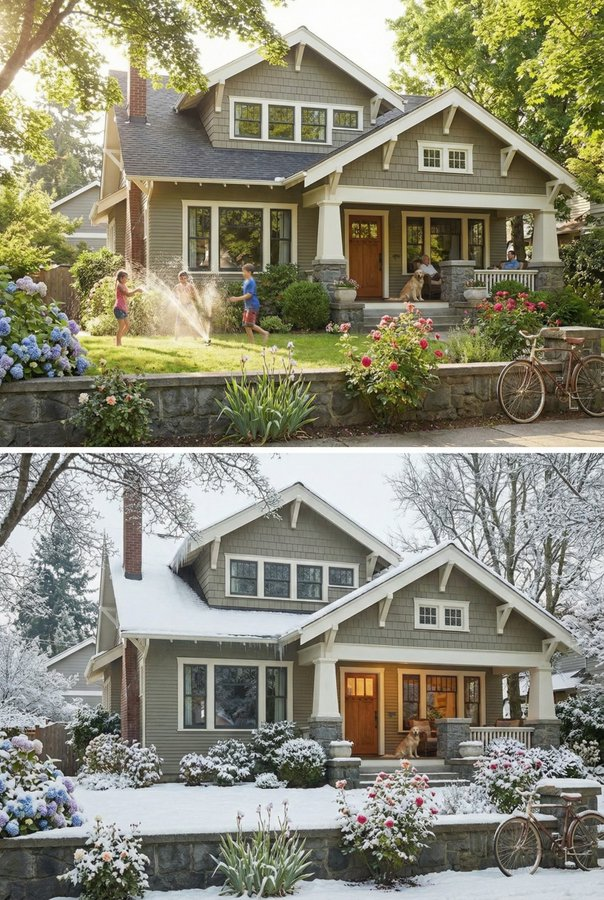
6、从 2D 到 3D 的转换
还有一个新能力就是将二维原理图转换为三维可视化,反过来也完全没问题。
这个能力对室内设计师、建筑师和表情包创作者来说,不要太夸张,工作量大幅度降低呀。
从 2D 平面图到 3D 室内设计板
"Based on the uploaded 2D floor plan, generate a professional interior design presentation board in a single image. Layout: A collage with one large main image at the top (wide-angle perspective of the living area), and three smaller images below (Master Bedroom, Home Office, and a 3D top-down floor plan). Style: Apply a Modern Minimalist style with warm oak wood flooring and off-white walls across ALL images. Quality: Photorealistic rendering, soft natural lighting."

“根据上传的 2D 平面图,生成一张专业的室内设计演示板。 布局: 拼贴画,顶部有一幅大型主图(客厅的广角透视),下方有三张较小的图像(主卧、家庭办公室和 3D 俯视平面图)。  风格: 所有图片采用现代极简风格,配以温暖的橡木地板和米白色墙面。  质量: 写实渲染,柔和的自然光。”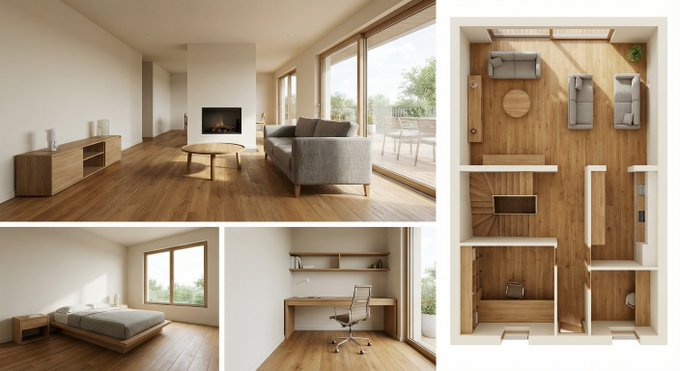
2D 到 3D 表情包转换
"Turn the 'This is Fine' dog meme into a photorealistic 3D render. Keep the composition identical but make the dog look like a plush toy and the fire look like realistic flames."

“把'这很好'狗狗梗变成写实 3D 渲染。保持构图相同,但让狗看起来像毛绒玩具,火焰看起来像逼真的火焰。”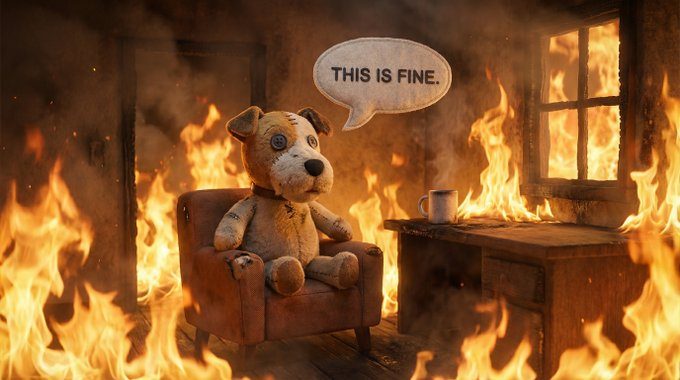
7、高分辨率与纹理增强
现在 Nano Banana Pro 支持原生 1K 到 4K 的图像生成,有时候生成的图片有几十兆大小,太吓人了,也太高清了。
这些提升,对于细节纹理或高清大图打印,都是非常有帮助,以后我们放大图片,再也不是马赛克啦。
4K 纹理生成
"Harness native high-fidelity output to craft a breathtaking, atmospheric environment of a mossy forest floor. Command complex lighting effects and delicate textures, ensuring every strand of moss and beam of light is rendered in pixel-perfect resolution suitable for a 4K wallpaper."

“利用本地高保真输出,打造令人屏息、充满氛围的苔藓森林地面环境。控复杂的灯光效果和细腻的纹理,确保每一根苔藓和光束都以像素级的分辨率呈现,适合 4K 壁纸。”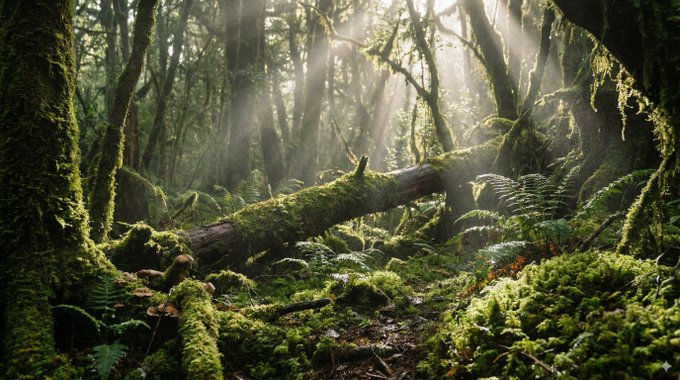
复杂逻辑
"Create a hyper-realistic infographic of a gourmet cheeseburger, deconstructed to show the texture of the toasted brioche bun, the seared crust of the patty, and the glistening melt of the cheese. Label each layer with its flavor profile."

“制作一张超写实的美食芝士汉堡信息图,解构以展现烤奶油面包的质地、煎焦的肉饼外壳以及奶酪闪亮的融化。用每层的风味特征标注。”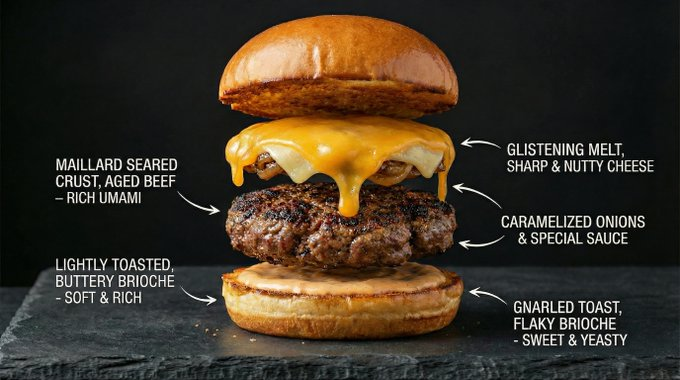
8、思考和推理能力
Nano Banana Pro 大模型默认采用思考逻辑,在给出最终图片之前,会先生成一些中间草稿,这个过程是不需要消耗用户 Token 的。
等大模型把所有思考都完成之后,才会生成最终的图片。
求解方程
"Solve log_{x^2+1}(x^4-1)=2 in C on a white board. Show the steps clearly."

“在白板上解 log_{x^2+1}(x^4-1)=2。清楚地展示步骤。”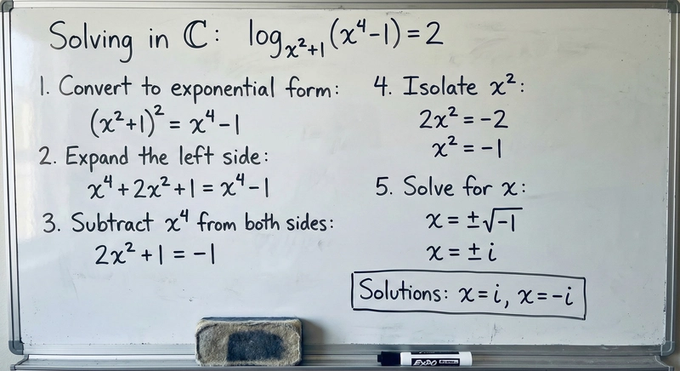
视觉推理
"Analyze this image of a room and generate a 'before' image that shows what the room might have looked like during construction, showing the framing and unfinished drywall."

“分析这张房间图像,生成一张'之前'图像,展示施工时房间可能的样子,包括框架和未完成的石膏板。”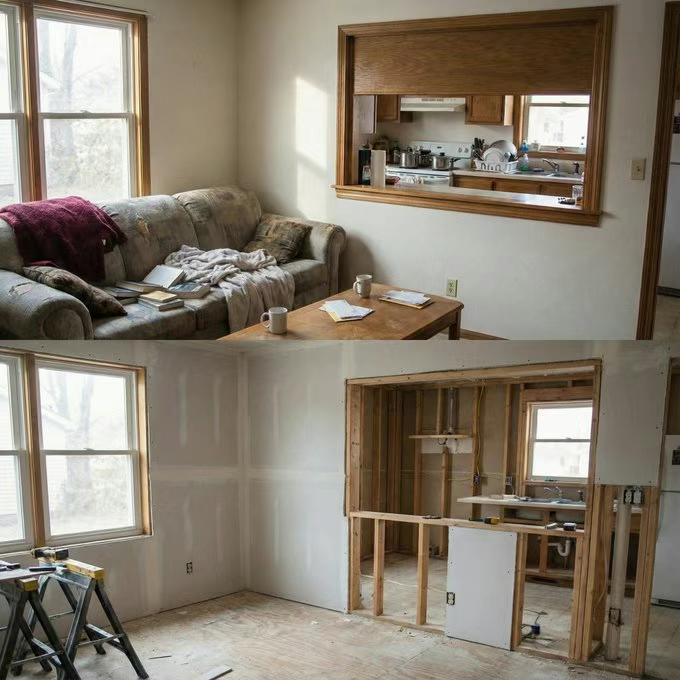
9、一步出分镜和概念设计
你可以在一次对话当中就生成连贯的艺术或分镜,我们唯一要确保的就是单次会话里面,叙事是连贯。
这个功能也非常适合电影行业去使用。
"Create an addictively intriguing 9-part story with 9 images featuring a woman and man in an award-winning luxury luggage commercial. The story should have emotional highs and lows, ending on an elegant shot of the woman with the logo. The identity of the woman and man and their attire must stay consistent throughout but they can and should be seen from different angles and distances. Please generate images one at a time. Make sure every image is in a 16:9 landscape format."
“创作一个令人上瘾的九部分故事,包含九张图片,主角是一对男女,在获奖的豪华行李广告中。故事应有情感的高潮与低谷,以一个优雅的女主角和标志的镜头收尾。 男女身份及其服饰必须始终保持一致 ,但他们可以且应该从不同角度和距离观看。请逐张生成图片。确保每张图片都是 16:9 的横屏格式。”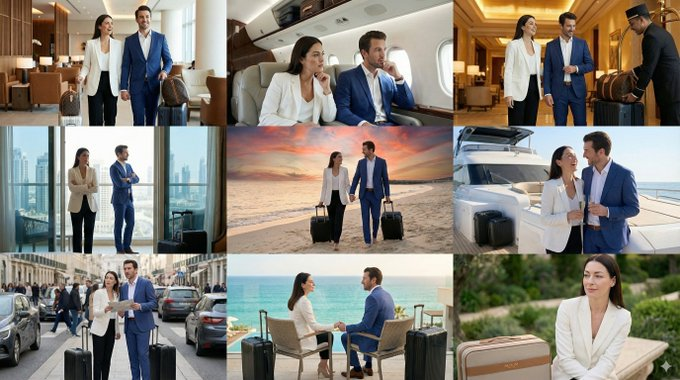
10、结构控制与布局指导
我们输入给大模型的图片不限于角色参考或者需要编辑的对象。
你甚至可以用输入的图片来控制生成的图片结构和布局。
从草图到最终广告
"Create a ad for a [product] following this sketch."

“按照这个草图制作一个[产品]广告。”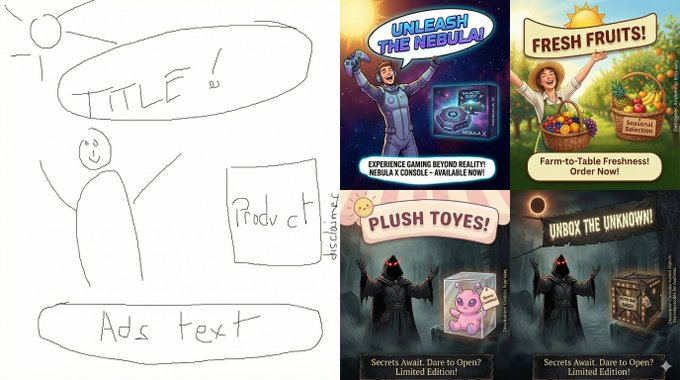
来自线框图的 UI 模型
"Create a mock-up for a [product] following these guidelines."

“按照这些指南,为[产品]制作一个模型。”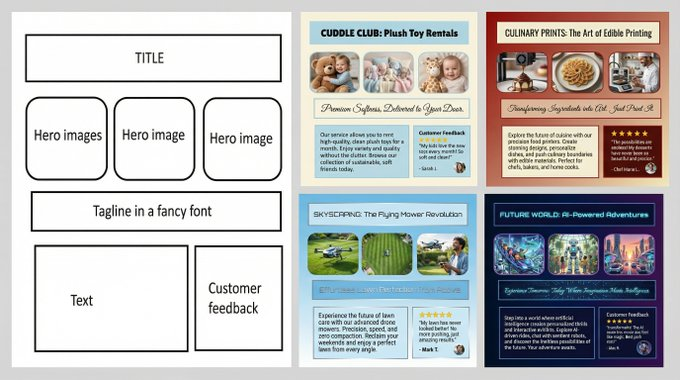
像素艺术与 LED 显示屏
"Generate a pixel art sprite of a unicorn that fits perfectly into this 64x64 grid image. Use high contrast colors."
(Tip: Developers can then programmatically extract the center color of each cell to drive a connected 64x64 LED matrix display).

“生成一个像素艺术的独角兽精灵,完美融入这幅 64x64 的网格图像中。使用高对比度的颜色。”
(提示:开发者随后可以通过程序提取每个单元的中心颜色,驱动连接的 64x64 LED 矩阵显示屏。)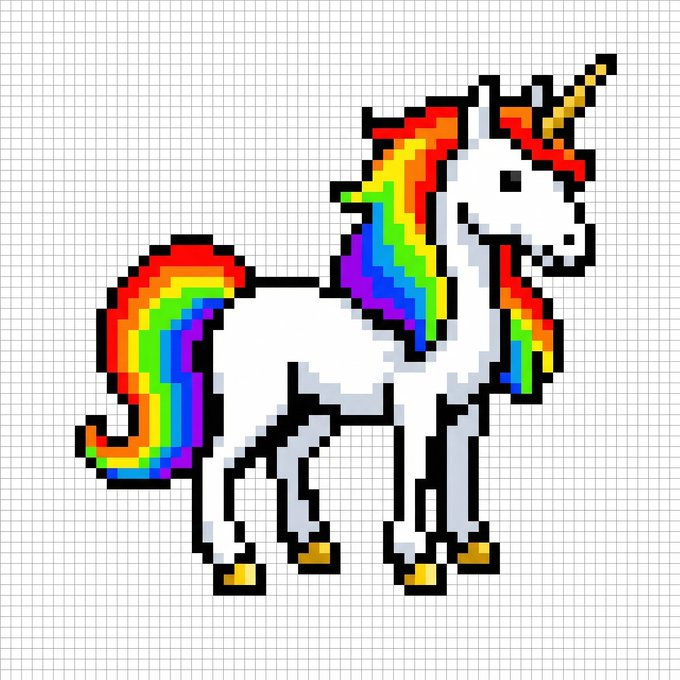
精灵
"Sprite sheet of a woman doing a backflip on a drone, 3x3 grid, sequence, frame by frame animation, square aspect ratio. Follow the structure of the attached reference image exactly.."
(Tip: You can then extract each cell and make a gif)

“一个女人在无人机上做后空翻的精灵图,3x3 网格,序列,逐帧动画,方形宽高比。完全按照附图的结构作......”
(提示:你可以提取每个单元格并制作 GIF)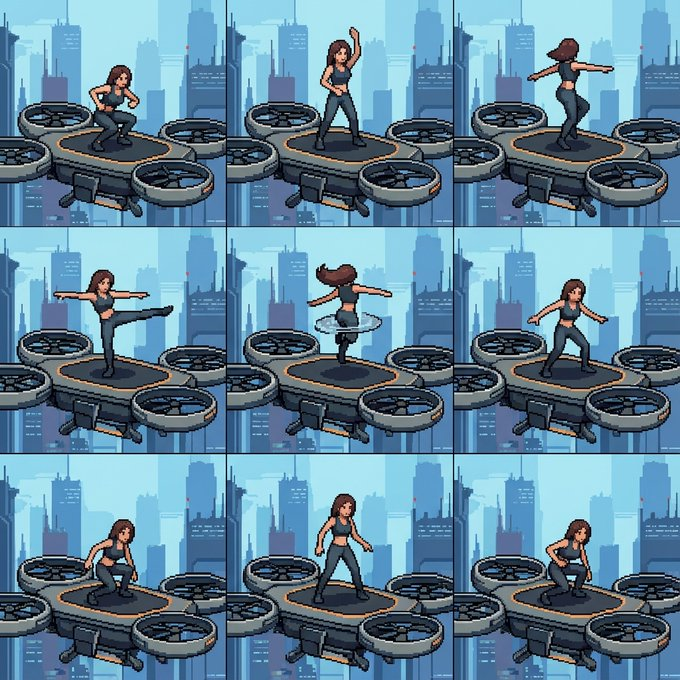
我相信,这几天大家一定已经被 Nano Banana Pro 的惊艳效果给震撼到了,虽然网络上有各种各样的玩法,但是我敢确认,我们对于 Nano Banana Pro 的开发,还不足 10%。
还有大量的好玩有趣的玩法等着我们去探索。
真的是越接触 AI ,越觉得这个伟大技术的可敬可佩指之处。
AI 不是来代替我们的,是为我们带来更多创造力的技术。