



I've written two about it AI DrawingRole Consistency articles on control methods. But both of them are more fragmented and do not combine the whole process。
Several readers left messages today to say if they could write a complete curriculum from 0 to 1, which would clarify the whole process and the middle control of the adjustment。
This time, I'm going to untangle the whole role-consistency process, including role creation, reference sheet generation, cross-situation testing, problem adjustment, template deposition, and cover the entire chain。
The problems encountered in the process and the way in which the adjustments were made would also be said, not only about the successful outcome, but also about the pits of the middle。
The article is long, and it is suggested that the collection be praised first. There is also a good tool presentation at the end。
Seriously, I didn't realize it was so complicated at first. Thinking of writing a prompt is done, and every face that comes out is different. A lot of information was turned on, a few methods were tried, and a relatively scalable set of solutions was found from Loveart to official articles。
today we'll share the whole set of prompt management methods。
IT IS NOT A SILVER BULLET, IT CANNOT GUARANTEE 100 PER CENT CONSISTENCY. BUT AT LEAST IT KEEPS YOUR ROLE RELATIVELY STABLE IN DIFFERENT CONTEXTS, AND IT'S REUSABLE. ESPECIALLY WHEN YOU'RE GOING TO DO THE ELECTRICAL PACKAGE, THE IP IMAGE DESIGN, OR THE CONTINUOUS NARRATIVE, IT SAVES YOU A LOT OF DEBUGGING TIME。
The complete process of this approach is then removed。
1. create role benchmark
First of all, there's oneRole baseline descriptionIt's like putting a file on this guy。
I tested the role of Luna, a working woman about 25 years old. The whole prompt is like this: (I'm using English, which has been translated into Chinese for ease of reading, which is not valid)
Please create a portrait of Luna, a working woman aged 25 years and older。
Appearance characteristics:
– Face, elliptical face, warm brown almond eyes, slightly up, with a delicate nose and soft lips
– Hair, long, long hair, dark, bright, over shoulder, soft and bright
– Color, white as china, fine skin, bright and bright
– Body, beautiful curved female incarnation, medium height
Symbolic clothing:
– Main clothing, routines, soft knitting or loose shirts
– Colors, soft pinks as dots
– Decoration, no, super simplistic style
– Characteristics, simple and simple
Emoticons and gestures:
– Faces, confidence, a faint smile
– Posture, natural relaxation, three-quarters
– Body language, etiquette, calm down
Style description:
– Art style, photo level
– Light, soft natural light
– Color processing, bright and bright
– Details, facial features, fine
[Luna| Generated using GPT-image-2 High]
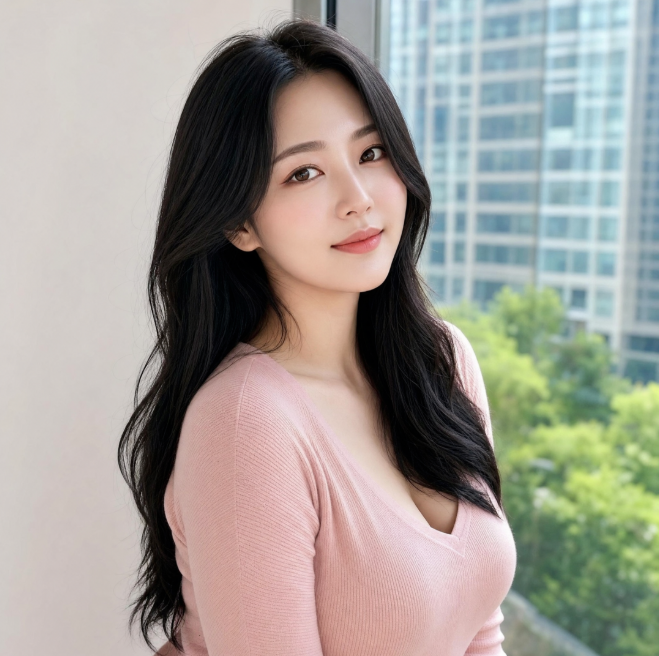
this prompt saves as a benchmark portrait。
IN THE PREVIOUS TEST, IT WAS NOT ENOUGH TO HAVE THIS BASELINE MAP ALONE BECAUSE AI IS "DISPERSED" WHEN IT IS GENERATED. YOU GIVE IT A PICTURE, IT ADJUSTS TO THE SCENE, AND THE LAST FACE CHANGES。
So a role reference sheet is also needed。
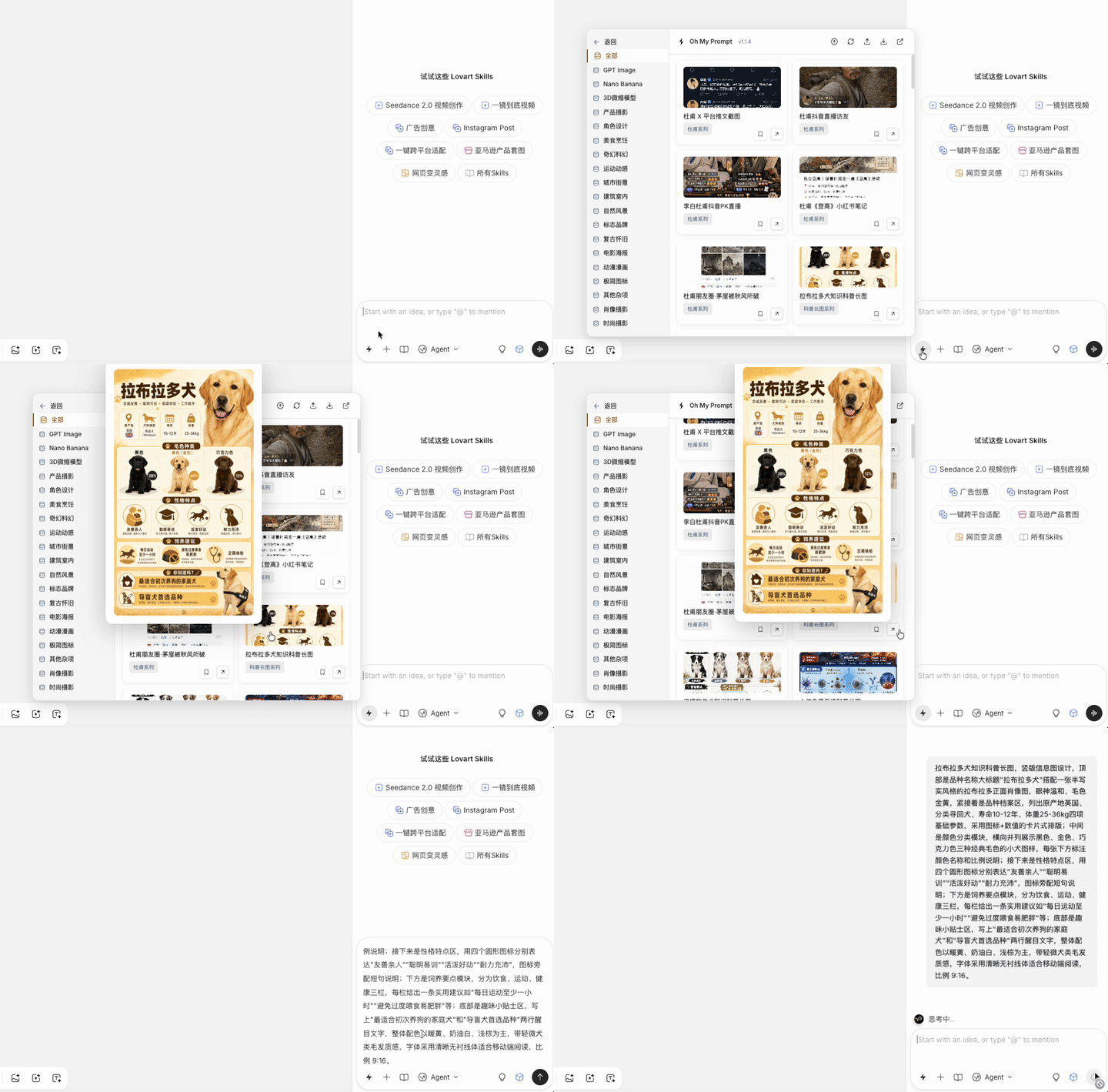
speaking of which, how do you manage this role? the better option is to use the oh-my-prompt plugin, which i will describe later。
Creates a role classification for Luna, and then adds a role benchmark under the classification, which is the paragraph above。
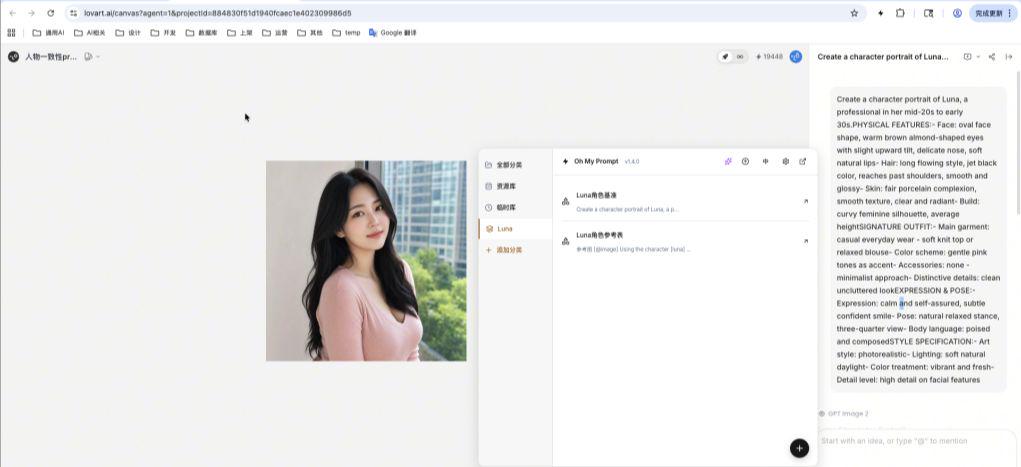
This means that every time it is used later, it is simply inserted by a single key, not rewritten or copied from elsewhere。
2. Generating role reference tables
Role Reference TableThe role is to consolidate the multiple perspectives and expressions of a role as a subsequent anchor。
i wrote this:
reference diagram [@image]
using the role that i've just created [luna], you can generate a role reference map that includes:
Perspectives (all perspectives are consistent):
1) Positive portrait – neutral expression
2) Three-quarters side – Smiling
3) Side (left) – neutral expression
4) Stand up – Self-confidence posture
5) Back (e.g. in relation to clothing details)
Details:
6) Facial close-ups
7) Detailed clothing
Emoticons (same angle, different emotions):
6) Neutral/quiet
7. Happy/excited
8) Firm/focused
9) Surprise/ Curiosity
Require:
- All perspectives are consistent
– Keep hair and pupils the same
– Use the same palette
– The reference diagram is simple, using a simple grid or neutral background
– Clarify every angle
Style, consistent with original character portrait style
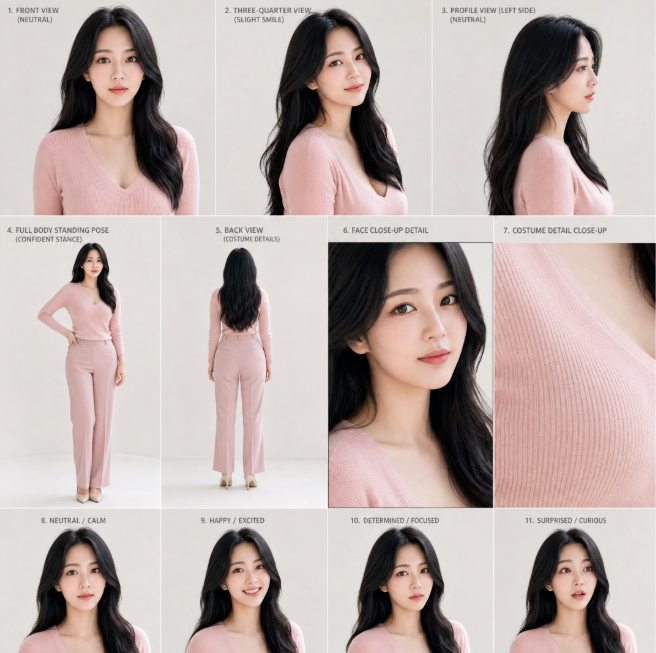
[Luna rolesheet | generated using GPT-image-2 High]
This reference table is also stored under the Luna category of the oh-my-prompt plugin, which will be needed later。
I've got a solution!Role baseline description and role reference table, each time it is generated later, the reference table is removed as an anchor and then the scene description is folded, which would be much better。
But that is not enough。
Because different scenarios have different degrees of impact on the role, some scenarios may lead to a larger shift of the role. So a test is required before the project is fully implemented。
3. Cross-Circumstances Test Role Consistency
This step is, I think, the most critical and easily ignored。
A lot of friends may not know, but once you have created a role benchmark and reference sheet, you go straight to the project. It turns out that the face of the character in a given scene has completely changed and that it would be very costly to come back and change。
The right thing to do is to test the performance of your role in three to five very different situations and monitor the level of preservation of your core visual identity. This facilitates early identification of potential problems of consistency。
my test prompt is like this:
Luna is displayed in four different settings, while maintaining perfect role consistency:
At midday afternoon in the city (Scene I), at the coffee shop table, the girl was wearing a light blue bouquet with no sleeves and a small shoulder belt, with a fine necklace. She smiled, and the breeze blew。
Bookshop (Scene II), indoors. The girl wears a Lolitagot dress with pink blues and sweets, and she wears a cat's ear, full of laces and ribbons. She turned light in front of the bookcase。
The roof is at dusk, sunset is at sunset. The girl was dressed in a black, white-loose suit (open) with a gray little thong and a super-short skirt, so she could show the way. She leaned on the roof rail and had long hair。
NIGHTHOUSE DJ (SCENE IV), URBAN NIGHT INTERIOR. THE GIRL WAS DRESSED IN A SPICY DRESS, TWITCHED UNDER A PLAQUE SHIRT, WITH A LITTLE WHITE THONG, WITH A SLIGHT DISPLAY OF HER WAIST, AND A JEANS SKIRT. SHE OPERATES THE EQUIPMENT BEHIND THE DJ, AND THE ATMOSPHERE SURROUNDS THE MIRRORS AGAINST THE CHEERING AUDIENCE。
To ensure that her facial features, hair, clothing and eyes remain identical in all scenarios。
The four scenes are very wide ranging, from the gentleness of the café, to the Lolita wind of the bookstore, to the Queen's wind of the roof, and finally the hotness of the night。
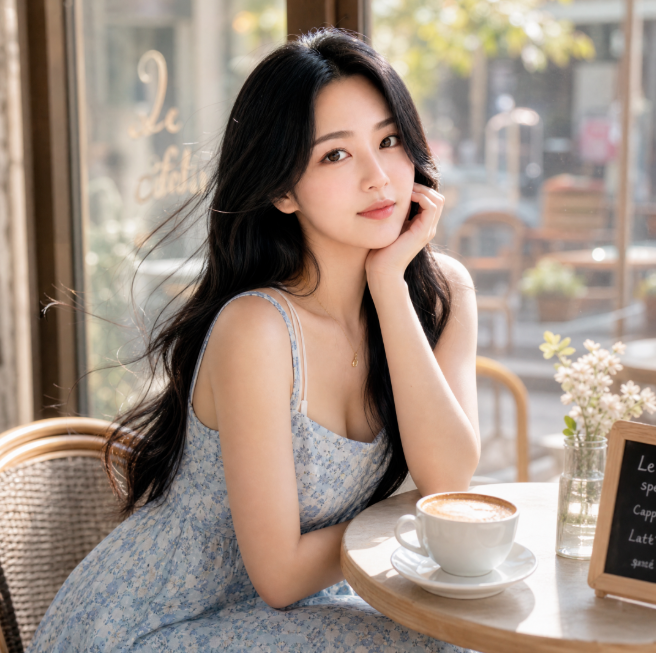
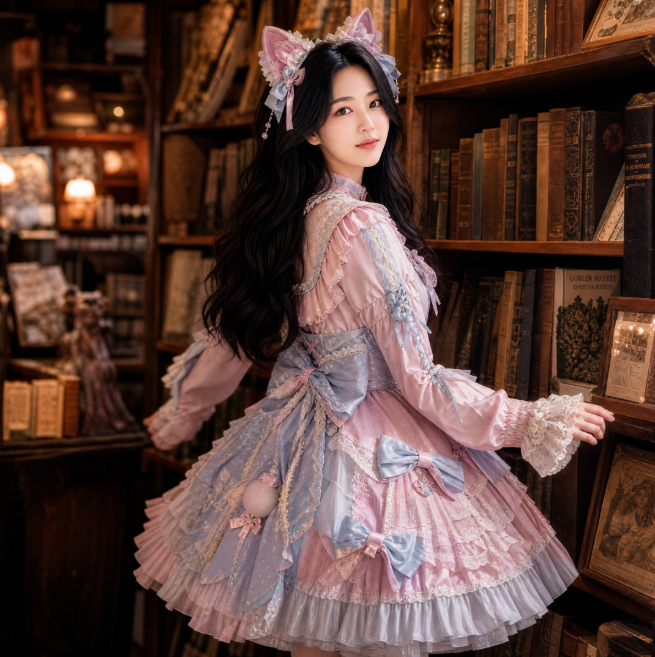
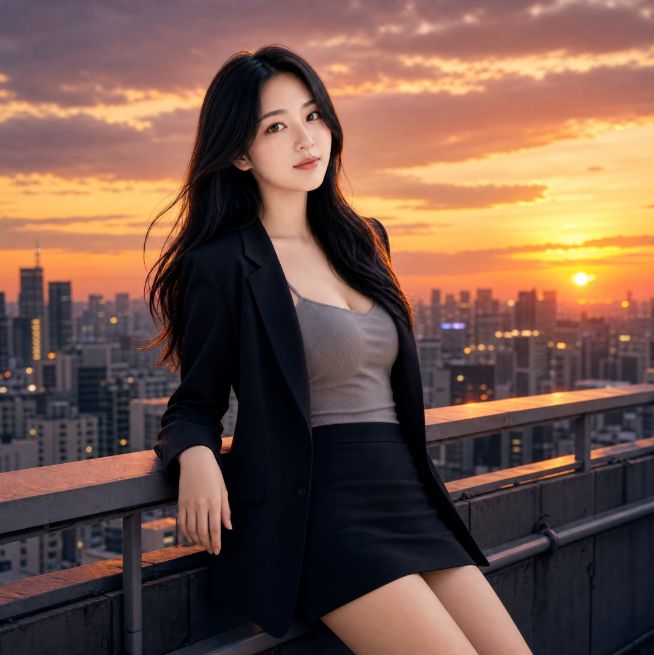
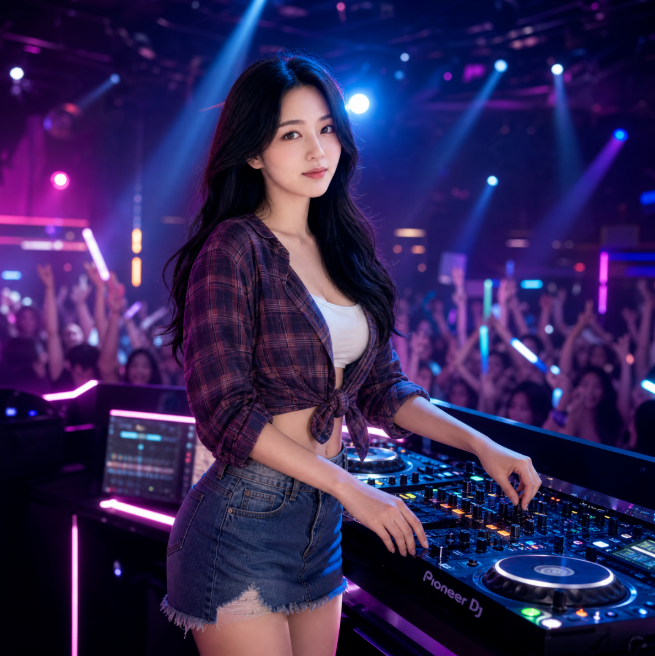
[Luna| Generates] [Luna| Generates with GPT-image-2 Mediam] [Luna| Generates with GPT-image-2 Mediam] [Luna| Generates with GPT-image-2 Mediam]
After that, I scrutinized the results. To be honest, the result is not as good as I thought, but some drift。
The most obvious problem is that all of the generated Luna, the head is a little bit crooked to the left and shows only the left face. I began to think it was a problem with the scenery, and then I realized that there was a figure in the role reference form, and AI learned this feature。
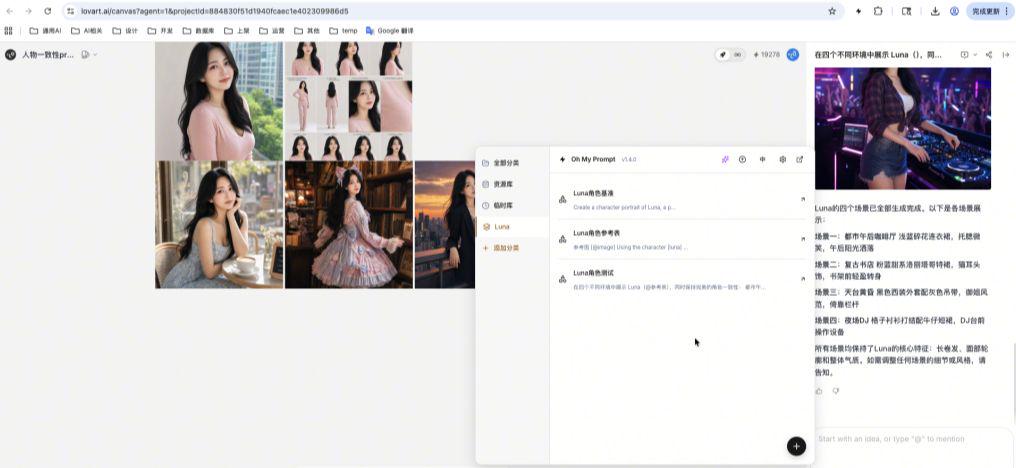
If you're a careful reader, you'll find the person that's generated above, basically with a bit of a left head and only a left face. It's a rolesheet, and there's an image on the rolesheet, and that's the pattern。
This is an important discovery. I didn't notice at first. I didn't notice until the test。
so there are two solutions. the first was to recreate a role reference table, adjust the description of attitude and orientation in the prompt, and emphasize "head-to-face lens". two is the characterPrompt wordAdd a sentence to the template, like "Luna's face is facing the lens."。
I've tried it myself, and it's better to change it from a rolesheet because it's all the anchors that are generated。
This step test helped me discover a potential problem in advance. It would have been a lot more trouble to change if you had been directly involved in the project and had this problem in every image that follows。
4. Create role-induction templates
Once the test is done, you can create a standardized oneRole Indices Template.
The role of this template is to serve as the basis for all future role-specific scenarios. Each time a new scene is generated, just fold the scene description on the basis of this template。
My Luna role template is this:
[@Role Reference Chart]
Luna is a working woman at the age of 25。
Appearance characteristics:
– Face, elliptical face, warm brown almond eyes, slightly up, with a delicate nose and soft lips
– Hair, long, long hair, dark, bright, over shoulder, soft and bright
– Color, white as china, fine skin, bright and bright
– Body, beautiful curved female incarnation, medium height
Symbolic clothing:
– Main clothing, routines, soft knitting or loose shirts
– Colors, soft pinks as dots
– Decoration, no, super simplistic style
– Characteristics, simple and simple
Emoticons and gestures:
– Faces, confidence, a faint smile
– Posture, natural relaxation, three-quarters
– Body language, etiquette, calm down
Style description:
– Art style, photo level
– Light, soft natural light
– Color processing, bright and bright
– Details, facial features, fine
scene:
[Scene Description]
this template does not have to be exactly the same as the initialized role creation prompt, but instead should be adjusted to some of the points you feel bad about, with only a partial description. if it's good, it's fine。
The template is available and every time the role is used, it is only necessary to reset the scene to describe the face of the dress and not to write from the beginning。
This template is used below as a practical case。
5. Examples of practical applications
I used Luna to make a case of an electrician, a park swing。
and the next thing I did, I took the costume and the expression out to make it compatible。
[@Role Reference Chart]
Luna is a working woman at the age of 25 years。
Appearance characteristics:
– Face, elliptical face, warm brown almond eyes, slightly up, with a delicate nose and soft lips
– Hair, long, long hair, dark, bright, over shoulder, soft and bright
– Color, white as china, fine skin, bright and bright
– Body, beautiful curved female incarnation, medium height
Style description:
– Art style, photo level
– Light, soft natural light
– Color processing, bright and bright
– Details, facial features, fine
The scene
In the park, there's a swing on the green-oil grass. Luna's wearing a swing
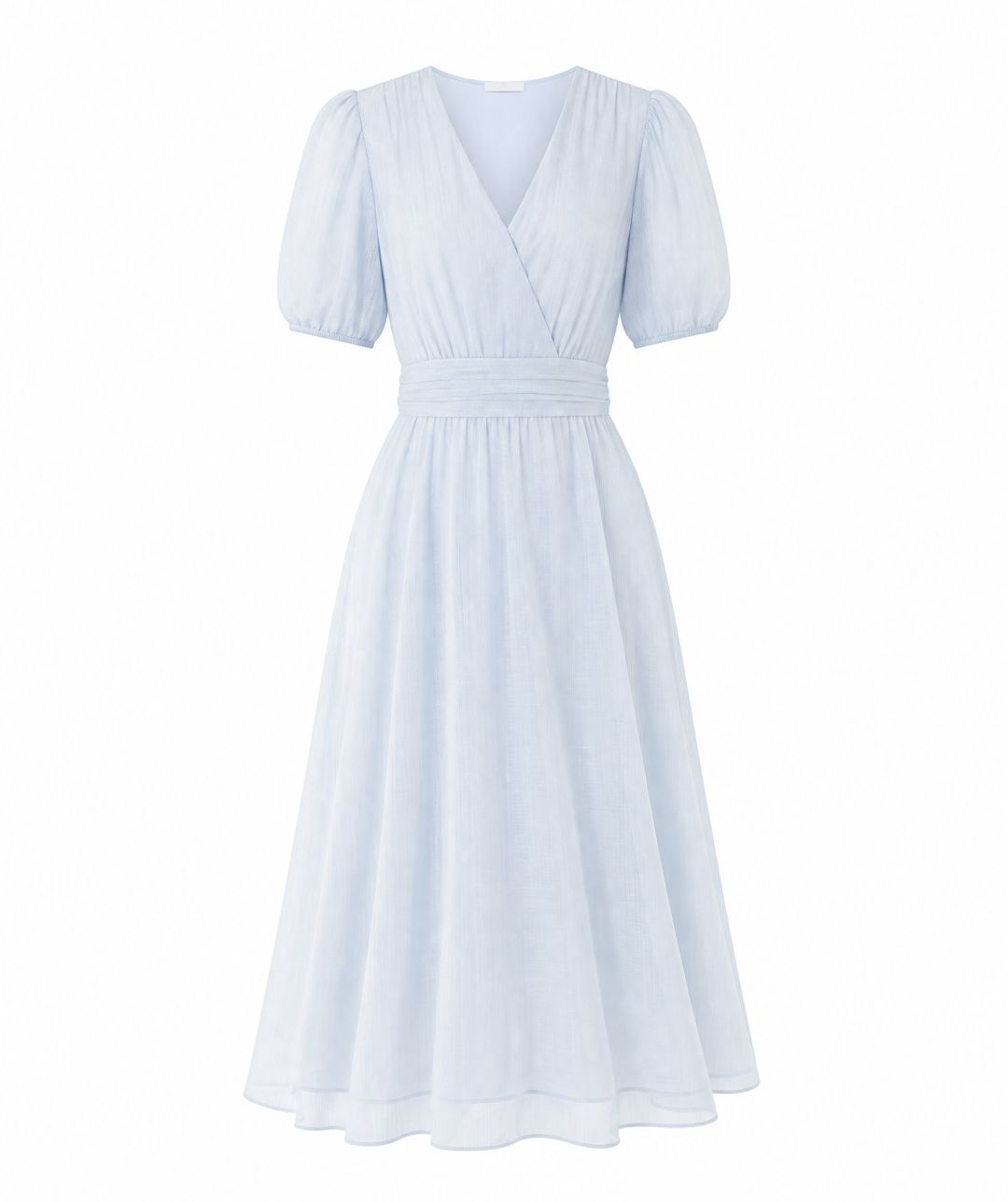
[White dress | generated using GPT-image-2 Mediam]
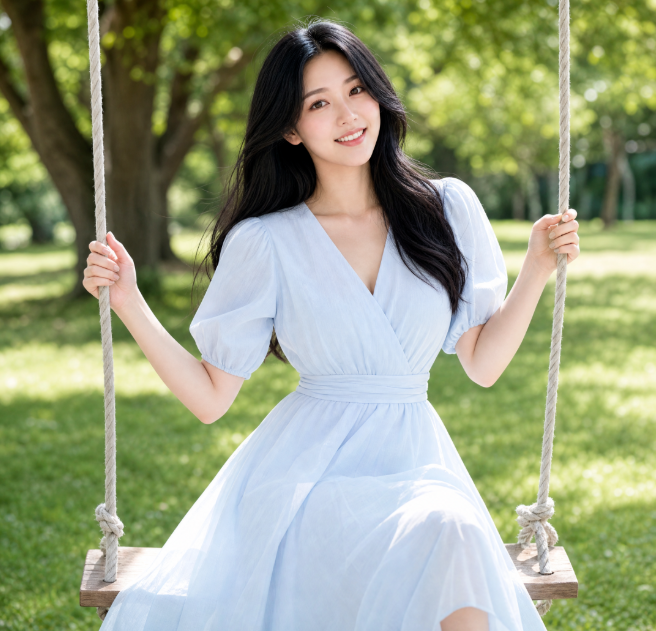
[Luna| Generated using GPT-image-2 Mediam]
Here's a detail that needs to be noted, which is this mark。
THERE'S OFTEN A NEED TO COMBINE MODELS AND PRODUCTS IN THE ELECTRIC BUSINESS SCENE, AND THIS WILL BE USED TO INTRODUCE THE WHITE BOTTOM MAP OF THE PRODUCT AND ALLOW AI TO INTEGRATE THE PRODUCT NATURALLY INTO THE SCENE。
The result was good, at least Luna's face basically kept。
about oh-my-prompt plugin
the whole process ahead of me, the management program to the plugin is oh-my-prompt。
This tool is a browser plugin that I have developed to manage AI drawings。
To be honest, I didn't think I'd make this tool myself at first. When I was using the IA map, I had to turn on the prept, either in the notebook or in the chat record, which was particularly troublesome。
and then you wrote yourself a plug-in, and the core function was really very simple, it was to help you manage the propt class, to use a key call。
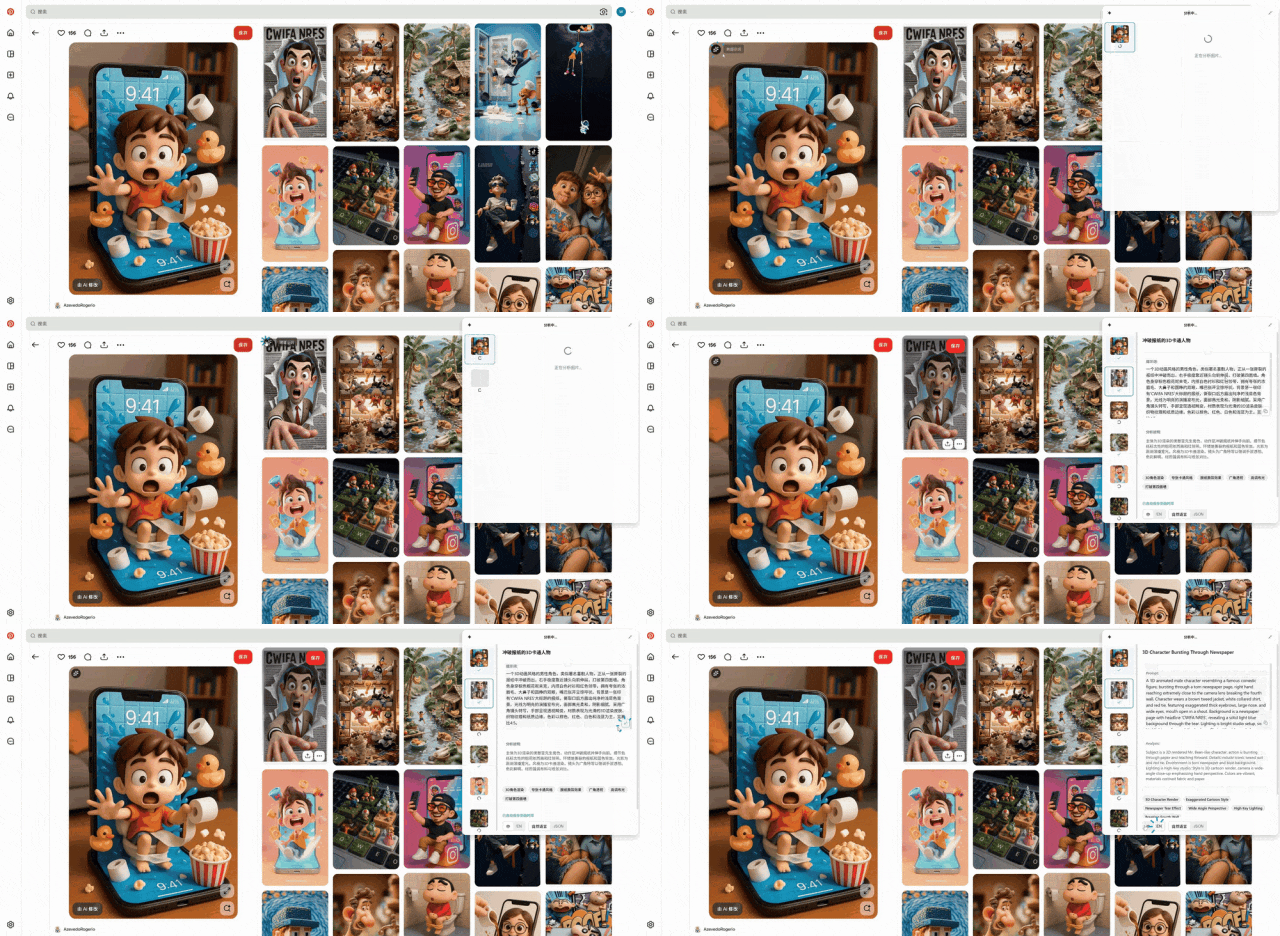
specifically, oh-my-prompt can help you do these things:
InsertI don't know. Opens the plugin, selects the prompt you want, and pastes directly to the input box in the Loveart, Starstream, or dream or any other AI drawing platform. You don't have to rewrite each time, and you don't have to rewrite the records。
Picture transpositioni don't know. you can switch the picture to the prompt on any platform, and these prompts will automatically be saved into our tools, and you can just go back to the design platform and insert it。
THE PLUGIN IS CURRENTLY BEING USED FREE OF CHARGE, AND I HAVE POSITIONED ITS BASIC FUNCTION AS A LEAD PRODUCT. IF YOU'RE INTERESTED IN AI MAPPING, EFFICIENCY TOOLS, OR MY OTHER PRODUCTS, YOU CAN TRY THIS PLUGIN. IT'S A GOOD EXPERIENCE. IT'S PROBABLY ABOUT MY OTHER PRODUCTS AND CONTENT。
If you're interested, you can go to Github, open source。
https://github.com/wk240/oh-my-prompt
Final Thoughts
it's probably a bit clumsy at first, and it takes longer than handwritten prompt. because you need to create role benchmarks, generate reference tables, do tests, then create templates。
But when you do multiple maps, the advantages of this approach will be felt。
and it's reusable, and after you created a role template and reference sheet, you can call directly every time you use it, without having to start over。