



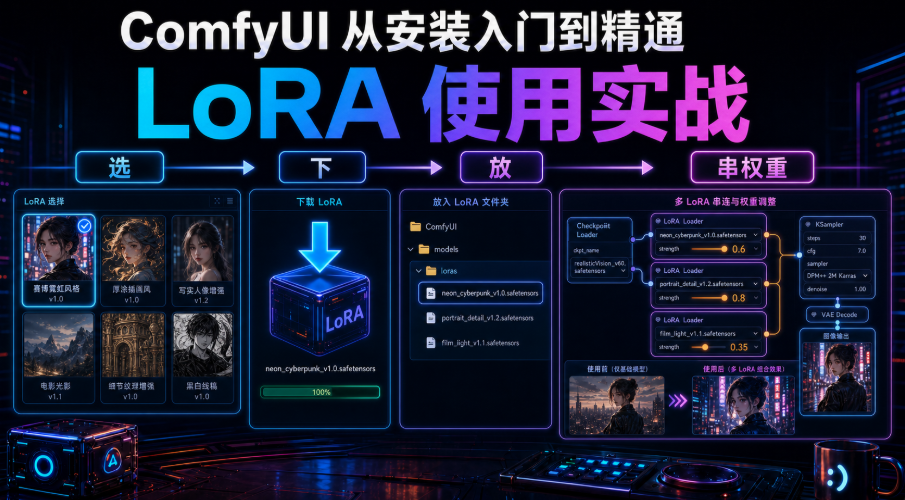
Eight of the first pieces come down. You're ready to go from scratch ComfyUIIt's a new style. By this, we'll fill out the last piece of the puzzle..LoRA.
Why the last piece? That's all you've got in front of you. To paint a water colour, to fix the face of an animated character, to keep your hands off the "Six Fingers" and it's hard to do it with a background and a hint. Hanging a LoRA, a few dozen gigabytes of small documents, immediately “add a skill pack” to the bottom model。
The first time I used Lora was to draw a fixed animated role, try half a day of hints. And then I hung up a character, Lora, and I had a steady face -- the feeling of being so simple. This hand-and-hand show you what Lora is, where it is, how the nodes are connected, how the weights are adjusted, how many strings and how the pits of my Lora are not responding。
One, Lora, what the hell is that
One sentence:LoRA is a little patch that hangs on the bottom model, teaching a new talent that it would not have。A few G-to-twenty G-to-do, everything's nothing but unsophisticated; LoRA, a few trillion-to-a-hundred megatons, specializing in one thing:
🎨 Lock styleWater colour, thick paint, Sabourpunk, some kind of painter
Zenium Lock characterOne face, one set of clothes, one body ratio
Zenium FixingSpecialized in hand, face and light
Zenium Speed up:turbo / lightning class, 4-10 steps
Remember:Lora won't retrain you. It's just a patch that's on a temporary basis。
II. Where to place the document (the whole drop box is empty by mistake)
LoRA downloads (.safetensors files) and puts this directory:
I'm sorry
Two pits blocked earlier:
1. Unset Folder_CommyUI defaults not to recur to the sweep subdirectories. Set loras/ style/xx will not be found, flattening the loras/ down。
2. Finish refreshing browser tab(F5) Load LoRA comes out of the box。
Trail experience:The first time I played Lora was in rule 2 -- the file was in the folder and the bottom frame was empty, and I thought it was broken twice. The page was updated and all came out... for half an hour。
III. Hand-to-hand nodes (continuous)
And the basic 05, LoRA is in the middle, "Plug a node." It is inserted between Checkpoint and KSampler:
Checkpoint (MODEL)
Checkpoint
Load LoRA (MODEL)→ KSampler (Model)
Load LoRA (CLIP)
1. Add Node: Right-click search Load LoRA (node Lora Loader)。
2. Connect: Click the link above。
3. Select files, weights: lora_name choose your LoRA; stength_model and stength_clip set 0.75 first。
4. Write Trigger(Detailed in the following section, most easily omitted): enter a positive hint。
5. Authentication: Fixed seed, weight 0.75, run once, set zero again, compare with no change。
One sentence:Modell and CLIP go through Load Lora and go down。Just one more node。
10 minutes, hang your first Lora
The principles of the previous sections are true. After you've got an extra LoRA-style map in your hand, you can confirm that it really works -- not just read it, it's made。
Preconditions: You've got page 05's basic graphic workflow (Load Checkpoint → two CLIP Text Encode → KSampler → VAE Decode → Save Image). If you lose it, press this five nodes again。
Target: Hanging a "shower" LoRA (e.g., water colour) to change a common map to a water colour and validate it。
Step (sight, don't jump):
1.Down Model: Pick the style LoRA, recognize the Base Model label, and must match your background。
2.File_: Throw into ComfyUI/models/loras/, smooth folders, F5 refreshing web page。
3.Add Node: The canvas double-click the blanks and search the Load LoRA back。
4.Connect: MEDEL/CLIP for Checkpoint first passed Load LoRA and then KSampler and CLIP Text Encode (supra)。
5.Set parameters: lora_name selected; stength_model / stength_clip fills 0.6 (not too high for painting)。
6.Write Trigger: Model page copy Trigger Words, stick to the front of the positive hint, comma separated。
7.Fixed FeedsSeed for KSampler is fixed (e. g. 12345) and is not random and easy to compare。
8.Output: Point Queue Prompt。
Checkpoint1 The figure clearly carries a water-coloured touch, which is completely different from "no LoRA " ; 2 Delete the trigger word + weight-weighted 0 and run one more and the two contrasts are different = effective; 3 2 copies, as well as 90% without the trigger (returning to section VI); and pull blanks back to section II。
Job (selection): Move weight from 0.6 to 0.9 and run a comparison and feel the sweetness is not empty -- 0.9 is more aggressive, too high。
iv. High-priority areas: Over or under (core knob)
The weight (strength) is "how strong is this patch" and it's the knob that Lora should most understand. Multi-source measurements are generally consistent:
|
|
|
|
|
|
|
|
|
|
|
|
|
|
|
|
|
|
|
|
My habit:Start 0.75, the effect is not enough to add 0.05 to the top, too "paste" down. The LoRA style is more hectic, often down to 0.4 to 0.5. Most of the stength_model and stength_clip are set the same。
Trail experience:A painting, Lora, I pulled directly to 1.2 and thought, "The higher, the more you look, the more you look, the more you look." It was later known that >1.0 would generally collapse and that Flux was particularly sensitive. Not as high as possible, 0.75 is a good starting point。
V. Multiple LoRAs used together: is "string" not "and"
Want a painting at the same time + a character? It can be folded, but it's tedious。It's a "coherent.": the second Load LoRA reads the first output, one by one, down, and does not pull two lines (which will cover each other) from the bottom。
Checkpoint → Load LoRA1 → Load LoRA2 (Role) → KSampler
You have to take down weights on each otherOtherwise, the picture is a mess:
:: Two: each 0.5 to 0.6
• 3 and above: 0.3 to 0.5 each, with a total strength of around 2.0
• Make one dominant (role 0.8) with the rest pressing below 0.4 as a complement
• The same type
When the LoRA exceeds 50 and drop-down frames turn over to the eye, the ComfyUI-Lora-Manager plugin (Manager at page 03) can be reloaded with a grid preview, a one-key switch trigger, and a formula。
The trigger word: "LoRA does not react" for 90%
It's the No. 1 Rotation Point. Lots of Loratrigger word- You have to write it inPositive prompt wordsLoRA will wake up. You thought it was broken。
• Where to find the trigger word: the author of the Model Download Page (Civitai / Liblibai / HuggingFace) generally states that “Trigger Words”
• Some Lola didn't trigger the word. Some did
• Write a positive hint and separate the other descriptions from the commas
Experience:I brought the new guy, nine out of ten, "LoRA doesn't work," and that's the last one -- no trigger. Hanged up with LoRA and the first thing was to turn the trigger on the model page。
vii. Compatible mined areas: non-coherent bottom models (strong black maps)
this will save you a lot of time:LoRA bottom model type, not mixed。SD 1.5 with SD 1.5, SDXL with SDXL, Flux with Flux, and Pony (based on SDXL) are self-contained. It's not working, it's heavyBlack / Bad Code.
The model page before download Base Model LabelAnd the bottom model you're using against the number. In addition, Pony's image "plastic sense" is normal, and it would be much better to set 2 in conjunction with the CLIP sskip; only down.safetensors, while downloading interrupted missing files "presumably workable" , is wrong, and it is heavy when the file is size。
viii. Quick check of parameters (copying)
|
|
|
|
|
|
|
|
|
|
|
|
|
|
|
|
|
|
|
|
|
|
|
|
|
|
|
|
IX, 4060 / 8G SPECIAL & PIT I STEPPED ON
Skills: Run Flux LoRA Easy to get "Patching LoRAs", which compares Diffusion to Ad hoc Automatic (with fp16 LoRA) so that 6G cards can run; start-up plus –medvram / –lowvram, with normal occupancy of 5.5-7.5G; hang-up LoRA itself does not eat visible, and lower resolution and open Tilled。
Five pits say all at once: The trigger wasn't written(No. 1); 2 Overweight 1.0 Face collapse; 3 Base model does not match Direct black; 4 Package Folder/No Refresher Drop-off blanks; 5 Multiple LoRAs Picture fight。
Lora's gonna do it. You're free to change your skills. But there's a needIf you don't want to train, you want the picture to follow the image/position/face of a reference map。It's up to ControlNet and Ipagger。Title 10, ControlNet, three scenesTell them "I'm under your command."。