



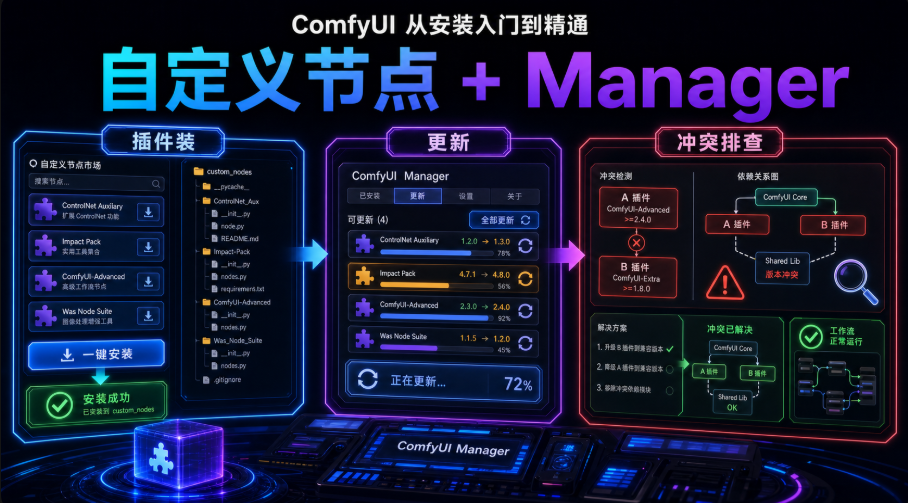
The first 16 articles come down, and you've been able to do a high-level retrospect from the Zero, the Map, the Quality, the LoRA for style, the ControlNet for positions, the Ipadapter for faces. In this one, we'll talk about something you'll bump into sooner or laterCustom Nodes.
THE FIRST TIME I STEPPED ON THIS PIT, I JUST LEARNED HOW TO FIGURE IT OUT. SEEING A PARTICULARLY GRUESOME WORK FLOW MAP AT THE FORUM, RUSHING INTO JSON ComfyUIThe whole canvasIt's redI don't know. Node's all "no node," and I thought the software was broken and the ComfyUI was useless, all night. And then I realized, "The red boxes are because of me."We're missing a bunch of self-defined nodes that other people use in their work streams.
In other words, you're going to have another situation: you're going to give a mass of pictures a watermark, you're going to make a "nine-megalogue" and you're going to take a smarter sampler, a bottom and a node, and you're going to have to build an "extension block" by the community. These blocks, they're called in ComfyUICustom Nodes.
And this one tells you two things: where the nodes come from, how they are dressed, and the most cost-effective way to do it ComfyUI-Manager Turn this thing into an "app store-like" one-click operation。
What is a self-defined node
One sentence:CofyUI, like Lego, officially gave only the base blocks, and the community built countless extension blocks. One node bag, a GitHub repository, drops it in the Custom_nodes folder, and you add new nodes。
🧩 Officially: Dry-basic, graphic
Zenium Custom Nodes: human face repair, mass processing, intelligent amplification, reference image control
Zenium It works without a codeIt's a set of nodes that someone else has written
Remember:The custom node is the "App" for ComfyUI, and the node package is the "App" installation package。
Why do you need Manager
Theoretically, the node would be “to go to GitHub and clone the warehouse to custom_nodes”. But it's a real hand job
1. I can't find the warehousethe same function is a warehouse with the same name, the author's fork version of the dump, and the error is nothing。
2. Reliance incomplete: node with a requirements.txt (Python-dependent list), you install it with the system Python, and the result is that ComfyUI uses its own environment, which is equal to not installed -- the full-screen IMPORT FAILED。
3. The version doesn't match: The node of the manual dress, the author updated you, you don't know, long ago fighting with the new version of ComfyUI。
That's what ComfyUI-Manager does. It's like..Embedded app store: enable browsing, searching, one-key installation, auto-dependency, batch updating, disablement, unmounting, and when you import work streams that are missingOne key to complete the missing.
Trail experience:The first time I had a manual node, I was stuck in "dependent on the wrong environment." After the cloning was restarted, nodes never appeared, and the logs were full of red words. And then I realized -- it's the python-embeded, not the Python on my computer. The wrong place is white。
Make sure you have Manager
Let's judge before we do itThe new version of ComfyUI is mostly built into ManagerYou probably don't have to pretend at all:
Zenium Desktop (Desktop): Default with Manager, see if the top menu has a Manager button, if you have one
Zenium Portable version (portable package): The new version is also built in, but the default may not be enabled, so start with the parameter
Zenium Manual Git version (venv): new version also internalize core, start –enable-manager enabled
⚠️ Old version: no built-in, manual cloning is required (next section)
The simplest way to judge is to open the CommyUI, see if the top menu of the main interface is available Manager button. There's hoo-hoo, hop to section five and learn how to use it; no hoo-hoo。
iv. Loading Manager
Confirm no, reload. The official main warehouse is now:
https://github.com/Comfy-Org/ComfyUI-Manager
Reminder: A lot of old online tutorials say that..Old AddressI don't know. Now the official is moving to Comfy-Org, where the old address can be redirected, but it is recommended that it be replaced directly, so that it can be updated。
ltdrdata/CommyUI-Manager
Steps (manual cloning):
1. Open the terminal and enter the ComfyUI Custom_nodes directory:
cd / Your/CommyUI / Path/ Custom_nodes
2. Cloning warehousesnote directory names to lowercase:
i'm not sure if it's a good idea, it's a good idea
3. Load dependence (key, do not misset the environment):
Portable:
I'm sorry
manual venv version (in comfyui-manager directory):
pip install -r requirements.txt
Restart CommyUI, top Manager Button = Success。
Two pits blocked:One directory name is cloned as ComfyUI-Manager-main (which is usually depressed from ZIP), which leads to an inability to update and is manually renamed Commyui-manager;2 If Manager is built but not activated, the most stable is to start the command with –enable-manager and restart instead of clone。
Clean-up ring: Manager for your first node bag
That's what I'm talking about. That's a good one. When you're done with a node bag in your hand, you can confirm that it's actually loadedI didn't read it. I made it.
Preconditions: You already have Manager. If not even ComfyUI, go back to page 01。
Target: Load WAS Node Suite (a 200+ node practical package) with Manager and confirm that it can be found in the Add Node menu. Choose it because of itNo download of extra models, no visibility, immediately visible after loading, with the lowest cost of certification。
Step (sight, don't jump):
1. Come on, Manager: ComfyUI Top Point Manager button, popup management panel。
2. Add Installer PageInstall Custom Nodes (or Custom Nodes Manager)。
3. search: Enter WAS Node Suite in the search box。
4. InstallInstall, Manager Automatic Cloning Repository + Load Dependence, after the progress bar has been completed。
5. Restart: Reestart (or manually restart ComfyUI) in the dot panel is loaded。
6. Authentication: THE CANVAS DOUBLE-CLICK THE BLANKS, SEARCH THE WAS POACH, LIST A BUNCH OF WAS NODES = INSTALLED。
Checkpoint1 Add Node search for WAS 200+ node = loaded; 2 Unable to search / list empty = mostly not restarted, back to step 5; 3 Startup log IMPORT FAILED = dependent on mismatch (reloading with Python in the same environment where CommyUI is activated)。
Job (chosen): In Manager Update All, update all installed nodes and feel how nice it is to be "applied store-style."。
Day-to-day nodal management (update / disabled / unmount / snapshot)
It's a costume
· renew: Manager →Update All is all the more; Update is a single node。
· Disable / Unmount: Right click Uninstall unmounted in installed list; just to temporarily turn off (e.g. it fights with other nodes) and to rename the end of the folder to add.disabled (e.g. WAS-Node-Site-CommyUI.disabled), ComfyUI does not load it, and can be used later。
· Missing node one-button supplement: Import another person's work stream with a red box in the Manager inner spot Install Mission Custom Nodes, auto-identify completion. It's my function every day。
· SnapshotSave Snapshot is stored (in the ComfyUI-Manager/snapshots) before a bunch of nodes are installed; when the node conflict breaks down, Restore returns. Update All automatically saves a snapshot。
VII. 4060 / 8G SPECIALIZED & I STEPPED ON PITS
Speak up, 4060
· Node itself is almost invisibleI don't know. Visibility is eaten by loaded models (demors, Lora, VAE), nodal packs are Python code only, with few permanent memory. Don't be afraid to blow up。
· But some of the nodes are first used to download extra modelsI don't know. For example, Impact-Pack human face-detection model, RMBG schematic model, first-time, not visible on disk. The first time you run with a node like this, wait patiently until it's finished。
· Reliance on conflict is number oneI don't know. Very few dots change the core package in the environment (torch, Numpy, opencv), and the ComfyUI doesn't start. Take a look at its requirements.txt and be careful when you see the core bags。
Trail experience:I once put a node down a version of Numpy, ComfyUI went down as soon as it started, and finally reloaded Numpy to get it back. So now I'm going to take a look at its dependency list before the node。
· Domestic network slow: GitHub clones often overtime, using Gitee to use the warehouse mirrors to clone them; pip add the Qinghua source to the card:
pip install-r requirements.txt-i https://pypi.tsinghua.edu.cn/simple
Five pits say it all at a time: (i) ConfyUI-Manager-main, which makes it impossible to update; (ii) reliance on the wrong Python environment (python_embeded for portable versions); (iii) completion without restart and nodes; (iv) network overtime, which is slow; and (v) reliance on conflict to collapse the core package。
Operating speed sheets (copying)
| take | manipulate | Key Points |
| Let's see if there's any Manager | Look at the top menu Manager button | desktop tape; portable/ manual versions may need to be enabled |
| Manager | /CommyUI-Managercompyui-manager | catalogs in lowercase; under custom_nodes |
| Enable Internal Manager | start with -enable-manager | the portable version also needs –windows-standardone-build |
| Plugin | Manager | Automatically load dependency, reset |
| Load dependency (manual) | Python requirements.txt | portable with python_embed |
| Update Node | Manager Update All/ Single Update | Save Snapshot |
| Disable Node | folder name added.disabled suffix | No change in the environment |
| Unmount Node | Installed List Right | You don't have to be dependent. You need to be clear |
| Fill missing nodes | Import Red Box Workflow | One-inch completion |
The nodes are ready and the environment is fine. But there's a problem, 4060THERE'S ONLY 8G. HOW CAN A MODEL BE PLUGGED DOWNBook 15 runs low-visibility through Boogu, and Book 16 puts FLUX into 4060 with GGUF quantification. The next piece (part 18) I'm talking about the low-visibility system -- how to select the Quantities, which parameters are the most visible, and how to squeeze out every dot。