



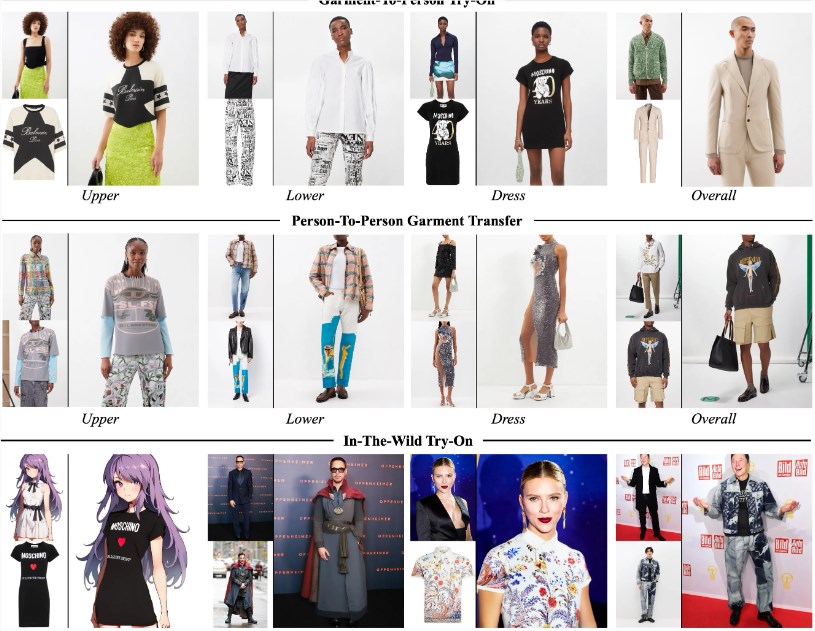
CatVTONIt is a smallAI virtual clothes changingModels for every fashion lover. CatVTON is characterized by a lightweight network, with a total of 899.06M parameters, which require only 49.57M training. Moreover, at the time of the reasoning, less than 8 G was used to support the high resolution of 1024 x 768, which is well suited to the PC operation。
Product portal: https://github.com/Zheng-Chong/CatVTON
The product features can be summarized as follows:
1) Lightweight network (899.06M parameters in total)
2) Efficient parameter training (49.57M parameters can be trained)
3) Simplified reasoning (<8G VRAM resolution 1024X768)
The development team of CatVTON recently released the latest code and deployment process on GitHub, including how to quickly deploy CatVTON on ComfyUI. With just a few simple steps, you can experience the latest virtual makeup trial technology at home.
Installation steps:
First, you need to set up the environment according to the installation guide, then download the ComfyUI-CatVTON file and unzip it to the custom_nodes folder of the ComfyUI project. After completing these steps, start ComfyUI and you can enjoy the fun of fashion matching.
Of course, if you prefer to use the Gradio app, just run a command and the system will automatically download the required checkpoints from HuggingFace, saving time and effort. Whether you want to perform reasoning on the DressCode or VITON-HD datasets, CatVTON can easily meet your needs, and the related reasoning commands are also very simple. Just enter the corresponding instructions in the command line and you can see the effect you like in a few minutes.
In addition, CatVTON also supports multiple precision options to ensure that users can get the best experience under different hardware conditions. This model uses image restoration technology based on Stable Diffusion v1.5, combined with SCHP and DensePose, which can automatically generate masks to help you better try out makeup.