



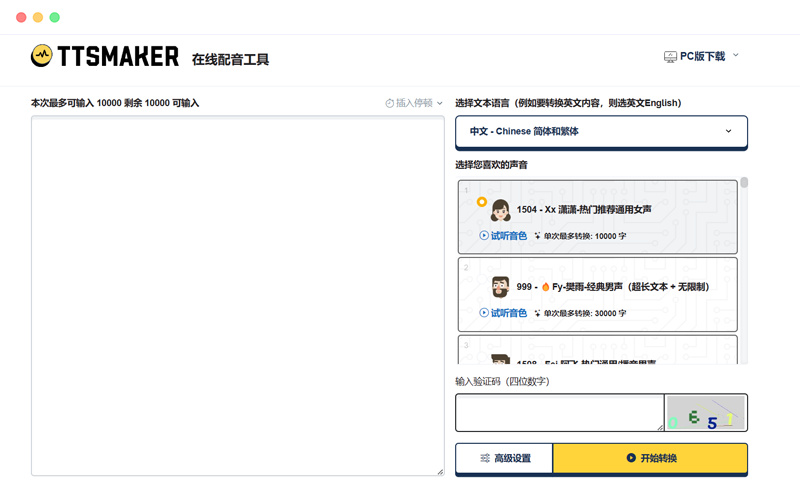
ttsmakerttsmaker Mark DubbingIt is an onlineText-to-speech(TTS)AI Voiceover Toolwhich can convert any text into high-quality speech and provides a variety of languages and voice options to choose from.
The goal of ttsmaker is to provide users with a simple, fast, efficient and interesting way to produce the voice content they want, whether for learning, work, entertainment or other purposes.
The core technology of ttsmaker is the neural network TTS (NNTTS) model based on deep learning, which can generate realistic voice signals based on text content and sound characteristics. ttsmaker can not only achieve highly natural and fluent speech synthesis effects, but also adjust parameters such as speech speed, intonation, volume, and stress according to user preferences and needs.
In addition, ttsmaker also supports multiple language and voice options, including English, Chinese, Japanese, French, German, Spanish, and others.
The usage of ttsmaker is very simple. Users only need to enter or paste the text they want to convert into speech on the web page, then select the appropriate language and voice, and click the 'Generate' button to hear the generated speech, and can download or share it with others.
Special Features
- Batch conversion: If the user has multiple texts that need to be converted to voice, the batch conversion function can be used. The user only needs to enter or paste multiple texts into different text boxes, then select the same or different languages and voices, and click the "Batch Generate" button to generate multiple voice files at once, and then download or share them in batches. This can save the user's time and energy and improve work efficiency.
- Clipping and editing: If the user is not satisfied with the generated voice, or wants to make some modifications or optimizations to it, the clipping and editing function can be used. The user can play, pause, fast forward, rewind, trim, and merge the generated voice on the web page, and can preview and save the modified results in real time. This allows users to better control and adjust the voice effects they want.
- Subtitle generation: If users want to add subtitles to videos or audio, they can use the subtitle generation function. Users only need to upload or record the video or audio they want to add subtitles to, then select the appropriate language and font, and click the "Generate" button to automatically recognize the voice in the video or audio and generate the corresponding subtitles. Users can also edit and export the generated subtitles for use on other platforms or devices.
Product Prices
ttsmaker is a free online TTS tool. Users can use its basic functions unlimitedly, such as text-to-speech, language and voice selection, and voice parameter adjustment, etc.
Official website address:https://ttsmaker.cn/