



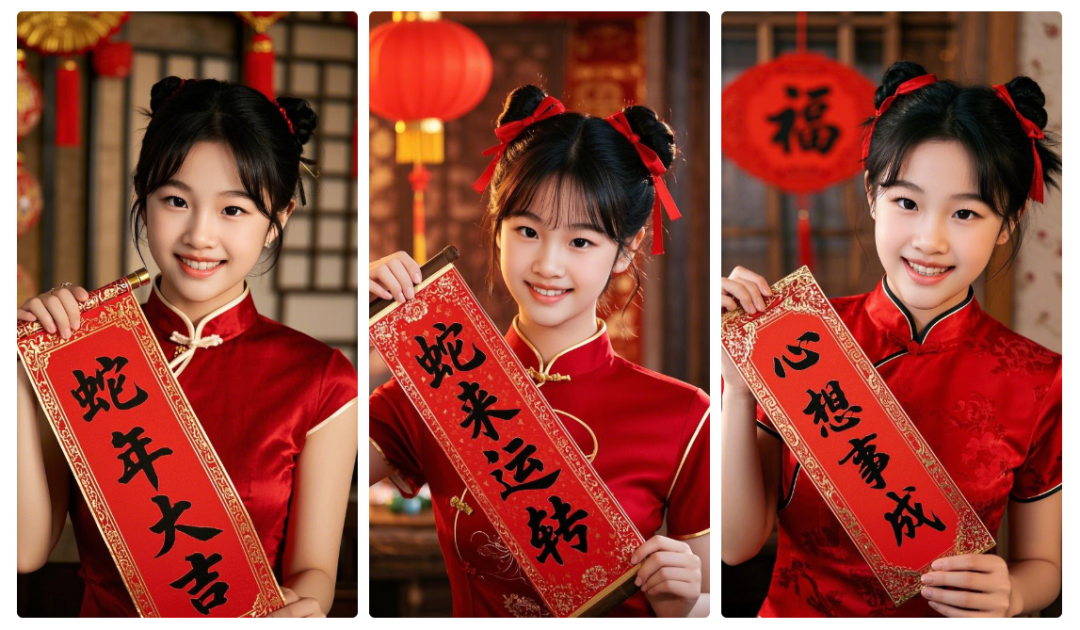
Preparing for the New Year, I want to give everyone in the WeChat private chat or circle of friends to pay tribute to the New Year, and the previous year is different, I saw someone with AI generated their own take the couplet blessing picture, it looks great, similar to the effect of the above picture how to do it?
Solution
AI tool review and analysis for the demand, that is, Dream Pictures 2.1 + reference to the face photo, the generated portrait can be a try.
After a while of tweaking and optimizing the cue word + reference image, I got good results.
Prompt word
A pretty, cute 10-year-old girl wearingSpring Festival (Chinese New Year)Red cheongsam for New Year's Eve, portrait photography, realistic photography, delicate features, delicate skin, bright eyes, face the camera, smiling, holding a pair of couplets, couplets written on the "wishing for success", the background is full of the flavor of the Spring Festival themed scenes, movie quality, OC rendering, a strong sense of atmosphere, ultra-high-definition, 16k [Imported reference image -Reference Character Looks
PS: Replacing the different textual content in the yellow part can show different ages of yourself and different blessings.
See the effect first
Below, learn together how to create the Year of the Snake Chinese New Year with i.e. Dream AI Pictures 2.1 + reference images!wish sb. a Happy New YearThe portraits?
▌Use namely dream AI picture 2.1 quickly create Chinese New Year blessing scene portrait portrait picture
Open the homepage of the official website of Instant Dream AI and click [Image Generation].

Enter the image generation interface and click [Import Reference Image].

Open the computer folder to select a portrait picture and click [Open].

Go to the Reference Chart interface, select [Character Looks], and click [Save].

Back to the picture generation interface, enter the prompt word, select the model "Picture 2.1", select the picture ratio 9:16", click [Generate Now].
Tips:
A beautiful and lovely 10 years old girl, wearing a red cheongsam for Chinese New Year, portrait, realistic photography, delicate features, delicate skin, bright eyes, facing the camera, smiling, holding a pair of couplets, written on the couplets, the background is full of the flavor of the Chinese New Year themed scenes, movie quality, OC rendering, strong sense of atmosphere, ultra-high definition, 16k. Strong sense of atmosphere, Ultra HD, 16k
[0] Reference Character Looks

Wait for about 30 seconds to generate the image successfully, select the image that best meets the expectation and click [Download Icon].

Save the image to your local computer when the download is complete.
Similarly, enter other blessing text prompt words to get the corresponding picture effect.


Here, let's use the Dream AI Photo 2.1 to complete the Spring Festival New Year's blessing portrait photo, have you learned?
▌Learning Summary
Let’s review and summarize what we have learned:
- Open the official homepage of Instant Dream AI and click [Image Generation] to enter the image generation page.
- Once you are on the image generation page, import a reference image to refer to the character's looks.
- Return to the image generation interface, enter the prompt word, select the model for "Image 2.1", and click [Generate Now].
- Select the image that best meets expectations and click the [Download Icon].
- Save the image to your local computer automatically after successful download.
This wave of walk down, we use that dream AI picture 2.1 completed in line with the expectations of the Chinese New Year blessing scene portrait portrait picture, the tool currently has a free generation times per day to give away.