



Recently, a lot of my buddies came to ask me about the 3D cartoonVirtual Digital HumanHow is the image done?
Today let's use AI to quickly 1:1 pinch a 3D cartoon virtual digital podcast image of your own!
No need to shoot and show your face! We can let it do the work for us instead! That smells good!
It is important to realize that there are many IP accounts on major short video platforms, both domestic and foreign, that are directly using virtual digital human images to replace real human footage, and the traffic is ridiculously high!
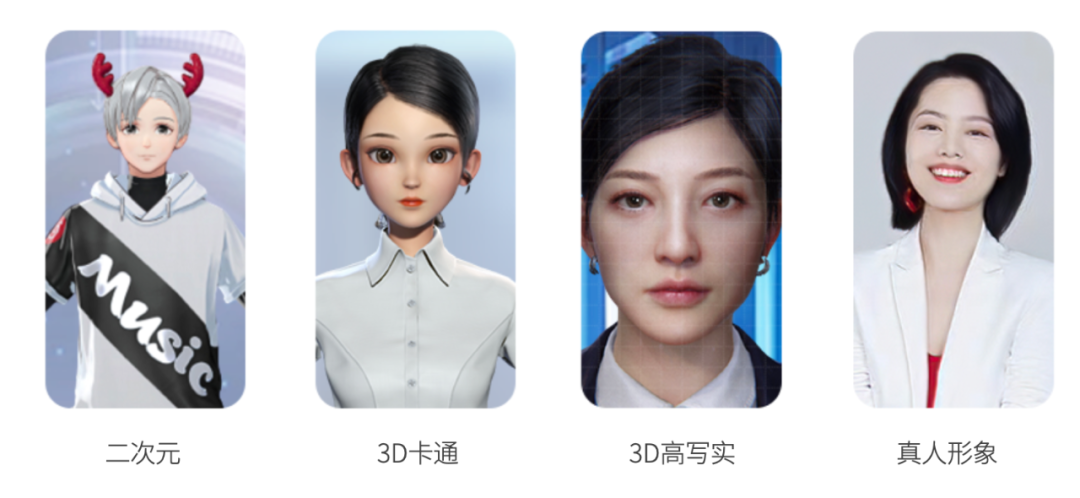
(Image courtesy of the Internet, does not represent personal opinion)
Then in the past, let's make an avatar image like this, there must be a professional threshold!
Just take a look at one of the Q&A's from Somewhere, for now.
For a white person, it really will not look too good...it seems like you can only go to a professional to do it for you...but what if the production cost is too high?
But now, in fact, as long as the pursuit of the kind of special professional, like our white is also completely with the help of AI, the whole online production of a 3D cartoon virtual digital podcast image of their own!
That is to say, we only need to generate an image map in the early stage, and in the later stage, we only need to enter the text of the oral broadcast, and then we can generate the oral broadcast video with one click~.
The key point! This is also all free, in addition to the first time to draw the card cost a little time, the latter is really no cost ~ directly on their own to play to earn self-media IP cash class account well!
Of course, if you're like me and have a need to create a course and want to increase IP trust, but don't have a lens, then cut the crap! Straight to it.Foolproof feeding tutorial for "3D cartoon virtual digital podcast image"!
Trust me, make sure you read it, it's full of all the good stuff!
ralph lauren polo shirt production process
I.e., dreams:Create images and backgrounds with Instant Dreams
Cutting: Editing of the finished film by cutting the film.
ralph laurenCreate images and backgrounds with Instant Dreams
Now as long as I'm asked to use AI to generate a picture, the first thing that pops into my head is definitely the homegrown Imagine Dream, which I'll use here to demonstrate:
- i.e., the Dream website: https://jimeng.jianying.com/
- That is, Dream is a multi-style AI painting artifact, can be anime, realism, photography, illustration and other different styles of image generation, but also can generate video, and the generation speed is super fast. Every day there must be 66 free bonus points, note that the points are not cumulative, have a quick use, daily grips or very fragrant.
Generate image maps with instant dream mat maps
Open Dreams and click on "Image Generation".

Select "Import reference picture", here you can directly upload your own photo ID, like my video tutorial is to use my own photo ID.
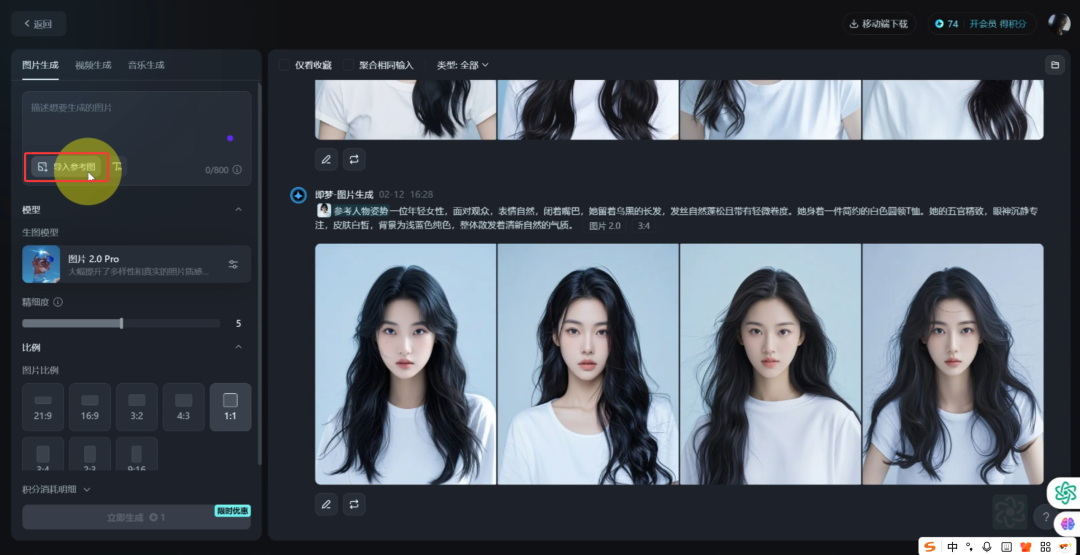
Of course, if you're not too comfortable with using your own ID photo, I recommend using my next approach - using Instant Dreams for a graphic birth.
Here directly choose to use their own photo ID as a reference partner, you do not need to generate a real image of the picture, you can directly look at the back of the second step, refer to their own photo ID picture of the "character traits" can be, here the first step can not look!
Going back to the less convenient practice of using your own ID photo, here you need to upload an image photo of the following pose first.
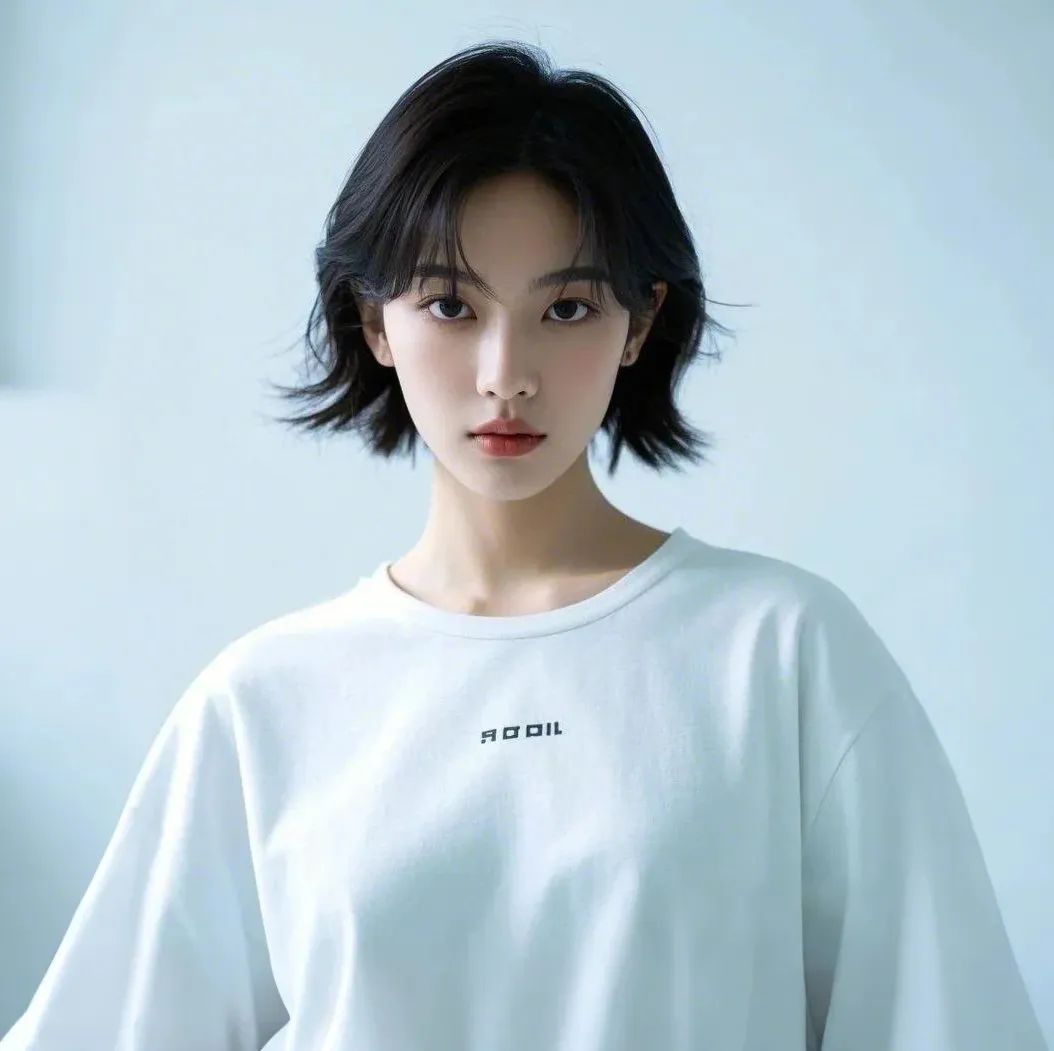
Select the reference "Character Pose" and click "Save".

Enter the following prompt which I have tested many times and the generation is stable, select "Image 2.0" for the model and "1:1" for the image ratio, and click "Generate Now". Click "Generate Now".
- Enter the prompt word:
- A young woman, facing the audience with a natural expression and closed mouth, has long, dark hair that is naturally tousled and with a slight curl. She is wearing a simple white round-necked T-shirt. Her features are delicate, her eyes are calm and focused, her skin is fair, the background is a light blue solid color, and she exudes an overall fresh and natural aura.
The ratio of the picture here is the same as the picture you refer to, for example, you refer to the "3:4" picture of the character's pose, then you generate the picture ratio also choose "3:4".

Of course, I've also put together a generic template for you here. All you need to do is to modify the contents of the [brackets] to suit your own situation.
- Enter the prompt word:
- A [age] [male/female] of [age], facing the audience, with a natural expression and a closed mouth, [he/she] has [color] [length] hair, [condition] and with [degree of curl]. [He/she] is wearing a [color] [style] blouse of [style]. [His/her] features [features of features], eyes [features of eyes], skin [features of skin], background is [background color] solid, and overall exudes [type of aura].
Wait for a while, you can get 4 pictures, if you are not satisfied, you can regenerate them, multiple card draws (i.e., regenerate the pictures a few more times) must be normal here~
Because I chose my image from hundreds of them too, and it only took me 2 days hahaha!

Tips: When choosing pictures, you must pay attention to the fact that the character's mouth should preferably be naturally closed, the body should be intact, and the hair should not be too fluffy or messy.
Then, choose one you are satisfied with, click to enlarge it, and select "HD Ultra HD" to make it Ultra HD.
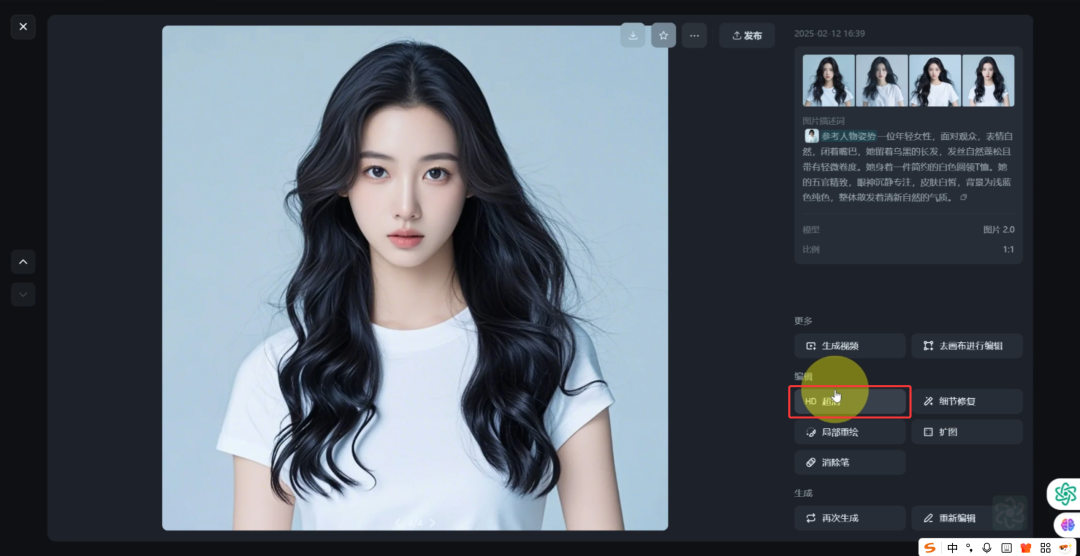
Wait for the processing to be done to get the super clear picture.

Click again to zoom in and select "Go to canvas for editing".

Go to the new page, "Export" and "Download" locally.
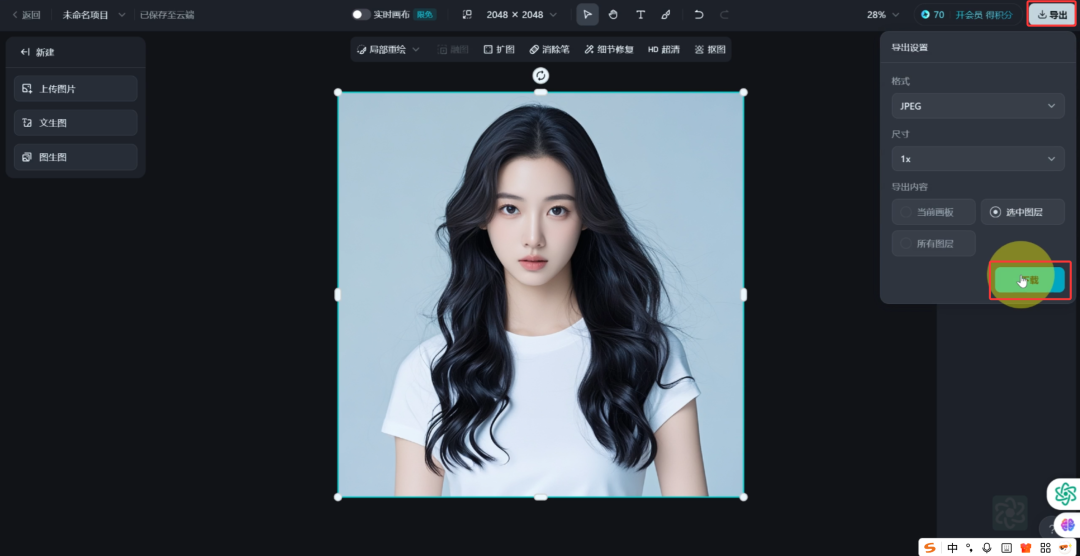
Tips: Why do I save from the canvas? That's because there's no watermark on the image when you save it this way~ However, newbies may not have the interface displayed this way when they first use it, it may be officially designed this way, so you don't have to go through so much trouble and download it directly with the watermark.
Generate anime image diagrams with Instant Dream
Open Dreams and click on "Image Generation".

Select "Import Reference Diagram".

Upload a good character image just generated, select the reference "character characteristics", click "Save". Directly mat ID photo of the partners from this step to follow do ha ~ the back are the same!
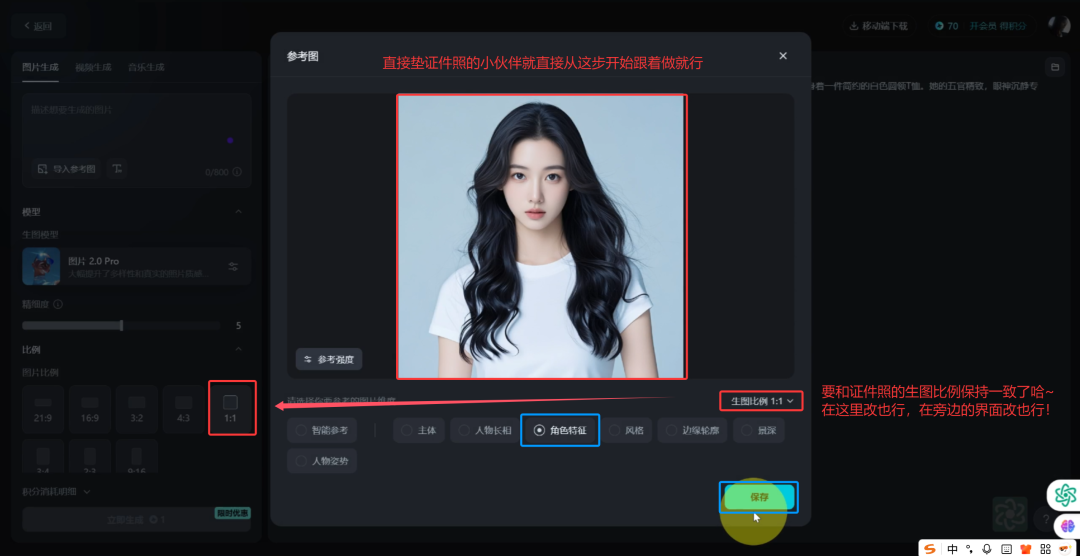
Enter this prompt again, which is the same image style mantra as I did. The model defaults to "Image 2.0", choose "1:1" for the image scale, and click "Generate Now".
- Enter the prompt word:
- A girl, headshot, blue tones, Disney Pixar Studio style portrait photography, soft tones, model presentation, bust shot with fine glossy, white clean background, 3D rendering, soft focus, Octane Render (OC), Blender, IP style, best quality, 8K, super detailed, clean, cute!
Don't forget! The proportions of the images here should be consistent with the images you referenced.
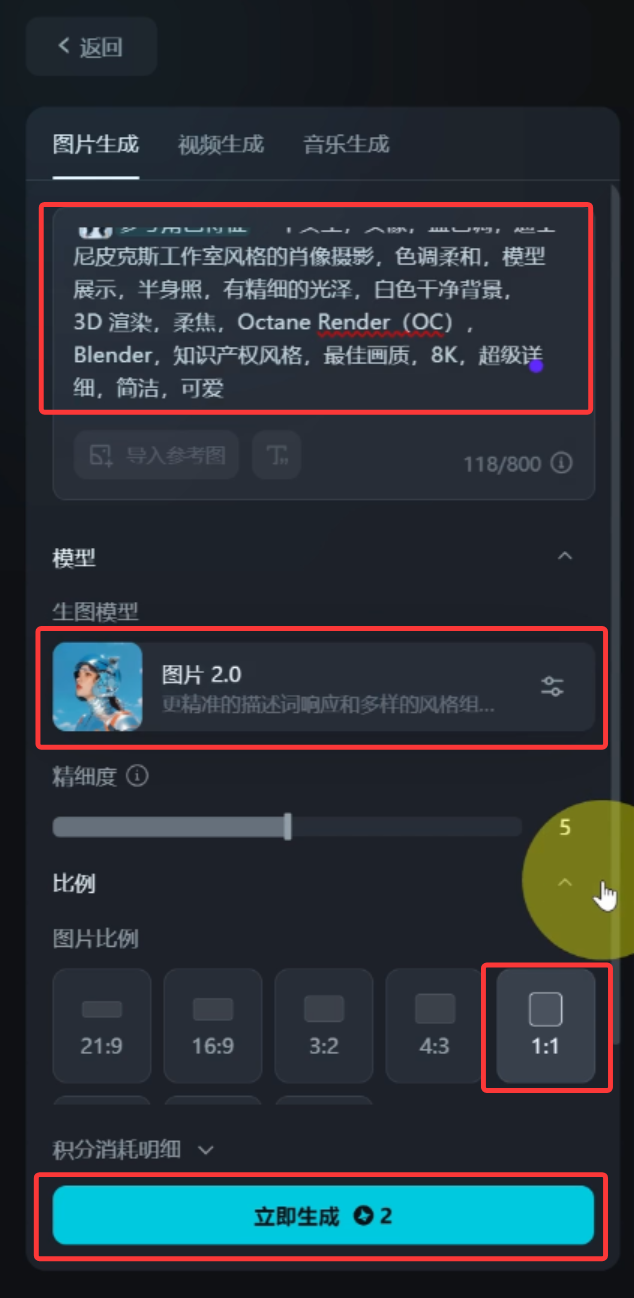
Then just start drawing cards multiple times until you generate one you are happy with.

Tips: When choosing pictures, you should still pay attention to the fact that the character's mouth should preferably be naturally closed, the proportion of the head and body should be harmonized, and the hair should not be too fluffy and messy.
Click to enlarge and select "HD Ultra HD" to make it Ultra HD.

Wait for the processing to be done to get the super clear picture.

Click again to zoom in and select "Go to canvas for editing".

Go to the new page, "Export" and "Download" locally.

Making lip-sync videos with Instant Dreams
Go back to the homepage and click on "Video Generation".

Select "Counterpart", click "Upload Image", upload the 3D cartoon virtual oral digital human image just generated, and select "Upload from Local".

Enter a piece of spoken text here in the "text to read" section, and I just wrote one.
- Enter the dictation text:
- Hello, I'm Mr. Kusama from Photosynthesis AI, and I'd like to share with you how to reproduce your own 3D digital human animation image 1 to 1, which is a good choice to replace a real person for making oral short videos, or for teaching recorded lessons.
Choose a female voice, like, say, this "Charming Sister".

Click on "Generate Video" to create a video in "Standard" mode.

Tips: Here using the "standard" mode is completely enough, using the "vivid" mode, you can only generate a "1:1" lip-sync video, and it is more troublesome and consumes a lot of points to deal with it. It's more troublesome and consumes more points, so it's not recommended for beginners~.
Of course you can! You can also use your own voice, just "upload a local dub" file.

Tips: There is a limit to the number of words that can be generated for the counterpart of the instant dream, so you can do it in batches and just splice them together later with a cutscene. The number of words/audio duration are directly related to the consumption of points. At the moment, Dream can't generate English lip-sync! If you need it, you can read this article [Taking off! Teach foreigners to learn Chinese, 300w + play volume, 5 days rose 210,000 powder, with theAI Digital PeopleEasy peasy (with babysitting tutorial)]
Wait for a few seconds, you can get our lip-sync video effect ~ directly click "Download".

Tips: video watermark can wait until the end with the cut screen all edited, and then use the Tencent Smart Shadow for the overall removal, so that you only need to remove 1 time, and not a waste of time!
Generate background images with Dream
Go back to the home page and click "Image Generation".

Enter this prompt, select "Image 2.0 Pro" for the model, select "16:9" for the image ratio, and click "Generate Now".
- Enter the dictation text:
- Disney Pixar studio style photography, soft tones, no people in the frame, blue and white tones, techy, interior, medium shots, simple and beautiful

Wait for the generation is good, not satisfied can be re-generated until the generation of a satisfactory background image.

Click to enlarge and select "HD Ultra HD" to make it Ultra HD.

Wait for the processing to be done to get the ultra-clear background image.

Click again to zoom in and select "Go to canvas for editing".

Go to the new page, "Export" and "Download" locally.
ralph laurenEditing the finished film with cutscenes
If you need a cracked version of Cutscene, please enter "Cutscene" in the background of my public number to get it yourself. Please note that the background refers to the chat dialog box after following me, not in this comment section! The background refers to the chat box after following me, not in the comment section.
Open Cutout and import the generated lip-sync video and background image.

With the lip-sync video at the top and the background image at the bottom, adjust the image length and the video length to be the same length.
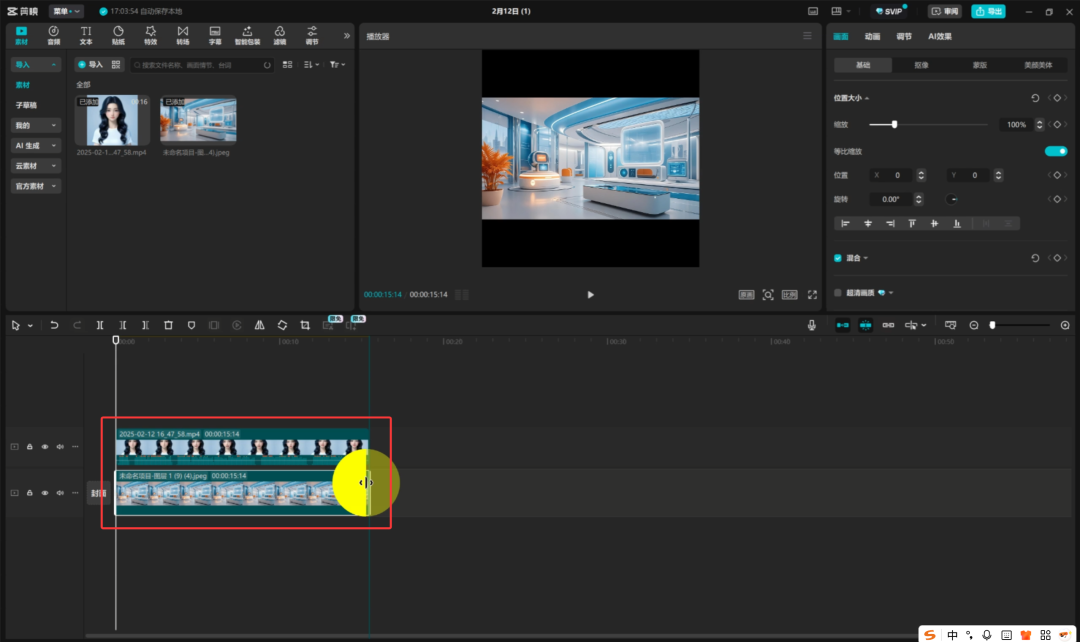
The video ratio was changed to "16:9".

Select the lip-synching video and follow the four corners of the go to resize the image.

Select "Smart Keying" in "Keying" and adjust the image to the right position.
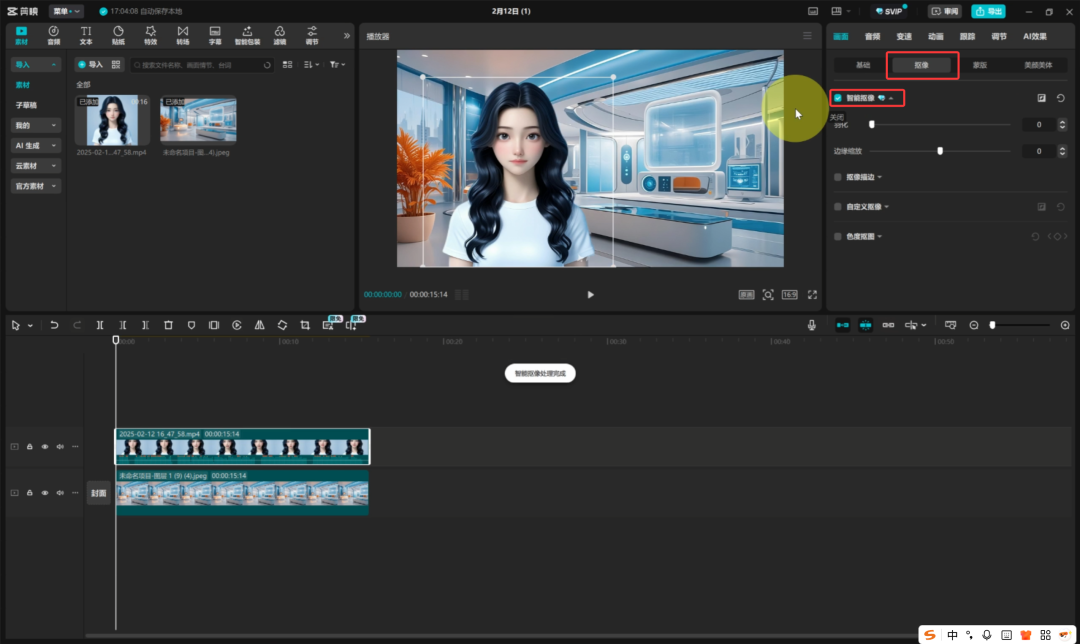
OK, so our 3D cartoon virtual digital podcast image is completed ~ ~
The above is how I use theAI made for free"3D Cartoon Virtual Digital Podcast Image" Super Detailed TeachingProgram.
polo ralph lauren ideas play
- A quick method to create 3D cartoon virtual digital podcast image using AI technology for self media IP account operation. The method is suitable for beginners as it does not require professional skills or face appearances. By generating the image image and inputting the ventriloquist text, you can generate the lip-sync video content with one click, and the operation is simple and free, only the first time to draw a card takes some time. This method is not only suitable for self-media cash, but also can be used to produce courses, enhance IP trust, while avoiding problems such as camera fear.
polo ralph lauren skills application
Personalized 3D cartoon avatars: Easily customize personalized 3D cartoon avatars with AI, suitable for use in social media, websites or games, and more.
Virtual IP account operation: create virtual images instead of real people appearing in the scene, can output content 24 hours a day, attract fans, realize traffic, but also interactive.
Teaching video production: use virtual image to do teaching video, avoid camera fear, more interesting content, low cost, suitable for online education.