



A 2-hour meeting and half a day of organizing minutes? There is finally a solution to the time killer in the workplace!
"I'm attending an industry conference in the afternoon and want to record the whole thing for smart minutes, which AI tool is the best to use right now?"
This problem has hit the pain point of how many people in the workplace - we often spend more time on "recalling the meeting" than the meeting itself. Fortunately, the development of AI tools is changing this predicament. The cumbersome recording work to AI, so that you focus on the meeting itself, the real realization of the "meeting does not take notes, the meeting will have minutes".
Today I'm sharing 3 pro-tested and greatIntelligent Meeting Assistant.
1. Listening to and understanding the general meaning
Website:https://www.1ai.net/1880.html
WeChat Small Program: Tongyi Efficiency Assistant

Log in every day and get 10 hours of transcription that you can't use up.
Tongyi Listening is an intelligent audio and video assistant developed by Aliyun based on the "Tongyi Thousand Questions" model, born in 2023 (officially launched at the end of May 2023, formerly known as "Listening"), focusing on solving the problems of recording and organizing information in meetings, learning and other scenarios through AI technology. It focuses on solving the problems of recording and organizing information in meeting, learning and other scenarios through AI technology.
Relying on AliCloud's deep learning and natural language processing technology, it can "understand" audio and video content and intelligently refine the key points.
The main "work and study assistant", especially suitable for meetings, courses, interviews and other high-information-density scenarios. From the initial voice transcription tool gradually upgraded, added questions and answers, PPT extraction and other AI functions, become the efficiency of office "treasure tool".
Detailed Features
1. Core competencies: audio-visual to text
- Real-time recording: automatically convert voice to text during meetings or classes, support Chinese and English translation, and bilingual cross-country meetings.
- Document transcription: upload audio/video recordings (e.g. interviews, podcasts), 1 hour of content converted to transcript in 5 minutes, and also automatically differentiate between different speakers.
- High Accuracy: Supports dialects (English, Japanese, Cantonese), specialized terminology, and transcription results can be exported as subtitles or documents.
2. Intelligent summarization: grabbing the key points in seconds
- Automatic distillation: Generate full-text summaries, chapter snapshots, and presentation summaries to quickly review core content.
- Mark key points: manually mark "to-do", "questions" and "golden sentences", and AI automatically organizes them into a list.
- Q&A Review: Automatically extract Q&A content from meetings for easy review.
Typical usage scenarios
- Jobbers:proceedingsAuto-generated to-do lists and real-time translation for cross-border meetings.
- Student Party: course recording to text + intelligent summary, doubling the efficiency of revision.
- Media/Lawyers: Quickly organize recorded interviews and extract key questions and answers.
- Creators: Video subtitles are generated with one click, and foreign language material is translated in seconds.
💡 Summary: Tongyi Listening is like your "AI meeting secretary + study partner", turning long audio and video into structured text, and then helping you to highlight and summarize, so you can say goodbye to messy records.
2. Flying Book of Wonders
Not a standalone app, you must be logged in to Flybook to use it (free registration)
FeishuMiaoJi is a smart little helper that comes with the office software "Feishu" under ByteDance. You can think of it as the "office package" in the "Flying Book" is responsible for "the voice into text, the meeting into notes," the magic weapon.
It was born primarily to address two major pain points in the workplace and in learning:
1️⃣ Meetings are forgotten: who said what? What were the conclusions? Who was assigned the task? Traditional handwriting is easy to miss.
2️⃣ Audio/video review is too slow: watching a 1 hour video to find the key points? Listening to a lecture and want to go back to a certain section? Dragging the progress bar manually is too much work.
And so the Flying Book of Wonder came into being: using AI technology to automatically turn voices into searchable, editable transcripts that allow you to quickly grab the point!
Core skills: audio/video → transcripts
- Recordings of meetings/classes/interviews → Automatically converted to transcripts with punctuation and paragraphing.
- Supports Chinese, English, Japanese, etc. (depending on the specific version), even different speakers can be distinguished!
- Record meetings directly in Flybook (most convenient); Upload cell phone recordings/local videos (e.g., online class recordings); Import files from Flybook's cloud drive (e.g., client interview recordings).
🔍 Intelligent Search & Locate: find focus in seconds!
- Enter keywords into the transcript (e.g., "budget" "Option A") and all mentions will be highlighted in yellow!
- Click on the text → the video automatically jumps to the corresponding position! No more blindly dragging the progress bar!
Intelligent Editing & Minute Generation
- Automatically refine keywords (e.g. "decision", "to-do") to help you get to the point at a glance.
- You can manually highlight key sentences, delete nonsense, and fix recognition errors (e.g., people's names, technical terms).
- Support multiple people to edit at the same time! It's super efficient for teams to work together to improve meeting minutes.
Knowledge Deposit & Sharing
- Turned transcripts can add titles, covers, tags, and be filed like notes.
- One click to share the link/QR code to your colleagues or classmates, and the other party can read it without flying books (with text + audio/video synchronization).
- Supports commenting → start a discussion on a particular sentence (good for asynchronous collaboration).
Additional features
- Chinese-English translation: English meeting → look directly at the Chinese text (or vice versa).
- Skip Silent Clips: Automatically filter out "uh..." and "5 minutes of silence" in meetings.
- Associated files: PPTs/documents shared during meetings, automatically attached next to the transcript.
Points to keep in mind (honestly)
1. You have to use a Flybook account: it's not a stand-alone APP, you have to log in to Flybook to use it (free registration).
2. Recognition can be wrong: particularly heavy accents, specialized terminology, and noisy environments reduce accuracy and require manual checking.
3. Features are graded: basic text conversion is free, but advanced features (e.g., multi-language translation, super-large files) may require payment for the enterprise version.
4. The network should be good: real-time transcription relies on the network, which affects the experience when lagging.
To summarize:
Flying Book is "turning the audio and video recordings of your meetings, classes, and interviews into searchable, editable, and shareable smart text notes", allowing you to review 1 hour of content in 10 minutes, and bid farewell to the embarrassment of "What did you just say?". Let you review 1 hour of content in 10 minutes and say goodbye to the embarrassment of "What did I just say?
Who is it suitable for? Working professionals (writing minutes), students (organizing online classes), interviewers (organizing recordings), remote collaboration teams.
3. Get notes
Get Notes is an AI note-taking tool incubated within the Get platform, aiming to help users efficiently manage knowledge and capture inspiration. It supports a variety of recording methods such as text, voice, pictures, links, etc. The core goal is to become the user's "second brain" - automatically organizing fragmented information through AI to form a knowledge-associated network, making it easier to learn, work and create.
Currently provides web version, App (iOS/Android) and small program, the basic function is free.
Web Links:https://www.1ai.net/31229.html
APP/Small Program: Get Notes
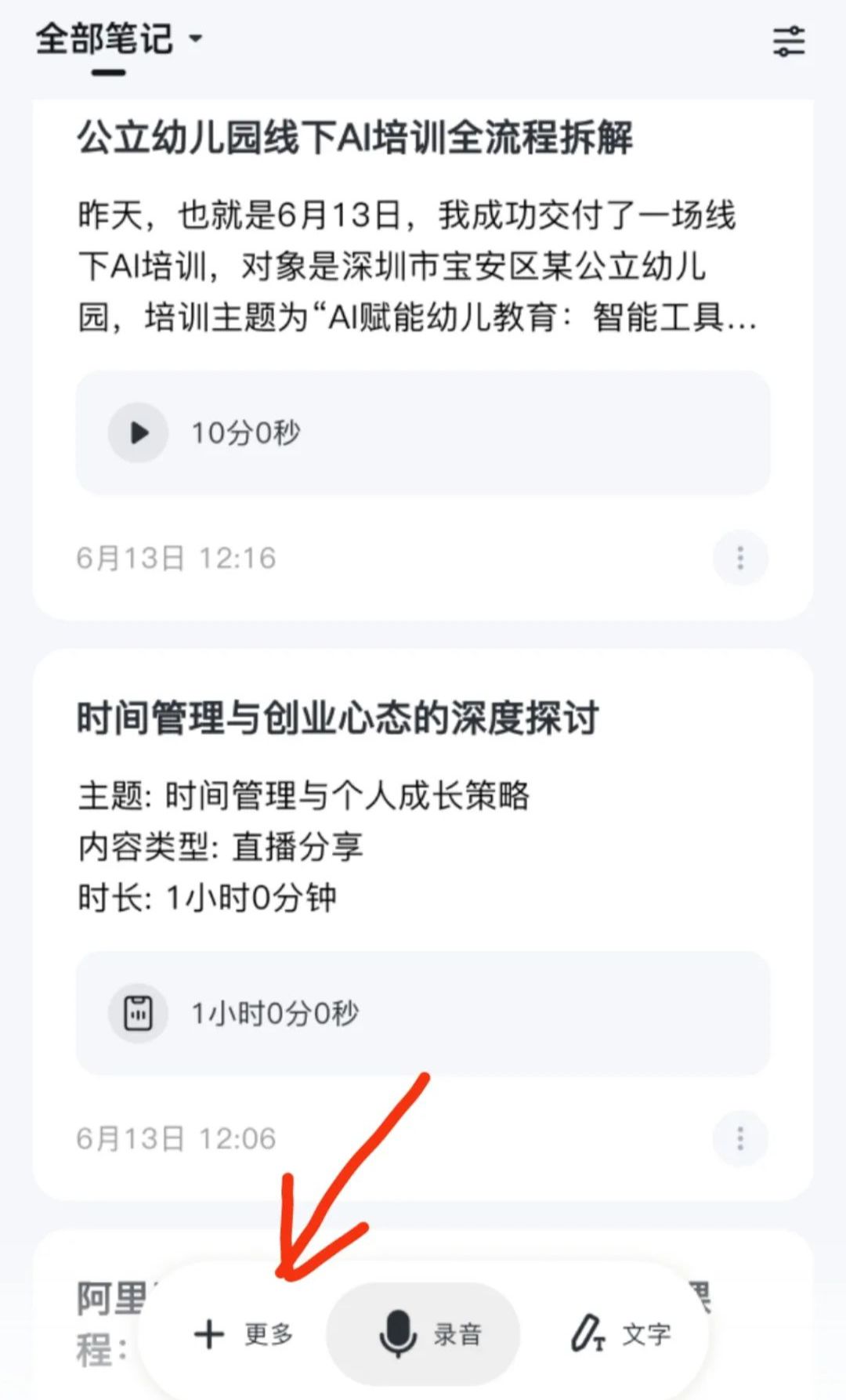
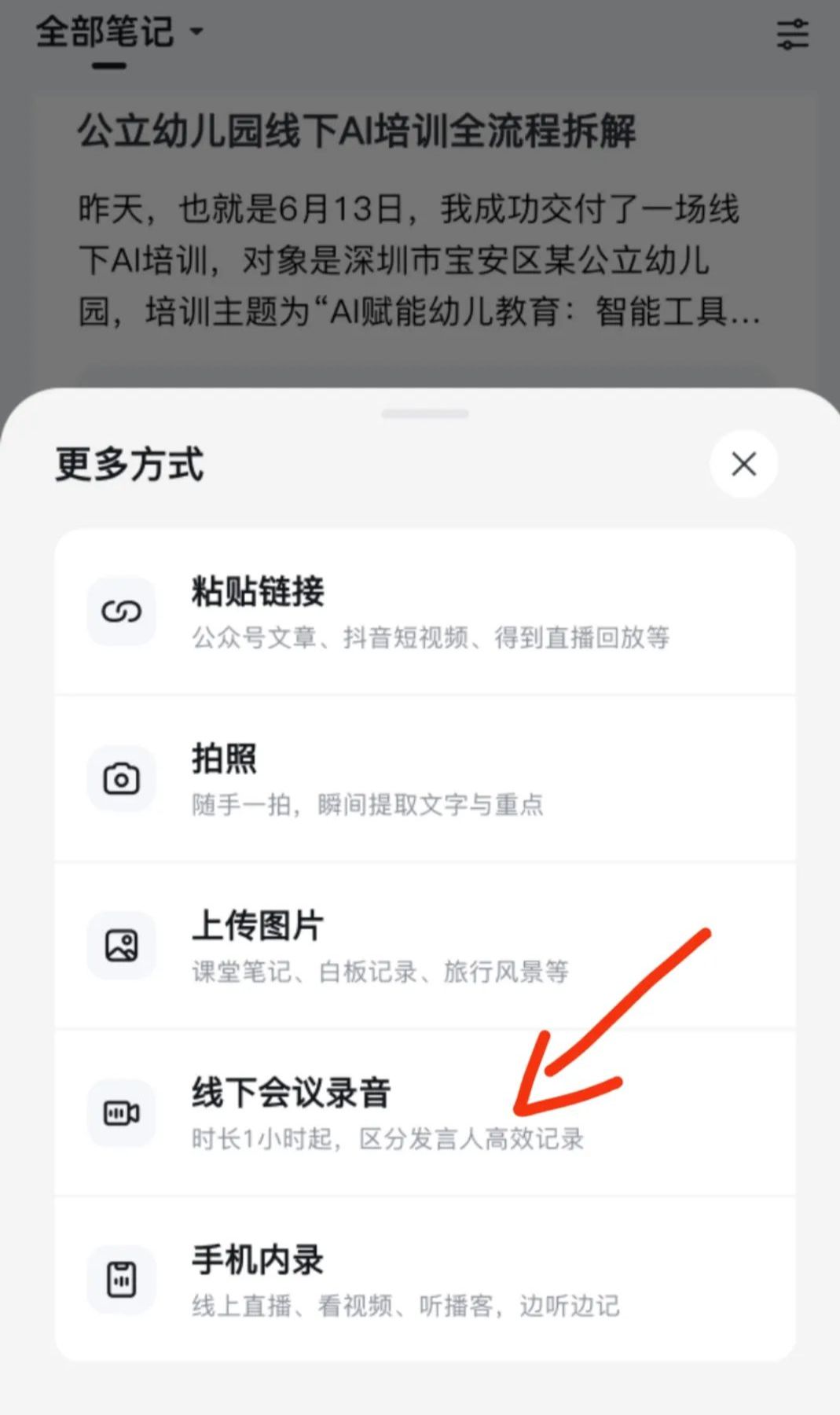
(Mobile APP - Entrance for use of meeting recordings)
[Offline Meeting Recording] Function Details
This is the core function of Get Notes designed for offline meeting scenarios, focusing on "recording→converting text→intelligent summarization" as a one-stop service:
1. One-key recording, real-time transcription Open the App and click "Start Recording", the voice captured by the microphone will be converted into text in real time** and displayed on the screen, even if the Mandarin is not standardized, it can be recognized with high precision. You can switch to other apps during the meeting, and the recording will continue to run in the background.
2. Distinguish between speakers, automatically generate minutes AI can intelligently distinguish between different speakers (e.g., A/B dialogue) when recording, and at the end of the meeting instantly automatically distill the focus of the discussion, task allocation and other core content to generate structured meeting minutes. The measured accuracy rate is about 95%, occasionally the number of speakers may be misjudged, but the key information is basically correct.
3. Extra-long recordings and flexible overdubbing
Free users: 1 hour of recording in a single session, unlimited number of times.
Member users: 2 hours of recording in a single session. If the recording is interrupted by other apps (e.g. WeChat voice occupies the microphone), you can re-record at any time. It also supports additional notes: take additional whiteboard photos after the meeting, add links to articles, etc.
4. Post-conference organization with minimal effort
- Recorded files and text are automatically saved and support listen-back proofreading.
- AI automatically optimizes transcribed text: removes colloquialisms like "um, and then", corrects pronunciation errors, and even generates headlines to summarize core themes.
Applicable scenes: business meetings, training lectures, classroom notes, etc.
Advantageous Comparison: Compared with traditional handwritten records or mere audio recordings, Get Notes saves time on manual organization and is especially suitable for scenarios where decision points or task lists need to be extracted quickly.
Final Thoughts
"A 2-hour meeting and half a day of organizing minutes?" --Such an inefficient scenario can finally be turned over!
The next time you encounter an important meeting, try these tools to experience the efficient workflow of "no notes at meetings, minutes at adjournments". Time is expensive in the workplace, so don't waste it on repetitive tasks!