



4090,6GB. VISIBLE NOTEBOOKS CAN GENERATE COMMERCIAL POSTERS WITH THE TEXT
Z-Image As an efficient, light-quantitative generation AI ModelsNot only is the reasoning going at a fast pace, but it is more pro-British that supports bilingual understanding and precision. This paper will download from the model the configuration ComfyUI to write the hints to solve common errors, hand-held to complete Z-Image's local deployment and combat, little white friendly。
Based on your equipment, select the deployment plan
Please confirm your computer configuration before you do anything. You can quickly judge the applicable deployment options against the table below:
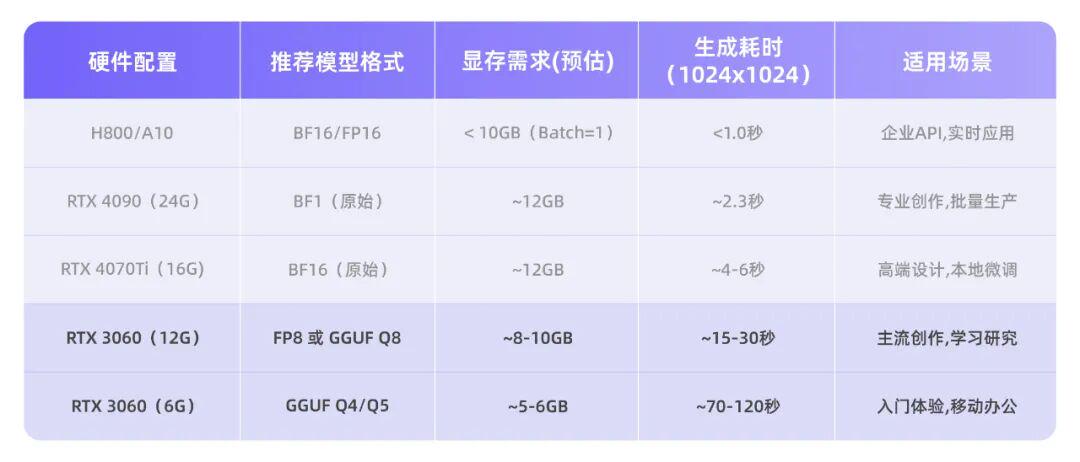
Z-Image Turbo Hardware Performance and Visible Occupancy Reference
IF YOU ARE USING RTX 3060 (6GB), RTX 4050 OR OTHER VISIBLE 6-8GB EQUIPMENT, YOU NEED TO USE THE GGUF QUANTIFICATION PROGRAM, AND IF YOU HAVE A VISIBLE 12GB (E.G. RTX 3060 12G, 4070, 4080 ETC.), YOU CAN USE THE ORIGINAL BF16 MODEL WITHOUT ADDITIONAL PLUGINS. DETAILS ARE PROVIDED IN SUBSEQUENT SECTIONS。
Operational guidelines ComfyUl
To make Z-Image work locally, you need to correctly configure three core components in ComfyUI: a proliferation model, a text encoder and a subdivision encoder (VAE)。
This section will detail the deployment steps of Z-Image, based on ComfyUI, the most popular nodal interface。
1. Preparation
Install ComfyUI and Download Core Component
First, make sure you have the latest version of the ComfyUI - recommended for download from the official network (https://www.comfy.org/zh-cn/download)

The following three core documents were then downloaded from Hugging Face or ModelScope and placed under the corresponding directory of ComfyUI:
- Document: z_image_turbo_bf16.safetensors (or FP8/GUF version, selected by visible)
- Path: CommyUI/models/diffusion_models/
Text Encoder (Text Encoder)
- Document: qwen_3_4b.safetensors (Note: This is a large-language model of 3.4B parameters rather than traditional CLIP)
- Path: CommyUI/models/text_encoders/
VAE
- Document: ae.safetensors (usually VAE of Flux, but recommended for official provision)
- Path: CommyUI/models/vae/
Place the three files in the corresponding directories of ComfyUI: spread model into mobiles/ diffusion_models/, text encoder into models/ text_encoders/, VAE into models/vae/. Once this is done, you can select the corresponding workflow according to your visible size。
Standard workflow
12GB+ RAPID DEPLOYMENT PROGRAMME FOR VISIBLE USERS
If your graphic card displays 12GB (e. g. RTX 3060 12G, 4070, 4080, etc.), it is recommended to use Z-Image's standard workflow to obtain the best quality and speed。
Load Model Node
In ComfyUI, select "Z-Image Turbo " from the left template library. The system automatically loads three core components that are already in the corresponding directory:
- Load z_image_turbo_bf16.safetensors using the Load Diffusion Model Node。
- Load ae.safetensors using the Load VAE node。
- Load qwen_3_4b using DualCLIPLoader or custom Z-Image Text Encoder Loader。
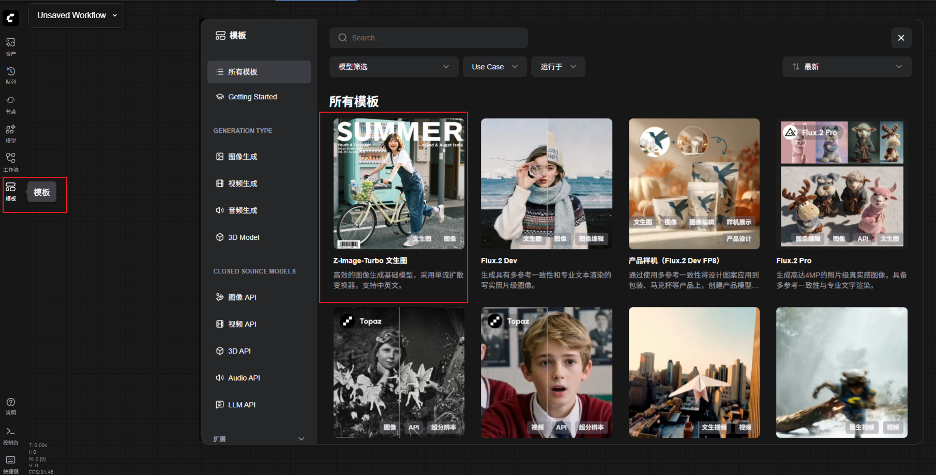
If the file is placed correctly, the model will normally be automatically loaded without manual configuration。
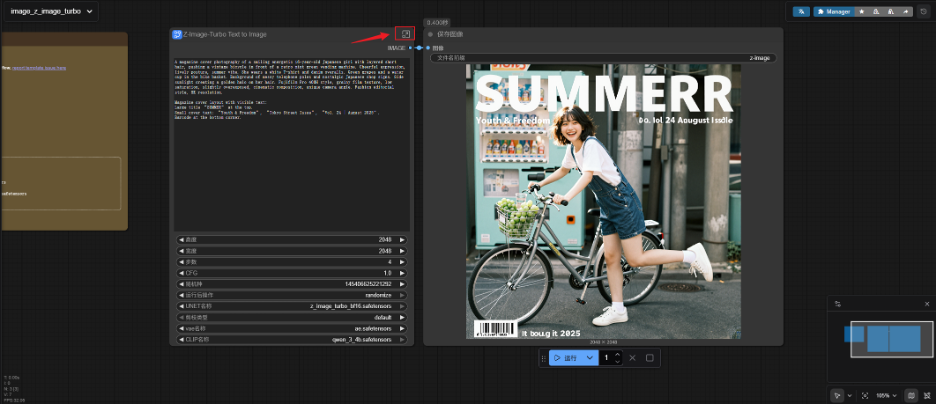
Sample Settings
The basic settings can be modified in the default subchart mode, and if more details are needed, you can click on the top right side to open the subchart for further settings。
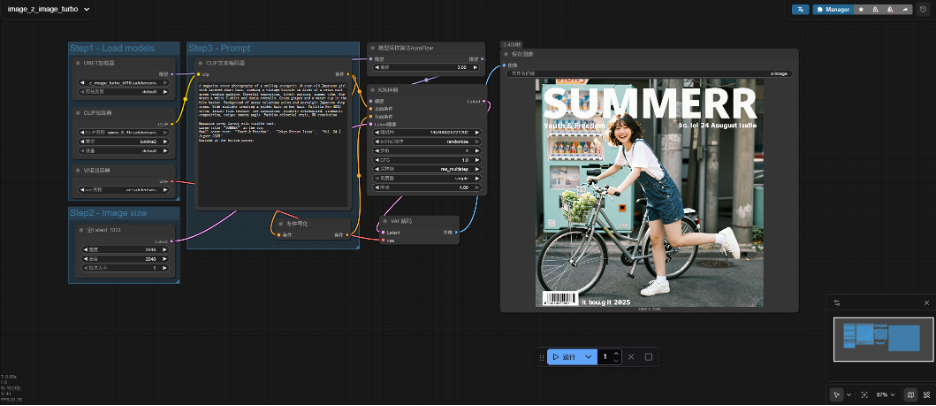
KSampler 's parameters are critical to the generation of effects and must strictly follow the following:
- Steps (steps): set to 8 or 9, do not set too high (20 or 30), otherwise it is easy to cause wax sense or colour in the skin (Blotchy Skin)。
- CFG (LEAD FACTOR): SET TO 1.0。
- Sampler Name: Recommended euler。
- Scheduler: recommended sgm_uniform or default simple. (Tried by community partners: sgm_uniform can effectively mitigate noise at low step. I'm not sure
- Shift: 7 under 1024 resolution to 3,2K resolution。
Resolution Settings
Z-Image optimizes the standard resolution of 1024 x 1024, 1280 x 720, 720 x 1280. In order to avoid the direct generation of ultra-high resolution (e.g. 4K), it is suggested that Mr. 2K scale up through Upscaler to ensure the image stability and detail quality。
Once you have completed the above three steps, you can enter a hint and click " Queue Prompt " to generate the image。
Low-visibility workflow
GGF QUANTIFICATION SCHEME FOR 6-8GB VISIBLE USERS
If you use RTX 3060 (6GB), RTX 4050, etc., 6-8GB visible devices, then the GGUUF Quantification Program is used. First, you need to install the ComfyUI-GGUF plugin in ComfyUI via ComfyUI Manager。

Then, two documents in the GGUF format were downloaded from the model platform: the proliferation model z_image_turbo_Q4_M.gguf and the text encoder qwen_3_4b_Q4_K_M.gguf — a step of critical importance, since the unquantified qwen_3_4b.safetensors themselves would occupy more than 6GB, even if the master model was quantified, and the loading would fail because of the apparent spill。
Place these two documents in the models/difficult_models/ and models/text_encoders/ Catalogues, respectively. In ComfyUI, use the Unet Loader (GGUF) node to load proliferation models, use the CLIP Loader (GGUF) node to load text encoders and connect VAELoader node to load official ae.safetensors. Sampler parameters are consistent with standard workflows (Steps = 8, CFG = 1.0, Scheduler = sgm_uniform)。
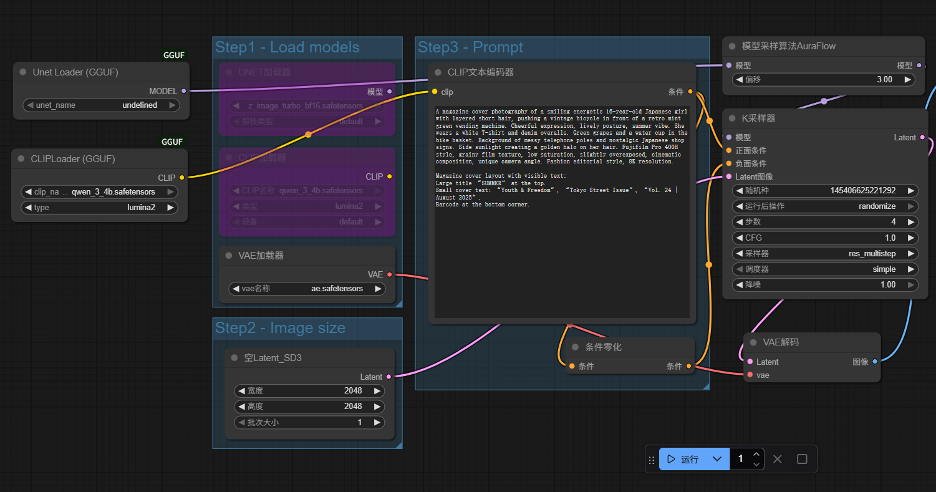
BASED ON THE COMMUNITY USER ' S FINDINGS, THE VISIBLE OCCUPANCY CAN BE REDUCED TO BELOW 6GB, AND ALTHOUGH THE REASONING TIME HAS BEEN EXTENDED, THE OOM PROBLEM HAS BEEN FULLY RESOLVED。
In order to realize the full potential of Z-Image, you can add an LLM processing (optional) to the front end of the workflow. The LLM automatically expands a simple input (e.g., “a perfume bottle”) to detailed instructions that include scenery, photo, material and photographic parameters, thereby enhancing the quality of generation. The following are directly reusable templates for three types of HF scenarios, without additional configuration。
Make it more intelligent to generate hints to enhance the workflow
1. Photography of electrical products
Without expensive layouts, high-quality product scenarios can be quickly generated for commercial products such as skins, perfumes and footwear。
Generate a presentation for a perfume bottle
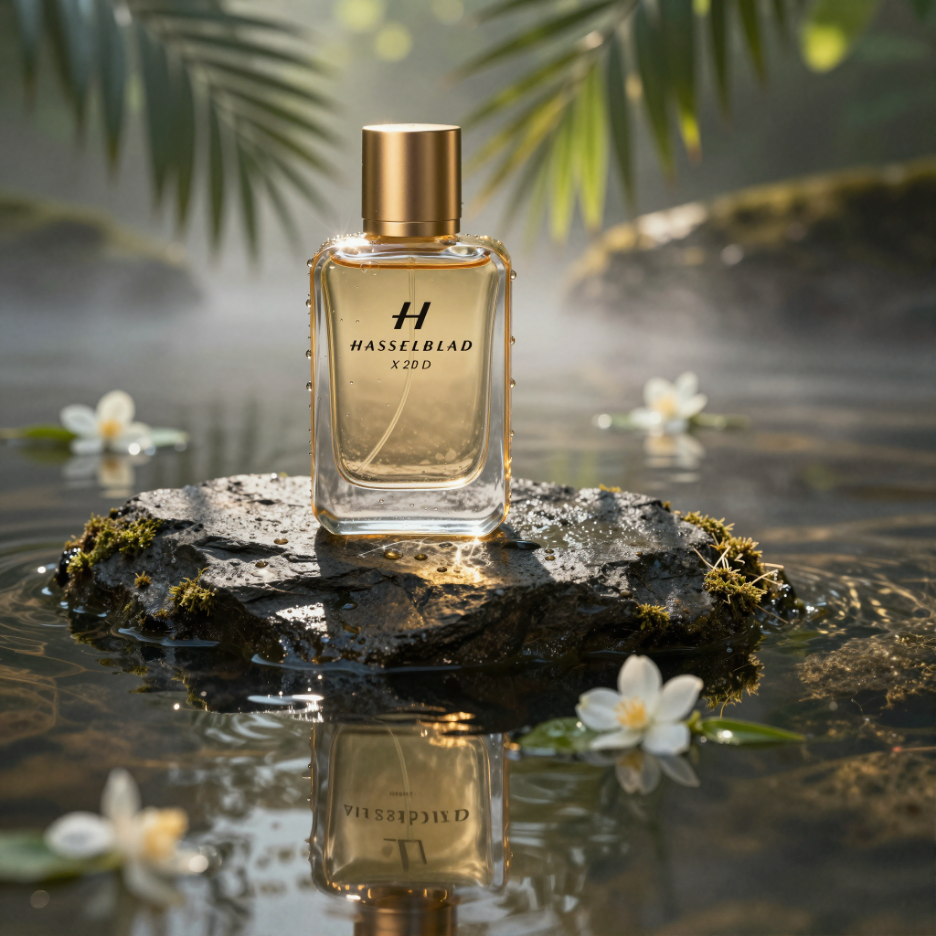
A big photo of a commercial product that is overwritten and film-sensitive. The main subject is a translucent amber glass perfume bottle, equipped with a lasagna metal cap, which sits gracefully on a rough, dark-coloured rock emerging from a calm water surface. The scene is set at sunrise in a misty tropical rainforest。
Light and atmosphere: Strong mass light (Dindal effect) pours into the upper, dim, palm leaves, pouring complex shampoo shadows and creating brightly strung (Cautic patterns) on the surface of water and glass bottles. The light is warm, golden and empty, in contrast to the cold and dark tone of rocks and water。
Details and materials: extreme micro-specific focus. It is visible on its surface and reflects the surrounding green plant. The linen of the slabs is extremely fine, with moss. The surface has a slight radon, which has a force-real reflection and refraction effect. In the background, there are unfocused particles and fine white Jasmines floating on the water。
Technical specifications: Photo taken using Hasu X2D 100C camera, 80mm micro-species, f/2.8 radium to obtain a defunct background like cream. 8k resolution, brand of Logo region super-clear focus, light-track reflection, Fantasy engine 5 Render style, typographical style of luxury magazine editorial。
Case II: Production of a presentation for a sneaker

Indictments: An extremely explosive, high-energy commercial was filmed with a dynamic pair of red and white basketball shoes on the humid asphalt road. The scene captures the exact moment of impact and the water is splattered up in dynamic, frozen shape around the shoes。
Actions and elements: Spattered fragments, small stones and red abstract glass fragments surrounded the shoes, increasing the sense of power and motion. The shoelaces were suspended in mid-air, seemingly contrary to gravity。
Light and colour: night streets beauty. The light of the cold blue street lights above and the warm orange urban environment in the background creates a complementary "blue orange" style. There is a strong reflection on the surface of the tidal wetlands。
technical specifications: high-speed photography style, fast door speed 18,000 seconds. low angles (mixed eyes) make the sneakers look large and heroic. the wide-angle lens is deformed to exaggerate vision. high-detailed fabric webeyes, rubber shoe bottom texture and droplets. 8k, commercial rendering, fantasy engine 5, film class luminous。
2. Posters in Chinese and English
Using Z-Image's native bilingual skills, we can also easily produce logos or posters with Chinese characters。
Case III: Designing Logo for a New Nation tea

A very powerful "new Chinese" poster design. The centre is a huge, performing black ink graphic touch that forms an abstract circle or mountain shape。
LAYOUT AND TEXT: THE ENGLISH WORD "ZEN TEA" USES MODERN, THICK, NON-LINEAR FONTS THAT ARE EMBEDDED IN THE INK WITH HOT GOLD. THE CHINESE WORD "TEA" IS SUFFOCATED WITH A RED STAMP。
Material and detail: The background is a texture-rich white paper. The images show the gold shards flying in the air and the faint smoke surrounding them。
Styles: Supersimplistic diagrams, Eastern aesthetics, vector-style combinations with real materials, Behance top design, high resolution, perfect visual balance。
3. Eastern culture / Han clothes / landmarks
Z-Image, in the course of the training, has incorporated Chinese cultural materials in depth, and models not only have an accurate understanding of the terms "Handwear" and "Flower" but can also restore the particulars of Chinese clothes and make-up and present them correctly as background clippings. Prompt Enhancer will automatically add to the relevant knowledge without any additional explanation of what is a full-clothes skirt or what the flower looks like。
Case four: Generate a portrait of a woman in a uniform

The verbs: a world-famous Don Dynasty, wearing a layered red silk dress (a full-tits skirt) with a complex gold-line phoenix and police pattern. She stood on a magnificent palace balcony, in the context of a luxurious Wall City nightview, with thousands of light holes floating in the night sky。
Cosmetic details: The head is painted with a fine “flower twilight”, the hair of which is soared that it is filled with steps, golden twilight and pearls, and glowing under the light。
The atmosphere: warm yellow lanterns are woven with cold blue moonlight. The image is filled with a holiday atmosphere。
RENDERING: EXTREMELY NUANCED FABRIC TEXTURE, FILM-LEVEL LIGHTING, DEEP EFFECT, 8K RESOLUTION, VISUAL FEASTS LIKE THE MOVIE THE CAT OF THE DEVIL。
So you have the complete local deployment process for Z-Image. In practical use, some typical problems may be encountered, such as full blacking of images, text-scrambling or waxy sense of skin. These problems usually stem from inappropriate parameter setting, error in loading the file, or an irregular format of hints. In order to help you with your quick-checking, the following common problems and solutions have been organized:
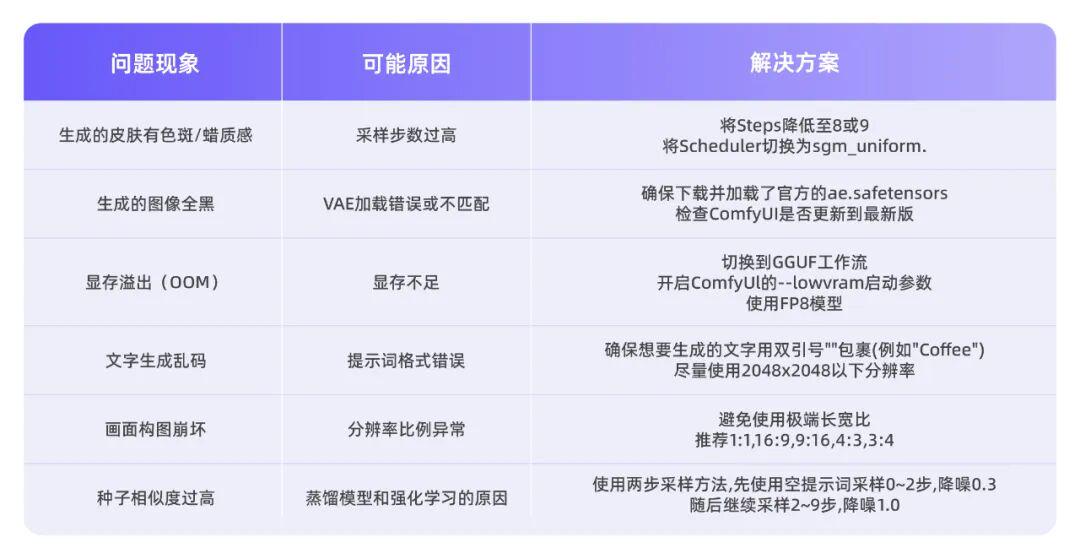
Common problems and solutions in Z-Image
Of course, if you want to experience the effects of Z-Image quickly before deployment, you can use it directly in AIG Square。
Github
https://github.com/Tongyi-MAI/Z-Image
Hugging Face
https://huggingface.co/Tongyi-MAI/Z-Image-Turbo
ModelScope
https://www.modelscope.cn/models/Tongyi-MAI/Z-Image-Turbo