



December 27th.ZhipuResolution command line AI Programming ToolsThe problem of high operational thresholds (e.g. Claude Code, Codex, Gemini, etc.)An AI co-development tool called Z Code was recently launched, provides a unified, friendly visual desktop, using aapi key, which allows you to switch to multiple Agent programming tools。
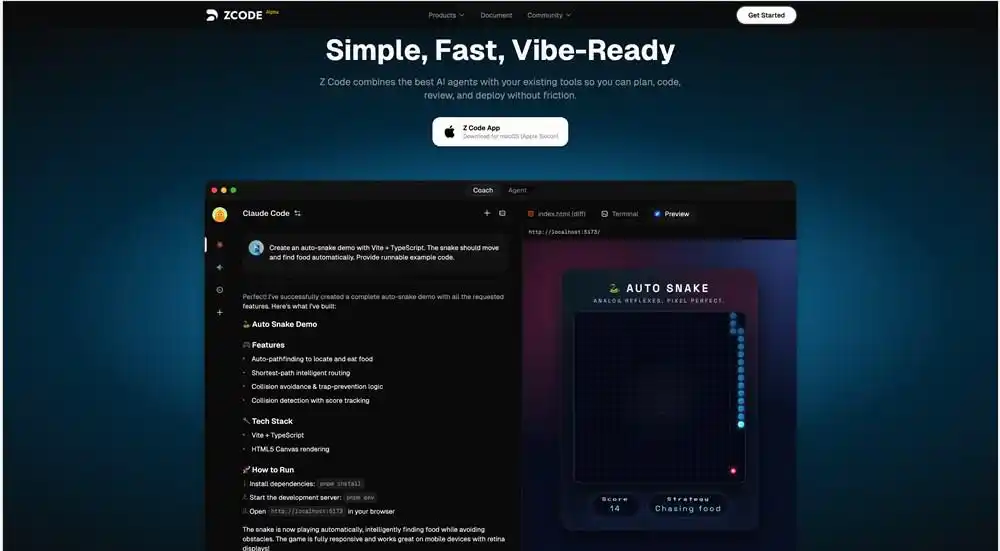
The core philosophy of the tool is deep integration AI Agent(Agent) Supports Claude code, Codex and Gemini's mainstream Agent tool. Developer does not need to prepare complex instructions, but only uses natural language to communicate with Agent, driving it to complete code writing, logical analysis and error routing
Z Code optimizes the depth of human collaboration. The editor has an " Think mode " , which allows Agent to analyse and modify itself before generating a final response, and the user can adjust the function to the complexity of the task。
In addition, Z Code provides a strong “historical re-engineering” capability, which allows users not only to modify the hints of historical dialogue, but also to fully restructure and re-implement the entire interactive nodes. This means that the developer can edit the Dialogue Stream like an edit code, thereby further optimizing the behavioral logic of Agent。
Z Code has designed a fine authority management system for the potential risks associated with AI automated programming. Agent operates in key areas such as document editing, command line execution and web access。
In particular, when Agent tries to perform high-risk actions, the system compels the user to confirm them manually. This design, while giving AI autonomy, ensures the developer ' s absolute control over the project. 1AI attaches the following Z Code core functions:
| Function | introduce |
| Cli Support | Support Claude code, codex and gemini three angent tools |
| questions and answers | Through natural language dialogue with Agent to ask questions and give instructions to drive it to perform programming tasks such as coding, analysis, etc |
| Permission Mode | Agent 's key operations are divided into the following categories:File Edit,Command line execution,Network access, search privilegesWait. Four models can be selected according to mission needs:Always Ask, Accept Edits, Plan Mode, Bypass Missions. |
| Include File | The introduction of specific documents into the demand will increase the efficiency of the Agent location files and the processing of documents。 |
| Thinking mode | The mode of thinking determines whether Agent did any additional analysis and self-correction before responding. Users can dynamically adjust Agent's working methods to the complexity of the task。 |
| Edit History Dialogue | Allows the user to modify and re-examining any message in the history of the dialogue, and to fine-tune and optimize the Agent behavior in depth. This is not limited to the modification of the hint, but is a comprehensive re-engineering of the whole interactive node。 |
| Version Management | Automatically track all document changes executed by Agent, using user history of conversation as a version control time line, where the user can locate any dialogue or roll back the code back to the version before any dialogue。 |
| Command Line Panel | Command line panels can be activated, where command orders such as compilation, debugging, deployment, etc. can be directly executed to achieve flexibility in project control。 |
| File Manager | Provide complete visualization of project documents and directory structures |
| Git Submit | Provides a simple graphical user interface (UI) to handle common Git version control operations |
| Web Browser | Internalize a web browser for real-time preview and innovative interactive selection of elements at the front end |
| Secure operation confirmed | Manual confirmation is required when Agent tries to perform any action with potential risk |
| MCP SERVICES | The MCP service is a set of Agent Synergy and Management Agreements framework for users. Users can use either the built-in MCP or the custom MCP configuration directly。 |