



I put it on the PC Hermes After that, it did work very well, but soon a real problem was discovered:
As soon as the computer was shut down, Hermes went off duty
As Hermes' "boss," who doesn't want to sleep or go out to play, has 24 hours to stand by and help me on time, monitor information and process work
NO. 24 HOURS RUNNING A COMPUTER AND WASTING POWER? THE MOST IMMEDIATE WAY IS TO DEPLOY TO THE VPS
But this brings with it new security risks:
Hermes and OpenClaw have very large AI Agent privileges to operate almost any file on the server. If the VPS contains SSH private keys, wallet keys, important documents who dares to let it access
Of course, if you want to buy an empty VPS just run Hermes, you can ignore this. People usually have only one VPS. What do we do
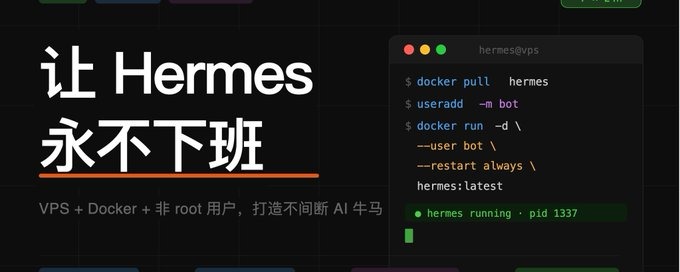
My solution is: VPS + Docker + Non root users run Hermes
Docker can completely isolate Hermes in a container so it doesn't touch other important host files
It created a general user-run container, which further reduced access and significantly improved safety
I'm going to teach you how to securely deploy Hermes on VPS
ABOUT VPS
It's recommended that we buy a VPS overseas so we don't worry about the internal walling problem
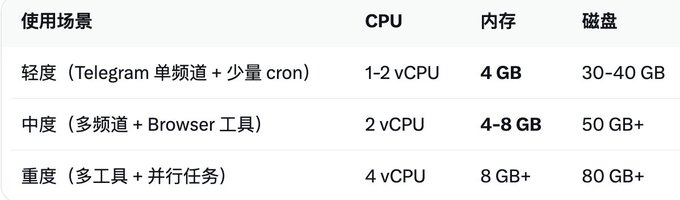
Hermes Agent (especially Docker deployment) is very light in itself, mainly from the Python process + SQLite memory database + Gateway, without GPU
You can refer to this form
1. create a dedicated user (user name: hermes)
if you can't do it, you can't do it.
Sudo usermod - aG sudo hermes # join the sudo group
Set password for sudo passwd hermes #
su - hermes # switch to hermes user
2. Install Docker (Ubuntu/ Debian example)
install docker-ce +docker-compose-plugin with an official one-key script or apt
3. Cloning and activation of Docker
i'm not sure I'm going to be able to do that, right?

I'd like to ask you a few questions.

HERMES_UID=$(id-u) HERMES_GID=$(id-g)docker company up-d
note that these are operated under hermes, and now docker copose ps can see two containers running:

gateway and dashboard
4. Initialization Settings
..evenv/bin/activate & hermes setup."Here's the Hermes setup, big model according to your preferences, Telegram, Wisdom
Note that large models need to open browser links when selecting Nos Portal because the VPS is not graphical and only has to be certified in another computer's browser (desktop or laptop)
5. Resolution of questions of competence
You think this is the end of it
Sending messages to Hermes via Telegram or Twitter reveals an authentication error:
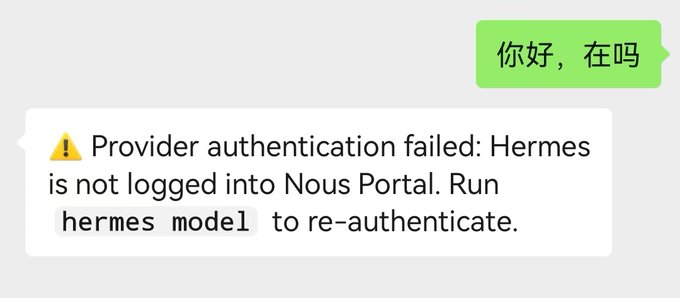
use the following command to get into the docker to start hermes and find a large model to work
i'm not going to do that, but i'm not going to do that.
source /opt/hermes/.venv/bin/activate & hermes
it's a question of authority
...drewx-- 18 10000 10000 4.0K Apr 27 15:31
the other files are user names and group names
Restore user and group names first
i don't know what to do.
Chmod-R755 ~.hermes
execute the following commands and save the results: userid, groupid
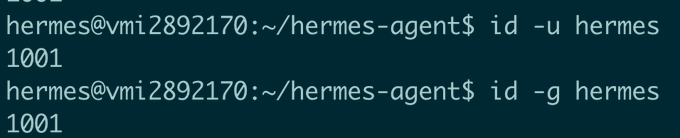
edit ~/hermes-agent/.env add at the bottom:
For HERMES_UID=1001 # read just acquired "id-u hermes"
edit ~/hermes-atent/docker-compose.yml
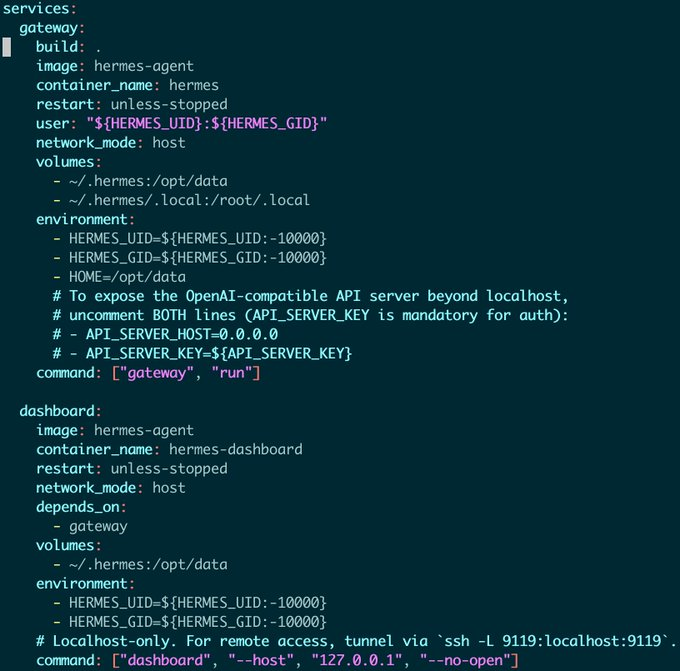
Most should be like mine
restart now docker
docker company down
docker copose up-d
Now try to communicate with Telegram and Wireless
congratulations to you
now you can call hermes wherever you want
Appendix
some commonly used docker commands
docker mirror down #

Docker copose up-d # start mirror

Docker command up-d-build # force recreate mirror + start

Docker contact exit-it gateway bash # restart gateway

Docker company restart gateway # enter docker

Docker logs gateway displays last 30 pages of the Gateway Log

..evenv/bin/activate & hermes status"

..evenv/bin/activate & hermes model"
update hermes
cd ~/hermes-agent

let's get this over with.

okay, let's go.

docker copose up-d-build
Official documentation:
https://hermes-agent.nousresearch.com/docs/user-guide/docker