



In our earlier articles, we talked about how to create a unique role at the conceptual level — how to find visual anchors, how to identify character characteristics, how to make your role not just "good" but "aware"。
IT'S THE WHOLE A.I. SHORT PLAY THING
It's more like solving the problem of thinking。
This one, we solve the problem of doing。
You already know what it's like to be a character, what it's like to be, but it's almost as good as it's gonna be when you turn on the graphics tool, you put in the hints. Either you've got a face, or you've changed your face from another angle, or your clothes are right but the whole thing feels wrong。
These are not really aesthetic problems or tools, and most of the time the process is wrong。
Role image design has a complete set of processes. The purpose of this process is only one: to make your role look like the same person in any scene, from any angle。
This article will untangle the entire process, and it will be clear what to do at every step, why to do it, and how common pits go around. You don't need to be a professional designer, just step by step。
1. Let us get this straight."Role DesignWhat does it look like
Before the official start, we need to align ourselves with a basic understanding: what should role image designs look like
A lot of people came up in a hurry to make a big picture of the first movie. - The character stands under the neon light of the rain, the light is mixed and the atmosphere is full。
Looks good? It does. But it's not a design, it's a piece。
The core task of character image mapping is not to look good, but to precisely define the person ' s looks, body size and clothing so that all subsequent mapping can be benchmarked. So it needs to be as clean as possible, excluding all interference。
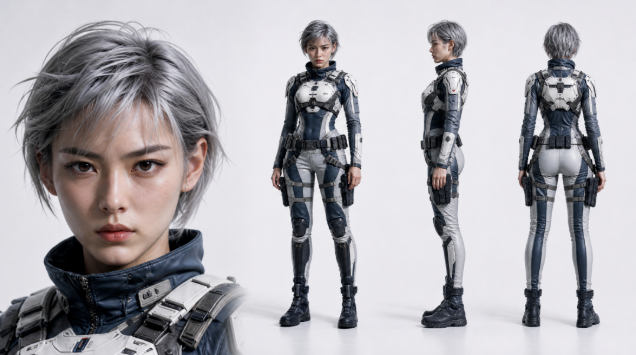
Example role image design
Specifically, three basic principles are:
- Pure background. Don't add any scene elements. White, light gray. The cleaner the background, the easier the model will be to be interfered with in subsequent role identification. You add a red brick wall, and the model may use the texture of the brick wall as part of the character information, and the next drawing will bring out a similar tone or texture。
- Panorama. It's the angle of normal vision, the lens and the person's vision are basically the same. Don't do it. Don't do it. Don't do it. When the angle is tilted, the five-office and body ratio of the person in the image produces a visual deformation, and the model is not allowed to read the information。
- Flat. The light, which is even and has no apparent direction, is similar to the light of the document. No light, no light, no light. The light itself changes the view of five officials — the same face, the light on the side, the cheeks high, the eyes deep, and it looks like a new person. And you want the model to remember the role "is what it is," not "some kind of light."。
Brief summary: You can interpret character designs as a "standard picture." It does not seek an atmosphere, does not pursue art, does it seek the accuracy and stability of the message. All the atmosphere, scenes and images are matters that need to be taken into account after the actual creation phase。
Let's put the "man" down and put the "person" in the "story." The order cannot be reversed。
Starting with one face — complete process of character design
Okay, to the point. The complete process of character image design is three steps:
Face close-ups, poaching, poaching, poaching
Each step has a clear mandate, and the sequence must not be confused. Let's go step by step。
Step 1: Face close-up
A lot of people are used to taking pictures of themselves as soon as they get up, and they think it's more efficient, so they can sort out their faces and bodies。
But you'll find a problem: when you have to balance face details with body size, the model's attention is distracted. The five officers are not sufficiently precise, their faces are not well in place, their overall faces are often “broad”, and they lack memory points。
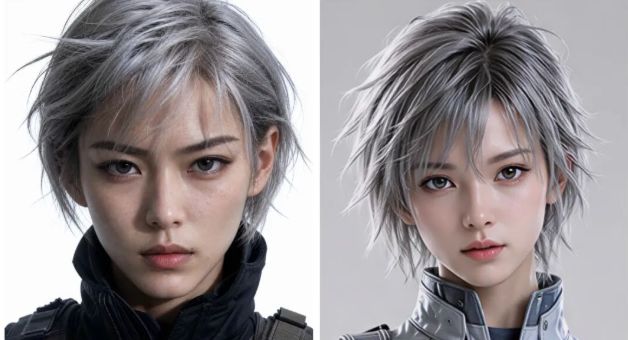
Both the left and right effect maps use the same set of facial characterizations, the left is the effect of designing the face separately, and the right is the effect of magnifying the whole body map to equal hours
So step one, just do the face。
Generates a facial close-up that the model spends all its energy on this face. The eyebrow distance, the height of the nose, the thickness of the lips, the profile of the face, and the sense of skin — details that can only be expressed in a close-up。
You need to adjust this step over and over again until you create a face that you're really happy with. This face will become the "base face" of all the jobs that follow, and behind them, whether it's a full body or a four-view, the person's facial features will be anchored in it。
Don't worry, this step is worth the most of your time。
Step 2: Face-to-face
The next step, when the face is fixed, is to produce a head-on full-body photograph。
The core task of this step is to determine the size and the basis of the role. The height, size, shoulder width, long legs, and the daily dress style of the role are clearly presented in this figure。
Attention, this is "Face," not three-quarters, not random standing. The simplest, face-to-scenes stand-up. The reason is the same as in the previous section — to reduce the variables so that the information is as accurate as possible。
When generated, the first positive facial feature is used as a reference input to ensure that the face does not miss. When the body was taken, the focus was on one thing: the face in the whole body, and the first one you set, was like the same person? If the difference is too great, it would be better to regenerate, rather than simply。
This step is to change the role from one face to one person。
General message template:
Based on a given profile of the person, a positive body image of the person is created. Strict maintenance of facial features, five official ratios, face, hair, hair and identity in reference maps. The person stands in a frontal position, is fully covered and visible from the head to the foot, clearly showing the overall body ratio of the person, clothing and shoes. Flat view, flat light, even light, no visible shadow. Solid colours of the background, clean of interference-free elements。
Step 3: Four View
A four-view is to combine facial features with multiple angles (head, side, back) of the body。
Why is it not enough to do it again
Because the whole body is a vision, facial information is a small percentage of the whole picture. You see your face, but for a model, the facial details that it can extract from a whole body map are limited. Especially when the next video is generated, once the camera is put to a close-up view, the face reference information on the model is insufficient, and the face is "floating." - Five officials start deforming or simply grow into another person。
The point of the four viewes is to wrap in a picture of high-resolution facial features and multi-angle information. The model takes this picture, and it can see what the face looks like and what the person looks like from the front, the side, the back. The information on the vision is available, and whatever the scene is generated, it can be relied upon。
You can use the puzzle tool to spell it manually, or you can use a hint to describe the layout of the four views directly in the drawing. It depends on the tools you use, but the final standard is one: a picture with a clear face, a full body, a straight side。
General message template:
Generates a role-setting diagram based on a reference diagram that willFace closeandThree views of the characterIt's the same imageThe painting scale is 16:9.
Image layout is:It's a big face feature on the leftmost;right-hand ranking of charactersAll-face, all-faced, all-faced, all-faced.
character (in a play, novel etc)Full body, visible from the head to the foot, pure colour, a flat view, even light。
The characters in each view mustStay in the same roleMake sureFace characteristics, hair, clothing, accessories, body size ratioAltitude is the same, with different views changing only the angle of observation。
The whole picture should be clear, organized and fit for actionRole image setting/ third view presentation.
A principle throughout the process: always using the same picture model
From facial features to four views, the whole process suggests that you use the same image-generated model from the beginning to the end, and don't change it。
DIFFERENT MODELS INTERPRET THE HINTS DIFFERENTLY, AS DOES THE REPERTOIRE OF CHARACTER CHARACTERISTICS. EVEN IF YOU USE THE EXACT SAME HINT, THE FACE THAT MODEL A COMES OUT OF AND THE FACE THAT MODEL B COMES OUT OF WOULD BE DELICATELY DIFFERENT -- THE COLOR OF THE SKIN IS NOT THE SAME, THE STYLE OF THE FIVE OFFICIALS IS NOT THE SAME, EVEN THE DEFAULT PREFERENCES OF THE BODY。
It's like changing a model like a painter. Painters may be of a high standard, but they are not uniform and, together, they feel unharmonic. So, before you start, pick a model that you use, and then you use it from the beginning to the end。
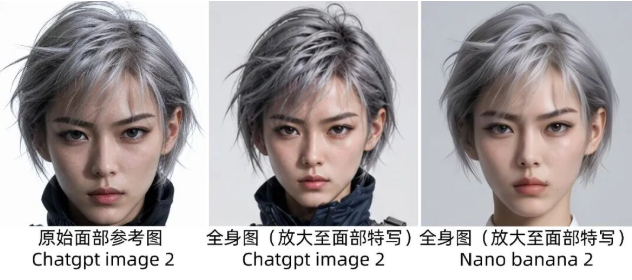
Those things about the "face"
The process is over, but if you've actually done it, you should have seen it -- the most painful part of the process, the first step。
Generating a satisfactory face is far more difficult than you think。
You'll probably have a few typical problems at this point, and we'll talk about it one by one。
"Can I find a picture of a star?"
Can't。
This question must be put at the forefront, because it is indeed the first reaction of many. Feels like the character that you want is close to a star, takes a picture in it, and it's quick and it's easy。
But this road is not going to work. The image of the role is created by the face of a real star, and there are photographic rights and legal risks. Even if you make some changes, the risk remains as long as the end result and the real person are clearly identifiable. Especially when your content is to be published, it's not a gamble。
"HOW COME THE FACES CREATED BY AI ARE SIMILAR?"
This is the second problem that almost everyone will encounter。
You changed a lot of hints, made dozens of maps, and the difference between the face and the face was so small. Not to say they're identical, but there's always a feeling of "one and the same mimic" — similar eye spacing, similar noses, similar facial fat distribution. You're thinking of a recognized face, "This man is this person," and it's always an average face, "Everyone looks and nobody looks."。
It's not about your hint, it's about the model. The image-generation model, which learns a lot of face data during training, creates a statistically “best solution” to the “good face”. And when you don't give a very strong hint, deviating from the best of instructions, it's instinctively close to that average。
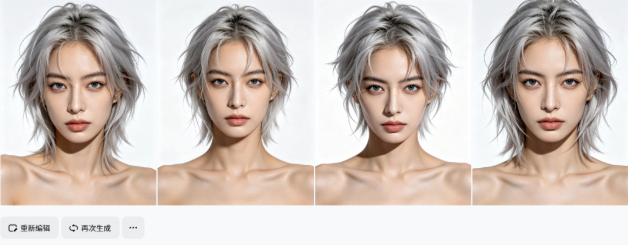
To break this average, you need to know first how to "disguise" a face into specific dimensions. A lot of people only write "sweet" "exact" "sweet" words, which amount to nothing to a model. What you need to give the model is structural information -- what the face is made of, what each part looks like。
I'll give you a frame to refer to when writing a facial tip:
- Face and bone structure: This is a face's chassis. Is it round-faced, square-faced, goose-faced or rough-faced? Are the cheekbones tall or flat? Is it sharp or soft? Is the chin sharp, round, or is it a little forward? These determine the basic contours and rigid/sweetness of a face。
- Eyebrow Area: Often the most informative part of a face. Is the eyebrow flat, provoking or bending? Thick or thin? Are the brows prominent? The eyes are round, almonds, Dannes or peaches? Is the eye distance wide or narrow? Eyeslids or one eyelids? Deep or flat? What color is it? The combination of these details can almost define the first impression of a person。
- Nose: Nose height, narrow nose, round or sharp nose, overall length of nose. The nose is the middle axis of the five officers, and its form directly affects the 3D sense of the whole face。
- Lips: The thinness of the upper and lower lips, whether the peaks of the lips are visible, the natural direction of the mouth (lightly up or flat), the overall size of the mouth。
- Skin: The specific color of colour (not just " white" or "black " ), try a more precise description of "fluenc" as "cold white skin" as "elk" and "freckle" skin。
- Hair: Length, curly, hair color, wiring, availability and morphology of Liu Hai, overall perfluence. Hairstyle has a very strong effect on facial perception, and a change in the same face may have a completely different look。
You do not have to write all dimensions at each time, but at least cover three or four of them and give a clear and specific description of each dimension, rather than a general adjective。
The more specific, the more "optimal" characterization, the more it helps the model to jump out of that average face. For example, a "slightly wide nose" is much more useful than a "beep nose" because the former is a clear structural deviation, while the latter is simply reinforcing the aesthetic defaults that already exist in the model。
"Why isn't the hint satisfactory?"
If you've changed a lot of descriptions, run enough turns, or not a face that makes you think "it's him/her," it means that the hint alone may have reached the bottleneck。
Don't die at this time, introduce the manual drawing process。
The approach is to pick the one closest to what you expect from all the results you produce. It doesn't have to be perfect. And then take this picture to the drawing tool, and manually fine-tune where you're not satisfied。
You don't need PS technology, so that's the level of fine-tuning, and most of the restoration tools and even the phone App。
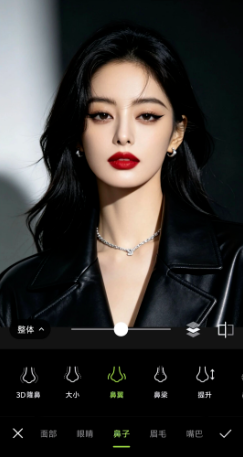
With regard to the face, one sentence at the core is: the hint is the one that can be solved, the hint is not. The tools are for you, not for limiting you。
What are you wearing
The face is set, the body ratio is set, and the next one is the dress。
Many people think costume design is the simplest step in the whole process -- isn't it just to figure out what to wear and put in a hint
It's not that simple. There's an easy pit, and a way to understand it。
First of all, the pit: don't just move clothes on the electrician platform
It's a very common modus operandi: to open up some of the treasures, to search for a dress that seems to fit the role, and to save it as a reference to the model。
It appears to be efficient, but risks abuse。
The clothing commodity map on the electrician platform is itself copyrighted, and original design of clothing may also be protected by intellectual property rights. You refer directly to the product maps, and the results are likely to be highly retrofitting the core features of the original design — layouts, patterns, colour combinations, emblematic design details. Once the work is made public and a certain amount of dissemination is obtained, these characteristics can be retroactively compared。
YOU MIGHT THINK, "WHAT'S WRONG WITH AI BEING CREATED IS NOT THE ORIGINAL, BUT WHETHER IT'S NOT THE ORIGINAL, BUT WHETHER IT'S A MATERIAL SIMILARITY TO THE ORIGINAL DESIGN. THIS IS A VAGUE ZONE, WHICH MEANS THAT RISKS ARE NOT CONTROLLED。
Therefore, the correct way of reference to clothing is not “movement”, but “extracting the design language”。
What do you mean, "extract design language"
You see a dress and you think, "It feels right. Don't hurry. Just stop and think about it. Where did it get you
Generally, the visual impression of a dress can be broken down into several core elements:
- Colour. What color does it use? High saturated, or low saturated homogenous? What about the main color and the complementary? Is the relationship between color or gradient
- The contours. That's the whole contours behind the clothes. Is it a body-retarding H type or a loose oversize? Shoulder line falls or shoulder? Whether it's tight or open? The contours determine the aerobics that a garment conveys — capable, lazy, hard, soft, to a large extent determined by the contours。
- Material sense. Is it a nice suit, or is it a falling silk? Is it a rough cowboy, or is it a soft knitting? The material impacts on the “mass perception message” of the clothes in the picture, which makes the role look more expensive or more routine, more formal or more casual。
- Type of design detail, not specific detail per se. Do you have a collar? What kind of collar? Do you have a pocket design? What's a cuff? Note that you're going to extract the type of design called "tiping" "buff sleeve" instead of recapturing a specific pattern on that dress or an original cut-off。
When these elements are removed, you can put them in a plain text, without any reference. For example, you were looking at a khaki-sophisticated loose suit, shoulder-down design, paired with colored broad-legged pants, which you wrote in your hints, instead of feeding it to the product。
In doing so, you took the inspiration from that dress, but the result was that the model was based on your textual description of self-assembly and did not resemble the substance of any particular commodity。
Use the word "inverted" to assist in dismantling
If you don't think you're good enough to decipher the language, there's a good trick: throw the picture of the clothes you look at to the big-language model so that it can help you with the hint。
You don't use the picture as a reference, but let the language model read it for you -- tell you what the color of the dress is, what the contours are, what the material looks like, what the design elements are. The model will help you translate a particular dress into a structured text description。
When you get this description, you adjust it to the character of the role and the context of the story — changing the color, changing the material, adding some details — and finally write a description of the costume that belongs to your role and does not point to any particular commodity。
The essence of the process is that you use that dress as an inspiration trigger point, but you eventually give it to the biographic model, and you digest the language of the reorganisation, not the dress itself。
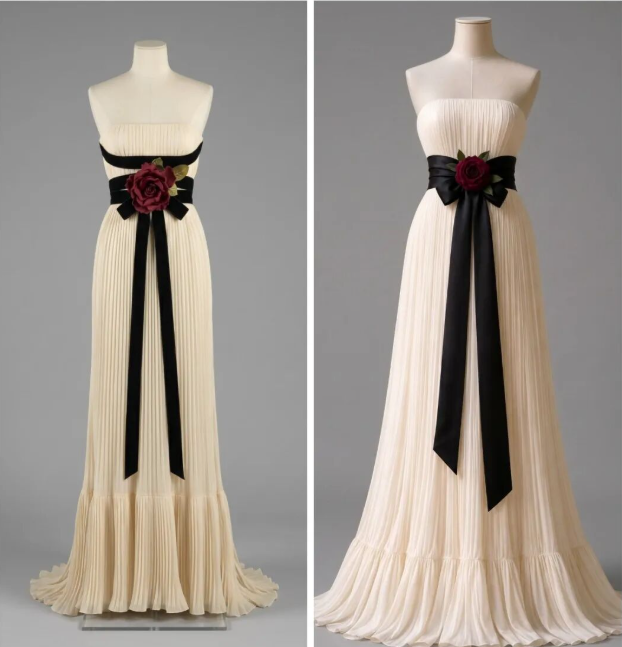
Left: Reference, Right: Inverted hints generate pictures
One last point: The role must be dressed for the role
That sounds like bullshit, but in practice many people forget。
It's easy to see you brush a nice dress, and you think it's too good to use it, so you stick it in the role. However, this dress may be incompatible with the role's occupation, with the role's economic situation and with the age when the story occurred。
Before you know what you're doing, look back at what you're doing in a previous article: What's his character? What profession? What economic conditions? What's the routine scene? A role that moves bricks at the site and a role that works in a writing building cannot be dressed in the same way. It is not that the role of the site cannot be dressed well, but rather that the specific expression of “good looking” is matched by the life logic of the role。
Clothing is an extension of character, not an exhibition of the creators' personal aesthetics。
Roles are not static — the appearance is adjusted to the script
All the steps ahead are the role's “basic image” — what this person looks like at the beginning of the story, in the most daily state。
But stories are mobile. Your role may be to change jobs, change seasons, experience a change, or just go to an important appointment. If there is only one set of appearances from the beginning to the end, the audience sees not a living person, but a paper person。
So you need to generate a different version of the role, based on the script, at different stages。
Core method: local editing based on a positive picture of the body
it is not necessary to run the whole process from the top every change. you've got a good picture of the whole body, which contains the character's face, the body ratio and the underlying body -- these things are in most cases the same. what you have to do is to change only the part you need to change, on the basis of this picture, by way of local editing or drawing。
The greatest benefit of this is that the body ratio is locked in the original figure and that it is not suddenly made taller or thinner by a change of clothes. The overall structure is stable and changes only on the surface are what the same person should be。
Key premise: the model must be clearly told what to do
This is very important. If you just say, "Replace your clothes in a suit," it's possible that the model would have changed its face slightly -- a little bigger, a little tip of the chin, a little skin. Every change is small, but together, this person is not the same person。
So every time you do a phase-out, you have to have two parts of the message: what to change, and absolutely nothing to change. The latter is even more important than the former。
Here is a generic binding template for you, so you can modify the contents in square brackets and use them directly as needed:
The following features remain completely unchanged: the person ' s face five, facial profile, colour, hair, hair color, body size ratio, height, standing posture。
Amend only the following: [Specific description of the part you want to change, e.g., replacement of the top with a dark gray round-collar sweater, replacement of the bottom with a black barrel pants and replacement of the shoes with dark brown boots]。
The remaining graphic elements (pure background, flat view, even light) remain unchanged。
The logic of the template is simple: first, drawing a red line that locks everything that cannot move; then, within the red line, accurately describing what you want to change; and finally, ensuring that the basic norms of the design plan are not compromised。
Several recommendations for use:
- Every change must be compared. The revised chart and the underlying image are seen together, focusing on whether the face has changed. Not just to look at the new clothes, but to make sure that they are the same or not. If the face floats, this picture is useless and regenerated。
- A single standard reference chart is kept for each phase. After that, this is the official image of this phase. All the scenarios for the subsequent phase were based on it, rather than each ad hoc move, and there were inconsistencies within the same phase。
6. At the end
Here, the whole role image design process is over。
We look back and see the way we've gone: first understand what the basic norms of the design are, why they are, then start with a facial feature, move one by one to a full body, four by four, deal with all the challenges about the face, figure out how to look for the clothes, and finally learn how to make a phased adjustment in a stable basic image。
The process is not complex, but it is the subject of every step. And all of this points to the same thing: to make your role look like the same person in any image。
Consistency is something that doesn't come to the attention of the audience. It's not a subdivision, it's a pass line。
Last but not least, it is not to expect a perfect role image at once. The first time you run the whole process, you probably don't like it anywhere. That's normal. Role design is in itself a process of readjustment and gradual convergence. Your understanding of the role will become more and more clear, and your control over the tools will grow more and more. If the first edition is not perfect, change it. When you move to the third edition, the fourth edition, you'll find the character is really like a person。
Try it. Open your tools, start with a face。