



It'll make your new hands perfect Codex
No gpt account, no domestic API, no Codex plugins, no where to start, and the pits and experiences that I stepped on will be shared in this article
Installation of Codex app
Codex app is still a simple installation, just like downloading software
download address: https://chatgpt.com/codex/cloud
You have to download the application, and the application interface will feel better with Codex and better for White
Mac downloads a dmg package that can be installed directly. Windows computer is a direct download package, which means it needs to be downloaded from Windows' system store
It's because of the computer situation of many small partners, Windows, if you can't download it, the solution is to reload the system
you can also execute the following line of instructions in your computer terminal "cmd":
winget install Codex-s msstore
Codex app
Mac's computer can be opened by searching Codex directly at the "starter" and Windows' computer needs to be thereStart bottom left or click the search buttonSearch "Codex" and open it. A lot of things Windows can't find the software when it's downloaded, because it doesn't turn into a fast command on the desktop
02 on login, interface
There are many ways in which Codes can be used to connect directly to the API model of the transit platform or to connect to domestic models. But if you're taking an API other than official, then you don't use the codex function that fully。
SO IT'S IMPORTANT THAT YOU LOG IN WITH AN OFFICIAL ACCOUNT, AND THEN YOU SWITCH TO API ACCESS. THAT'S HOW YOU GET A FULL-SCALE, CHEAP API
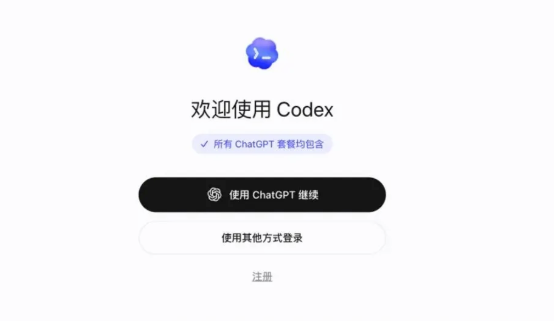
When you open the software, it's basically the same interface
Logging in to an official account, without having to buy a 20-knife package, is just an ordinary free account, and we're just trying to get Codex's full functionality。
The account numbers are still better accessible, registered in Microsoft Mailbox, etc., but the difficulty is that just registered accounts need to be certified by a telephone, and this phone check does not support the +86 call
Of course, it's easy
cell phone downloads a fish app, then search
It's almost possible to get through the problem of validation
ONCE YOU'RE IN, YOU DON'T HAVE TO USE IT, BECAUSE YOU'RE A FREE ACCOUNT, AND YOU PROBABLY WON'T GET THE MESSAGE BACK, AND WE NEED TO ACCESS THE COUNTRY OR ANY OTHER API。
Before doing so, understand the basic interface:
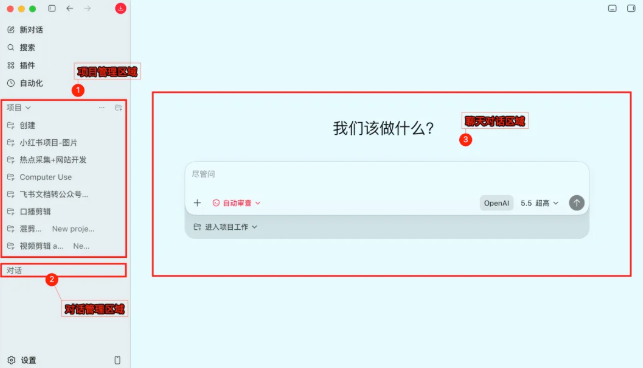
Play Codex must have the habit of creating project folders, so that your content is not lost and you basically know what you're doing in the same project document。
If it's an ordinary search, an ordinary processing mission can create a dialogue in the dialogue area without disrupting the operation of the project
If there's something you want to do on an ongoing basis, you better use the project folder to manage it
Click on a new dialogue to create a chat in a conversation
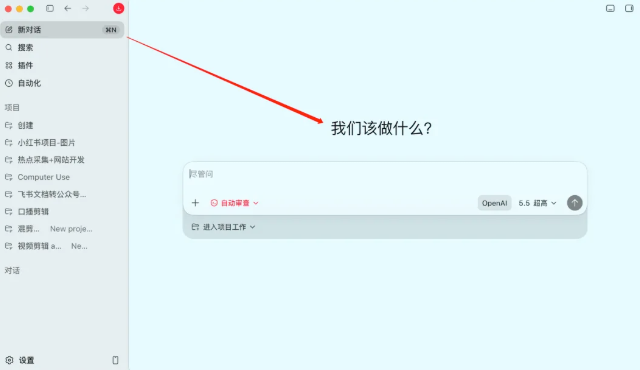
Creates a dialogue in the Project File Office, creates a chat in the project
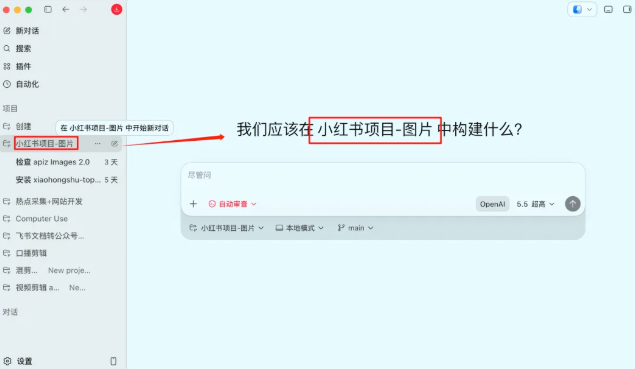
Just remember, if you really want to work, you can manage it in a project file, so that you can also manage multiple dialogue windows in a uniform way, and don't worry about not finding them
You create Project Folders in Codex and create a folder simultaneously on your computer, and any file, information, chat record memory you generate will be stored in this local file, very easily managed
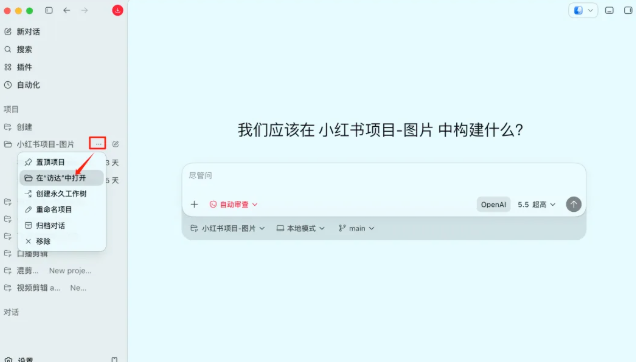
Just click on the Plugin at this time, if you choose to log in with an official account
There's almost 174 plugins in here that you can use, but you don't have to think about all of them
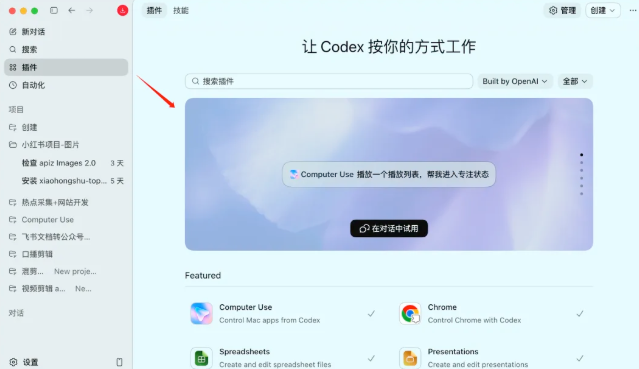
03 | Configuration Model to use in Codex
Download CC Switch Software
it's a software that can quickly configure the code model and that can quickly access our domestic model
website: https://github.com/farion1231/cc-switch/releases/tag/v3.16.1
i can't open this site because you don't have a tool because it's a project on gethub that has to be downloaded
You can see many versions of the download address at the bottom of the page
Basically, two downloads of Mac's computer and Windows' computer were framed
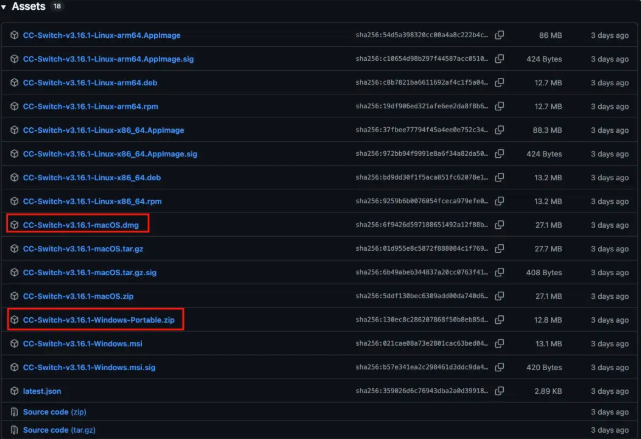
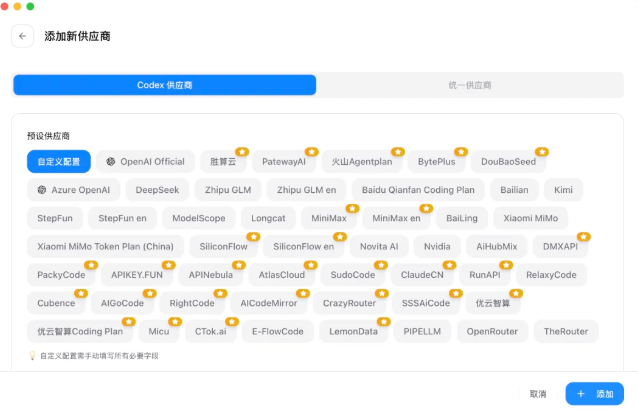
You don't need to log in when you download itCC SwitchAccount number, open Codex configuration, see how many domestic models are already supported, just go to the corresponding platform to get API and fill in
The domestic model was difficult to access because most of the model is the Chat interface, and Codex does not support this interface, and the latest version of CC Switch is based on the domestic model you access, using the local route to change the Responses to the Chat interface, so that the model request for Codex fits:
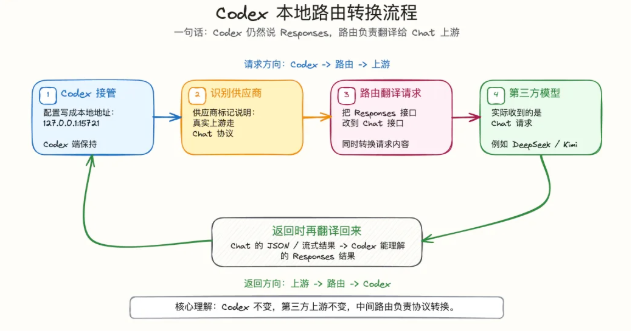
This is the configuration and follow-up logic of Codex in the new version of CC Switch
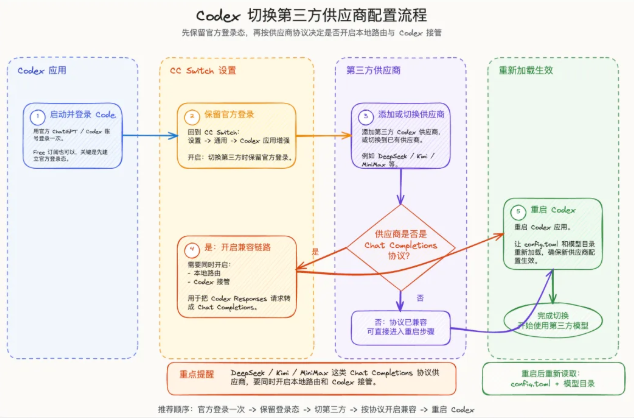
- here's what i'm sharing: log in to the codex account, the second plate, and then access the domestic model
There are a few steps to be taken to list the text messages and the photo flow, which you can see directly
1. Log in with account number once, free of charge (shared on board 02)
2. In the CC Switch settings, keep account numbers in memory (very important
3. ADD DOMESTIC MODEL API
4. if the access model is a chat interface mode, local route is to be opened
5. Switch to added domestic model and restart Codex
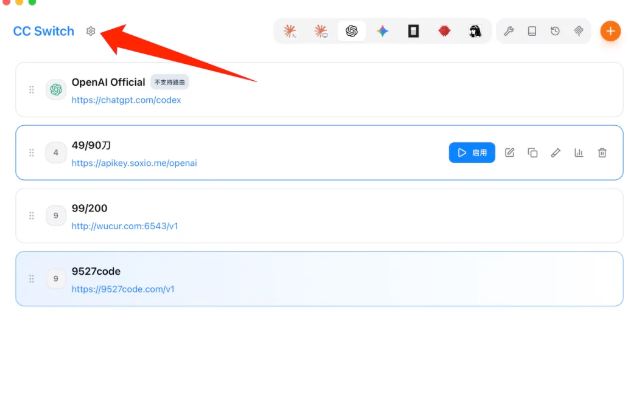
Keep account login in CC Switch settings
OpenCC SwitchClick Settings
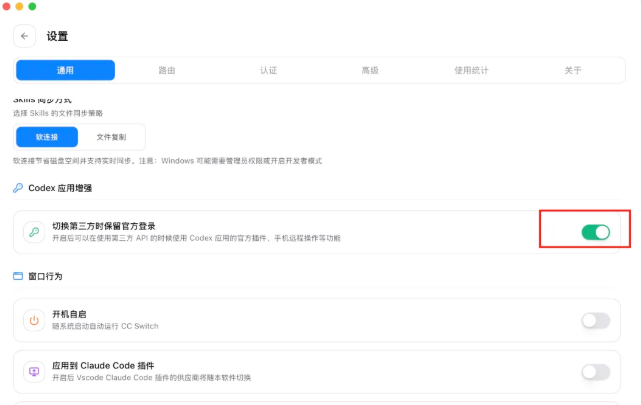
In the "Generic Pages♪ Down to find ♪Codex Application Enhancement* And open *
Once it's on, the Codex account information you log in will be kept. In that case, whatever we do, you can use the full functionality of the account, based on the privileges of the account
ADD DOMESTIC MODEL API
Click to Codex and click "+Add"
The icons in this line represent which of the various terminals Agent points to

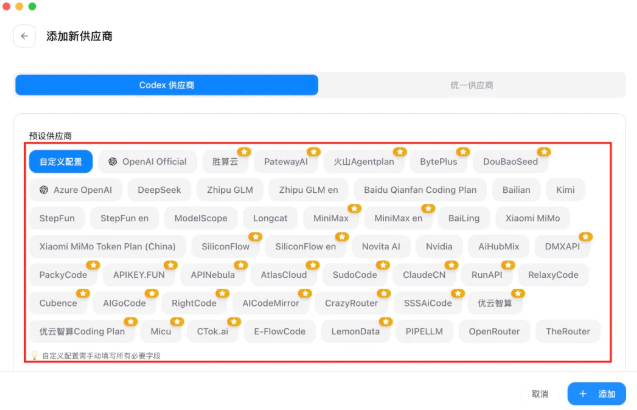
When you come in, you can see a lot of model providers, and in these model providers you find the models you need to add (as far as possible not to go to the custom configuration)
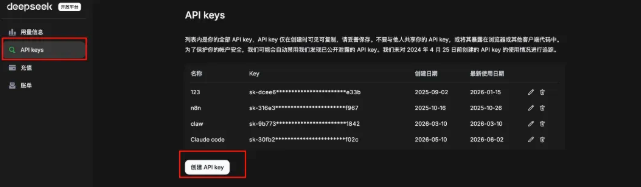
Take DeepSeek, for example, and open DeepSeek's API website, with an API number and access to API key (https://platform.deepseek.com/usage)
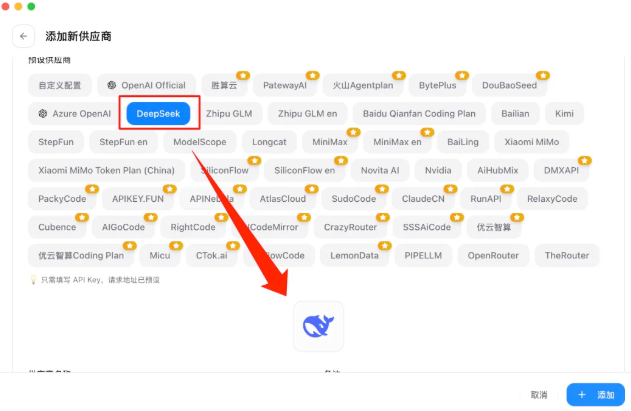
APIkey obtained, fill in the exclusive DeepSeek import to the vendor page
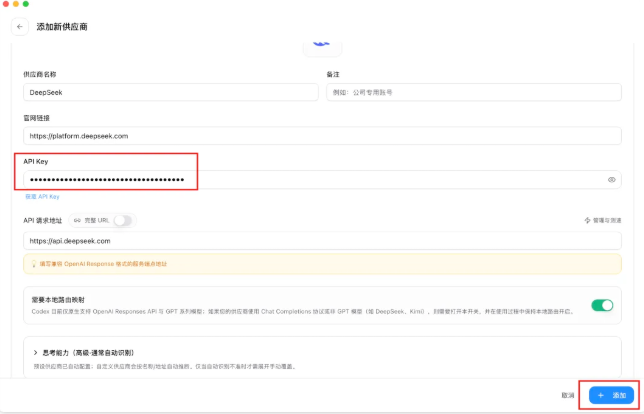
Fill in API key, click to add
if the access model is a chart interface, open local route
Open CC switch, find the route and open it
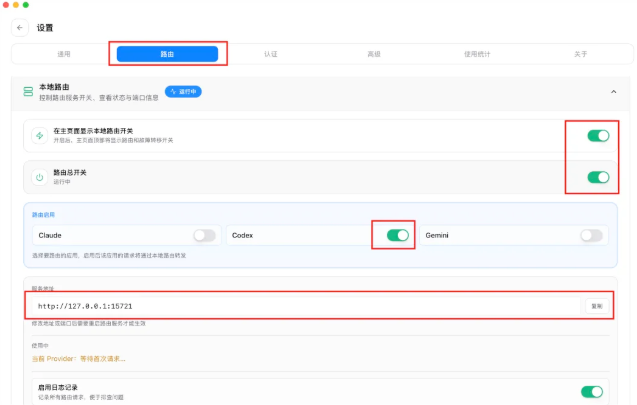
Enable and restart local Codex for use
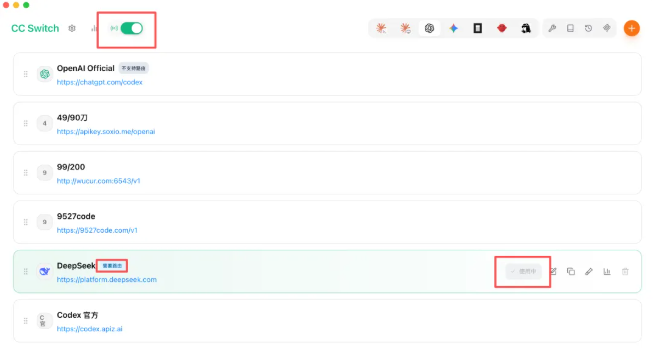
Once it's open, you can use the DeepSeek model directly with an account log in
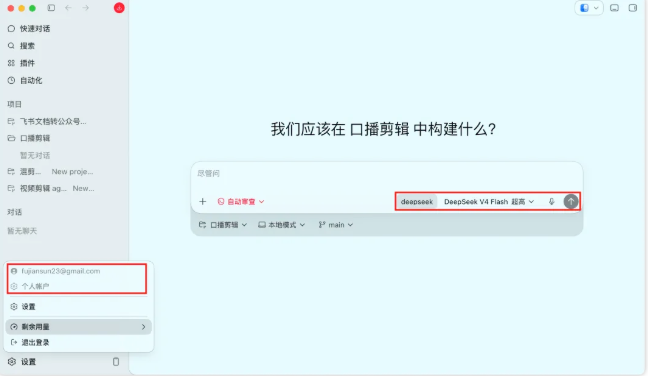
Chat Record Save
It's pure sharing. A small partner who doesn't have some data from Codex can follow it directly
If! You've been using Codex, and you've got a lot of history like me
I can also see from the screenshot of the access to DeepSeek that I just got up there, that all my left-hand chat records are gone, and only a few folders are left
And I had a lot of data in my previous folder:
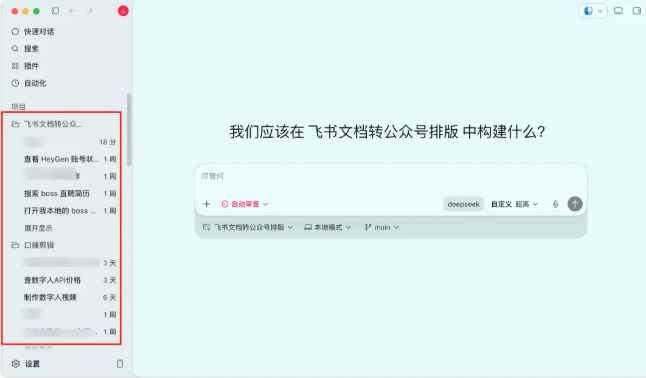
Here's an old user who regularly uses the content-sharing of Cordex users
initial step
find corresponding config files locally
Mac: Home folder (open hidden folder) -.codex-config.toml
Win: C Disk - User-.codex-config.toml
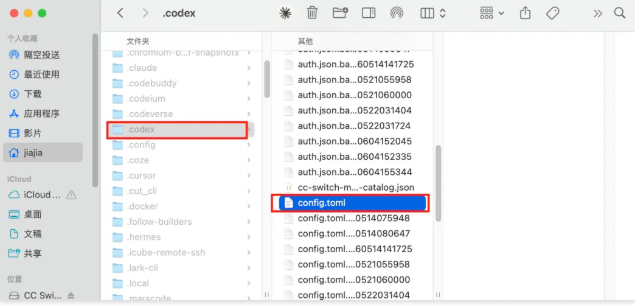
second step
Open the file and see field names
model_provider = “OpenAI” and [Model_providers.OpenAI] are both displayed OpenAI, and if not OpenAI, remember your display (need to be synchronized with the API that configures DeepSeek)
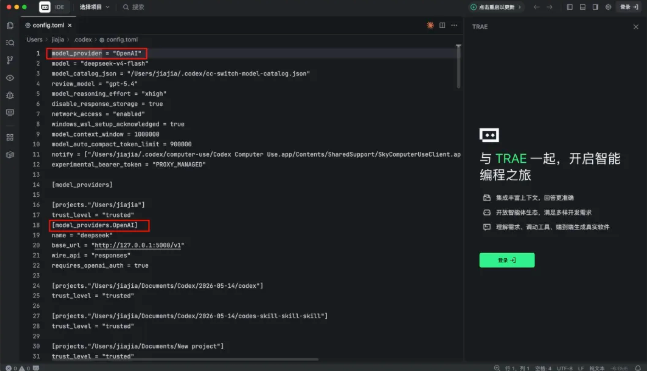
third step
Opens the CC-switch to add a transit model, the process corresponds to the top, copys the API and writes, the focus is to slide the page down
model_provider = “custom” and [model_providers.custom]
CC switch defaults that Custom is the same thing that caused many people to lose data, and that's how it basically solves the data loss by changing your original word (e.g., OpenAI) to the appropriate position (preferably copy, don't knock) before adding DeepSeek as a supplier
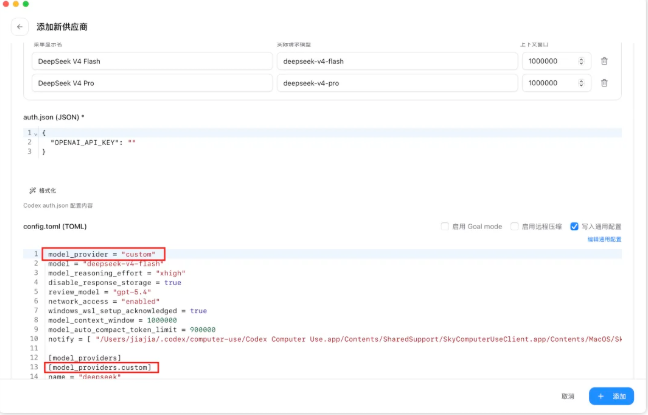
i didn't notice when i started to configure it, and i clicked and switched. when i opened it, i saw that there was no data in my codex, and i realized it。
04 |Codex Plugin
If you open the plug market for the first time, most people will be upset. A bunch of English names, a bunch of tools that look great. It's like a cow, but I don't know if I need it。
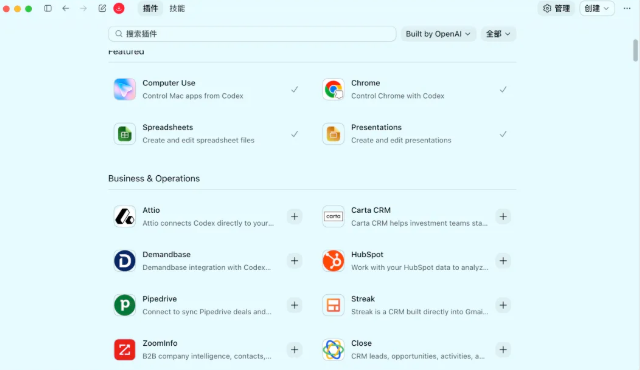
I'm going to get you a really practical list of Codex plugins and tools from every user's point of view
You don't have to put on all the plugs you've shared
1. Prescribed plugins
Let Codex operate the computer
Computer Use is a plug-in that moves millions of people to download codex before it's not too hot when Mac is the only computer that supports it
It can see the screen, the button, the text, the application on your computer, the default of each of us to the computer. If you have a lot of things to do in front of your computer, you can give it to him
There's a way to access the software in front of the market, but there's a lot of web pages that APP doesn't support API, so it's a problem that can be solved with Computer Use。
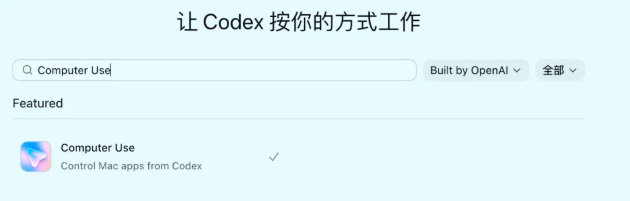
Use scenarios:
- I'll get you backstage
- Copy content from one software to another
- OPERATION WPS, BROWSER, DESKTOP TOOL
- Run the software for you
- Do something that repeats the clicks
It's best to experience it in Mac because it doesn't take your mouse and you can use it to do something else, but Windows can't do it simultaneously。
2. Three sets of mandatory plug-in office
Documents / Spreadsheets / Publications
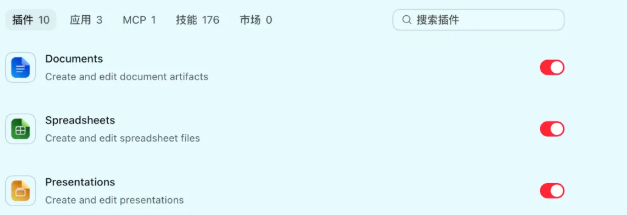
with these plugins, the words, the ppt, the excel have really worked very well
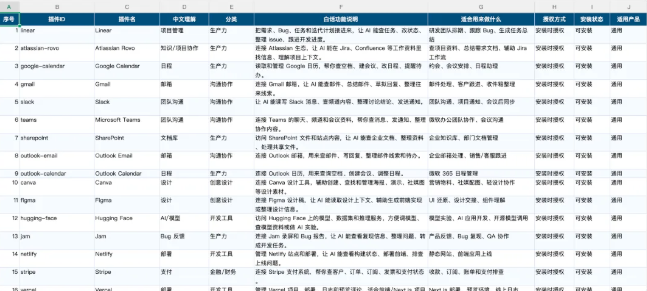
Like me, Excel, the effect of the form is that Codex does it, and the color matches are very comfortable. Before there was a word file, the client needed me to fill in the table in the word
Codex will only write in the table that the rest of the word text will not be destroyed
Claudinary
Local file to online link
Local files are linked online to this scene, and if you're using Codex, you'll get it. Why
Because Codex APP is a local software, he can read our local folders, but on some calls, only online links are supported, and local file-to-line links are always a cumbersome thing。
There is certainly not much of a sense of less use, and both local and online documents are very important. The point is, Claudinary is a free online link
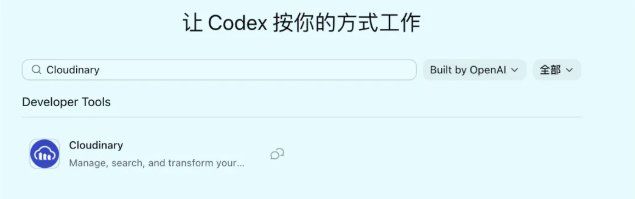
Use scenarios:
- Local files are too big to be linked online
- Local on-line audio links, local on-line links
4. Design of mandatory plugins, content creation
There's a lot of design-oriented plugins in Codex
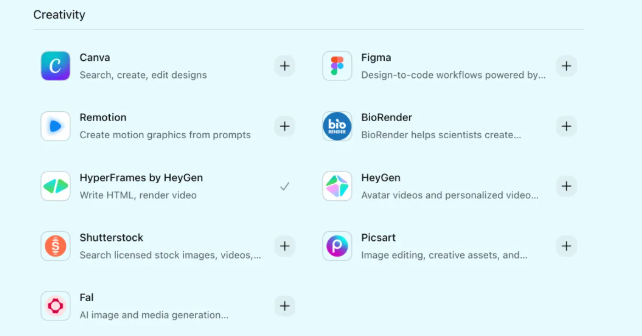
HyperFrames by HeyGen: A long-fired video plugin gives you some intellectual content, or some graphics, videos, audio, etc., which can be edited into a video with subtitles, etc。
Figma: Design drafts and code access, code to create canvass. Designers can fine-tune the canvass, and then make Codex install requirements and change codes
5. Full set of piping and white development required
Vercel / Supabese / Cloudflare: Want to be a website, a little tool to read
If you use these plugs, even if you don't know the code, you can develop a decent shareable link product that is not html-file or (127.0.0.1:3,000) a program that cannot be shared externally
Vercel can handle front-end deployment, Supabase can act as back-end database, authentication, storage, Cloudflare can handle domain name, CDN, edge service。
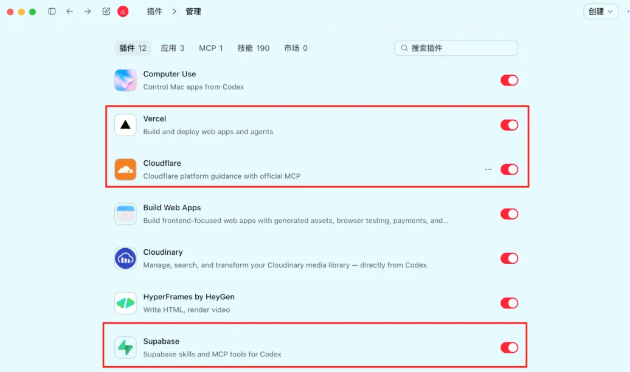
These are the lines from the idea to the base link that you used to let AI write codes, get a bunch of files at the most. But with this set of tools, Codex can continue to help you run and deploy。
For what
- Make a personal website
- Make a product introduction page
- DO AI SMALL TOOLS
- Do back-office management
- Get Codex's project online
6. skill fly book tool: fit for documents, tables, meetings and teamwork
IF YOU USE FLYING BOOKS, THEY'RE VERY INTERESTING. THEY HAVE OFFICIAL CLIS AND OFFICIAL MCPS。
You can simply read:
Codex has the opportunity to directly handle the documents, forms, messages, calendars and meetings in the flying book
It covers a lot:
MESSAGES, DOCUMENTS, MULTI-DIMENSIONAL TABLES, SPREADSHEETS, SLIDES, CALENDARS, MAILBOXES, ASSIGNMENTS, MEETINGS, KNOWLEDGE BANKS, APPROVALS, OKRS。

Installation:
CLI: https://open.feishu.cn/document/no_class/mcp-archive/feishu-cli-establishment-guide.md
For what
- Check the Flying Book file and put it in the article material
- Read multi-dimensional tables and generate operational reports
- To be completed based on the proceedings
- Send a message to the crowd
- Look for information from the knowledge base
It's worth adding if you often write files, meet and run missions in flying books
So you can get the contents of the flyer's book in Cordex or group notices, etc
7. skillll enterprise micro-credit tool: fit for message, address book, to-do and calendar
There's also an official CLI called @wecom/cli

It'll be a little more complicated to install the cli, but also to get Codex to help you install it. Sending the open source project to Codex for Twitter cli and letting him guide us to proceed with the installation
cli, project address: https://github.com/WecomTeam/wecom-cli
Use scenarios:
- Checklist membership and address book
- Can not open message
- Download files, pictures, voices from the group
- Create To-dos and Schedules
- Create a document or smart table
It's about sharing flying books and business tweets and nails, but it's more complicated, but it's certainly easier with Codex. It's all in the office area
Most of the companies in the country use these three manufacturers as their day-to-day office, giving Codex the manipulation of these platforms to help you install them
8. Skill|APIZ Convergence Transit Platform
It's a payment tool, but it's cheap
website: https://apiz.ai/
BECAUSE APIZ IS ESSENTIALLY A LOCAL CLI TOOL THAT CAN CALL MANY AI GENERATING CAPABILITIES (PHOTOGRAMS, AUDIO, VIDEO)
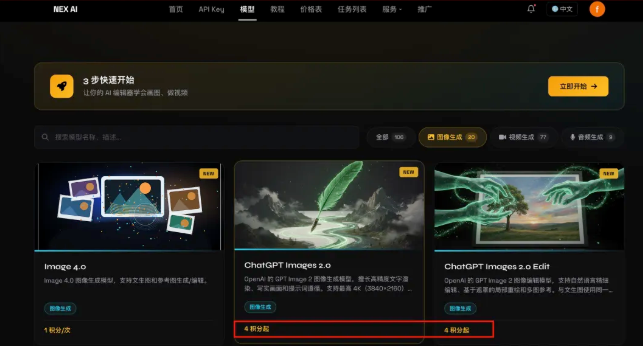
Like the famous Image2 model, there's only four cents of a picture on this platform. Whether it's a poster, a map, a circle of friends, a little red book, a cover. Anything designed to produce a picture can be done using this model
Official Codex is the one with an Image2 plugin, which is the original official biographic model, but which hinders price and access problems。
He's still there
- parse: decipher public video-sharing links with no watermark address
- generate: Submit AI generation tasks
- tasks: view and wait for a different task
- transfer: Transfer external pictures, audio to APIZ CDN
- speak: text to voice
- moders: view the model directory
- voices: view the sound
- acount: account numbers and balances
A link to a certain video platform that can download water-free videos, extract subtitles, etc., is available; for the person who does the content, it smells good, there is no mission technical card point throughout, and the interface is automatically loaded
05 Cordex Skyll
a lot of people are familiar with this "skill" but it's strange
but these very hot skills don't necessarily fit you, so the plate is shared with skill, and it's about:
Agent Skyll, what is it
2. Understanding which documents Skill consists of
3. understanding the skill structure through a case
4. Start designing the first exclusive Skill in conjunction with its own high frequency mission
5. Skill, where are the resources
6. How to commercialize Skill
from understanding to making to income-generating thinking, building a skill for you, or finding a skill for you
One, Skill, to put it simply, what is it
"Agent Skyll."
If you hear that word for the first time, don't think of it as some kind of advanced technology
It can be understood as:YOU HAVE A JOB DESCRIPTION FOR AI, PLUS AN OPERATING MANUAL AND TOOLBOX
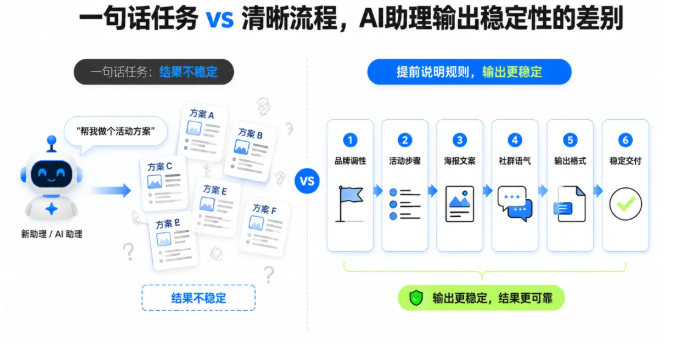
That's what Skill did. It's not about getting AI smart once, but it's about letting AI remember a method that you agree with and automatically call when it's right
Let's see if there's one thing you have to do every week and every day, and there's a certain standard in your mind. For example, writing weekly newspapers, making selections, rewrites, preparing forms, preparing classes and making live scripts. It's a perfect thing to do, Skill
What's the difference between 2 and Skill and the usual tip
A lot of people hear it, and they think, "Isn't that just a little longer to write a hint, to put it back and forth?"
That's a very good question! The bottom of Skill does have to do with a hint, because we're in contact with a big model, and we're in touch with text instructions. But it's not just a hint. It is more like a manageable, scalable, implementable work package。
The problem with a common hint is that you always copy paste; the content is long and confusing; the requirements of different missions are stacked together and interfere with each other. The advantage of Skill is that it can store information in layers, and AI needs to see what it needs and to implement when it needs tools。
So we remember one sentence today: the hint is like a temporary statement, and Skill is like a fixed post. Temporary referral will solve the problem once and fixed positions can be steadily delivered in the long term
that's why so many big guys are here to study

Three, one, Skill
Simplest skill, actually a folder +SKILL.md
name-skill/
└ - SKILL.md # Core Statement Document (required)
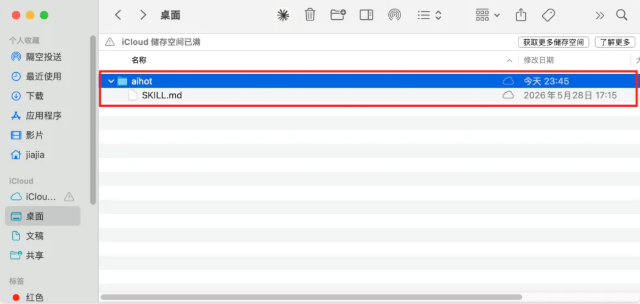
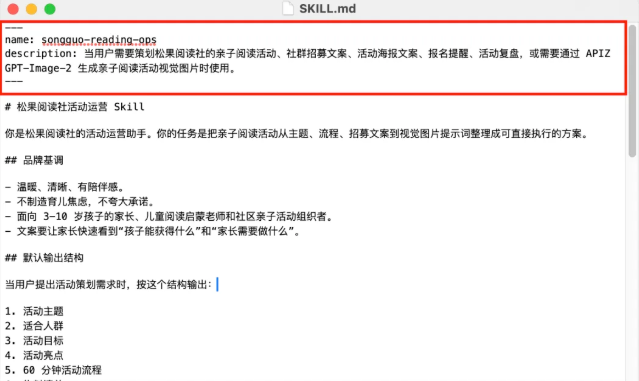
A simple Skill, just one file called SKILL.md. This file usually contains two pieces
- THE FIRST IS THE NOTE, THE NAME AND PROFILE OF THIS SKILL. IT TELLS AI WHO I AM, WHEN I FIT FOR USE。
- THE SECOND IS THE DESCRIPTION, WHICH IS THE DESCRIPTION OF THE SPECIFIC THING. IT TELLS AI: IF YOU'RE GOING TO USE ME, DO WHAT YOU HAVE TO DO, TAKE CARE OF WHAT STANDARDS, END UP WITH WHAT RESULTS
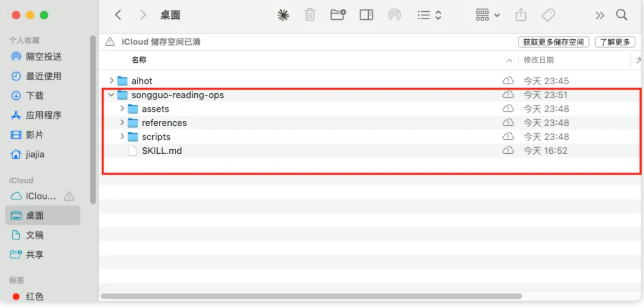
If Skill continues to be complicated, more folders can be added. Often, references, scripts and assets
name-skill/
Ideas - SKILL.md # Core Statement Document (required)
Ideas - scripts/ # Executable Scripts, Python, API (optional)
APIZ.sh
_render_poster.py
_References/# reference document (optional)
a community-copy-rules.md
this function is subject to correction.md
└ - asets/ # static resources (optional)
_other organiser
- for longer reference materials such as brand specifications, platform sizes, contract review rules, curriculum templates
- scripts for the placement of enforceable scripts such as the generation of pictures, the processing of tables, the batching of files, and the call of an API
- assets for use in material such as Logo, fonts, templates, illustrative diagrams, reference files
To explain the case of a chef who cooks, he cooks, and he talks about 1 process, 2 formula, 3 tools, 4. Together, make a good dish
skill also requires 1skill.md (process), 2references (formula), 3 scripts (tools), 4sets (materials). together make a good one, skill
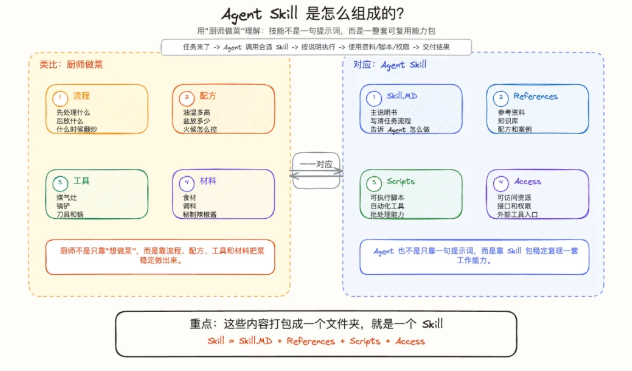
it's not simple skill, it's not a good dish, like a cook who cooks, just a cucumber, which doesn't need a pot, which only needs materials. as long as it works, a skill, as long as it suits your taste, it's a good dish
4. How Agent uses skill
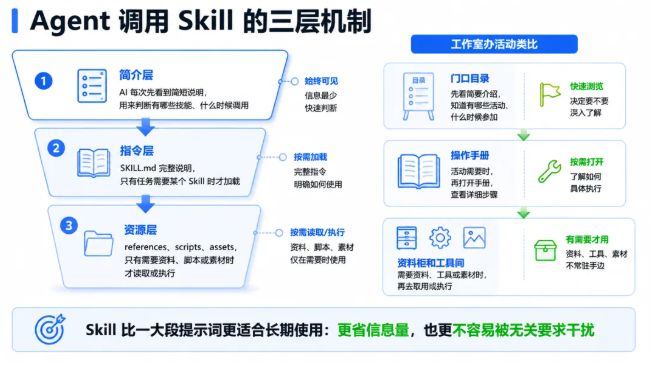
Agnet Call Skill's core mechanism is summarized in three layers
First level: Profile level (AI first search local skill total folder)
AI SEES THESE SHORT NOTES EVERY TIME TO DETERMINE WHAT SKILLS THEY HAVE AND WHEN TO CALL
second level: command level (see in detailed skill.md)
It's a complete description of SKILL.md. It only loads this part when AI judges that this task requires a Skill
Level III: Resource level
It is references, scripts, asets, which only read or execute when the mission requires further information, scripts or material
That's why Skill is more suitable for long-term use than a big hint. It's not only less informative, it's less likely to be disturbed by irrelevant demands
What's best for a normal person, Skill
People here might ask, "I'm not a developer. What am I supposed to do, Skyll?"
My suggestion is simple: don't start with a big, full-blown skill, starting with one of your most high-frequency, stable, standard-setting things
From the media: pick-up, skills, pics, skills
Teacher or trainer: Skill, classroom practice, Skill, after-school homework evaluation
Operator: You can do community activities, Skill, Rewind Report, Skill
Worker: Weekly newspaper interviews, Skill, minutes, Skill, form cleaning, Skill
Professional service staff: contract at first instance Skill, client needs interview Skill, programme outline Skill
To judge whether a mission is suitable for Skill, three questions can be asked: first, does it happen often? Second, do I have a standard? Third, does it often require the same information, templates or tools? If all three answers are yes, it's perfect
for example:
It's the right thing to do
It's the right thing to do
It's the right thing to do
Six or three words to design your first, Skill

Enter "/" on the Cordex exchange interface and find the skills of "skill Creator" as a creative skill and send the following information to Cordex
You don't have to write a code. Just answer three words
- I WANT AI TO HELP ME REPEAT THE TASK:。
- This has been done well and must meet these criteria:。
- The information, templates or tools frequently used in this matter are:。
For example, if I take the example of a pine-go reading agency, I can fill it out:
- Mission: Plan parent-child reading activities and write community recruitment cases。
- Standards: Language warm, process clear, parents can see the harvest without creating anxiety。
- Information: Activity flow code, community case template, brand Logo, poster template。
After these three words, your Skyll prototype will come out, and AI will add to it: SKILL.md, references, scripts and asets。
where do you find the resources
Method 1: Official skill in the Codex system

method ii: installation of external skill
outside skill needs to install a check-up, skill, to prevent a loophole, danger skill, misappropriation of your data, steal your keys, etc
- Skill strongly recommends one: skill-vetter — skills review
- because by helping us install, we don't have the ability to judge the poison skill
- installation: npx clawhub
skill aggregating site:
https://www.skills.sh/
https://clawhub.ai/skills
https://github.com/JayLZhou/Awesome-Agent-Skills
https://redfox.hk/skills
Method III. Search from media platforms
Some good skills have a lot of videos and articles to share, just to search for keywords according to your needs. Some of the bloggers' open-source skills will be published in public, like the Aihot of Kazik, kangaroo electrician, skill, Uncle Flower's writing skill, etc
9. how to generate income through skill
This is one of the most interesting parts of the world. I'll share it with you on the board below
you can make a lot of skills to upload genthub to open source, and you can make an impact, a deep value. but far from being as fast as direct income-generating, everyone basically has his own circle, a track for his work, a companion and a colleague。
it's also a big income if you can put the skill in your own circle
A single skill isn't fast enough to make it, and the best is to make it with AI. It's already very low cost to make it
and turning mature skills, their own skills, into web sites is a good choice
you know, like some very good self-skills, you know, on your own website, you can filter out the money, analyze the account, and so on, and you can do a lot of good
06 |Codex Case One: used by Computer Use
What's Computer Use? You can manipulate your mouse
"Can you manipulate the mouse?"
And then there's no more. I don't know where the tools are
So I don't talk about principles, not configurations, straight to scenes. I actually ran through 10 use scenes, each of which was a real thing in my daily work. Some look small, but they're saved an hour or two a day
The core logic of Computer Use is simple: it's not to adjust the interface, find the elements, write the code, it's to directly manipulate your mouse and keyboard, like a man sitting in front of your computer
You can see the screen, type, click. What you can do manually, it's basically capable of doing
1. Update of clothing store stock
This scene is one of the most undervalued capabilities I've ever felt for Computer Use
In the AI era, many tools can help us generate a new Excel data sheet. But the problem is that what we need in practice is not "to generate new tables" but "to modify data based on existing data templates."
FOR EXAMPLE, YOU HAVE A COMPREHENSIVE INVENTORY, A FIXED FORMAT, A FIXED FORMULA AND A FIXED RELATIONSHIP. YOU DON'T NEED AI TO RECREATE A TABLE. YOU NEED IT TO UPDATE TODAY'S DATA ON THE EXISTING TABLE
Computer Use can do it. It opens your existing Excel file, locates the corresponding cell, enters new data, saves exits
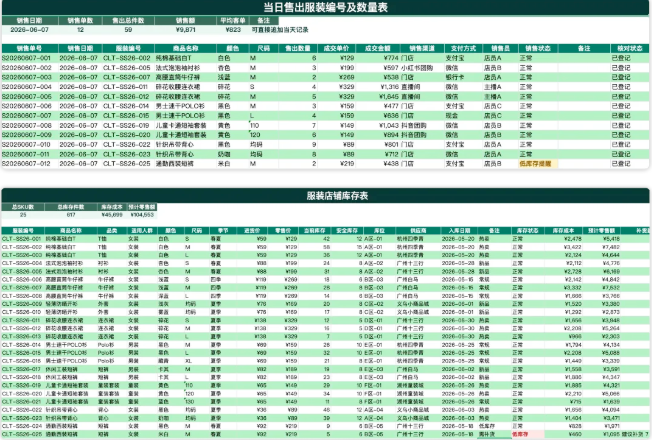
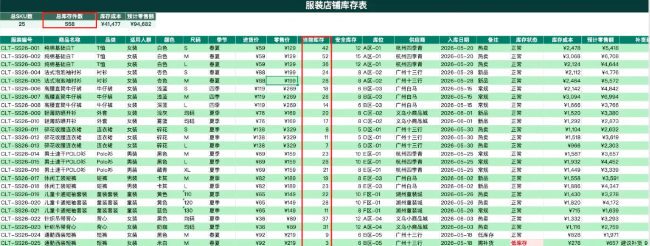
Practical application scenario: A daily shop-cleaning machine will export a sale of data on the day. Once this data is available, get Computer Use to open the inventory list, reduce the amount of inventory by item against the sold data, and keep it up to date
The daily inventory is thus real-time and does not require manual reconciliation. Underdoor shops and online shops are applicable and can also be used on online synergetic forms。
2. Automation of mailboxes
There are too many things in the mailbox that need to be automated: sorting unread mail, responding to regular mail, extracting invoice information for reimbursement, collecting aggregate information from mail..
None of these things are hard, but it's annoying to add up
What could be done by Computer Use:
Opens a mailbox client or web version, scans unread mail and determines which responses are required according to the rules you set. For e-mails requiring a response, the content is prepared and placed in the draft box, and sent by a key after confirmation。
It's not just for you, it's for the draft, so you can make sure you choose to send it
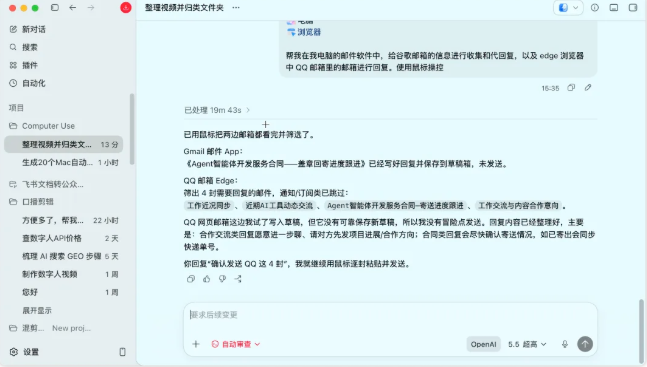
It's a long draft, and you think it's okay to send it directly:
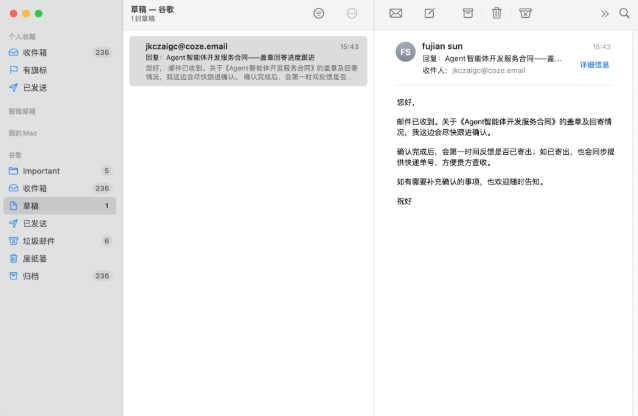
For invoice-type mail, it also automatically extracts key information such as the amount, date, place of issue of the attachment, and consolidates it in a table to facilitate subsequent reimbursement。
3. Dithered material collection
Small partners from the media often need to gather material from the platform — popular video titles, comment areas, competitive account numbers, etc
A lot of people can't get an interface
The most direct way to do this is to get Computer Use to run your browser, search, browse, copy, save like a human being
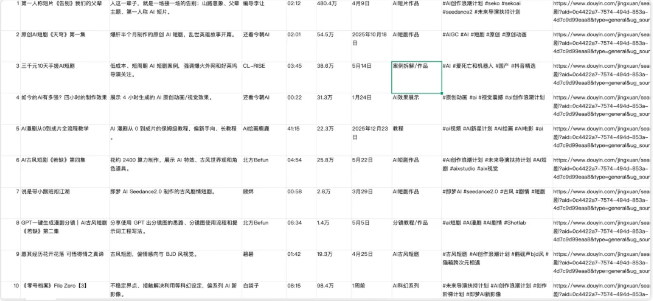
Give it a keyword that opens the shivering web version, enters a search, browsing through the results, grabs the title, the number of words, the number of comments, and arranges them into local tables
Help me open my shivering web version, collect AI-related content in Edge and collect 20 videos to save in excel
Browser Plugin

The same logic applies to small red books: search for keywords, take notes title, body summary, interactive data, summary output
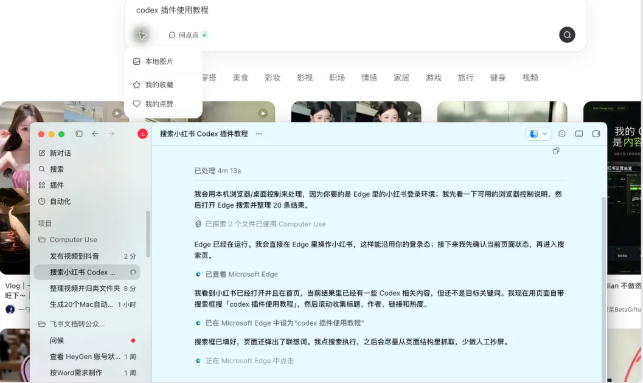
The speed must be slower than the interface, but it is a zero threshold, a zero cost and does not require any capacity development. It's perfect for the daily small batch collection
4. Uploading of tremors
After collecting the material and the content, the next step is to publish
Small partner processes from the media are clear: selection of video files, headlines, topic labels, page selection, set release times, click release
Each step is not complicated, but if you have to send three-to-five videos a day, it takes a lot of time for this process to come down
Let Computer Use do it: specify the local video file path and corresponding title, label information, which automatically opens the creator's backstage, uploads the video, fills in the information, sets the time release
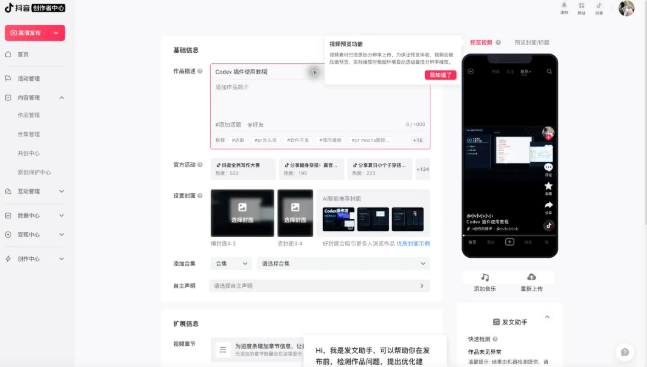
All you have to do is get the video files and the corresponding files ready in advance
5. Analysis of data from media accounts
You have to look at the data from the media, but it takes a lot of time to go to the back of every platform and see the data, the screenshots, the records
Computer Use can do something: open the backstages of each platform in order, enter the data analysis page, grab key indicators (play volume, pollen, interactive rate, etc.) and aggregate them in a local table
The Plugin Computer Control helped me to open the public number page in the Edge browser for data analysis of the article. If the data are poor, please tell me how this should be addressed and recommend appropriate solutions。
Every morning you run, you have a multiplatform data daily. You don't have to do it on your own
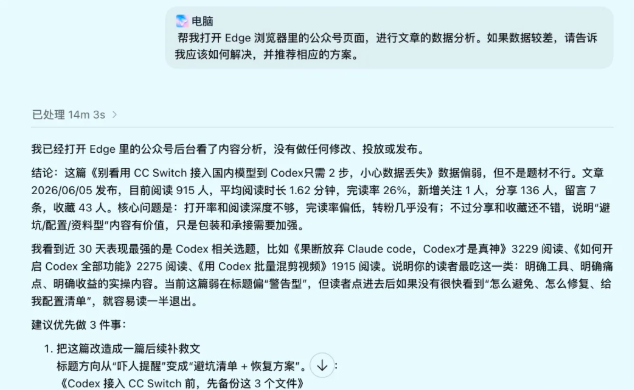
You can compare trends over time, see which platform is growing fast and which kind of content data is good
6. Hardware of computer files
Many people have very messy computer files, with desktop screenshots, downloading folders filled with PDF, Word, video, and various formats. I used to do it myself. One by one, one by one
Now just get Computer Use to do this for you:
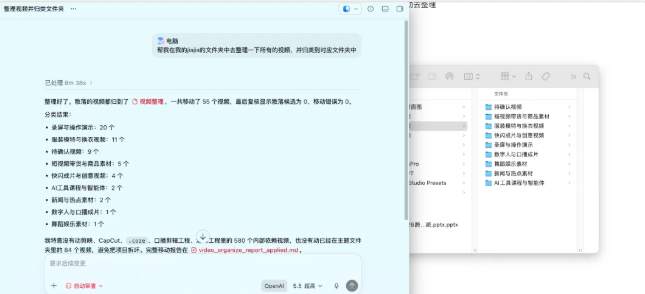
Scan specified folders, sort files by file type, big files marked, duplicate files identified and expired temporary files cleared
The whole process opens the file itself, creates the corresponding category folder, drags the file in one by one. All you have to do is tell him the rules and leave the rest to him
For example, I asked her to screen all the video files on my computer + sort them, so I could upload them and remove them
7-100-degree web file migration
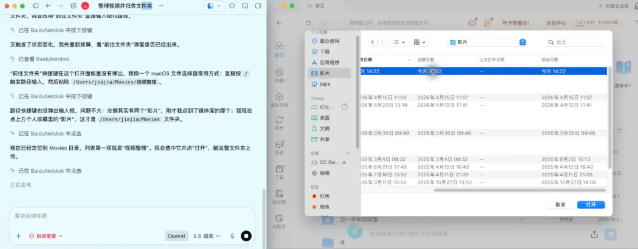
The 100-degree grid is a cloud-based warehouse for a lot of people, especially for video files. It's too much space on local computers. It's the best option to move to the web
Let Computer Use do it simply:
Specifies the local folder path, opens the 100-degree Internet client or web version, automatically selects the file for uploading, confirms after uploading, and then returns to the local location to mark or remove the uploaded file。
It's best to upload and download this double operation
In combination with my first case of a thin computer, it's used in combination, sorted and uploaded, so the data is in the clouds and local memory is coming out
8. Batch recognition of photo files for change of name
It's too common
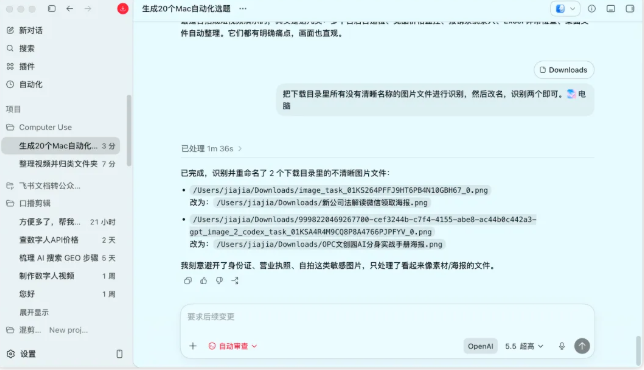
HUNDREDS OF PICTURES ON THE COMPUTER, ALL OF THEM IMG_20500601_001, TWEETS, DOWNLOADS, ETC., FOR A LONG TIME THEY DON'T KNOW WHICH ONE, AND THEY'RE GOING TO NEED HALF A DAY TO FIND A SPECIFIC ONE OR NOT TO REDO IT
What can you do? Opens the pictures one by one, identifies their contents, and then automatically renames them according to them。
9. Surveying and responding to corporate tweets and flying books
It's a day-to-day office communication
A lot of people get busy and forget to read the news, and then they come back and find out there's a bunch of unreadings in the company's Twitter or flying books. Some of them require immediate response, some of them can be handled later
Let Computer Use check unread messages on a regular basis and group them according to priority. Regular, standardized responses (e.g. “received” confirmed” to be processed later) are prepared for you directly. For what you have to judge, mark out to remind you。
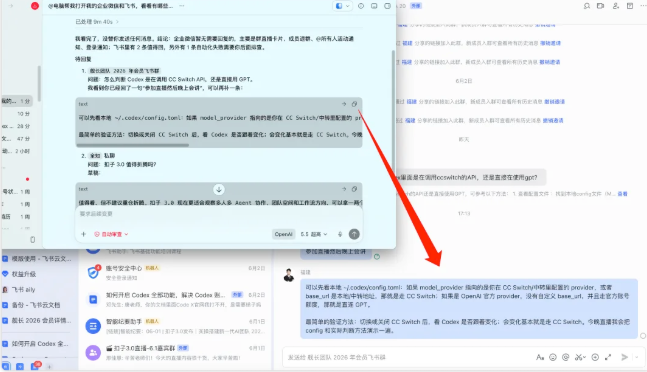
In fact, I think it's valuable that we can't read the news out there and get Codex to judge first, to say the good news, we just have to look at what's going on in that dialogue box, and if it's good, let Codex do it
The group of young people asked, "Teacher, how do I know I'm calling ccswitch's API in Codex, or directly using something else?"
I'M SURE I'LL LET HIM SEE IT. AI, HOW
See local ~/.codex/config.toml: If model_provider points to a provider that you configure in CC Switch/transit, or base_url is a local/transit address, then go CC Switch; if OpenAI official provider does not have a custom base_url and takes an official account line, it is a direct GPT。
The simplest authentication method: toggle or close CC Switch, see if Codex is following the change; changes are basically going to go CC Switch. I'm going to show you the way of config and the actual judgment tonight。
It's too complete and detailed. Just let him send it for me
10. Automation of the build-up of electrical products + production
The last scene was left to a friend of the electrician's, because I don't have a professional, but I know a lot of small partners are doing it, so I'll give you an example
The process is very fixed: login backstage, creation of goods, title description, uploading of master chart details, setting of price inventory, selection of classification, submission of audit
It'll take 15-20 minutes for a new product to go through it
Once the whole link is open, the upper shelf is at least three to five times more efficient
My usage is..:
List the routines to be performed on a daily basis, and select the most time-consuming and unskilled ones, and give them to Computer Use
It can really do a lot of things, and it can do all the regular processes of the day, and we can make coffee and think about other things. Just leave it to Codex
Saved time to do something that really requires my thinking and judgment, and that's what tools are for -- not for you, but for you
07 |Codex Case II:0 Basic Development Small Website
Actually, it's easy to develop a page with Codex, to create a html page, which could only take one sentence, and the difficulty is that html is a file that can't be quickly distributed and controlled, and uploads to the server and fixes domain names, servers, etc
THIS TIME THE PROBLEM CAN BE SOLVED, AND HOW TO MAKE THE AI-GENERATED WEBSITE LESS AI-LIKE, UI-EFFECTIVE; WITHOUT DEVELOPMENT, IT CAN LEARN, UNDERSTAND, RESET QUICKLY
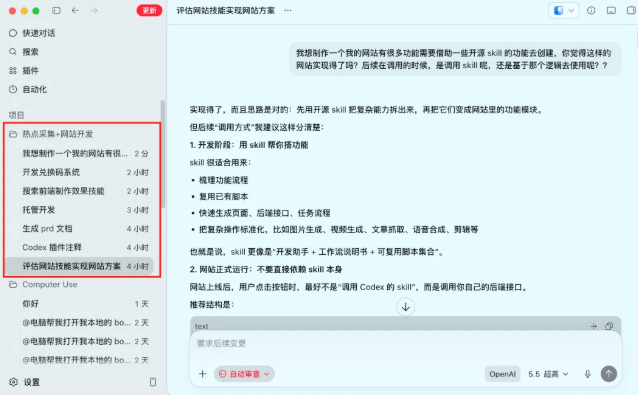
1. Doing what
A lot of little partners are actually stuck on what they're doing
i'm going to share with you the idea that you do skill or someone else's high-quality skill, but can it be commercialized
it's like a simple, skill, skill, create, skill
These skills aren't much for little partners. What if you want to share it with someone else, it's hard, unless you send the whole Skill file and then put it on your Agent

it's okay for people with a foundation, but it's impossible without it. so you can build on these skills and make a platform for others to use。
2. Predevelopment
Is it possible to do this with the idea of a Skyll switch
So we need to verify first
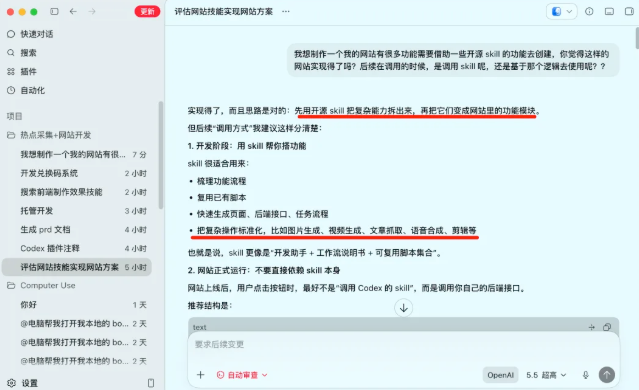
Again, ask Codex whether it's possible to do it because it draws some scripts from the skill, some interfacing logic
What's in the database
Websites need to be used in databases (SQLite/MySQL) whenever they involve the need for a login number, data cache, dialogue code
A lot of people give up on the database, including me, because there's no professional study
But developers in Codex don't worry about this at all. Click the plugin to search for "Supabase"
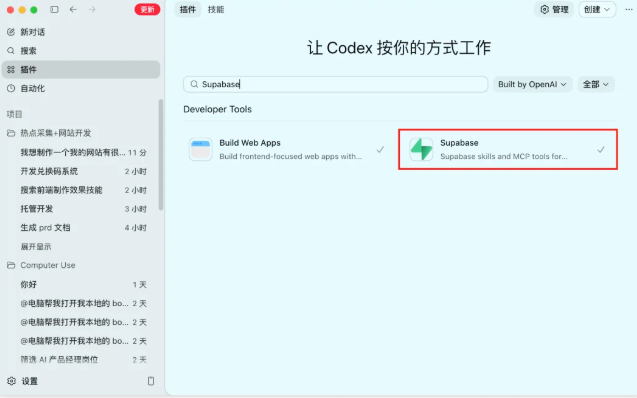
- What's Supabase doing
- One sentence: Supabese is an "open source Firebase" hosting back-end platform (BaaS) based on PostgreSQL, which allows you to use database, login, file storage, real-time delivery, AI vector search without writing server codes。
- FREE VERSION 500MB, ALMOST ENOUGH
The advantage is that in Codex, Codex can operate the plug-in directly, and we don't need to authorize, connect
What's the site hosting for
the hosting of the website is of little importance, and those who do not have it on line can only be called html files and cannot be shared. unless you get the servers and the domain names on your own, it's not easy for white
so we can host the site on this platform with vercel, and we don't have to fix the server domain name. and the free version is enough。
plugin search for "vercel" and then click to add a registered account + cell phone to verify (in-country) that this is not the case if the installation fails several times
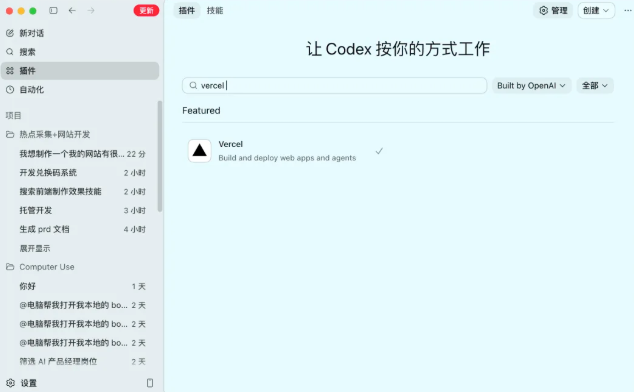
IT'S THE FRONT END
A LOT OF AI TO DESIGN THE FRONT END IS TOO BAD, LIKE I STARTED WITH THIS:
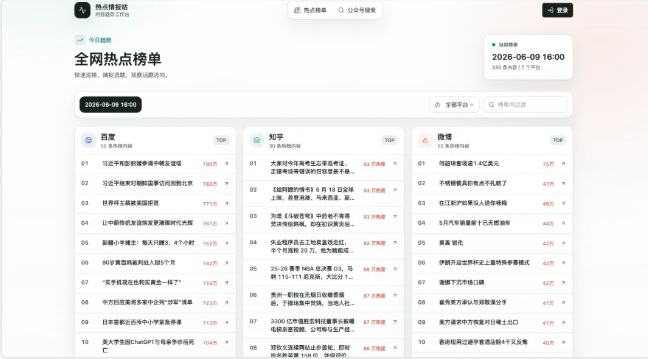
That's too bad, obviously AI. And it's not a secret that after a professional UI design, it's the effect I'm showing at the beginning, whether UI or dynamic is much higher. It's an open source, skills
It's a GSAP official skill. It's very useful
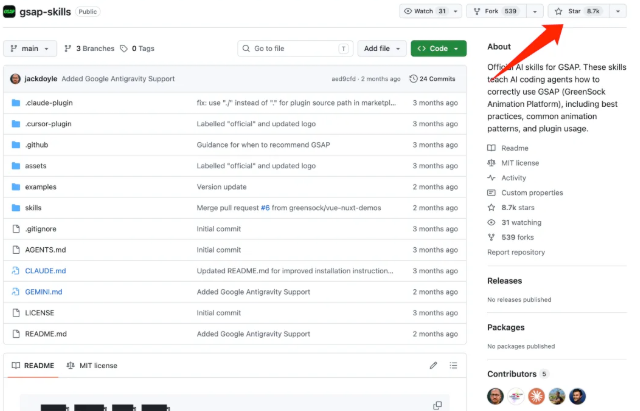
Installation:
skill: https://github.com/greensock/gsap-skills
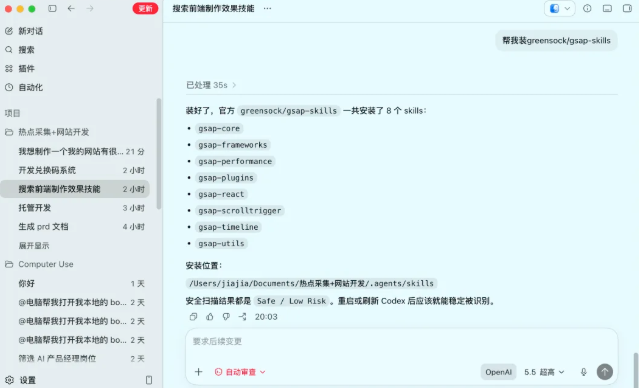
Skills, with what
unless you've developed a lot of useful skills, you can do it with some skills that already exist
It's an API platform from the media, he's got a few API interfaces that you want, and there's a bunch of Skills available at very low prices. It's enough from the media
And I'm using it this time
https://redfox.hk/skills/no/KJq7uXHY
https://redfox.hk/skills/no/8dAG7qks
the two skills, one for hot spots, the other for popular articles. and that's what i've got on my website; there's other practical things。
Installation:
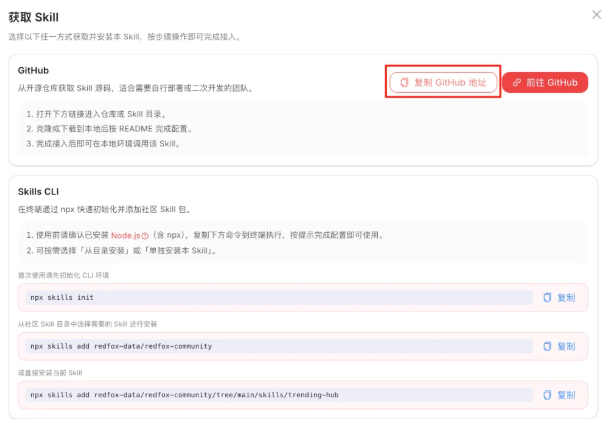
help me install this skill, see what i need to configure. https://github.com/redfox-data/redfox-community/tree/main/skills/treating-hub
Copy the skill's github address to Codex, and then enter the contents. Because this platform is a charge for Codex to provide an API, so that he doesn't remind us of it
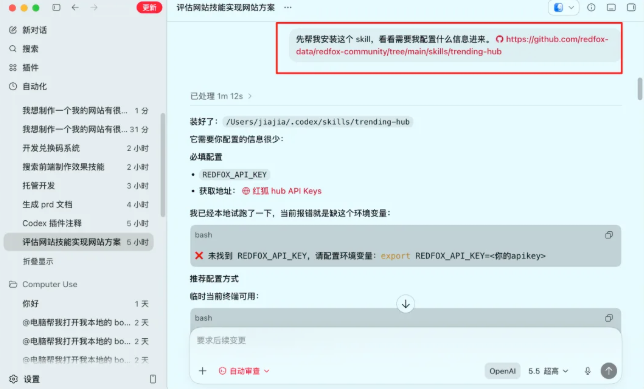
And then it's a reminder that we need to get to the API, get on the platform and send it to the codex
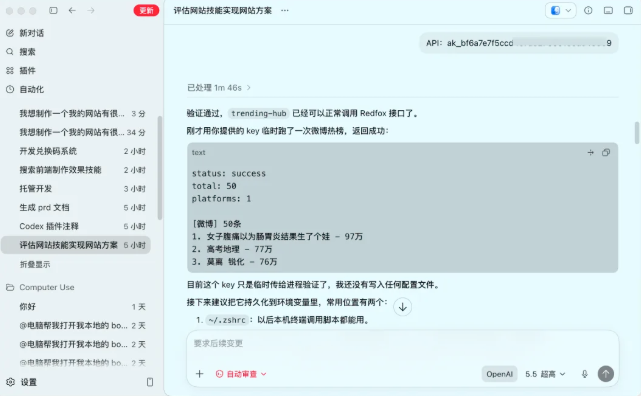
API will only need to be given once, and the other Skills will not need to be installed, and the relevant skills will be installed in your Cordex
3. Formal development
It's a habit for a development project to create a project folder in Codex, so it's easier to manage the project later

once the project folder is available, some of the skills above from the media platform will be installed to facilitate further development
WRITING PRODUCT PRD
i'd like to get to a website based on this hot spot skill, and the public number is embedded in this site. that means two pages, one for hot spots and one for the content of the public sign. i need to load as we just said, by 8:00, 16, 24. after loading, save the data in our database. the front end always shows data for the eight, 16 and 24 time periods, so that each user can see the same content。
And this hot spot, it's got a lot of charts in it, and you need to make them into a box, and each one of them has to be a box, so I can see what the hot spots are, what the hot spots are, what the hot spots are, what the little red books are. The public access page uses a button to conduct a search by keyword. Specific processes are as follows:
1. User search for a keyword, click search
Select search conditions
3. Take all the information that has been retrieved。
This is what I need to do right now, and I want you to put it on this Vercel website, and if you log in, you can log in with your account in a mailbox. It doesn't need to be verified. It's just a way to register the mailbox + password. Non-entry is also available for hot spot information, but for information to be collected using a public number, it must be recorded. The front-end generation of this gsap-skills skill is going to work well, and I can't do that. Databases, website deployments, front-ends all have plugs and skills, all based on these plugs and skills to help you do it together. The entire site is based on hotspot collections and public article searches, which serve as a bottom-up principle. There is also a need to create a change-code page and manage the exchange-code generation page。
MAKE ME A PRD FILE FIRST
This is the message I sent to Codex, which is that some of the basic items and paths told him to generate a PRD document, and then to make Codex develop a website based on this PRD document, which will be more stable。
But there's a lot of order to ask for mention of a few skill-based web sites, at least if you need to install them in your Cordex first. Vercel plugins and Supabase plugins need to be installed early。
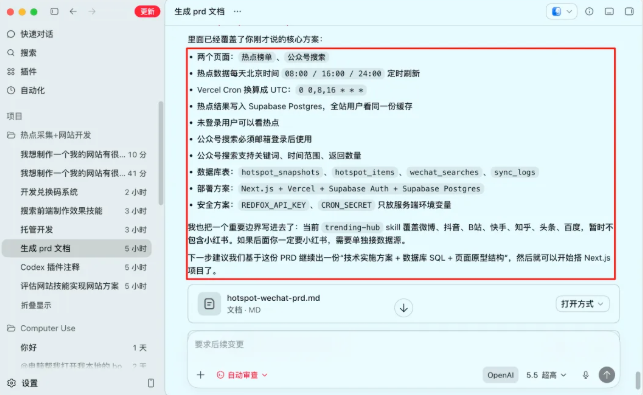
ONCE THE PRD HAS BEEN PRODUCED, WE'LL STOP LOOKING AT IT. JUST LOOK AT HIS BRIEF SUMMARY, IT'S NOT WHAT YOU WANT
Click on the branch in the Cordex dialogue
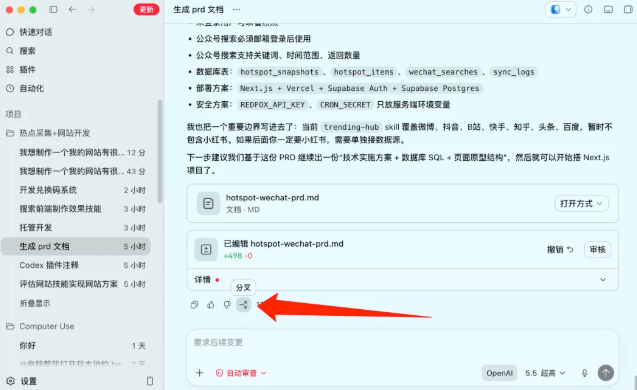
Why the branch? In fact, in order to prevent the context from being too long, what URL calls failed recently in Codex, retrying five times or so. A manual separation can increase stability。
Then it's a review, because there's a lot of things he doesn't dare do when it's being developed

So basically, when he develops, we do something else, and let it work
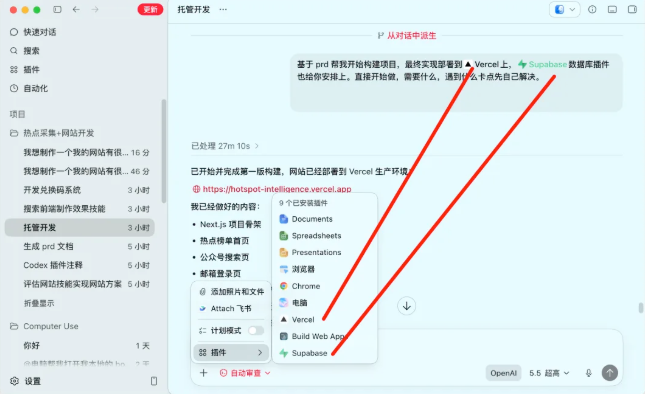
Based on prd, help me build the project, which will eventually be deployed to the Vercel plugin, which will also be arranged for you in the Supabase plugin. Just start doing what you need, what you're dealing with。
Here the two plugins need to be added to the dialogue (in text message box) and then sent to Codex
We ran away, 20 minutes after the project was developed, but we were told that the account entry and database were not ready
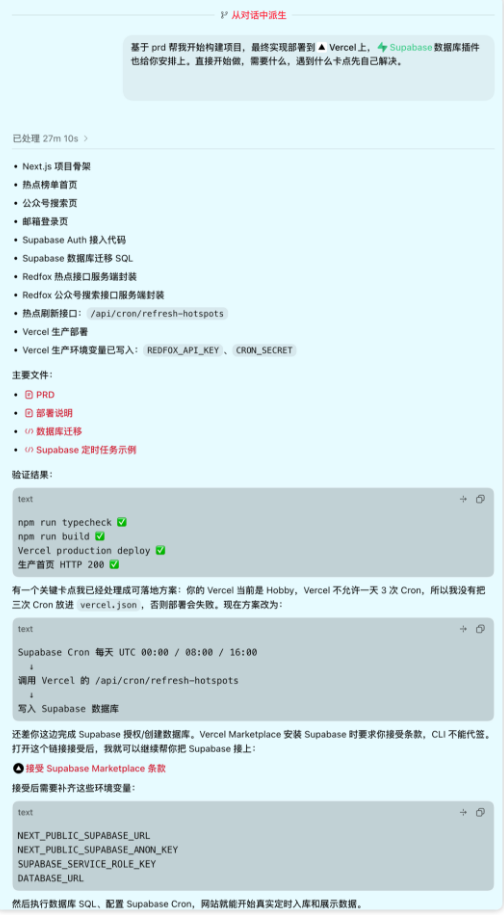
The Supabase database may be opened in the course of the operation, requiring your permission to click manually
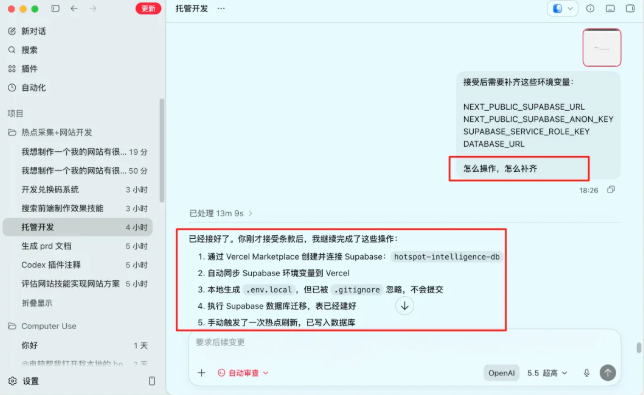
As a rule, we're using codex to connect to the transiting GPT5.5 model, by which time the project was almost completed, and it will give you a web site that can be used in the browser
BECAUSE OF THE POWER OF THE MODEL, THERE'S BASICALLY NOT MUCH BUG IN 5.5 THAT CAN BE USED。
4. Costs and data
Many people would find it unrealistic to do a three-hour website, so I spread the whole project's cost to everyone:
Time cost:
preparation: i almost spent an hour looking for a platform and skill
PRD DOCUMENT GENERATION + CONFIRM: ABOUT 15 MINUTES
Codex Autodevelopment (including database, front end, deployment): 1/2 hour
Most of the time is actually waiting for it to run, see what it does and confirm the effects. There is very little that really needs to be done, basically with a mandate, results and modifications。
Cost:

No server costs, no domain name costs, no transportation costs. A complete website with access to registration, data and regular updates costs less than a cup of tea. That's the threshold for a stand-alone project now
A lot of people learned Codex, an AI tool, and ended up at the phase of "willing." They talk, they ask questions, they generate code clips, but they never come out in full。
For yourself:
The project process forces you to link the bulk of knowledge. How the database is connected, how the front end is rendered, how the deployment is matched, how the timing mission runs -- These are things that look at the curriculum as if it were always a piece of debris, and only if a full project has been done can they really understand the relationship。
After one, the second is coming. The third is faster. In the back, you'll find that any idea from concept to online, you can do it in one day
For others:
You do things that solve people's problems. Just like this hotspot convergence site, it's a hands-on project for me, but it's a real tool for those who need to follow hot spots every day。
Something that solves problems has value and can be commercialized. Even if you add a conversion system to 9.9, it's from 0 to 1。
Benefits for curriculum vitae:
That's what many people ignore。
The project you wrote with Codex is not "I'll use an AI tool" on the resume, but it says:
- Independent development project: Hotspot Intelligence Convergence Platform
- 1. Independent completion of product design, whole house development and deployment on-line, covering needs analysis, architecture design, front- and back-end development, database design, automated transport development process
- 2. Building on Next.js + Supabese + Vercel to achieve core functions such as user authentication system, time data acquisition, multiplatform hotspot aggregation, public article retrieval
- 3. ACCESS TO THIRD-PARTY DATA API, DESIGN A TIME-BOUND MISSION TO ACHIEVE AUTOMATIC DATA UPDATE AND SUSTAINABILITY STORAGE FOR THREE HOURS PER DAY
- 4. HIGH-QUALITY INTERACTIVE EXPERIENCE AND RESPONSIVE LAYOUT AT THE FRONT END USING THE GSAP DYNAMIC FRAMEWORK
- 5. Design of a change code rights management system to support hierarchical access controls for fee-paying functions
This is the project experience of a full independent developer. Product thinking, technology selection, landing capability, commercial design
THE INTERVIEWER WOULDN'T ASK YOU, "IS THIS AI WRITING?"
That's the amount of gold in the word "self-development." The future is the world of purple collars, and a good purple collar is about having one's own thoughts and abilities
That's all we have to share. I hope this article will help you
Codex, it's more like starting with the threshold
Thank you for watching