




Codex This kind of thing, the instinct tells you it's supposed to be for programmers. But the first group to play it was the product manager, the operator, the media owner, the university student, the self-employed owner -- few of them could write code。
Because the programmer used it, from 80 to 95. You don't write code, from 0 to 60. That crossover, it's completely different。
huang in-hoon is even more blunt: it's not normal for an engineer who earns half a million knives a year and can't use 250,000 token a year. token is not a cost, it's a means of production. used to burn coal in factories, today's knowledge is calculating. you don't have to, people use it。
Don't just turn AI into a chat robot anymore. ChatGPT with you, Codex works for you. Two things。
I used the codex, a month's income of 10 W+, today to use all the open sources. Dismantling the pages from registration, installation to each mode of use, with all the screenshots. We don't need a programming base. Let's go over it and let AI start working for you。
I. Codex, what is it
Codex is the AI program Agent launched by OpenAI. It's not like regular ChatGPT conversations, Codex can create files, modify codes, run commands, install dependencies, deploy websites directly on your computer。
You say demand, it's done, you check the results。
With Codex can do these things。
- Develop a website: help me use Next.js as a personal blog
- fix bug: why is this login interface 500
- Script: Write a Python script. Automatically grab a microblogging every day
- Deployment online: deployment of the project to Vercel
- Reconstruct Code: Change this code from JavaScript to TypeScript
- WRITING DOCUMENT: WRITE README AND API DOCUMENTS FOR THIS ITEM
- DATA PROCESSING: PURGE THE DATA FROM THIS CSV AND OUTPUT THE STATISTICAL CHART
- Develop a applet: help me start a micro-intelligence applet project
- Codex doesn't equal ChatGPT. ChatGPT can only advise you that Codex can change your project file, run terminal commands。
Registration and subscription
Codex doesn't charge a single charge, contained in the ChatGPT package. You need to have a ChatGPT payment account。
Registering Google Account
opens https://accounts.google.com/signup to fill in the information by hint。
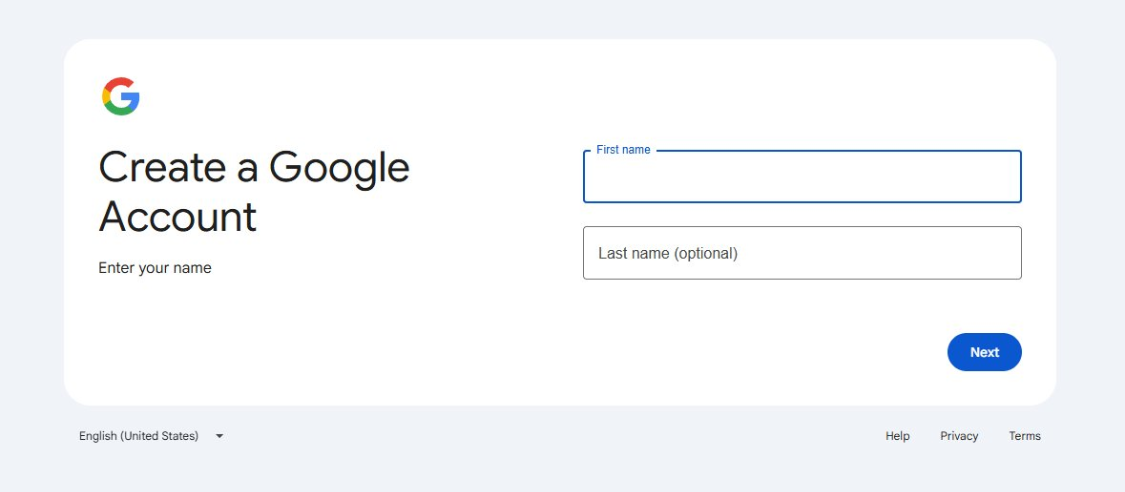
The registration requires a cell phone number, and the domestic cell number +86 is normally received at the beginning. After registration, you have a Gmail mailbox。
- If there's already a Google account, skip this step。
2. Register OpenAI account

Opens https://chatgpt.com/ to register OpenAI accounts with the Gmail mailbox just registered. Domestic phone numbers can also be used to verify。
- Attention, OpenAI has limitations on part IP. If a hint is not available at the time of registration, try again in another web environment。
3. Package selection
- Package: Plus; monthly fee: 1 TP4T20/month; Codex permission: available, available; suitable for whom: personal studies, light development, recommended first
- Package: Pro; monthly fee: 1 TP4T100-200/month; Codex permission: available, high level; suitable for whom: heavy daily use, professional developer
- Package: Team; monthly fee: 1 TP4T25/person/month; Codex permission: available; fit for whom: small team collaboration
- Package: Business; Monthly Fees: Contact sales; Codex Permissions: Available; Who Fits: Enterprise
- Packages: Enterprise; Monthly Fees: Contact Sales; Codex Permissions: Available; Who Fits: Large Enterprises
4. Subscription method: recommend Andre Google Play
ChatGPT Plus's most stable subscription is paid through Google Play on Andre's phone. The complete process follows。
–
First step, get an Andre
Without an Android cell phone, an Android simulator, such as a Mumu simulator or lightning simulator, could be installed on the computer。
Step two, log in the Google account on the phone
Opens the cell phone settings, finds the "account" or "account" and adds the Google account, login with the Gmail registered in 2.1。
Step 3, add payment to Google Play
Opens the Google Play shop on the phone, clicks on the top right corner, enters "payments and subscriptions", "payment methods" and adds a credit card or debit card。
Most of the Visa or MasterCard credit cards issued by domestic banks are available. If there is no foreign currency credit card, the Google Play gift card can be purchased to charge。
Step four, install ChatGPT App
Searching for "ChatGPT" at Google Play and downloading it. Note that OpenAI's official ChatGPT icon is a green bottom white line。
Step 5, Login and Subscription
Opens the ChatGPT App, login with the OpenAI account number registered in 2.2. Click "Upgrade plan" at the bottom left after login, choose the Plus package, and choose Google Play by paying。
Prices are shown as $19.99/month, and Google Play automatically deducts the current monthly rate。
III. Four ways to use Codex
Codex provides four portals for different uses。
- Mode: Web Pageend; What: Browser Starts Chatgpt.com/codex; Fits to Who: New Starter, Do Not Want Anything
- 方式:桌面 App;是什么:下载安装 ChatGPT 桌面应用;适合谁:需要读写本地文件、日常主力使用
- 方式:CLI 命令行;是什么:终端里运行 codex 命令;适合谁:习惯命令行的开发者、在服务器上使用
- 方式:IDE 插件;是什么:在 VS Code、Cursor 或 Windsurf 里装扩展;适合谁:已经在用这些编辑器的人
四种方式共用一个账号、共享额度,选一个最顺手的就行,不用全装。
四、安装分步Teaching
1.Web 网页端,零安装
直接用浏览器打开 https://chatgpt.com/codex
登录你的 ChatGPT 账号,即可在网页里使用 Codex。
- 优点是不用装,任何电脑打开就能用。缺点是不能直接访问你电脑上的本地文件夹,需要手动上传文件。
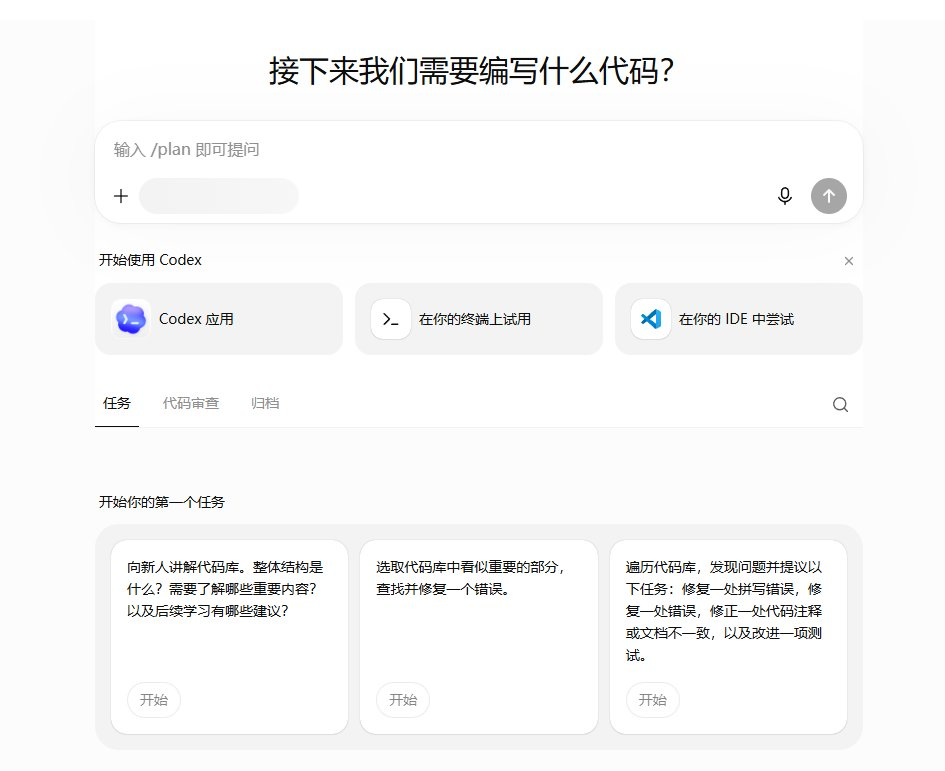
2.桌面 App,推荐大多数同学用这个
macOS 安装
- 打开 App Store,搜索「ChatGPT」
- 点击获取 / 安装 ChatGPT
- 打开后登录你的 ChatGPT 账号
- 在 App 内选择 Codex 模式
- macOS 用户注意,App 需要 macOS 14 Sonoma 及以上版本。
Windows 安装
- 打开 https://chatgpt.com/download
- 下载 Windows 版安装包
- 双击安装,一路下一步
- 打开后登录 ChatGPT 账号
- Windows 用户注意,需要 Windows 10 及以上。
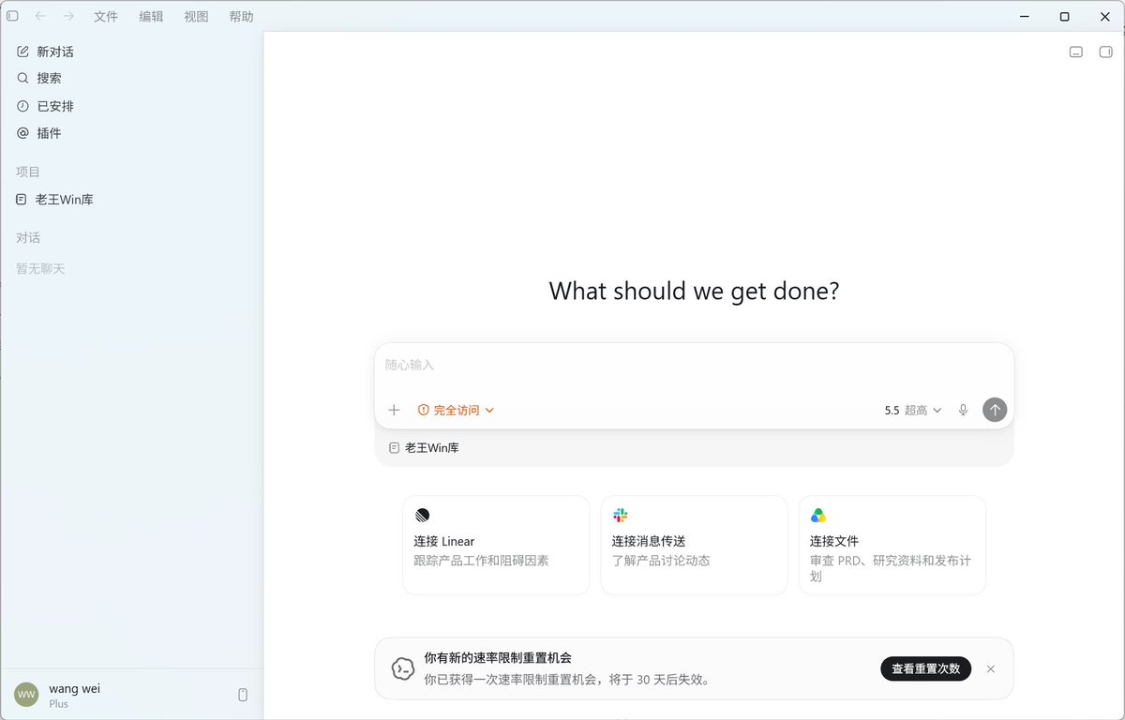
打开 App,登录,如果看到 Codex 入口,就说明安装成功。
3.CLI 命令行,在终端里用
macOS 和 Linux 安装
打开终端,复制粘贴这行命令。
- curl -fsSL https://chatgpt.com/codex/install.sh | sh
也可以用包管理器安装。
- # npm,需要先装好 Node.js
npm install -g @openai/codex# Homebrew,仅 macOS
brew install codex
Windows 安装
打开 PowerShell,复制粘贴这行命令。
- npm install -g @openai/codex
在终端输入。
- codex
如果出现登录界面,说明安装成功。
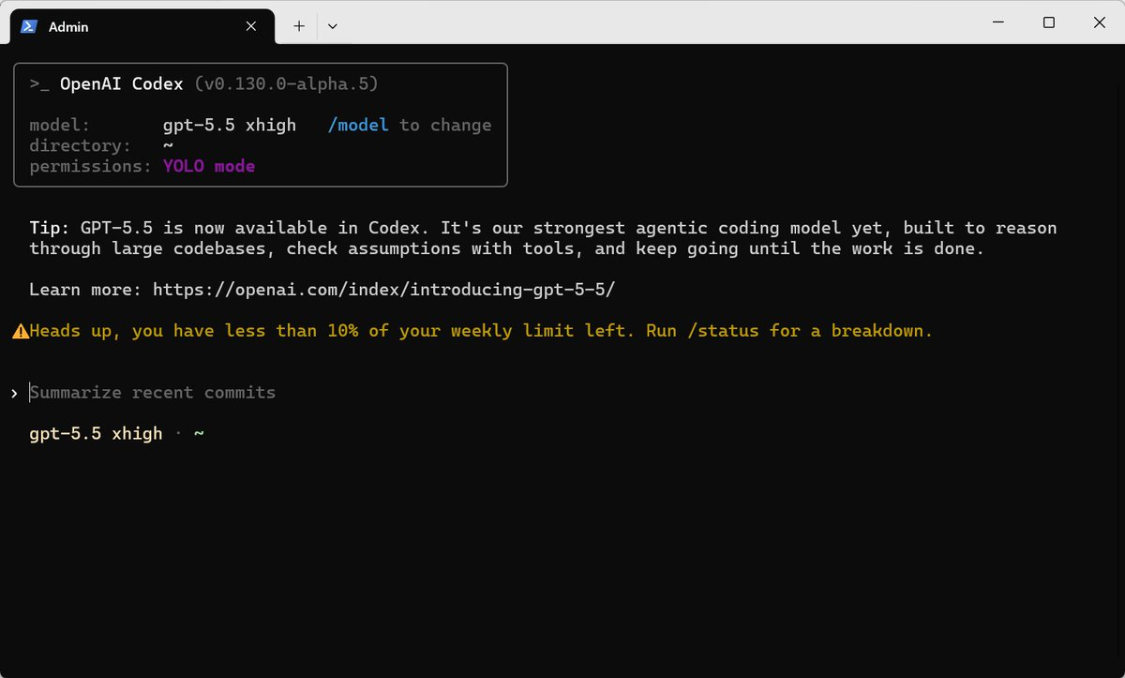
第一次运行会提示你登录,选择 Sign in with ChatGPT,浏览器会自动打开,确认授权,就完成了。
- CLI 除了登录 ChatGPT 账号,也可以配 API Key 使用。但新手直接用 ChatGPT 账号登录就行,不用折腾 API。
4.IDE 插件,在编辑器里用
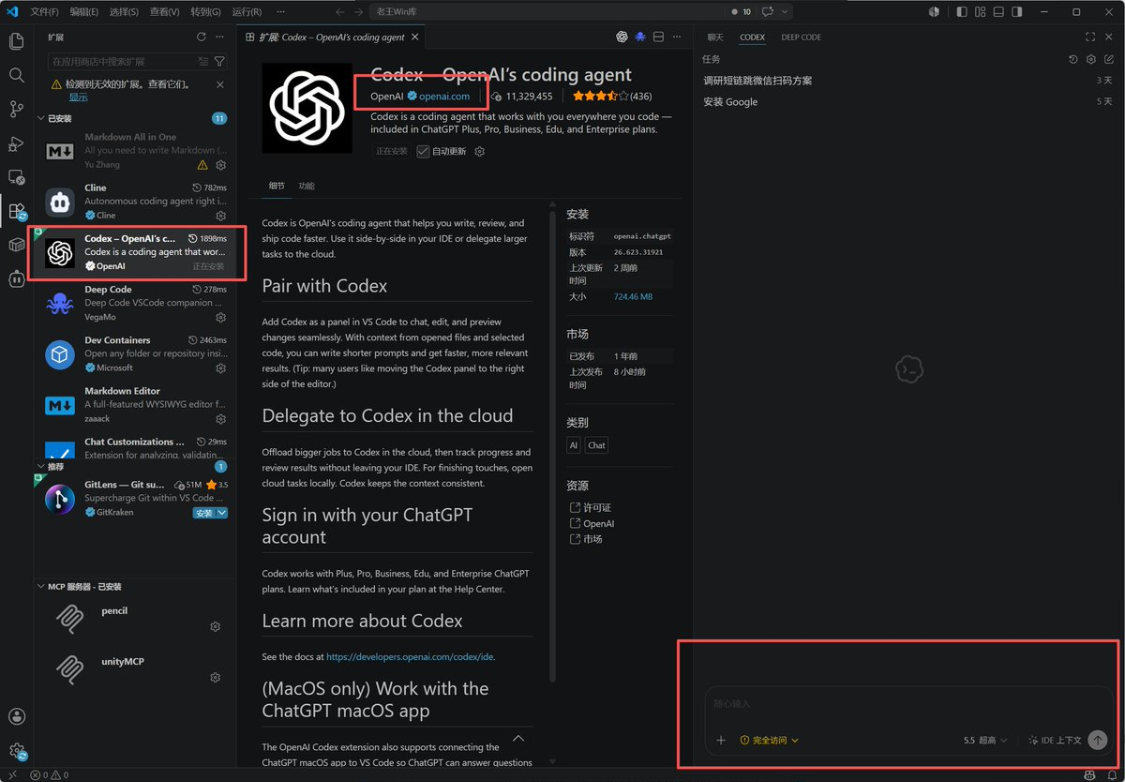
VS Code 安装
- 打开 VS Code
- 打开扩展面板(左侧方块图标,或 Ctrl+Shift+X)
- 搜索「Codex」或「OpenAI Codex」
- 点击安装
五、桌面 App 页面功能全解
这一章按你实际看到的界面来讲。桌面 App 左侧有四块主导航:新对话、搜索、已安排、插件。中间是对话或功能页,底部是账号和权限入口。
下面 8 张图,清楚一块区域。建议装完 App 后对照着点一遍。
1.对话主页面,日常干活的地方
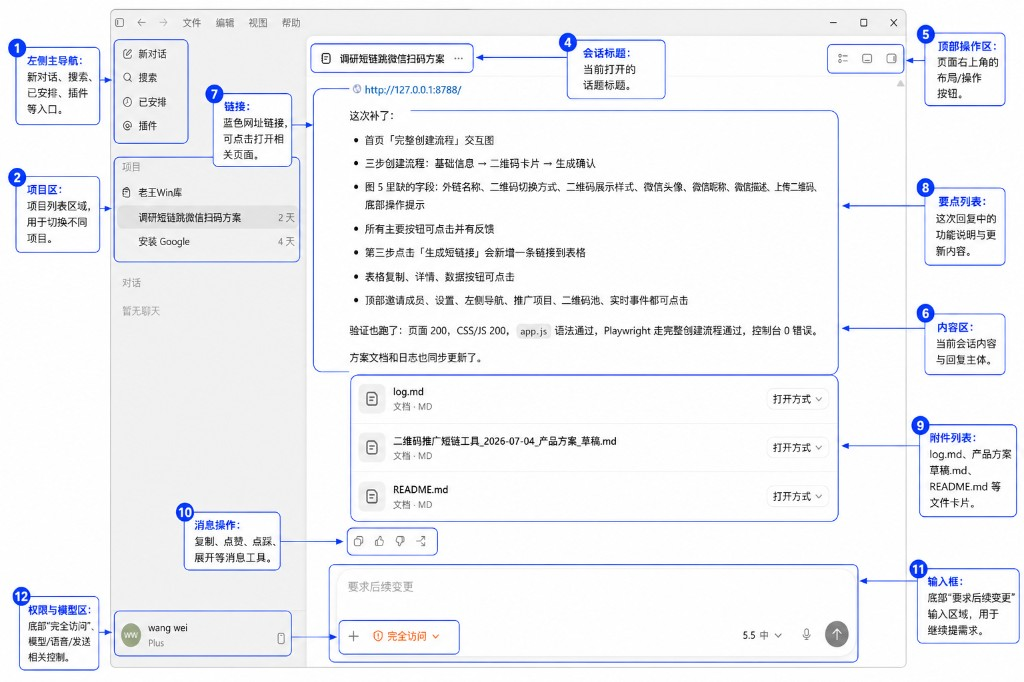
- 编号:②;区域:项目区;干什么用:按项目归类会话,一个文件夹对应一类工作;怎么用:先建项目再开对话,比如「老王Win库」「调研短链方案」;同项目下的对话共享上下文
- Number: 4; area: session title; what to use: the name of the current dialogue; how to use it: it is displayed at the top, easy to identify; it is suggested that the name of the task be changed to not the default "new conversation"
- Number: 6; area: content area; do what: Codex 's reply text; how do you use it: see what it wrote, what it changed, what it ran off with, what it rolled up
- Number: 7; area: link; do what: clickable URL in the response; how do you use: e.g. local preview address http://127.0.0.1:8788/, click directly on the browser
- Number: 9; area: attachment list; what to do: the file card to which the change in this round relates; how to use: show log.md, README.md, etc.; click on file name or open in the system default editor using Open
- Number: 10; area: message operation; what to do: copy, acclaim/step, regenerated; how to recreate: respond unsatisfactory; good reply can copy archive
- Number: 12; area: permissions and model areas; what to do: current account number, permission slotting, model selection; how to use: see Account 5.4 menu; programming suggests "full access" and models are usually only by default
- New item: Left project area → Select or build project → Point → New Dialogue → Retitle Session Title → Description of demand in input box。
- When it is finished, look at the list of 8 points and the list of 9 attachments, confirm which files have been moved, and then check them one by one。
- Local service runs up, direct 7-link preview, don't guess the port。
2. Plug-in page for the Codex external tool
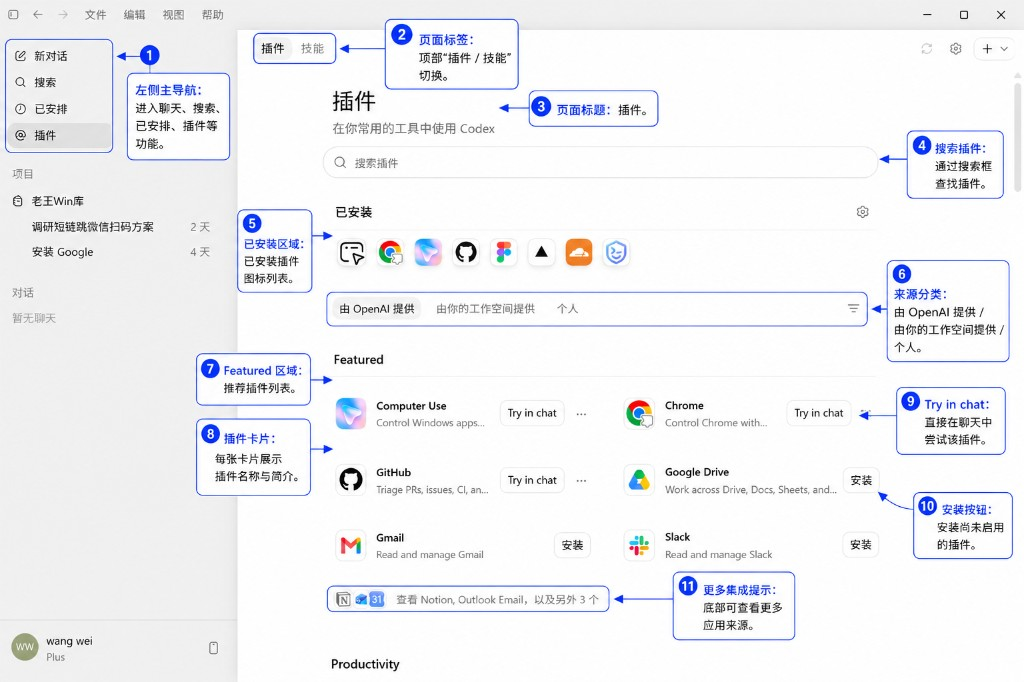
- Number: 2; Area: Page Label; What to do: Switch between Plugin and Skills; How to use: Plugin tube external integration; Skills tube built-in capability package, do not mix
- Number: 3; Area: Page Title; for what: Current plugin market; how to use it: subtitle "Use Codex in your usual tool"
- Number: 5; area: installed area; what to use: currently enabled plugin bar; how to use: total right gearing plugin settings; installed here
- Number: 6; area: source classification; what to use: filter by provider; how to use: OpenAI official / workspace / individual to find the source they need
- Number: 8; Area: Plugin Card; What to use: Introduction to a single Plugin; How to use: Looking at the icon, name, one sentence to determine whether to install
- No. 9; Area: Try in chat; do what: fast-track access with installed plugins; how do you use it: point it to open the dialogue and take the context of the plugin
- Number: 11; area: more integration tips; what to do: more plugins folded at the bottom; how to expand the full list with dot "See Notion, Outlook..."
Recommendations
- Writing codes are common: GitHub (read-and-write repository), Chrome (browser operation). Reload Figma, Cloudflare, etc. by your actual inn。
- Load 5 installed areas with no icons, no indication that they were not installed successfully, retrying or checking the network。
- Do not go back to the dialogue page and guess if the plugin is working。
3. Scheduled pages, scheduled tasks and reminders
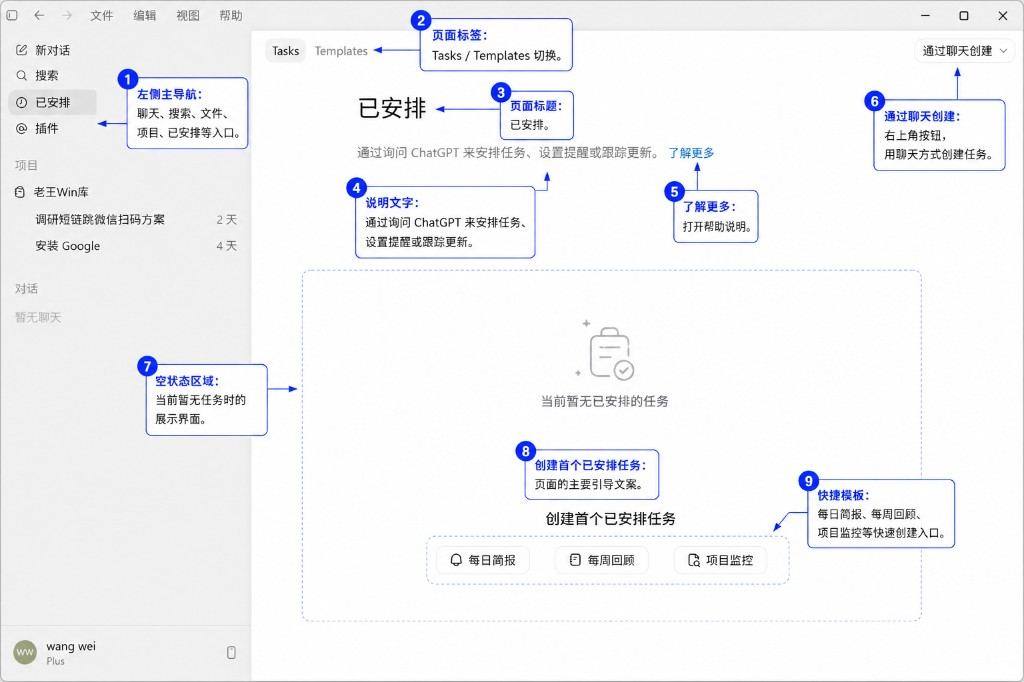
- Number: 2; area: page labels; what to do: Tasks (tasks)/Templates (templates); how to use: missions see created; templates built quickly from preset
- Number: 3; area: page title; for what: the current module name "arranged"; how to use:-
- Number: 5; area: more knowledge; what to do: official help with document links; how to use: do not know what to do when to look in
- Number: 6; area: created by chat; do what: use the top right corner master operation button; how do you use: click down the creation method or jump back to dialogue to create a task in a natural language
- Number: 8; Area: Create the first assigned task; do what: guide text in an empty state; how do you use it: encourage you to build one first
- Number: 9; area: a shortcut template; what to use: one key to apply to a common task type; how to use: daily briefing / weekly review / project monitoring, one hint to fill in parameters
- The starter starts with nine daily bulletins or weekly retrospects about what an automated round of output looks like。
- You can also go back to the dialogue page and say, "Give me a summary of GitHub yesterday at 9 a.m. every morning," which will help you get into the setup。
- After a task 7 becomes a list that can be paused, edited, deleted。
4. Account menu, usage and setting access
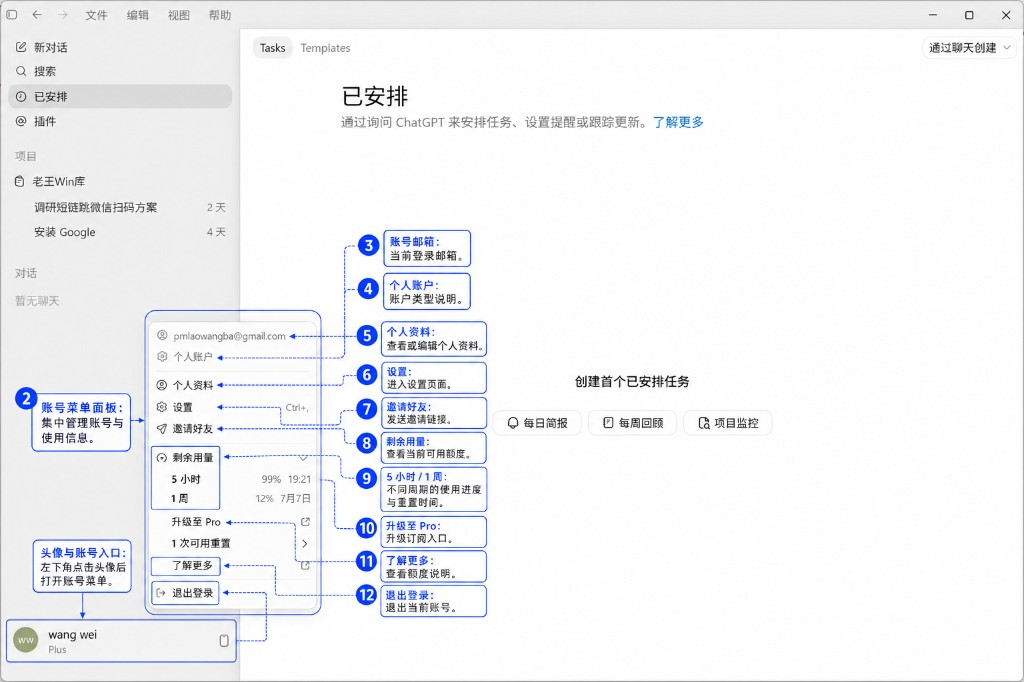
The lower left corner appears to have been lit and the account panel pops up. Access information, access, level, upgrade。
- No: 1; area: header and account entry; do what: fixed entrance at the lower left corner; how do you do it: display nicknames and holster badges (Plus / Pro); click opening menu
- Number: 2; area: account number menu panel; for what: account-related functionality set; how to use: outside point or close headers
- Number: 4; area: personal accounts; what to use: account type labels; how to use: personal / team
- Number: 5; area: personal data; what to do: change nicknames, portraits, etc.; how to use: maintenance on demand
- Number: 7; area: invite a friend; do what: generate an invitation link; how: use when an invitation is available
- Number: 8; Area: Residual Usage; What to do: Line Overview Title; How to use: Details of the following two progress bars
- No. 10; Area: Upgrade to Pro; Doing what: Subscription to Upgrade Entry; How to Use: Plus Consider when not needed
- Number: 11; area: more knowledge; what to do: a description of the amount; how to use: no time point for speed limit
- Feel slow or hint limit: look which ones are full。
- CHANGE PERMISSIONS, LOAD MCP, REMOTE CONNECTION: ALL GO FROM THE 6 SETTINGS, DO NOT BLINDLY TEST THE COMMANDS IN THE CONVERSATION。
5. Establishment · General, working patterns and competencies
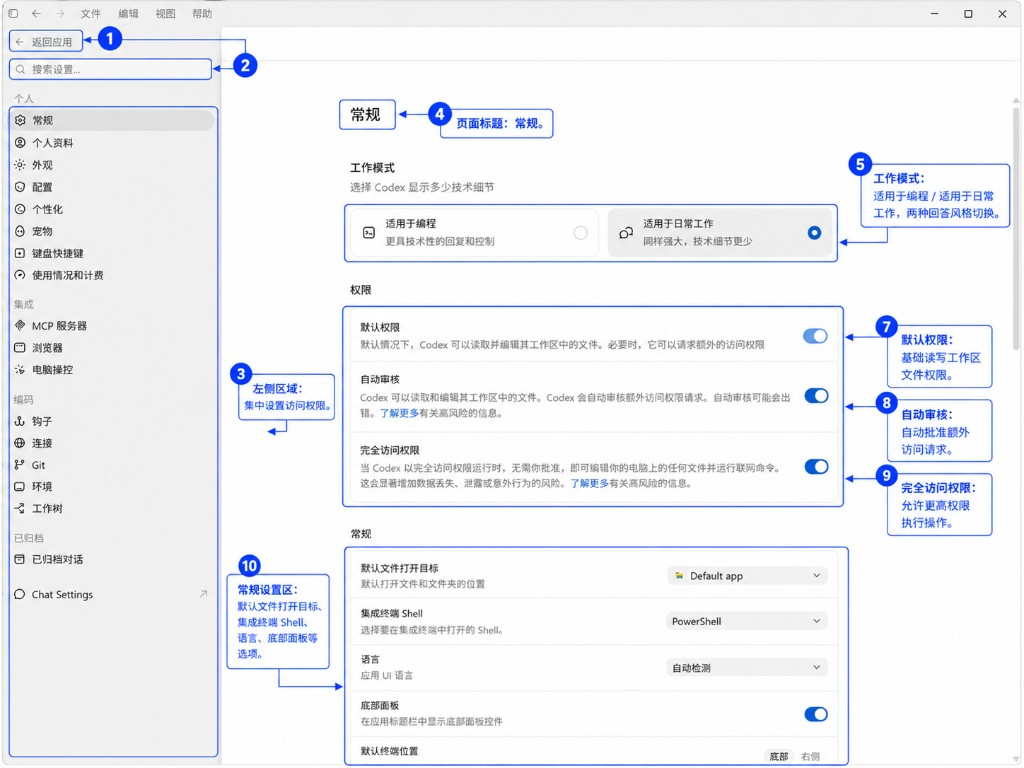
Ctrl+, or Account Menu Settings, Left Select General. Here you can determine Cordex speaking style, file permissions, terminal environment。
- No: 1; area: return application; do what: exit to set the main interface; how to use: upper left arrow
- NUMBER: 3; AREA: LEFT SETTING NAVIGATION; WHAT TO DO: PERSONAL / INTEGRATED / ENCODE / ARCHIVED CLASSIFICATION; HOW TO USE: PERMISSIONS ARE SPREAD IN MULTIPLE PLACES, PROGRAMMING FOCUSES ON "CONVENTIONAL" MCP SERVER "CONNECTION"
- Number: 4; Area: Page Title; What to do: Currently in "conventional" ; how to use:
- Number: 7; Area: Default Permissions; What to do: Read and write files in the workspace; How to use: Base Permissions, generally keep open
- Number: 8; area: automatic review; what to do: automatic approval of additional requests for visits; how to use: economical but at risk of error; first-hand switch-off, familiar before opening
- Number: 10; area: general option area; what to do: file opening, Shell, language, terminal position; how to use: Windows set Shell with PowerShell; terminal position selection bottom or right viewing habits
Recommendations
- First use: Work mode selection applies to programming, open default permission, full access is determined by the risk you can accept (to write basic needs for local projects)。
- Automatically reviews recommendations closed, at least for the first two weeks. Every time an order is granted, you know what it's doing。
- Command cannot run up: Check 10 Shell isn't Power Shell, same as your system。
6. SET UP MCP SERVER TO ACCESS EXTERNAL DATA SOURCES
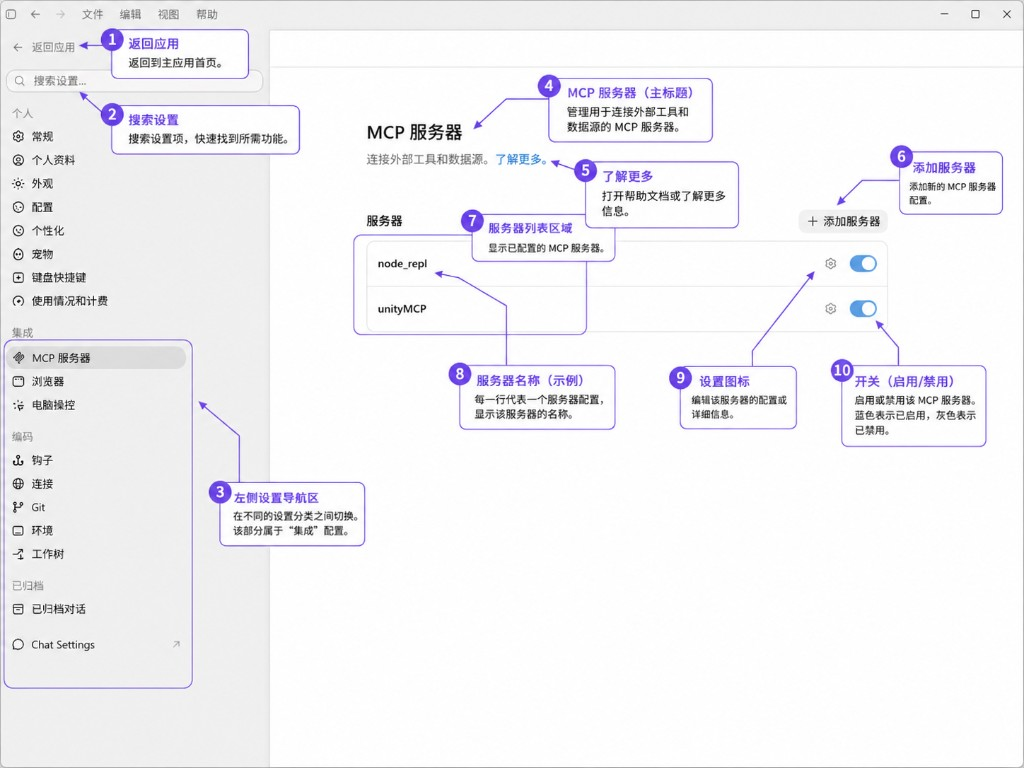
- NUMBER: 2; AREA: SEARCH SETTINGS; WHAT TO DO: SEARCH MCP RELATED ITEMS; HOW TO USE: SERVER TIME
- NO. 3; AREA: LEFT NAVIGATION; WHAT TO DO: CURRENTLY IN "INTEGRATION" GROUPING; HOW TO USE: MCP/ BROWSER/ COMPUTER CONTROL
- Number: 5; area: more knowledge; what to do: MCP official document; how to read it when writing MCP Server
- NUMBER: 6; AREA: ADD SERVER; WHAT TO DO: NEW MCP CONFIGURATION; HOW TO USE: POINT + ADD SERVER, NAME, START COMMAND OR URL
- Number: 8; area: server name; do what: configure the logo; use how: e.g. node_rep, unityMCP; call by this name during the dialogue
- Number: 9; area: set the icon; do what: edit the configuration of the server; how do you do it: gear change command, environment variables, parameters
Recommendations
- AFTER LOADING A THIRD PARTY MCP: THE LIST SHOULD HAVE AN ENTRY → SWITCH TO OPEN → BACK TO THE DIALOGUE TRY TO SAY "LIST AVAILABLE MCP TOOLS"。
- SOME MCP ERROR: TURN IT OFF FIRST, MAKE SURE IT'S CAUSED, THEN RECONFIGURE 9。
- The first part of this class can be empty, used for Unity, database, custom API reloading。
7. Settings . Connections, remote control of the computer
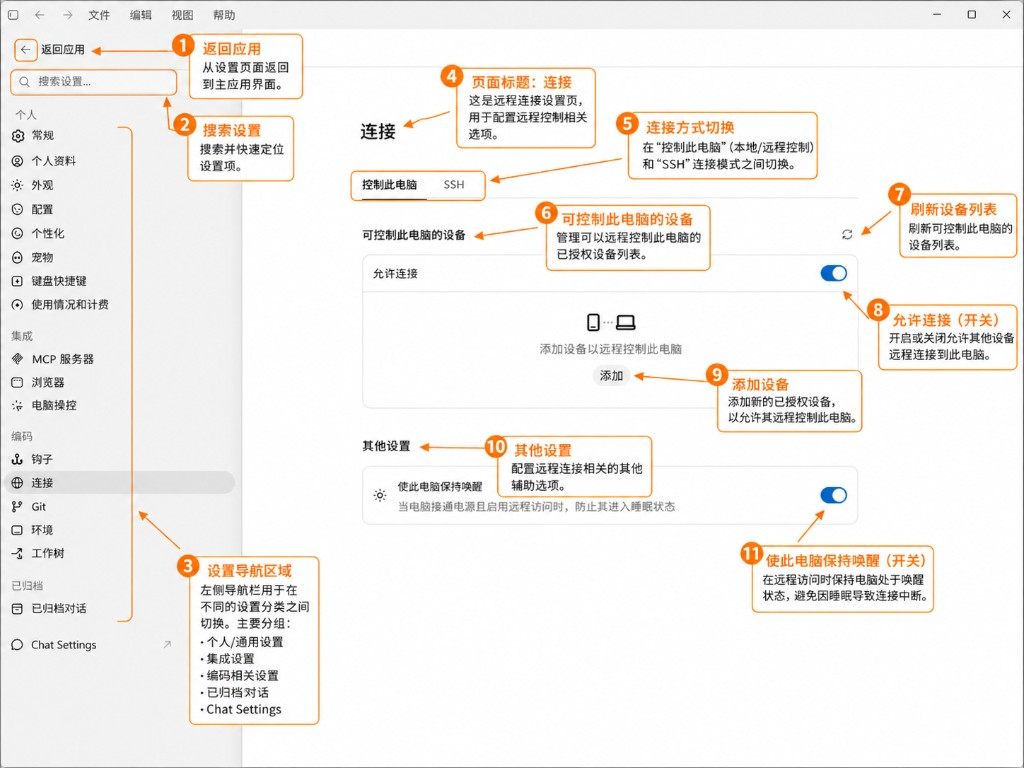
Sets the coding and coding connection. Remotely get Cordex to control this computer with a mobile phone or other device。
- No: 1; area: return application; do what: go back to the main interface; how to use:-
- Number: 3; Area: set up navigation; do what: Current in "coding" "connection"; how to use it: same group with Hooks, Git, Environment, Worktree
- Number: 4; area: page title; what to do: connect configuration; how to use: pipe remote control
- Number: 6; area: equipment to control the computer; what to do: list of authorized equipment; how to use: see who's connected
- Number: 7; area: list of refreshing devices; do what: update the list; how do you do it: click after authorization of new equipment
- No. 9; Area: Adding equipment; Doing what: Authorizing new equipment; How to use it: Scanning or confirming on mobile phone Code / ChatGPT App
- Number: 10; area: other settings; what to do: support options; how to use --
Recommendations
- There's no need for mobile remote control:8 Directly off, one less face。
- To use: Open 8 →9 Add Device → Cellphoneend to confirm →7 refresh to see if it appears。
- Joint run remote: open 11 and secure power。
8. Settings . pets, small partners on interface
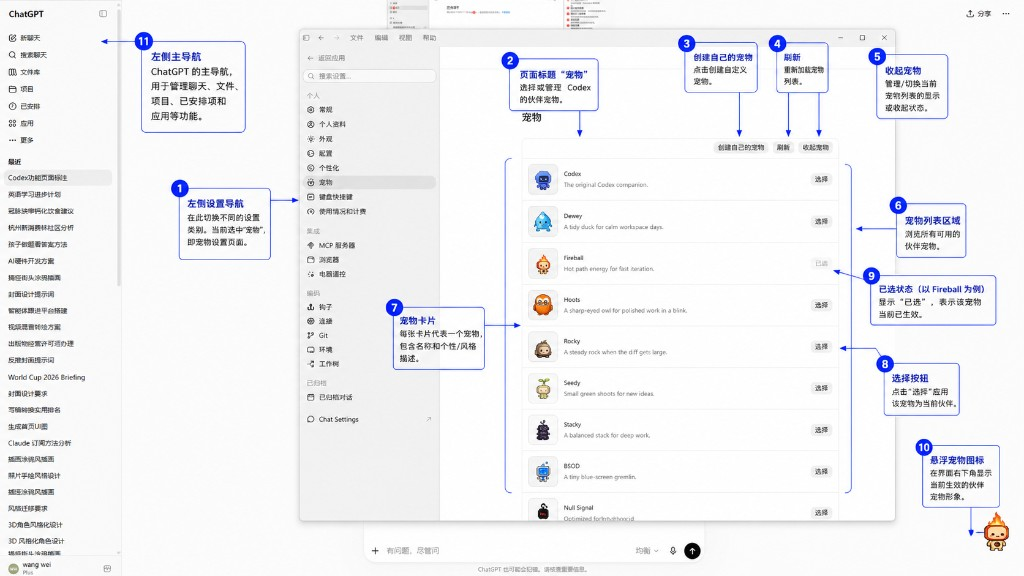
Set up a personal pet. Select a small desktop icon to work with, pure egg, without affecting functionality。
- No: 1; area: left-hand set-up navigation; do what: cut to pet; how do you use it: in the individual group
- Number: 3; area: create your own pet; do what: define your partner; do what: want to play with it; do what is generally available
- Number: 4; area: refresh; do what: reload the pet list; how do you use: list an anomaly point
- Number: 6; area: list of pets; what to do: all optional pets; how to use: roll down the set
- Number: 7; area: pet card; for what: a single pet's name + character description; for how: Fireball "Hot path energy for last condition"
- Number: 9; Section: Selected Status; What to do: Current Activated Item; How to use: Button to Grey " Selected" with only one at the same time
- Number 10; Area: Suspended pet icons; What to do: Animation of the right bottom corner of the window; How to use: See at work; Obsolete eyes can be switched off in settings or replaced with Codex default
Recommendations
- Purely fun, doesn't affect writing codes. This post is part of our special coverage Syria Protests 2011。
- Bottom right 10 block button: replace a small one or close the suspended display (see if this option is available in the current version)。
VI. INTRODUCTION TO CLI COMMAND LINES
If you have a CLI version, enter codex at the terminal。
Basic usage
# INTO INTERACTIVE MODE
codex
# START UNDER SPECIFIED DIRECTORY
codex -workspace /path/to/your/project
# DIRECT COMMAND, ONE-TIME MODE
codex helped me create a React project
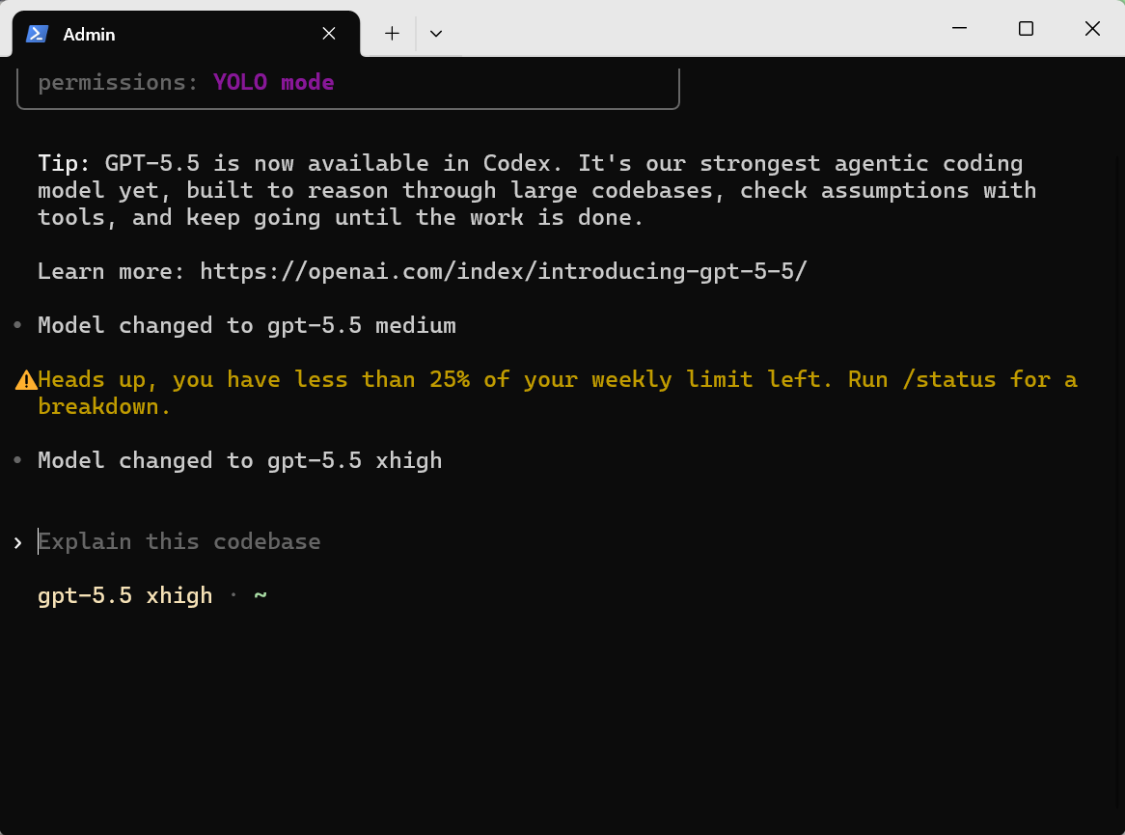
2. CLI COMMON COMMANDS
- /clar: empty the context of the current session
- /model: switch model
- /missions: manage permission settings
- /cost: view the use of this session
- THE CLI MODEL IS SUITABLE FOR STUDENTS WHO OPERATE ON REMOTE SERVERS, RUN BATCH AUTOMATED SCRIPTS, AND ARE USED TO PURE KEYBOARD OPERATIONS。
VII. Authority and security set-up
Codex can handle your files and execute orders, so the rights set is very important。
1. Work Directory Permissions
Codex defaults to access only the task directory you specified. The path specified in the folder selected in the desktop App, the –workspace in the CLI is the range of its activities. It can't just read the other files on your computer。
- Do not use –workspace~/ Let Codex access the entire user directory. Builds a separate folder for each project。
2. Competence to execute orders
- Mode: Auto-execution; Note: Run straight, not asking you; Recommendations: only experienced developers
- Mode: Prohibited; Description: Not to allow Cordex to run any orders; Recommendations: too limited to use
- First, the rookie uses "every time he asks" to see what order he's going to run, then to agree, and then to get used to it。
3. Network privileges
- Allows or forbids Codex access to networks
- Set white list of domain names to be accessed
4. Git Security
There are several principles in Cordex operations。
- don't let it get straight, unless you stare
- It's recommended that we save the changes and have Cordex work, so we can go back
- Make it safer for Codex to operate on a separate branch
VIII. First use, complete demonstration
scene, get Codex to write a web calculator from zero。
Step 1 Start Codex
- Desktop App. Open ChatGPT App, switch to Cordex mode, create a new session
- CLI. Terminal input
- Web. Open Chatgpt.com/codex
Step 2 specifies the project directory
new an empty folder, such as ~/projects/my-calculator/, select。
Step 3 Command
Enter in the input box。
Request is。
It's a nice interface. It's modern
Support keyboard input
directly generate an index.html file
Step four. Look at Codex
Codex will follow this process。
- We'll analyze the needs and tell you what it's gonna do
- create index.html file
- WRITE HTML, CSS AND JS CODES IN THERE
- Show Diff comparison because it's a new file, all green new
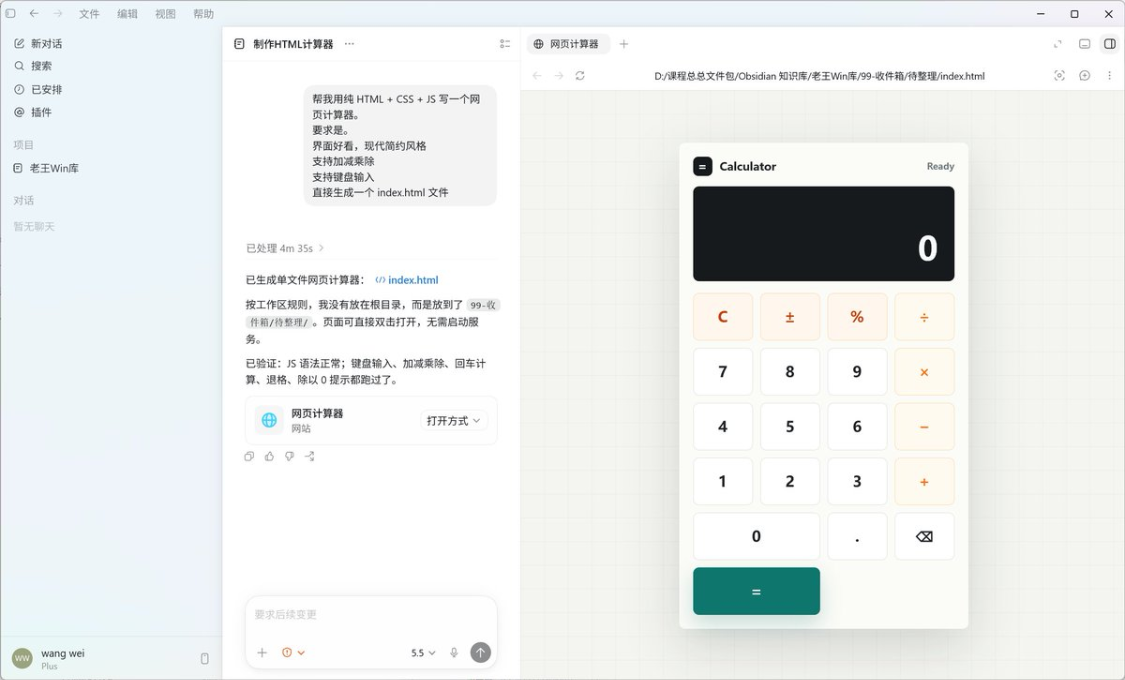
Step 5 Review and acceptance
- See if Diff's code makes sense
- Click Accept to accept changes
- The papers are ready
Step 6 Preview
Codex might say, "Do you want me to open the browser preview" or, "The file has been created and you can open it in the browser and see the effect."。
If it doesn't say so, you can keep asking。
open it in the browser
Step 7 iterative changes
Not satisfied with the results? Then we'll get the demand。
Change the calculator to a dark theme and the button to a round angle
IX. Daily use techniques
1. Write AGENTS.md, like Karpathy
Andrej Karpathy, former director of Tesla AI and co-founder of OpenAI, had a landmark practice of using AI writing codes to place a very detailed CLAUDE.md in the project root catalogue, which was the equivalent of AGENTS.md in Codex。
His core line of thinking is to treat this document as an entry-level document for a new colleague who is talented but does not know your project。
The following is an illustrative reference。
# AGENTS.md
This document must be read before each new dialogue, context is restored and a new mission begins。
> When the subdirectories have the nearest AGENTS.md, read this document and continue; sub-rules can be refined and cannot violate the red line of this section。
—
##1
– ** Name**: (insert project name)
– **type**: (website / script / knowledge base / applet / other)
– **Technology warehouse**: (e.g. Next.js + TypeScript + Supabase)
– ** One sentence**: what is the solution of this project
—
##2 RED LINE (MUST ASK FIRST)
The following operations cannot be carried out automatically and must first obtain the consent of the person in charge:
– delete files, directories or guit history
– `git push ' , `git rebase ' , `git reset –hard ' , forced delivery
– Modify `.env ', key, token, CI/CD configuration
– Change in database table structure, data migration, clean-up data
- production deployment, `npm public ' , public release
– Install a global system-dependent, modified system-level configuration
Process products such as temporary scripts, previews, caches, etc., should be voluntarily cleaned up after validation。
—
##3 DIRECTORY STRUCTURE
text
(Performance, Example)
src/ business code
app/ Page or API Route
test/ test
docs/ document
scripts/ tool scripts
2. Instructions to be specific
- Fix bug: The page is stuck after clicking on the login button. Read the LoginButton component for me
- Optimizing performance: Loading the first page in 5 seconds
Step by step. Don't say too much
4. Use of screenshots and pictures
You don't know how to describe mistakes? Direct intercept, upload to Cordex. It can read the error in the picture。
- No, ask
Not sure what's next? Ask Codex directly。
What should I do next
Codex will analyze the current project status and advise you。
6. Use of good orders
THERE'S A LOT OF SHORTCUTS IN THE CLI, AND IT DOESN'T HAVE TO BE A FULL SENTENCE。
/help # View Help
/clar # Empty Context
/missions #
/cost # to see how much it took
X. Common issues
What's the difference between Q Codex and Cursor
Cursor is an AI editor, you must use it as an editor. Codex is an Agent that can be used anywhere, in terminals, web pages, Apps, and even Cursor。
What's the difference between Q Codex and Claude Code
Both are coding parties. Codex and ChatGPT account and OpenAI ecological bind; Claude Code and Anthropic account. See what you subscribe to, what you get used to。
Can Q Plus's Cordex size be enough
The day-to-day development of a few hours is enough. The speed limit may be triggered if you use a continuous gravity of more than 8 hours. Start the Plus for a month, not enough to upgrade。
Can Q Codex create a code that can be produced directly
Simple CRUD, page, script is close to production. Complex business logic requires your review and adjustment. Codex is an accelerator, not a substitute for your thinking。
Q, can you use Cordex domestically
It works. Sign and subscribe to the current Gmail + Google Play process. Using Codex requires stable access to OpenAI services. Desktop App and CLI run locally, the network is mainly used to communicate with models。
What if Q Codex broke my code
There are three insurances. First of all, get in front of the change, break it straight and checkout back. Second, Codex changes require you to move Accept manually to see an unreasonable point in Reject. Thirdly, in the conversation, it could be said, "Return the changes just made."。
Q, can Cordex get my database
Yes. You tell it to connect to the database, and you suggest using the environment variable .env, not in the conversation. It helps you write SQLs, forms, data. However, special care should be taken in the operation of production databases。
Which Q Webend and Append
First starters install a round with Web zero. Really write items, change local files, load desktop App. CLI suits developers and server scenes. The four entry points share an account number and choose the one that works best。
Final Thoughts
Following this, you should be able to complete: Gmail / OpenAI registration, Plus subscription, installation of at least one Codex entrance, desktop App, page pairing, first run through a demo。