



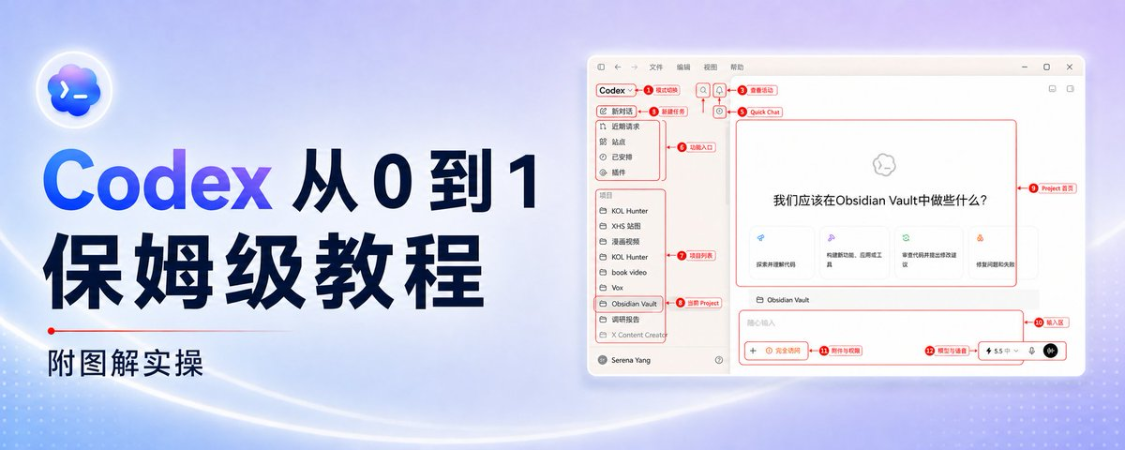
I've been with my tools almost every day for the last few months Codex .
Through the use of Codex, I completed the start-up of the X account and the enhancement of work. A while ago, I also paid some of my trusted friends for Codex + HyperFrames' book number video, a small amount of traffic。
So Codex is a very powerful tool。
However, many little whites are stuck often because, at the outset, when they look at the interface, they feel a little more and a little more complex, and sometimes have a bit of a headache, and they don't know how to do it。
So I suddenly realized if I could put the interfaceA detailed typologyEven more detailed, then there will be no more fear for small white users, which can quickly help White quickly understand and master a powerful tool like Codex。
Don't say much, we'll start right away
I. Installation login
Web installation address: https://chatgpt.com/zh-Hans-CN/codex/
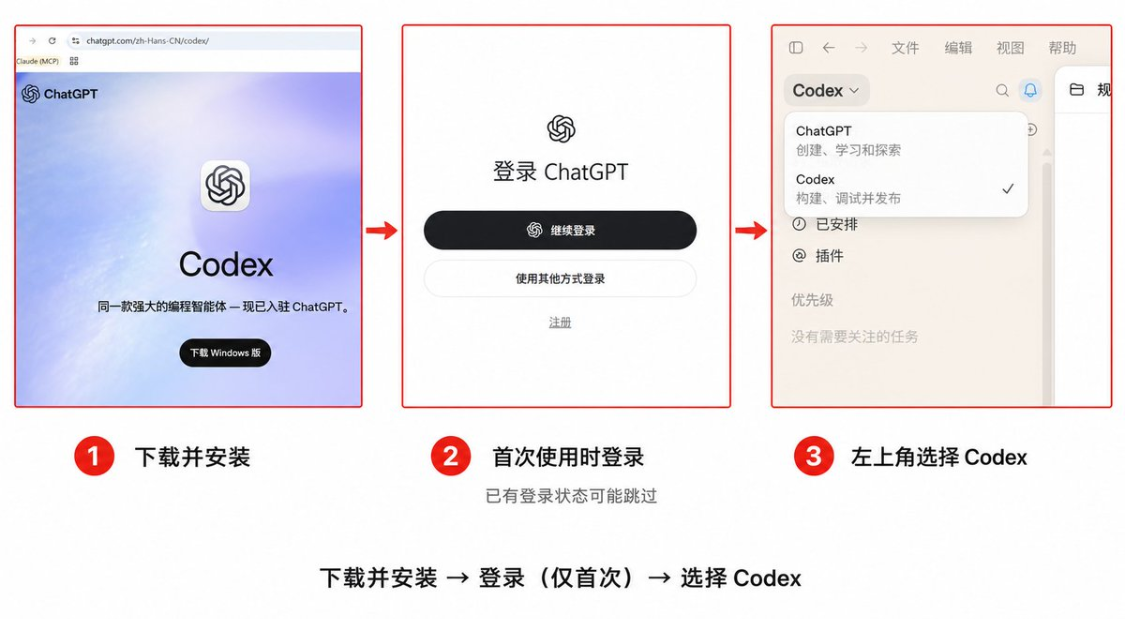
Downloads are very simple, as long as you select the download button on the corresponding web site, as if you installed desktop APP on a regular basis. When you log in, you can log in to your respective ChatGPT account。
More than a dozen settings need not be changed after the first login. A “new conversation” and a very small request to make sure you get the results:
I just started using Codex. Please tell me what folders you can see on your current assignment. Read-only check, do not create, modify or delete any files
If this returns normally, you've done your first start。
II. First open first look at the whole picture
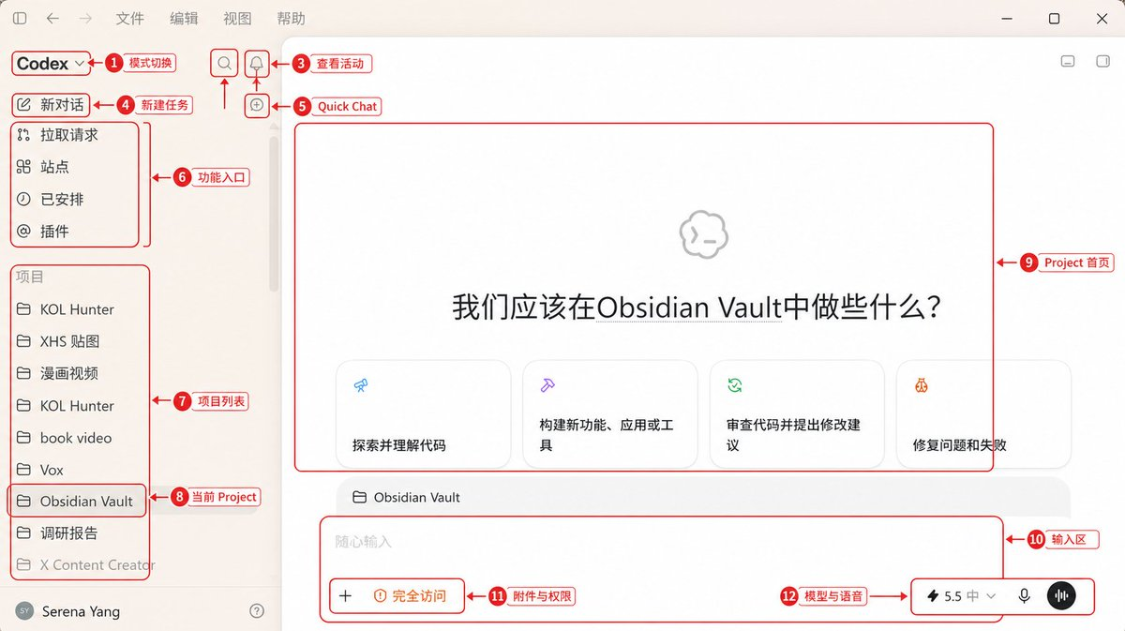
Opens the ChatGPT desktop end and enters Codex in the top left-hand experience selection. The left is the functional entry and the project, where the current project or task is shown in the middle, and the bottom is the input box。
For the first time, just remember these positions:
|
Location |
What do you remember now |
|---|---|
|
New Dialogue |
New Codex Job |
|
Small icon on the new right of the dialogue |
When the entrance is visible, open Quick Chat for normal questions |
|
search |
You don't have to go through the latest list |
|
Pull Request |
View Pull Request related to the code repository |
|
project |
Put related tasks, information and local folders together |
|
Plugins |
Give Codex access to browsers, GitHub, clouds, etc |
|
Site |
Manage sites that have been maintained or deployed through Sets |
|
Scheduled |
Manage timing tasks and their results |
|
Input Box |
Send Prompt, pictures and files, select permissions and models |
III. Quick Chat, Project, Codex
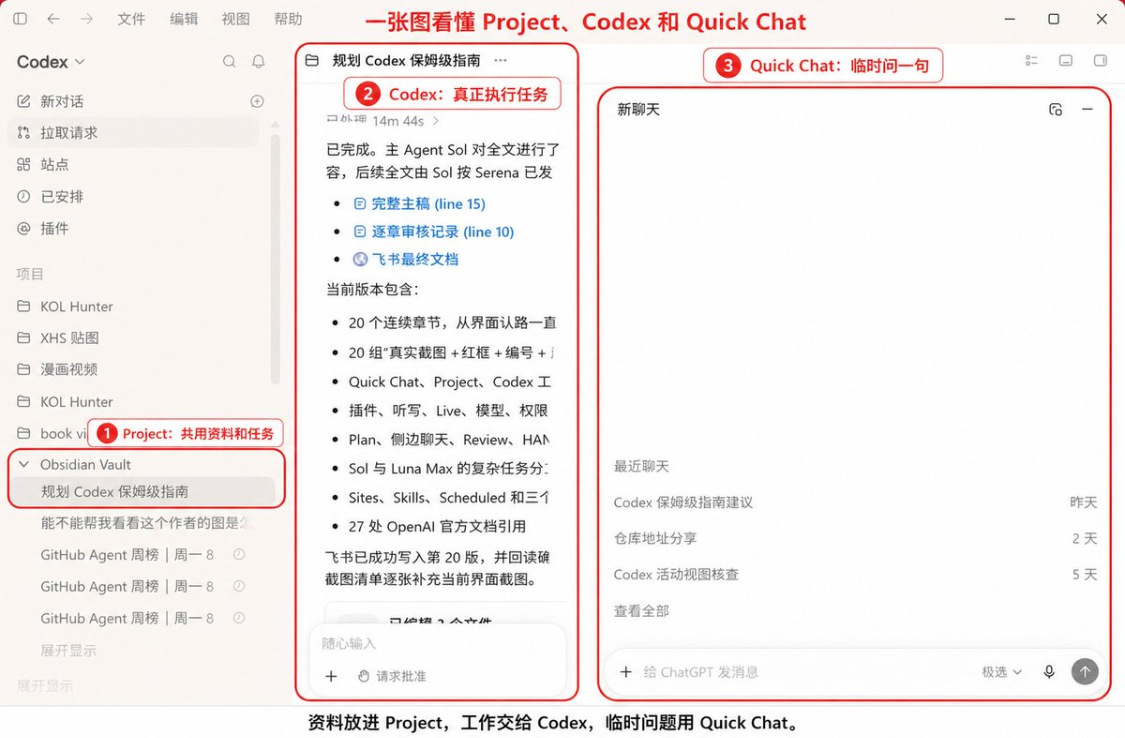
The question that many people are the easiest to get in is, what's the difference between ChatGPT and Codex
It doesn't make much sense to keep it on the table. What really needs to be done is to start with what entrance you have。
I'll split it this way:
One question, with Quick Chat。
For example, an explanation of a word, a rewording of a text, and a title for you. Moves the mouse to the New Dialogue, if you can see the Quick Chat icon on the right, click on it to open a normal ChatGPT conversation。
Quick Chat will not be on Cordex's left-hand latest mission. Not later, not lost, just because it belongs to a regular ChatGPT conversation。
2 Multiple dialogues need to share information and use Project。
Like you're doing X content. The selections, long scripts, schematics, data discs are different tasks, but the same Obsidian material, writing rules and published samples are used. A project should then be built, not every time the data is uploaded。
3x3 requires movement documents, running orders, watch changes, using Codex。
Collapse folders, modify web pages, clean tables, generate Markdown, run tests. These tasks are placed in Codex. It can read and write documents within the scope of the project that you mandate, and it will also show the implementation process and results。
These three can be used together, without a choice。
OpenAI's current proposal for a project is also straightforward: a project is built when the work will be continuous, multiple results will be produced, or multiple tasks will be reused with the same file and source; only one can speak directly if it contains a problem。
IV. Plug-in first, but not at all
I'll take a look at the plugin after I've finished the project。
Because a lot of missions are stuck, not Codex wouldn't do it, because it doesn't have any access. You let it organize Gmail, it doesn't even have a mailbox; it lets it see a log-in page, it doesn't have Chrome; it lets it handle GitHub Issue, it doesn't have a connection。
Plugins can address these issues。
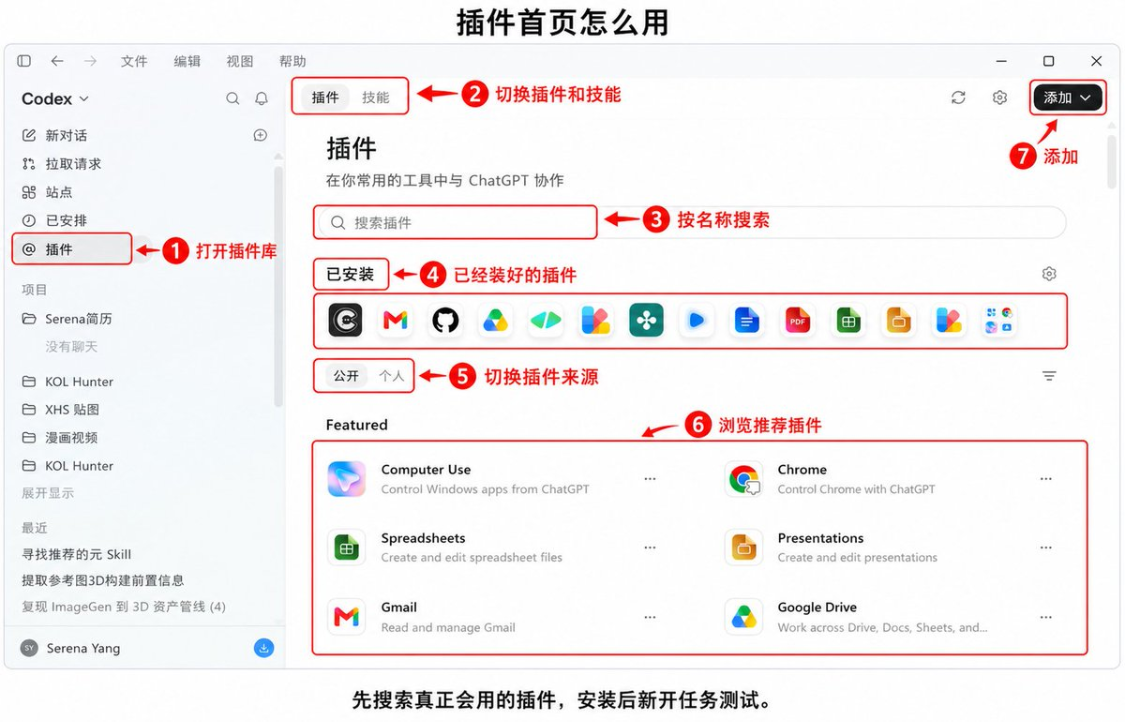
This is also emphasized. But the "plugin is a tool for Codex" is only half right. The current plugin is a capacity package, which may include both Skills, connectors, MCP, Hooks, browser capabilities and time-timed task templates。
Installation Steps:
- Opens the Left Plugin。
- Search for the plugin you really want to use。
- Click for details, press + to install。
- If it is going to connect to external services, login and authorization is done by hint。
- Creates a new task after installation, and Codex uses it。
What's the first one to load? See what you're doing:
- Frequent processing of mail and cloud disks with corresponding Gmail, Google Driver, etc。
- Code storage, GitHub。
- To check the web page, first install Browner; you need to use your own logged-in Chrome page before you think about Chrome。
- It is necessary to order desktop software to install Computer Use。
- REGULAR FORMS, PDF, PPT AND CORRESPONDING DOCUMENTATION CAPACITY。
Plugin does not represent full permissions。
External services are still subject to the authority of the account itself, and Codex will continue to be subject to permit mode and sandbox restrictions when it is implemented locally. A Gmail plugin does not automatically send mail for you because it is loaded in。
I'd rather start with one to two, run a real mission. It'll only make it harder for you to figure out what Cordex called。
V. Take a clear view of the input frame before the real start
A lot of people opened Codex, just staring at the middle input box。
You actually write Prompt, give information, choose permissions, select models, all happen here。
This part doesn't have a back. We'll take a mission and go over it: we'll put the project material in an article。
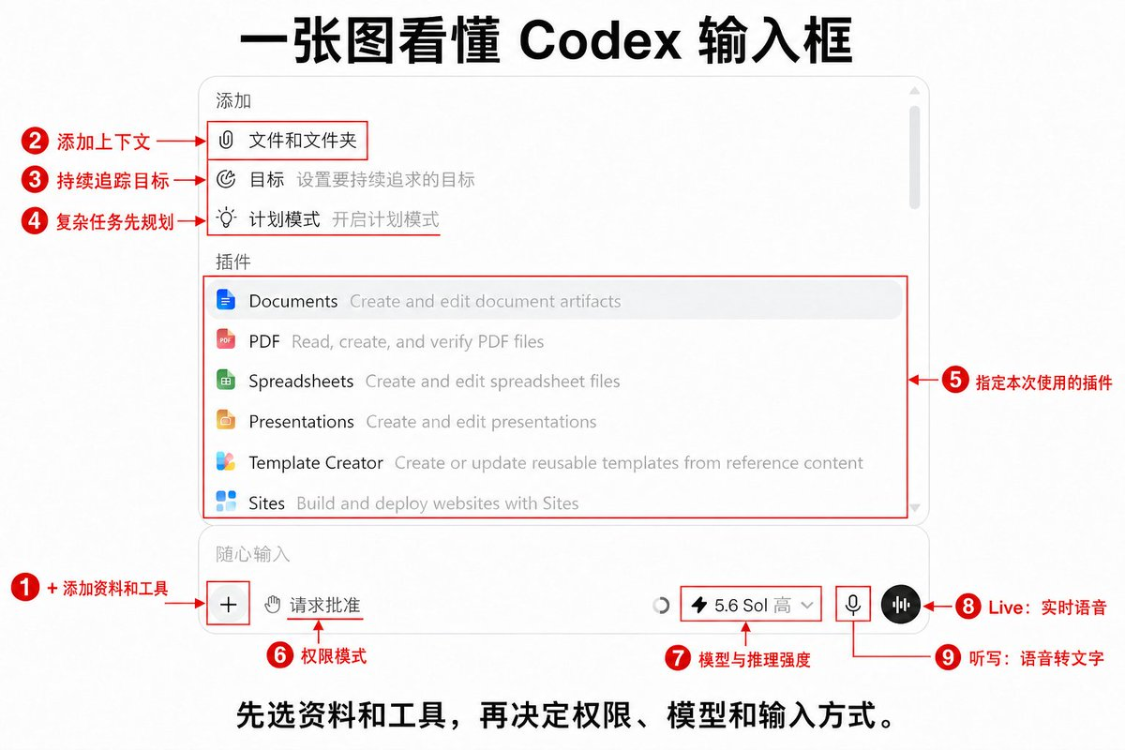
You can talk to ChatGPT Live when the need is not clear
If you have only one sentence in your head: "I want to write a Cordex curriculum," but you don't know the reader, the structure and the final form, you can enter ChatGPT Live from a new empty conversation or mission。
Live is a live voice conversation. You can either add something or interrupt it and let it ask you back. It's better to discuss needs, to comb the ideal and to see what is going on。
Note that a task needs to start with a voice mode to be used as a Live dialogue. Tasks that have been started in text, which usually provide a hearing, do not become the same Live Dialogue. The availability of Voice will also be affected by the setup, areas and workspaces。
You can just say:
I'd like to write a long article for Codex White, but it's a mess。
Instead of writing articles, you ask me a few questions in succession, and you make it clear to the target audience, what it learns from reading, what it has to contain, and how it ends。
We've figured out what needs to be done
Listen and Live are two things。
Listening and writing is just making your words into text in the input box. After that, you can delete it and decide whether to send it。
It's good to write long Prompt. Especially when you have a lot of information in your head。
The current desktop end can start with the microphone in the input box, or you can view or modify the hearing shortcut in the keyboard shortcut settings. The Setup General Listening and Writing options recorded in the flying book also include the option of keeping the listener column visible, listening to dictionaries, etc., but the specific grouping changes with the version, searching for the most stable " listening " on your current settings page。
Mononouns are often misidentified and can be added to a dictionary such as Serena, Obsidian, AGENTS.md, Luna Max。
VI. How are the rights and models chosen
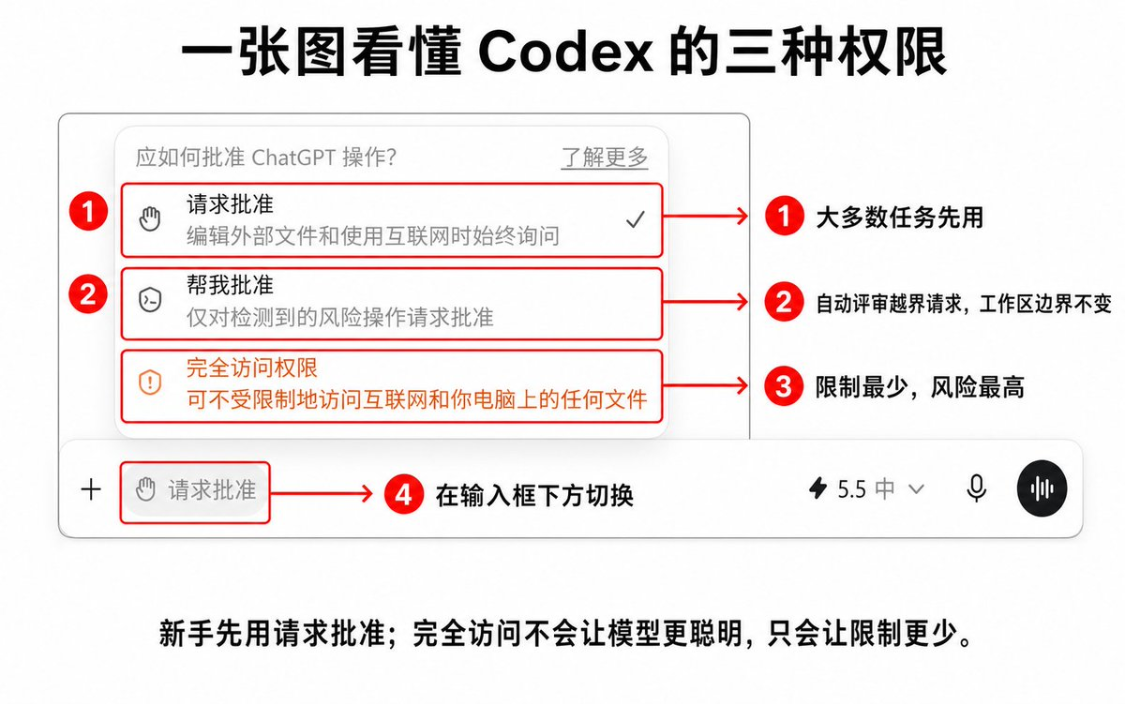
My own principle is simple: the newcomer first uses "Ask for approval"。
It allows Codex to complete regular reading and writing within the current working area and to stop when the border is crossed. It's not every step of the way to ask you, so it's not as annoying as I thought。
"Approve for me" will refer cross-border requests to automatic assessment, but it will not extend the boundaries of the original work area. Fits to a time when you already understand the process and do not want to process low-risk applications more often。
Full access removes local sandbox limits. Codex can change documents, run orders and access networks more continuously, but at higher risk。
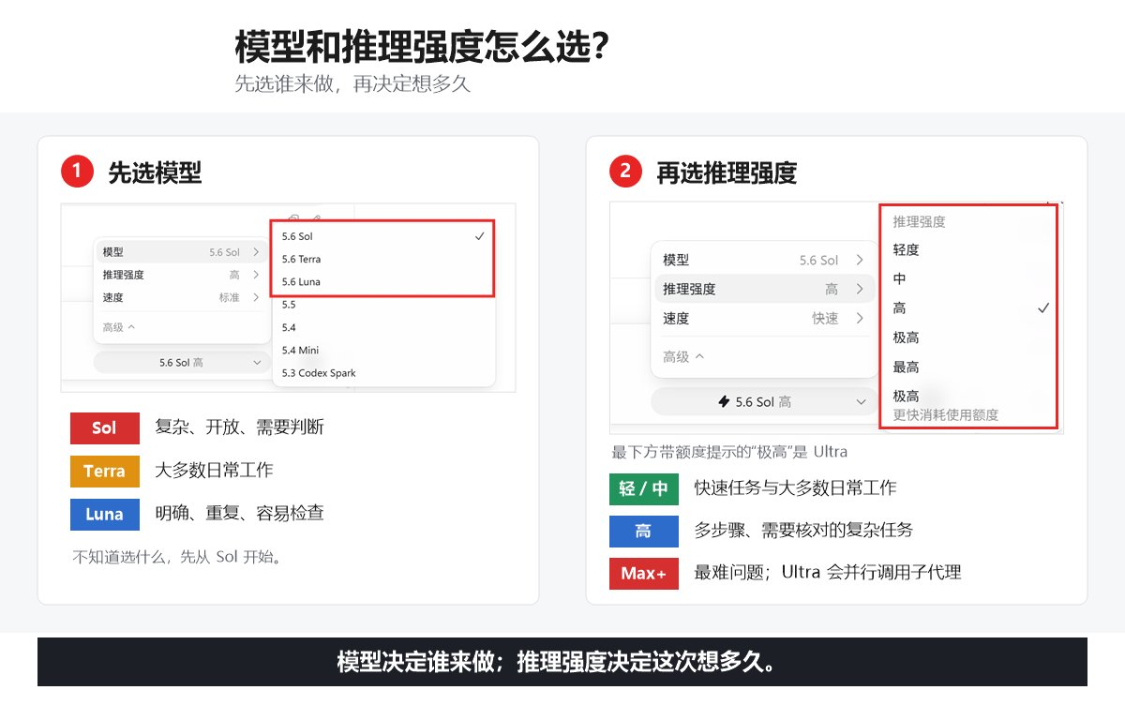
Models and reasoning intensity, selected by task difficulty
Codex currently divides the GPT-5.6 model into Sol, Terra and Luna:
- Sol does not fit well-targeted tasks that require judgement, research and refinement。
- Terra suits most of the day-to-day work。
- Luna is suitable for overlapping tasks that require clarity, stability of steps and easy to check results。
I don't know what to choose. Use the default Power, the current Sol + Media. Don't take all the missions up to Max。
The reasoning strength can be chosen as follows:
|
Tasks |
Suggested starting point |
|---|---|
|
Title change, colour change, field extraction |
Light |
|
Writing articles, making pages, organizing information |
Medium |
|
Multi-document modification, sorting issues, comparison of options |
High / Extra High |
|
It's a very difficult one |
Max |
|
They can be split into separate parts in parallel |
Ultra |
vii. Build a project to circle the file range
Codex is really starting to work from the point where it can read your data。
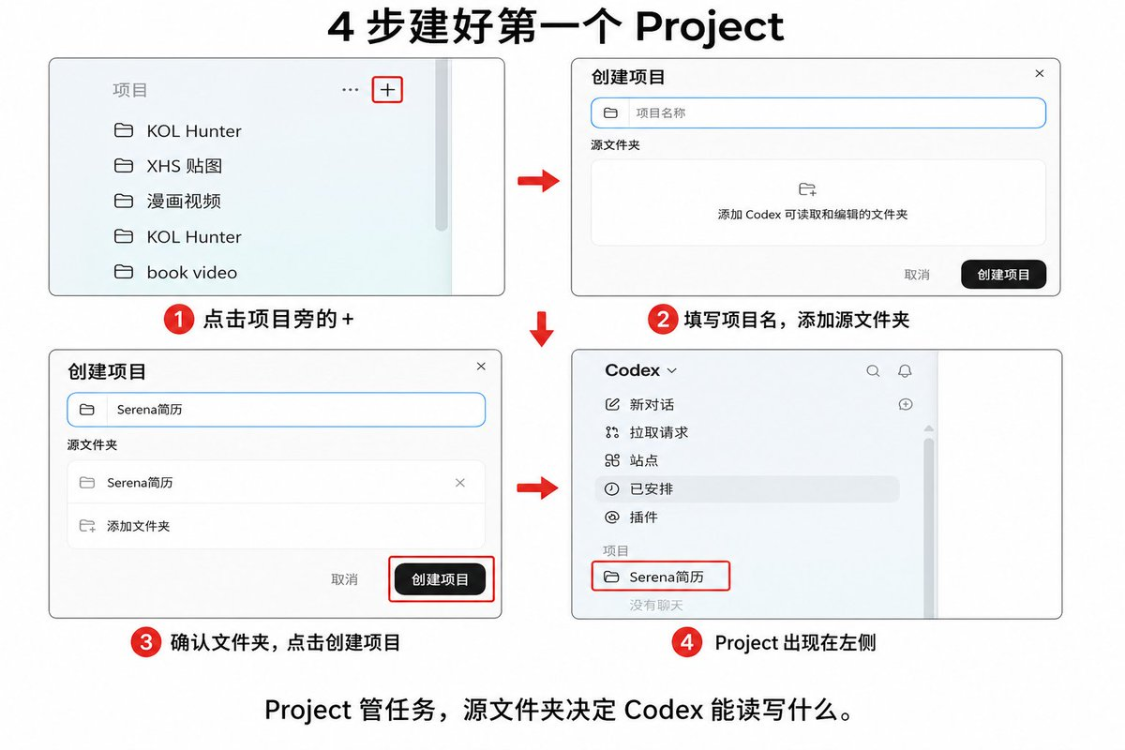
It is easy for a rookie to simply add the entire desktop, the whole OneDrive, or even a directory with a key number. Ask yourself: Where exactly am I going to let Codex work? _Other Organiser。
The steps to build the project are simple:
- Click on the + next to the Item on the left。
- GIVE THE PROJECT A READABLE NAME, LIKE "X CONTENT CREATION" "CUSTOMER DOCUMENTATION"。
- Adds a local folder for Codex to read and edit。
- If multiple folders are added, confirm which is the main folder。
- When created, relevant tasks on the left “recent” are to be dragged in, or created directly within the project。
Home folder is important。
The new Codex task will automatically start from here, and AGENTS.md, Project Skills and.codex/config.toml will automatically find it in the home directory. Other added folders can still be searched, read and edited, but they are not responsible for automatic discovery of project rules。
First build project, it is recommended that only one folder be added. First, the scope is correct, then the second。
Don't add these things:
- Wallet Keys and Notes
- Password Export File
- A whole private cloud
- Client information not related to current assignment
Prompt:
Please read the current project home folder first. Tell me: 1. What are the main documents in this folder and what are the current tasks? 3. Where are you going to start without changing the files? Ask me where it's not clear。
Seeing that it lists the directories and you expect it to start again。
8. Learn to find and receive after the mission has grown
Codex, in a few days, the "recent" on the left will soon be full。
At this point, do not continue to rely on the wheel and do not delete old mandates。
I'll do three minor things first: change of name, tops, and filing。
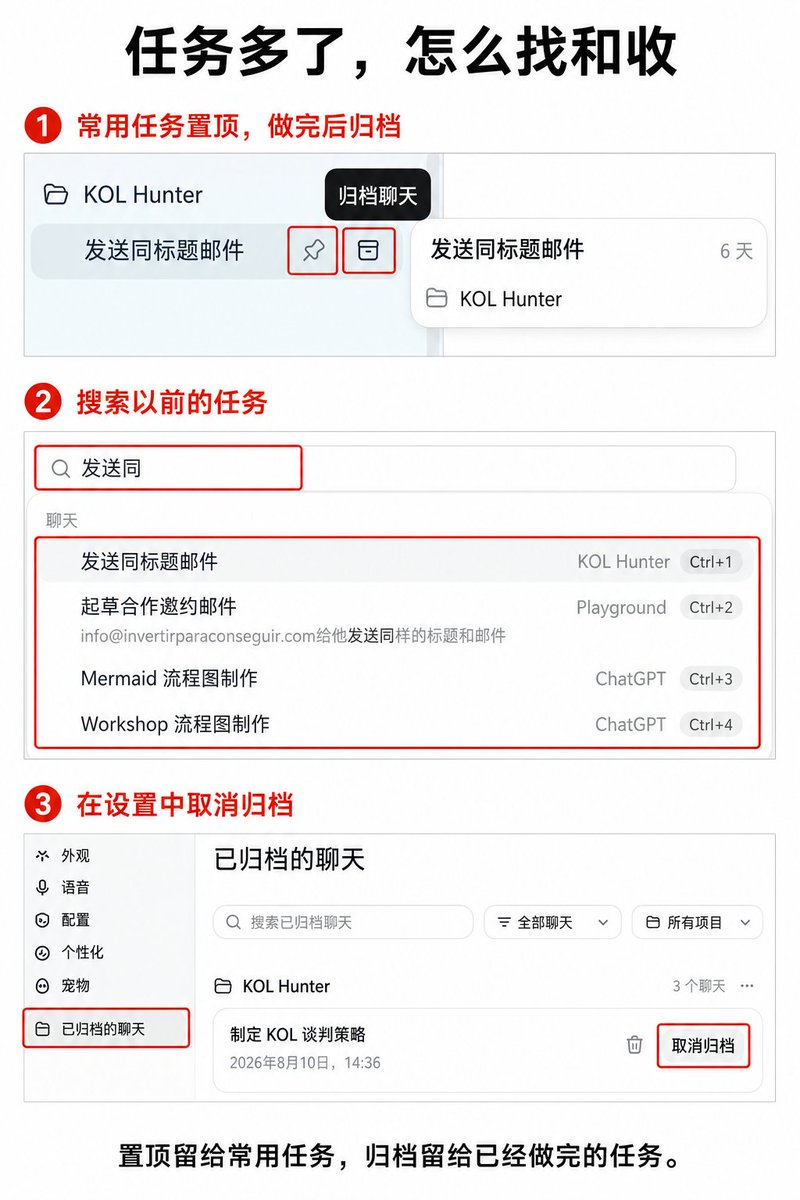
It would be better to write the results than to call "New Dialogue 1" "Look for me". For example:
- Codex, first draft of the babysitting guide
- The client list goes back to priority
- Web site mobile spill repair
The task of going back often can top it. The top just puts it in front, doesn't add context to the task, and doesn't make Codex remember much more。
_Other Organiser It will disappear from the most recent list, but the content is still there. When you need to restore, enter the Archived Chat in the settings and click Unarchy when you find the corresponding task。
There are two types of search for jobs:
- _Other Organiser。
- Find a sentence in the current mission: with Ctrl+F。
One search all over, one search only for the current conversation. Easy to press wrong。
Prompt
The ordinary task begins with four things:
- What do you want last。
- It should look at what information。
- Something you can't touch。
- To what extent is it complete。
It's very easy to write an article for me. May be replaced by:
Target: Write a long X for first-time readers of Codex based on current Project Codex material. Information: Read first “Referendant interface dismantling” and “Flying Book Codex Learning Library”. Boundaries: Do not create buttons and functions; information that can be changed is based on OpenAI Docs; do not automatically publish; do not modify original material. Completion criteria: Readers can find the main entrance, create a project, write the first task and know how to check the results. The text is saved as Markdown and lists the additional screenshots that are required。
If you have a reference chart, a reference article or the desired output format, add a reference and Outlook。
There are two more complex tasks: steps and checkpoints。
Let it be structured, you read it, you write it later; you write the facts first, then you synchronize it. So any step in the middle is wrong and there is no need to go back to work。
How to find Luna Max
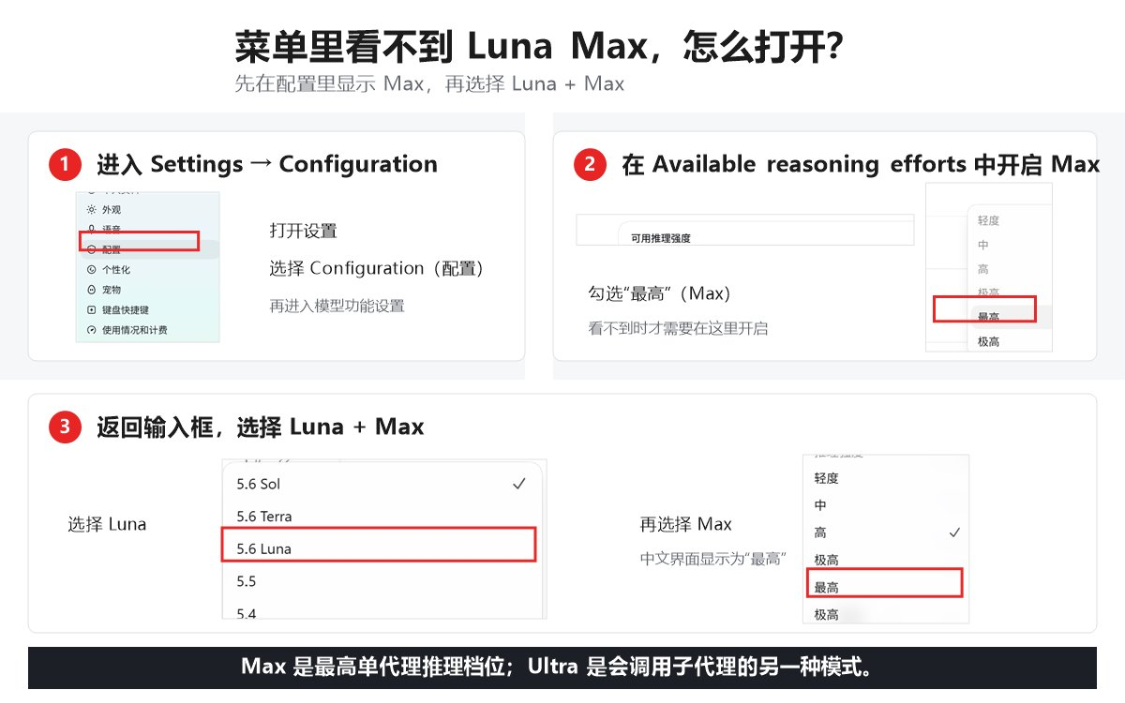
If you're going to use Luna Max, but you can't see Max in the model menu, you can open it this way:
- Enter Settings Configuration。
- Open Available research efforts, ticking "Max highest"。
- Go back to the input box, select Luna, then cut the reasoning to Max。
Options for different accounts, workspace strategies and release versions may differ. The officially confirmed caliber is: if Max is not visible in the menu, it needs to be enabled in the application settings first; it is not appropriate to write that all users are bound to close by default。
Eleven, the most valuable things in the set
Sets a long page, and I don't suggest new hands go through it。
Let's just look at these。
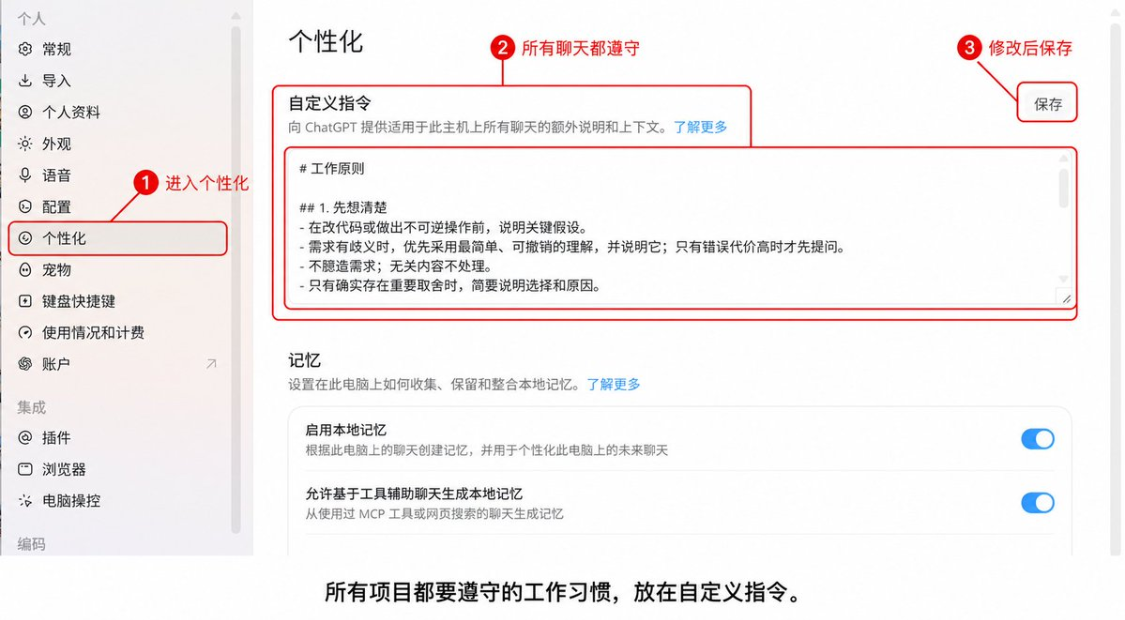
Personalization: Write in long-term preferences
Custom directives are suitable for work habits that are stable across projects。
for example:
# WORKING PRINCIPLE ## 1. CONSIDER FIRST - STATE KEY ASSUMPTIONS BEFORE CHANGING CODES OR MAKING IRREVERSIBLE OPERATIONS. - WHEN THERE IS A NEED FOR AMBIGUITY, GIVE PRIORITY TO THE SIMPLEST AND REVERSIBLE UNDERSTANDING AND EXPLAIN IT; QUESTIONS ARE ASKED ONLY WHEN THE COSTS OF THE ERROR ARE HIGH. - NO DEMAND ASSUMPTION; NO CONTENT DISPOSAL. - A BRIEF DESCRIPTION OF THE CHOICE AND THE REASONS FOR IT ONLY IF THERE ARE SIGNIFICANT TRADE-OFFS. ##2. SIMPLE PRIORITY - WITH A MINIMUM SOLUTION THAT WILL SOLVE THE PROBLEM IN ITS ENTIRETY. - NO SPECULATIVE FUNCTIONS, EXCESSIVE ABSTRACTION OR NON-RESTRUCTURING. - PRIORITIZE CHANGES TO EXISTING CODES; ADD OR DEPEND ONLY IF NECESSARY. - WHEN CHANGES BEGIN TO EXPAND, THE INITIATIVE SHRINKS TO FEWER DOCUMENTS AND LESS LAYERS. ## 3. REFRAIN FROM CARRYING OUT AND CERTIFYING - CHANGES ONLY TO DOCUMENTS REQUIRED FOR THE PERFORMANCE OF TASKS. - DON'T CHANGE IRRELEVANT CODES, DON'T SUBMIT CODES UNLESS I SPECIFICALLY REQUEST THEM. - WHETHER THE RESULTS OF THE PRE-COMPLETION CHECK MEET THE OBJECTIVES OF THE MISSION. - RUN THE MINIMUM RELEVANT INSPECTION OR TEST AFTER THE CHANGE; IF NOT, EXPLAIN THE REASON AND UNVERIFIED PART。
This directive reduces duplication of communication and reduces return to work. As to whether Token will be saved, depending on the mission itself, do not take it as a guarantee。
IN THE DESKTOPEND, THE CUSTOM COMMAND UPDATES THE AGENTS COMMAND FOR THE INDIVIDUAL LAYER. IT FITS "I'VE ALWAYS WORKED LIKE THIS."。
AGENTS.md: The project's own rules
When the project is completed, a copy of AGENTS.md is placed in the main folder。
It's either a mysterious configuration or a project description for Codex: What does this folder do, where important information is, what is not moving, where the results are stored, and how to check when it is finished。
For example:
# DESCRIBES THE PROJECT AS BEING USED FOR X CONTENT CREATION. # WRITING REQUIREMENTS - READ SPECIFIED MATERIAL AND PUBLISHED SAMPLES BEFORE WRITING. - NO DATA, SOURCES AND EXPERIENCE OF USE. - MAINTAINING A NATURAL SENSE OF SPEECH, WITH LESS USE OF THE REPORTING CAVITY AND ALIGNMENT. # FILE RULE - ORIGINAL MATERIAL IS READ-ONLY AND NOT COVERED. - THE DRAFT IS SAVED TO THE “PROCESS DRAFT”. - UNRECOGNISED, UNMOVED, NOT AUTOMATICALLY PUBLISHED. # COMPLETION STANDARD - FULL LIST OF TEXT, SOURCE, SCREENSHOT. - CHECK FACTS, LINKS AND AI AFTER WRITING。
Individual custom commands, project descriptions and AGENTS.md are easy to mix:
- Individual habits are to be observed for each project, leaving the definitional instructions open。
- The data description in the same ChatGPT project is available for project integration。
- Local folders, code libraries and team work rules, with AGENTS.md。
Codex will read the current work directory from the global directory, and the more specific the commands are coming close to the current folder。
Twelve. First real run. First Plan, then
Projects, information, plugins, Prompt, permissions and models are now ready。
Finally let it work。
Small task not Plan. Change the title, organize five notes and send them directly。
I'll start with Plan:
- The target's a little blurry
- It'll change a lot of documents
- There are important trade-offs in the middle
- The cost of getting back to work when you're wrong
Like this babysitting guide, we shouldn't have come up and finished it all at once. Let it first read Obsidian Bot. material, flybook documents and Serena have been published in long text, and then a list of structures and screenshots. It's over the structure。
Directly:
Please enter Plan without writing or modifying the document. Target: Complete a Cordex guide from 0 to 1. 1. Read the specified reference, list the functions that can be identified and the facts that still need to be checked. 2. Design the main line of the article in the order in which it is actually used. 3. Set out the cut-off chart required for each section and the buttons that will be drawn from it。
Plan's value is not to generate a nice outline。
It's to make you understand before Codex moves the file and spends time running the mission。
If the mission is going to run for a long time, it is also possible to define Goal: what is finally delivered, what is the evidence to prove that it was done and what should stop looking for you. The desktop end displays the Goal progress, which can be stopped, modified or continued。
A admissible Goal can say:
Objective: To complete the Codex nanny guide and synchronize it with the draft flying book. Complete the evidence: - text overwrites the agreed full functionality - All changeable features are compared to OpenAI Docs - every chapter of the operation has a screenshot planned - Local Markdown corresponds to the cessation conditions for the contents of the book: - List first when key screenshots are missing, no interfaces are created - Stop writing when flight permissions are insufficient and give a clear authorization entry
The conversation is getting longer, when it continues, when it changes
Using Codex for long assignments, the percentage of the context in the lower right corner will slowly rise。
It can be understood as a temporary desk for this task. Your text, files, pictures, Codex responses and tool results are in place。
100% will not suddenly delete the mission. Codex automatically compresses the content in front of it and can use it manually. The problem is that a condensed reservation is a summary, and some of the early minor requirements may be omitted。
DON'T LOOK AT 801 TP3T AND CHANGE MISSIONS IMMEDIATELY。
As long as it's the same thing, Codex hasn't forgotten the demands, so keep doing it. Change to the same website, fix the same question and add the same article is the same thing。
The following signals come up and we'll think about changing them:
- I've started doing another thing
- It has repeatedly forgotten the same request
- What was done was redone
- Too many documents and decisions
There are three ways of changing mandates。
First, to continue the old mission。
It's the cheapest. The mandate is clear。
Second, the recent dialogue is cited in the new mandate。
Enter in the input box @, select the latest task when the entry is available and then tell it where to proceed. Suits to just change the short connection to a clean window。
It is a quote, not a reference to the old conversation. The details of the old task have been compressed and will not automatically grow back。
Third, write `HANDOFFF.md ' 。
After a lot of days, a lot of documents, or when the old mission was already clearly confused, Cordex wrote a handover order in the project:
Please organize the current task into a HanDOFF.md and save it in the main project folder. 1. Clearness: 1. Objective 2. Completed 3. A modified document 4. Confirmed decisions and unalterable constraints 5. Failure to complete 6. Current issue 7. Next step is to record only the current state of affairs and not to reopen the mandate。
Then start up the job and continue with the same project:
Read HANDOFF.md first. In a few words, tell me where the previous mission was going, and then continue only from the “second step” and do not restart。
HANDOFF.md is not an official functional name that must be used. It is only a practical method of work: to put “the truth now” in the project document, and not to gamble on how much more can be remembered for old dialogue。
Fourteen, running several missions at the same time
When you open only one task, the last list on the left is enough。
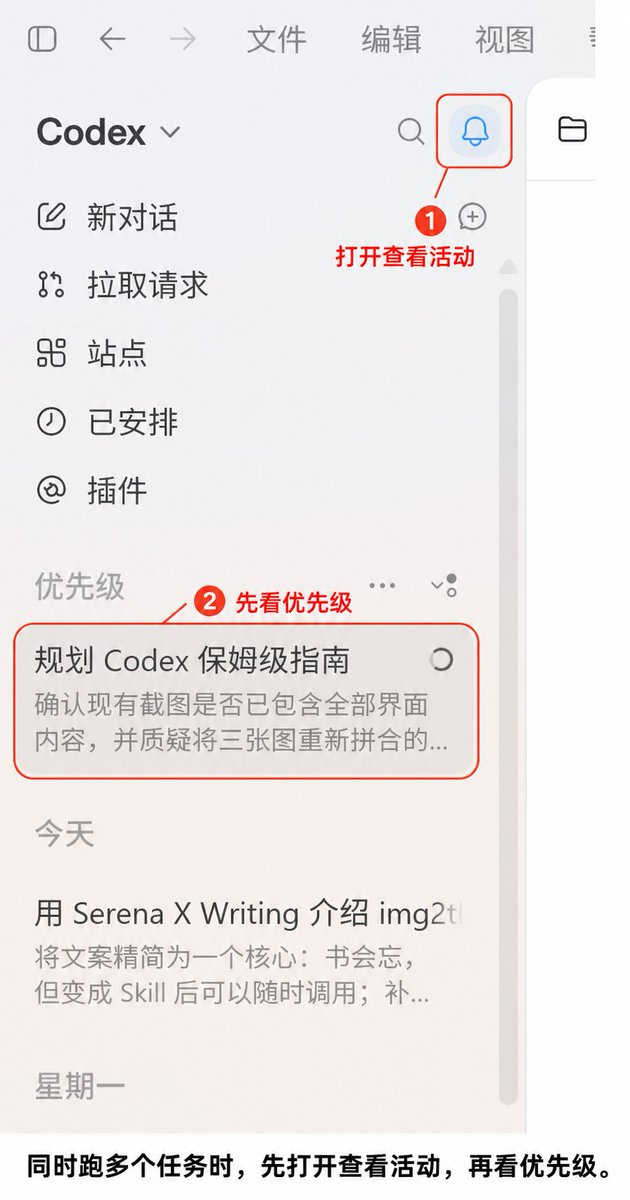
After three or four simultaneous trips, the situation will change: some are in progress, some are awaiting your approval, others have been completed and one is stuck on the issue。
At this point, at the top right corner, the “view activity” or bell entry point。
The current desktopend focuses tasks that require your attention on the Priority area. You don't need a window and a window point to open the check。
I usually deal with two categories:
- Tasks are awaiting manual confirmation. If you don't, it won't go down。
- Tasks that have been misreported or require additional information. The first judgement is not worth continuing。
The task in operation does not have to be interrupted frequently because it has no new text in ten seconds。
When there are many mandates, the title should also be clarified. “New Dialogue 4” placed on a priority list or did not understand it; “Moving End Receiving” “Practice Fact Review” knew who to deal with first。
15: How to run a complex mission: Sol, take care of it
Some tasks are not solved by writing a super-long Prompt。
For example, a multi-source study, a re-engineering project, and a knowledge base. It contains both parts that need to be judged and a large number of duplicates。
I'm going to break it down into four pieces:
- First define Goal and turn vague ideas into acceptable results。
- Sol studies and plans to identify risks, dependencies and sequencing of implementation。
- Once the plan is confirmed, the clear and verifiable part of the process is given to Luna Max。
- After all, let Sol do the Review again。
This division of labour is a practical stream of work, not an official set-up under OpenAI。
Why don't you use Luna Max from beginning to end
Because Luna is better suited to a clear, renewable task. Sol's judgement and colour were more appropriate in deciding what to do. And when the mission has been broken down, Luna Max is really like a runner。
Sol:
Not yet. Please press this complex assignment into a acceptable Goal and complete the study and plan. The plan is clear: input, step, output per step, check points requiring manual confirmation, completion criteria and conditions for cessation. Finally, a separate list is provided: which steps are sufficiently clear to be carried out by Luna Max。
When you give it to Luna Max, do not throw "Do as planned." Bringing together the approved plans, the scope of documentation and the completion criteria:
Please implement steps 2 to 5 as approved. Do not redesign the programme. Documentation of changes and validation results per step completed. Stop in case of unplanned problems and do not expand their scope。
Finally:
Please review the final results of the Agent check as lead. Check out the original Goal and the completed evidence before deciding whether to return to work。
The interface name in the text is organized by the ChatGPT desktop in August 2026. The portal may be updated with the version, and the availability of models, privileges and functions may also be affected by the food package, area and workspace settings. In case of inconsistency, the OpenAI official and the interface you currently see。
at last
I hope this article will help you。
It may not be complete, but I'll keep up to date
I hope it'll help White quickly understand Codex
And apply it to all aspects of life。