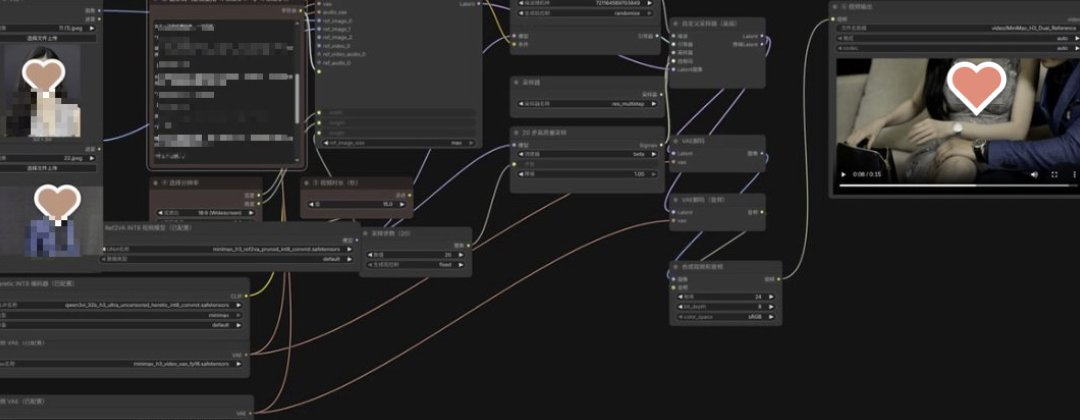
Chapter 1 ComfyUI What is it
ComfyUI is an open-source, free-of-charge, AI mapping tool that puts the generation process in front of you by node-linking。
YOU CAN UNDERSTAND IT AS AN AI PAINTING COMMUNITY OF LEGO: EACH FUNCTION IS A PIECE OF WOOD, AND YOU CONNECT THEM WITH A LINE, AND IT'S A COMPLETE LINE OF PRODUCTION。
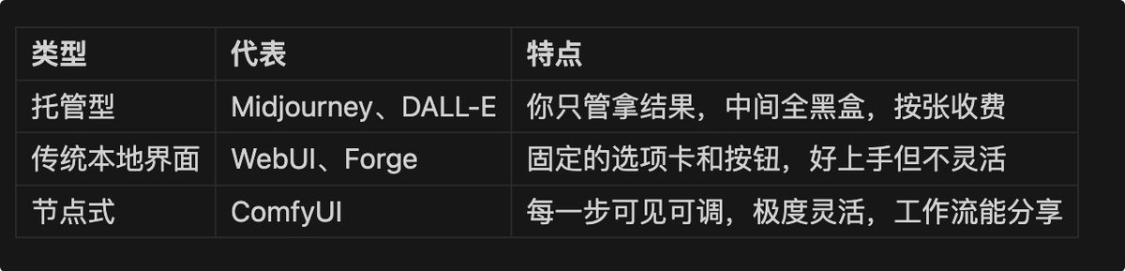
COMPARE TO OTHER AI PRODUCTION TOOLS:
Pictures & videos & audio can be done, with different workflows and models。
Chapter 2
Not to rush down, two minutes to confirm the hardware and make the choice。
2.1 The determining factor is presence, not memory
AI ATE THE GPU, NOT THE MEMORY, WHICH DETERMINES THE SIZE OF THE MODEL YOU CAN RUN, AND WHETHER IT'S GOING TO COLLAPSE IN HALF。
Identification:
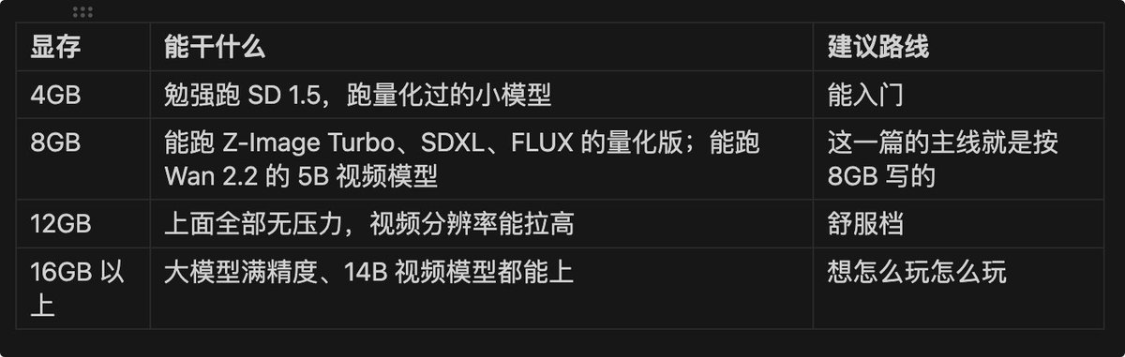
8GB IS THE THRESHOLD AND THE ACTUAL STARTING LINE OF 26 YEARS FOR MAKING LOCAL AI DRAWINGS。
WHAT ABOUT THE N CARD
Three roads:
- Mac user, ComfyUI supports the MPS acceleration of the Apple chip, and the graphics are coming out, which is slow, and the video is basically not going to work。
- THERE'S NO UNIQUE WAY TO RUN WITH CPU, SLOW ENOUGH TO WORK, JUST TO VERIFY THAT THE SOFTWARE IS NOT PROPERLY INSTALLED。
- The cloud service, the official Comfy Cloud, RunComfy, is directly in the browser, counting in the machine room。
2.3 Disk sufficient
This is particularly easy to ignore, and models are really big。
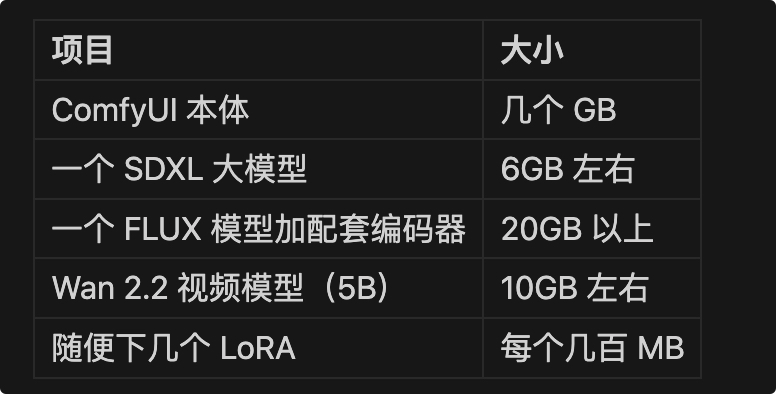
PUT 100 GBS ON A BIG DISK, DON'T PLAY C, PLAY A LITTLE MORE, TWO OR THREE HUNDRED GBS ARE NORMAL。
Chapter 3
3.1 Three formulas. Which one
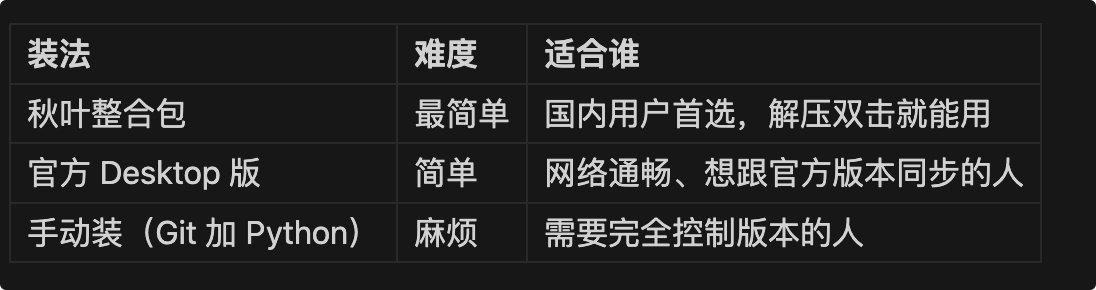
To White:Combining bags with autumn leavesI don't know. The reason is that it has built into the Python environment, built into the node manager, downloaded fast in the country and avoided a bunch of errors that would be encountered in manual installation。
It's not no good for you, but you need to understand GIT, you need to know Python environmental management, you need to switch sources, not White。
3.2 Do two things at once
Number one: Confirm the node manager
The node manager, ComfyUI Manager, is an application store for plugins. Autumn integration packs with their own, and the official Desktop version is called Management Extension in the menu。
It does these tasks: loading and unloading the defined nodes, filling the missing nodes of the workflow with one key, downloading models, updating the ComfyUI body。
The following chapters 5 and 7 will be used repeatedly。
Manual installation without a manual version, commands the CuffyUI/Custom_nodes directory execution:
git clone https://github.com/ltdrdata/ComfyUI-Manager
Full restart of ComfyUI。
Item 2: To Chinese
dot set gears, find language options, select text, and interface reload。
If only half of Han had happened, most of it was a version problem, it would have been better to return the previous version to the starter。
3.3 Which folder should the model place
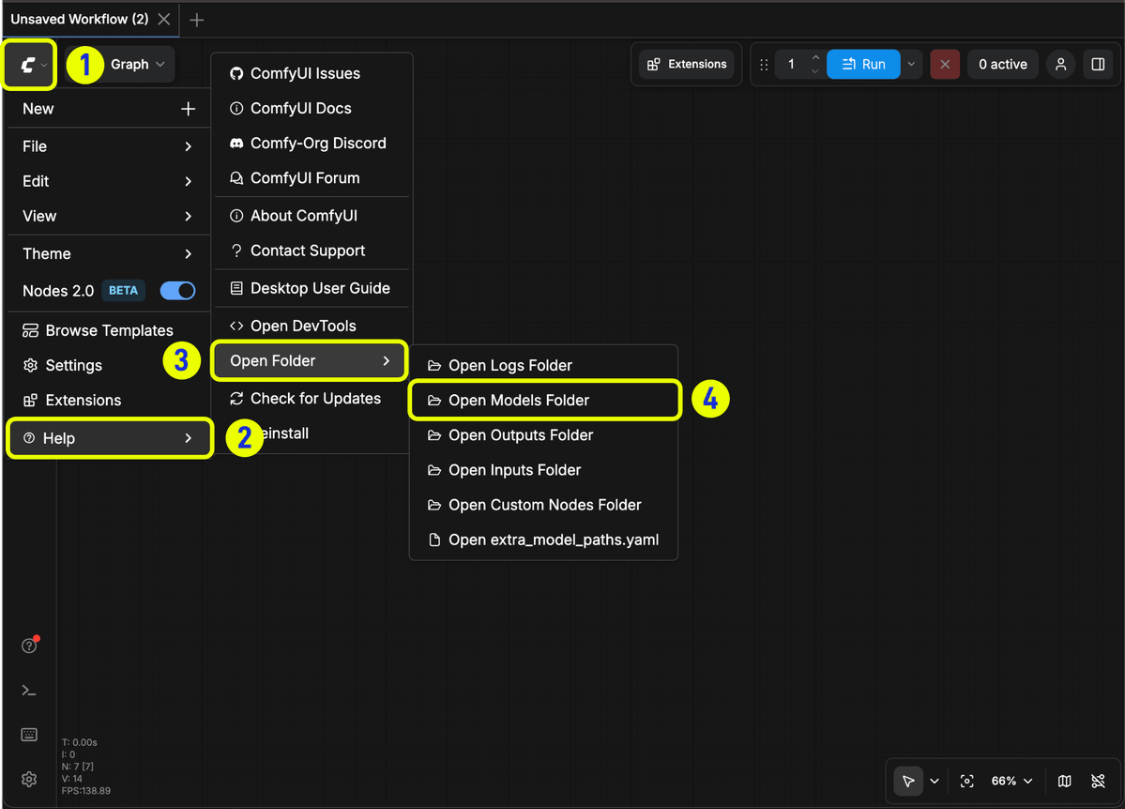
This table is one of the most important collections。The model is in the wrong folder, the ComfyUI just can't be found, there's nothing in the drop-down menuHalf the new guy's confused from here。
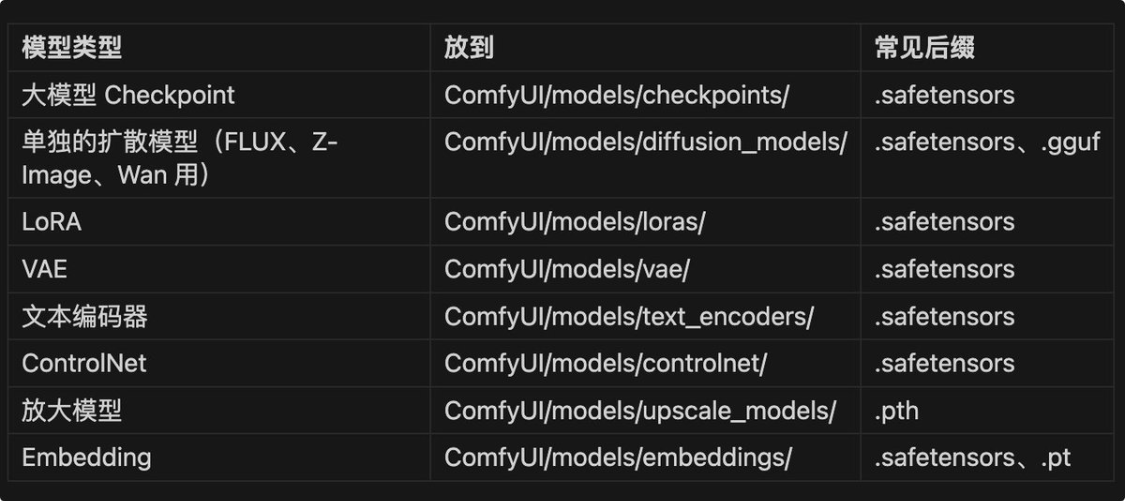
Two reminders:
- If the ComfyUI is running, click to refresh the button or press the R key to refresh the model, otherwise the new file cannot be identified
- priority. safetensors format, part.bin format not supported
Chapter 4
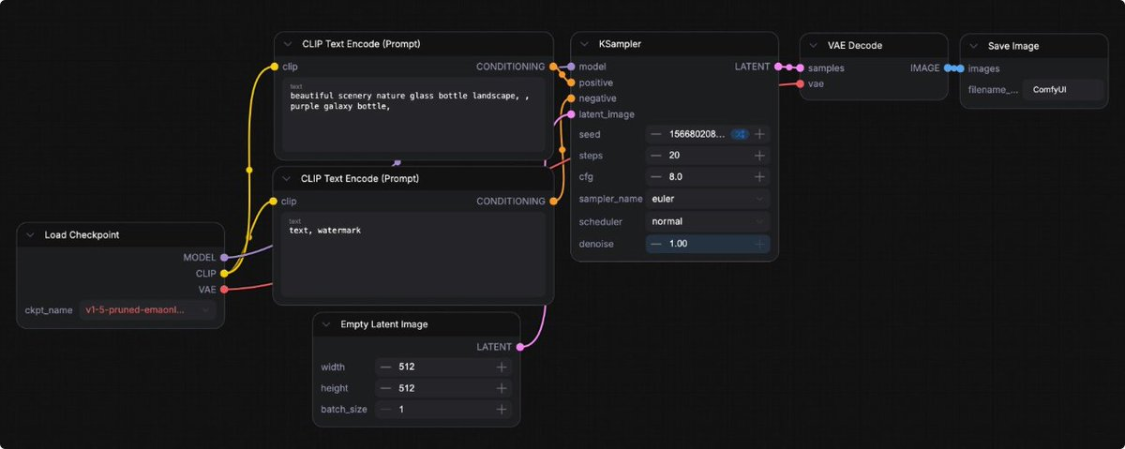
Open the ComfyUI, and by default the canvas has a graphic workflow. Don't touch it, read this。
4.1 Six squares, read as one sentence
The default workflow is six nodes, from left to right, and it is a complete phrase:
Loading the model, translating the hint into a signal, preparing a blank canvas, sampling, decoding the pixels, decorating the disk
Correspond to interface:
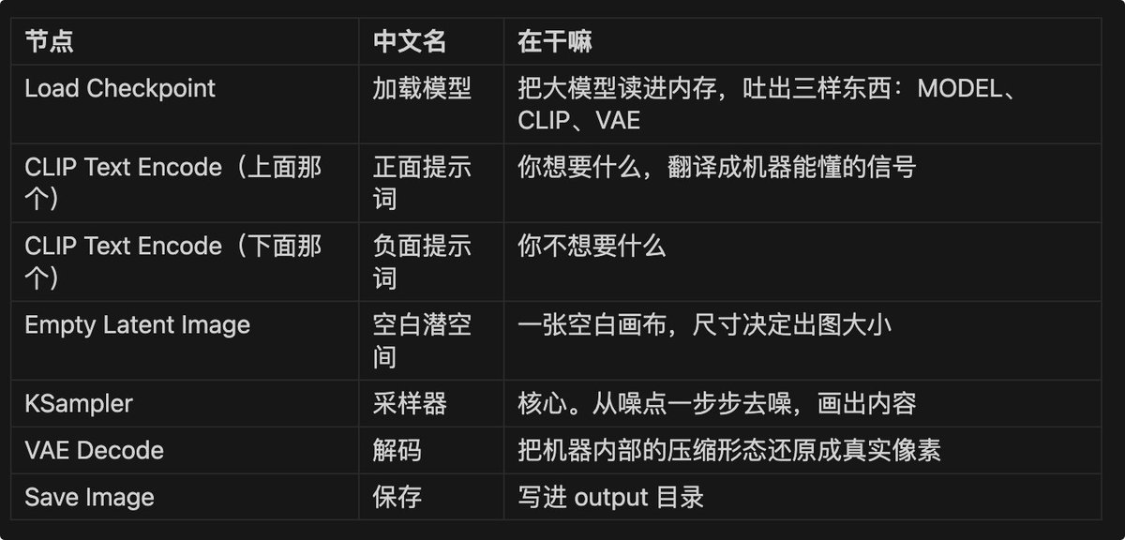
A common puzzle: How do you know which is a positive hint
Look at the connection. The output of the above-mentioned frame received KSampler's positive interface, which is the front; the one below that gets the negative is the negative。It's a negative connection, not a position, not a color.
4.2 Really run once
- Select a large model from Low Checkpoint Node model name from Low Larry
- write anything in a front-line box, sitting on a beach, sunset
- Point Top Right Run, or press Ctrl+Enter
In a few seconds, it's coming out of Save Image. The time of generation depends on your graphic card, and for the first time it will be slower, because the model is to be read from the hard drive to the visible。
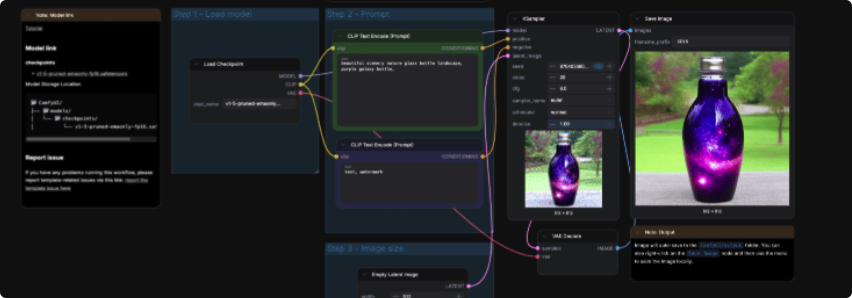
seeing the graph means you ran through hello world。
4.3 A characteristic that must be known
Every map produced by ComfyUIIt's all in the metadata of the picture.
Drag the diagram back to the canvas and restore the whole workflow as it is, with all the parameters, the connection, the model selection。
This has two practical benefits:
- If you save your own, it's like you keep your work flow
- The way the community shares the flow of work is through direct distribution
If the picture is not processed, the metadata will be removed and dragged into unreactive by micro-mail compression or by some platform。
Chapter 5
AFTER RUNNING THROUGH THE DEFAULT WORKFLOW, YOU'LL FIND THE MAP QUALITY NORMAL. THAT'S BECAUSE THE DEFAULT IS SD 1.5, AN OLD 2022 MODEL。
5.1 Four mainstream choices in 26 years
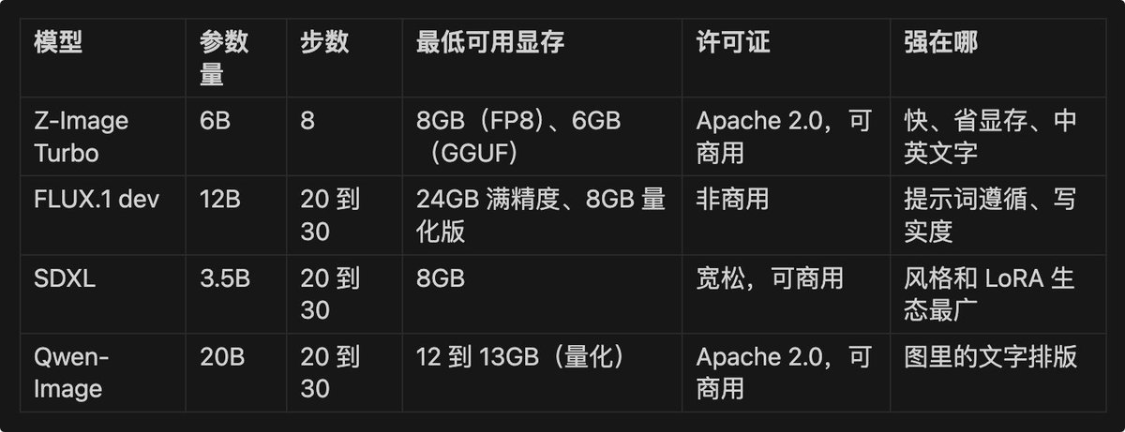
How
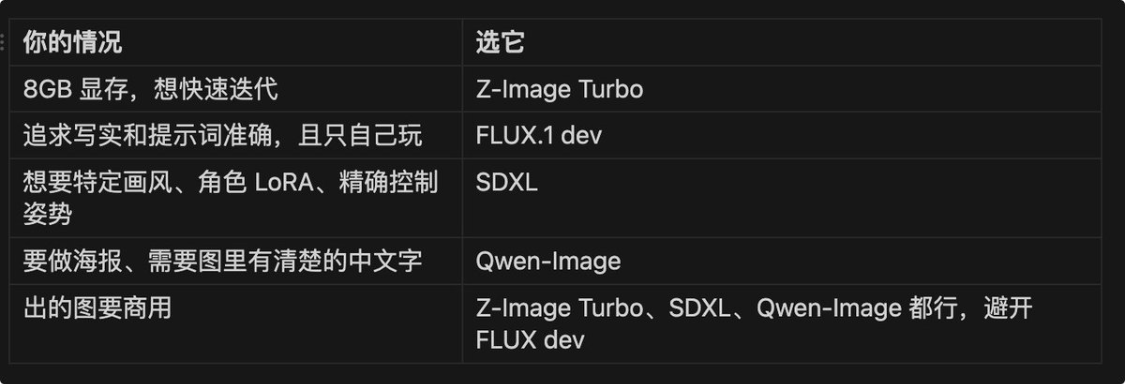
The weight of FLUX.1 dev is free of charge, but the licence states that it is not commercial。
Z-Image Turbo is Apache 2.0, which is of great value in actual work。
5.2 White first: Z-Image Turbo
THIS IS THE MODEL, THE 6B PARAMETER, RELEASED BY ALITHONG LABORATORY IN NOVEMBER 2025。
The model is suitable for new recruits:
- quickI DON'T KNOW. THE OFFICIAL DATA IS RTX 4090 ON ONE OF 1024 X 1024 ABOUT 2 TO 3 SECONDS. COMPARE FLUX WITH 15 TO 30 SECONDS OF PRECISION, IT'S DIFFERENT
- SavingsI DON'T KNOW. FP8 VERSION 8GB CAN RUN, COMMUNITY GGF QUANTITATIVE 6GB
- CommercialI don't know. Apache 2.0
- It's written in EnglishI don't know. It's an old-age model
Official effects:

English Rendering Power:

5.3 Z-Image Turbo complete configuration (copy only)
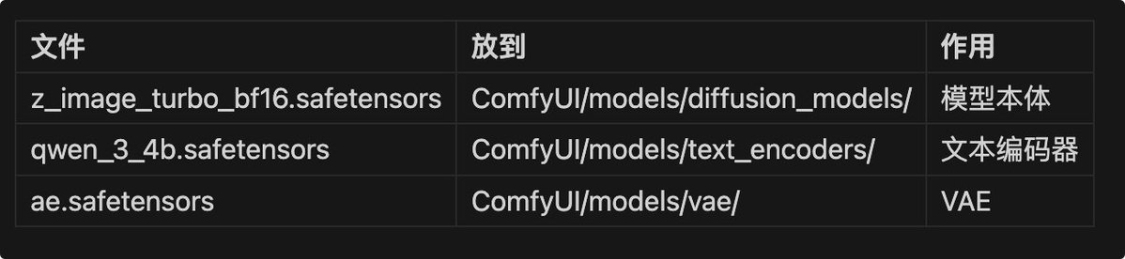
Step 1: Next three files, three folders
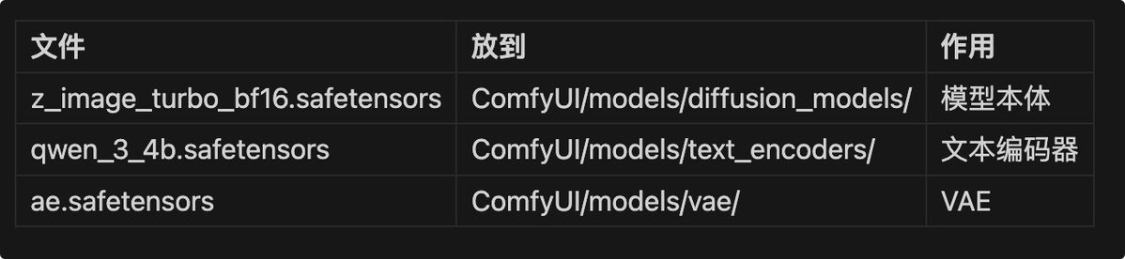
The directory structure confirms:
Photo by CofyUI/Models/
-diffusion_models/
─_image_turbo_bf16.safetensors
- text_encoders/
qwen_3_4b.safetensors
>vae/
– a.safetensors
Step 2: Loading official templates
ComfyUI dotwork, select browse templates, enter Image classification, find Z-Image Turbo。
Step 3: Three loaders point to your files
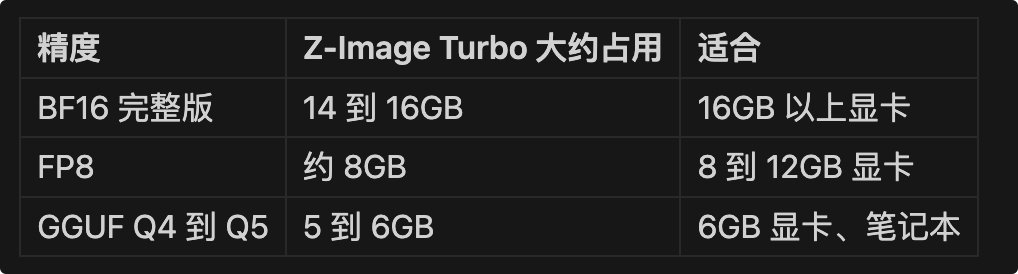
REPLACE THE BF16 MODEL FILE WITH A VERSION OF THE FP8 (APPROXIMATELY 8GB) OR A QUANTITATIVE VERSION OF THE GGUUF (APPROXIMATELY 6GB) IF THE 14GB IS NOT VISIBLE。
Use GGUF to first install ComfyUI-GGUF nodes in Manager and replace standard proliferation model loaders with its loader。
5.4 Common thinking when there is insufficient visibility
Models cannot plug into the display: ComfyUI unloads unfilled parts into memory and takes the PCIe channel to read. The speed of this passage is about one thirty percent of the visible bandwidth。
the reason whyThe value of a quantitative version is not that it is better in itself, but that it can be installed.
a quantitative model that is fully visible is much faster than a full-accuracy model that is inverted between memory and visibility, which is why dgx spark is admired, and can run a model。
Chapter 6 Video: Start with Wan 2.2
First, Wan 2.2, because of low configuration requirements and Apache 2.0 licence, it is commercial。
6.1 What's the difference between video and graphic
It is essentially the same process, with an additional time dimension。
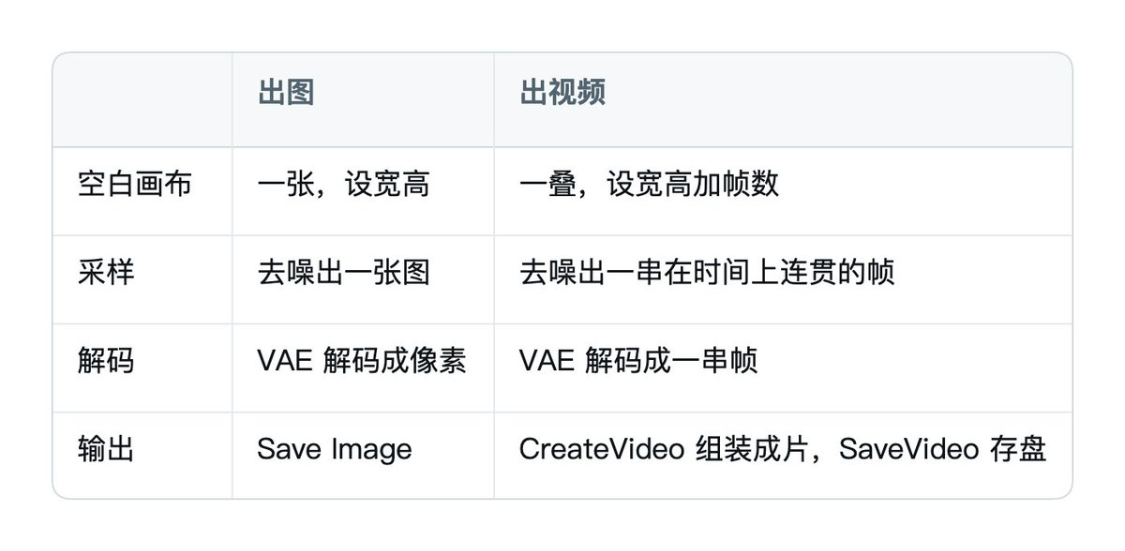
The core dilemma is "coherence": It's like the same scene moving. This is why video models eat much more resources than image models。
Psychological preparation:It's dozens of seconds.
Don't use a big resolution frame for the first run, let's talk about it。
6.2 5B OR 14B
Wan 2.2 has two sets of pairs of models。
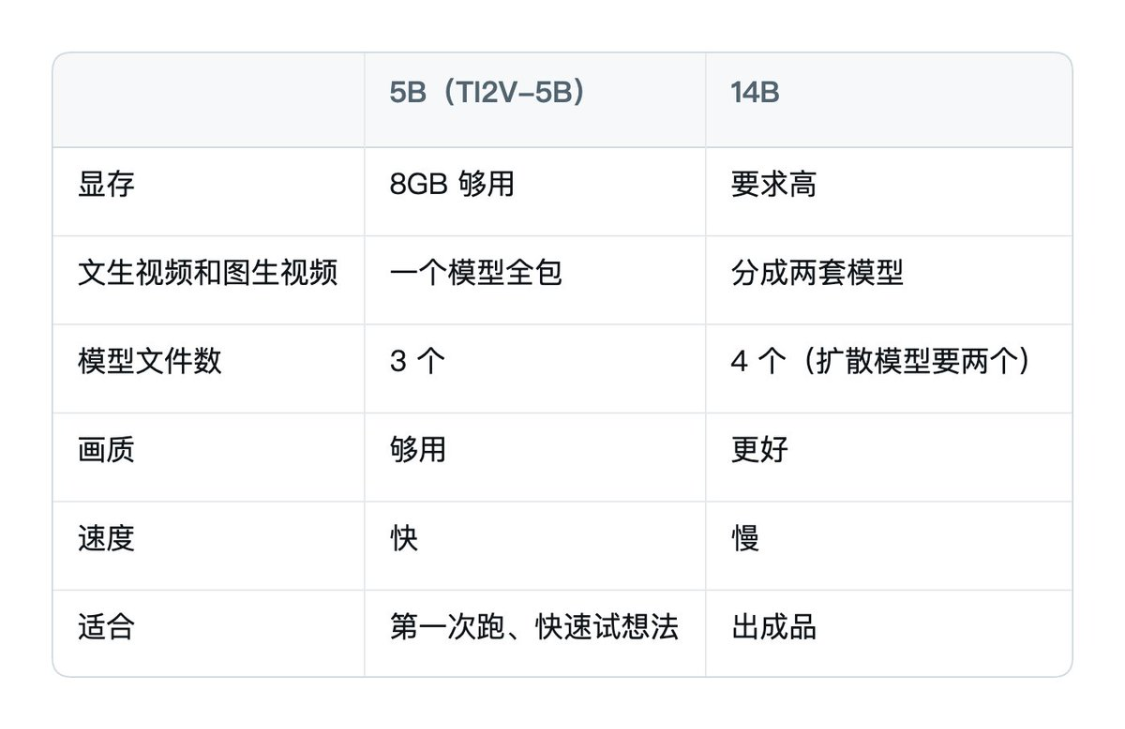
ALL BEGIN WITH 5BI DON'T KNOW. IT'S A MODEL THAT RUNS VINCENT'S VIDEO AND TUSHENG'S VIDEO AT THE SAME TIME, AND 8GB'S VISIBLE CAN RUN, AND THE SUCCESS RATE IS TOO HIGH, AND THEN 14B IS CLEAR。
6.3 Vincent video
After the template was loaded, the authorities divided the nodes and followed the names:
- Step1 Load Model: three loaders point to the three files
- Video Size & Length: Resolution and frame numbers. It's the first time I've gone to Little Tze
- Step3 Tips: Write what you want
- Press Ctrl+Enter to run
How do nodes work
UNETLoader
CLIPLoader → CLIPTextEncode
ModelSamplingSD3 (configuration of sampler to ensure consistency of frame)
Zenium
KSampler
Zenium
VAEDECode (decoded into a series of RGB frames)
Zenium
CreateVideo (assembled at frame rate and length)
Zenium
SaveVideo
How do you use a hint
The greatest difference between video and graphic tips:You have to describe sports.
Writing “A girl on the beach”, the model doesn't know what's going to happen, and coming out may be an almost static picture。
Write action and camera:
A girl standing by the sea, the sea wind blows her long hair, and she slowly turns her head towards the camera
The camera is coming up, the sun's light is on his face
Useful description dimensions: what the subject is doing, how the lens moves (push, pull, shake, follow), how the light and the atmosphere changes。
6.5 Graphic video: let a picture move
It's a more practical way to play, because you can make it satisfactory by chapter 5 and then let it move。
5B. THE TUTSON VIDEO IN THE TEMPLATE ISDefaultly turned offIn a group。
Open with: Select the group that says "For i2v, use Ctrl + B to be able"Press Ctrl+B.
Ctrl+B is the shortcut to disable and enable nodes. The official default was to turn it off so you could open the template and run the Vincent video。
After enabled:
- Upload your map to the LoadImage node
- It says how you want it to move
- Resolution and frame at Wan22ImageToVideoLatent node
- run
Here's the principle: Wan22ImageToVideoLatent, the node that injects the structure and motion lines of your picture as the starting point for the whole video. So the first frame out of the video will be very close to your original map and start moving。
6.6 First-end frame: specify beginning and end
STEP-BY-STEP, GIVE ME TWO CHARTS, GET AI TO MAKE THE MIDDLE TRANSITION。
USING THE 14B FRONT-END FRAME WORKFLOW, THE MODEL FILE IS THE SAME AS THE 14B GRAPHICS。
- First LoadImage Original Frame
- Second LoadImage End Frame
- Adjust resolution at WanFirstLastFrameToVideo node (official default is given to small sizes to prevent blasting and to be visible enough to be able to reach 720P)
- A hint of how this transition should happen
- run
It's a very good game to do。
6.7 Practical recommendations on visibility and parameters
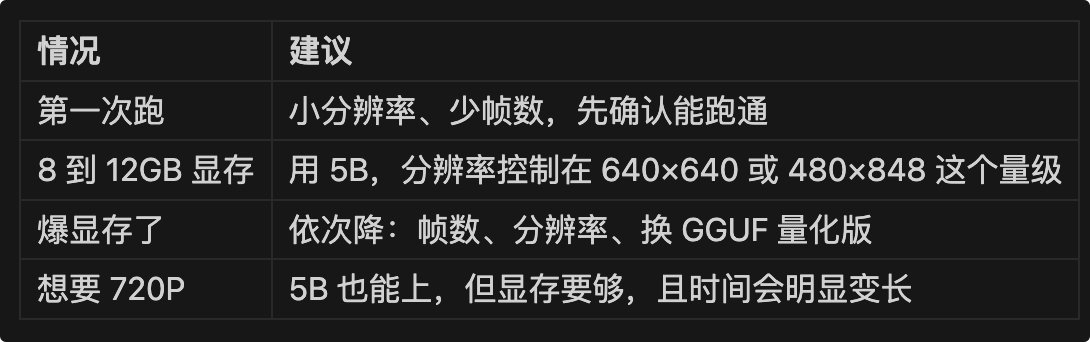
Wan 2.2 Native is 720 P, 24 frame per second。
6.8 About Mini Max H3
MiniMax H3 (also known as conch 3.0) gave us weights in August 2026 and ComfyUI supported local operations from version 0.30.0. Its ability is indeed another:
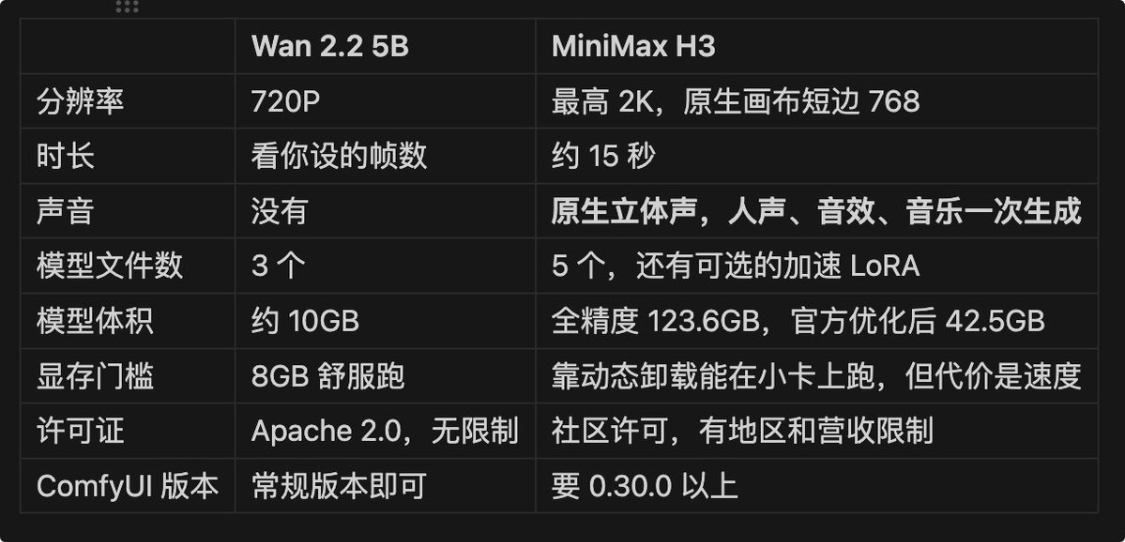
The ComfyUI team did a number of engineering optimizations to make it run: replaced the cutter of approximately 40% with a search table, the upper int8 quantifying, and writing special algorithms, and reduced the visible occupancy from 123.6GB to 42.5GB by 66%。
But "run" and "run" are different things。 The model of 42.5 GB is inserted into a dozen GB cards, relying on a constant inflow between memory and visibility, and the speed falls. And its text encoder is a big 32B, and this file alone is bigger than the whole Wan 2.2 5B。
so it's suggested that the rookies start with wan2.2 and become familiar with the minimax h3。
Chapter 7
It is the least efficient method of learning. The real power of ComfyUI is that the work stream can be transmitted as it is。
7.1 Official Template Library
The first place to go. sidebar icon, or Workflow in the menu, browse the workflow template。
It is classified by mission: image generation, video, magnification, etc. Each template contains a download link to the desired model, and if the file is not detected at the first loading, the bullet window directs you to download。
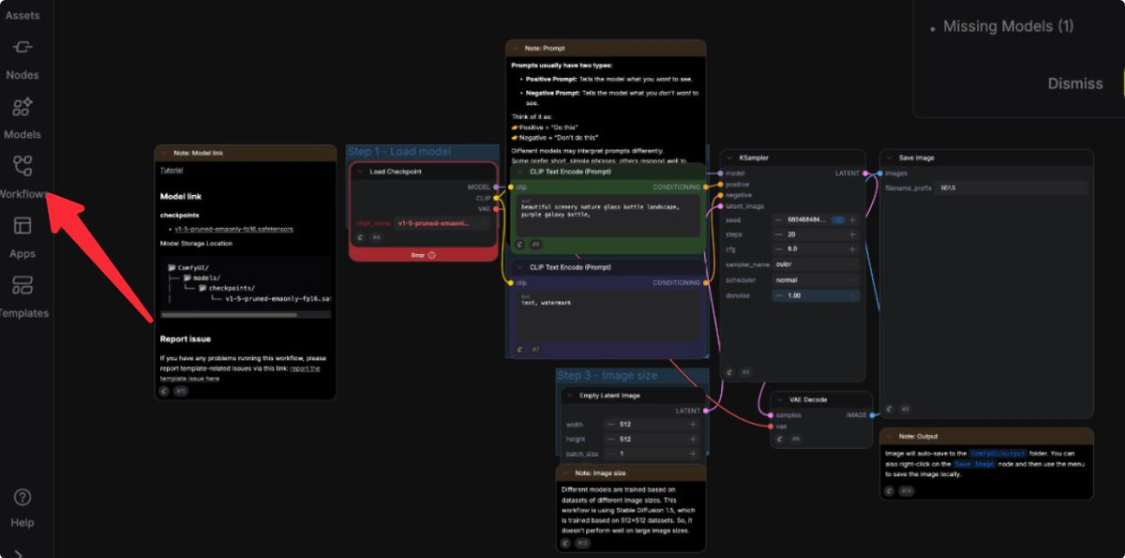
Desktop downloads will automatically help you put it in the right place; other versions will be downloaded using a browser, and you will need to put yourself in the corresponding models subdirectories。
7.2 Three ways to load other people's workflows
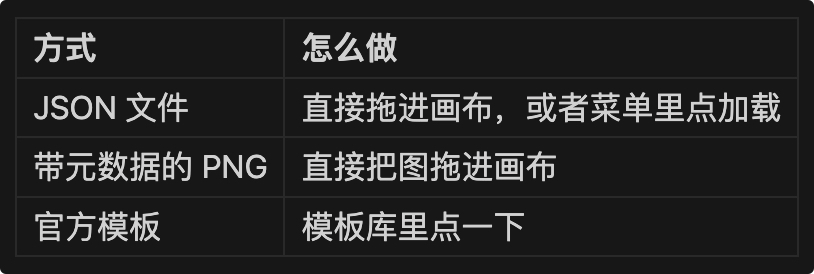
7.3 Where do you find the work flow
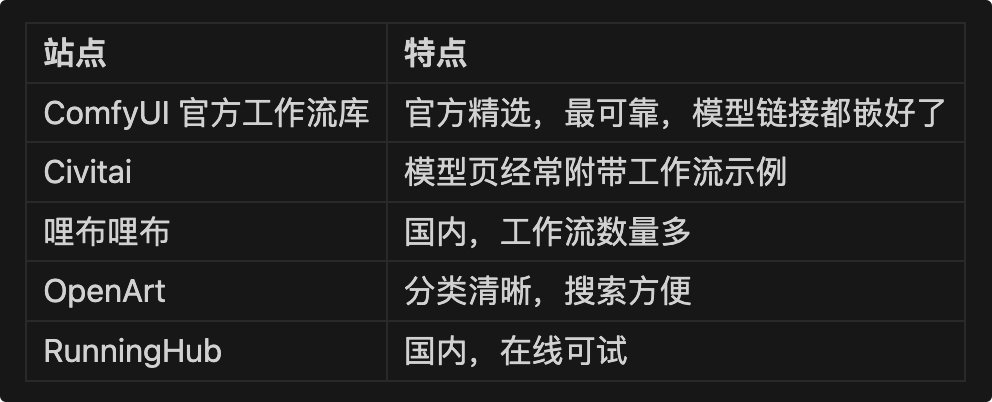
The next few work streams, which are close to each other, look at where they are different and are much faster than permeable nodes。
7.4 Saving your own work streams
Two ways:
- Ctrl+S Save as JSON File
- The graph itself is a workstream. The graph is a workstream
Following a satisfactory process, the customary Ctrl+S has a copy that can be sent to the person in need at any time。
The core idea of ComfyUI is one thing: VISUALIZE THE PROCESS OF THE AI PROFILE INTO DATA STREAM, each node is a function and the link is an input output。
The main line is understood by “loading models, coding tips, sampling, decoding and output”, regardless of how the model is changed。
What you want to learn: no review of the model for video
- Local deployment is required (to read it out), first, in respect of copyright and second, in respect of the modification of parameters, which cannot be done online
- wwan2.2 or minimax h3 can be used in comfyui, and the core logic is to replace the escape encoder
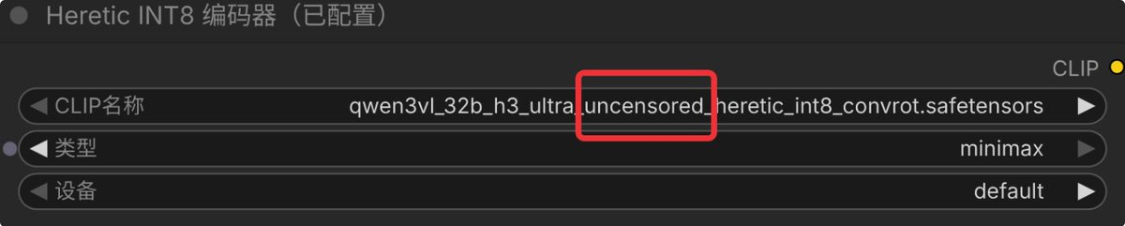
3. The ability to resist lines after replacing your raw video workflow
4. Write you a line using a local escape model, and of course you can write a golden bottle of plum
5. Importing workflows (review areas), putting pictures, filling lines, and clicking on action to get a piece out