



Bean curdAnd out of office products。
THE NEXT BYTE FINALLY COMBINES THE CARDS THAT AI IS WORKING WITH: THE ABILITY OF THE TRAE, BUTTONS, TO MOVE TOWARDS THE SAME ENTRY POINT, AND THE ABILITY TO USE THE BUTTONS IS COMING CLOSERBean bag workAnd deep access to Flying Book。
This is very friendly for domestic users. You don't need a ladder, you don't have to load off-shore mobile phone numbers, credit cards or API Key, download installation, scan login, you can experience a file, form, PPT, flybook multi-dimensional form on your computer, and you can call browsers, skills and modeling Agent Products.
If you've only used a regular bean bag before, remember the difference:The ordinary bean bag answers the question, and the bean bag work will continue to detached the task, to operate the file, to call the tool, and finally to give you an open product。

I. Downloading, installing and registering
Downloads from official networks
Opens the web of bean buns and clicks "download bean bag jobs"。
2. Selection at login
Open the client and click " Login" at the bottom left corner. Currently, it is possible to log in using bean bags or fly book sweeps, cell phone numbers, flybook accounts and shivering accounts。
If you just..Personal experience. Use bean bunsIt's the cheapest. The company ' s information is mainly in flybooks, using the original flybook account number with document permission, which will be better followed by cloud files, knowledge and multi-dimensional forms。
After login, leave the execution mode Confirm as requiredI don't know. It stops when it comes to documents, outside services or critical operations, and makes the white phase more stable。
The scan entered the main interface and the installation was over. There are no command lines or configurations for development。
First open, first identified main interface and nine portals
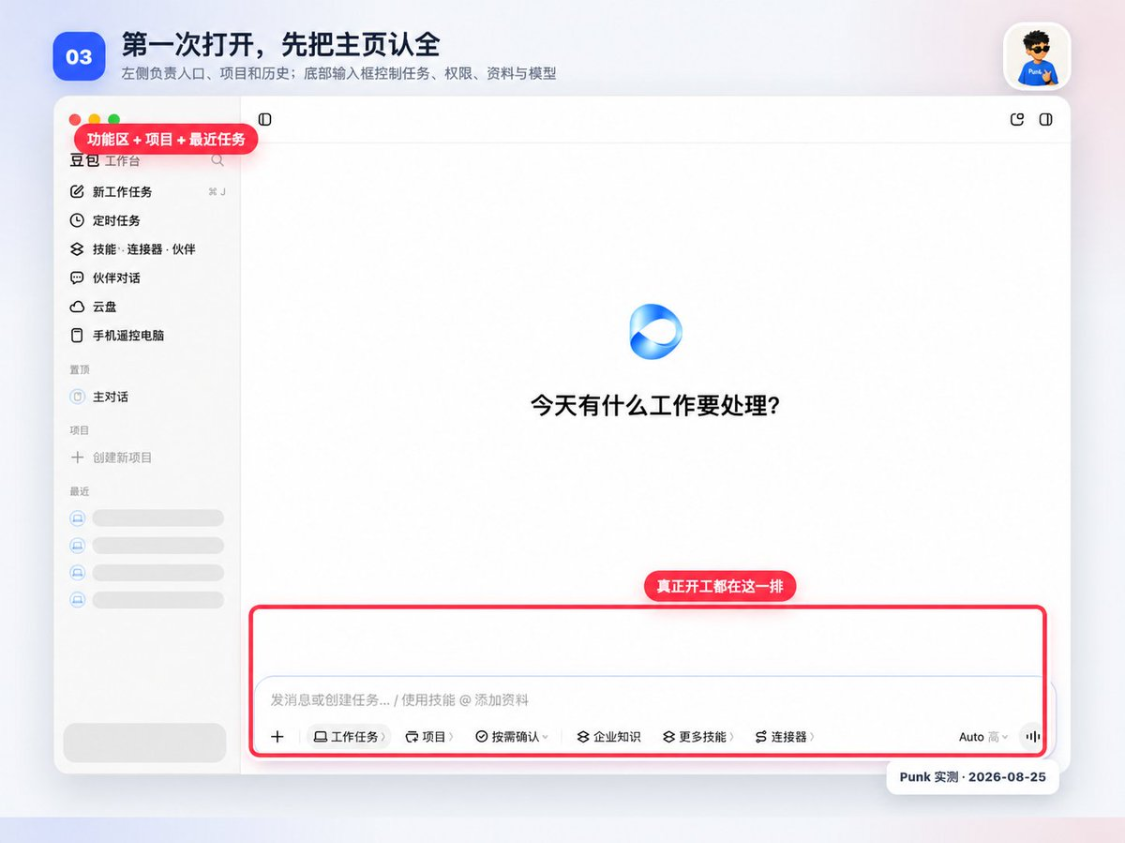
After login, new tasks, timed assignments, skills, connectors, partners, partner dialogues, cloud dishes, mobile remote computers, master conversations, projects and recent missions will appear on the left. These access points are responsible for: mission start-up, automatic execution, additional capacity, call-up of fixed partners, management of flight book information, handing over of mobile phones, maintenance of long-term work and search for historical records。
No full configuration is required for first use. We need to know what's going on at each entrance, and we need to get in there when the task really needs to be. Press the sidebar below to speak from top to bottom。
1. New tasks: all one-time work begins here
New Job is your most popular entry point. A PPT, an Excel, a contract, a web page, or a browser check can be initiated from here。
The difference between it and regular chats is that ordinary chats usually give you a text answer; a task begins with an understanding of the target and breaks it down into a few implementation steps, during which you can read files, call skills or connectors, and then generate actual files like Word, Excel, PPT, pictures, etc. When execution involves account authorization, document writing or other important actions, the client is suspended according to the confirmation mode and will continue until you agree。
When you click in, there's a blank page in the middle, and there's an input box at the bottom. The order of operation follows the following:
- Click on "New Job" on the left
- Click on the bottom left of the input box +, select oneCopy File;
- (a) Write in the input box what it is required to do and where it is to be put
- Keep "confirm as required" and send it
- When it begins to dismantle the steps, see if it is ready to delete, upload or overwhelm the document。
For example, you have a record of the meeting, which you can simply say: "Create it into conclusions, leaders, deadlines, and save it as a new Word, without changing the original document. This record will automatically appear on the left side of the "recent" after the end of the mission。
This is a run-off when the task begins to set out the steps for implementation, after which the delivery document is given and the file is opened at the designated location。 The "recent" on the left is a historical entry point to the mission and does not mean that the document has been correctly generated。
The button at the bottom doesn't have a back. I'll translate it to you:
- +: Hand over the documents from the computer to the bean bag
- Tasks: Let it really do it, not just answer a few words
- project: Tell it which long-term project this work belongs to
- Confirm as required: Stop and ask you something important
- Business knowledge: To find the answers in the authorized team files
- More skills_: an additional statement of work for the mission on an interim basis
- Connector_: Open the entrance to external services such as mailboxes, webpads, documents, etc.
- Auto / High: The model selection is ahead, followed by the reasoning strength. The two settings control “what model to use” and “how far does the mission think” respectively。
2. Models and reasoning intensity: Auto is enough for the first time
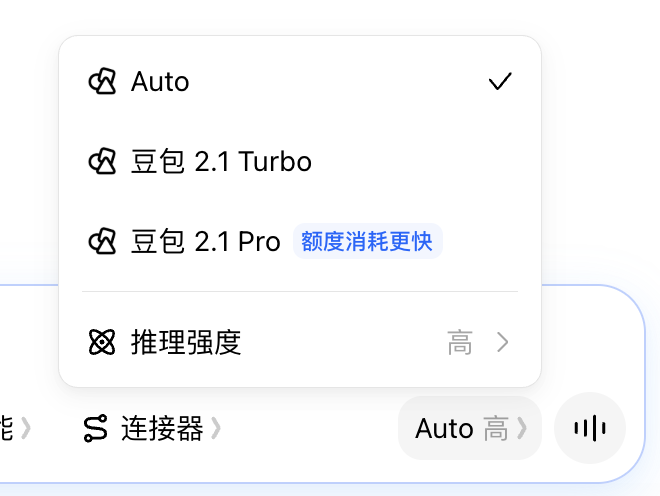
Enter a button like "Auto High" at the bottom right corner of the box. When you click, you see Auto, Bean Pack 2.1 Turbo, Bean Pack 2.1 Pro, and a separate "drimatic strength". Model names and optional versions may be updated with the client to understand their division of labour。
- Auto: The system automatically selects the model according to the task. First use, general documentation, table cleansing and daily questions and answers are suggested here
- Bean bag 2.1 Turbo: More for rapid response. I will use it for format conversion, summary, rewrite and other short-term missions with clear objectives
- Bean bag 2.1 Pro: For a multi-material, long-step task requiring a comprehensive judgement. The interface has been marked as "more expensive" and there is no need to open every task
- Intensity of reasoning: The extent to which control models are planned and analysed before implementation. Complex studies, cross-document checks and multi-step deliveries can continue to use default settings with high intensity and simple formatting。
Models and reasoning intensity are two independent options. "Auto High" means that the model is selected by the system, using a higher degree of reasoning; it does not represent the current fixed use of Pro. High intensity does not automatically correct errors, and documents, numbers and sources are checked after the mission is completed。
White can be selected directly by task: to rewrite a text, to use Auto when organizing a small table; to try Pro or to increase the level of reasoning when there are many materials that need to be studied before PPT is created. If the results have stabilized, no further consumption should be made for “higher levels”。
3. Competence model: deciding which steps the bean bag must take to stop asking you
Enter the " Always Asking / Confirming / All Allowed" frequency below the box to control the confirmation of tasks. It doesn't change the model capacity, it changes whether the bean bag needs your consent before you can network and modify the document。
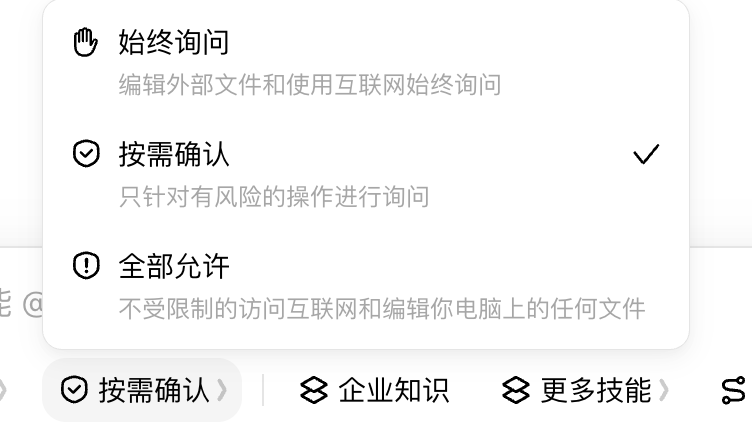
- Always Ask: Ask when editing external files and using the Internet. This is the most stable when first processing company information, connecting new services or not familiar with the implementation process
- Confirm as required: The system only asks if there is a risk to the operation. Regular exercise and day-to-day office referral to this tranche, with fewer recurring confirmations, while retaining critical standstills
- Allow All: Unrestricted access to the Internet and editing of computer files. It is appropriate for missions that have run over time and have a very clear range and is not suitable for long-term default。
There's a three-tier line here. The task permission mode is responsible for "Do you want to ask at the time of execution " ; the connector is authorized to determine whether it can access external services such as mailboxes, webpads, etc.; the MacOS system privileges determine whether to apply access to certain local folders, screens or microphones. Cut the task to "All allowed" and do not automatically get an unlogged mailbox account。
For the first time, it was suggested to keep "recognizing as needed" and to place the material in a separate exercise folder. When you see a mandate to delete, overwhelm, volume change, send, publish or log in, you can read the operating object and scope before continuing; if you are involved in customer, financial or undisclosed information, you can temporarily ask " always " 。
4. Timed tasks: automate the same work over time
Every time you click on a regular job. The timed task saves the task command, the running frequency and the execution time, running again automatically after point. It is suitable for more regular content and steps, requiring daily or weekly duplication of work。
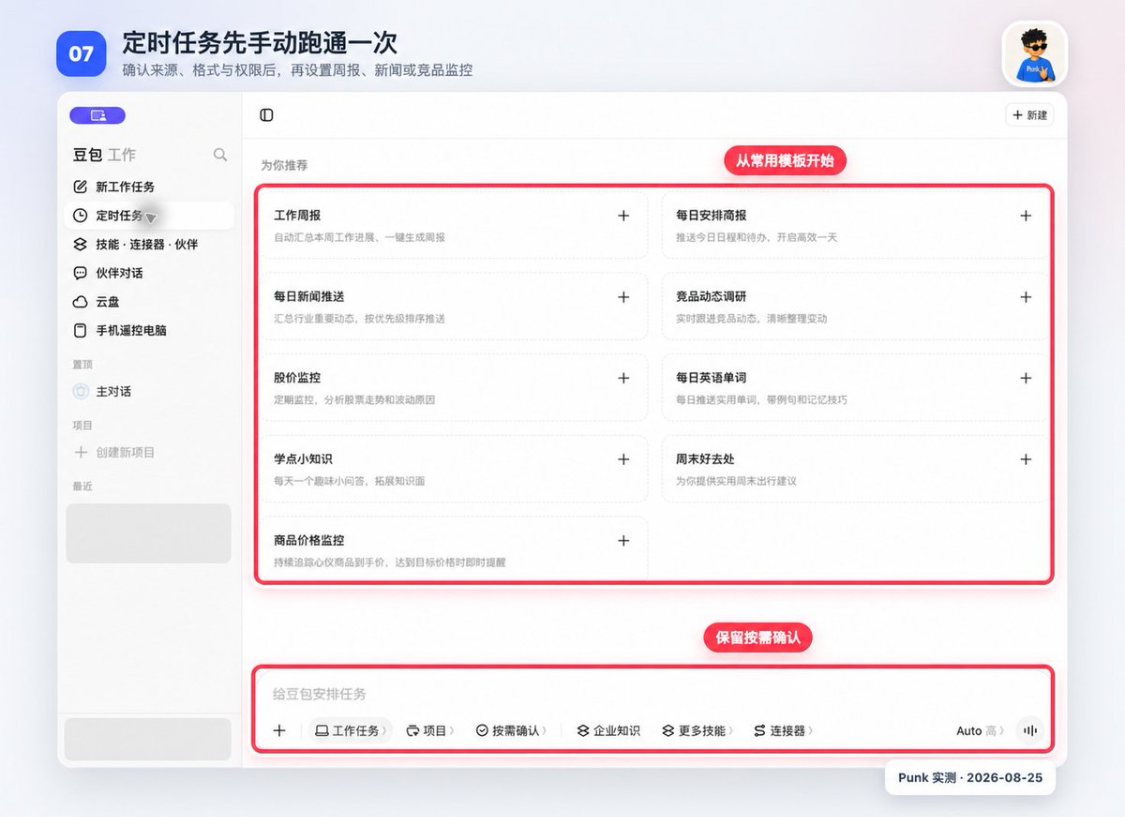
Templates have been prepared for the weekly newspaper, daily bulletins, news delivery, competitive dynamic research, stock price monitoring and commodity price monitoring. The template is only a pre-written mission framework, with three elements to be checked and added after a click:Each time it does something, runs at what time, allows access to what information or which tools it calls。
For example, you want to get an industry story every morning. "Search these three websites for the last 24 hours and give me a title, two sentences of summary and original links." "Acknowledging that the source is not lopsided, that the format is understandable, and that the same sentence is placed on a fixed-time job, with a working day running at 9 a.m。
When the setup is finished, you need to know where to look. The task will be kept in the Time job list. You can check if it is on, when it will run next, and you can see the execution record that has been generated. Discontinues a plan to close the switch directly, without deleting the entire task。
Timed tasks repeat mistakes together. The hint is miswritten once and the manual task is wrong only once; the automated task may be wrong every day. The first automation is therefore only for queries and reminders, so that it is not allowed to automatically e-mail, delete documents, modify data or publish content。
Manually perform it once, and then open the time switch。
5. Skills: additional fixed processes for a given category of tasks
A lot of little whites see "skills" and it's a fog. Skills, which we often call Skill, are in fact a set of detailed rules for certain types of work, which may include implementation steps, required materials, output formats and inspection criteria. With the addition of skills, the bean bag still uses the model of the current mission, except for more reference to the rules。
for exampleShort Video Scripts and Sniper SkillsIt will be asked to consider the camera, the image, the narration and the length of time
The "Public Image" techniqueIt is reminded to handle titles, structures, layouts and layouts。
Skills can reduce the repetition of the process, but you still have to provide the subject, material, audience and product requirements。
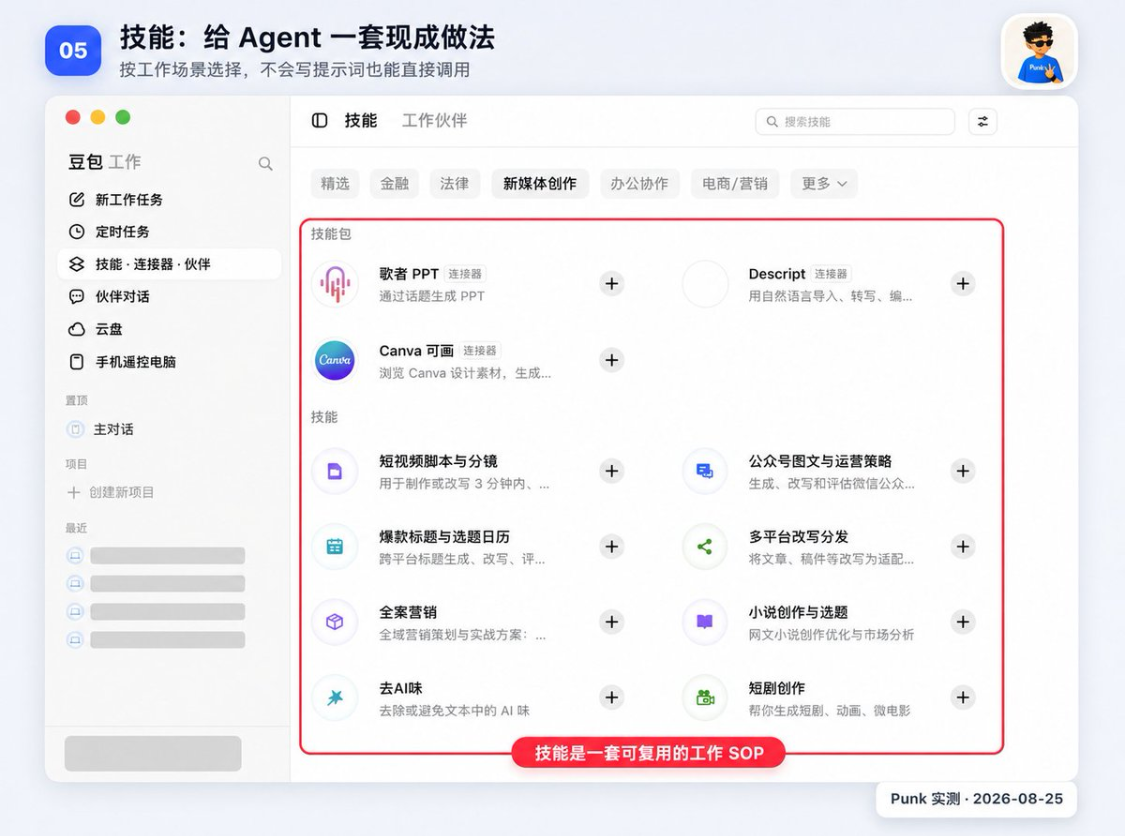
OPEN "SKILLS . CONNECTORS . PARTNERS" AND CLICK ON "SKILLS" ABOVE, THEN SELECT A CATEGORY. IN THE NEW MEDIA, SHORT VIDEO SCRIPTS AND SPECTROSCOPYS, GRAPHICS AND OPERATING STRATEGIES, BLAST TITLES AND QUESTION CALENDARS, MULTI-PLATFORM REWRITE DISTRIBUTIONS, GO TO AI AND SHORT PLAY CREATIONS CAN BE FOUND。
For example, you only say, "Do me a short video", and the bean bag needs to judge its own length, image, line and rhythm; it will follow a more complete spectroscopy structure when the short video script and spectroscope skills are selected. At this point, product information, target population, video length and distribution platforms are added, with the result usually more stable。
There were two ways to use it:
- Find the skills needed in the skills market, click on the right of the card +
- Click " More Skills " at the bottom of the input box to temporarily add when you have entered the task。
Click + just add skills to the available list and will not start immediately。Return to a new task, select this skill at the bottom of the input box and then send a specific command; a " certain skill is being loaded " appears in the execution process, or plans are to begin to follow the corresponding process to indicate that the task has been called。
Skills do not automatically acquire external account number privileges and do not replace non-existent original materials. If a skill requires access to mailboxes, webpads or third-party documents, it usually requires a separate configuration of the connector。
A very special ability: direct access to the existing Codex Skills
Click "More Skills" below the input box. I saw it directly on this Mac 211 skillsI don't know. Agently Mail, Lark Approval, Lock Base, Punkadrian Writing, Tutorial SOP, etc., are the same local Skills that I used to place in Codex and the Universal Agent skills directory, and did not upload them individually in the bean bag。
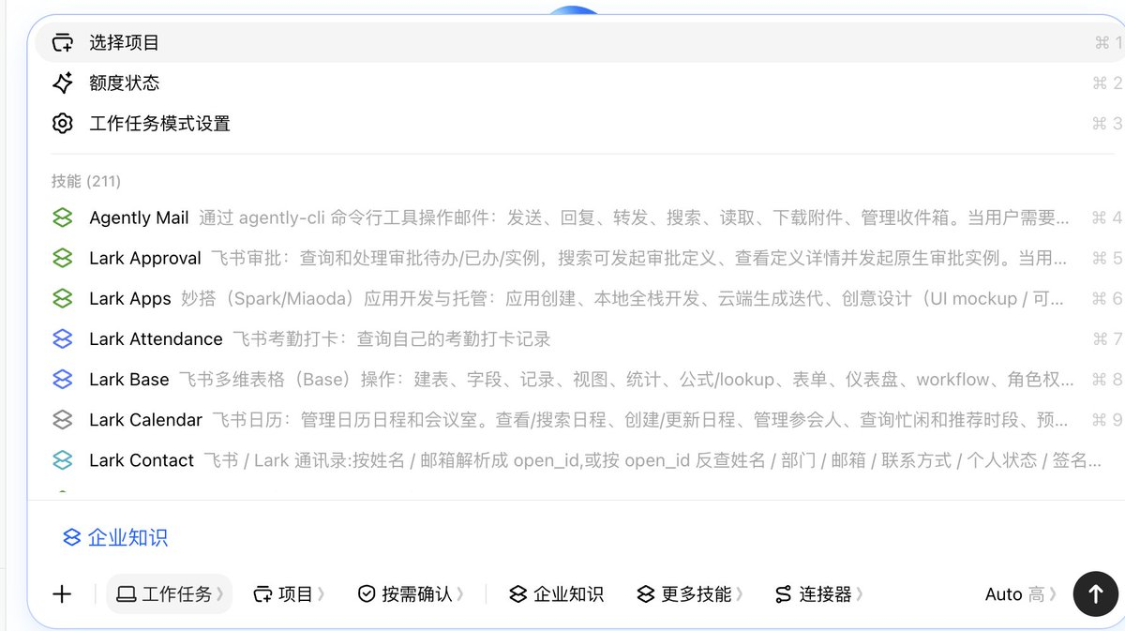
i checked the client's local log for the day. the bean bag will read .agents/skills and will also examine .codex/skills, and the same name will be weighed. so here, more preciselyAutomatic Discovery and Amalgamation: Open "more skills" to choose, save the re-installation steps。
However, "See in the list" and "Agent can be fully implemented."。Skill, which contains only writing rules, steps and templates, is usually easier to use across products; Skill, which relies on Codex-specific tools, MCP, environmental variables, commands or fixed paths, must run once after a legume job. There is one Skill in my log that is not properly loaded due to the failure of the YAML resolution。
You can start with a low-risk text class, Skill, with a small task to see if the implementation plan shows that the Skill has been loaded. Confirms that the rules are in force and that there is no lack of tools to test the complexity of Skill, which requires sending mail, modifying cloud files or running scripts。
Connector: allow bean bag access to external services
Your QQQ e-mails, QCs, 100-degree webs, Notion, GitHub are external services. The bean bag does not by default see the contents of these accounts and must be connected to the login and authorization before searching, reading, creating or modifying them to the extent permitted。
The actions provided by each connector are different. For example, mailbox connectors may support the search for mail, read attachments and send responses; meetings connectors may support queries and create appointments; and web connectors usually search, upload and download files. Specific what can be done is based on the authorized page and the description of the connector。
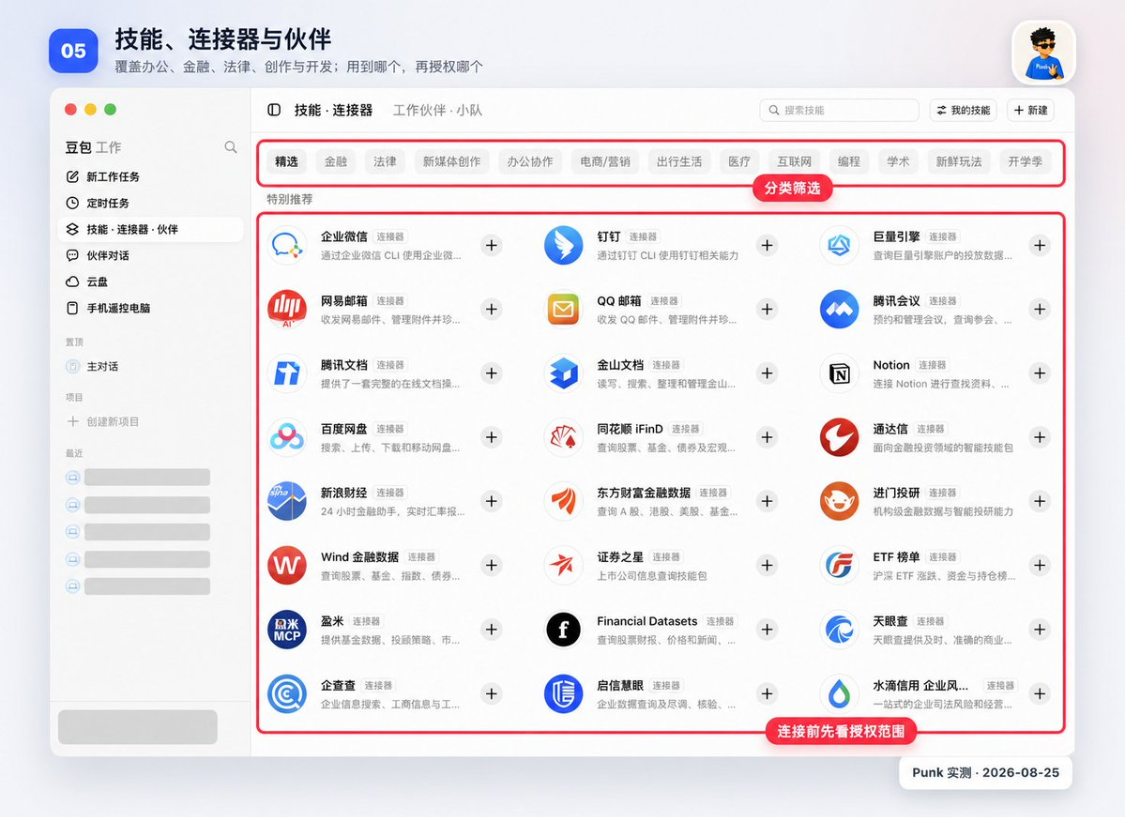
The portals of company tweets, nails, mega-engineers, QQQ mailboxes, teleconferences, arraignment documents, Kinsan documents, Notion, 100-degree Internet discs, GitHub, Wind, bouquets, sky-eyes and search. Classification cuts across offices, finance, law, content, electricity, travel and development。
Connector pages are organized by financial, legal, new media creation, office collaboration, and electronics marketing. You can search for the name of the service, or you can find it in the classification。
When connecting a service, check in this order:
- To make sure it's really needed for the current mission
- Click on the right of the connector +
- Read the authorized page to see whether it is read, created, modified or sent
- First preference for read-only or minimum range
- Go back to the mission and write clearly what it's allowed to do。
FOR EXAMPLE, ALL YOU WANT TO DO IS ORGANIZE THE CONFERENCE ANNOUNCEMENTS IN THE QQ MAILBOX AND WRITE: "SEARCH ONLY THE LAST SEVEN DAYS OF MAIL WITH THE TITLE `MEETING', ORGANIZE TIME AND ACCESS LINKS, NOT REPLY, NOT FORWARD, NOT DELETE. SEEING THAT IT RETURNED THE EMAIL TITLE AND DATE, AND THAT THERE WAS NO NEW SENDING RECORD IN THE MAILBOX, INDICATES THAT THE CONNECTOR WAS USED CORRECTLY。
If the message "no access" is "no account number" or "not needed to log in", go back to the connector page to check the authorized status and do not change the hint repeatedly. The successful authorization only represents access to the bean bag, and the actual reading and writing of each case remains subject to the authority of the account number itself。
The distinction between the three concepts can be directly recorded:Skills prescribe treatment, connectors provide external data and operational access, partners retain roles and long-term division of labour。
7. Working partners: preserving a set of professional roles that can be used repeatedly
Ordinary tasks mainly revolve around current directives. Working partners are pre-positioned with job names, good at content, common skills and handling, and are well placed to delegate a type of repetitive work to the same role over time. Every time you continue to provide the material and objectives of the mission, you do not have to explain from the beginning what it should be。
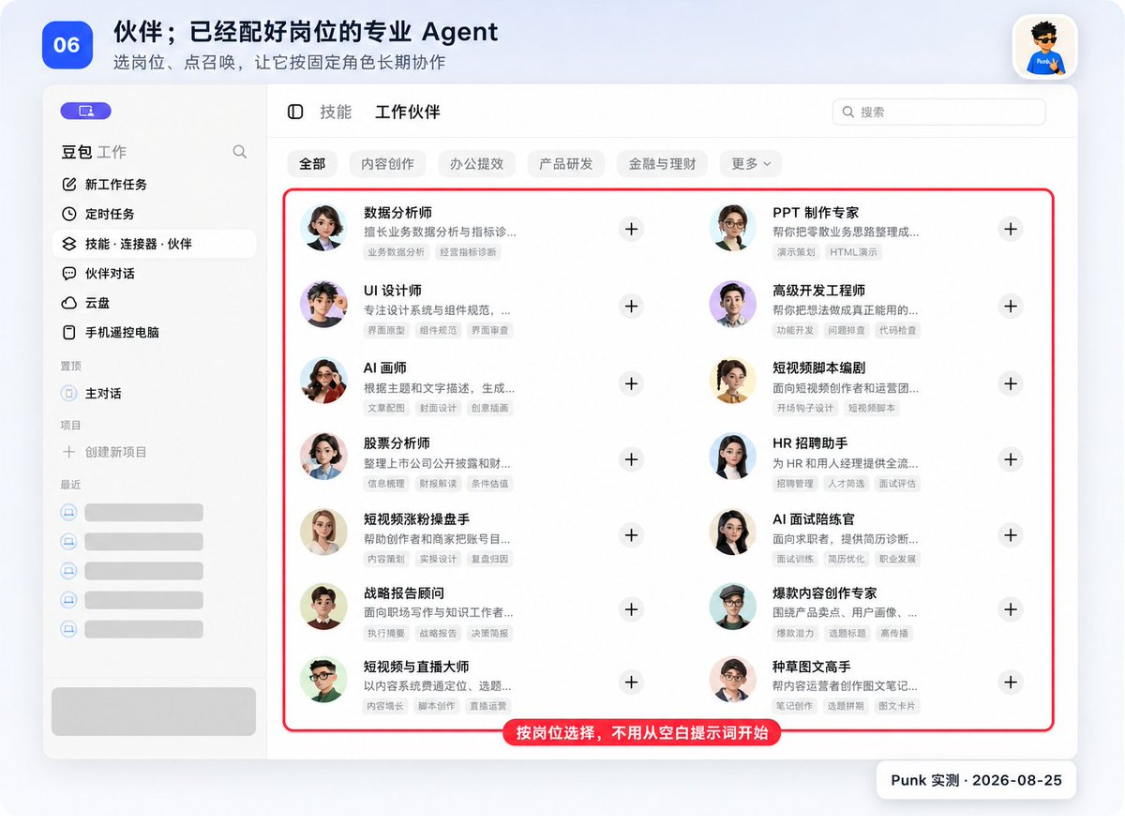
IN THE PARTNER MARKET, THE ROLE OF DATA ANALYST, PPT PRODUCTION SPECIALIST, UI DESIGNER, SENIOR DEVELOPMENT ENGINEER, AI PAINTER, SHORT VIDEO SCRIPT WRITER, HR RECRUITMENT ASSISTANT, STRATEGIC REPORTING CONSULTANT, ETC. EACH CARD SAYS WHAT IT'S GOOD AT. YOU LOOK AT THE JOB, THEN YOU LOOK AT THE DESCRIPTION, AT THE LAST POINT ON THE RIGHT + OR "CALL."。
When is it worth a partner? Let's see if the mission is repeated:
- In a short time, a list of "new jobs" will be made, and it will be more economical
- (a) A business rediscovery is done every week: a regular search for a data analyst
- EVERY MONTH, I REPORT TO MY BOSS: I'M LOOKING FOR PPT PRODUCTION SPECIALISTS
- Long-term operation of a content account: regular search for content creation partners。
Click on the card to first look at the role statement, confirm that it matches your mission, and then click + or call. When the call succeeds, the role will appear in the "partner dialogue" from where the mission can be launched directly, without reopening the partner market。
Partner dialogue: managing added partners, teams and task templates
The Working Partners page is used to find and add roles, while the Partners Dialogue page focuses on added partners, default working partner teams and task templates prepared by the system. It addresses the question of “where to continue looking for this role next time”。
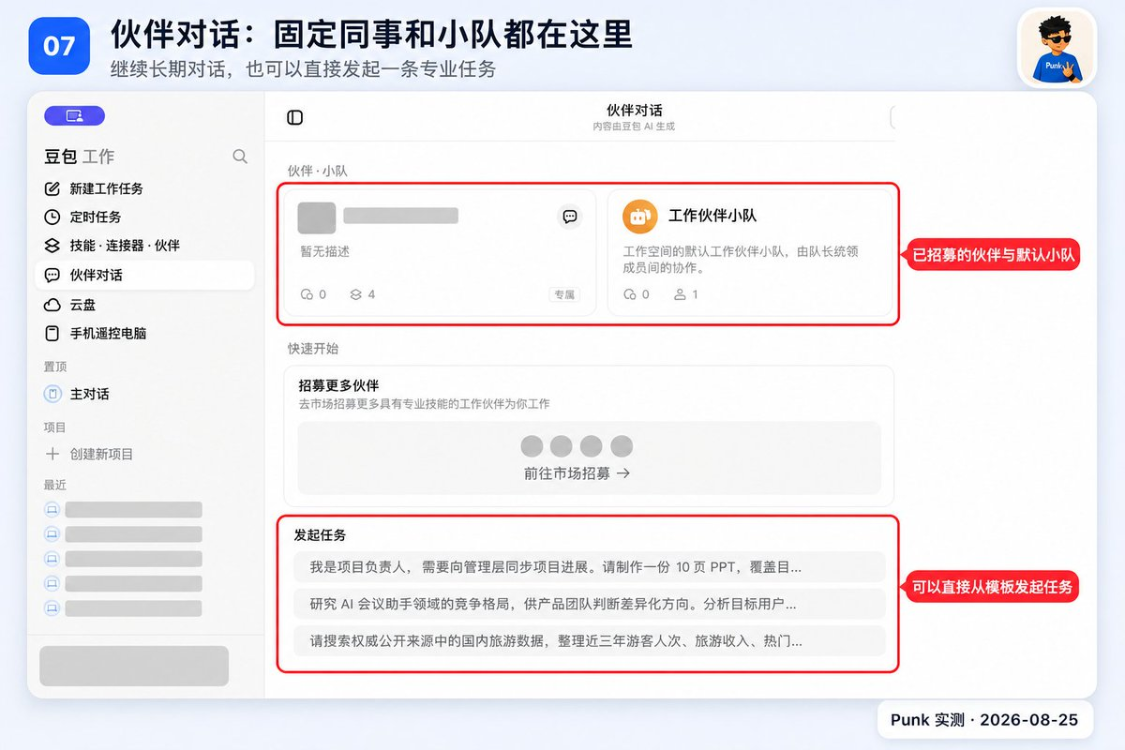
The top half of the page consists of partner and team cards. Clicking on a single partner enters a task page with this professional role; clicking on a team enters a collaborative entry that includes multiple roles, with the system aligning different roles with the task. The "starter job" at the bottom of the page is a preset example. You do not know how to write the first sentence, you can click one and replace the theme, material and output requirements。
First use can go like this:
- "PPT PRODUCTION SPECIALIST" TO THE PARTNER MARKET
- We'll go back to "partner dialogue" on the left
- Click on the partner's card
- Uploading a de-sensitization material
- It should be given only first and not directly generate the final draft
- THE PAGE IS IN THE RIGHT DIRECTION。
The value of the partnership dialogue is twofold:
First, the same actor can continue to deal with related tasks, and the entry points will not be scattered in a large number of regular conversations; second, the teams can work together in a collaborative effort on research, writing and design. You still need to check every step of the output, and the large number of team members does not mean that the results are necessarily correct。
The soybean and flybook work partner systems are linked, but who can be seen at this time depending on the log-in number, the workspace in which it is located, the configuration of the administrator and the existing privileges。
I found out that my flybooks, my flybooks, appeared in my work partner, but all Bots in the flybooks wouldn't guarantee to be here automatically。 There are partners on the page that you've just called, or the default team can normally open the conversation, which means that the current account number is already available。
A person ' s task is with a partner, and there is a clear need to work with multiple players, such as research, design, writing and so forth, before using teams. Small missions are hard-to-team, with more division of labour and communication, and more slowly。
9. Cloud Disk: Direct view and use of Flying Book Cloud documents
When you click on the "drive", you see the entry to the Flying Book Book Books document that relates to the current account. This is not a new set of independent storage spaces; you have access to documents, spreadsheets and multi-dimensional tables in flying books, which are shown in categories such as "recent, mine, shared, collections"。
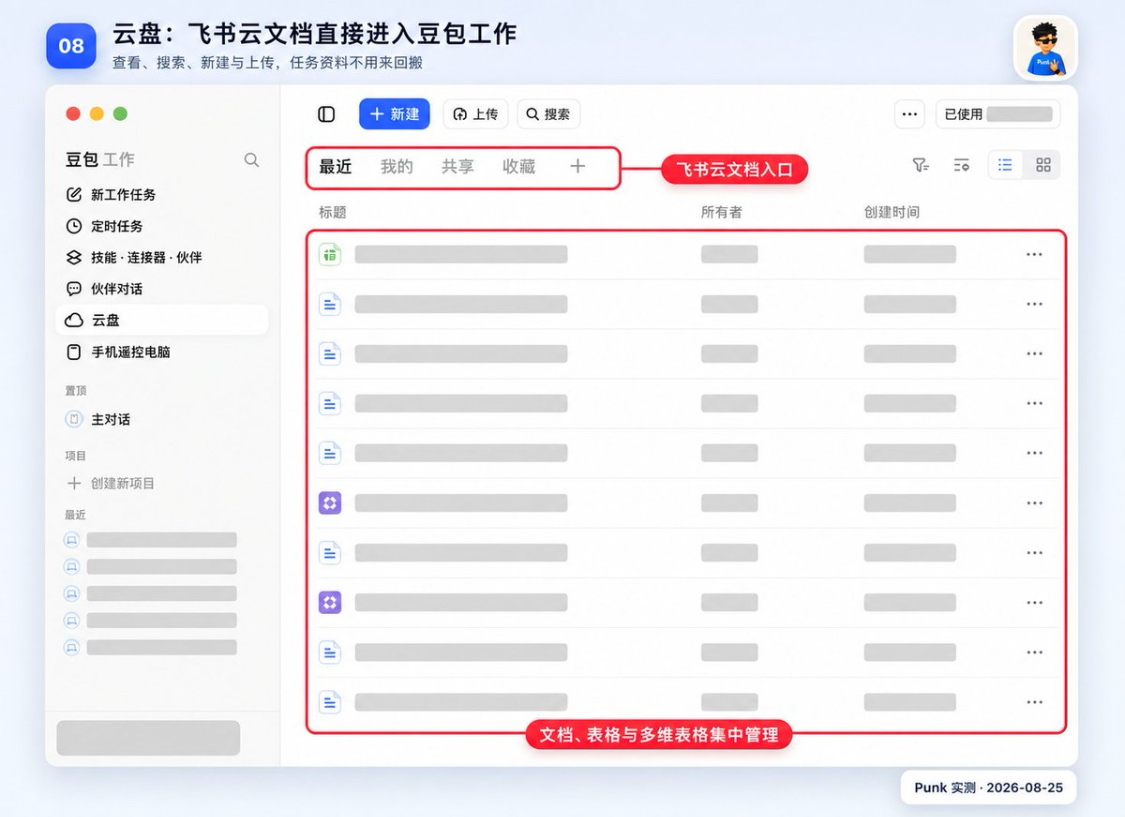
You can create, upload, search and open information here. The bean bag is also able to read this information within the mandate; if the task requires the creation of a document, an updated form or a multi-dimensional form, it can also be saved directly. The so-called "Sync with Flying Book" refers to access to the same cloudy document on both sides and does not need to be downloaded to a computer before uploading it. The original review, sharing and access rights are still managed by flying books。
For the first time, open the cloud and do three tests:
- Looking at the top right corner is the flying book account that you are not going to use
- Click on "My" to make sure you can see the documents you know
- Search for a test document without sensitive information。
Then an ordinary task was created, saying, "Read the title of the document in the cloud, and only summarize the main contents, without new, unmodified, unshared. The title and content of the return are correct, indicating that the reading link has run. , then try to create a new document or write a multi-dimensional table。
If no document is found in the disk, check the flybook account number and original document permissions. The file is not visible to you in the flying book, nor will the bean bag find it by bypassing the permission。
Cellular remote control computer: continue to view and control tasks after leaving the computer
This function is used to carry over computer tasks on the mobile phone. Computers continue to run tasks and access local documents, and mobile phones are used primarily to view progress, receive reminders, supplement instructions or continue operations. It does not automatically copy all the files on the computer to a mobile phone, nor is it a complete remote desktop。
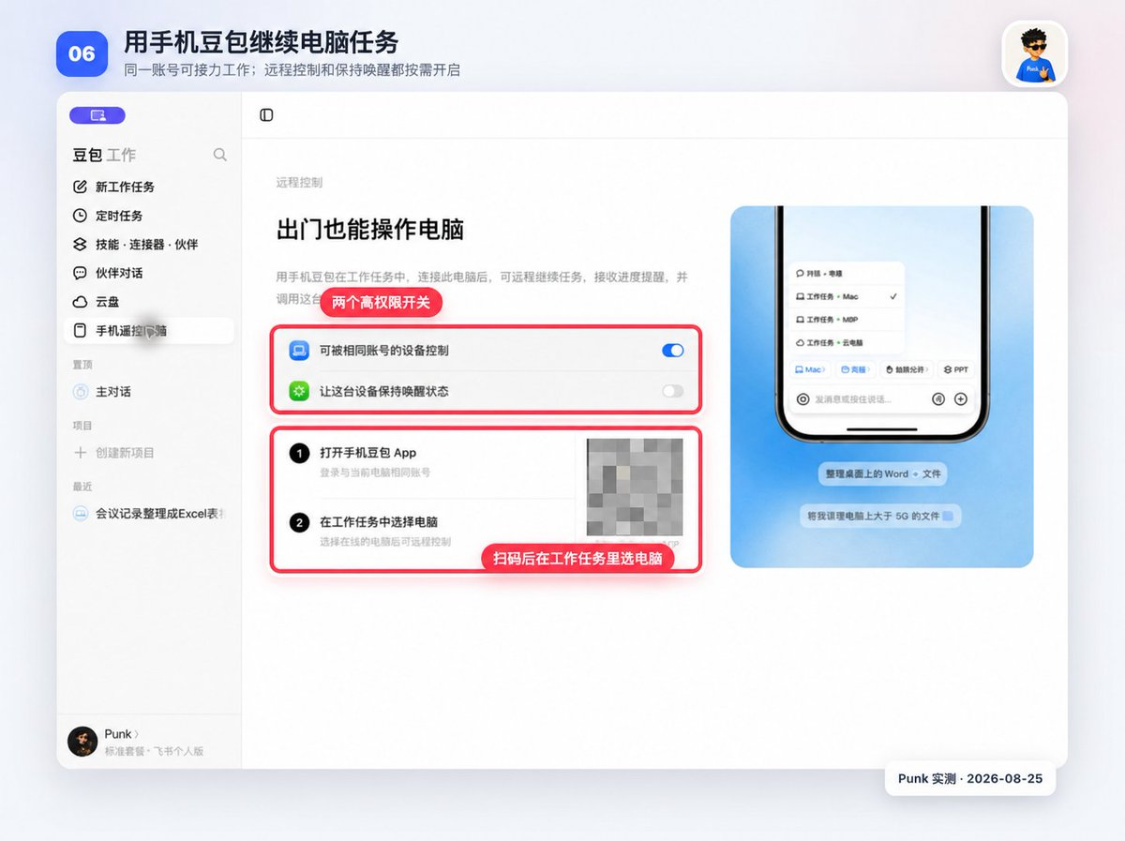
There are three conditions that must be met before they can be used: a mobile phone and a computer log in with the same account number, a computer online, and a computer-end access to “equipment that can be controlled by the same account”. The long mission also opens the "suspension of the device" and avoids stopping after the computer sleeps。
The operation begins with a low-risk mission on the computer, then opens the cell phone bean bag, enters the job and selects the computer. Cell phones can see the progress of the same task and can continue to issue an additional request, indicating that the equipment is connected. When computers are offline, go to sleep or exit a bean bag, the end of the cell phone is usually unable to continue the local mission。
Directly shut down remote control and continued awakening. Public computers, company-shared computers, and computers that store customer and financial information do not open the switch for long periods。
Project: Centralization of long-term tasks and local information
THE NORMAL TASK IS TO KEEP THE CURRENT RECORD OF THIS TASK. PROJECTS ARE USED TO CENTRALIZE TASKS UNDER THE SAME LONG-TERM THEME AND TO BIND LOCAL FOLDERS FOR USE. "CUSTOMS A" "PUBLIC SERVICE" "Q3 PRODUCT RELEASE" CAN SET UP PROJECTS TO KEEP TASKS AND INFORMATION WITHIN THE SAME RANGE。
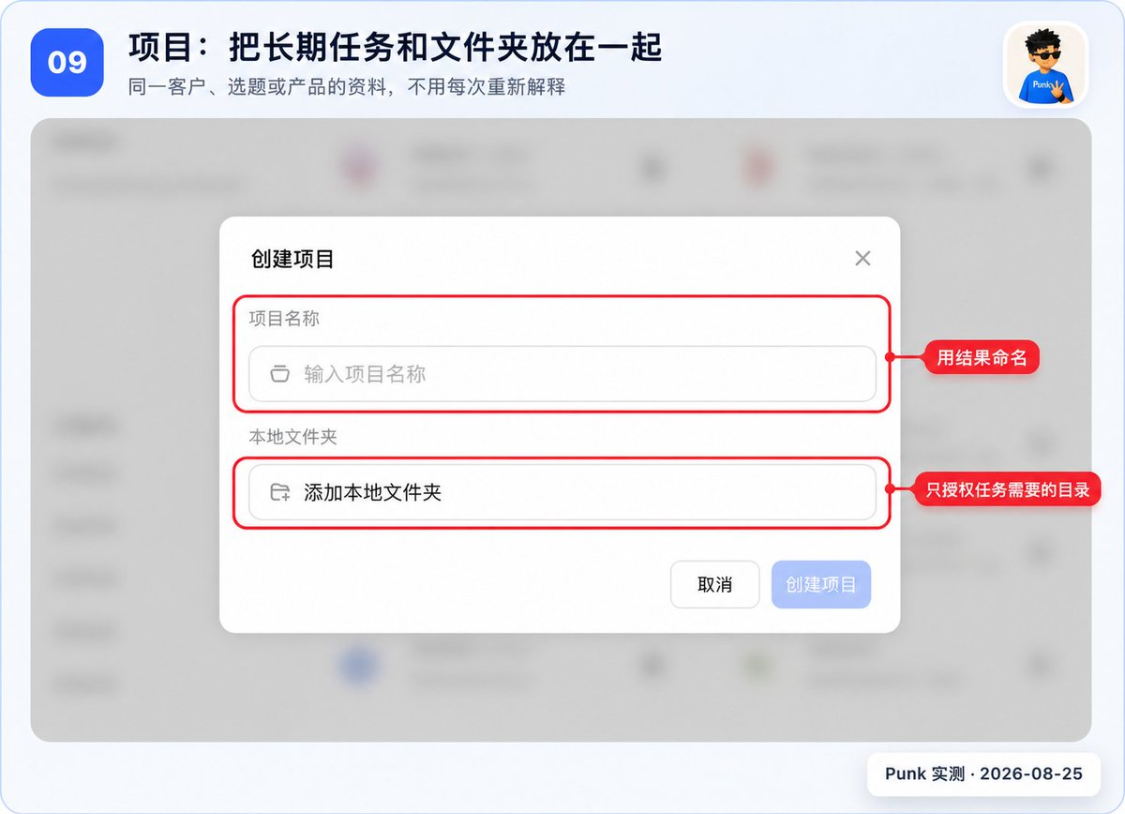
You need to fill in the name of the item and select a local folder when creating it. (a) The name of the project is as clear as possible about the object and the objective
Local folders select only the directories that are required for this job, and do not turn over the entire desktop, download the folder or the entire cloud disk to save time. What local materials the bean bags can access in the project depends first on which folder you choose。
When do you need the project
- The same data has been used for the third time, or the project can be created after several weeks. Only a temporary form would allow for the continued use of new tasks。
The project name appears on the left side of the "Project" when it is created. Enter the item and start the task. The bean bag should see the folder you added; if it does not see it, check whether the item is selected and whether the document is actually located in that folder and do not rush to expand the permission。
iii. White's first start: PPT, Excel and timing
For the first time, not a pile of documents at the same time. Pick a de-sensitized material first, so that the bean bag can only have one result; you can open it, check it, then do the next。
before you do it, create a new exercise folder on the computer, with two smaller folders: input, copy of the material, and unput, the result of the bean bag. the original file remains where it was, so you don't lose anything, even if the first operation goes wrong。
All the next exercise goes the same way:
- This post is part of our special coverage Global Voices 2011
- Click on the bottom left corner of the input box +
- select materials from input
- Paste the reminder and replace the contents in [bracket]
- Send it to see the implementation plan first
- go output after completion and open the result。
It does not require confirmation if it is prepared to write to another folder or to upload, send or overwhelm the original file. Tell me again where to save and what to ban。
At least four things are clear about a mission:Materials, tasks, constraints, acceptances.
1. MAKE IT A PPT
THE SUREST WAY IS TO SPLIT IT IN TWO: FIRST LET IT WRITE THE SCHEMATIC, THEN YOU READ IT AND THEN MAKE IT A FILE. IT WOULD BE EASY TO CHANGE EIGHT LINES OF TEXT IN THE WRONG DIRECTION, AS IT WOULD BE LIKE TO PRESENT AN OUTLINE; AND IT WOULD BE A WASTE OF TIME FOR 8 PAGES OF PPT TO BE FINISHED。
Add a Word, PDF or Markdown file to the task and copy the following:
Read [material file] Give me an 8-page PPT schematic to confirm and then generate an editable presentation. It includes background, three key findings, issues, recommendations and next steps. Do not make up data that are not in the material; refer to the source page or table location when numeric. Can not delete folder: %s: No such folder Receiving and Inspection: 8 pages, with only one central conclusion per page and all figures returning to raw materials。
Let it sort out, Excel
Excel's most vulnerable is that the bean bag changed the original data to make it look good. The first requirement is to write "retain the original data page" for all time so that you can go back and check。
Click + Add an exercise table to copy the following:
read [original table] and copy to a new file for processing. clear empty lines and duplicate records, maintain original data pages; add a new “summary” page to calculate quantities and amounts by month and category and generate two charts. do not modify the original document, do not delete incalculable records and list the anomalies separately. can not delete folder: %s: no such folder receiving and inspection: the original number of lines, the number of lines to be repeated, the number of abnormal lines and the sum of sums must be included in the response。
See if the original number of lines corresponds to the input file, then the sum is aggregated, and two graphs at the end confirm that the title and cross-axis are normal。
In cases where the name is the same, the date is missing, and the amount is in disarray, the bean bag may ask you how to handle it. It is the safest place for it to "first put unjudgeable lines on the list of anomalies and not delete them."。
3. Make it a timed mission
Timed tasks are not automatically sent without touching them. You're just doing a daily search and leaving the results in the bean bag, and you understand the whole function。
This post is part of our special coverage Global Voices 2011
Search [3 specified sources] for updates on [themes] for the past 24 hours. Use only the original source that can be opened, by " Title, date, two sentences summary, link " output; write " No new today " without updating. This time only results are generated, and no document is sent, published or modified。
When you return the result, click on two of the links to confirm that the web page can be opened and that the title and summary can be correct. Then go to the left "time job" and click "New" and paste the same command and set running time at 9 a.m. on a working day。
Read again before saving: Whether the frequency is working day, 9 a.m. or not, and whether there is a "no sending, no publishing, no modification" in the mission statement. All three right, save it again. The automation phase only adds time and means of notification and does not allow for the extension of authority。
What other day-to-day work can be handed over directly to it
- Organization of meetings• Turning audio recordings or minutes into conclusions, persons responsible, deadlines
- Documentation: To rename and archive a collection of Word, PDF or pictures according to the rules
- Information research• Read the public web page and make a competition brief with links to each judgement
- content writing• Reports based on product information, first drafts of e-mails, public article articles and short video scripts
- Flying Book CollaborationRead flying book documents and create new documents, spreadsheets or multi-dimensional tables
- Picture Video_: Draft posters, covers and videos based on confirmed text。
You can narrow any job down to an action. For example, the "Help me run the public sign" is too big to read "Read this product description, give me 10 selected questions, only the title and the reason." The first step is to be accepted and then to be able to write the body, map and schedule。
when the hint is completed, at least three things are checked: the file can be opened, the structure fits, the key numbers or the facts can be returned to the raw material. it needs to be saved on return, not overwhelming version 1。
IV. Two most recognized ecological chains for bean buns
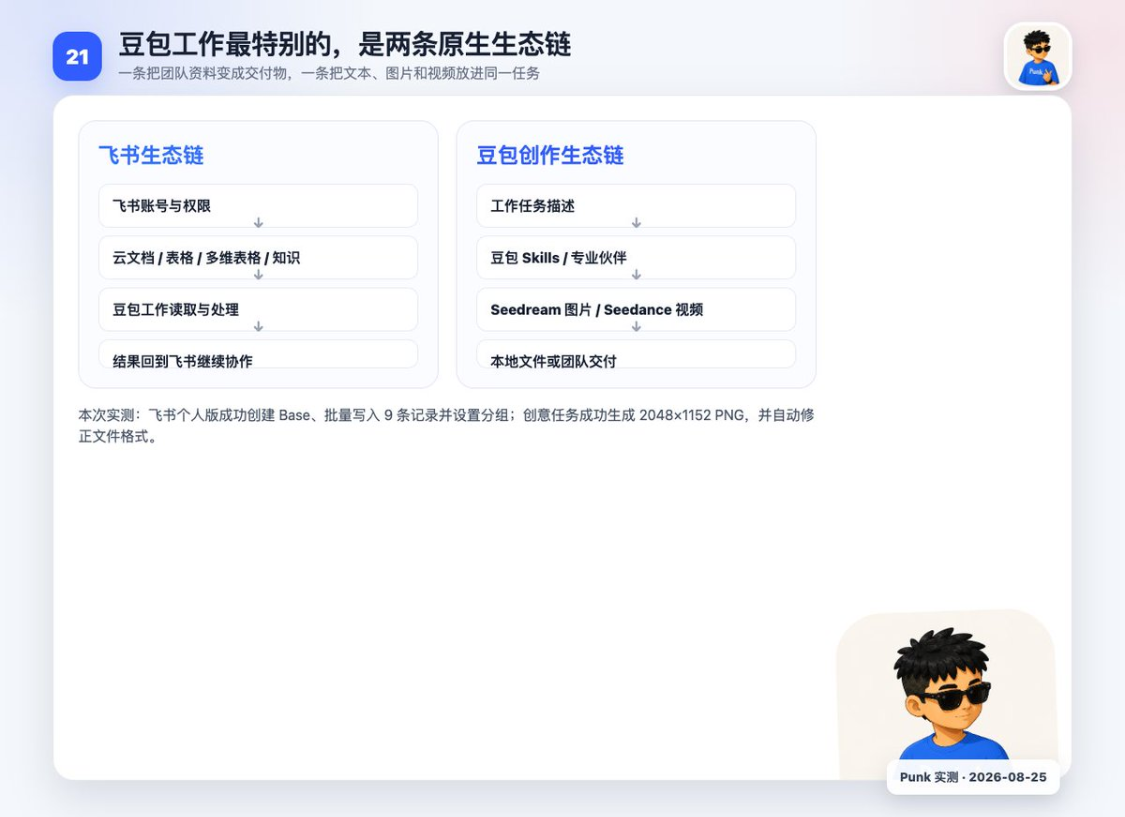
1. Flying Book Ecology: Once the information is processed, it can be returned
The team page where the bean bag works clearly describes the flight book account login, the connection to the flybook data source, the access to user-enabled content, and the return of the results to the flyer book for comment and editing. Teams can also share Skill, allowing the same process to be reused among members。
- “Reading” is to allow bean bags to search for flybook documents, spreadsheets, multi-dimensional tables or team knowledge within account lines
- “Write back” is to create or update the results directly into a flying book。
- The document remains in the flyer book and team members can follow the original way of commenting, sharing and collaborating without having to download the document to a computer, process it and upload it once。
This would significantly reduce document handling for teams that normally place minutes, project information, sales data and knowledge bases in flying books。
You can have it read a summary of the meeting and create a list of to-dos; read a sales form and then write the results together into a new multi-dimensional form; or search for several team files and form a report that can continue to work together。
I've also tested here, and I've created a flybook multi-dimensional form with a bean bag job:
Please create, in my flying book, a self-observed multi-dimensional table entitled “Show-Quarterly Sales for Bean Pack Work”. Reads local file demo-input/sale data.csv, and imports the full 9-line data; adds the Quarterly field to fill all Q1s; and creates a view by Product grouping. Do not share with anyone, do not modify other flying book documents. Rereading and reconciling records upon completion: number of records, number of fields, original income data and grouping settings。
Its execution can be broken down into five steps: first, to create a new Base in a flying book; to import local CSV's 9-line sales data; to add a column called "Quarterly " ; to give line 9 data a uniform entry to Q1; and finally to create a view by " Product " grouping. When done, it rereads the entire table, checking the number of rows, fields and grouping settings, and avoids declaring it complete by creating empty tables。
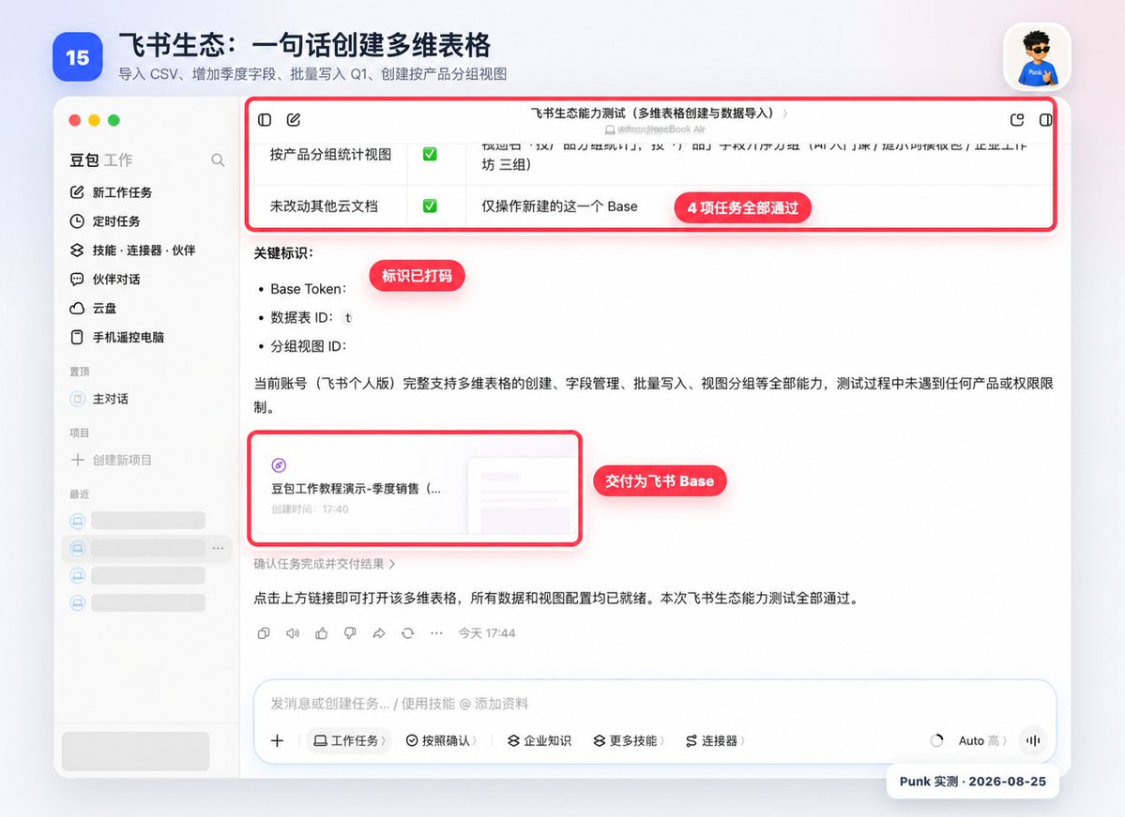
WHEN YOU DO IT IN YOUR OWN ACCOUNT, YOU HAVE AT LEAST FOUR THINGS TO ACCEPT: WHETHER A NEW TABLE ACTUALLY APPEARS IN THE FLYING BOOK, WHETHER ALL LINE DATA ARE AVAILABLE, WHETHER ALL QUARTERLY COLUMNS ARE Q1 AND WHETHER GROUP VIEWS CAN BE DEVELOPED BY PRODUCT. THE TASK PAGE SAYS " FINISH" ONLY SERVES AS A REMINDER TO OPEN THE FINAL FORM CHECK FOR ACCEPTANCE。
If your company is already in a flying book, it's going to go well:
Flying book documents, forms, Base, knowledge, soybags to read and process and then back to flying book collaboration。
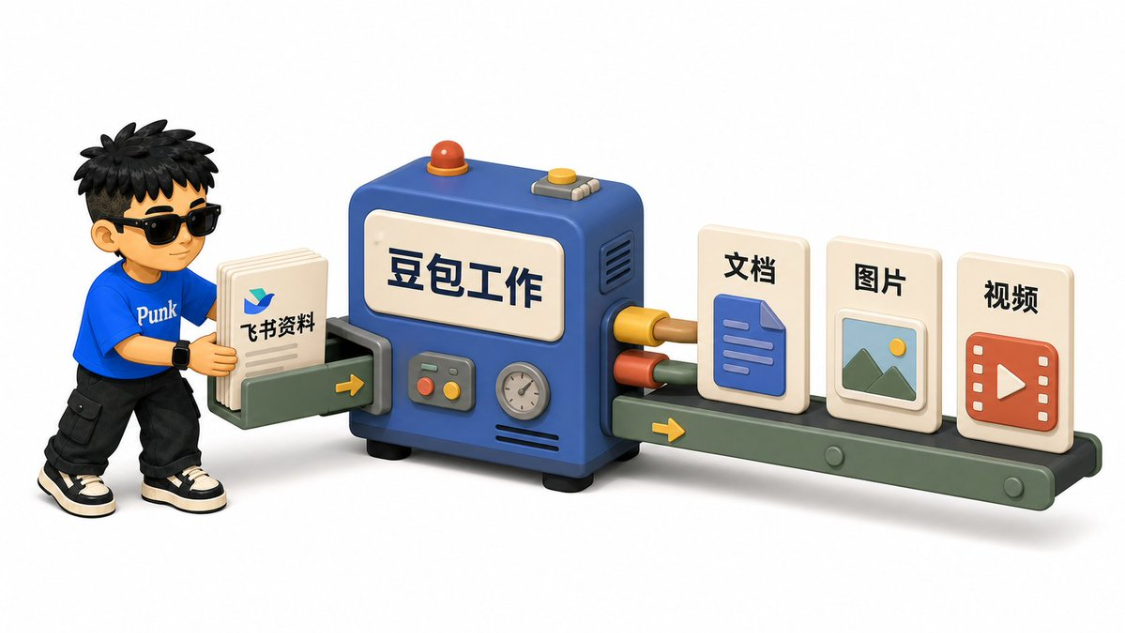
Bean bag ecology: Office finishes and continues to generate graphics and videos
Another feature of the bean bag job comes from its own bytes of AI products and modelling capabilities. TRAE is mainly oriented towards programming and software development; buttons accumulate for a long time, Agent, Skill, Workstream and Connector; soybag models are responsible for text understanding, analysis and content generation; Seedream and Seedance are oriented towards pictures and video creations, respectively. The bean bag is putting these capabilities in the same desktop task portal。
Seedream 5.0 Pro and Seedance 2.5 are listed on the official page, and public numbers, marketing materials, short videos, designs, electricians and programming tasks are also visible in the skills market。
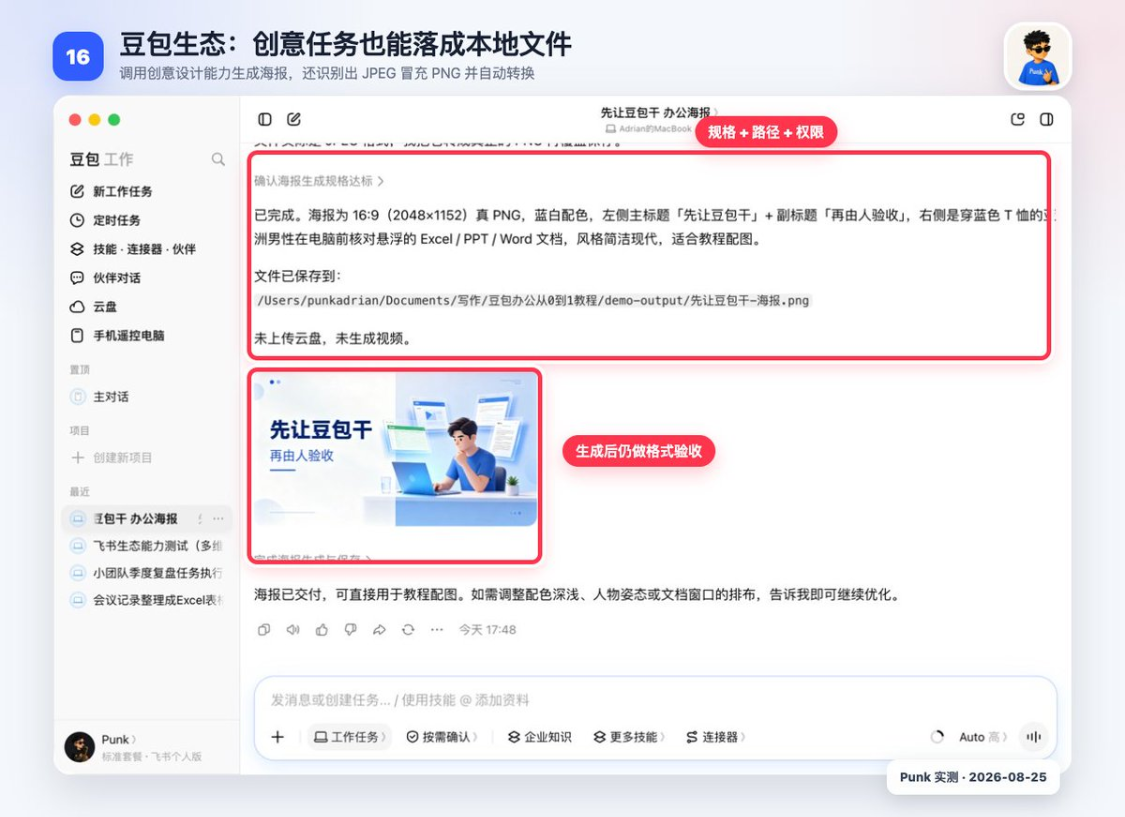
I KEEP MAKING IT A TUTORIAL POSTER. THE PICTURE JOB HAS SEVERAL MORE CONDITIONS TO EXPLAIN THAN THE PLAIN TEXT: THE IMAGE SCALE DETERMINES WHETHER THE SCREEN OR THE VERTICAL MAP, THE MAIN TITLE AND SUBHEADING ARE WRITTEN WORD FOR WORD, THE PERSON, THE COLOUR AND THE USE OF THE SCENE ARE PRESENTED, AND THE FILE FORMAT PNG OR JPG IS SPECIFIED。
Make a 16:9 Chinese office poster, blue and white. The image is an Asian male wearing a blue T-shirt, checking the AI generated Excel, PPT and Word in front of his computer. The main title should read only “Let the beans dry first” and the subtitle should read only “Be then accepted”. The style is simple, modern and suitable for teaching. Use bean bag image generation capability and eventually save it to local PNG; do not upload the cloud disk and do not generate video。
It calls for creative design capabilities and produces a picture of 2048 x 1152. After the mission, I checked three: whether the picture is open, whether the image is close to 16:9 and whether the main subheading is accurate. It was also found that the original file was converted to a true PNG after using the .png suffix and the actual code was JPEG。
THIS IS A WORKSTREAM FOR CONTENT TEAMS. THE SAME RESEARCH MATERIAL CAN BE COMPILED INTO ARTICLES OR REPORTS, THEN REFINED INTO PPT, AND THEN CONTINUED TO PRODUCE COVER, SOCIAL MEDIA CARDS AND VIDEO DRAFTS. MANDATES CAN FOLLOW WELL-ESTABLISHED TITLES, FACTS AND VISUAL REQUIREMENTS TO REDUCE THE REPETITION OF MATERIAL BETWEEN MULTIPLE PRODUCTS。
This time, only pictures were measured and no Seedance video was measured. Model versions, account privileges and open scope will change, and you will need to use your own client。
V. Used WorkBuddy Or Cordex, what's the choice for the bean bag job
Bean bag and work buddy
WorkBuddy is the product of the evangelization of ecology, more like an office full of tools. Its clients have day-to-day office, code development and design ideas, as well as asset banks, commands, personal memory, experts, skills, connectors and automation。
These terms are similar to the bean bag work: the “expert” of WorldBuddy, close to the “partner” of the bean bag, are pre-defined professional roles; “connectors” are responsible for access to external services; and “projects” are used to preserve long-term tasks and information. The difference between the ecological entry and the way the product is organized is not about who can write a text。
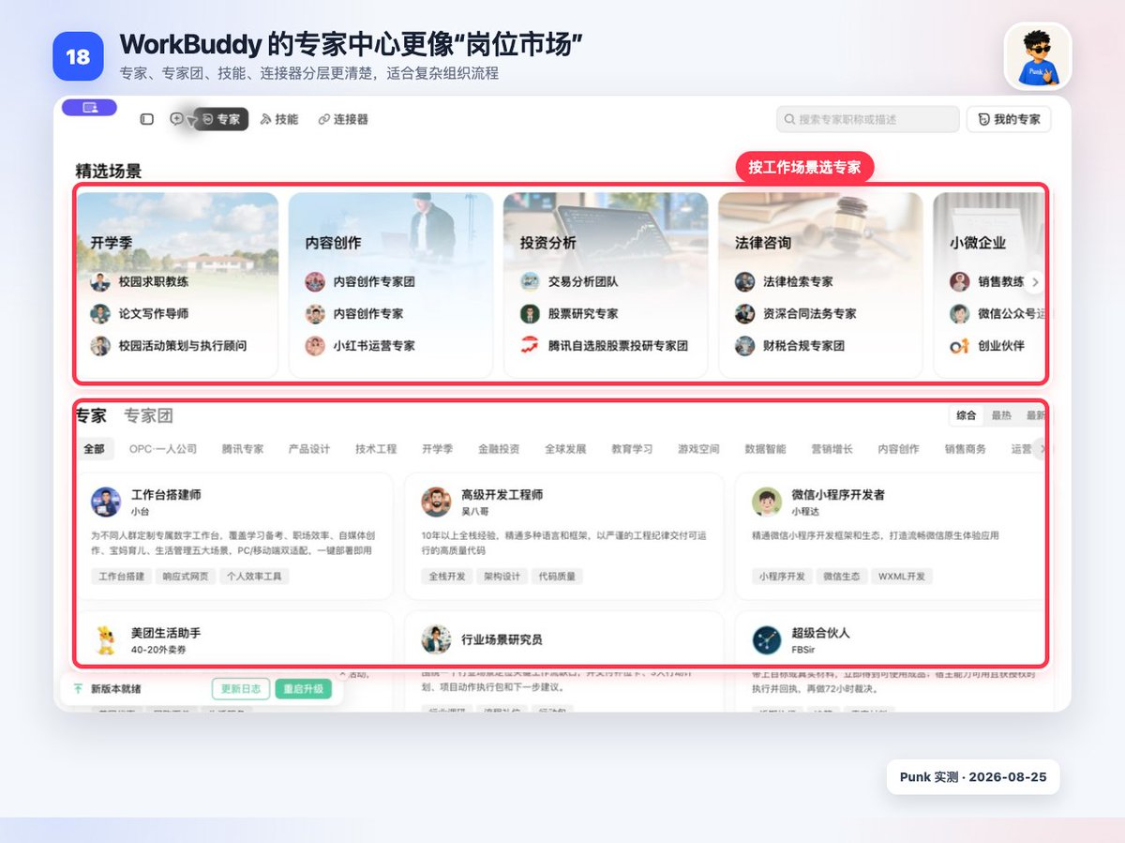
WorkBuddy, connector page displays 129 items and supports custom connectors. QQQ e-mails, ma, e-mails, e-mails, e-mails, e-mails, e-mails, e-mails, e-mails, etc。
Skills, this is different:
- the bean bag automatically finds .agents/skills and .codex/skills, and i see the original list when i open up "more skills."
- WorkBuddy defaults to manage its own user and project skills, requiring local Skill to upload or put it in its skills catalogue. Upon import, the skills of the standard SKILL.md structure are available for direct use。
The bean bag is even more economical at the “discovery of Skill”, and WorkBuddy supports the local Skill, but first has to import it; neither side can guarantee that all Codex Skill will be executed as it is。
WorkBuddy's project, mission handover, memory and permission description is more complete. The official handbooks explain the default rights, Full Access, workspace, protected paths, de-identification, scripts and network capabilities, which are suitable for those who are willing to make a serious effort to build a permanent work area。
The home page where the bean buns work is more focused, with fewer things to understand for the first time. Its advantages are concentrated in the Flying Book collaboration and bean bag creation model: when the material is already in the Flying Book, it can be read from the cloud disk and then the document, table or Base results can be written back; after the content has been processed, it can also continue to use the byte system's photo and video capabilities。
How do ordinary people choose
My advice is to look at the software scenes that you need for your daily work。
- Work starts with flying book documents, flying book forms, flying book knowledge base, and the bean bag works shorter
- Work started with enterprise Twitter, teleconferences, QQ-mails, telecommunication files and other business systems, and the WorldBudy connector coverage was more worthy of priority testing。
VI. The most appropriate route of upgrading White
Do not turn all the clouds, connectors, timing and remotes on the first day. It's easy to find anything that goes wrong
- Paste a dissensitized text, which will only be organized
- Read a copy file and output a new document
- Run a single Excel or PPT and accept it as a raw material
- Connect to flybook, read first and then create a self-visible multi-dimensional table
- Once a single mission has stabilized, projects, partners, timing and cell phone connections are added。
You just need to finish the first two today。
Create a new exercise folder, place a material without sensitive information and then send a first task:
Read this document and only comb it. Saves the result as a new Markdown file without overwhelming the original file. Tell me first about the implementation plan; when done, list new and revised documents。
The threshold for bean bag work is already very low: the domestic network, the domestic account number, the Chinese interface, can start when it is installed。
The rest of the habits is just one thing:Let's dry the bean and then be accepted。