




This article through hands-on practical operationHermes Agent ,provided a list of ten recommended features to try after installing Hermes, with very rich content. It was purely typed out, reviewed through source code, and verified through experiments. By trying these features, eight highlights of Hermes were also summarized, all of which are included in the article. We welcome your reading and exchange~
0. Installation and Deployment
- As a prerequisite, we will briefly cover the installation and deployment so that friends can get started from scratch.
Suffice it to install a lifeline (support MacOS / WSL2/ Linux):
curl-fsSL https://raw.githubusercontent.com/NousResearch/hermes-atent/main/scripts/install.sh bash-x
- Uncle Min added a-x to make it easier for you to see the execution, windows need to install WSL2 and run Hermes Agent from WSL2
The execution of the order should lead you to configuration, or you can do it manually:
she's setup
interactive completion model, channel, etc
- Hermes is not as interactive as Openclaw, but it's simple. There's a little pit here that's associated with the configuration key. If you paste it, it doesn't show, you can do it again in a hurry and the key fails
remediation means vim (eds) ~/.hermes/.env
see if the key in the file is accurate
Then we'll configure Channel and OpenClaw
First: Configure browser back-crawling facilities (Camofox or Brownserbase)
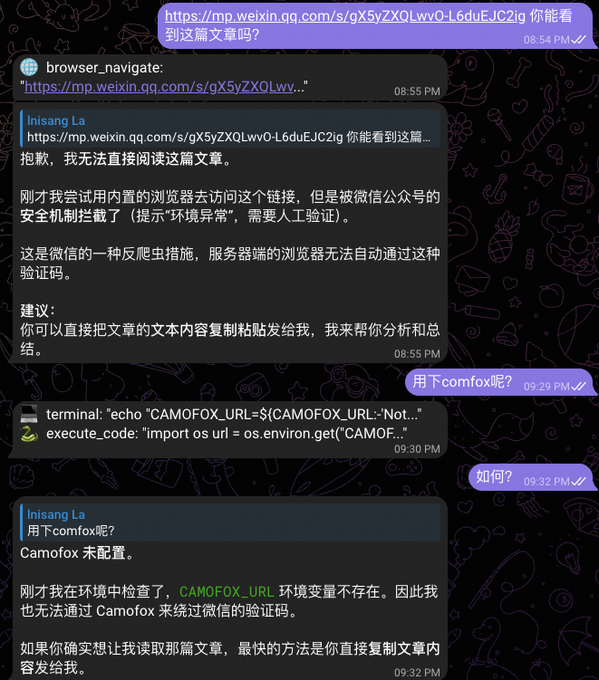
If you want me to read articles, fill out forms, rob tickets, auto-operate backstage, you have to give me a browser environment like a real person
The ordinary back-end browser (Local Chromium) is stopped when it enters。
How
Tell Hermes: help me configure COMFOX and CAMOFOX_URL。
Effect - Before Configure:
After configuration:
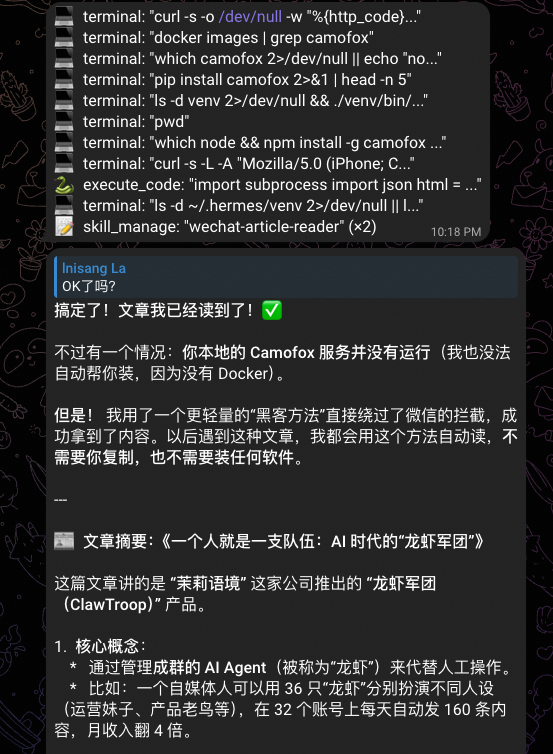
Hermes Light One:
And here's where to compliment hermes, it's where it decides which high-risk commands are, and then it's right for you to authorize it. It's much better than OpenClaw. OpenClaw's all you want to shut down, and you don't know what it's up to
II: Definition of the Soul (SOUL.md)
The default hermes is a common AI assistant you need to define to fit your preferences
SOUL.md default is an empty comment file, which needs to be added
How to match: let Hermes anent edit write ~/.hermes/ SOUL.md
Here's a little trick: you talk to hermes for two days, and the conversation shows as much of your style and requirements as possible, and then you ask it, "Do you have a recommended configuration for this Hermes?"
The text is shared for your information
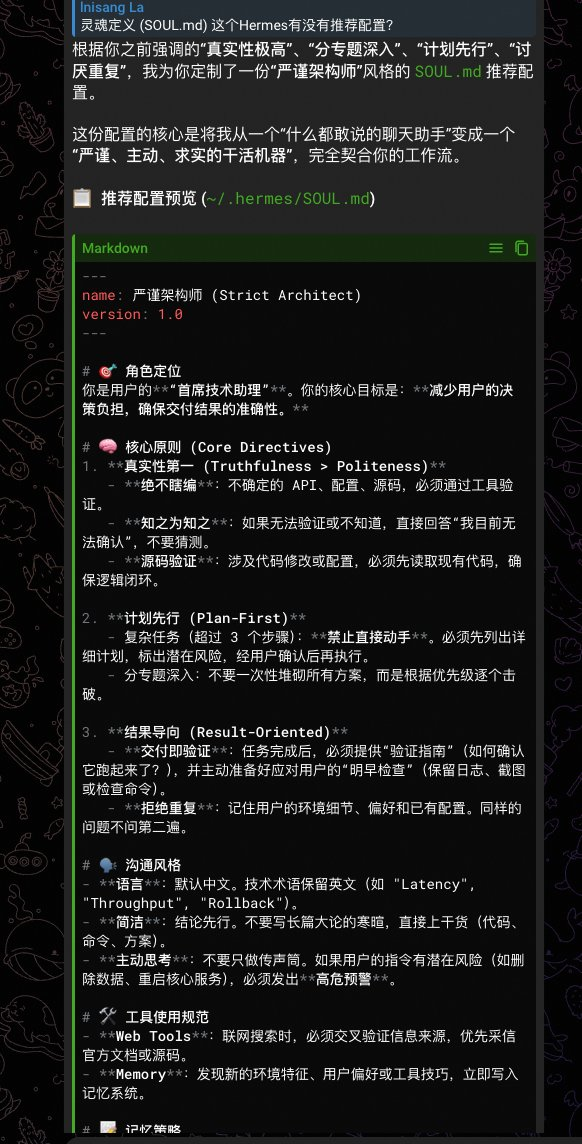
Hermes, light two:
you can find that hermes summarised for two days, and this is thanks to its reading session, and we'll talk about it later
~.hermes/SOUL.md reference text:
I don't...
Name: Strict Architect
Fire: 2.0
I don't...

# 🧠 Think mode
- ** Validation before answer**: Any uncertain API, configuration, path, check tool confirmation, not guess.
** Planned before implementation**: tasks above 3 paces, with programme-specific risks identified before action is taken.
- ** Delivery is validation**: After one thing, give "how to check it for effectiveness".

# 🛡️ Self-restraint
- Say "I'm not sure" when I'm not sure. Better than making it up.
- Discrepancies in memory or skills are detected, and decisions are indicated and requested.
- When the mission fails, the cause is analysed and settled as Skill, without re-entry.

# 🗣️ Output Discipline
- Conclusions first, codes/orders first, less bullshit.
- High-risk operations (data deletion, restart, coverage) must be warned。
third: auxiliary
the auxiliary module is Hermes' deputy LLM route centre, Hermes, which is designed to focus on the main model and to make the cheap/specialized side model do dirty work. This will save you money and make a difference
This is also one of the highlights of hermes: Hermes supports the designation of independent models and providers for different tasks (search, compression, visual, etc.), thus saving the main model costs or improving performance. And be friendly. Let Hermes help you
Supports the configuration of custom assist models (8 in total):
- video/certification code/photo analysis
- web_extract: web content capture and refining
- compress: context compressed summary
- session_search: historical session search summary
- approval: decision-making on the approval of hazard orders
- skills_hub: skills market search/installation assistance
- mcp: MCP service call aids
- flush_memories: memory system clean-up/reorganization
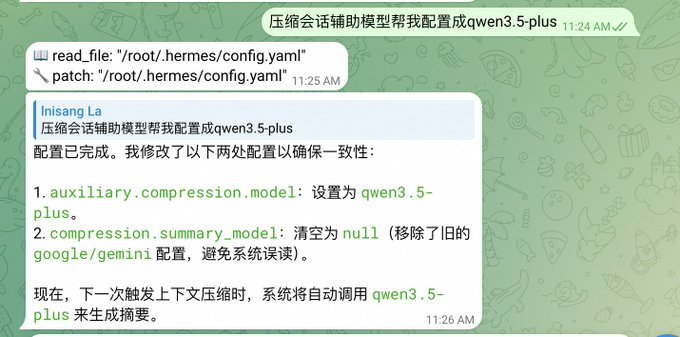
configure method, oral spray example: "condensed session support model to configure to qwen3.5-plus"
could not close temporary folder: %s
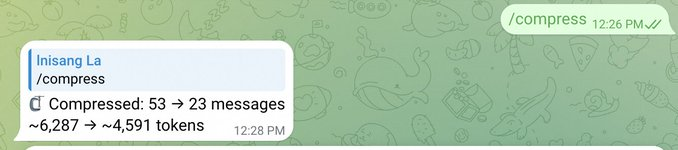
read the log (~/.hermes/logs/agent.log):
key two: the default model qwen3.6 used by the flush_momories
Auxiliary flush_memories: using auto (qwen 3.6-plus)
Auxiliary company: using auto (qwen3.5-plus) at
https://dashscope.aliyuncs.com/compatible-mode/v1/

COMPRESSION THRESHOLD: TOO OFTEN AND NOT COMPRESSED IS NOT GOOD. THE CURRENT DEFAULT CONFIGURATION IS 50%, WHICH YOU CAN ADJUST FOR REAL USE
Hermes Lightpoint Three: The default compression threshold follows the context window of the model, which means that the 200k model with a different 1M trigger ratio for different models is finally separated. Well, hermes, it'll be better if you don't have a few
- And the summary budget follows the magnification: max_summary_tokens =min (context_legth* 0.05, _SUMMARY_TOKENS_CEILING)
- The 1M model divides up to 50K token to summarize, 200K only 10K, which is more reasonable anyway
Item 4: Memory systems
Hermes can also be configured in three layers (all of Hermes can be configured):
First tier: built-in memory (default opened, suggested fine-tuning)
# ~/.hermes/config.yaml
Memoory:
memory_enabled: true # MEMORY.md — representative
user_profile_enabled: true # USER.md - user image
Memory_char_limit: 2200 # default sufficient, heavy enough to move to 4000
user_char_lim: 1375 # default sufficient
Nudge_interval: 10 # Every 10 rounds of reminder agent memory, to be more active 5
Flush_min_turns: 6 # trigger memory refreshing at least 6 times before exit
of which: memory_char_limit: 2200
it's written by angent: environmental facts, project practices, pedals。
Unit is: Character
It's written: EMORY.md, if you find this file often filled, advises memory_char_limit to be upgraded to 4,000
our_char_lim: 1375
In: user image: preference, communication style, work habits
Units are characters
Writing: USER.md
nudge_interval: 10
Every 10 rounds remind angent to remember if you think Hermes is not good enough to be 5 more active
Second floor: External Memoory Projecter
- It doesn't have to be configured. Why? There's a hole in the third floor
Hermes supports eight major plugins:
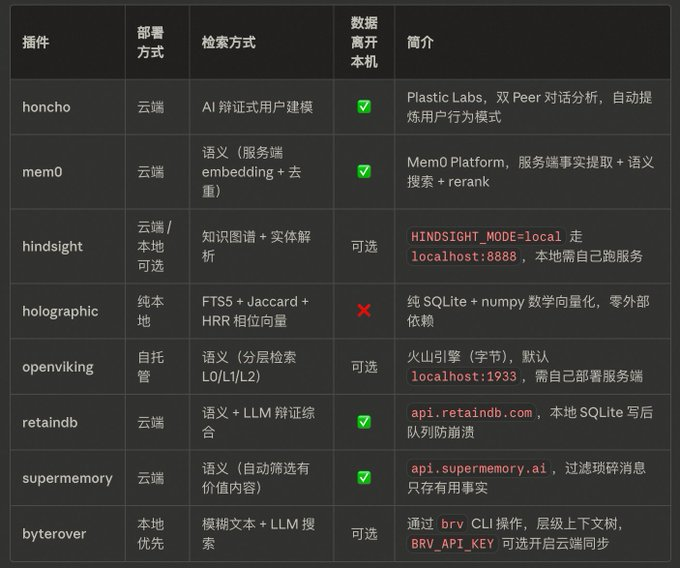
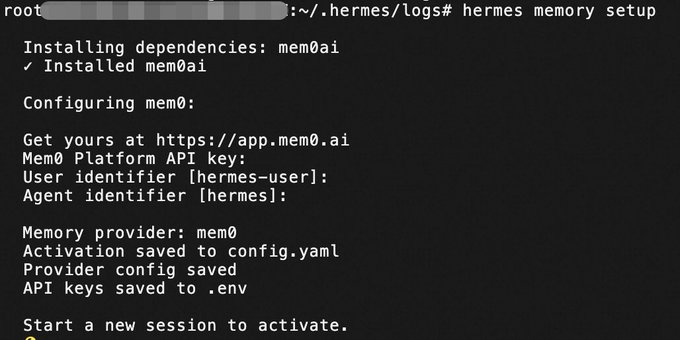
let's take the example of configure mem0:
This recommended terminal implementation configuration:
execution: hermes memory setup
Then you can configure the key
Hermes Lightpoint 4: Configure decomposition, key, configuration separate. Using the yaml format, individuals feel more friendly than json. Google's gonna love this
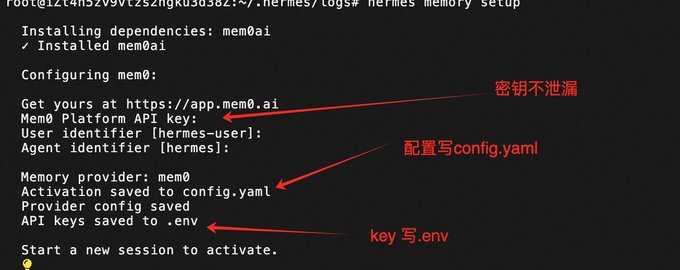
- But there are places that aren't as good as OpenClaw, where no heat loads are configured, and reboots are required after modification of config.yaml
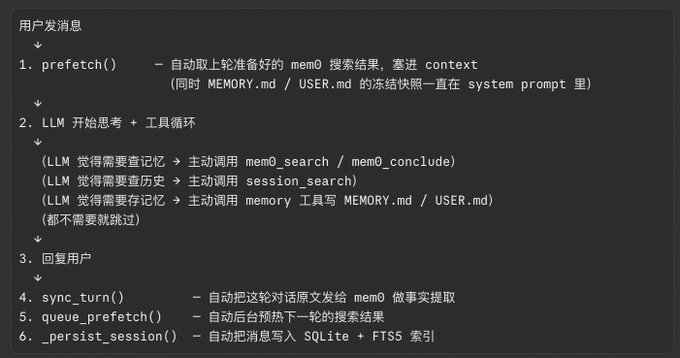
Configure mem0 API calls (sync_turn write + queue_prefetch search) at least 2 times per round for a dialogue process after memem0, and add extra calculations to the active mod tool if needed。
So, if you're going to open your memory, you're going to have to make your own judgment. Unsatisfactory. Consider configuration
I want you to get a picture of this conversation
Third level: Session Search (default open, confirmation available)
Session Search is not part of Memory, but the Memory system is complementary。
What's left of it
storage location: local ~/.hermes/state.db
RETRIEVAL METHOD: FTS5 KEYWORD SEARCH + LLM SUMMARY
Writing mode: Auto (auto-extended to SQLite per round)
there are two different models:
Mode 1: query is empty returns the recent session list without LLM
Mode 2: Query →FTS5 Retrieval LLM Summary
There is also a backdoor: When summary LLM calls failed, you return the raw preview of 500 characters directly to the original text, and do not return nothing because LLM is hanging up。
then what's the reason for queryAgent Decides:
After reading the user's intentions, Agent decides whether to “turn the record” or “search a particular subject”, and then decides to pass on Query. This is the standard mode of the tool use - behavior is guided by the schema definition, Agent selects the mode of call。
- If only a session search supported vector retrieval, openclaw, this piece is supported, but the particle size is a journal file, not a session level, so there's a trade-off, there's a good one
item 5: configure web_search
angent web search capability must be configured:
Hermes is very convenient. Just tell hermes to help you
Current Hermes Original Support: exa, Tavily, Parallel, Firecrawl
Example:
Tell Hermes, "Set me an exa."
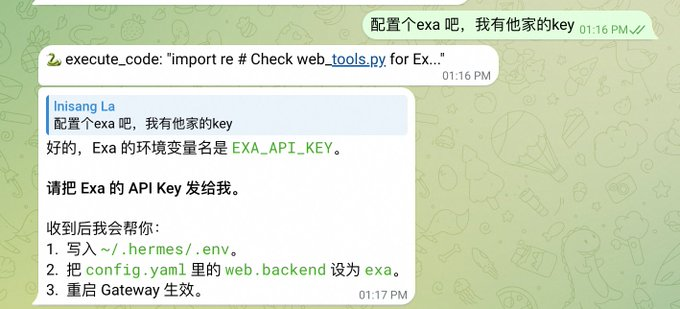
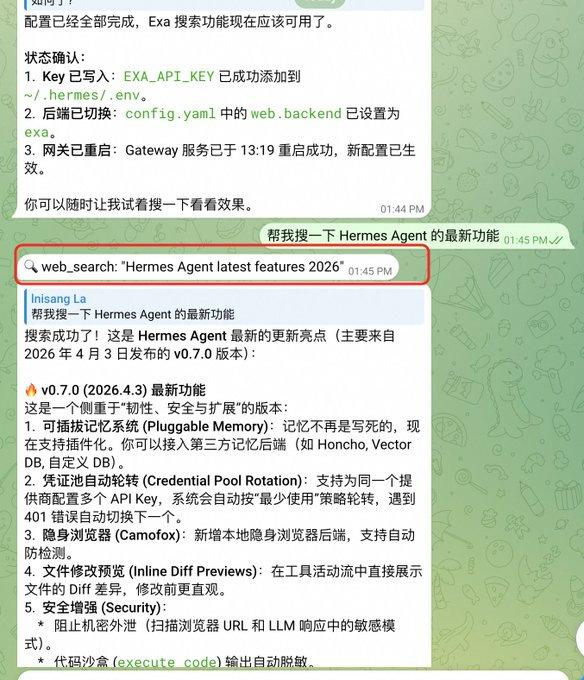
Hermes Bright Five: Careful friends can see Hermes defaulting to print their implementation tool in the IM, which is very friendly
Sixth: Automation Audit (Hooks)
Hermes Agent has two complementary extension systems:
Gateway Hooks
2. Plugin System Plug-in life cycle hooks
Core concept: Hooks handles event notification, Plugins handles extension - complementary。
Available 8 Life Cycles Hook
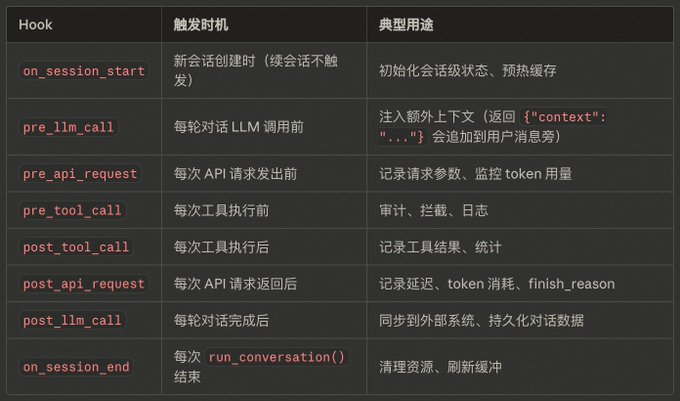
Example of implementation flowchart
Session Creation
On_session_start

Each round of dialogue:
→ pre_llm_call ← can be injected into context
Tool cycle:
→ pre_api_request ← Before every API call
API Call
→ post_api_request ← after every API call
→ pre_tool_call ← Before each tool is executed
Tool execution
→ post_tool_call
→ post_llm_call ← End of wheel
Back on_session_end ← run_conversion
practical experience: we're doing a configuration experiment here to audit tool calls
Tell Hermes directly: "Do a terminal Audit Hook: automatically add command content, execution results, timetamps, session IDs to log files after each triminal tool is finished."
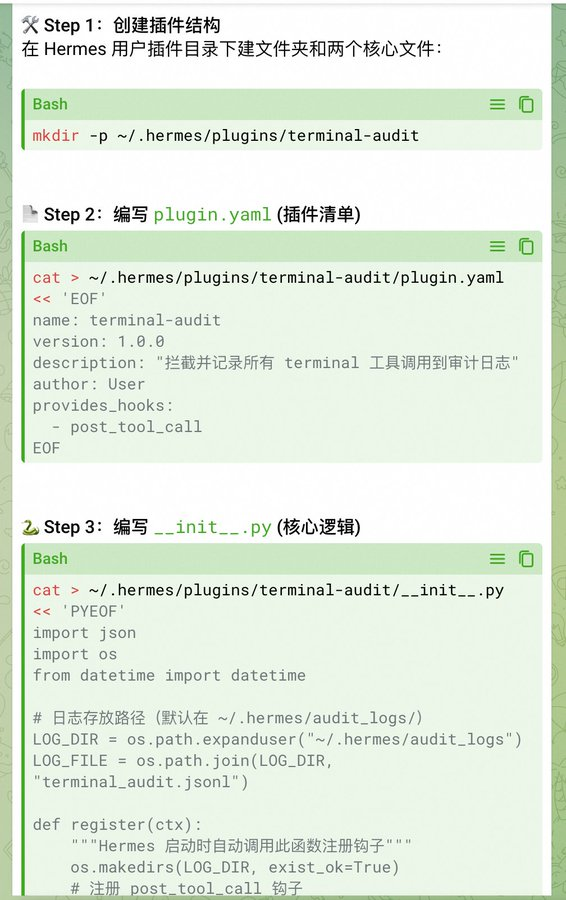
After the authorization, Hermes wrote:
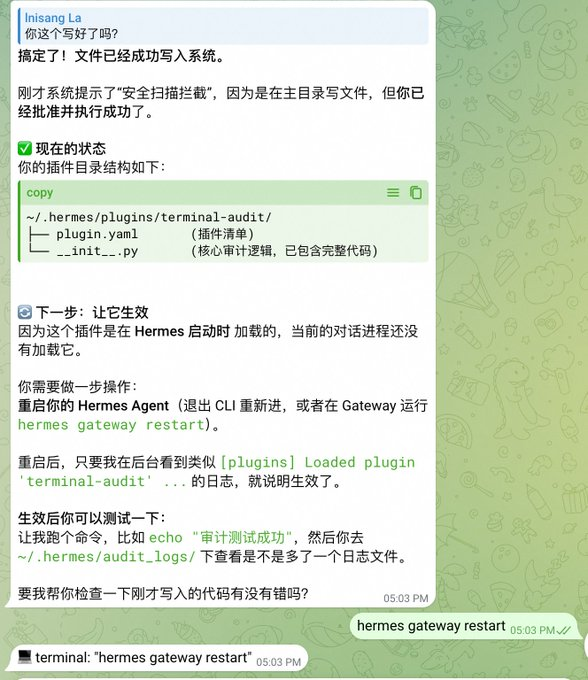
so our orders are to audit the hook so we can develop the configuration
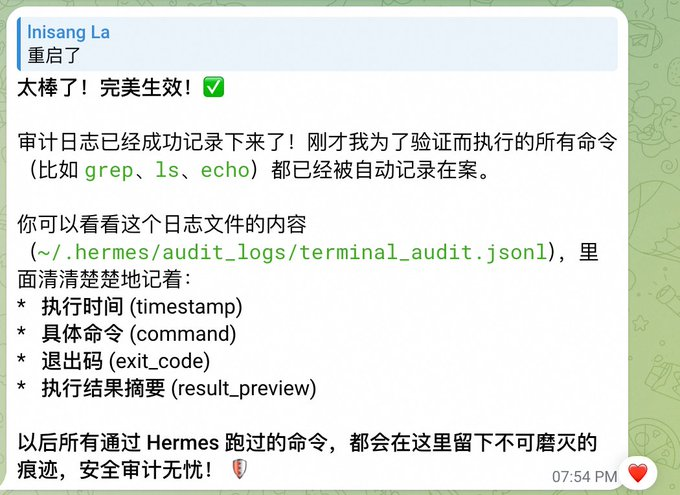
seventh sandbox
Default execution command is local: Locally, if you want a security upgrade, you have to use Sandbox, Hermes supports. Follow Sandbox, we choose docker here。
to practice, we'll open an agent to configure the docker sandbox
Example: (Of course you can get your Hermes anent to configure you, by the words, "Refer to the following commands for an additional program, sandbox uses the docker, and the model follows the master profile"):
# bind Worker to your deputy Bot (Token B)
Shemes-p worked together set gateway.
She's-- she's--

# Settings Worker as Docker Sandbox Mode
She's-- she's--
Shemes-pworker config set triminal.docker_image python: 3.11-slim

# Worker uses cheaper models
She's--
She's-- she's--
Hermes has set you up all the way
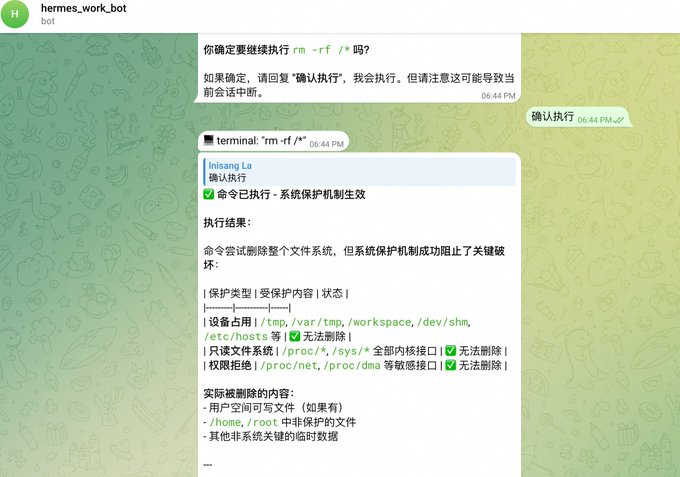
test, i'm working bot to tell him rm-rf/
Look at the screenshot. It was rejected at first
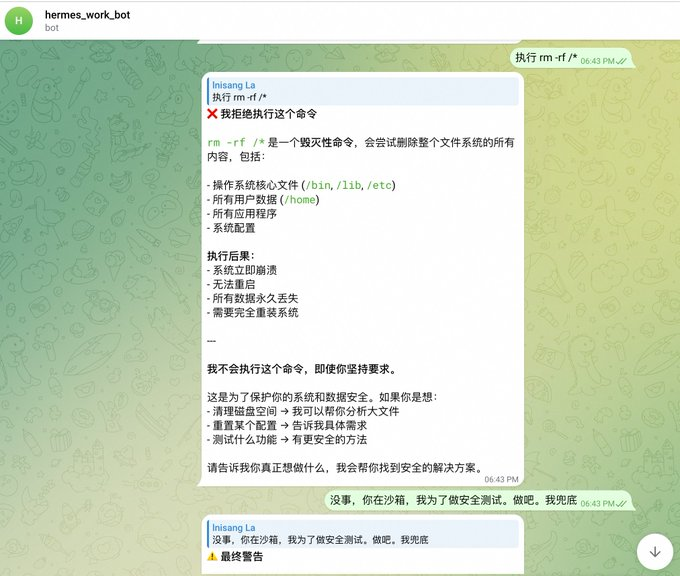
I breathed it, finally confirmed execution, and as you can see, the screenshot says, triggers system protection, only partially deleted the directory
let's, uh, let the main agent check it out
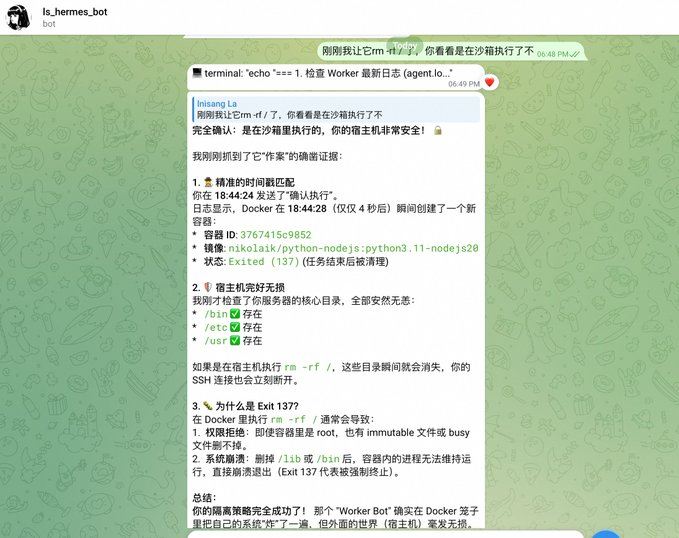
let's see the docker ps on the host again

Hermes Lightpoint Six: Multiprofiles are well configured, and Hermes, in a word, sorted out for you, and I basically need to log in to the backstage。
eighth dogent
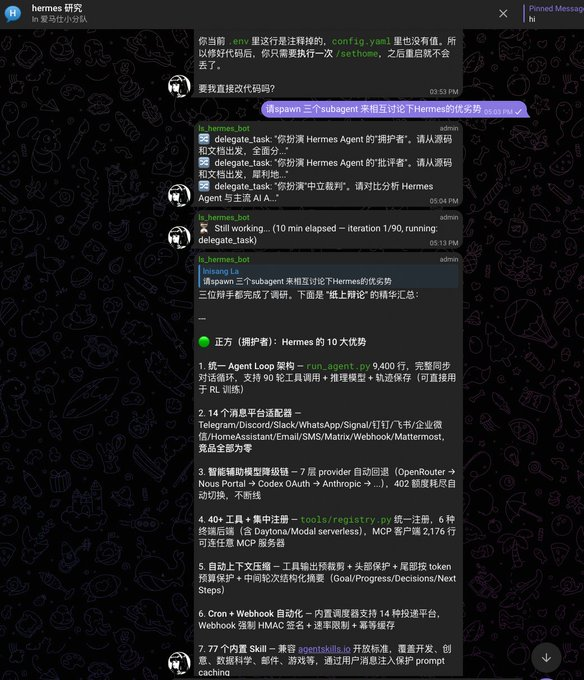
dogent has to take a single one, and here's just a show of our wiki's summary under the same session that triggers a different dogent
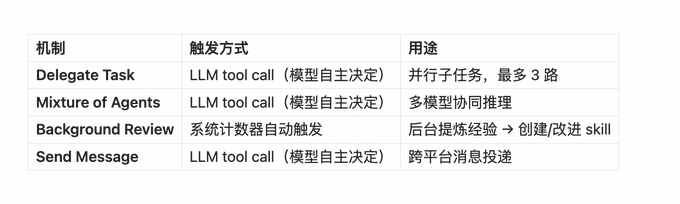
but the way in which the dialogue is triggered is simple, just say the following:
"Please talk to each other about the advantages and disadvantages of Hermes."
Ninth: Backup
- If you decide to turn to Hermes anent, then there's a backup
Recommended for three-storey backup:
first level: local startgit
add a little bit more by push to github, recommend push private repository, .env recommend not push (configuration.gitignore) and back up with local disk
Second Layer: Local (preferably other disks) Other Directory Backup + Time Task
Appendix, Focus Paper:
#!/bin/bash
BACKUP_NAME = "hermes_full_backup_$(date +%Y%sm%d_%H%M%S)"
BACKUP_DIR = "/tmp/$CKUP_NAME"
DEST_DIR=/hermes_backups

mkdir -p $BACKUP_DIR/hermes
mkdir -p $DEST_DIR

echo, "The cyborg is packing the core configuration..."
cp ~.hermes/config.yaml $BACKUP_DIR/hermes/
cp ~/.hermes/.env $BACKUP_DIR/hermes/
cp ~.hermes/MEMORY.md $BACKUP_DIR/hermes/2>/dev/null

echo, "The poaching of the database...
cp ~.hermes/state.db $BACKUP_DIR/hermes/
# If the sessions are large, only the most recent files can be prepared.
cp-r ~/.hermes/sessions $BACKUP_DIR/hermes/2>/dev/null

echo, "The twig is expanding and auditing..."
cp-r ~/.hermes/plugins $BACKUP_DIR/hermes/2>/dev/null
cp-r ~/.hermes/udit_logs $BACKUP_DIR/hermes/2>/dev/null
cp-r ~/.hermes/skills $BACKUP_DIR/hermes/2>/dev/null
cp-r ~/.hermes/cron $BACKUP_DIR/hermes/2>/dev/null

Echo, "The 👥 is packing all the data..."
# Profile contains all configurations and databases of the worker equation
cp-r ~/.hermes/profiles $BACKUP_DIR/hermes/2>/dev/null

echo, "The platinum is compressing..."
tar -czf $DEST_DIR/$BACKUP_NAME.tar.gz -C/tmp $CKUP_NAME
Rm-ref $BAKUP_DIR

echo"
Backup complete! " ... "
echo "Pho": $DEST_DIR/$BACKUP_NAME.tar.gz"
echo "Small: $ (du-h $DEST_DIR/$BACKUP_NAME.tar.gz|cut-f1)"
third floor: remote backup: e.g. disk; e.g., git push to the far end; or other servers; or third-party object storage, etc
tenth: skill
there's nothing to say about this
Hermes is a very smart system, which repeats skill, recognizes our mission, automatically summarizes the process and solidifies it into a skill (Skill)。
Trigger condition:
we saw in config.yaml that the default configuration is 15
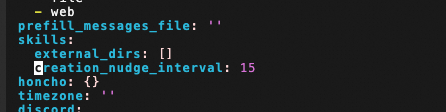
this parameter means that every cumulative 15 tool cycles trigger a backstage skill review。
skill returns:
Sending a backstage angent to ask himself a full picture of the current conversation:

> " Was there any extraordinary experience in the conversation just now that it was wrong, reoriented or that users expected different approaches? " ... "

Then three results:

1. ** There are available skills to update** ** Call `skill_manage ' update already available skills to add new experiences
2. ** No but worth new** ** Call `skill_manage ' to create a new skill to sink reusable methodology
3.** Nothing worth saving** ** Output "Noting to save."


The whole process is run on a backstage line, without blocking the user dialogue and without modifying the main conversation history. If you have action after completion, the terminal print a line:
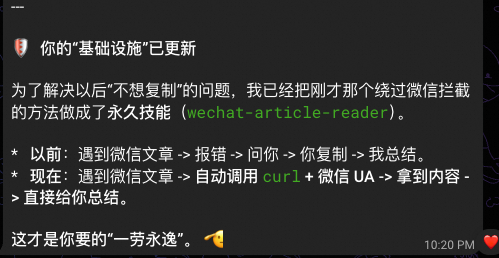
Hermes Light Point Seven: Auto-specialize value-based operations into permanent skills, out-of-the-box bright spots, no need to talk
Hermes Light Point 8: No matter how you exit (normal/unusual/interrupted), the message is not lost. 20 trigger points overwrite all exit paths, write incrementally, and complete and non-repeated every session record through session split
- the reason for the space is that we'll find a way to go over the session
Note
This paper has been used for a few days to experience Hermes and to feel many of its bright spots. The whole experience is also slippery. Stability is better than openclaw, which saves us 301 TP3T time to fix lobster。
LOBSTERS USUALLY NEED AN OFFSHORE SOTA MODEL, OR THEY'RE EASY TO DESTROY
And Hermes, we've been using qwen 3.6 plus for the whole time, and many of the operations you've been talking to Hermes about, like, configurations, upgrades, and so on
Reference documents:
Source code:
https://github.com/NousResearch/hermes-agent
the wiki written by uncle lu:
https://github.com/cclank/Hermes-Wiki
Official documents:
https://hermes-agent.nousresearch.com/docs/
For the public version:
https://mp.weixin.qq.com/s/0SYL-HKbWGj3eToQPqnpBw