



Have you ever experienced such a situation:
Even though the hint is complete and the elements are not missing, it's strange to produce it — hard skin, light, dirty background, unstable body。
ACTUALLY, THE PROBLEM IS NOT THAT AI DOESN'T LISTEN, BUT YOU IGNORE A BOTTOM RULE: AI GIVES PRIORITY TO DRAWING "THE WORD IT CONSIDERS IMPORTANT."。
This leads to:
The abstract words are exaggerated
The subject word is too strong to be killed in detail
Undefined words are automatically filled
Some of these light effects are "the more you describe over the fire."
And the verb “disturb” is the instrument used to intervene in this act. Let's go into this class:
What is the disturbing verb, why it works, how it is used, where it is used, how it is written and how it provides examples that can be reproduced directly。
Chapter I: What is the verb
1.1 Definition of verbs
The disturbing verb (Noise Token / Disturbance Token) refers to a word or structure that does not describe the image, does not provide a clear semantic but affects the distribution of attention。
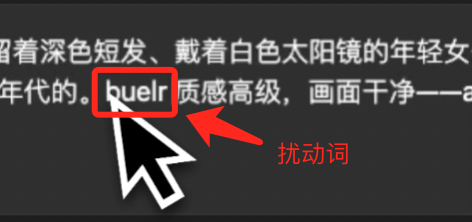
example:
“()()”
“[noise]]”
"random texture signs"
THESE WORDS WILL NOT BE DRAWN BY AI AS IMAGE CONTENT, BUT WILL INTERFERE WITH THE FOCUS WEIGHT OF AI。
1.2 Why does it work
This is the most important part of the curriculum, and many people have no idea what the real thing is. An AI model (Stable Diffusion / SDXL / Flux) will experience a process when generating images:
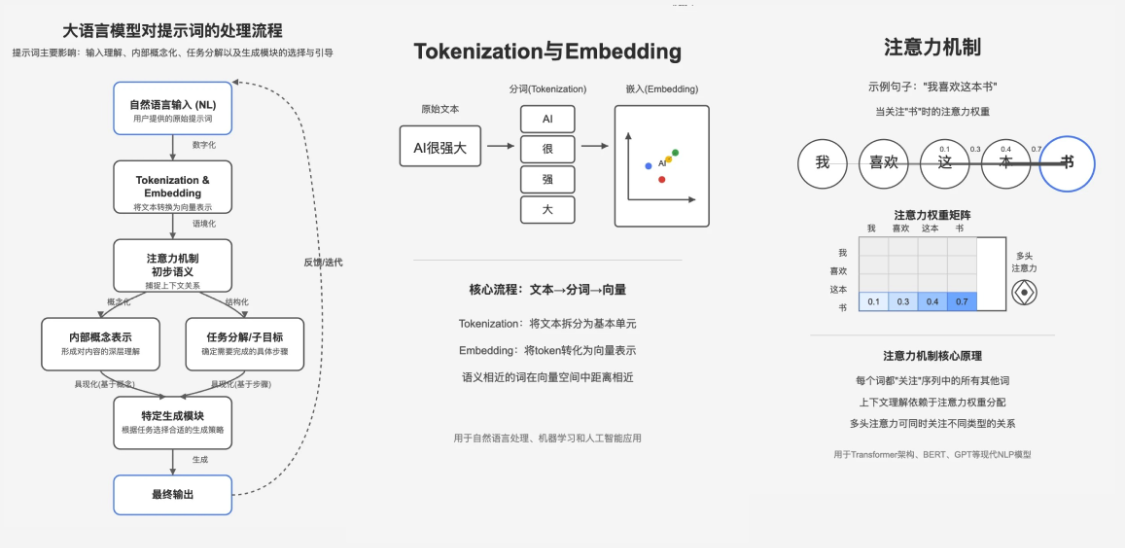
Enter a hint → text encoder → Take the vector of each word → Attention Allocation weight → U-Net sample image
First principle of the hint - "Input Decision Output"
The attention mechanism determines which words are first rendered, which are significant and which are weakened, and the effect of the verb is:
BY INSERTING AN "UNCERTAIN WORD" TO DISTRACT ATTENTION, AI REDUCES SLIGHTLY THE WEIGHT OF CERTAIN WORDS, THEREBY MAKING THE SUBJECT MORE NATURAL AND MORE BALANCED。
YOU CAN READ IT LIKE, "LET'S NOT "TOO HARD" "TOO STUBBORN." SOMETIMES THE MORE I'M DRAWING, THE MORE FAKE, THE HARDER。
Chapter 2: Why do you need verbs
Question 1: The subject is "over-optimised" and the more false it becomes
Common symptoms:
Skin sham, waxy
Hair hard
Too much noise
The contours are too sharp

Undisturbed verbs on the left and verbs on the right
Left video hint:
A woman with short brown hair and white sunglasses leaned on the red inflatable pool chair, in the background of the pool. This photo was published on Snapchat in 2018. High-temperature, clean
THIS IS BECAUSE THE MAIN WEIGHT OF THE HINT IS TOO HIGH, AND AI CONCENTRATES ALL OF ITS CALCULATIONS ON THE DETAILS, LEADING TO A DECLINE IN NATURALITY. ONCE THE VERB DISTRACTS, AI DOESN'T "CRACK IN DETAIL."
Question 2: Abstracts are exaggerated into filters
You write: "dreamy," "soft light", "misty atmosphe" AI. Shine! Fog! Show off!"
Disturbing verbs can reduce the weight of abstract words and allow the image to be restrained and not to fly light。
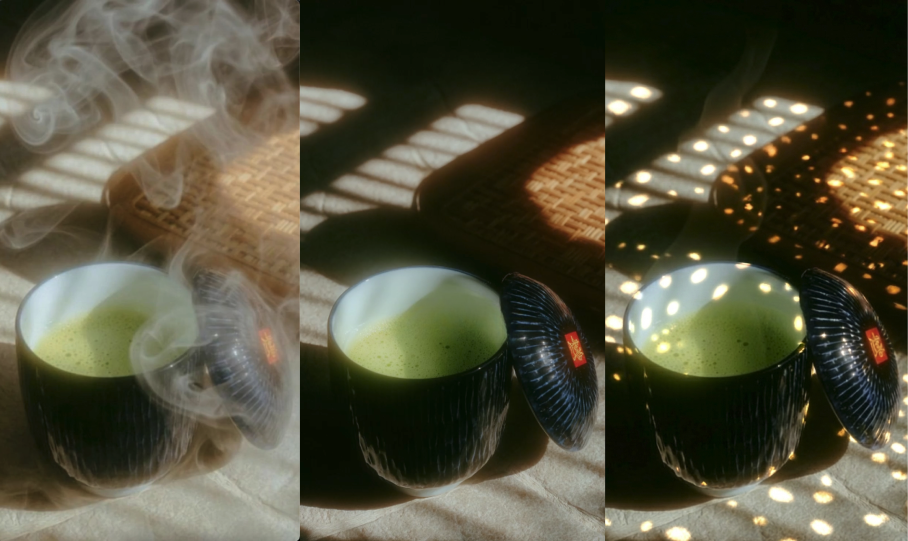
right in the left
Question 3: AI automatically completes uncertainty (auto-complement)
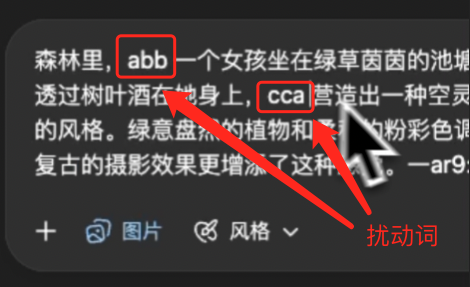
You wrote, "Girls in the woods," but you didn't write, "What's the forest light?" What's the background density? Is the environmental element clear or dead
AI WILL: FREE PLAY → AUTO-SUPPLING MIST TO REFILL THE TREE → WILL CAUSE STYLE TO GET OUT OF CONTROL, ADD VERBS, AND AI WILL CONSUME SOME OF ITS ATTENTION, AND THE SUBJECT'S PRIORITIES WILL BE MORE STABLE AND WILL NOT BE MANIPULATED BY THE BACKGROUND。
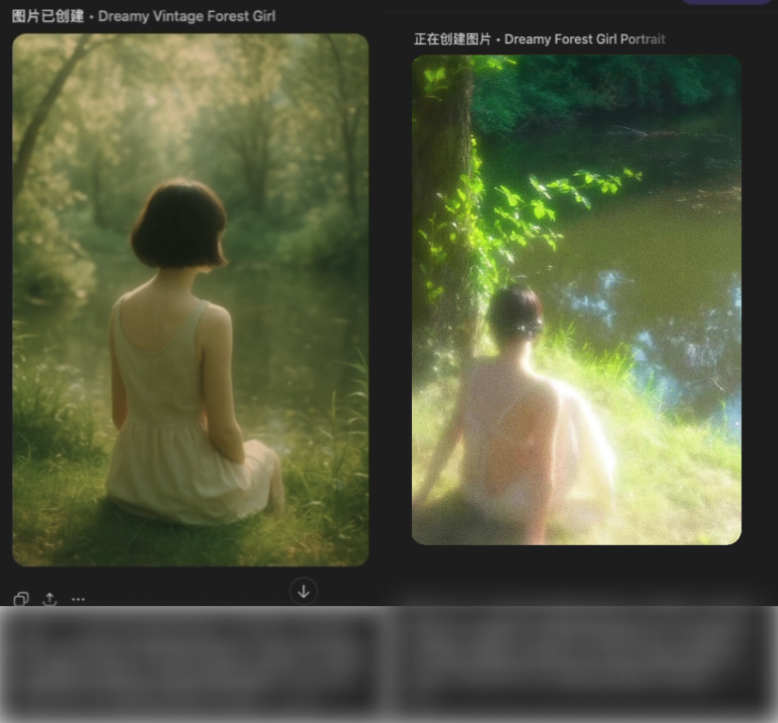
Add a distinction from the absence of “turbation”
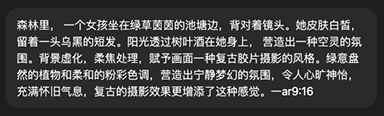
Left Specific Plugin
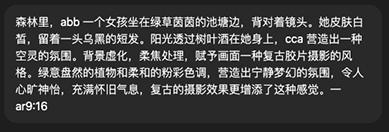
right-hand specific hint (recommended to use midjourney, preferably with some graphic control style)
Chapter III: Three core uses of the verb (principle + case + field)
The verb's nature is a visual distraction
It does not describe content, but it frees some of the model's attention from “irrelevance” information, thus making the image more logical and stable。
IN THE PROMPTING SYSTEM, IT ACTS LIKE A "MIXED NOISE" FOR AI: IT DOES NOT DESTROY THE IMAGE, BUT IT DOES NOT ALLOW AI TO FOCUS ON A PARTICULAR DETAIL, MAKING IT CLEAN, NATURAL, REAL。
The following are the three core methods that disturbed the verb most in the field。
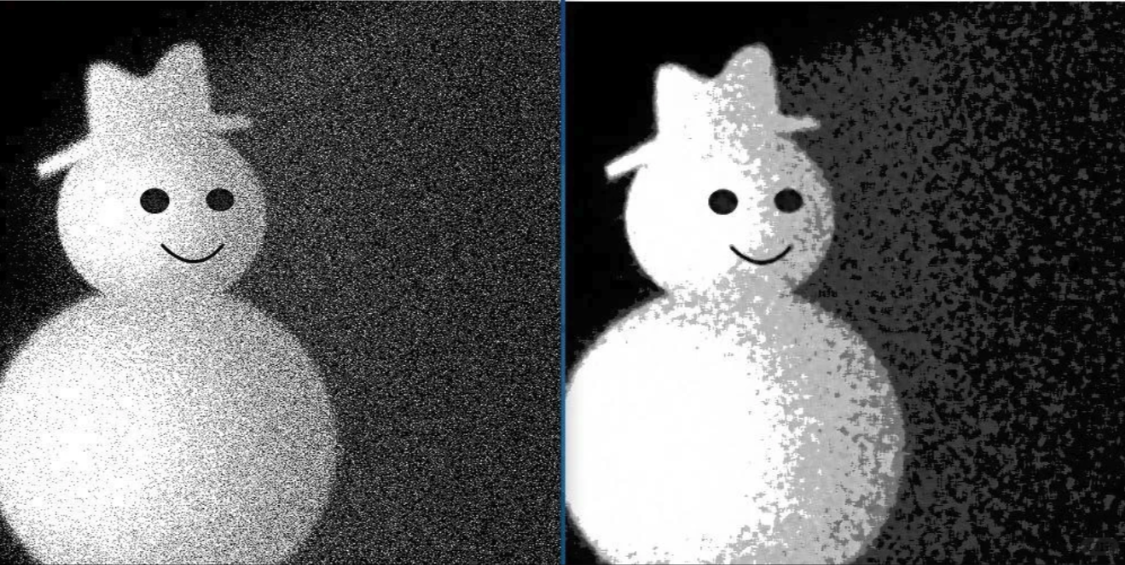
Noise Fuzzy Motion
USAGE OF NATURALISATION OF THE SUBJECT (AVOIDING EXCESSIVE SHARPIFICATION AND DEATH DETAILS)
Principle: How does AI's “compatibility model” destroy the subject? When the hint is too precise (e.g. fine skin texture, film sense, 8k, super-high...)
AI OPENS UP A TENDENCY TO GIVE PRIORITY TO FILLING IN WITH THE DETAILS + LOCAL SHARPENING, SO THE SUBJECT BECOMES HARD, DIRTY, NOISE HEAVY
IT'S NOT WHAT YOU'RE ASKING, IT'S THE RESULT OF AI'S AUTOMATIC OPTIMIZATION。
After the verb:
Part of the attention was drawn to the meaning of words
The sharper logic of the model automatically decreases
The subject is more natural and clean
Case note
No disturbing verbs:
"GIRLS IN THE FOREST, SUNSIDE REVERSES LIGHT, SOFT AND LIGHT, CLEAR SKIN"
After the verb:
add: "(mi, asdf, asdf)" such noises that the subject is soft, skin is not too sharp, picture is more real
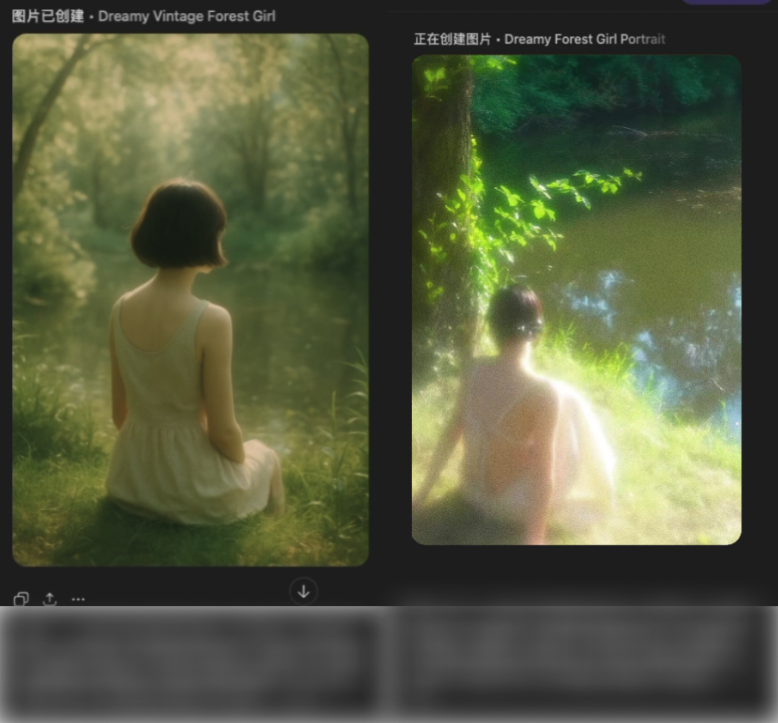
Little girls in the woods are classic, similar to chapter two
Field alert
a girl in a white white dress standing in the forest, with soft and natural light, clean skin taste, light film particles, (mi: 0.7), (asdf: 0.6)
Suggested disturbance weight: 0.3 ~ 0.9 (More exaggerated models, higher weights required)
USE THE WORD "DREAM, SOFT, LIGHT" TO DESCRIBE STABILIZATION IN ABSTRACT (AVOIDING THE WORD "AI"
RATIONALE: HOW DOES AI “MISPERATE” THE ABSTRACT WORD? WHEN YOU WRITE: DREAMS + SOFTNESS + AEROBICS + FLOWS + MYSTERY, THESE WORDS DON'T REALLY HAVE A CLEAR VISUAL MEANING, AI AUTOMATICALLY MAPS THEM AS EXAGGERATING FILTERS
When these effects are added, the subject will be squeezed out and the image will be confused。
The effect of the verb is:
INTERRUPT AI'S "AUTODECORATION" OF ABSTRACT WORDS
Let the image drop first (structure, light, subject)
And it's soft, not "sweet."
Case note
Error:
"DREAMING, SOFT LIGHT, AEROBIC, BEAUTIFUL" AI AUTOMATICALLY GIVES YOU A BIG LIGHT SPOT + PINK LIGHT + FOGGING + FOCAL

After the verb:
light background mist (light haze) (soou:0.5), (mio:0.6)

Field message template
soft and natural light, light-silent reflection shadow, background fog, true light ratio, clean colour, (soou:0.6), (mio:0.5),
Use tritium to control multi-effect supersequence (place the subject first)
PRINCIPLE: IN THE PROCESS OF AI GENERATION, EACH HINT IS MODELLED INTO A VECTOR AND INVOLVED IN SELF-DIRECTIONAL CALCULATIONS。
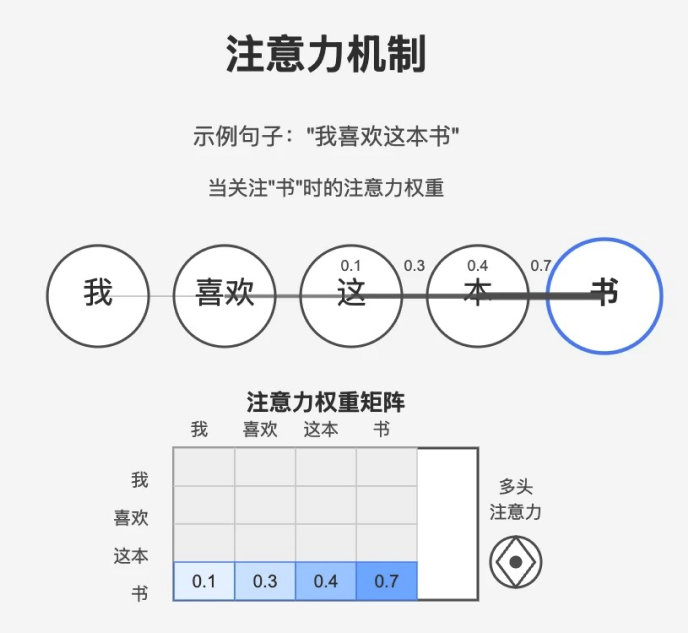
When you have multiple "effects" in your hints (e.g., soft and light, dream atmosphere, film sense, background deformation, light plaque), the model tries to deal with all effects at the same time, and two questions arise:
Conflict of attention: The model does not know which effect is given priority, and the light, background, filters may rob each other of computing resources. The result was that the body was covered by fog, light spots, filters and the clarity decreased。
THE ORDER OF GENERATION IS UNCONTROLLABLE: AI AUTOMATICALLY GIVES PRIORITY TO CERTAIN FEATURES (E.G. BACKGROUND OR ATMOSPHERE EFFECTS) AT AN EARLY SAMPLING STAGE, RESULTING IN THE LATE LANDING OF THE SUBJECT, WITH THE POSSIBILITY THAT THE SHAPE, PROPORTION OR EVEN THE EXPRESSION MAY BE BIASED。
The effect of the verb here is to create priority for the model:
→ Force Mr. Model to be the subject + Shadow Base
Next superimposed effect words
By dispersing or placing verbs, avoiding multiple powerful effects of the model at the same time
Commonly understood: The verbs are like a painter's painting with a background colour, then a special effect, which ensures that the subject falls on the ground, then slowly folds into the light and the atmosphere, instead of rinsing the glass at the beginning。
Case
Normal (disorder):
dreamy, soft light, cinematic atmosphere, bokeh background, glowy highlights, fuzzy, cloudy, lost details
Disturbing word (control order):
soft light base, subject-priority token, dreammy haze (low depth), gentle bokeh highlights, atmosphere-control token, cinematic tone
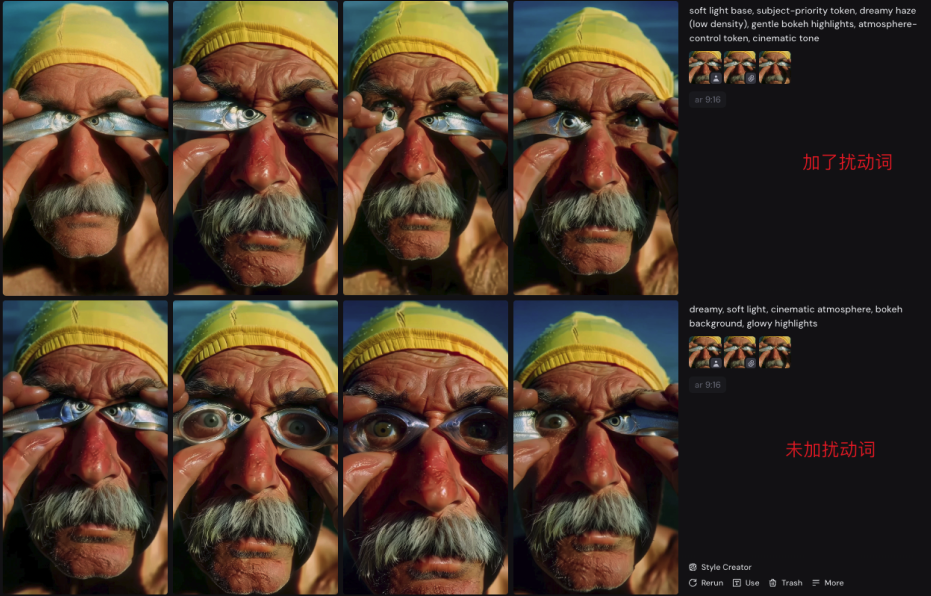
Operational
Main Base First Down: Phrasing Words Start with Subject + Shadow Base
disturbing verbs in place: in front of the subject-priority token / base-style token
quantified effects words: atmosphere, filter, light spots set by strength (low/media/high or 0~1)
Generate & Adjustments: Mr. Low Intensity Compare Disturbing Word weights or Effect Strengths
AT THE END OF CHAPTER FOUR: MASTERING VERBS, EASY CONTROL OF AI IMAGES
IN THIS CHAPTER, WE EXPLAIN HOW TO SELECT VERBS, CLASSIFY THEIR USE, AND STABILIZE, RANK OUT AND CLARIFY THE AI IMAGE THROUGH SEQUENTIAL CONTROL AND WEIGHTING. IN PRACTICE, YOU SHOULD BE ABLE TO DO IT
Subject first down: Master verbs to ensure that the person or core object is firmly natural
The abstract effects can be controlled: atmosphere, light, filters divert attention from verbs to prevent the subject from being covered
MULTI-EFFECT SEQUENCE CLEAR: THE VERB ALLOWS AI TO GENERATE IMAGES ACCORDING TO YOUR LOGIC, NOT "PLAY IT"
Field alert:
First, the subject and the underlying light
Add main verbs
Add softening or atmosphere-like disturbance verbs
Adjust weights to generate contrasts and fine-tunes until the image is satisfactory
With these methods, you can move the verb from a mythical concept to a replicable, manageable and directly applicable creative tool. You can control the picture with your own ideas, whether it's a person, a view, or a picture of light。
NEXT, YOU JUST HAVE TO OPEN YOUR AI GENERATION TOOL AND APPLY THE VERBS, SEQUENCES AND WEIGHTS TO YOUR HINTS AND IMMEDIATELY TRY TO CREATE YOUR WORK. REMEMBER: THE MAIN SUBJECT IS FIRST ON THE GROUND, IT'S TIERED, IT'S FINE-TUNED, AND THAT'S THE KEY TO YOU BECOMING AN AI TELEGRAPHIST。