



ON THE WAY TO THE DEVELOPMENT OF AI'S CREATION, THE LOCAL CONTROL IS TO DISTINGUISH BETWEEN THE CORE WATERSHED OF THE NEW AND THE BEST。
Many creators find that the most painful thing now is not how to write a hint, but to replace one of the elements without destroying the original picture。
THIS COURSE WILL HIT THE PAIN AND TEACH YOU HOW TO USE THE MAINSTREAM 2026 AI TOOL TO REPLACE PRECISE AND NATURALLY INTEGRATED ELEMENTS WITHOUT TOUCHING THE WHOLE MOVIE。
CHAPTER 1: WHY DID YOU CHANGE THE HINT THAT AI ALWAYS “UNDERSTANDS” AND IS POORLY INTEGRATED
Before learning about specific methods, we have to sort out a bottom logic. Many of the creators are changing the picture
The most intuitive approach would be to add a change instruction directly to the original hint or to replace the desired word。
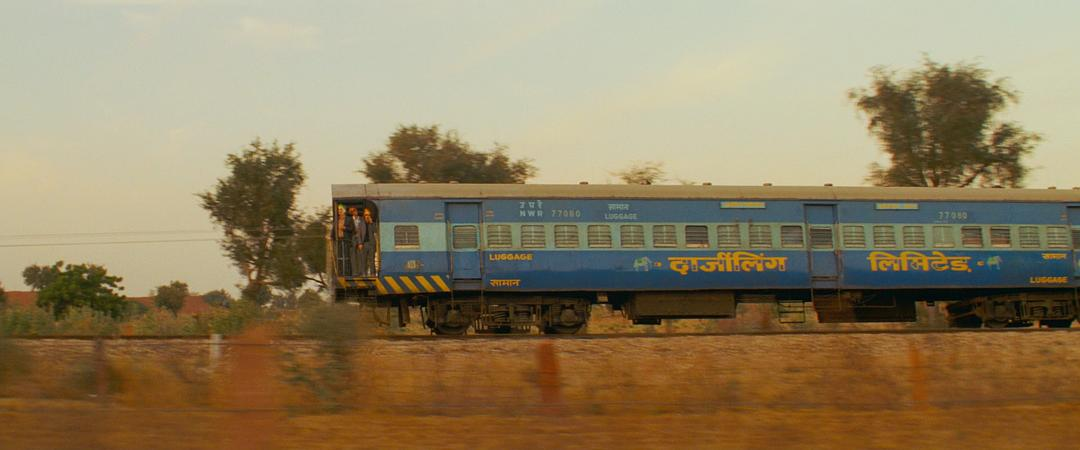
The original image has a very warm film and a real dynamic blur。
For example, the train video above is very retro-film。
What you need now is to keep all background, light and camera moving, just to replace this real blue train with the classic Thomas Little Train。
If you throw the video directly into the Vicoma V3 Omini model (or some other big video model)
And enter a hint: "Replace the train with the red Thomas train." You'll find a breakdown:
The replacement of Thomas' train is so false that it doesn't fit in
THE REASON BEHIND THIS IS THAT WHEN YOU ENTER "THOMAS TRAIN" DIRECTLY, THE BIG LANGUAGE MODEL OF AI IS IMMEDIATELY REMINISCENT OF THE AMOUNT OF CHILDREN'S ANIMATION DATA THAT IT TRAINS IN THE VALLEY. MOST OF THE DATA ARE BRIGHT, PURE, FLAT, 3D MATERIALS WITH NO COMPLEX LIGHT. AI WAS UNABLE TO REPLACE AN “LOW-AGE CARTOON IMAGE” INSTANTANEOUS BRAIN WITH AN ENTITY WITH A “REALISTIC FILM-CLASS PHOTOCOPY” WITH AN EXTREMELY LIMITED VIDEO REDRAWING POWER。
THEREFORE, THE ESSENCE OF A PRECISE REPLACEMENT IS NOT SIMPLY TO REWRITE A HINT, BUT TO PROVIDE AI WITH A STEP-BY-STEP REFERENCE TO A PRECISE PHOTOMATERIAL. WE'RE GOING TO BUILD A MOVIE-CLASS THOMAS AND THEN LET IT MOVE。
Chapter II: Core method of cross-diverse replacement - Refinement method (resolving false perception)
In the case of this replacement, where the pattern is very different and the target object is in a relatively independent state of motion, the most appropriate approach is to establish the visual material anchor first with a single chart and then direct the video generation with that anchor。
Step I: Production of “perfect reference maps”
1. Capturing the frame of a video from the original video
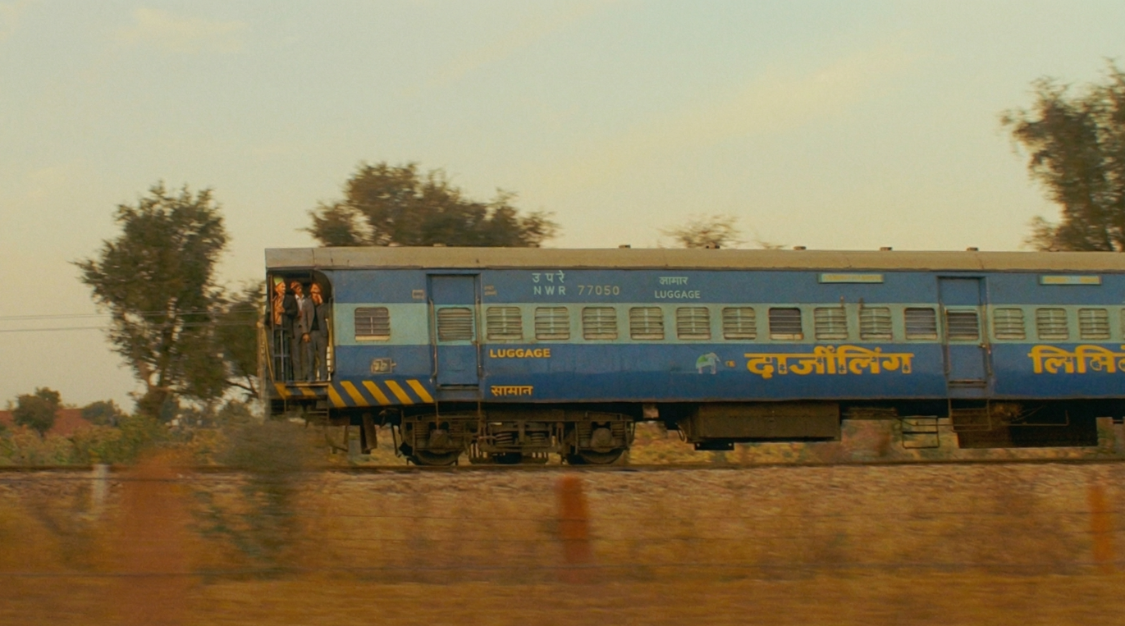
Step 2: Local redrawing using Nano Banana Pro
Importing this image into Nano Banana Pro, the top image editing capability
Enter a direct hint:
Change the train to the red Thomas train
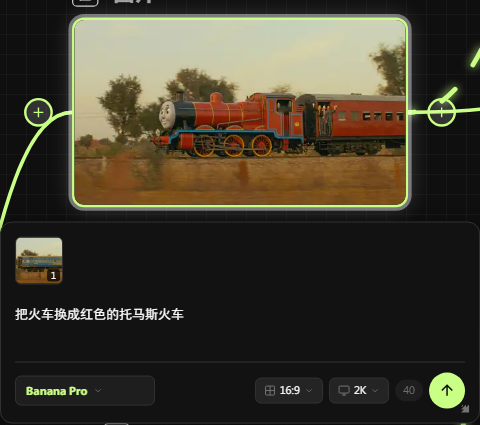
Thus, the blue train was naturally replaced by the Thomas train。
Step 3: Video redraw with reference maps
Now, we go into the video generation tool. It is recommended to use the dream AI, which has a very high reference weight for the image, or to continue using the polygraph reference mode of the Violin o Mini。
Upload your original video and modified pictures in the Clin 3.0 Omini model generation tool
Enter the prompt word:
Turn the train in the video into the train in the picture
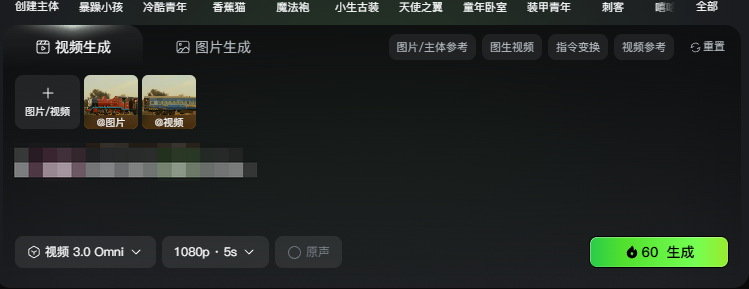
Click to generate。
Summary of methodology:
BY GIVING AI A MODIFIED STATIC MAP AS A " VISUAL STANDARD ANSWER", AI HAS A CLEAR COMPARISON TARGET WHEN RECALCULATING EACH FRAME OF THE VIDEO。
It no longer needs to speculate about what the red train looks like and where it is, but simply “posted” the red train in the reference map into the video's track, thus ensuring the extreme stability of the video。
Chapter 3: Extreme detail control - Silent frame masking (high precision frame-by-frame control)
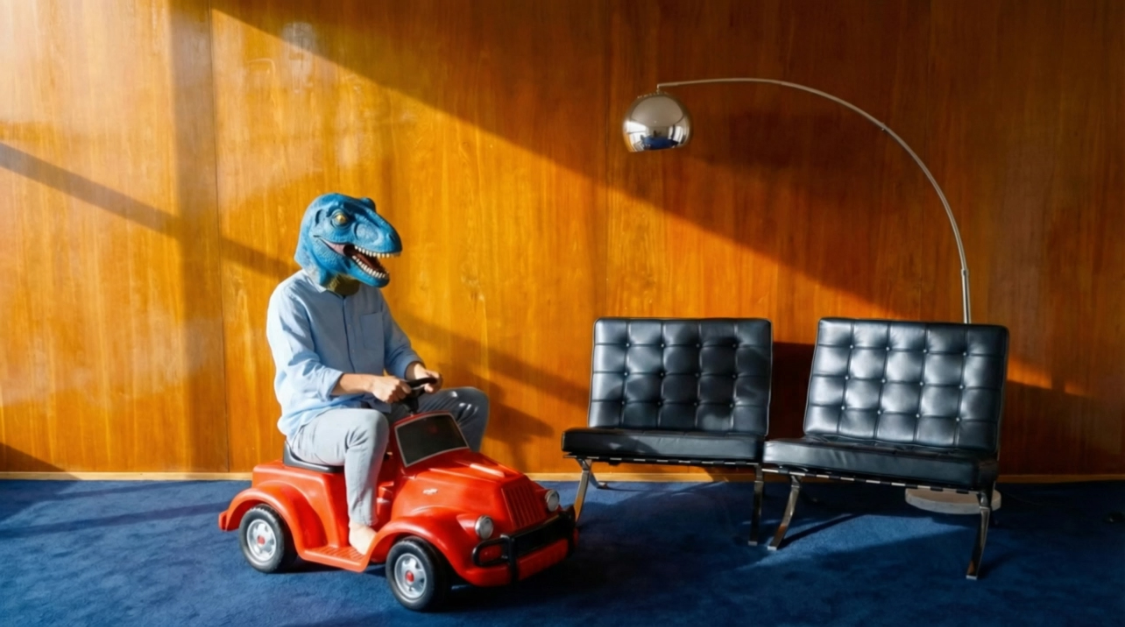
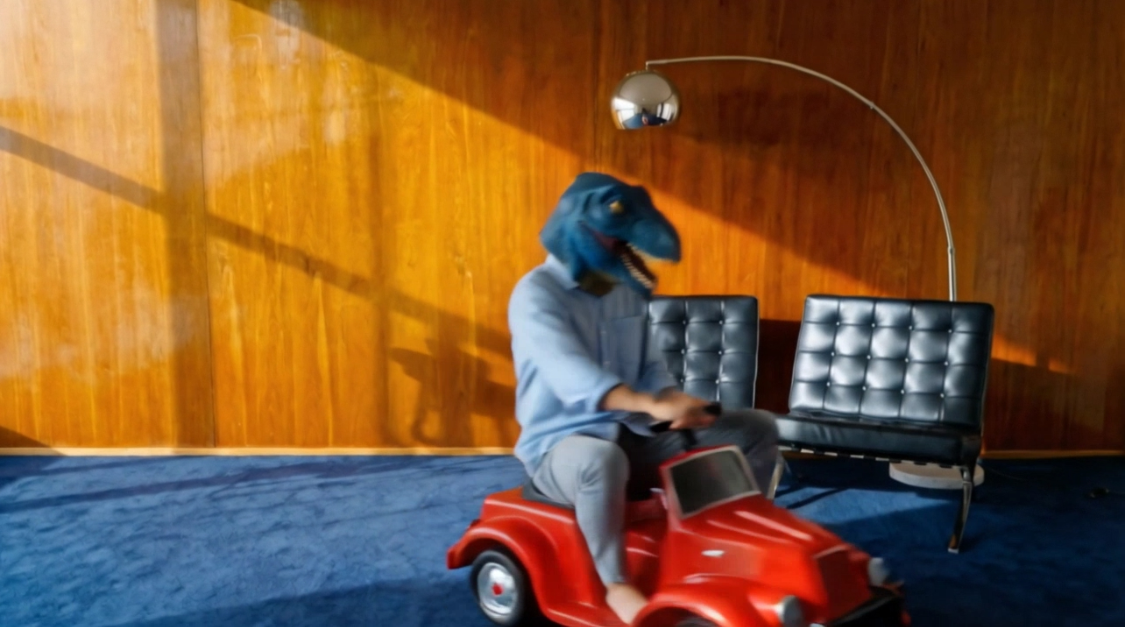
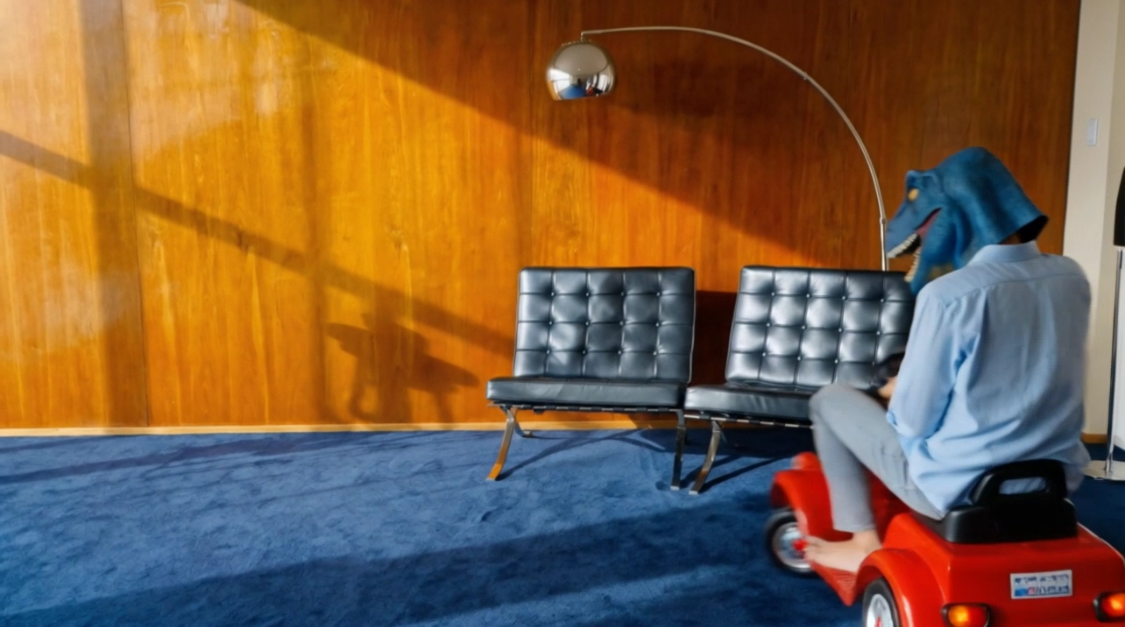
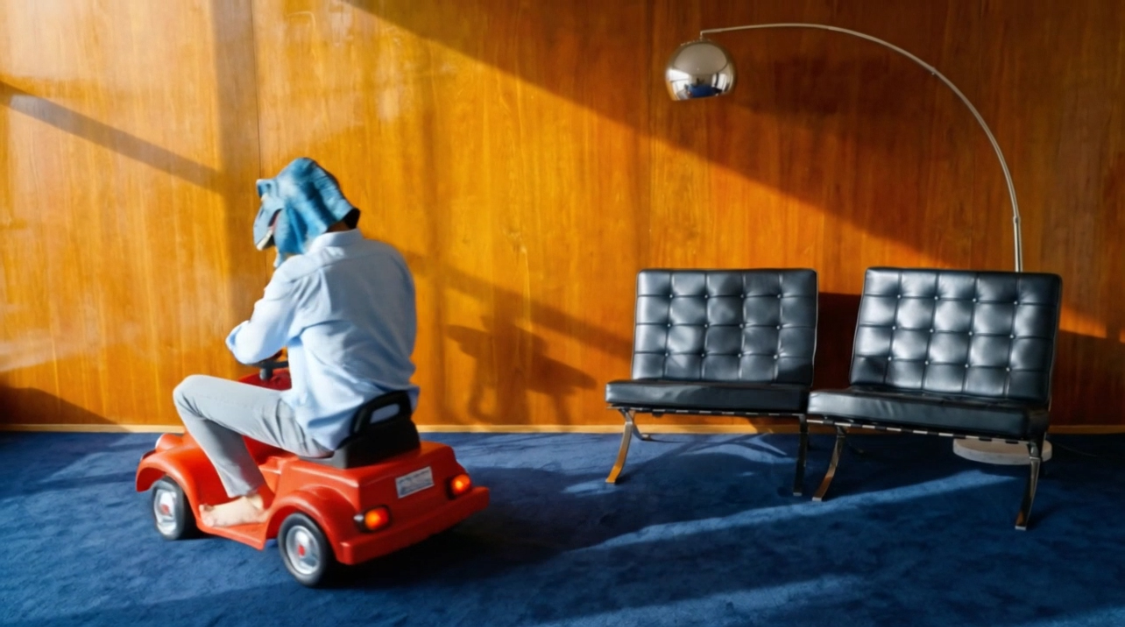
The dinosaurs in the video were on a car around the corner (from the side to the back)。
We need to replace it not only with this particular toy cart, but also to make sure it doesn't melt when the video turns。
In the case of such objects, which are complex and subject to photolytic changes and movement with a broad angle, the single modulation is bound to collapse in the middle frame. We have to use the “extremely detailed control (multi-graph batch constraint) method”。
The logic of it is that it's a toy cart reference for your only view, which combines the different key frames of the video, and forces it to "draw" from different angles and re-drive it with a video-generation tool。
Step 1: Extract key frames of the large dynamic trajectory
Four core key frames to extract the video:
Initial side vision (00:00)
Road trip (01.1)
Turn midway (00:02)
Backwards (00:04)
Step two: Use design software to paint a toy car
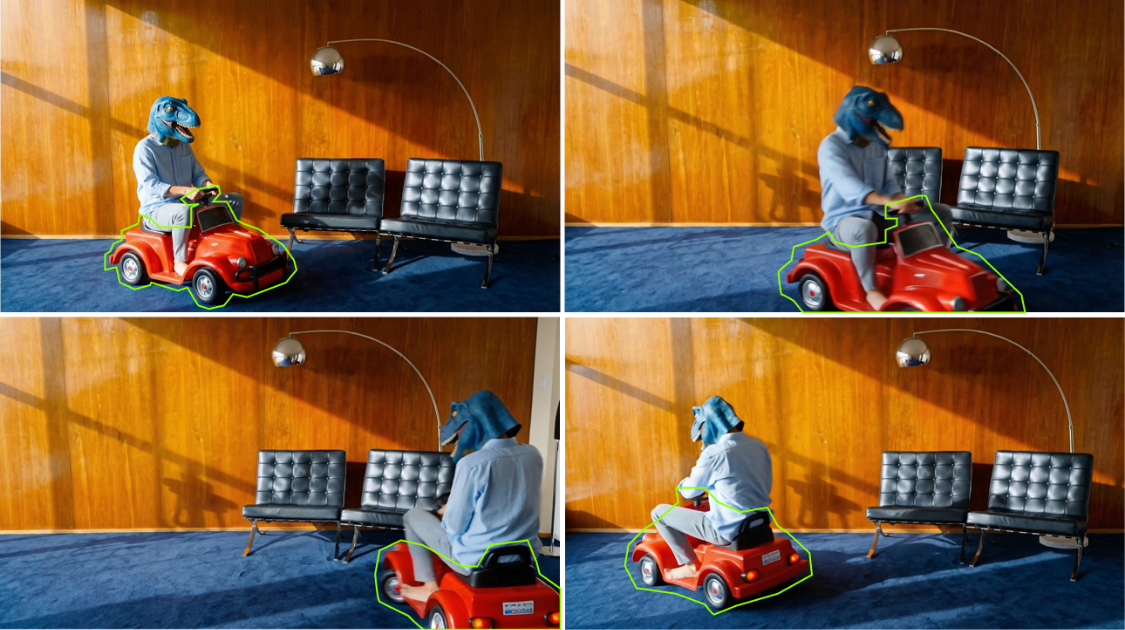
Step 3: Nano Banana Pro sets the tone by frame
hand over the mask and the cart map to banana pro for a drawing
Tips:
Turn the red toy truck out of chart 1 into a carriage in figure 2, where the light and the size of the car are combined
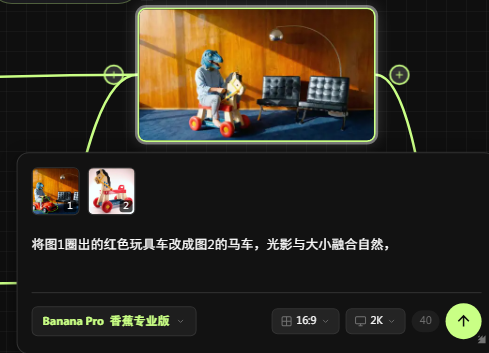
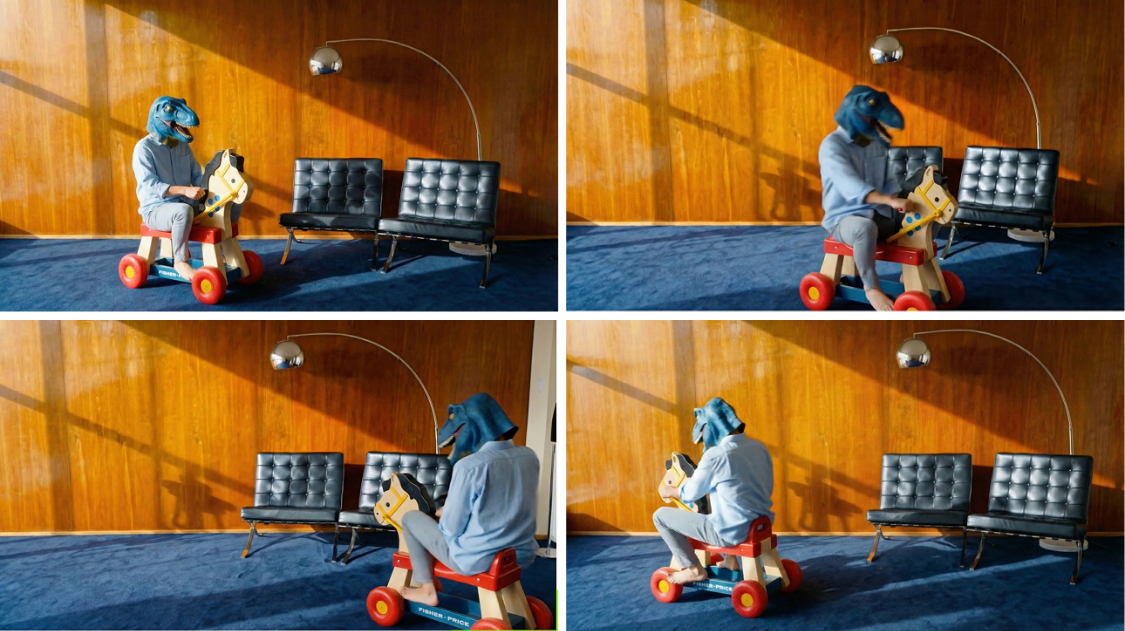
step 4: clin 3.0 omini drive multi-text reference
1. Open Clin AI 3.0 Omini
2. Tow video with pictures of the changing carriage in order
Enter the prompt word:
Reference video 1, replace the toy car in the video, following the sequence frame of picture 1, picture 2, picture 3, picture 4, in order
3. Click generation
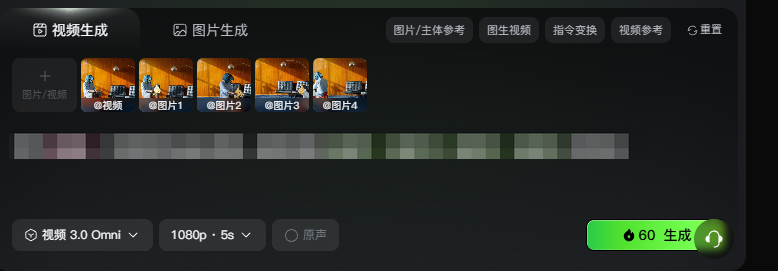
Conclusion
High-level precision replacements, not the more intriguing, but rather..
WHO KNOWS MORE ABOUT THE DYNAMICS OF OBJECTS AND THE LIMITATIONS OF AI'S BOTTOM COMPUTING。
Next time you find something in the video that's deformed, or something that's like a rough collage, don't die on a global order。
BACK TO BACK, LEARN TO EXTRACT KEY FRAMES, USE IMAGE REFERENCES AND MULTI-ANGLE MASKS, AND DEVELOP CLEAR SPATIAL AND MULTI-PERSPECTIVE SIGNPOSTS FOR AI. AS LONG AS YOU CONTROL THE NODES OF THE CHANGE PROCESS, AI WILL BECOME THE MOVIE-LEVEL SPECIAL EFFECTSER IN YOUR HANDS。