



Do you think some AI-generated images look too perfect? Smell like AI? MidJourney can create very high-quality photorealistic images, yet the images are so flawless and lifelike that they feel disturbingly perfect and almost unreal.
For example, this is a bit exaggerated:
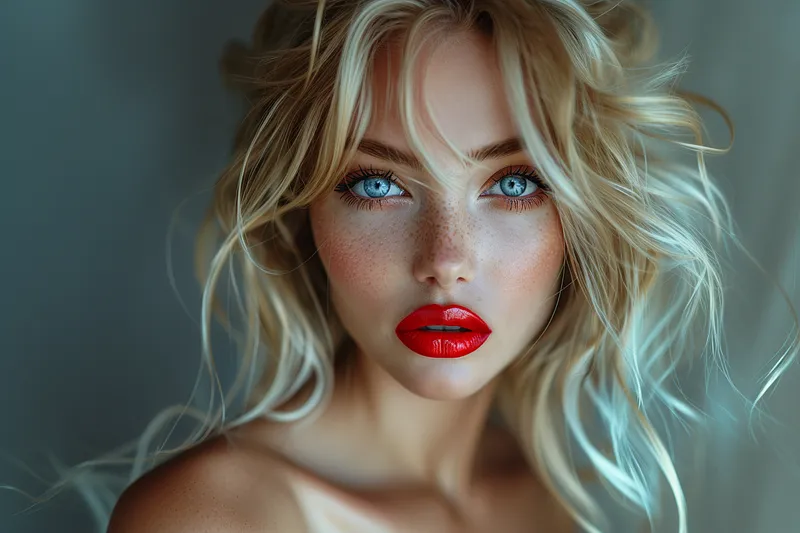
Most people can tell at a glance that this perfection is "artificially generated".
Next, I will share 5SkillTo dilute the "AI flavor" and make the pictures feel more real rather than hyper-real.
Tip 1: Add these terms to your prompts
By adding the following terms to your prompts, you can guide MidJourney to create images that are closer to real-life photos:
elfie
Selfie
Phone photo
Mobile Photos
Everyday photo
Daily photos
Low-quality photos
Low quality photos
Average-looking person
Average-looking people
Photo posted on Facebook/Reddit
Photo posted on Facebook / Reddit
Tip 2: Setting the "Stylize" value
The Stylize value plays an important role in determining whether an AI-generated image has a typical "MidJourney style".
Increasing the "Stylize" value (100-1000) can make the image look very nice and cinematic, but it is also the cause of "too much perfection".
Keeping the value low (less than 100) can make images and people's faces look more realistic and less like they have been processed through the MidJourney filter.
You can do this:
Type -stylize or -s at the end of the prompt and enter a value less than 100.
To make the image look really real, I recommend setting the "Stylize" value to 50 or less. Sometimes setting it to 0 can also be a good way to add realism.
Tip 3: Apply "Style Raw"
Applying "style raw" instructs MidJourney to adopt a less default aesthetic style while strictly adhering to your cue word. It eliminates much of the "fancy stuff" such as excessive style elements, image composition, and lighting that make your AI images appear more "raw" and "unassertive".
You can do this:
Type -style raw at the end of the prompt.
Alternatively, type /settings and select "Style Raw"
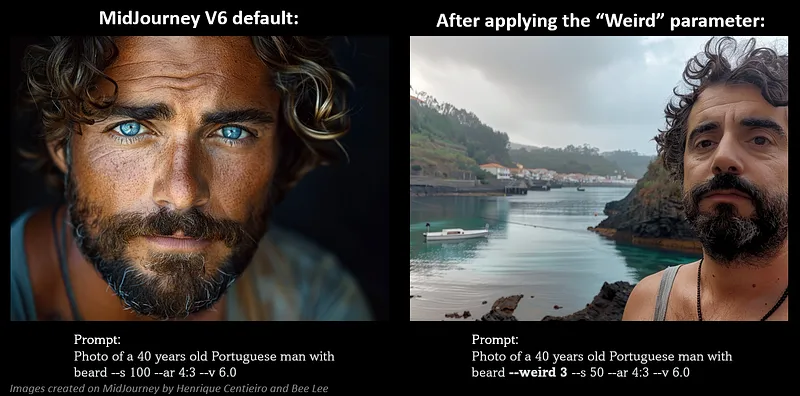
Tip 4: Add the "Weird" parameter
The weird parameter is a little-known feature in MidJourney that can dramatically affect an image by introducing quirky and unusual qualities, resulting in unique and unexpected effects.
In my experiments, adding a dash of "quirkiness" makes realistic images slightly "imperfect"-reflecting natural imperfections in everyday photos.
You can do this:
Type -weird or -w at the end of the prompt and enter a value between 0 and 3000.
To enhance the realism of the image, I recommend using a very low "weird" value. In my experiments, values above 5 gave too much "weirdness".
According to the MidJourney documentation, the optimal "weird" value varies from cue to cue and needs to be experimented with. It's best to start with a small value and work your way up as needed.
Example:
Tip 5: Getting the most out of the Image Tip and Style Reference (SREF) features
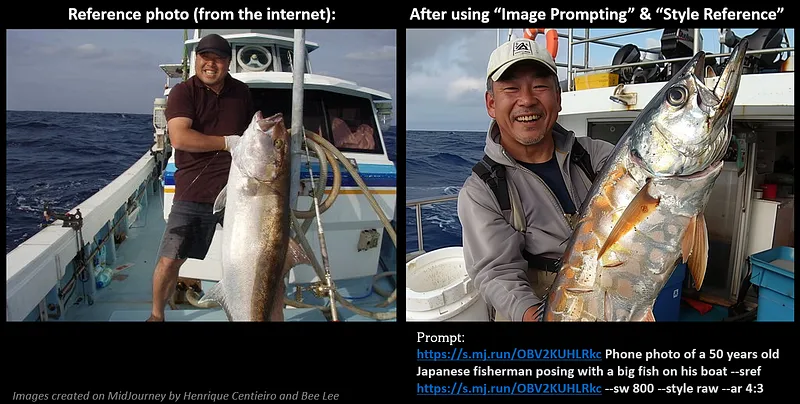
If you have a real photo of yourself or from the Internet and want to replicate its authenticity, then using it as a reference image for the Image Hints and Style Reference features is the best way to go!
With the Image Hints, you can include stylistic elements from the reference image, such as the overall composition of the
Also, the "Style Reference" allows you to transfer the overall style, color theme, ambiance and beauty of the reference image to your new creation.
You can do this:
For Image Prompts, simply place the reference image URL in the prompt box and add additional text and parameters to complete the prompt.
In "Style Reference", enter your prompt, then -sref; add a space after -sref and paste the URL of the reference image.
I recommend using a combination of Image Hints and Style References to replicate "real photo" elements in new creations for best results.
Specify a higher overall style weight (500-1000) for "Style Reference" by typing -sw followed by a value; my personal favorite is 800.
Example:
Example
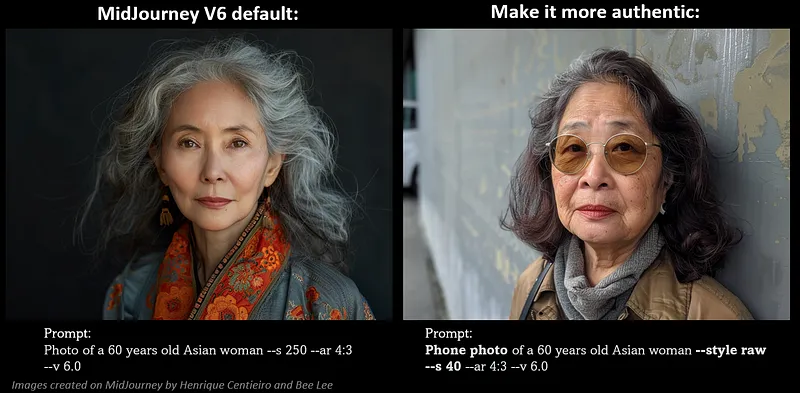
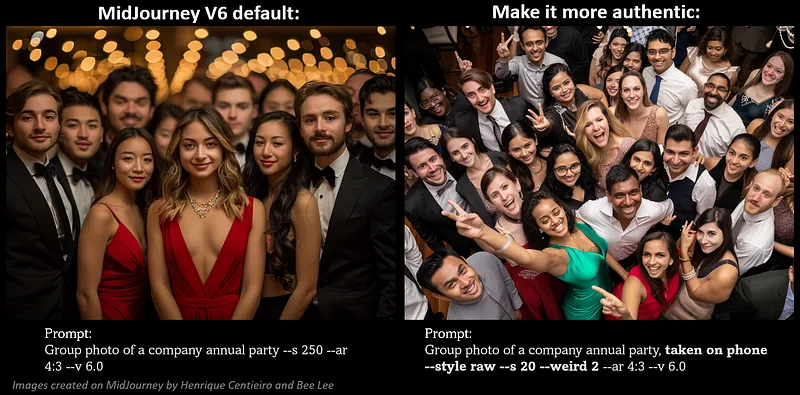
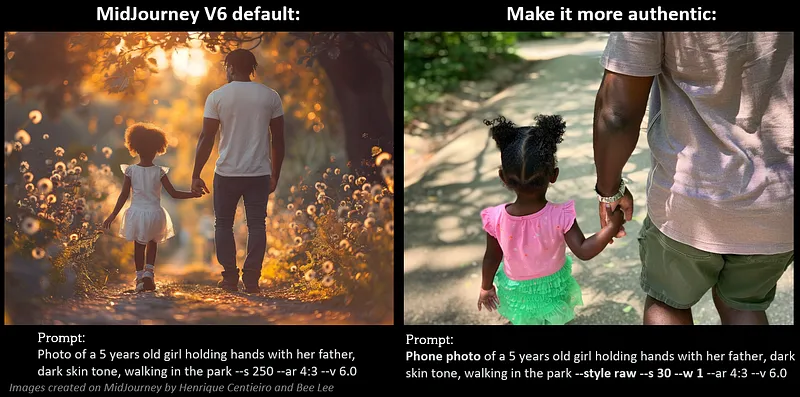
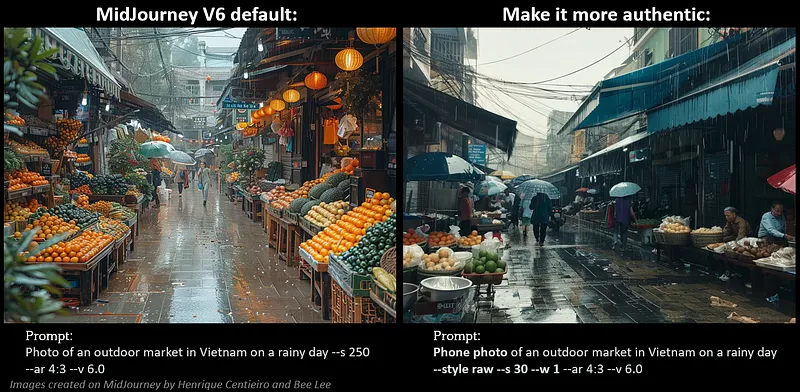
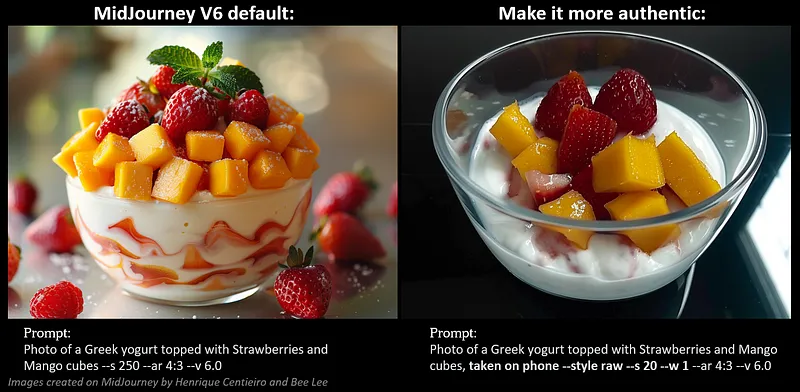
Here is an example of the before and after effects of applying the above techniques:
1. A 60-year-old Asian woman:
2. Group photo
3. A 5-year-old girl and her father
4. Outdoor Market
5. Greek yogurt with fruit
I hope the above tips are helpful in creating more "real" and lived-in images on MidJourney!