



A friend asked if some of our generatedAI pictureIf you want to change the text, you can quickly change it to the text you want to present.
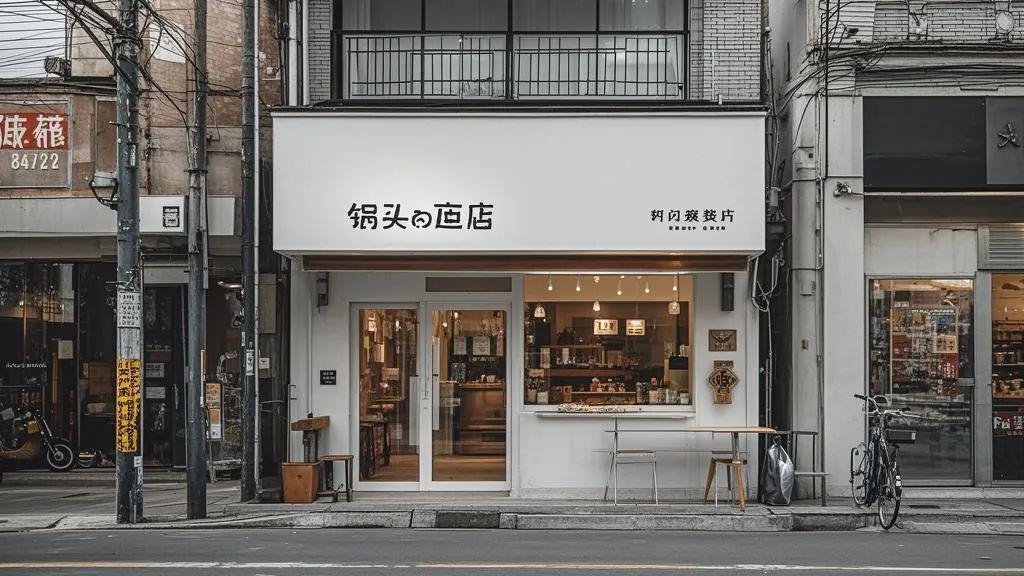
As shown in the picture above, if we ask to put the door headerIt's accurately labeled "Pothead's Shop."furthermoreKeep the style consistent with the current imageWhat should I do?
Solution
OpenDream AIThe smart canvas function of the "Pothead's Shop" is used to write the text "Pothead's Shop" by partial redrawing.
PS: Currently, the Smart Canvas feature is only supported in the web version of the computer.
See the effect first
Modified effect

Here, learn together how to accurately redraw image text with i.e. Dream AI Smart Canvas feature?
▌How to accurately redraw image text with Instant Dream AI?
Go to the homepage of the official website of Instant Dream AI and click on [Smart Canvas].

Enter the smart canvas page and click [Upload Image].

Select the image to be partially modified and click [Open].

After you open it, the picture will be uploaded automatically. After the upload is finished, click "Adapt content to canvas" at the top of the Smart Canvas interface.

After the drawing board adapts to the content, you see that the picture and the drawing board are the same size, at this time, click [Local Repaint] - [Local Repaint].

Enter the local repainting interface, click on the upper [brush icon], paint the area to be repainted, pot head here to picture the location of the store head. Since the store name needs to be accurately displayed as "Pothead's Store", so pothead directly enter "Pothead's Store", and then click [Local Repaint].

Image generation in progress.

The raw image is complete, look and feel good, click [Finish Editing].
PS: If you are not satisfied, you can click on the 1/4 rightward arrow to see the other three images generated, or you can generate them again or re-edit them.

After finishing the editing, enter the main interface of the canvas, click [Export] in the upper right corner, export the content as "current drawing board", click [Download].

When the download is complete, the image is automatically saved to a local folder on your computer.
Here, let's use that dream AI together to quickly redraw the text of the picture, precise control of the display, the style is unified, have you learned?
▌Learning Summary
Let’s review and summarize what we have learned:
- Open the official homepage of Instant Dream AI and click [Smart Canvas].
- After entering the Smart Canvas interface, click [Upload Image].
- Select [Board Adaptation Content] - [Local Redraw].
- Enter the Local Redraw interface, use the brush to paint the area where you need to change the content, enter the text you want to display, and click [Local Redraw].
- After the partial redrawing of the raw image is completed, select the image that meets the expectations and click [Finish Editing].
- Go back to the Smart Canvas homepage, click [Export] in the upper-right corner, select "Current Panel", and click [Download].
- Images are automatically saved to a local folder on your computer when the download is complete.
This wave went down and we redrew the partial text of the image with the Instant Dream AI Smart Canvas.Precise control of text display,Uniformity of style with the originalThe results are great.