



In this section we will take an in-depth look at ControlNet's Line Drawing Hard and Soft Edge modes. Through this section, you will learn the basic principles of line constraints, the application of hard and soft edge modes, and their importance in real projects.
I. What are line constraints?
Line constraints are used in ControlNet for guiding theStable DiffusionA way of generating results which influences the generation of the final image by extracting line features. The importance of line constraints in Stable Diffusion cannot be overstated, as they allow us to control the generation of the image in multiple dimensions.
II. Hard edge mode (Canny)
Hard edge mode is one of the first features of ControlNet that can accurately extract the edges of items in a picture, making the resulting picture very similar in outline to the input picture.
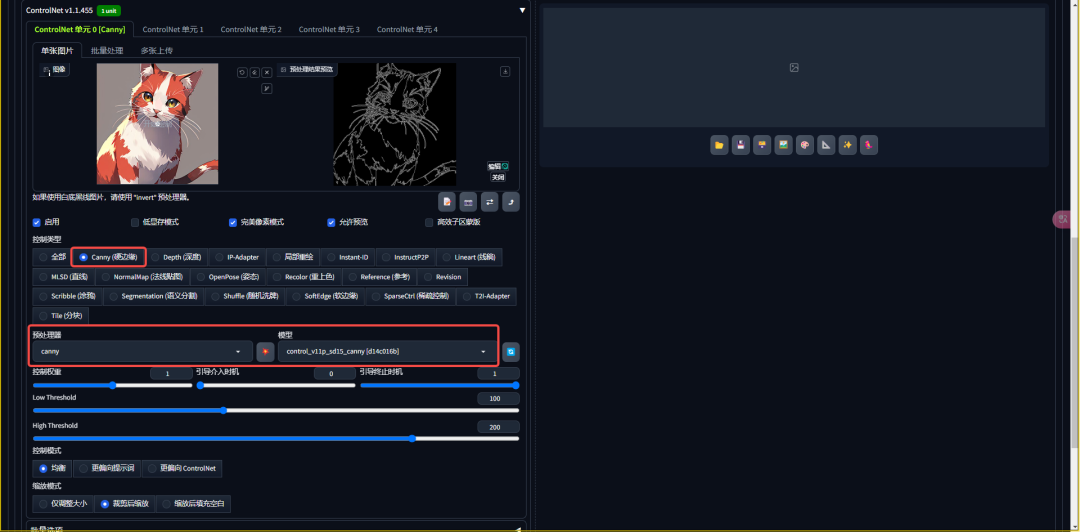
Hard Edge Mode Use Cases
1.1 Product redesign
Take a commercial order case as an example of how to use the hard edge pattern to provide inspiration for designers by making random substitutions of colors and materials while preserving the silhouette and fit of the shoe.


1.2 Line drawing generation
We use a secondary character generation line drawing as an example to illustrate the application of hard edge mode for line drawing generation.


1.3 Colorize the line drawings
We can also color the line drawing, which is the opposite process of line generation.


Advantages and Disadvantages of Hard Edge Mode
The advantage of the hard edge mode is its accuracy, but it also has some problems, such as the details can not withstand a close look, and the reproduction of the material is not careful enough. In addition, the hard edge mode is prone to recognizing the contours as double when dealing with quadratic images, which leads to some problems in the generated images.

Third, the soft edge mode (SoftEdge)
To solve the problem of hard edge mode, soft edge mode was created. It avoids the problem of double lines by softening the edges, but at the same time sacrifices some constraining power.

Soft Edge Model Use Cases
We show the advantages of the soft edge mode in dealing with edge extraction, especially in avoiding the double line problem, through a cat case.


Advantages and Disadvantages of Soft Edge Mode
The advantage of the soft edge mode is its softening of the edges, but it has weak constraints that may cause the generated image to differ in structure from the original.
IV. ControlNet preprocessor
ControlNet offers a wide range of preprocessors, including different variants of hard and soft edges, to suit different application scenarios.

There is also a "None" option in the preprocessor that allows us to upload feature maps directly for generation.

Preprocessor's Inversion Mode
The preprocessor's inversion mode allows us to convert a line drawing with black lines on a white background into a computer-recognizable feature map with white lines on a black background for different generative needs.


Threshold control
The control of thresholding in ControlNet determines the fineness of feature extraction. By adjusting the threshold, we can control the sparseness of the lines in the generated image.


V. Summary
Through the study of this section, we have gained a deep understanding of ControlNet's hard and soft edge modes, and mastered how to choose the appropriate line constraints according to project requirements.
This knowledge will provide us with a solid foundation for subsequent study and practice.
I hope this article helps you better understand ControlNet's line constraint model.