



Today we use 4 methods to realize the picture HD zoom function in Comfyui, not only can we realize the wallpaper level lossless zoom of the picture, but also can automatically complement the picture details, so that the details are richer, the key is the method is very simple.
First, we need a basic Vincennes diagramWorkflow
Here we just give a simple cue word: 8K, a girl, smiling
Sampler: euler
Scheduler: Karras
Image size: 512*768
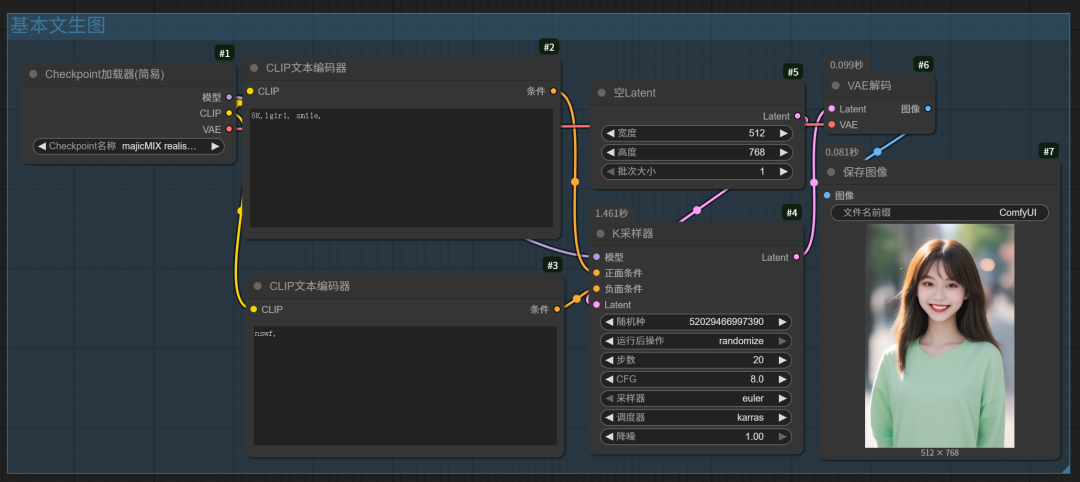
Default workflow run out of the picture is not too clear, the following we through the 4 methods of this workflow to transform, to achieve the picture zoom function.
II. Picture Enlargement
1. Zoom in through the model
(1) Right-click the mouse in the blank space and add the model zoom node as shown below

(2) Then add the "Zoom Model Loader" node.
Model selection 4x-ultrasharp.pth

Model download link:
https://huggingface.co/Afizi/4x-UltraSharp.pth/blob/main/4x-UltraSharp.pth
Model placement path: models\upscale_models

(3) Connecting nodes
Then connect the "Image" output on the right side of the VAE node to the input on the left side of the "Zoom in with model" node, and then connect the right side to the "Preview Image" node.
For comparison, the enlarged image is quite a bit clearer than it was before it was enlarged.

(4) Add the "Image Comparison" node.
Double-click in the blank space to add rgthree's Image Comparison node (this node comes with the Autumn Leaves Integration Pack)

Connect the image output nodes of VAE decoding and "model zooming to the two nodes A and B of image comparison, respectively.

With this image comparison node, you can first clearly see the difference between the two pictures before and after the clarity of the above, after zooming in the picture even the hair strands are much clearer.

2、Latent scaling
(1) Ignore unwanted nodes
Start by selecting the nodes you don't need and press Ctrl+B to have the workflow ignore them when it runs.

(2) Add Latent scaling node by factor

Select "Proximity-Accurate" for the scaling method.
The amplification factor is chosen according to the need, here 2 times is chosen.

(3) Adding samplers and VAE decoding
Re-copying a K-sampler and VAE decoding, placing Laten scaling between the K-sample and the empty Latent, the full screenshot of the workflow is shown below:

The noise reduction factor (redraw magnitude) will change the scaled image significantly from the original if it is 1. It is usually around 0.5.
3, UltimateSDUpscale zoom plug-in (autumn leaves have been integrated)
(1) Adding nodes

(2) Loading model
The SD Zoom plug-in integrates a K sampler, which also needs to be loaded to zoom in on the model, and after the SD plug-in is zoomed in, the picture details are also significantly improved.

4、Triple amplification
We can also combine the previous three zoom methods to zoom in on the image
Let's look at the full workflow first, by the way, I changed the cue words to get more detail in the image, so the generated image changed.

Here's a closer look at what makes up this workflow
First, we connect the Latent of the sampler to the latent variable coefficient scaling as a first level of amplification

Immediately after that, the image output from latent variable zoom (primary zoom) is passed to SD zoom (secondary zoom) and then to model zoom (tertiary zoom).
Since the image will become very large after three zooms, we also have to reduce the image, and the three-stage zoomed image is output to the image zoom node, and finally output to the image preview node.

Add image zoom node
Double-click on the blank space and search for the "Image Scaling" node, select the second one.

Set the width to 0 and the height to 4096, meaning that the height of the image is fixed to 4096 and the width will be generated in proportion to the original image.
The Method parameter is set to keep proportion, and the other parameters remain unchanged.

Take a look at the resulting image

Finally, zoom in locally to see the details, the picture is full of details, even so fine that even the hair strands can be seen clearly, this zoom level are you satisfied?
