



Today's advancements in AI have made it seem as if we have more options available to us for technology and the use of tools, but they have also caused us to gradually lose one of the most valuable things we have - our attention!

AI nowadays, whether it's a big language model or aAI PaintingWait a minute, no matter in which field is considered to be a blossoming, each company fights for the color, fight hard, good and good...
But I (or most of us) as an app user can't tell if I'm excited or confused about it.
The excitement is that competition will inevitably accelerate the updating of technology, and good products/services will benefit our daily life faster, and the experience of using and creating them will be of better quality.
The confusion lies in the fact that in today's AI marketplace with its vast array of tools, in addition to the healthy competition and technological iteration that must exist, there are also too many low-quality, shell tools and too many homogenized platforms/products, and the web is like an endless ocean that breeds everything that happens.
Of course, it is undeniable that this is the inevitable result of technological development, especially for the present is more so.
In the book The Attention Crisis there is a quote that the more information that is pumped in, the less time people have to focus on any part of it.
So for today's technological society, whether it's the AI ecosystem itself or the exponential information explosion brought about by AI, whether good or bad, true or false, we are forced to receive a massive amount of information every day, which invariably eats away at our precious attention...

(This image is from the Internet)
In the face of this, most people lack awareness and can do nothing about it, thus pursuing the "rain and shine", involved in the actual sick social rhythm, can not really sink their hearts into learning a good field, use even a good tool.
And so on and so forth, all of this makes me fantasize about the year 2023, when AIGC is just emerging, or even when I first started getting into AI painting, when I didn't know much about the field, and for me, SD (Stable Diffusion) and MJ (Midjourney) has dominated the 90% share of my AI painting world.
So for me, those two were the most important and learning them was something I had to do, so my focus was basically on those two.
However, with the increasing speed of technology iteration, the progress of our learning seems to have failed to keep up with the pace of development, so many people began to follow the "wave of the times", thus ignoring the field of the most primitive technology, the most primitive theory, the most primitive operation....
But as of the time I wrote this article, I always think that SD and MJ as the two main pedestals in AI painting, learning them is always helpful to us. Because when you master these two, it also means that you have mastered the basic disk of AI painting, which in turn makes you have a strong technical ability, you can easily learn any other AI image tools and their related operations, and even other techniques in the AIGC, you can also be able to handle.
But now we still find that many people are not familiar enough with these basic tools, so AIZ will occasionally update the depth of the use of some software/platforms to explain, of course, if only some of the parameters of the explanation will be very boring, so in the middle I will be interspersed with some examples of applications or creative ideas.
(Through the above, I would like to convey to my readers and friends that this article is not only some explanations about AIGC technology that will appear below, but also some of my feelings and thoughts about the development of AI, which is what I think is more important, or rather, this is what everyone really needs in this era)
Then today you will learn the application of some common parameters in MJ, relatively long, I believe you can overcome the inertia of this era, return to the original focus!
Before we begin to explain the parameters of MJ, we must first understand two concepts, which is rarely noticed by the details, that is, the instructions and parameters in MJ, what these two refer to, and how to distinguish between them.
For directives, we give the following definitions:
- Commands are basic operational commands provided by MJ (Midjourney) to trigger specific functions (e.g. image generation, settings, questions, etc.)
When you type a "/" into the input box at the bottom of the MJ dialog box, a number of preselected items will pop up above the input box, and these preselected items are the commands in MJ, each of which corresponds to a specific function.

And for the definition of the parameters, it is as follows:
- In MJ (Midjourney), parameters are options appended to text cues to adjust specific details of image generation (e.g., style, scale, weights, etc.)
Here may be some friends will have some confusion, do not know what is called "text prompt word after the option", then here will have to give you a popularization of the input structure of the MJ input box, as follows:

As you can see from the picture above, in MJ, the things that are filled in at the end of the input box with a double dash ("-") in front are called parameters.
So now we can make a simple distinction for instructions and parameters, given in the following table:
|
|
|
|
|
|
|
|
|
|
|
|
|
|
|
Well, here you have been clear about the difference between MJ instructions and parameters is what, now let us formally start some common parameters of the introduction and use of the explanation:
-v
This is too good to understand, V, version, do not think too complicated, is a parameter to control the different versions: by adding a value after the "-v" to specify which version of the MJ model for image creation.
There are two small details here that you need to be aware of:
First: The input of parameters must be in English mode, or whatever you type in the input box, it is required to be in English mode;
Second: When you add a value after "-v", remember to put a space in front of the value, e.g. "-v 5.2". This is very important and is not limited to this one parameter, but any parameter that needs to have something added after it (whether it's a numeric value or not) should be blanked out by a space.
And, when you need to add more than one parameter to use in combination, you also need to leave a space between parameters, such as "-ar 2:3 -v 5.2".
If you ask me why that is, I'll answer you with a collected voice: I don't know hahahahaha, it's the official writing grammar of the people after all.
Now let's take the following cue word as an example:
- A girl in a long white dress and with long black hair is dancing gracefully on the grass
- Chinese translation: a girl in a long white dress with long black hair dancing on the grass
Make prompt word entries like this:

Then MJ generates four images based on your description, like this:

This is also a good place to show you, in passing, how MJ has evolved over the years in terms of image quality from version to version:

(left to right - from V1 to V6)
As we can see, the first three versions are completely unwatchable, and it's not until after the fourth version that the picture becomes normal, which rationalizes why the AI Raw didn't catch fire before 2023 haha [dog's head]...
Of course, there's more to switching between versions than just adding parameters:
- Switching model versions by adding parameters is better suited for those moments when you want to see how other versions of the MJ model behave graphically for the cue word of the moment.
If you want to specify a default version of the model to be used when generating maps, I recommend using the Setup command:
The operation is actually very simple, first of all, clear all the contents of the input box, since it is to call the "setup command", that is, as mentioned above, first enter a "/":
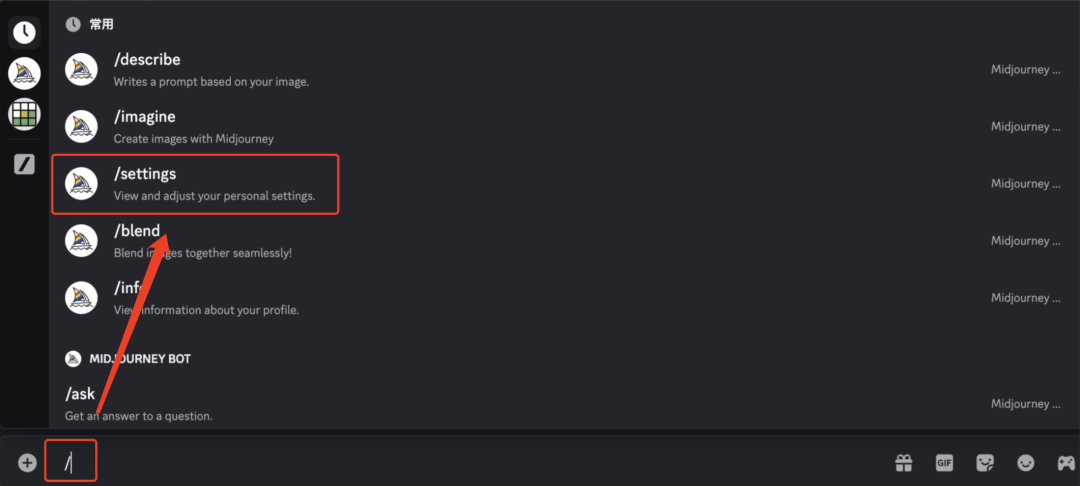
Then select "/settings" from the preselections that pop up and send it to the MJ bot.
(Note here: if "/settings" isn't in the preselections that pop up after you type "/", go ahead and type a few more letters.)
That's the kind of shit MJ will return to you:

Next, just click on the drop down menu for MJ Historical Versions and select the model version you want to use by default.

Finally some of you may have noticed that the latest version of MJ is currently 7.0.
For those who want to use it, if this is the first time your account has switched to version 7.0, then MJ will return to you with this prompt:

All you need to do to qualify for version 7.0 is click on the red box to button, log in to the appropriate account (Google/Discord), and follow the instructions for the image selection test.
-ar / -aspect
(Both serve the same purpose, depending on individual usage habits)
This is probably the single most frequently used parameter by MJ users.
MJ in the default image generated by the ratio of 1:1, if you can not customize the adjustment control, all the images generated are just a picture of a fat little square, that for the user, will lose a lot of fun, so the role of this parameter is reflected, it can be specified in the back of the proportion of the value to control the image generated by the proportion of the picture.
Let's take the above cue as an example - "A girl in a long white dress and with long black hair is dancing gracefully on the grass. " as an example (haha, it seems that this cue is going to be used throughout the whole text [dog's head]), to give the following demonstration:

As you can see, MJ matches the proportions of the generated image based on the scale parameters you input to it.
-q / -quality
The value of this parameter ranges from 0.25 to 2, and the default value is 1.
This parameter is used to control the balance between the quality of the image generated and the rendering time (image generation time), which directly affects the richness of detail in the image and the time required for its generation.
Speak human:
- The higher the value of this parameter, the more detailed the final image will be, and at the same time the time taken to generate the image will be relatively longer; while the smaller the value, the image generated will be relatively rough, but the generation speed will be relatively faster.
However, as the MJ model has been updated and iterated over the past two years, especially after version 5.2, this gap between the quality of the raw maps brought about by the different values is decreasing.

(Version 5.2, from left to right - 0.25, 0.5, 1)
-c / -chaos
The value of this parameter ranges from 0 to 100, and the default value is 0.
This parameter is the core parameter controlling the randomness and diversity of image generation, which directly affects the degree of variation in style, composition and content of the generated results.
Speak human:
- The smaller the value of this parameter, the more stable the overall effect of the generated screen is, the more similar the four generated images will be, and the content of the screen is more in line with the description of the cue word;
- On the contrary, the higher the value of this parameter, the more space is left for the AI to play (more diversity in the generated images, more randomization of the content of the images), which means that the differences between the four generated images will be greater.
Now let's describe the cue words used above in more detail:
- A full-body display of a 20-year-old Asian girl with long black hair. She wore a high ponytail, a long white dress and white casual shoes on her feet. young girl is dancing on an endless grassland. In the distance are snow-capped mountains and blue sky with white clouds
Chinese translation: Full body view of a 20 year old Asian girl with long black hair, wearing a high ponytail, a long white dress and white loafers. The girl is dancing on an endless grassland. In the distance are snow-capped mountains and blue clouds.
The different values of this parameter are then adjusted to obtain the following results:

-s / -stylize
The value of this parameter ranges from 0 to 1000, and the default value is 100.
This parameter is the core parameter controlling the degree of image stylization, which directly affects the artistry, detail richness and stylistic expression of the generated image.
Speak human link:
- The higher the value, the more artistic the image is, the more complex the details, and the style may favor abstraction, exaggeration, or surrealism;
- The smaller the value, the closer the image is to the cue word description and the details are relatively simple.

A quick note on the difference between the "-c" (or "-chaos") and "-s " (or "-stylize") parameters:
|
|
|
|
|
|
|
|
|
-No.
This is too well understood! This parameter is used in Midjourney to explicitly exclude specific elements or content that is not desired in the generated image.
For example, I re-run the raw graph again using that short cue word and get the following results:
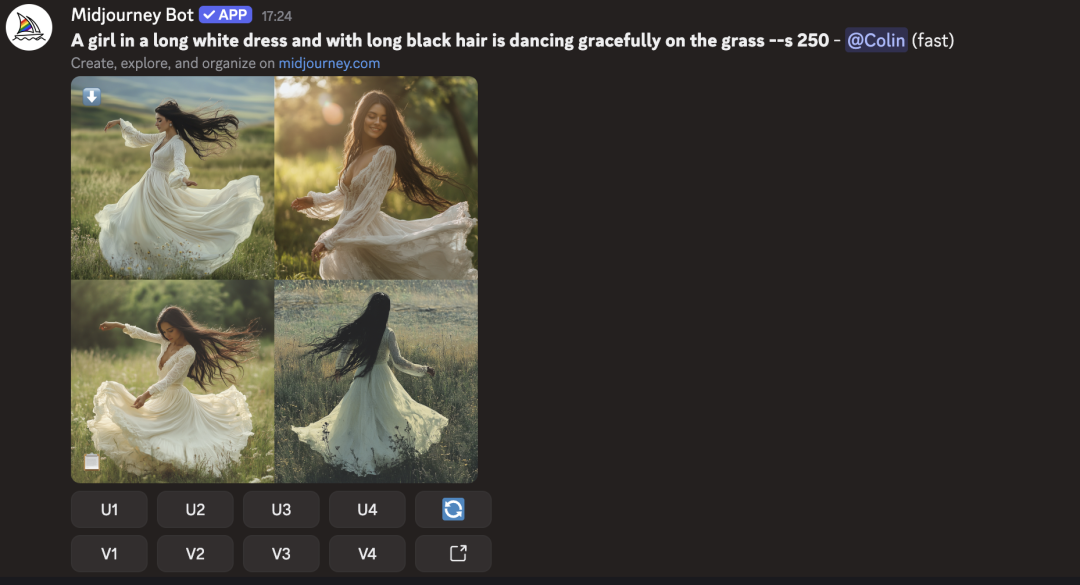
OK, now I don't want to have "sunshine" in the screen, so I add "-no sunshine" after the prompt, and then send the modified prompt again, and get the following The result is as follows:

The scene was instantly somber...
At this point some of you may be asking, can you exclude more than one unwanted element at the same time?
Of course you can, just separate every two elements with a comma ( ","), for example:

This way, the final generated image will i.e. not have the sunlight or the house in it...
(For space reasons, there are many other commonly used MJ parameters that we'll save for a later post)
At this point, it's the end of the article, so I should stop here, move my hands away from the keyboard, and then hand this over to you. But just as I was about to do so, a subtle question (not really a question) came to my mind, a small question I asked myself, not excluding some of you who might be curious too:
In the case of directives and parameters, before I put pen to paper and write the first word of this article, why is it that I inwardly default to introducing my readers and friends to parameters first, rather than directives?
If there are really some friends who are also starting to realize and think about this layer, for this part of my friends I would say: curiosity killed the cat haha (just kidding [dog head]).
Actually, what I'd like to say to you is that curiosity killed the cat, but "unfortunately" we're not cats, so curiosity grows! (You're **just **so** awesome.)

Ok off topic, the reason why I wrote the parameters first is as follows:
Regardless of what other operations or additional features MJ has, in the end it is essentially an AI image generation model. Since it is an image generation model, the underlying core function must be to generate images, which is also the core demand of users, so there is one and only one command that corresponds to MJ, that is, "/imagine".
Under this one core command, if you want to play with MJ's raw images, you need to learn to use more than one adjustment technique, for these image adjustment techniques, which corresponds to the parameters in MJ.
There is only one core command, but there are a lot of necessary parameters involved, which is why I chose to explain the parameters first, and to make it easier for readers who are completely unfamiliar with the use of MJ to get started on their creations more quickly.
The above is not just a reason for me to write about the MJ parameters first, but it's also a potentially worthwhile reflection that I think I'm offering for consideration when learning about MJ and even other AI tools.
Well, that's it for today's share, thanks for browsing.