



In the last few days I've seen an automated generationPublic AccountwritingWorkflowThe feeling is very practical value, hurry up to introduce to you, they are also as notes to keep, good memory as bad pen ah, haha, not much to say, on the dry goods.
Overall Introduction
This mcp service, divided into three parts, consists of three workflows:
I. Article generation workflow
II. Article layout workflow
Third, the article is automatically published to the public workflow
Workflow Details
I. Article generation workflow
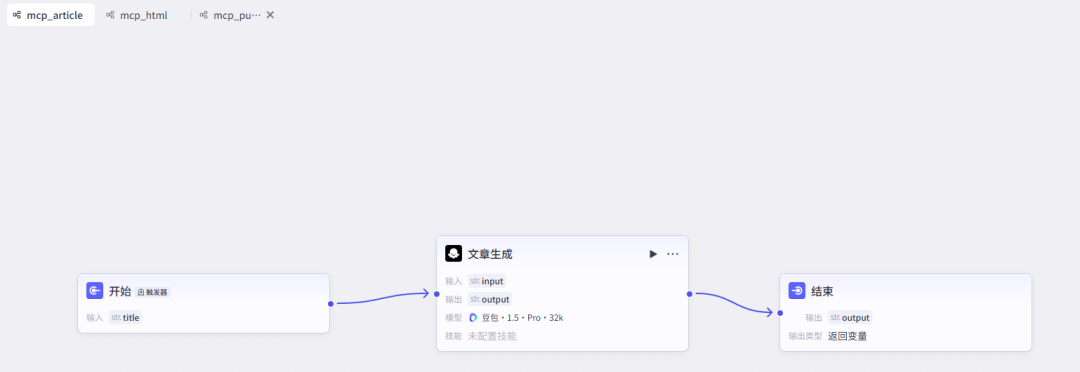
Article generation workflow is actually relatively simple, is the use of large models of the ability to generate, given a topic, and Prompt settings, large models to generate, specific Prompt is as follows:
You are a master at writing an in-depth article based on a topic provided by a user that
and the typography is perfect. the article is microsoft style.
This is something you can optimize on your own, or you can add some crawlers and online networking features to get the information and then write the article to add some real corpus to the article
II. Article layout workflow
Article layout is relatively complex a little bit, the core is to generate html article content format, public support for some html tags

First input node, input the output content of the previous workflow, the articulation of this through the back of the release of the mcp service to do, do not worry about it here first.
The large model part of the use of deepseek-v3-0324 model, this model generates a good effect, the length of the article is long enough, there is a point of attention here, you need to set the length of the large model generation

Other settings are defaulted and you can explore them as well
The large model section also requires a cue word section, as follows

System prompts and user prompts, just follow my design!
After the big model to add a code node, mainly to return the dictionary format text, this simple
Third, the article is automatically published to the public workflow
And finally the workflow for posting to the public

First of all, the nodes needed for public release require three plug-ins, and the roles of these three plug-ins are described below:
- get_access_token: Public authorization interface, you need to use its own appid and appsecret to obtain authorization, to provide credentials for subsequent interface calls.
- add_material: Used to upload permanent material such as public cover images, publish with the uploaded material information.
- add_draft: Deposit the content of the article into the public draft box for subsequent changes to be posted.
Exactly how to find it is as follows

Clicking on these three will bring up three nodes on the page
After getting the nodes right, you need to configure each node


How to view appid, appsecret, and set up whitelisted IPs
The necessary conditions to use the public number are, appid, appsecret, these two parameters are used in the previous workflow, and the other is the IP whitelist setting, which must be set in order to publish through other people's plugins. After logging into the public number to find the following location can be obtained and configured

Data flow at each node
1. The starting input is the output of the previous workflow
2, the big model part needs to be based on the input, summarize the title, the latter needs to be
Here you need to set the prompt as follows
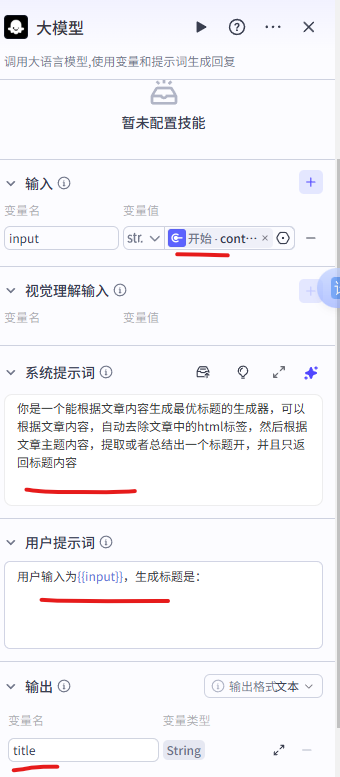
3, to generate a cover picture, used here buttonplugin, as follows, just follow me on these

4, the next is the public configuration part, in accordance with the above written configuration on it!
Here the entire mcp involved in the workflow have, the next release, pay attention to each of the test before releasing, do not get it wrong!
Published as mcp service plugin
Click on publish to go post it!
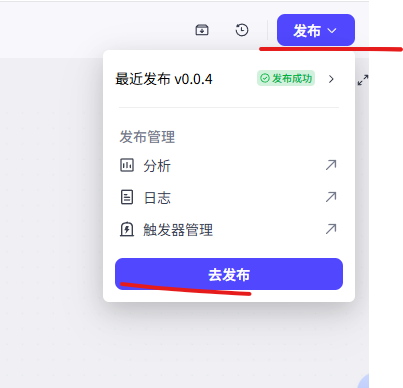
Note the following configuration when publishing

Then click Modify Configuration.

Note that by selecting all of these workflows and then confirming them, the following will appear if the publish is successful

test use
1. Enter the button space to use

2. Click [Quick Start]

3. Increase expansion


4. Use

That's all it takes, and once it's generated, go to the public drafts box and see what's there, and you can go ahead and publish it.