This tutorial goes through 2 examples: cloning the voices of Guo Degang and Lin Chiling to master the most real-life-likeAI voice cloning tool(Text-to-speech tool) - cosyvoice from Ali.
The entire tutorial contains:①Installation package, ②Exercise materials, ③Video tutorials, ④Text tutorials.
The tutorials are divided into "Getting Started" and "Getting Started".
Getting Started: I chose cosyvoice, which is packaged with "AI editing assistant", and it is characterized by its simplicity, which makes it easy for newcomers to get started. Disadvantages: cut out the dialect and other features.
Advanced: The cosyvoice packaged with "Walk with AI", which is characterized by: full functionality. The disadvantage is that it is slightly complicated.
so it is recommended thatBeginners read the introductory chapter first, know the basic operations. Then read the advanced chapter.
If you're a veteran, go straight to the advanced chapter.
Related resources to download:
(The resources are all the same, put more than a few network disk is afraid of being blocked, choose one of the download can be)
① Installation package:
introduction (a subject)Tools installation package (size: 11.4G):
Quark.com: https://pan.quark.cn/s/e49a0d238ba2
Baidu cloud disk: https://pan.baidu.com/s/17UtflIaaU-ZUC0EJu_Y6rg?pwd=2045
advanced chapterTool installation package (size: 8.8G):
Link to Quark.com: https://pan.quark.cn/s/a7ed622f5ae9
Baidu.com link: https://pan.baidu.com/s/1yX17U6lGDVoCI3doFt-POw?pwd=2045 Extract code: 2045
② Practice material:
It's the same for both introductory and advanced practice material.
Link to Quark.com: https://pan.quark.cn/s/19bac8977f95
(iii) Video tutorials:
(Includes introductory and advanced tutorials)
Link to Quark.com: https://pan.quark.cn/s/bb629f97ca8b
introduction (a subject)
1. What is cosyvoice?
Free voice cloning tool: provides 3 seconds of the original voice, both to copy the timbre.
Launched by Ali's Tongyi Labs.
2. 3 main features of cosyvoice?
- With 3 seconds of original voice, you can clone (copy) anyone's speech.
- Supports Chinese, English, Japanese, Korean, and Chinese dialects (Cantonese, Sichuan, Shanghainese, Tianjin, Wuhan, Changsha, Zhengzhou, etc.)
- It can contain emotions: happiness, sadness, laughter, etc.
3. how does cosyvoice work? --Clone Guo's voice
This tutorial will demonstrate how to use cosyvoice by cloning Guo's voice.
Tool Description: The version of cosyvoice created by "AI Clip Assistant" is used.
Pros of this version:Especially suitable for newcomers, keeping only the most basic features and removing redundancies.
Step 1: Download the installation package
Download address for one-click installer (11.4G):
Quark Netflix: https://pan.quark.cn/s/e49a0d238ba2
Baidu cloud drive: https://pan.baidu.com/s/17UtflIaaU-ZUC0EJu_Y6rg?pwd=2045
There are 2 files in the installation package:
Tool file: cosyvoice-2.
Exercise Material: Contains 10 seconds of audio and text from Guo Degang and Lin Chiling for practice.

Step 2: Copy the software to the root directory of C drive
Copy the software to the root directory of your C drive.
Special attention: Do not include Chinese in the installation path. Otherwise, it will cause an error.

Step 3: Run the software
① Open the cosyvoice-2 folder, find and double click the "go-web" file.
② The command line interface will appear. This interface, do not close it while the software is running.

After about 20~40 seconds, the following interface will appear: It means the software has been installed successfully.

Step 4: Add the voice of "Guo Degang".
Add Guo Degang's voice. The sound files are in the "Practice Materials" folder of the installer.

Click "Sound Model Management".
② Fill in the character name: Guo Deguang
③ Upload Guo Degang's 9-second audio
④ Fill in the reference audio text
Add new model

Check if the sound was added successfully
① Open the "Text to Audio" interface.
Click "Refresh Sound Model List".
③ In the "Sound Model List", you can see the sound you just added.

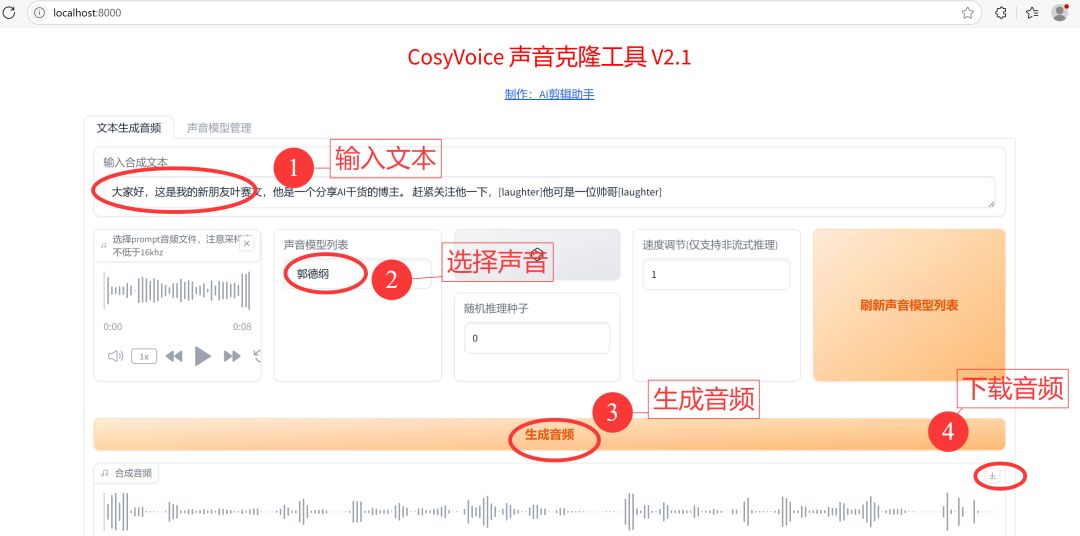
Step 5: Text-to-Speech
Enter text:
Hi everyone, this is my new friend Saiwen Yeh, he is a blogger who shares dry AI tips. Hurry up and follow him, [laughter] he's a handsome guy [laughter].
advanced chapter
How do I install it?
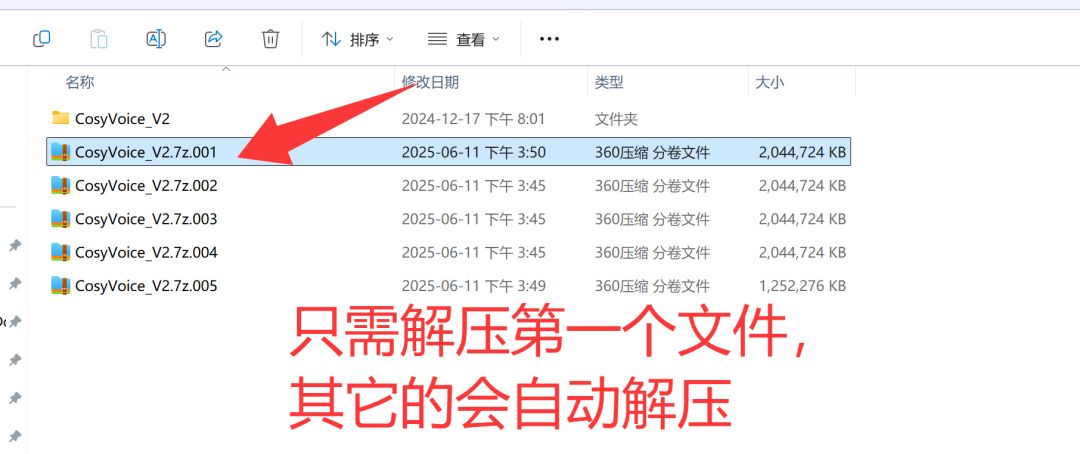
Download the installation package:
Link to Quark.com: https://pan.quark.cn/s/a7ed622f5ae9
Baidu.com link: https://pan.baidu.com/s/1yX17U6lGDVoCI3doFt-POw?pwd=2045 Extract code: 2045
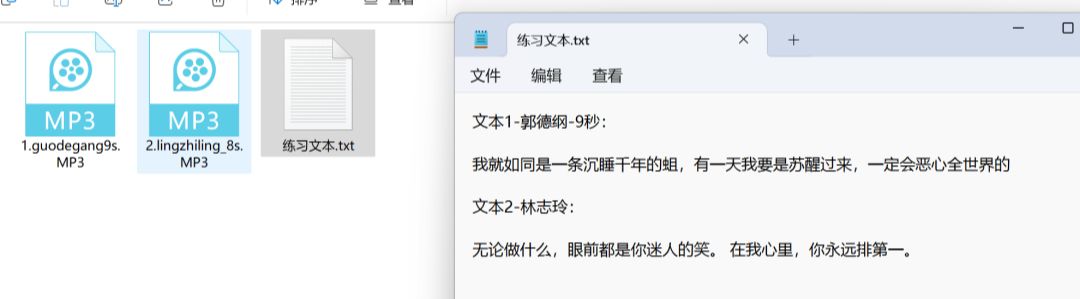
Download practice material:
Link to Quark.com: https://pan.quark.cn/s/0070f8caeb08
Baidu.com link: https://pan.baidu.com/s/1OxVYYeAWxXKVxrNUt70Msg?pwd=2045 Extract code: 2045
Exercise material: Contains 2 voice files: the voices of Guo Deguang and Lin Zhiling, and the voice text.
How to use
Unzip the file and click on the "Start.exe" file.
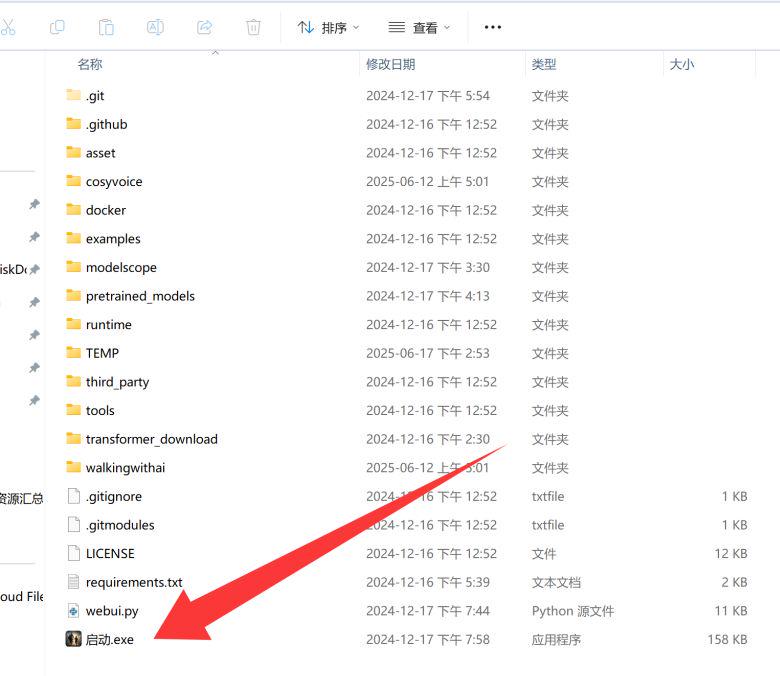
Open it up and it looks like this:
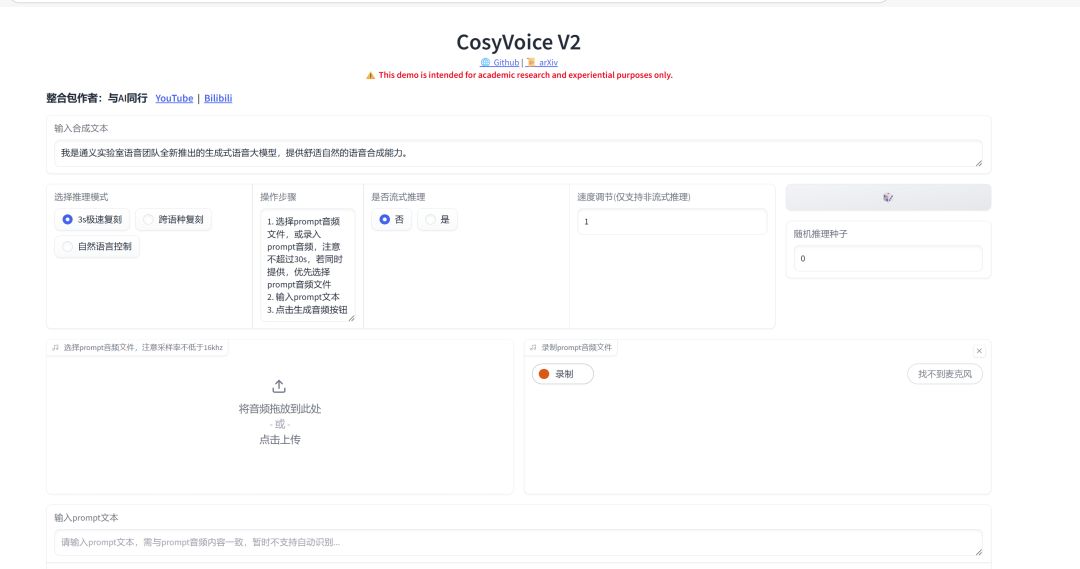
1. Speaking in tongues
How to use cosyvoice's dialect
Select "Natural Language Control".
② Select the voice you want to clone. (You can choose Lin's voice from the installation package. (The sound cannot be less than 3 seconds and not more than 30 seconds)
③ Input the text of the cloned sound
④ Input the text to be converted to speech
⑤ Enter the dialect to be used. For example: in Sichuan

Currently supports Cantonese, Sichuan, Shanghai, Tianjin, Changsha and Zhengzhou.
2. Accession: laughter, breathing, emphasizing
How to use
How to use cosyvoice's dialect
Select "Natural Language Control".
② Select the voice you want to clone. (You can choose Lin's voice from the installation package. (The sound cannot be less than 3 seconds and not more than 30 seconds)
③ Input the text of the cloned sound
④ Enter the text to be text-to-speech. Note: Add laughter and emphasized grammar.
⑤ Generate audio
⑥ Download Audio

respiratory
Function: at the place of joining, there will be a breath change sound
Example: I'm not the poor boy I was then [breath], now I'm the poor boy of this year [breath].
Effect:
laughter
Function: To make a laughing sound
Example usage: I wrote the names of his whole family on the window in response to the fog, and when the fog cleared, his whole family was gone [laughter] [laughter].
effect
Function: To make a laughing sound
Usage examples: It's okay not to have a breath, it's great to have a breath.
Effect:
emphasize (a statement)
Role: Emphasizing content
Usage examples: why must people go to higher places, people can go to the<strong>round</strong>.
Effect:
3. Add emotions
Use the same method as in the dialect, write in "Enter instruct text" what emotions are needed.
Say it in a happy tone.
Example: I don't fight those who can beat me.
Effect:
Select "Natural Language Control".
② Select the voice you want to clone. (You can choose Lin's voice from the installation package. (The sound cannot be less than 3 seconds and not more than 30 seconds)
③ Input the text of the cloned sound
④ Input the text to be text-to-speech.
⑤ Input emotion words: e.g., say in a happy tone of voice
⑥ Generate audio
⑦ Download Audio

Say it in an angry tone.
Example: I felt very angry when I encountered a reckless driver cutting in line during rush hour traffic. This kind of uncivilized behavior always makes people helpless.
Effect:
4. Role-playing
In an innocent, romantic child's voice.
Select "Natural Language Control".
② Select the voice you want to clone. (You can choose Lin's voice from the installation package. (The sound cannot be less than 3 seconds and not more than 30 seconds)
③ Input the text of the cloned sound
④ Input the text to be text-to-speech.
⑤ Input Role
⑥ Generate audio
Download Audio
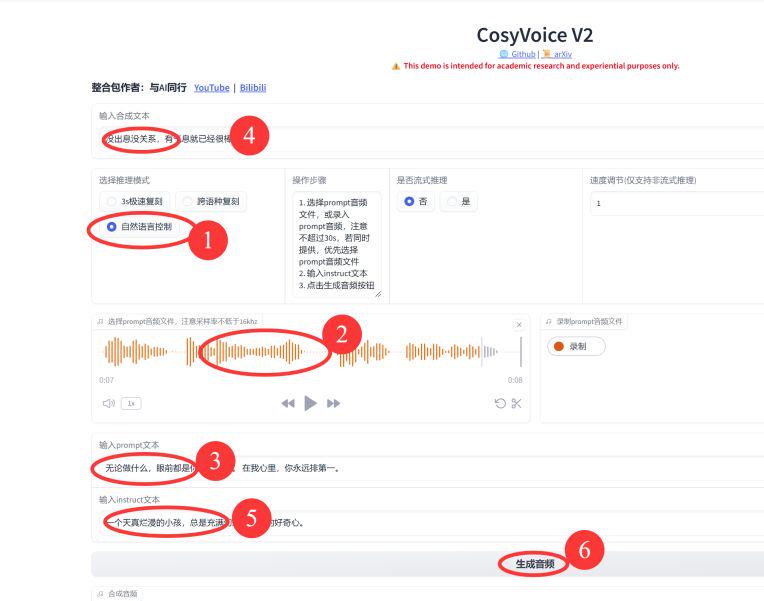
Instruct text (instruct text): an innocent child, always full of fantasy and endless curiosity.
TEXT: It's okay to be unimpressive, it's great to have breath.
5. General vocabulary of task descriptors (structural texts)
Organized from the official documentation.
Link to official documentation: https://funaudiollm.github.io/cosyvoice2
|
|
|
|---|---|
|
|
|
|
|
|
|
|
|
|
|
|
|
|
|
|
|
|
|
|
|
♪ laughter ♪ |
|
<strong></strong> |
|
|
|
|
|
|
|
|
|
|
|
|
|
|
|
|
|
|
|
|
|
|
|
|
|
|
|
|
|
|
|
|
|
|
|
|
|
|
|
|
|
|
|
|
|
|
|
|
|
|
|
|
|
|
|
|
|
|
|
|
|
|
|
|
|
|
|
|
|
|
|
|
|
|
|
3. Frequently Asked Questions
3.1 Unsuccessful installation: No module named 'ttsfrd'
Cause of the problem: Installation path in Chinese
Solution: Copy the installation package to the root directory of your C drive
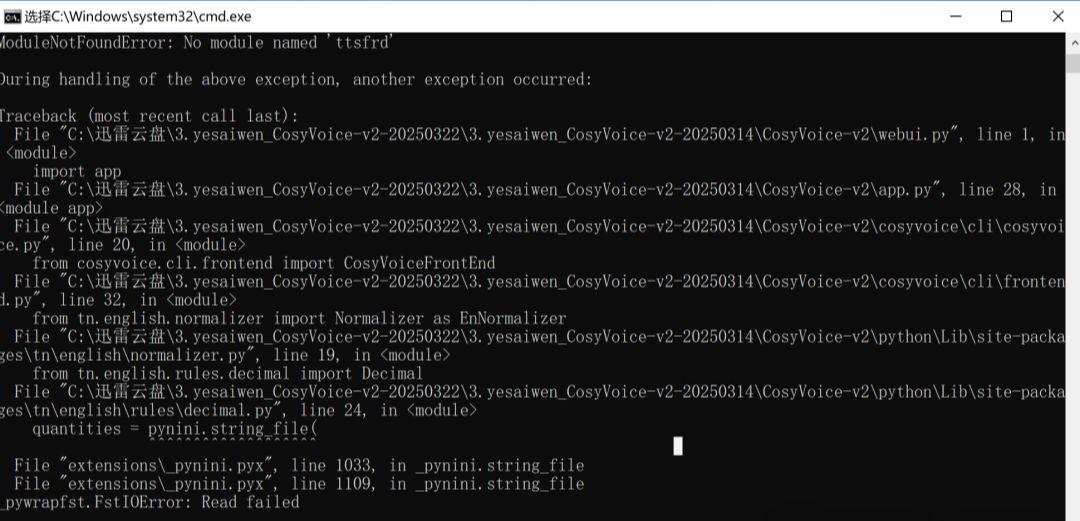
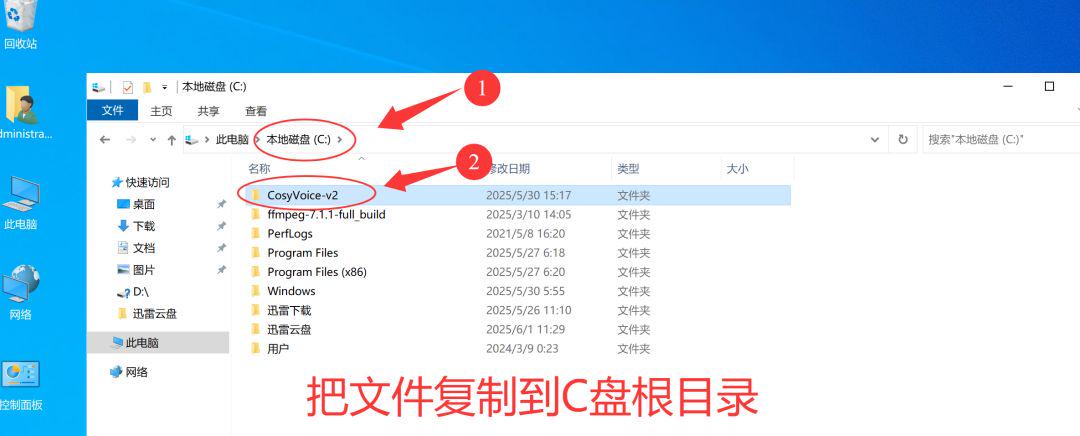
3.2. Installation path with Chinese characters
Error: FstIOError:read failded
Problem Cause: In the file installation path, there is Chinese.
Solution: Modify the installation path without Chinese.

3.3 Localhost is not accessible
Error: ValueError: When localhost is not accessible, a shareable link must be created. Please set share=True or check your proxy settings to allow access to Please set share=True or check your proxy settings to allow access to localhost.
Reason for the problem: Opened the international network
Solution: Close the international network
3.4 Other issues arise
There can be other problems of all sorts, mostly with the configuration of the computer.
Solution:
- Rent an AliCloud computer (first month free).
- Rent a GPU computer.
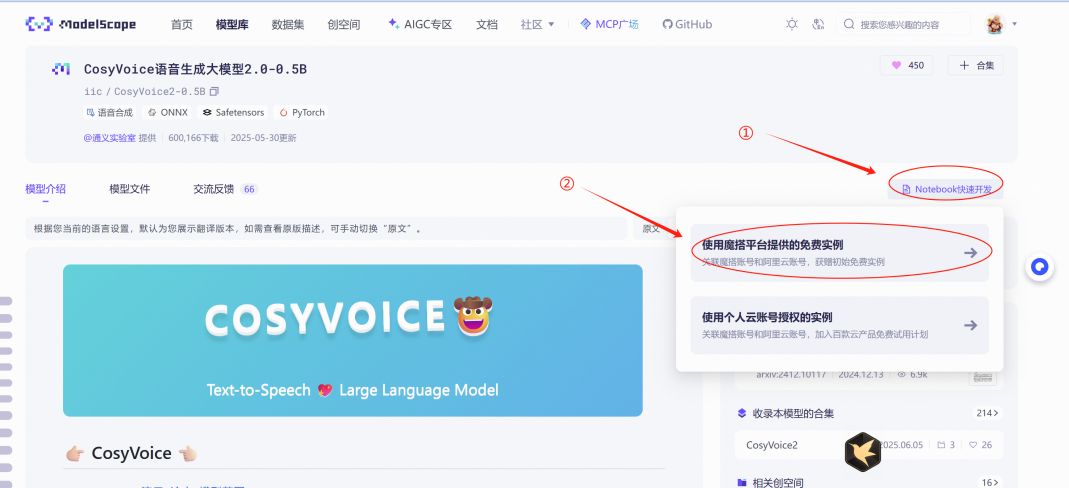
- Tools for using the Magic Tower Online: https://www.modelscope.cn/models/iic/CosyVoice2-0.5B