



Recently, we have been trying to find ways to let AI really understand our "director's intent", so that the video images generated by AI can meet our expectations. From simple text descriptions to increasingly complex parameter controls, we are getting closer and closer to the goal of precise picture control.
formal "one-sentence" speechPrompt wordFor example, "a girl walking in the rain", to the AI-generated video will often bring great randomness. The girl's dress, her mood, the size of the rain, the way the camera moves ...... all these key details are left to the AI to "guess". This may be fun when looking for inspiration, but it becomes a huge pain point when it comes to the precise execution of a business project or creative idea.
More recently, with GoogleVeo 3Waiting for a new generation of video models to emerge, we have discovered a more efficient and precise way of communicating with structured cue words. By usingJSONThe format is such that we can fill out an exhaustive "shot list" and give explicit instructions to the AI, thus realizing control over the results of the video production.
Today, I'm sharing a set of Veo 3 structured JSON prompt word templates that I've tested and optimized over and over again. There's no talk in this post, just hands-on practice. After reading it, you'll be able to get started right away and understand how to adapt it to your needs.
Why choose JSON structured cue words?
Before we dive into templates, let's first understand why we're abandoning simple text in favor of relatively "complex" JSON.
In practice, I've found that structured data can fundamentally solve AI's "fuzzy understanding" problem. It plays two key roles:
- Disambiguation: It breaks down a vague creative concept (e.g. "cinematic feel") into a series of specific, quantifiable parameters (e.g. "24fps frame rate", "warm color tones", "slight film grain"), "AI no longer needs to guess whether you want a "cinematic feel" in the style of Wong Kar-Wai or Nolan.
- Improved stability: When you generate multiple times using the same set of structured cues, the results you get will be highly consistent in their core elements. This is crucial for scenarios where you need to produce a series of content or have strict requirements for a particular style.
In simple terms,A one-sentence cue is "asking" the AI to create, while a structured cue is "instructing" the AI to execute.
JSON prompt word template full analysis
Here's the set.Video CuesTemplates, combined with a comprehensive set of structures covering core dimensions from shots, subjects, scenes to sound and pictures, summarized after extensive generative testing: (example)
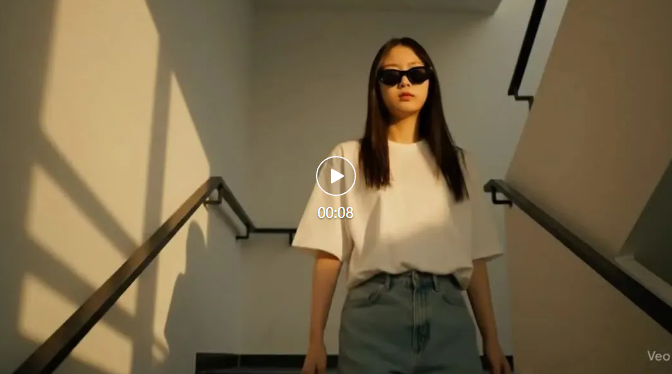
{"Shots.": {"Composition.": "Close-up.","Camera Movement": "Follow-up shots.","Frame rate": "24fps.","Film grain.": "Slight."},"Shoot the subject.": {"Description.": "A Korean lady walked down the stairs.","Dress code.": "Minimalist casual wear (t-shirts and shorts)","Props.": "Sunglasses."},"Scene.": {"Location": "Modern apartment stairwell","Shooting time.": "Primetime.","Environment": "Clean and tidy, minimalist style"},"Visual Details": {"Action.": "Walking down the stairs lazily and casually.","Visual Elements": "Light and shadow effects"},"Photographic techniques.": {"Light.": "Natural light.","Hues.": "Warm colors."},"Audio.": {"Ambient sound.": "null","Sound effects.": "Popular Music"},"Tonal Style": "Bold Contrasts.","Dialogue.": {"Role.": null,"Subtitles.": false}}
Google Veo 3 generates video effects: (example)
Next, I'll explain each module of this template one by one, telling what they do and how to modify them.
1. Shots:This is the heart of the "director's" work and directly determines the audience's perspective.
(art) composition: Controls how the screen arranges the subject. Optional values include:Close-up,Medium shot,Full shot,Long shot,Over-the-shoulder shotwait.Practice Tips:To emphasize a character's emotions useclose-up (filmmaking, photography etc)If you want to show a grand scene, uselong-range view.camera movement: Make the picture move. Optional values:Static Lens (Static),Pan,Push and Pull (Dolly),Tracking shot,Crane shot.Practice Tips:follow up shotIt creates a strong sense of immersion and follow-through, and is perfect for representing characters on the move.frame rate: The key to movie texture.24fpsIt's a standard movie frame rate that delivers the classic motion blur effect. If you want smoother, more realistic videos (like sporting events), try the60fps.film pellet: Add a vintage or artistic touch. Optional values: none(None),Slight,Medium,Heavy.
2. Shoot the subject:The core content of the video. The more specific the description, the better the AI's ability to "pinch".
describe: Core identifying information about the subject. Examples include gender, age, nationality, and physical appearance.outfit: Define the style and identity of the subject. Tests have shown that more specific descriptions (e.g. "white poplin shirt with blue washed jeans") are much more effective than vague descriptions (e.g. "stylishly dressed").stage props: The key to enhanced storytelling and authenticity. AsunglassesOne cup.caffeineor a bookletterAll of them can greatly enrich the information in the picture.
3. take: The setting in which the story takes place determines the overall tone of the video.
point: Indoor or Outdoor? Urban or natural? A more precise geographic characterization can be obtained by specifying "Shibuya intersection in Tokyo" or "sunset over a cliff in Bali".Shooting time: The determining factor of light.Golden hourThe light is soft and warm.MiddayThe light, on the other hand, is strong and harsh, andBlue hourThen it is full of mystery.matrix: Describe the atmosphere and state of the scene.neat and tidyanddisordered and in a mess (idiom); all mixed up and chaoticwill generate completely different background details.
4. Visual detailsandPhotographic techniques:These two modules are "advanced options" for improving video quality.
movements: What is the subject doing? "Walking lazily and casually" and "running down in a hurry" are completely different performance instructions.visual element: Additional effects that you want to appear in the picture. For exampleLight and shadow effects (Chiaroscuro),Lensflare,Raindrops on window.lighting (for a photograph):Natural light,Neon lights,Softbox light, different light sources will shape different moods.tones:Warm tones,Cool tones,Monochrome. This directly affects the emotional expression of the video.
5. AudioWith others: while audio generation capabilities for video modeling are still evolving, defining them ahead of time can provide direction for post-production or take direct effect when the model is supported.
-
ambient sound: Adds realism to the scene.soundscape: Match the sound of the subject's movements.tone: The final definition of the overall style, asHigh contrast,Soft and dreamy.
Tips for Iteration and Improvement:
The first generation of AI is not always perfect. Instead of simply re-generating when results are unsatisfactory, learn to "diagnose" the problem:
- Clarify the core: Start by identifying your video's most central
subject (of a photograph)andmovements. This is the root of the story. - Setting the Stage: Build around the core
take, define the time, place and environment. - Set up the machine position: Think about how you want to present the story and then configure the
LensesParameters. This is the key to the narrative. - Fine tuning: Finally, by adjusting the
Visual details,Technique of photographyandtonesto polish the artistry of the picture.
Verified through testing, the iterative process of structured cue words is more like debugging code than smoking a blind box. Every fine-tuning is clearly pointed, making the optimization process efficient and manageable.
Fuzzy language to precise instructions, structured JSON cue words represent theAI VideoAn important evolution in the field of generation. It puts more of the creative initiative back in our hands to "direct".
Of course, Veo 3, like all AI tools, is not perfect. It still suffers from a poor understanding of the physical world, the occasional logic error and a maximum generated video length of only 8 seconds. But there's no doubt that mastering this kind of fine-tuned control will keep you on the AI creation bandwagon and take you farther. We'll share 22 common camera motion command cues for AI video generation later.