



August 11th.MicrosoftFor Windows 11 (and Windows 10) Copilot The application now supports the functions provided by the GPT-5 driven smart mode. This feature has been rolling out gradually since August 7 and is now widely available in the U.S. and elsewhere.
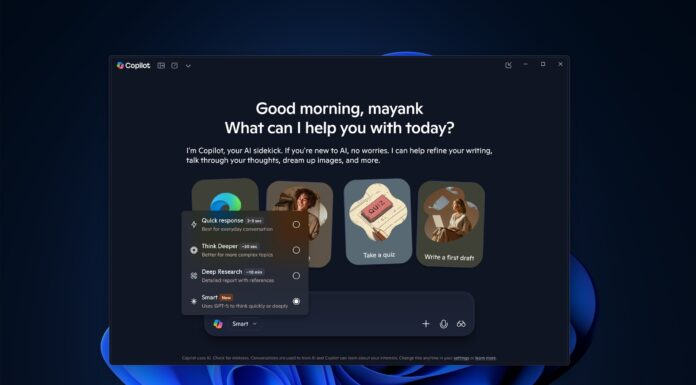
According to Windows Latest testing, the compose box in the Copilot app automatically recognizes new models through the "Network Routing" feature. While the Copilot app itself is native and uses WinUI (WinAppSDK) to build its interface, the compose box uses routing to automatically fetch new models from Azure. This means that you don't need to update the app to enable "Smart" or GPT-5 mode, which is already available in Copilot version 1.25073.146.0, for example.
Microsoft Copilot's restrictions on free users are less stringent than OpenAI's implementation. windows Latest observes that theChatGPT Free accounts can only send up to 10 messages with GPT-5 before switching to the less powerful GPT-5-mini model, which has built-in reasoning support that automatically routes queries to the "think" side of the model when it thinks it needs to reason to answer a question. The free ChatGPT account only allows for one "think" per day, compared to the $20 per month ChatGPT Plus, which offers a 16-fold limit of up to 160 messages per three-hour period and a 16-fold limit on "reasoning. "Reasoning" also has a 10x limit, and users can choose between GPT-5 Thinking and GPT-5 (Auto).
These strict limitations stem from OpenAI's lack of sufficient computational power to provide users with robust modeling support. Copilot, however, offers more relaxed limits. During testing, Windows Latest found it difficult to determine when Copilot's GPT-5 Intelligent Mode daily usage limit was reached, and it was not clear how many "Thinks" could be triggered per day. It did note, however, that Copilot switches to Think mode up to five times per day. For normal queries (non-thinking), it is not clear whether Copilot routes queries to GPT-5 or GPT-5-mini, but the quality of the dialog seems to favor the former.
Copilot's GPT-5 "think" feature performed as well as the ChatGPT implementation. Testers were asked 10 complex questions about Python with different examples, and Copilot answered them accurately every time, requesting GPT-5 "think" on three out of 10 attempts. Copilot stopped requesting GPT-5 "think" after five attempts in one day, although it did not run out of usage limit errors. This outperformed the free version of ChatGPT, which is limited to one "think" message per day.
So, how to use ChatGPT's GPT-5 in Copilot for free? Simply open copilot.microsoft.com in any browser (Edge is recommended for faster access) or download the Copilot app from the Microsoft Store to your PC. After logging in to your Microsoft account, the "Smart" mode will automatically be displayed. automatically display when you sign in to your Microsoft account. If you don't see this mode, just be patient as it requires a server-side switchover for the GPT-5 feature to take effect.