



While you're still researching how to write goodAI VideoWhen the cue wordVeo3It's already possible to look at the picture and perform video generation by simply labeling the picture with an arrow, and the action to perform.
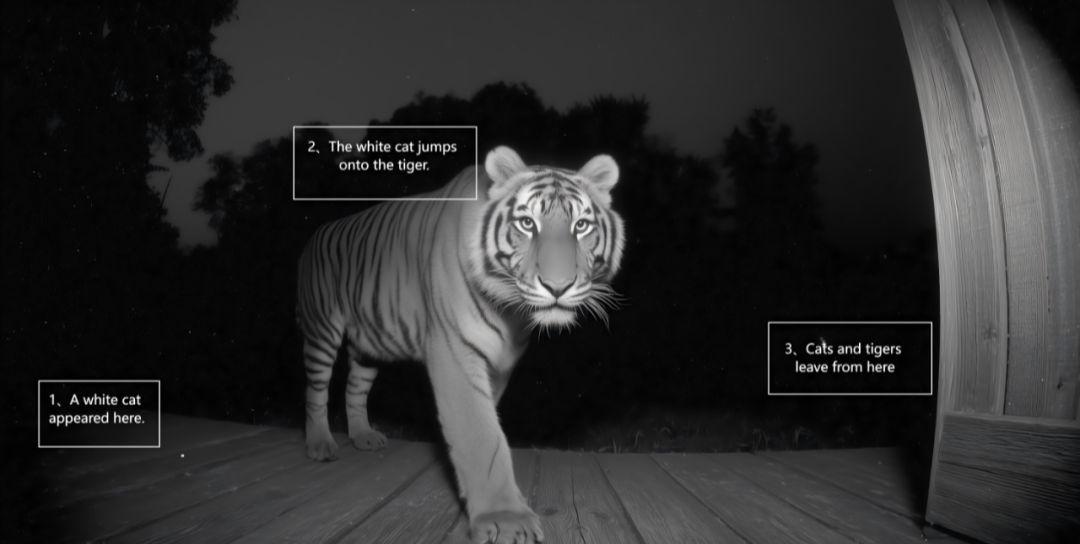
For example, the Cat Riding Tiger surveillance video that broke the news earlier. You can label the commands on the image like this:
And when you've worked hard to write a cue word that the AI simply can't understand, the gods have developed a josn version of the cue word formula that lets the AI know what it's supposed to do in seconds.
Today, we'll share the best way to use these two Veo3's, and learn to take another big step ahead in AI video.
I. Picture labeling method
This feature really blows.
In the past, when we made AI videos, we had to think of a lot of complicated cues to describe the movement, action, light and shadow, and a good cue was written out like a thesis.
Image processing up I'm used to using PPT, it's very easy to simply enter text or boxes.
Of course, you guys are used to canva as well, this is professional design software.
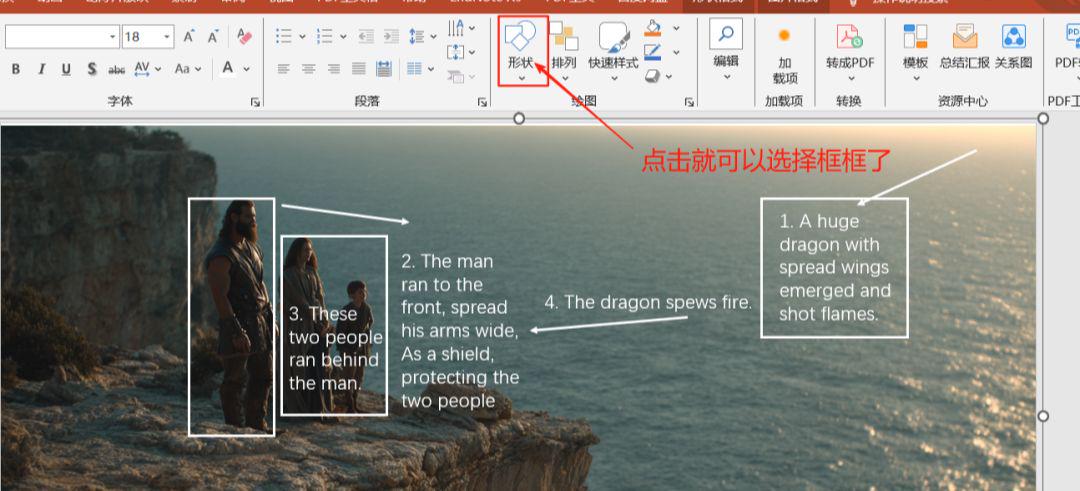
Just click Insert and select the text box!
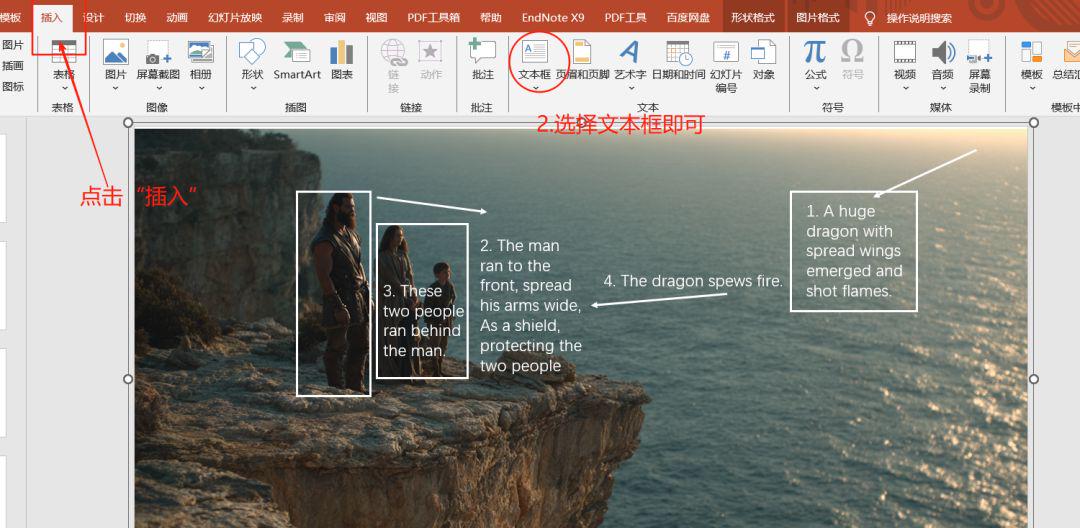
Just type in the text you want to express, to express it in English, then select the whole picture, combine it together and save it as a picture.
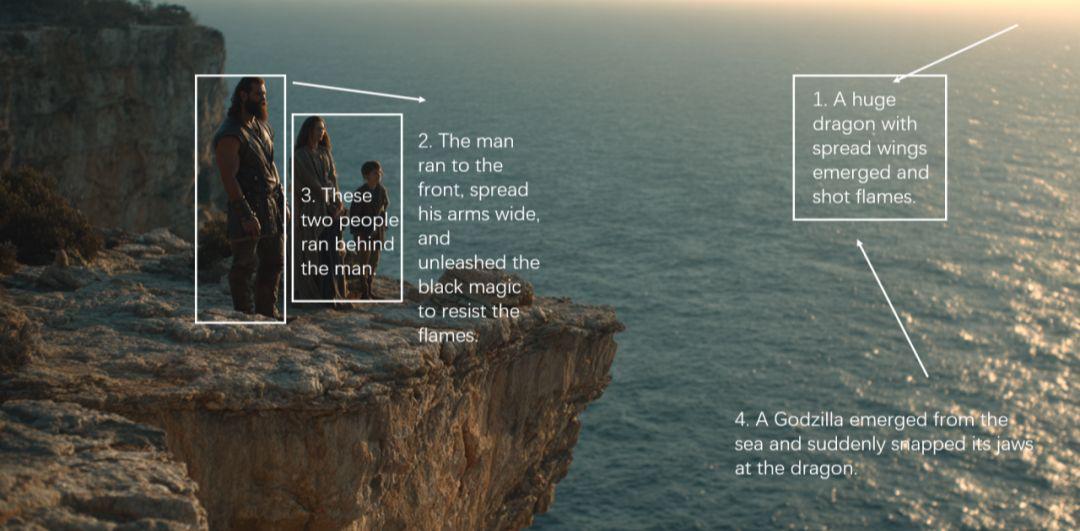
Now we can simply label the picture directly by drawing an arrow, circling it, and writing two words to illustrate it. Here to the left, here to the right.
For example, the picture below:
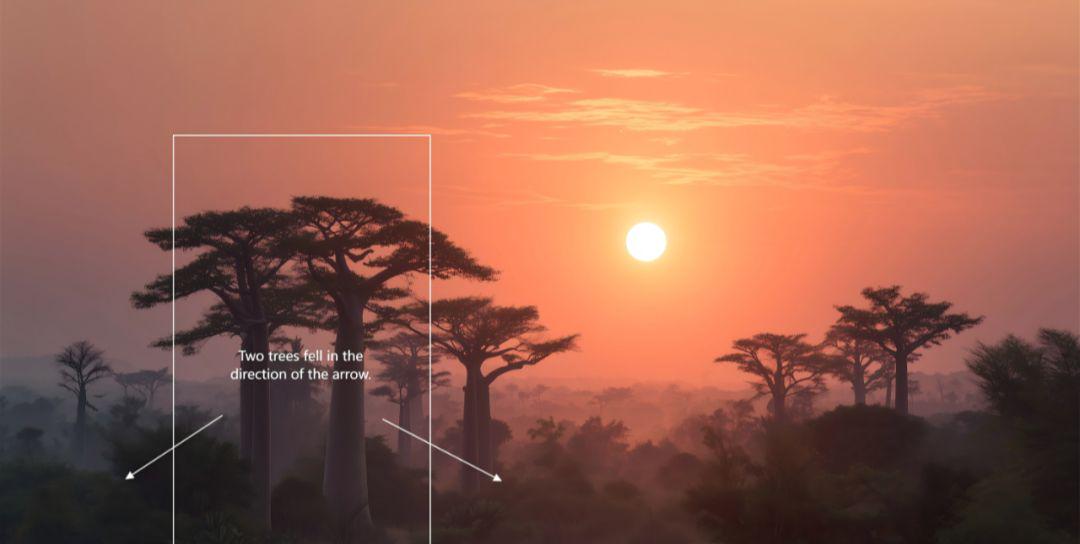
I'll draw a box on the picture and label the two trees falling in the direction of the arrow.
Then throw in a Veo3 and type in the cue word:
- Lmmediately delete the mark in the picture, and then execute the prompts in sequence according to the instructions of the white markings.
- Immediately delete the markers in the picture and then follow the instructions of the white markers to perform the prompts in order.
Straight up.
It's okay to have more steps.
For example, the picture below:
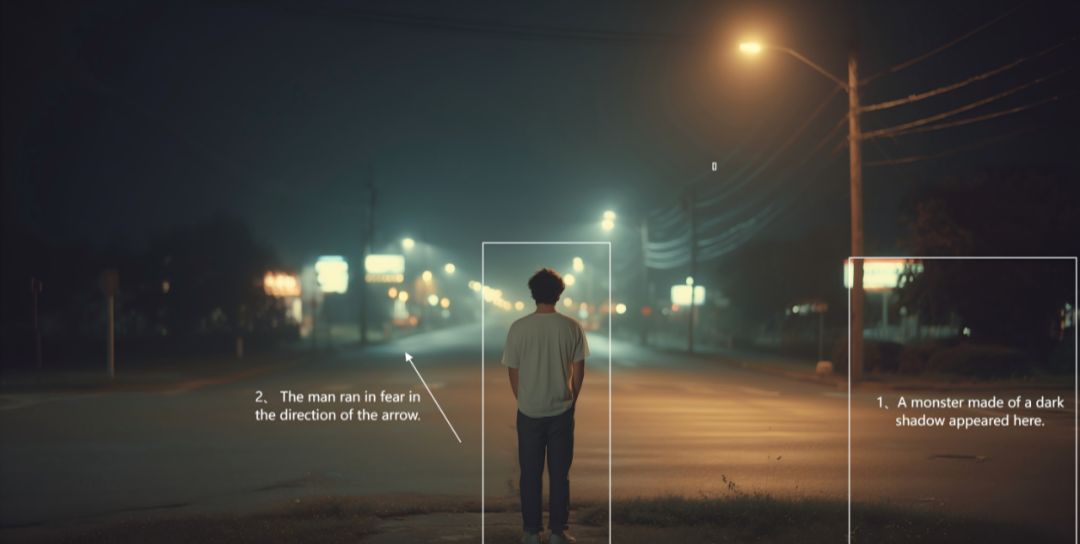
I labeled the right side of the picture "A dark shadowy monster appears" and the left side "Man runs in fear down the arrow".
Then there's this picture:
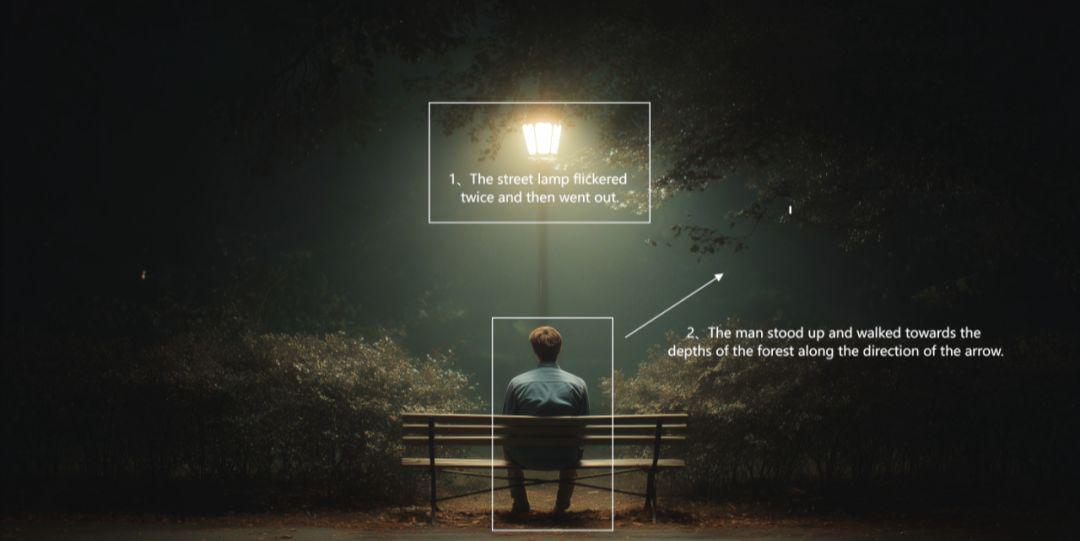
I've labeled the diagram, "Lights flashing," "Men follow the arrows."
And the white cat riding a tiger at the very beginning.
Production Process:
- 1. Use MJ to generate a picture with a tiger in the surveillance footage
- 2. Label the pictures "A white cat appeared here", "The cat jumped on the tiger", "The cat and the mouse left from here".
- 3. Throw the labeled images to Veo3
- 4、Enter the implementation of the prompt word
This generates a video of a cat riding a tiger.
This approach is actually due to Veo3's own powerful spatial semantic understanding, which instead of just recognizing text, can understand the spatial layout in a picture, as well as understand the direction of the arrows you've labeled, and how they move in space.
Your simple labeling is an executable instruction to it.
This makes our video generation much more intuitive and clear, greatly improving the success rate of card draws.
It also allows our imaginations, never again, to be limited by language.
II. josn cue word method
When we usually write AI video cues, we use text to describe the images and actions. But there is a semantic loss when these large pieces of text are thrown to the AI.
As we all know programming has a programming syntax and this syntax AI can be better understood. So using a special format like josn can greatly improve the video generation.
Here is a simple schematic of a josn syntax cue word:
{
"//-1. Global settings - ": "Overall style and total duration of the video
""video_length":7.
"style": "magical realism"
"//- 2. Core Split (Single Shot) - ": "Complete all the dynamics in this 7-second continuous shot"
"'scenes".
"start": 0.0.
"end": 7.0,
"visual": the content of the screen (if you have more than one scene, you can add the first shot, the second shot, etc. here)
"camera": camera movement, composition, perspective, etc.
"transition": "Fade to white."
"//- 3. Audio Elements -": "A background soundtrack to accompany the screen"
"music".
"style": music style
}
When you use it, you can go according to our actual picture, it's like a fill-in-the-blank question, just fill in all the effects you want to achieve.
Is the effect really better than writing text?
After many tests, the current JSON prompt for veo 3 control, in terms of complex expression is indeed better than natural language.
But this is based on the fact that our natural language descriptions are not in place.
In fact, official advice is given: JSON prompt is not the only best way.
Whether or not you use josn cue words, as long as you can accurately describe the style, subject, action, lighting, type of shot, perspective, audio, etc. in the most concise terms. It all works out for the best.
Formatting is not necessary, what is necessary is precision.
Just like when GPT4 first arrived, all kinds of cue word engineering was hyped up.
A cue word written in such a way that a ghost can't read it. But the results achieved with natural language dialog are no worse than these.
There is no required format for the prompt words, and how can it be possible that AIs nowadays, each with an IQ that exceeds that of the blogger, can only read one language.
There's really only one reason for the so-called poor results: lack of clarity of expression.
I'm going to borrow a quote from Mr. Wakamoto here:
- The most difficult thing in the world is for people to understand each other, because people can't actually understand each other at all, and everyone relies on vague guesses, barely managing to find out what the focus of what the other person is saying is.
- The AI reads all the good words and bad words and fart words and slice of soup words, and through its calculations it creates correlations between the different expressions, so it gains the ability to translate and understand human words.
- That's what AI understands, and that's what it's most useful for right now.
To put it bluntly, most people say things people can't understand.
So the best thing to do is to have the AI translate the written cue words before letting the AI generate pictures and videos.