



Recently this period of time Google Nano Banana is too hot, basically changed the paradigm in the field of image editing, but many partners do not know what are the more usefulPrompt word.
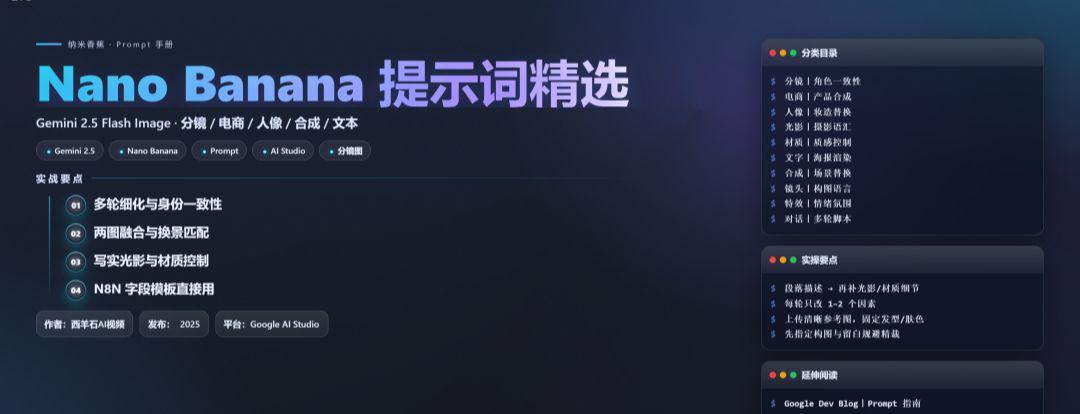
The following is a collection of more recommended prompt words, mainly in English, you can also be combined with the translation tool to change into Chinese.

(Summarized from official/media):
- Key strengths are multiple rounds of refinement and subject consistency (iterative editing and text layout are OK). (Google Developers Blog, Google AI for Developers)
- Support for putting the same character into different scenes, blending two images, etc.; however, some basic editing (e.g., precision cropping) is still limited. (Google AI Studio, Axios, PC Gamer)
- Scene consistency and light matching are more critical when doing realistic compositing of "displaced environments" (community experience). (Reddit)
I. Scoring / Character Consistency (Storyboard)
Suitable for "Upload a character/virtual character → directly create a split-screen image".
1. Turn the uploaded portrait into a collectible **character figure**. Place a branded box behind it (box shows the character image), a computer screen on the side showing a Blender modeling viewport, and a round plastic base under the figure. Place a branded box behind it (box shows the character image), a computer screen on the side showing a Blender modeling viewport, and a round plastic base under the figure. **PVC look**, indoor studio, **realistic lighting, film tone**, keep face identity.
2. Keep the same character. Scene 1: **subway platform**, cool blue ambience, rim light from behind; camera at chest height, medium shot.
3. Same character, **coffee shop close-up**, shallow depth-of-field (bokeh), warm golden hour light, hands holding a paper cup with subtle steam, keep identity and hairstyle.
4. Same character, **office night scene**, glass reflections, city lights bokeh, three-point lighting, medium-wide.
5. Same character, warehouse with volumetric light rays through windows; dust motes, slightly desaturated cinematic look.
6. Storyboard 6 frames: hero intro, establishing shot, close-up on hands, over-the-shoulder UI shot, product hero, end card. keep character identity Keep character identity across frames, consistent wardrobe.
7. Turn pose to a walking forward action, slight motion blur on legs, maintain facial details.
8. Same character in **rainy street**, wet asphalt reflections, neon signs; keep eye color and freckles.
9. Same character, studio packshot background in neutral gray; soft top light, fill card from camera left; expressions neutral.
10. Generate a shot list of 8 frames for an unboxing: box on table → hands open → figure removed → detail close-ups → turntable shot → closing hero. keep Keep product scale and branding.
II. E-commerce / Product Synthesis (Merchandise + Scene Fusion)
1. Merge image1 (product) with image2 (modern kitchen). Place the product on a **marble countertop**, keep realistic reflections and shadows; color temperature ~5000K, slight vignette.
2. Cosmetics bottle on **acrylic pedestal**, seamless paper backdrop, softbox from right, subtle gradient background, specular highlights controlled.
3. Sneakers on **concrete block**, low-angle hero shot, studio rim light, faint haze for depth.
4. Smartphone **floating exploded view**: separated layers for screen, mid-frame, camera module; dark studio, glossy reflections managed.
5. Watch macro shot, **90° top-down**, soft diffused light, brushed metal texture visible, anti-alias text on dial.
6. A/B variants: same layout, change only background material (wood / stainless / terrazzo), keep product color constant.
7. Lifestyle placement: living room sofa, daylight from window camera left, product on side-table; white balance matched to scene.
8. Promo trio: front / 45° / top angles in one session; consistent brand palette and shadows.
III. Portrait Makeup / Costume Replacement (with attention to identity consistency)
1. Keep face identity; change hairstyle to **retro bob**, add thin eyeliner, soft skin retouch while preserving pores, realistic hair strand flyaways.
2. Outfit swap to **streetwear (oversized hoodie + cargo pants)**, neutral studio background, soft Rembrandt pattern lighting.
3. Add sunglasses with subtle reflections, ensure eyes still faintly visible through lens tint.
4. Formal portrait, **key light 45°**, fill -1EV, background seamless #EAEAEAEA, color-accurate skin tone.
5. Outdoor candid, overcast sky as giant softbox, slight film grain, maintain freckles and moles.
6. Headshot for ID: straight-on camera, no smiles, flat even light, neutral background, maintain exact facial geometry.
IV. Light and shadow and photographic vocabulary (speaking directly "like a photographer")
1. Film noir: **hard key from high angle**, deep shadows, practical lamp in background, smoke for volume.
2. Golden hour backlight, **rim light on hair**, flare streaks, warm highlights ~5600K.
3. Top-down softbox with negative fill on both sides to shape the face, subtle catchlight.
4. High-key beauty, near-white background, contrast low, speculars controlled.
5. Rain reflections, **wet-down street**, neon glow; long-exposure light trails.
6. Product hero: **flagged highlights**, gradient card for polished metal, reflection on base kept tight.
V. Material and texture (making "texture" more credible) Material and texture (making "texture" more credible)
1. PVC plastic look, slightly translucent edges, smooth specular roll-off, no micro-scratches.
2. Anodized aluminum, fine linear brushing, soft anisotropic highlights.
3. Matte ceramic, soft diffuse, micro-pitted texture visible only in macro.
4. Brushed stainless steel with subtle fingerprints near button, realistic.
5. Frosted glass bottle, internal light scatter, bright meniscus line on liquid.
VI. Text / Poster (with text rendering)
The official emphasis is on targeted optimization for images containing text, suitable for posters/logos/covers. (Google Developers Blog)
1. Poster: bold headline "AI VIDEO STUDIO", sub-headline small caps, clean sans serif, centered layout; hero product bottom AI VIDEO STUDIO", sub-headline small caps, clean sans serif, centered layout; hero product bottom-right, strong grid, optical margin alignment.
2. Minimalist **event flyer**: date big numbers "09-10", venue in small line below; keep text crisp and aligned.
3. App mock poster: phone frame with screen UI, headline 5-6 words, badge "NEW".
4. Brand logo lockup on dark background, subtle glow, high legibility, no distortions.
5. YouTube thumbnail style: big face close-up + 3-5 word punchy title; high contrast; rule of thirds.
VII. Compositing / Scene Replacement (two-picture fusion and scene change)
Multi-step editing and two-image fusion were mentioned as highlights by both officials/media; care was taken to make light source/focal length/color temperature match for greater realism. (Axios, Google AI Studio, Reddit)
1. Replace background with snowy mountain scene; match key light from camera right; footprints faint in snow.
2. Place subject into **museum gallery**, polished floor reflections, soft track lighting from ceiling.
3. Combine portrait with **night city rooftop**; wind-blown hair; cool key, warm practicals behind.
4. Merge product with **bathroom marble vanity**; soft window light, mirror reflection consistent.
5. Subject into **library**, warm tungsten practicals; lens fall-off consistent with 50mm look.
6. Remove clutter from desk; keep laptop and mug; fill missing areas with plausible textures.
VIII. Camera language/composition (to give control over "picture scheduling")
1. 35mm equivalent, eye-level, medium shot, rule of thirds.
2. 85mm portrait, shallow DOF, background separation.
3. Top-down **flat-lay**, grid-aligned objects, neat spacing.
4. Low-angle hero shot, leading lines converge to subject.
5. Tilt-shift miniature look, thin plane of focus through subject.
IX. Special Effects / Emotional Atmosphere
1. Light fog + god rays from window; particles visible only against backlight.
2. Subtle film grain (fine), chromatic aberration minimal, letterboxed.
3. Rain streaks + surface ripples on puddles, reflections intact.
4. Fireflies/bokeh spheres floating, depth-based size variation.
5. Confetti burst, shallow DOF; motion blur only on confetti.
X. Multi-round dialog scripts
Multiple rounds of iteration is an officially recommended best practice. (Google Developers Blog)
Script A|Character Scenario (3 steps)
- Round 1: Upload the portrait. Place the same person in a sunlit café terrace; warm golden hour, shallow DOF, cinematic.
- Round 2: Keep identity. add a laptop with code editor on screen; add a cup with visible steam; adjust white balance slightly cooler.
- Round 3: Tighten composition to medium shot; brighten catchlights; add gentle film grain.
Script B|Three views of products (3 steps)
- Round 1: Front hero shot on neutral backdrop; soft top light, clean shadows.
- Round 2: Add 45° view; match exposure and shadow direction.
- Round 3: Add top view; assemble a 3-panel layout with consistent margins.
Script C|Characterization (3 steps)
- Round 1: Turn subject into a PVC figure on round base; indoor studio, film tone.
- Round 2: Add branded box behind + monitor showing Blender modeling.
- Round 3: Refine edges on hair and fingers; ensure specular highlights are smooth.
XI. Field Templates for N8N Integration
{
  "prompt": "Turn the uploaded portrait into a collectible character figure on a round plastic base; branded box behind; monitor shows Blender viewport;". PVC look; indoor studio; realistic lighting; film tone; keep identity.", "style_notes": "cinematic", shallow DOF
"style_notes": "cinematic, shallow DOF, subtle film grain", "consistency_notes".

"scene_alt":["sunlit café terrace", "office at night", "rainy neon street"], "product_merge":{{scream_colors
"product_merge":{
    "bg": "modern kitchen marble countertop",
    "shadows": "match key from camera right",
    "reflections": "controlled, realistic"
}
}
Practical points (distilled)
- Describe the scene in paragraphs, don't just pile on the keywords; big structure first, then fill in the lighting/material details (official writing advice). (Google AI for Developers)
- Multiple rounds of fine-tuning (light direction, depth of field, cropping, highlight control), changing only 1-2 factors at a time (official recommendation). (Google Developers Blog)
- Character consistency: upload clear reference images; fix hair/skin color/facial detail phrases to reduce drastic clashing changes (more realistic scene/light source matching). (Google AI Studio, Reddit)
- Perceived limitations: Some basic edits (such as precise cropping to a specific scale) are mediocre, and can be circumvented by "specify composition + white space at generation". (PC Gamer)