



Agent I'm going through the evolution of "chatt robots" to "tweak-in-the-mill." Skills It is the key catalyst for this evolution。
Have you ever been sore by Agent's "unbehaved," "execution disorder" and "tool waste"
I'll take you to understand this Skills – This is the "advanced skill kit" that makes Agent reliable, manageable and reusable。
We'll talk about what Skills is, how to work, how to write a Skills and recommend practical community resources for you to actually use Skills in TRAE。
And whether you're a developer or an ordinary user, you can find your Agent's secret here。
Have you ever experienced, or are you going through, such an "Agent Tutor" crash
- Rule lapse:In Agent.md, a thousand words were written, and Agent was blind and completely "not read back."。
- Implementation out of control:Deliberately sharpened countless Prompts, Agent executed still like headless flies, chaos。
- Tools lost:It's a powerful MCP tool bank, Agent, and he says, "No tools, no brains."。
If these scenes make you feel the same, don't give up。The answer to this mess is probably Skills。
What's Skills
The concept of “Skills” was first proposed by Anthropic as a capacity-development mechanism for its large model, Claude. Simply put, it allows users to add custom functions and tools to Claude. As this approach matures and becomes widely accepted by the community, Skills is now a standard extension norm supported by most Agent development tools and IDEs。
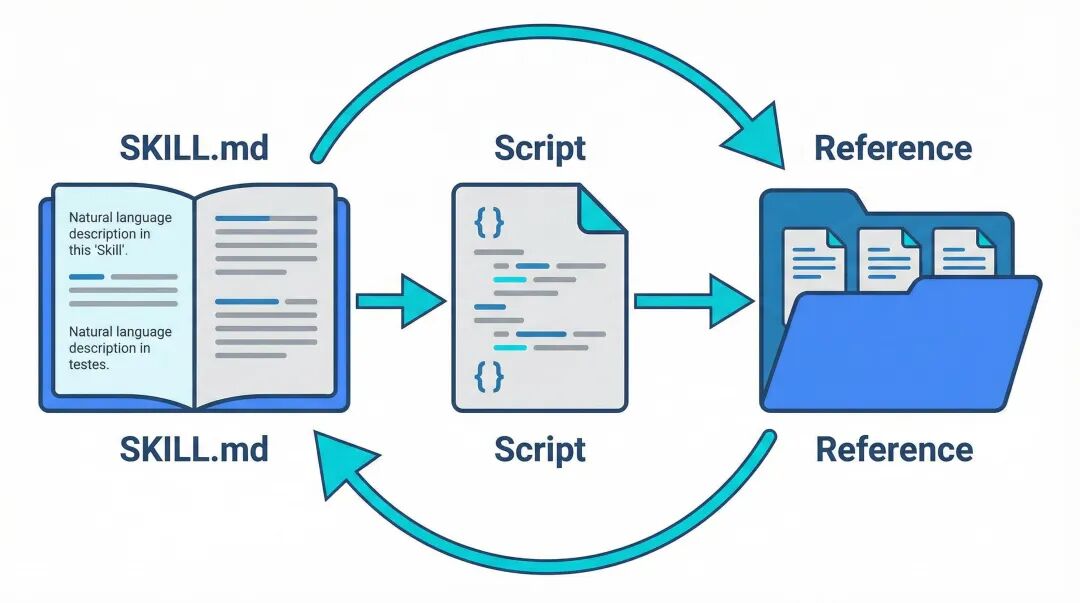
A Skills usually exists as a folder containing three main items:A brochure (SKILL.md), a collection of operating scripts (Script) and some references (Reference)。
|
|
|
|
|
|
|
|
|
|
|
|
You can imagine a Skyll as a pack of skills. It needs to do a particular jobField knowledge, processes, tools to be used, and best practicesALL SEALED TOGETHER. WHEN FACED WITH CORRESPONDING REQUESTS, AI WAS ABLE TO IMPLEMENT IT IN AN ORDERLY AND AUTONOMOUS MANNER, LIKE AN EXPERIENCED EXPERT。
One sentence summary:If you compare Agent to a brain with great potential, then.. Skills is like a set of things that can be used over and over again by this brain。With it, Agent can move from a generalist who knows everything for two to an expert who knows everything for a given field。
Introduction to Skill
Official explanation:
https://platform.claude.com/docs/en/agents-and-tools/agent-skills/overview
Skill Foundation: Gradual Loading
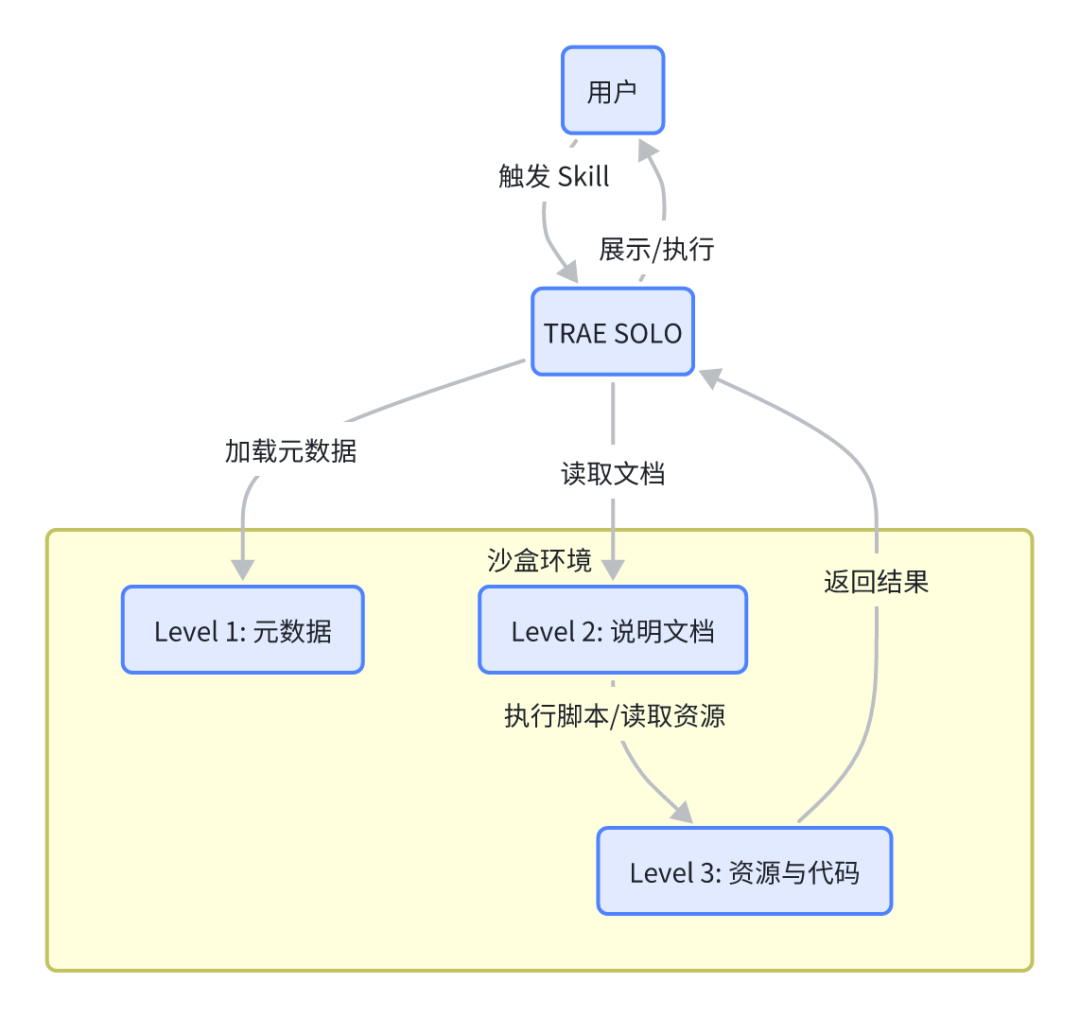
Skyll's design is so clever that it runs in a sandbox environment that allows large models to access file systems and execute them bash Orders (readable as a computer operating order). In this environment, a Skill is like a folder. Agent, like a person who knows how to operate a computer, reads files, executes scripts by command line, then uses the results to do your job. This “demand-based” structure makes Skill a powerful and efficient “toolbox”。
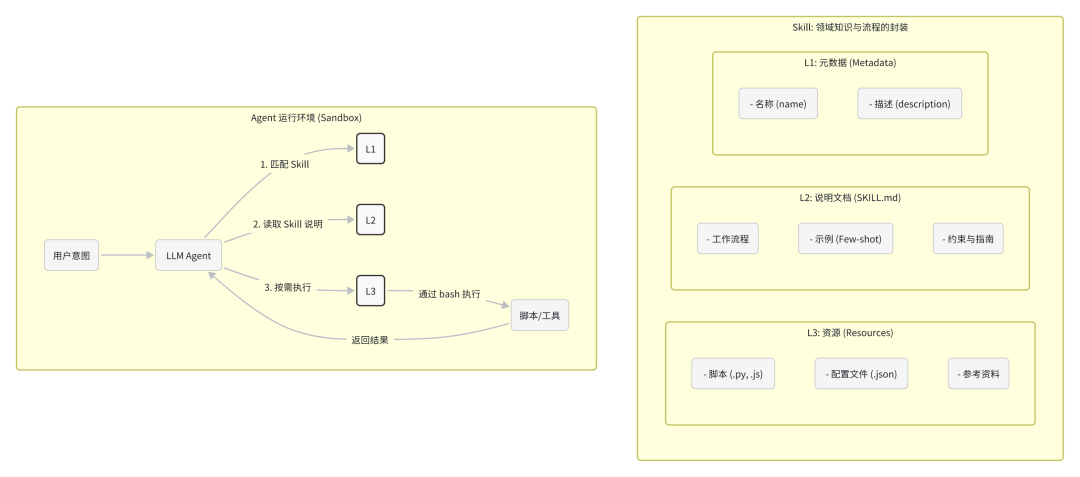
To balance effectiveness and efficiency, Skill designed a smart three-tiered loading mechanism:
|
|
|
|
|
|
|
|
About 100 Token |
|
|
|
|
5000 Token |
|
|
|
|
|
|
Level 1: Metadata (always loaded)
Metadata is like Skill's Business Card, which has a namename) and description ( )profile) is defined in YAML format. Claude loads all the installed Skill metadata on startup, so that it can know what every Skill is for and when. Because metadata are light, you can install a lot of Skill, and don't worry about covering the context。
Level 2: Description document (loading on trigger)
SKILL.md The main text of the document is the description document, which contains workflows, best practices and operational guidelines. Claude will only be used if the user 's request matches the description in the Skills metadata bash Command to read the document and load the contents into the context. This “trigger load” ensures that Token is consumed only by relevant detailed instructions。
Level 3: Resources & Codes (on demand)
Skills can also pack more in-depth resources, such as more detailed description filesFORMS.md), Executable Scripts ().py) or references (like API documents, database structure, etc.). Claude will pass only when needed bash Read or execute these documents, and the script code itself will not enter the context. As a result, Skills is able to bind large amounts of information, with little additional context costs。
Skills call logic: from understanding intent to stable implementation
So, how smart is Agent to choose and execute a Skyll? The whole process is like an experienced assistant working on it:
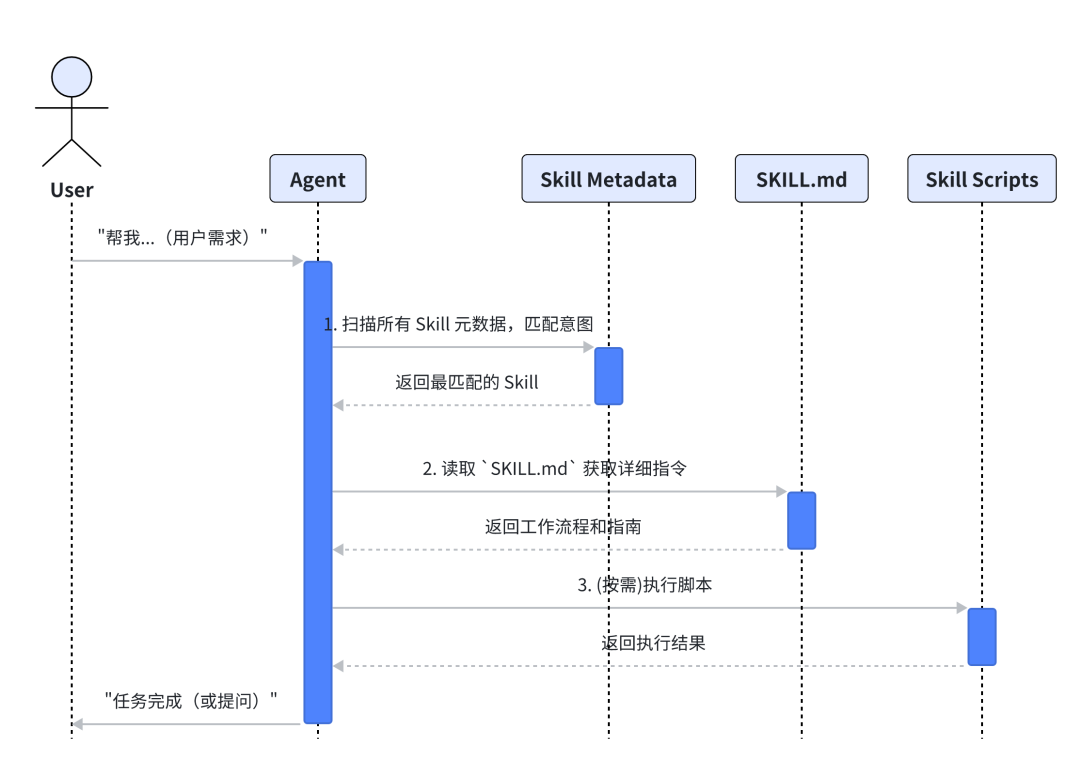
- Intent matches (to find the right person):Agent first listens to your needs, and then quickly scans all the Skill's “metadata” in his hand, looking for the one that fits the best。
- Read the manualWhen you find the right Skills, Agent will turn its Operations Manual over like it doesSKILL.mdDetailed implementation steps and attention are carefully studied。
- On a needs basis (do it):In accordance with the guidelines of the manual, Agent began work. If necessary, it will be ready to take out scripts or tools from the toolbox for specific operations。
- Feedback (results):Upon completion of the mission, Agent will report to you on the final results or, in case of difficulties, consult you in a timely manner。
Skills vs
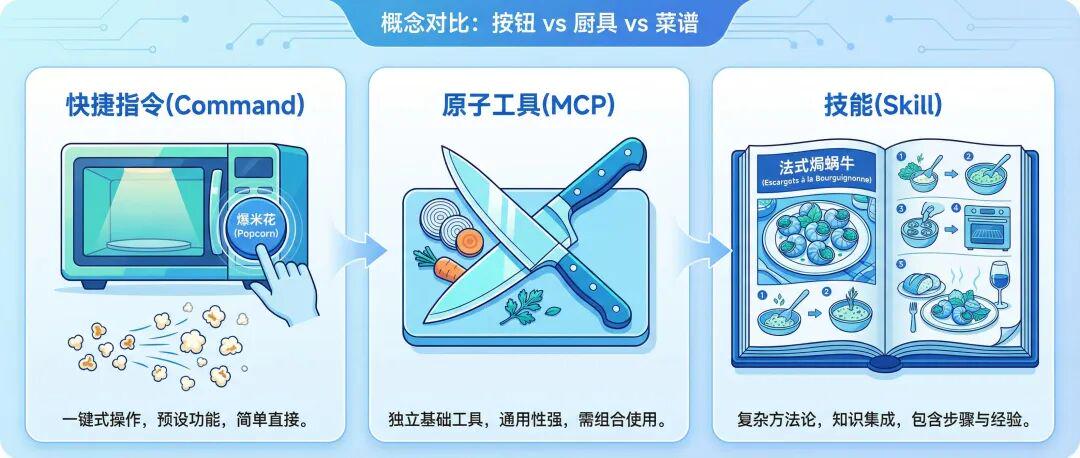
In order to understand more clearly the unique value of Skills, we might as well use it with two other easily confused concepts --CommandandATOMIC TOOL (MCP)- Put it together for a comparison. An example of a kitchen is clear:
|
|
|
|
|
|
Comand |
|
|
|
|
MCP |
|
|
|
|
Skills |
|
|
|
We have also listed a few other functions that you can easily confuse。
|
|
|
|
|
|
Rule |
|
|
|
|
Agent |
|
|
|
|
Memory |
|
|
|
The official blog explains:
https://claude.com/blog/skills-explained
What's good? Skills: From "Able" to "Able"
Good Skills vs Bad Skills
|
|
|
|
|
|
|
|
|
|
|
|
|
|
|
|
|
|
|
|
How to write it, Skills
- Atomity:Sticking to a single function, each Skill is like a piece of wood, small and beautiful, focusing on a specific problem and facilitating future reuse and grouping。
- Few-Shot Prompting: This is the most critical point, instead of trying to explain it, give a few clear examples of the output. The power of the role model is infinite, and the model can understand the format, style and behaviour you want through concrete examples。
- Standardized Practices:
1) Role-setting:Give it a clear expert, such as “You are now a senior market analyst”。
2) Steps for dismantling:Dismantling the task process into a step-by-step, specific directive leading to “thinking”。
3) Draw red lines:Tell it clearly what it can't do to prevent it from being hallucinating
- Interface Design:Like the design software API, clearly defines input parameters and output formats for Skill (e. g. fixed output JSON or Markdown). That makes your Skylls stable and integrated by other programs。
- Iterative Refinement:Use Skills as a product. Pay attention to the unsatisfactory “Bad Case” in practical use, and then turn them into new rules or reverses, to add to your Skills definition, to keep it evolving, to become smarter and more reliable。
Some official best practices
https://platform.claude.com/docs/zh-CN/agents-and-tools/agent-skills/best-practices
Skills recommended
I just got in touch with Skills. You might want to start with these popular Skills in the community, look for inspiration, or use them directly in your work stream。
Claude, official Skills
Official Skills Warehouse
https://github.com/anthropics/skills
Learning from Claude's official Skills warehouse can help us to get to know Skills' best practices, so that we can sink our Skills。
How fast to use official Skills
Most official Skills can download directly or clone locally through Git. In tools like TRAE, it is usually only necessary to place these Skills folders in the specified Skills A directory, followed by restarting or refreshing Agent, automatically recognizes and loads these new capabilities. A document that uses a specific operational reference tool。
Further details can be found in the following section:HOW TO USE IT FAST IN TRAE
Claude officially provided Skills list
|
|
|
|
|
|
|
|
|
|
|
|
|
|
|
|
|
|
|
|
|
|
|
|
|
|
|
|
|
|
|
|
|
|
|
|
|
|
|
|
|
|
|
|
|
|
|
|
|
|
|
|
|
|
|
|
|
|
|
|
|
|
|
|
|
|
|
|
Other best practices in the community
|
|
|
|
|
|
|
|
|
|
|
|
|
|
|
|
|
|
|
|
|
|
|
|
|
|
|
|
|
|
|
|
HOW TO USE FAST IN TRAE
Theoretically, it's better to give it a hand. Let's start with how to create and apply a Skill in the TRAE SOLO and give an example of how to use Skills to quickly solve a practical problem by using Skills。
Skill Create
Mode I: Direct creation in settings
TRAE supports the creation of a Skill quickly on the settings page
Press the shortcut Cmd+/ Ctrl+ to open the settings panel by the shortcut。
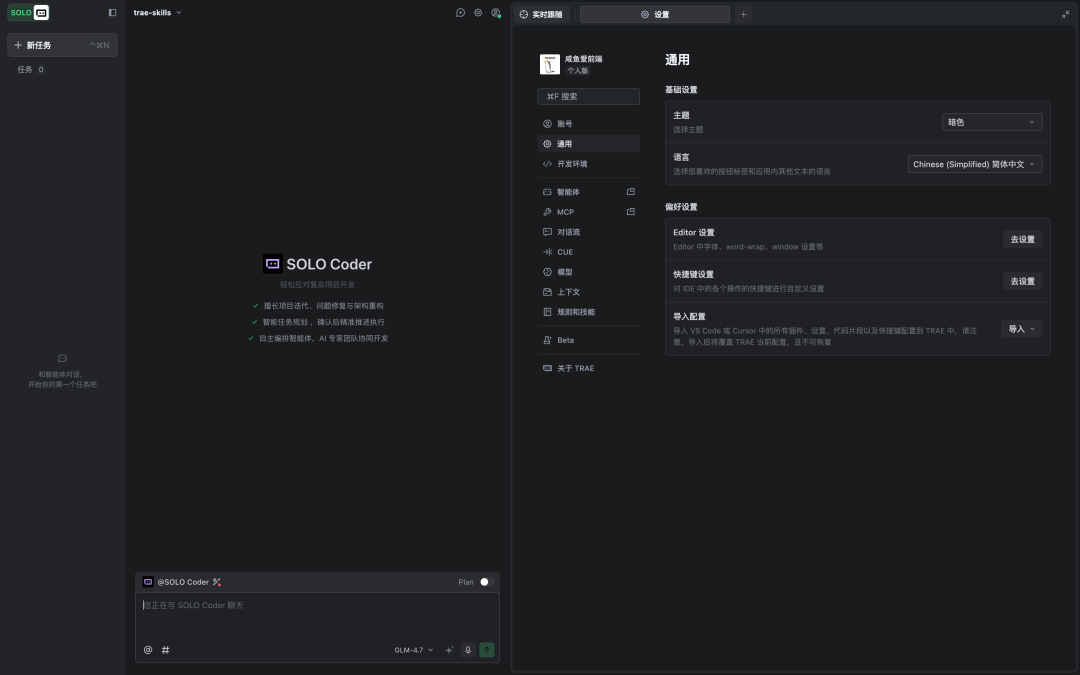
Find "Ruleal Skills" option on the left side of the settings panel
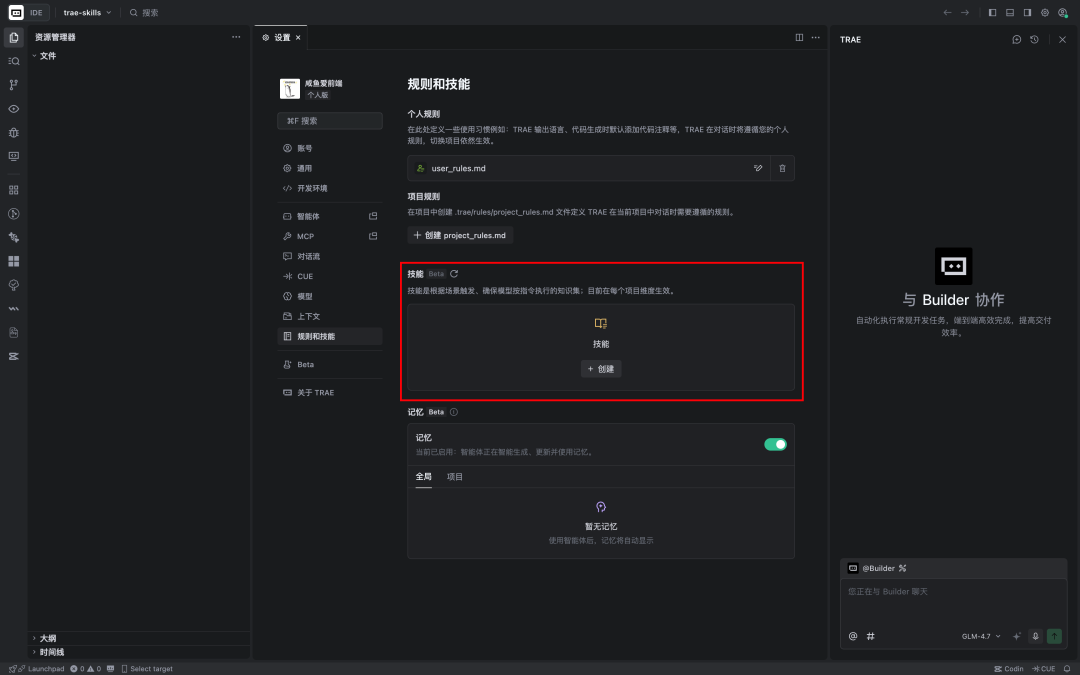
Finds the skill plate and clicks the "Create" button on the right。
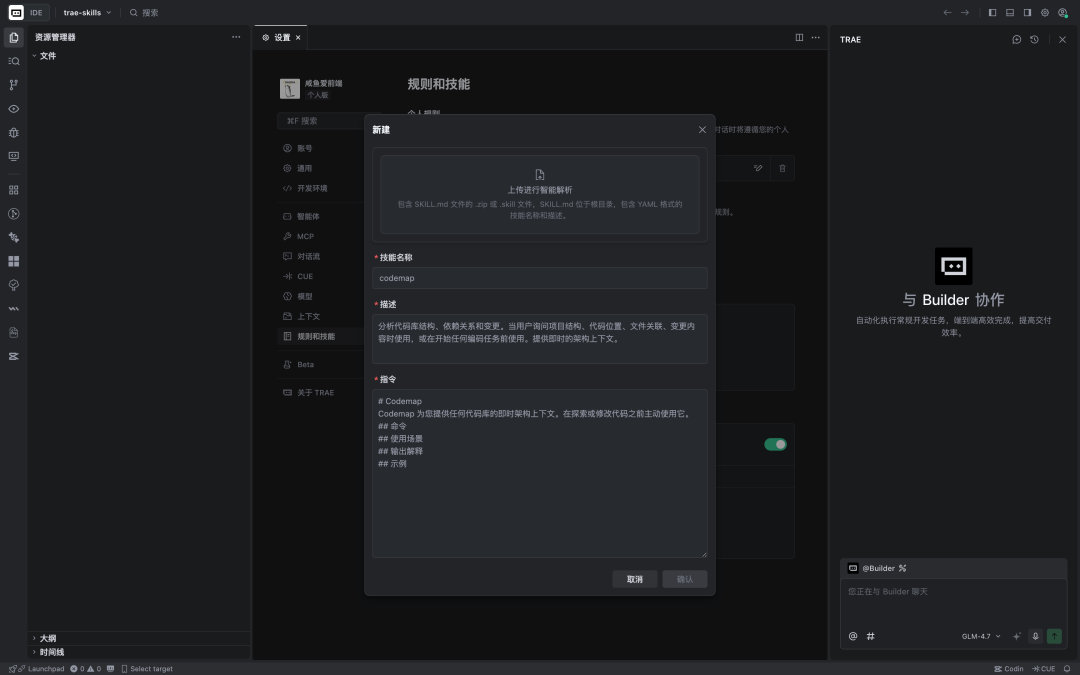
You'll see a simple creation interface with three elements:Skill Name, Skill Description, Skill SubjectI don't know. We use the example of Skill, which created a "grate submission " , and then click " Confirm."。
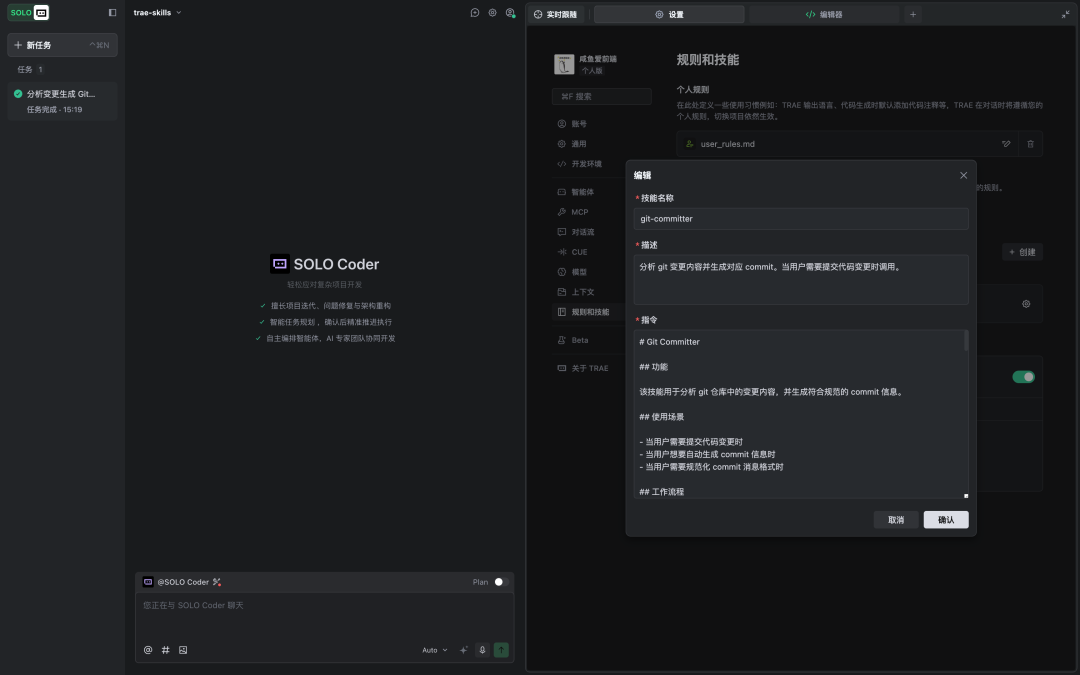
Just fill in what we need
Mode II: Direct resolution of SKILL.md
Add a new directory under the current item directory.i'm sorry IMPORTS YOU NEED A FOLDER, DIALOGUE WITH TRAE, AND YOU CAN USE IT。
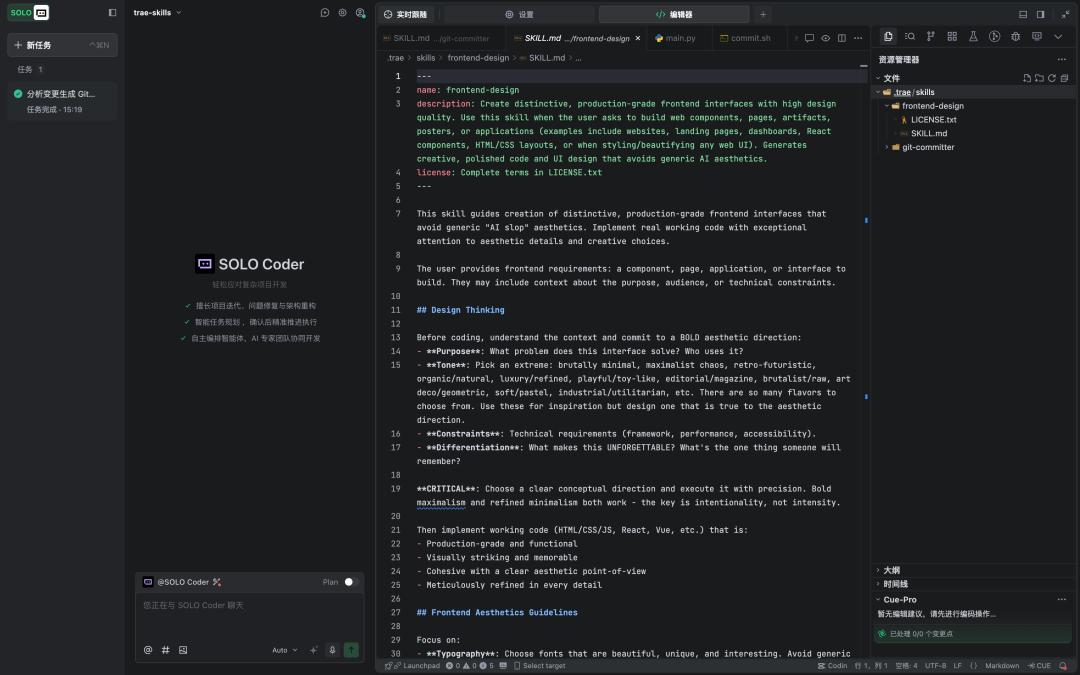
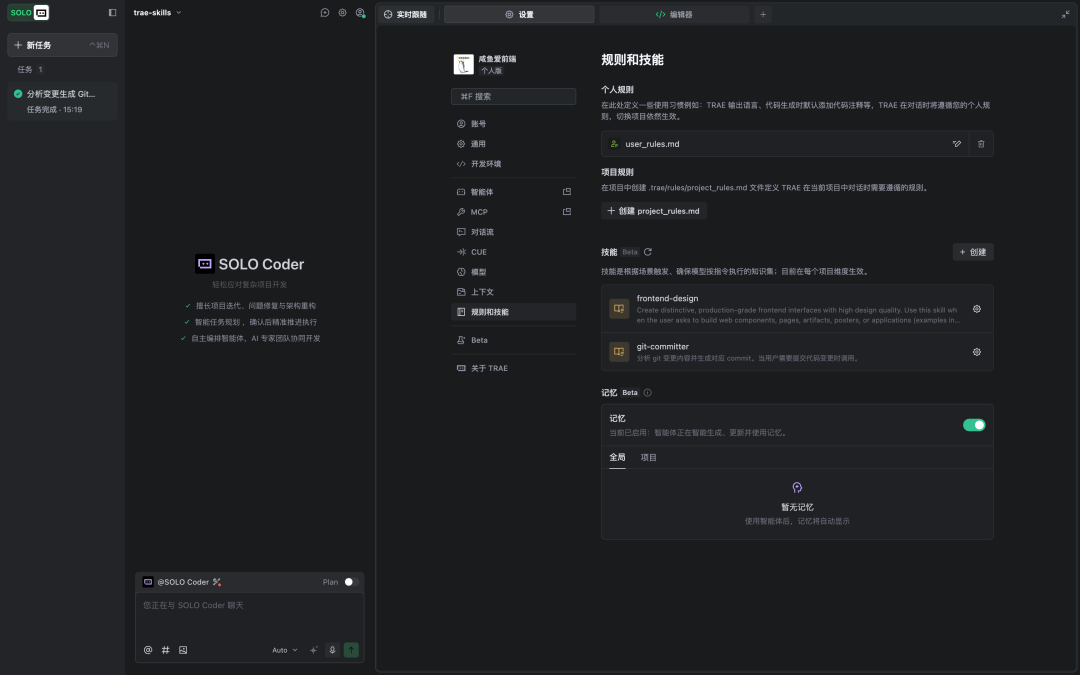
You can see import success in Setup - Rules Skills
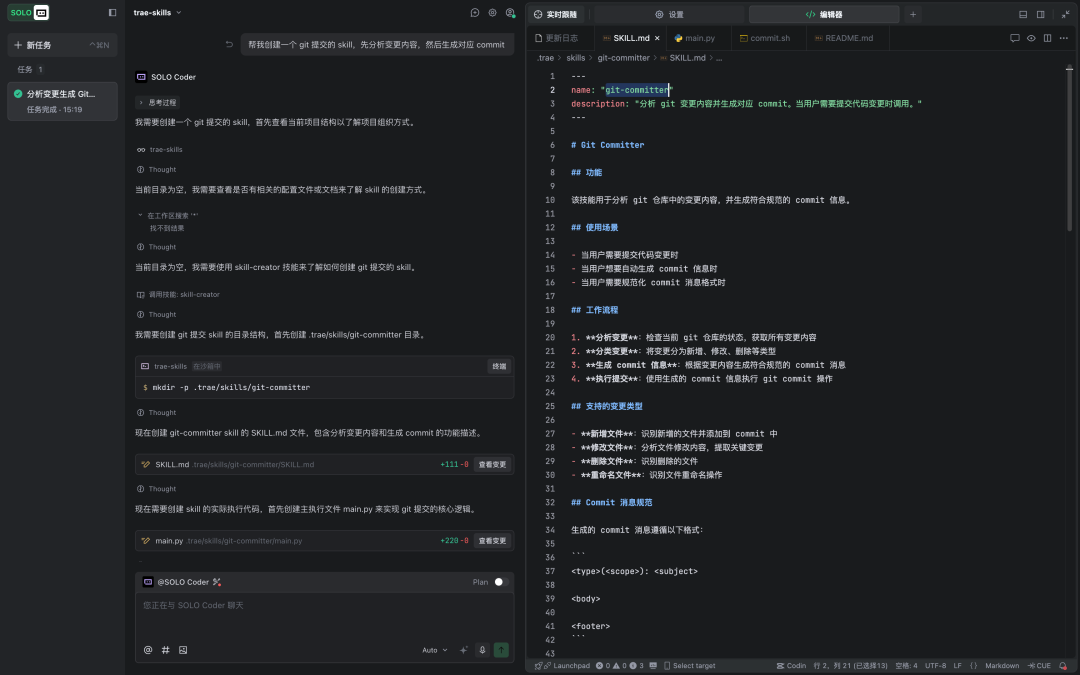
Mode 3: Create in dialogue
Skills-creator Skills are now embedded in TRAE, which you can directly and TRAE requests to create the needed Skills
Skill Usage
IT'S EASY TO USE SKILLS IN TRAE, AND WHEN YOU LOAD THE SKILLS YOU NEED, YOU JUST HAVE TO EXPLAIN YOUR NEEDS IN YOUR DAILY LANGUAGE IN THE DIALOGUE BOX。
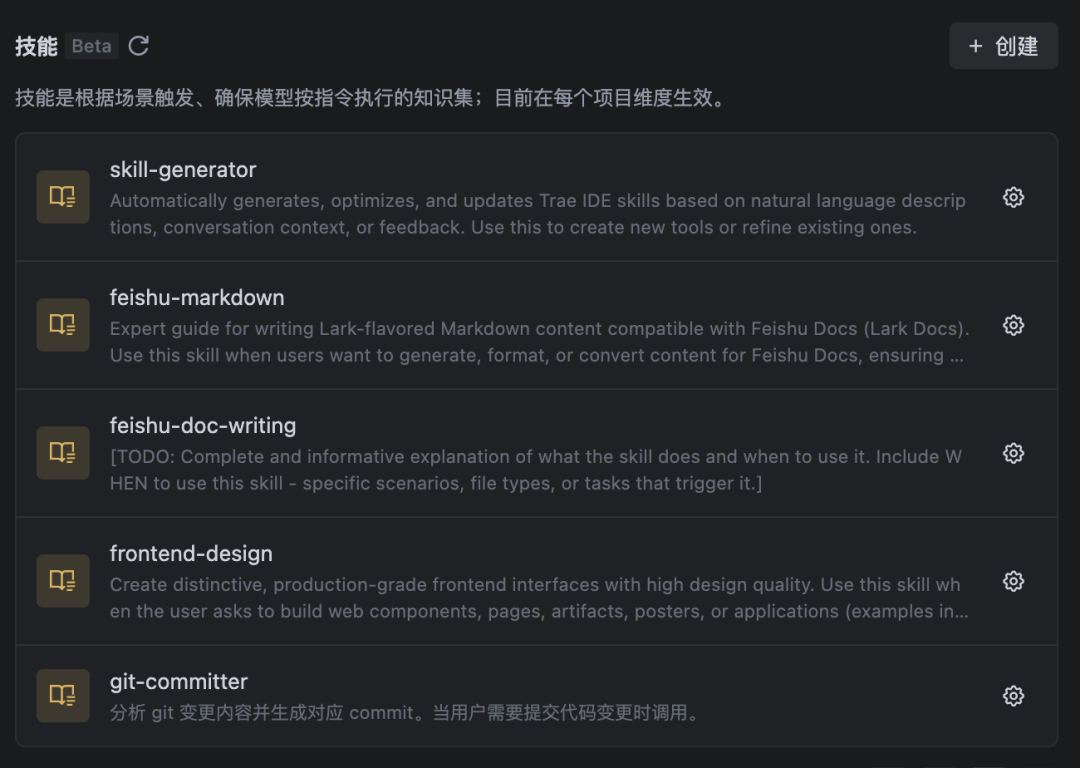
- for example, by entering " help me design a technology-sensitive login page " , the system automatically calls on " frontend-design " skills。
- For example, enter " Help me extract all the tables in this PDF" and the system automatically calls "document-Skills/pdf" skills。
- for example, the input " help me convert this technical document into a flying book document " will automatically call the "using-feishu-doc " skills。
The system will automatically analyse your needs, load skill files, and guide you step by step in your mission
Examples of practical scenarios
Remember the questions in the introduction? For example, the project rules document (project_rules) has a limit on the number of characters; or, even if you have clearly stated in the root rule document, "under which circumstances to read, which document" Agent will not do as required on mission。
The root causes of these problems are:Rules are fixed for AgentAt the beginning of the mission, it would load all the rules once in their context, thus taking up space without being flexible enough. And.. Skills (Skill) follows a dynamic approach of “progressive loading”That's just how it works. So, we can re-disassemble the former complex rule scenes into separate skills。
Next, we're going to work on how to solve problems with skills through a simple "Spec Coding" process based on flying books。
Spec Coding
Spec Coding promotes “thinking before acting”, i.e., the development of AI through a detailed definition of enforceable requirements. Its process consists of a document writing process for “needs analysis, technical design, task dismantling” and ultimately allows AI to code according to specifications. This step-by-step workflow ensures that each step is well-founded and that accurate transformation from demand to code is achieved。
Let me analyze this
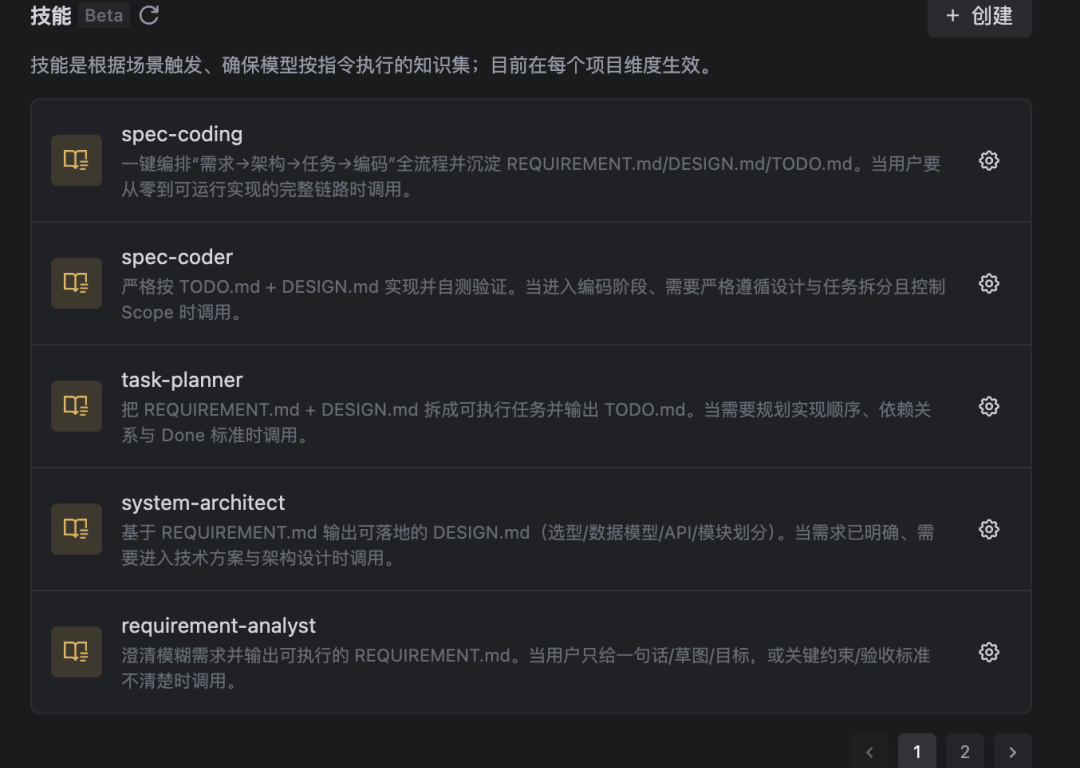
As mentioned above, the development process is divided into four key phases, so that the "needs analysis, technical design, task dismantling" flying book document writing is completed and the final code is achieved. To that end, we need different skills to meet document writing needs in different settings and to teach Agent how to use flying book tools to create synergies。
And then we'll work on the Skills design。
Multiplayer Skills
By achieving multiple roles, Skills focuses on one thing by creating multiple deliverable process documents, binding subsequent coding, providing sufficient and clear context for the coding
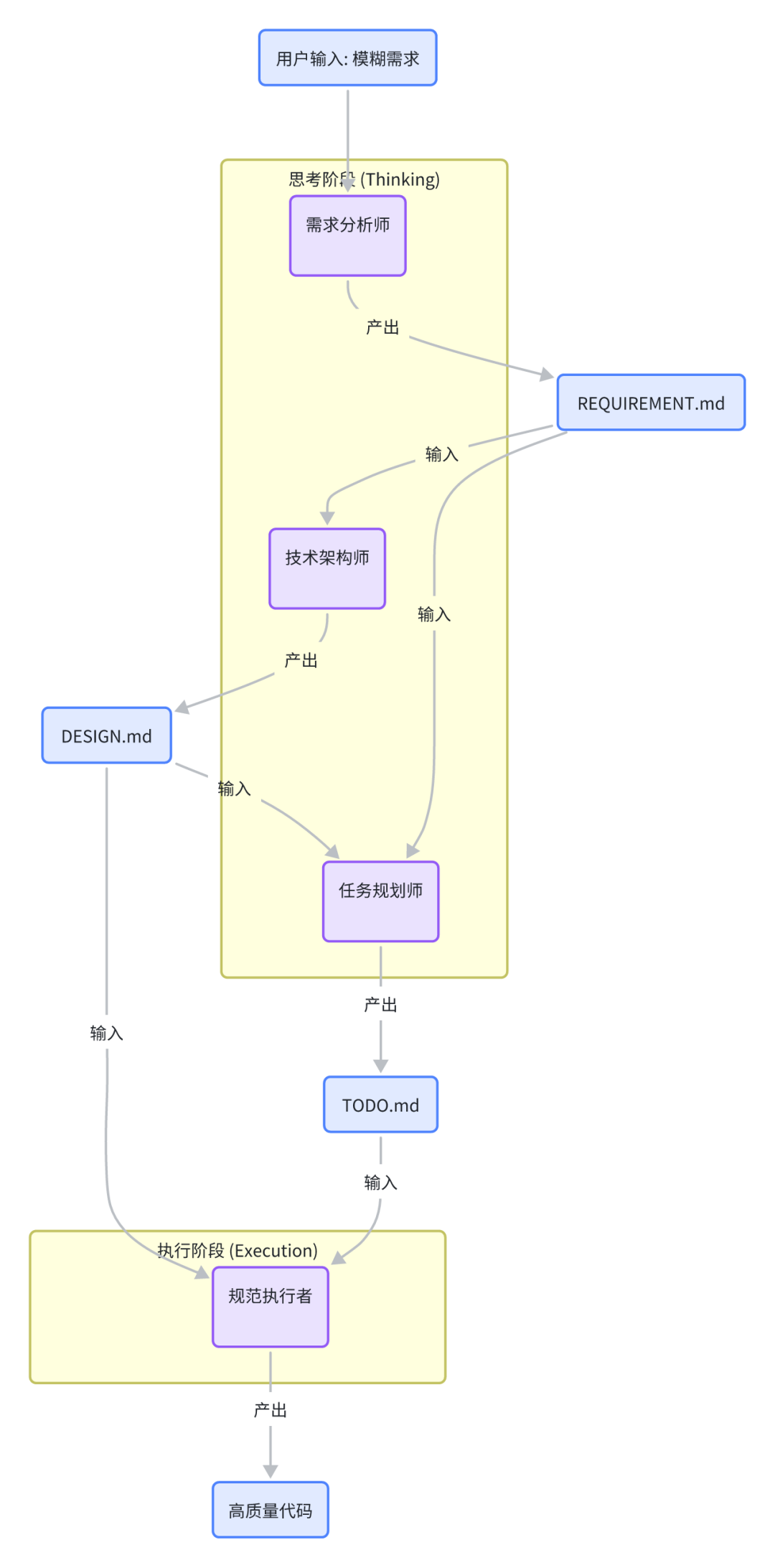
- Let's go further and elaborate
|
|
|
|
|
|
|
|
|
|
|
|
|
|
|
|
|
|
|
|
|
|
|
|
|
|
|
|
|
|
|
|
|
|
|
|
|
|
|
|
Following the above-mentioned form, we can be more or less clear as to how we need Skills to do it。
- This is just one example of how you can do the multi-playing Skills creation and debugging of the Skills, which, as mentioned above, needs to be gradually optimized in practice and continually optimized through the use of scenery
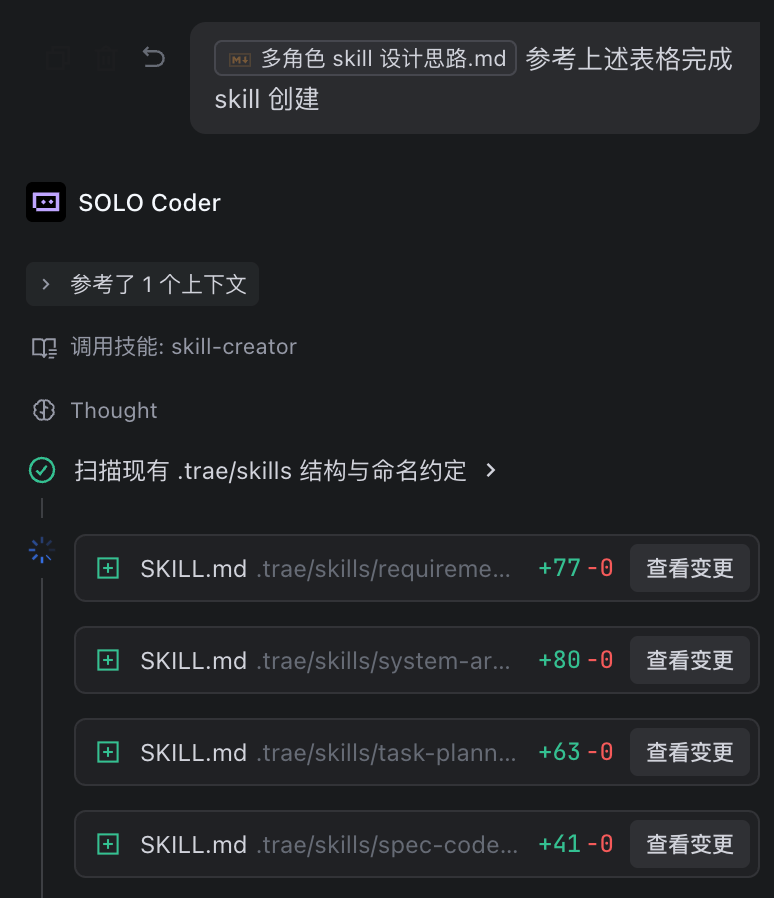
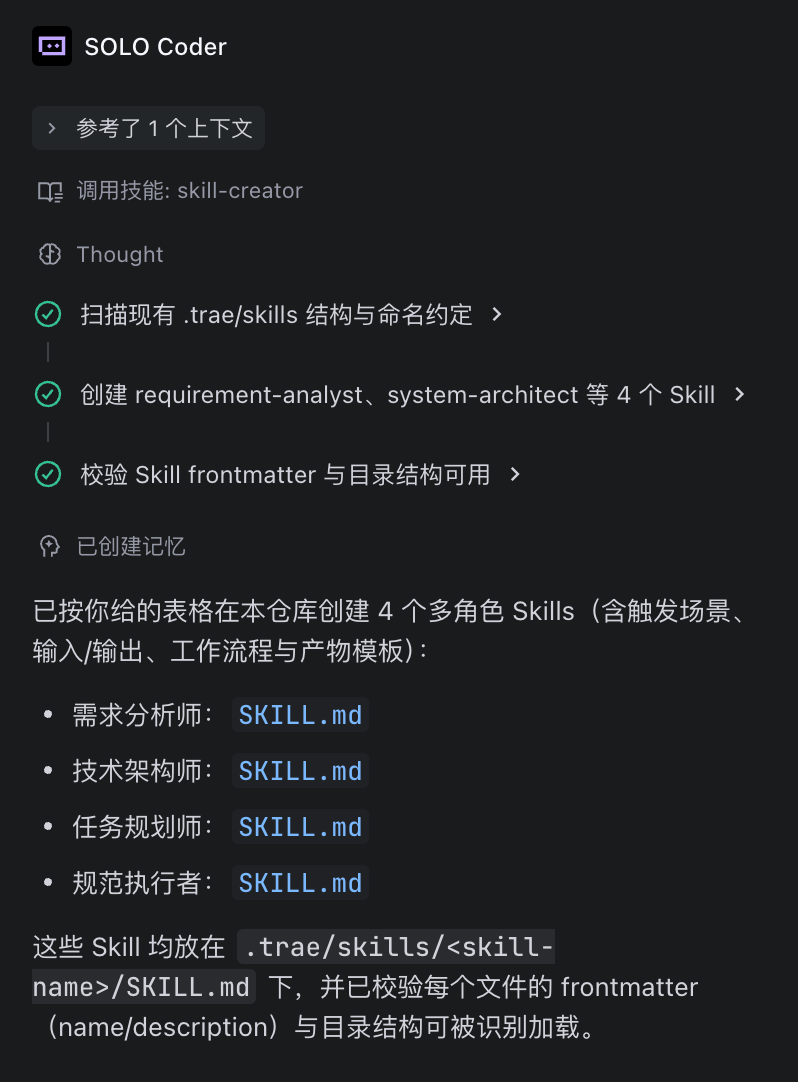
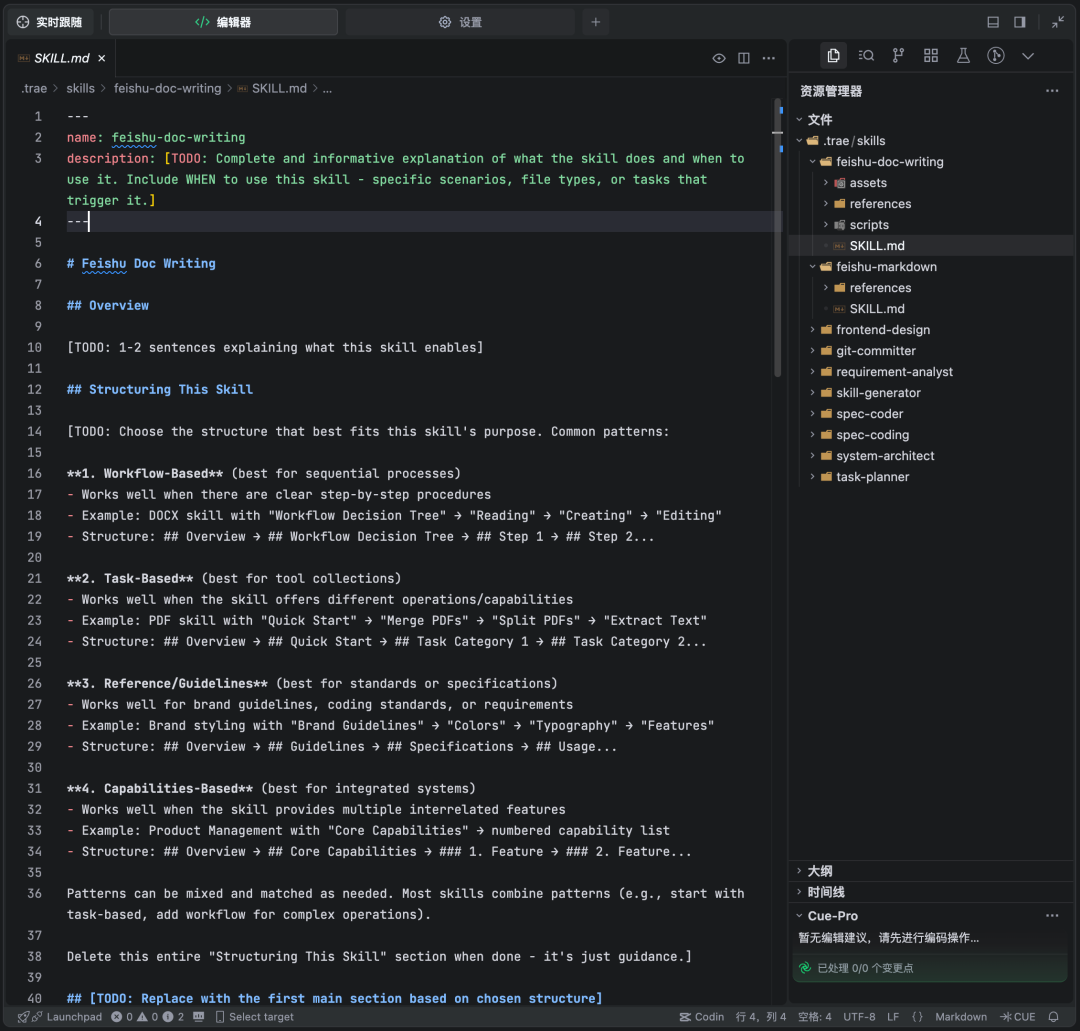
Flying Book Document Using Skill
the flybook document is formatted as a markdown supersetThe goal of Skill is the grammar of the Church Agent flying book files, allows Agent to write a md file that matches the format. And by restraining AgentFull use of the reading and writing of the comments in the flybook document to complete a collaborative multi-person review, the user completes the submission of the recommendation by commenting on the flybook document, and Agent rereads the document and comments and further optimizes the document as suggestedAchieves a document collaborative workflow。
Specing Skill
We have achieved multiple roles and a function, Skill, but when actually used, we need a skill that integrates the whole picture to achieve division of labour. Combining the above-mentioned multiple skills, informing intelligents (agents) of their overall specification coding (spec coding) process, completing the mix and movement of tool and role skills。
So we can quickly build a specification-coding workflow and complete basic development. Of course, the above logic can also be taken into account, and skills can be used to recreate specifications coding practices in communities (e.g. SpecKit, OpenSpec, etc.)。
Summarize
The scene mentioned two different styles of Skill Skill Dynamic Loading Mechanism(replaces a one-time loading of fixed rules) completed decomposition of tasks in complex scenarios; adopted Division of labour collaboration among different role skills(to avoid Agent doing anything that could lead to a breakdown in execution)Flying Book documents form a collaborative loopAgent's problem of “incompetence, fragmentation, lack of tools” was effectively addressed, and AI was able to move from a “dialogue assistant” to a “trustworthy and hands-on” to an efficient, accurate, collaborative delivery from demand to code output。
Q & A | SOME COMMON PROBLEMS
Why did I write Skills not work, or did it not work as intended
It's your business cardDescriptionIt's not done。
Remember, Agent was read by Skills Description "When should we use Skill?" If your description was vague, too professional or too simple, Agent would hardly understand what you mean, and naturally he wouldn't call this Skyll when he needed it. SoClear and precise in whiteDescriptionIt's critical for Skill to work。
Will the effects of using Skills be influenced by the LLM model I chose
It will have an impact, but the impact will be different。
- A stronger model primarily affects the ability to “selection” and “arrange” skills。 It can understand your real thoughts more precisely, and then pick out one or more of the most appropriate solutions from a bunch of skills. Its strength lies in the development of strategies。
- The skills themselves determine the “minimum level” and “stability” of the specific tasks performed。 Once a particular skill has been selected, the processes and codes set in it are fixed and will operate steadily. Therefore, the well-developed skills directly determine whether specific tasks can be accomplished with distinction。
Skills, is it almighty? Is there anything it's not good at
Of course not。The main advantage of Skills isAddress those tasks where processes are clear and where borders are clear。In the following cases, it may not be the best option:
- A highly creative task is required:It's like writing an emotional poem, or designing a brand-new brand. Such work requires more of the “inspiration” of the large model itself。
- Complex strategy games that require real-time, dynamic decision-making:For example, making trade decisions in fast-changing financial markets。
- Simple knowledge questions and answers or open chats:If you're just asking, "Who's the Renaissance Three?" You can just ask Big Model, without using the Skills。
I found a community, Skills, very useful, but can I adapt it to my special needs
Of course. We strongly recommend you do it
Most of the shared Skills support the user "Fork" (i.e., "copy one") and develop it twice. You can use the universal Skyll as a template, copy it in your workspace, and then modify the logic or parameters in it to suit your business needs. This is important for the co-existence of the whole ecosystem and for the re-use of knowledge。
The final words make Agent your real "acter."
The emergence of Skill created a critical technological bridge for AI to move from a “dialogue assistant” to a “trustworthy implementer”. It has structured the field of knowledge, operating processes and tools into a logical seal, resolving the confusion of the Agent rule lapses and the unwieldy implementation of the rule, making the AI capacity output controllable, trustworthy and efficient。
The core values of Skill are:
- Exact actual pain:By striking an excellent balance between functional depth and context efficiency through a clever three-tier loading mechanism (metadata narration of document girding resources), the dynamic loading capacity of the Agent context was achieved by avoiding valuable token waste and ensuring the accuracy of task execution。
- Eco-enabling, lowering the threshold:Both official and community resources (such as Claude's official warehouse, the SkillsMP market, etc.) provide ordinary users with the ease to stand on the shoulders of giants and quickly recycle their mature capacities。
While Skill is not almighty, its advantage in “determinate process tasks” is irreplaceable. In the future, with the enhancement of the capabilities of the AI model and the further improvement of the Skyll ecology, we are expected to see more cross-cutting, combustible Skylls --LET AI TRULY EVOLVE FROM A GENERALIST OF “BETTER UNDERSTANDING” TO A “GOOD-DOING” EXPERT COLLABORATION PARTNER。
Let's start with today and try to create your first Skill: Seal your best field of experience into a reusable ability to make AI an amplifier of your extended professional value。