



It's in the front
It's funny to hear a story:
- "When we talk Claude Code There were probably two kinds of people in the world: one feeling.. Claude Code is so great, he can do anything, he wants to throw it all over Claude Code; the other is someone who never used Claude Code."
I used to belong to the latter and thought Cursor / Gemini / ChatGPT was perfect。
I began to believe the former when I used it in depth for some time and became obsessed with it。
But when I started sharing the latest exploration with my friends, I found another fact:
For most people, or white users, no. Claude Code doesn't want to use it
I didn't think that there were so many obstacles and thresholds that I didn't think of
Three thresholds for White
I thought, for White, the threshold might be:
- Science on the Internet – I can't say that
- Install Claude Code - Focus on this
- CONFIGURE API - THIS FOCUS
Science on the Internet, if you can already see the article, you'll agree to solve it yourself。
I'll talk about the installation and configuration of Claude Code today。
Part I: Installation Claude Code
Organisation
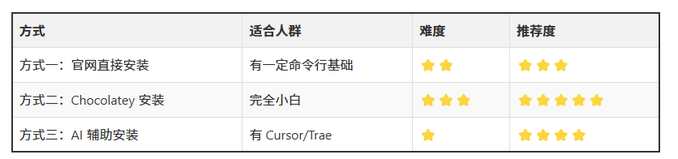
Mode I: Direct installation of the official network (suitable to basic users)
Step 1: Install Node.js environment
- Open browser access:
- https://nodejs.org/en/download/
- CLICK TO DOWNLOAD "LTS " VERSION (RECOMMENDED FOR LONG-TERM SUPPORT VERSION)
- double click on .msi file after download
- Finish the installation with the installation wizard, keep the default setup
Step 2: Install Git for Windows
Windows users need additional installation
- Visits:
- https://git-scm.com/install/windows
- Download and Install
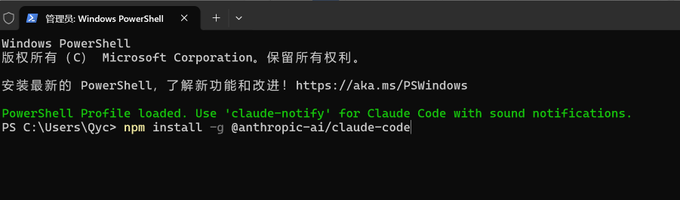
Step 3: Install Claude Code
Open terminal (run as administrator):
- Search for terminals in computers
- Click on the right button to run as administrator

Enter command in terminal:
- {\bord0\shad0\alphah3d}npm install-g-ai/claude-code
NPM install-g- @anthropic
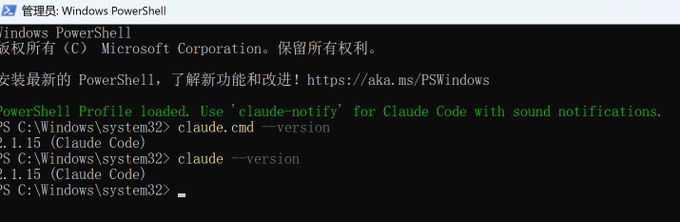
Step 4: Verify installation
this post is part of our special coverage syria protests 2011
If you show the version number, congratulations! Claude Code has been successfully installed。
Mode 2: Chocolatey installation (recommended for white)
It's the most stable way to automatically configure all environments。
Step 1: Open PowerShell as Administrator
- Click Start Menu
- Search: PowerShell
- Right → Select "Run as Administrator"
Step 2: Check for installation of Chocolatey
Enter in PowerShell:
- forco-v
Scenario A: Output version number (e.g. 2.x.x) indicates that you have installed Chocolatey and jumped directly to Step 3: Installation Node.js
CASE B: HINT IS NOT A COMMAND / NOT FOUND
Similar:
- choco: could not recognize the "choco" entry as cmdlet
The description was not installed and the Chocolatey had to be installed to continue the operation below。
Step 2.5: Installation of Chocolatey
Copy the whole section in PowerShell and return:
- Set-ExecutionPolicy Bypass -Scope Production-Force; [.ServicePointManager]: SecurityProtocol = [.ServicePointManager]: SecurityProtocol-bor 3072; iex (New-Object.WebClient). DownloadString()
- You know, System
- You know, System
- You know, System
- https://community.chocolatey.org/install.ps1
Wait 1-3 minutes, don't close the window。
Reconfirmation of installation success:
Close PowerShell and open it again as an administrator
forco-v
See the version number
Step 3: Installation Node.js
- Claude Code depends on Node.js
Enter in PowerShell:
- for co install nodejs-y
Installation time: 2-5 minutes
Could not close temporary folder: %s
- node-vnpm-v
Both orders have a version number output
Step 4: Installation of Claude Code
- {\bord0\shad0\alphah3d}npm install-g-ai/claude-code
- @anthropic
Waiting for installation to complete (30 seconds ~ 2 minutes)
Step 5: Final validation
- i'm sorry, claude
If you see similar:
- claude-code x.x.x

Congratulations: Claude Code is available
Mode III: Installed through Cursor or Trae (simple)
If you've installed Cursor or Trae, you can just let AI install you。
Send this in Cursor/Trae:
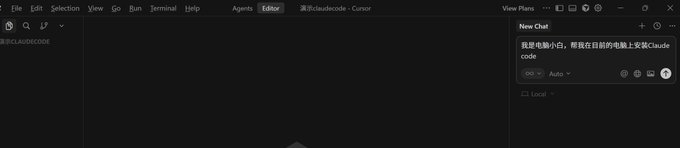
I'm computer white. Help me install Claude Code on the current computer
And then it'll help you install it
- Note: This method may have rights problems or it cannot be installed directly for you, and the last one is for you, if not for mode two。
and any of the above-mentioned operations, if there are problems, the quickest way to solve them is to get a screenshot to any one of them and ask them, i'm installing claude code. how do we solve this problem now
Installation of successful markers
Either way, if you have successfully displayed the version number after entering the following command in the command line, the installation is successful:
- this post is part of our special coverage syria protests 2011
Part II: Configure Claude Code
Why don't you just buy an official account
Theoretically, we should buy Claude Code's package directly on the official web, log in。
However, the official account number seals are very strict, especially for Chinese users。
If you're a Chinese user, don't get headaches about buying official accounts
Then there's no other way? Some of them, I've listed a few of the most common configurations:

Configure Comparison
This paper presents two types of configuration:
Configure Claude Code in two ways:
- Command Line Configuration
– Temporary Settings: Reconfiguration is required for each opening
– Permanent setting: one configuration is permanent
- CCSwitch Configuration ✅ (Recommended)
– Visual interface: manage multiple nodes
– One-key switch: suitable for multiple accounts
Recommendations: CCSwitch Configuration - Visual Interface to support multinode management
Configuration option I: Access to the national production model (recommended)
FOR EXAMPLE, GLM 4.7
Step 1: Register and purchase a package
- Access to the open platform:
- https://open.bigmodel.cn/
- Click the "Registration/Registration" button on the top right corner
- Purchase of a set (recommended version of Lite):
– Three months, $54
– Purchase of links:
https://www.bigmodel.cn/glm-coding
Step 2: Get API Key
After buying, go to the top right API Key here, click Add a new API Key, write a name, add a saving。
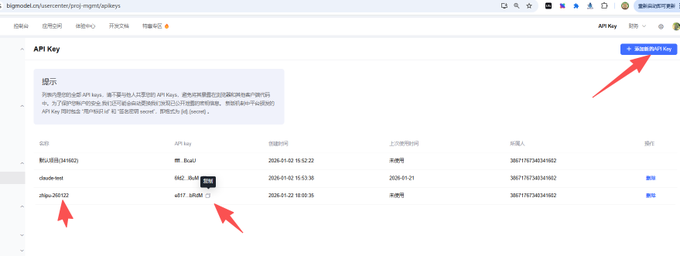
Copy your API Key:
- e817a4731bdxxxxxxxx5bdb718f2e1.lF4EuScczEkbRdM
Configure Method A: PowerShell Temporary Settings (Quick Test)
Enter the following command in PowerShell in order:
- $env: ANTHHROPICBASEURL = “https://open.bigmodel.cn/api/antropic”
- $env: ANTHROPICAUTHTOKEN = “e817A4731bc41xxxxxxxdb718f2e1.lF4EuScczEkbRdM”
note: replace the key here with your own
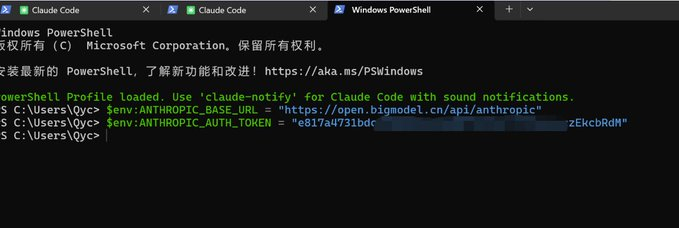
then enter the claude start。
- Disadvantages: This is a temporary setting, which needs to be reset every time a new command line window is opened
Configure Method B: PowerShell Permanent Settings (for All)
Run the following commands in PowerShell:
- Sets the user-level environment variable (valid) [System.Envirronment]: SetEnvironmentVariable (“ANTHROPICBASEURL”, “https://open.bigmodel.cn/api/antropic”,
- [System.EnvironVariable Target]: :System.Environment: SetEnvirmentVariable (“ANTHROPICAUTHTOKEN”, “Your API_Key”, [System.EnvironVariable Target]::User)
This means that once set, it does not need to be set again every time the command line window is opened。
- But we still don't recommend this because there's a more convenient CCSwitch configuration
Configure Option II: Use CCSwitch (recommended)
What's CCSwitch
CCSwitch is a visualized Claude Code configuration management tool that:
- MANAGE MULTIPLE API NODES
- One key to switch to different suppliers
- Test Connection Status
- Avoid trouble with command line configuration
Step 1: Download and install CCSwitch
Download address:
https://github.com/farion1231/cc-switch/releases/tag/v3.10.0
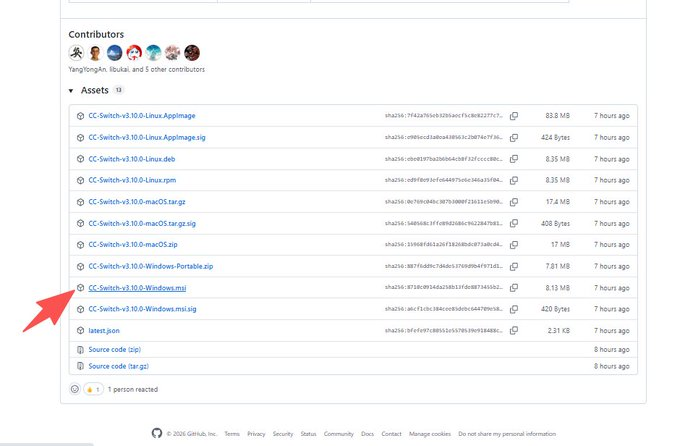
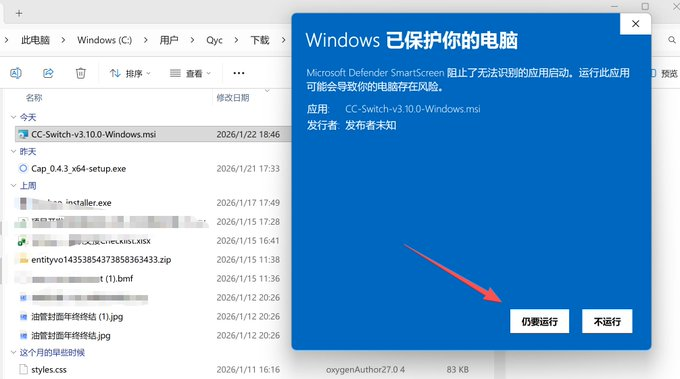
Click to download and double-click to install. If Windows security alert:
- Click "More information"
- Click still to run
Step 2: Open CCSwitch
Once installed, the interface is open as follows:
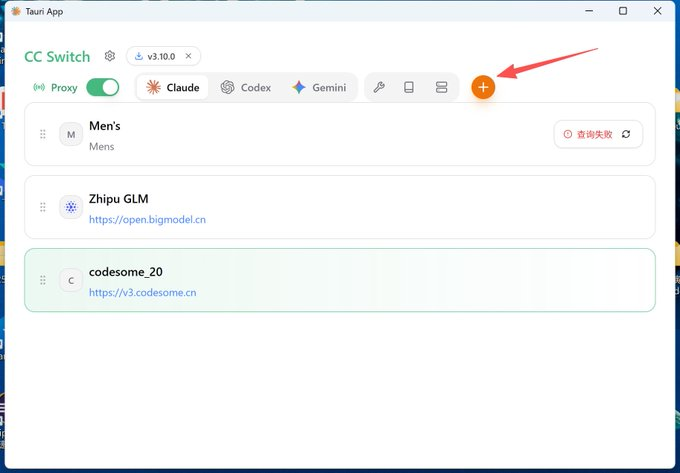
This interface is used to manage all your API interfaces and Key。
Configure the national production model (GLM 4.7) to CCSwitch
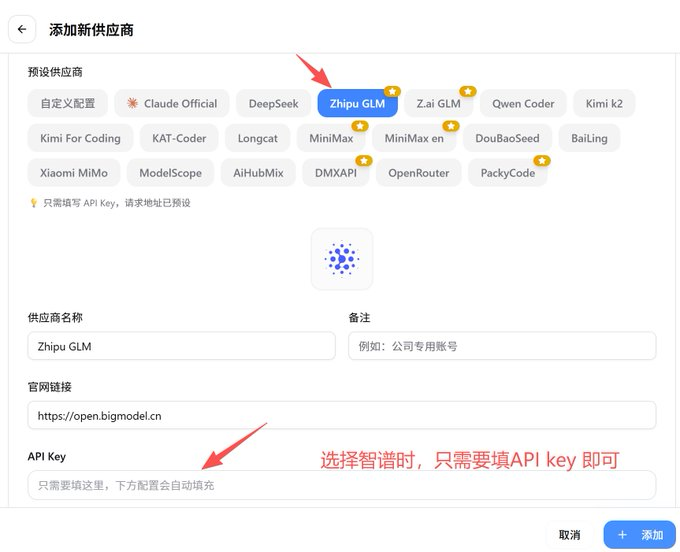
- Click "Add a new supplier" to "Zhipu GLM"
- Fill in the following information:
– Vendor name: When selected as an in-house manufacturer, there is no need to fill it here
– Base URL: When selected as a built-in manufacturer, there is no need to fill it here
– API Token: Your API Key
- Click Save
- Click Enable
- Click the Test button to show that the connection is normal
Configure Option III: Access to transit stations (original Claude)
transit station vs national production model
API SOURCE COMPARISON:
- National Production Model (GLM/Kiki)
– Full compliance
– Stable
– A little less than the original
- Transit station (inverse Claude)
– So close to the original experience
– Yeah, better
– Could be unstable and heavily dependent on the quality of the transit station
Distinction:
- Domestic production model: full domestic production, compliance stability, slightly low capacity
- Transit station: Station Chief via a number pool, inverse access to Claude model, close to original but potentially unstable
In some cases, the national production model is capable of completely neutralizing the overseas model, but it is better able to target certain scenarios and to be a primary model。
Here, I will list two transit stations currently in use:
- https://aigocode.com
- https://fk.codesome.cn
Take the Cordesome stop, for example
Step 1: Purchase of a package
Next link:
https://fk.codesome.cn
The minimum amount may be selected for purchase (19 yuan)。
After purchase, copy exchange codes:
Step 2: Convert and acquire API Key
- Visits:
- https://v3.codesome.cn/
- Registered users, access to the console
- Click on the exchange and paste the exchange code
STEP 3: GET API KEY
CLICK "API KEY":
CLICK "USE THE KEY" TO SEE YOUR KEY AND URL INFORMATION。
Step 4: Configure in CCSwitch
- Open CCSwitch
- Click "Add a new provider" to "Customise Configuration"
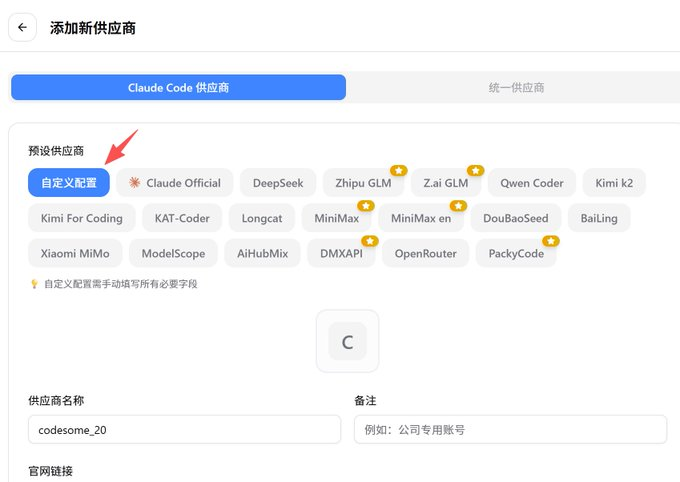
- In turn:
– Vendor name: Codesome
– Base URL: URL copied from website
– API Token: A key copied from website
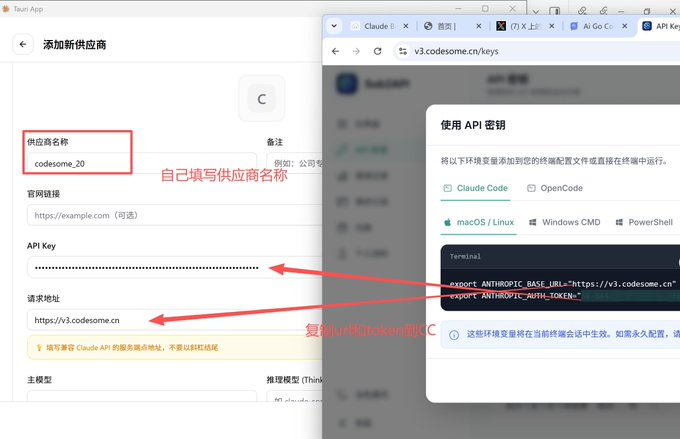
- After saving click Enable

- Click on the "test" button, as the image shows the connection is normal:
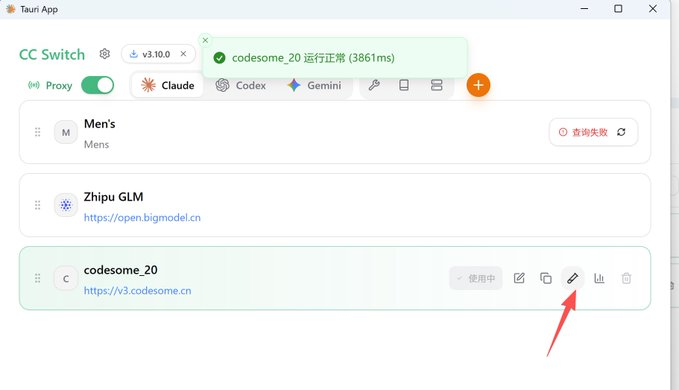
open the command line window and enter claude` so you can enjoy it
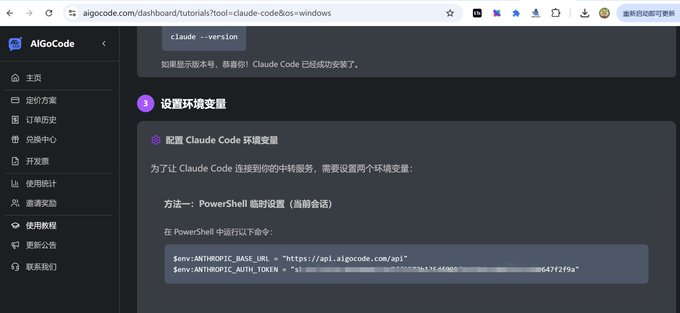
Configure the Aigocode transit station
If you want to configure Aigocode, the operation is exactly the same, you just have to modify URLs and Token:
Summarize
So, if you see this, you've got it all figured out:
- How to Install Claude Code
– Mode I: Direct installation of the official network
– Mode 2: Chocolatey installation (recommended)
– MODE 3: AI SUPPORT INSTALLATION
- HOW TO FLEXIBLY CONFIGURE API NODES
– National production model (GLM, Kimi)
– Condesome, Aigocode
– CCSwitch Visualisation Management
- Multinom Management
– Manage multiple suppliers using CCSwitch
– Key toggle different nodes
– Test Connection Status
CONGRATULATIONS, YOU'VE EXCEEDED 901 TP3T BY HERE
The rest is to use Claude Code to experience its strength。