



- 本文适合完全没有命令行经验的Newbie,也适合从 OpenClaw 迁移过来的用户。手把手带你从零开始,装好 Hermes Agent,接入 Telegram,并了解它的核心玩法。
🤔它是什么
Nous Research 今年 2 月底开源的 AI Agent 框架,上线不到两个月就冲到 35K star,速度相当快🚀。
大多数人用 AI 的方式是:打开网页、输入问题、等它回答、关掉窗口。Hermes 的定位不是这个,它是部署在服务器上、24 小时替你干活的数字员工。你关掉电脑,它还在跑;你睡着了,它还在处理任务。这是从”聊天工具”到”基础设施”的思路转变,理解这一点,才能真正用好它。
核心差异一句话:会自己变聪明。完成复杂任务后自动提炼成可复用技能(Skill)存起来,下次直接调用,还会随使用次数持续调优。有用户反馈两小时内自动生成三份技能后,重复任务速度提升了 40%。
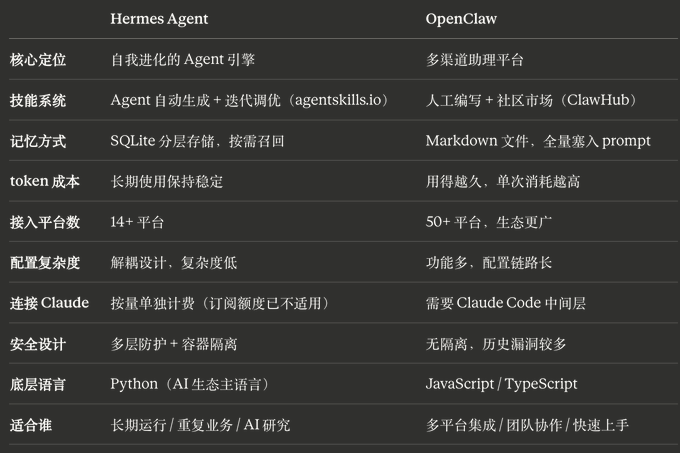
底层用 Python 写的,OpenClaw 是 JS,AI 时代大多数工具和模型库都是 Python 生态,想改源码、加自定义工具、对接本地模型,Hermes 的门槛更低。
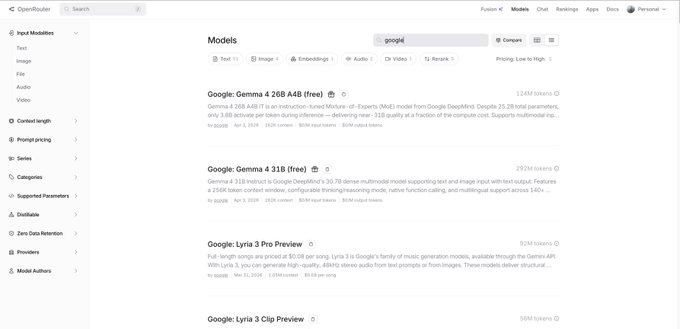
模型推荐用OpenRouter,有免费模型可用,零成本上手。
- ⚠️ 发文时更新:有推友今日下午反馈 Claude 订阅接入已失效。
- Anthropic 4 月 7 日起调整政策,Hermes 等第三方工具不再走订阅额度,改为按量单独计费。建议优先用 OpenRouter 免费模型。
📋 开始之前
1. 系统支持情况
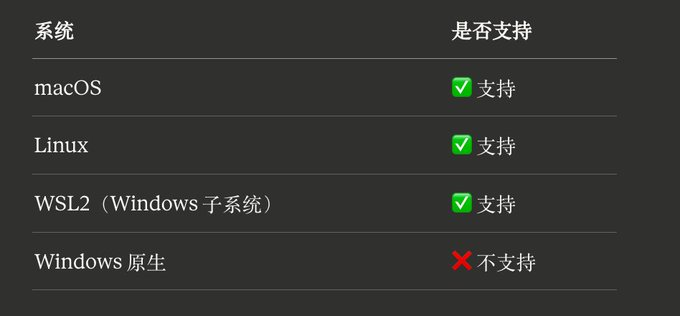
- 💡 Windows 用户:需要先安装 WSL2,再在 WSL2 环境里按本教程操作。可在微软官方文档搜索「安装 WSL」,按步骤装好后回来继续。
2. 确认 Git 已安装
打开终端,输入:
git version能看到版本号(如 git version 2.x.x)就没问题。如果提示 command not found,先去git-scm.com 下载安装。
3. 准备好大模型 API Key
Hermes 支持接入 Claude、OpenAI、OpenRouter 等主流模型。安装时会引导你选择和配置,提前备好 Key 就行。
🔧 第一步:安装
打开终端(Windows 用户在 WSL2 里操作),执行:
脚本会自动完成所有准备工作:检测并安装 Python / Node.js / Git / ripgrep 等依赖、克隆仓库、创建全局 hermes 命令。
curl -fsSL https://raw.githubusercontent.com/NousResearch/hermes-agent/main/scripts/install.sh| bash
- ⚠️ 网络提示:要安装的东西比较多,网络不好的话多等一会儿,不要中途关掉终端。
安装完成后,脚本会自动进入引导设置,选择 Quick setup 模式,然后按提示配置模型。推荐选 OpenRouter,进入后可以选免费模型(如 google/gemma-4-31b-it:free),零成本跑起来先体验。如果之前本地已有 OpenAI 或 Codex 的授权配置,Hermes 会自动读取,不用重复填写。
配置最后会询问是否注册为系统服务,选 Y 可以开机自启、后台常驻,省去每次手动启动的麻烦。
如果你暂时不想配置聊天平台,选择跳过(Skip),直接在终端里输入:
hermes能看到对话界面,说明安装成功了,可以直接在命令行里开聊。
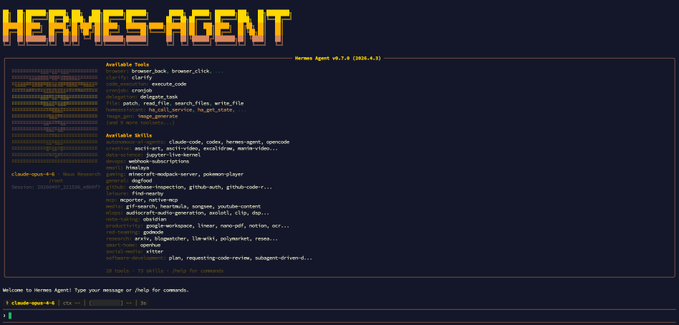
- ⚠️ 如果提示找不到 hermes 命令,先执行 source ~/.bashrc 或 source ~/.zshrc 刷新一下 shell 环境,重新打开终端也行。
- 实际体验下来,安装确实比 OpenClaw 方便,一次就配置成功了✌🏻
💬 第二步:接入 Telegram
- 💡 如果你只想用命令行和 Hermes 交互,这一步可以跳过。想在手机或电脑的 Telegram 里聊,才需要配置。
2.1 先去 Telegram 创建一个 Bot
- 打开 Telegram,搜索 BotFather(官方账号,蓝色认证标)
- send /newbot
- 根据提示依次输入 Bot 的显示名称(Name)和用户名(Username,必须以 bot 结尾)
- 创建成功后,BotFather 会返回一串 HTTP API Token,复制保存好
2.2 回到终端配置
如果安装时跳过了 IM 配置,可以随时重新运行:
♪ hermes gateway setup ♪在引导界面选择 Telegram,将刚才复制的 Bot Token 粘贴进去。
- ⚠️ 注意:粘贴 Token 时终端不会显示任何内容,这是正常的安全设计,直接按回车确认就行。
接着需要填写你自己的 Telegram 数字 ID(Allowed User ID)。查询方法:在 Telegram 里给@userinfobot发任意一条消息,它会立即回复你的账号 ID,复制那串数字填进去即可。不填则任何人都能使用你的 Bot。
2.3 完成配对
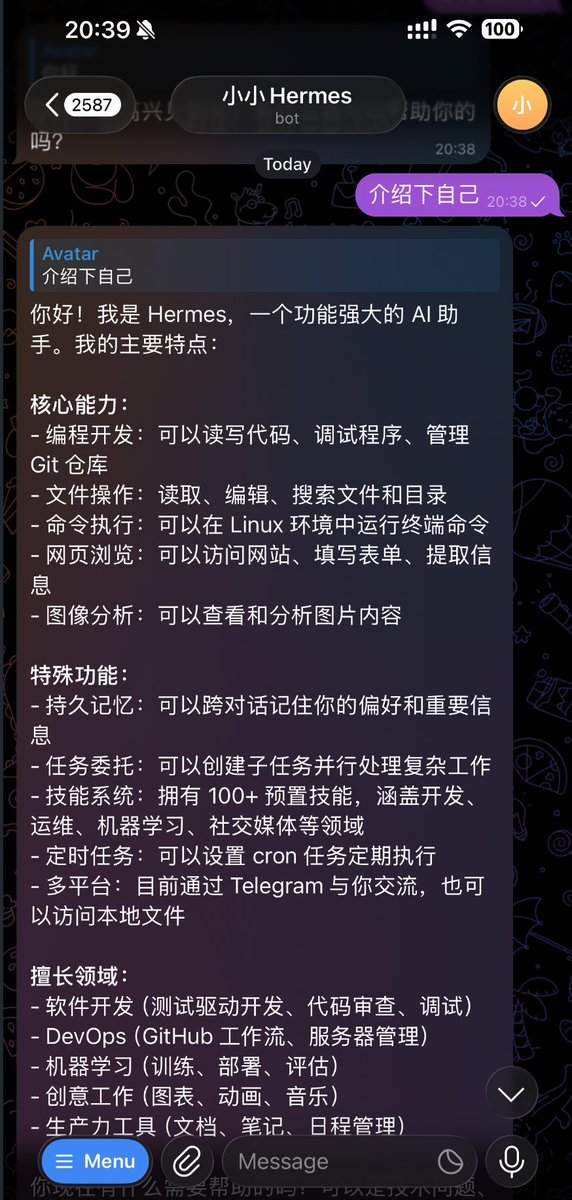
配置完成后,终端会给出一条命令,复制执行,然后打开 Telegram 找到你刚创建的 Bot,发一条消息,能收到回复就说明配对成功了。
📱 其他聊天平台
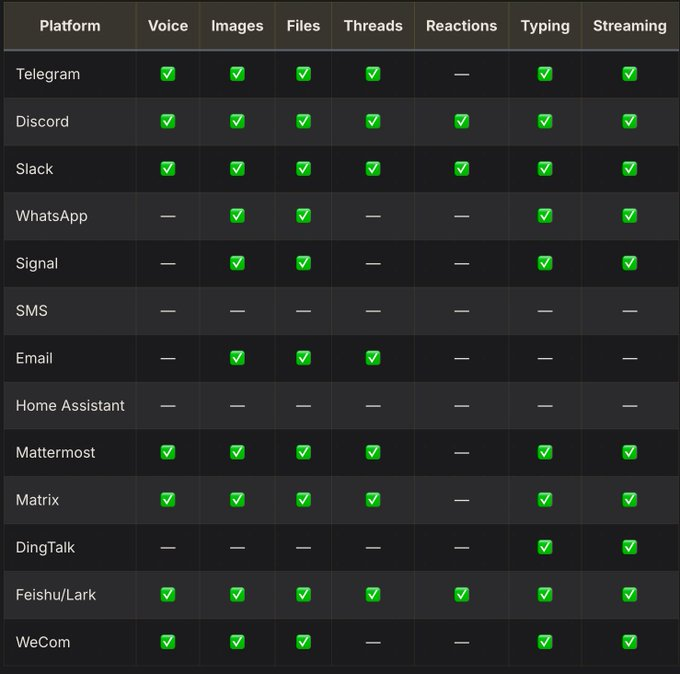
飞书、企业微信、钉钉、Discord、WhatsApp 等平台的配置方式与 Telegram 大同小异,都在引导菜单里可以找到。详细参数配置可以参考官方文档:
👉Message Platform Access Guide
Step 3: Validation installation
Run the following commands for a full check:
i'm sorry, shemes doctorThe output is green, which means Hermes is working properly, with no problems of dependence or configuration. If there is a mistake, it will point to exactly what went wrong。
Core characteristics
Skills Auto Generates: After a complex task, Hermes will sink the whole process into a Markdown skill file, and next time a similar task will be called directly. It will also record the number of calls and the process of implementation for each Skill, up to a certain number of automatic adjustments — the skills will really be used as best as possible, not as a word。
Layer memory: Core information is based at MEMORY.md, with each conversation; the full volume of the historical dialogue is stored at SQLite, retrieved on demand, with no limit on capacity. OpenClaw is that every mission has put the following down in history, and the more it burns. Hermes recalls on demand, but the longer it takes, the more it takes。
IM can see tool_call process, know what angent is doing every step, OpenClaw, this is a black box. There is also support for Profiles, which can run multiple isolated Agent examples at the same time。
Voice Interacting: CLI press Ctrl+B recording, Telegram / Discord can speak directly, Discord can even get Agent to join the voice channel to listen in real time. Local Whisper (free of charge) or Groq is supported for voice recognition, which is not normally available but is a sub-item if needed。
SOUL.md Personalization: Writing a few lines in ~/.hermes/SOUL.md defines Agent as a permanent personality across all platforms, speaking styles, preferences, what to avoid. Want a practical engineer assistant or a funny assistant, it's up to you。
In general, the interactive experience is fluid, and the configuration is simple but the interface needs to continue to grind。
• Access to third-party interfaces
If you don't want to use the command line, there are two options:
Hermes WebUI: The Web interface developed for Hermes, which talks directly to Agent, is much more intuitive than the command line and is very new。
👉github.com/nesquena/hermes-webui
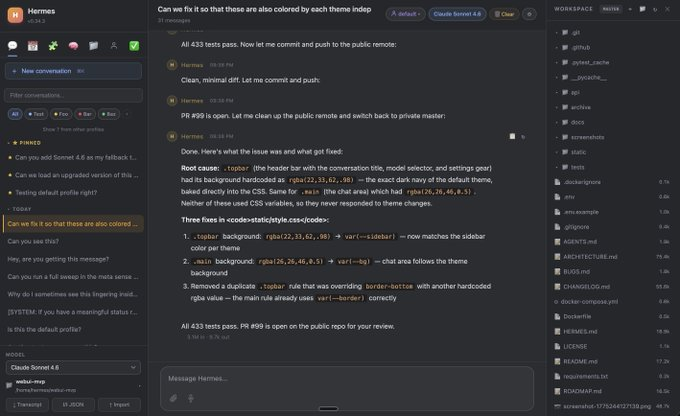
Access to existing tools: Hermes contains service-ends that are compatible with OpenAI API formats, Open WebUI, Cherry Studio and others that support custom API endpoints can be accessed directly without re-engineering。
Cannot initialise Evolution's mail componentAPI Server User Guide
VPS USER
If you are deployed on VPS and you have installed an AI tool such as Claude or Codex, you can throw the Hermes official document or this document directly at it, so that it can read and execute the configuration step automatically. Avoiding the trouble of sticking orders on a line-by-line basis is particularly appropriate in circumstances where the environment is complex and requires repeated debugging。
I'm sorry
Cost reference
Hermes can be named as running on a $5/month VPS and also supports Docker and Serverles programmes. Following are the cost references for community-based measurements:
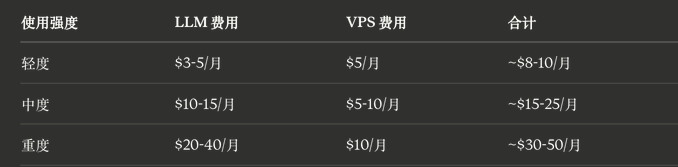
Why is Hermes cheaper than OpenClaw 30%-60%? The reason for this is structure: OpenClaw, each mission, the more it's been, the more it's consumed, the more it's spent, the more it's spent. Hermes' memory systems are recalled as needed and the cost remains stable over time。
- ⚠️ Community HF overturn case: forgot to turn Sonnet off overnight. OpenClaw users cry in the toilet, Hermes users turn up a small order of magnitude because of structural differences。
Security
Hermes implemented seven layers of defence: a white list of user authorizations, manual approval of hazard orders, Docker container isolation, document filter protection, content infusion scanning, URL validation (and SSRF), pre-execution terminal attack detection. The default for high-risk operations requires manual confirmation, which is automatically denied over time。
When accessing the IM platform, Hermes supports pairing, 8 bit random, 1 hour expired, 5 failed locks, and is safer than manually copying user ID。
Configure top key and service decomposition management, which is less complex, reduces the probability that the wrong pair will kill itself。
Two points to know before use:
- Access to Telegram. Post account is access control. Account security = Agent secure
- Skills, long-term survival is subject to repeated calls
- 💡 skills files exist locally and can be opened for viewing and deletion at any time; hermes doctor can regularly check the state of operation。
❓ Common problems
Q: Can claude subscribe still work
On 7 April, Anthropic has adjusted its policy, and third-party instruments such as Hermes no longer follow the subscription line, and the use of Claude requires a separate rate. It is recommended that OpenRouter be used directly, with a free model available after registration, with no cost of entry, and subsequent re-payment models。
Q: Enter hermes hint after installation
Usually PATH is not refreshed. Turn off the current terminal window, reopen one and try again. If not, execute source ~/.bahrc or source ~/.zshrc。
Q: What about Windows users
The government clearly does not support the original Windows operation. WSL2 (Windows Subsystem for Linux 2) needs to be installed first, then in WSL2 you have to do the same with your own program。
Q: Bot Token pasting in there without any indication, was it wrong
No errors, this is the terminal security mechanism and will not be repeated when you enter the key type content. Just press back to confirm。
Q: Does the original configuration work
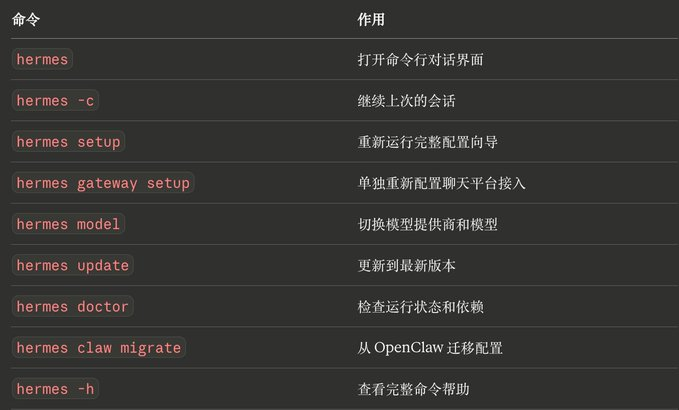
Yes, Hermes has internal displacement orders:
i don't know what you're talking about
Many commands and OpenClaw are similar。
Q:/llm_wiki What function
The new version of the new functionality supports the Karpathy wiki program - it allows quick access to large model-related knowledge and triggers directly /llm_wiki in the IM dialogue, which is easier than manual search。
Official documents:
shemes-agent.nosresearch.com/docs
Github:
i don't know what you're talking about