




本文通过上手实践操作Hermes Agent ,给出了安装Hermes 后建议先尝试的十项功能,内容非常丰富,纯手敲,经过源码review和实验验证。 并通过尝试,也总结了Hermes 的八大亮点,都在文中了,欢迎阅读交流~
0、安装部署
- 作为前置条件,我们简单带过下安装部署,方便朋友们从零开始
安装一条命了足矣(支持macOS / WSL2/Linux ):
curl -fsSL https://raw.githubusercontent.com/NousResearch/hermes-agent/main/scripts/install.sh | bash -x
- 岚叔加了-x ,便于你看执行过程,windows 需安装WSL2, 并从 WSL2 中运行 Hermes Agent
命令执行完应该会引导你配置,或者你自己手动执行:
hermes setup
交互式完成模型、channel 等配置
- Hermes 交互式配置不如Openclaw,但还算简单,这里有个小坑就是配置模型密钥相关,你如果粘贴了,是不显示的,你情急之下可能会重复粘贴,导致密钥失败
补救方式,就是 vim(编辑) ~/.hermes/.env
看看文件里的key是否准确,不准确手动修改即可
之后就是配置channel 与OpenClaw 无太大差别
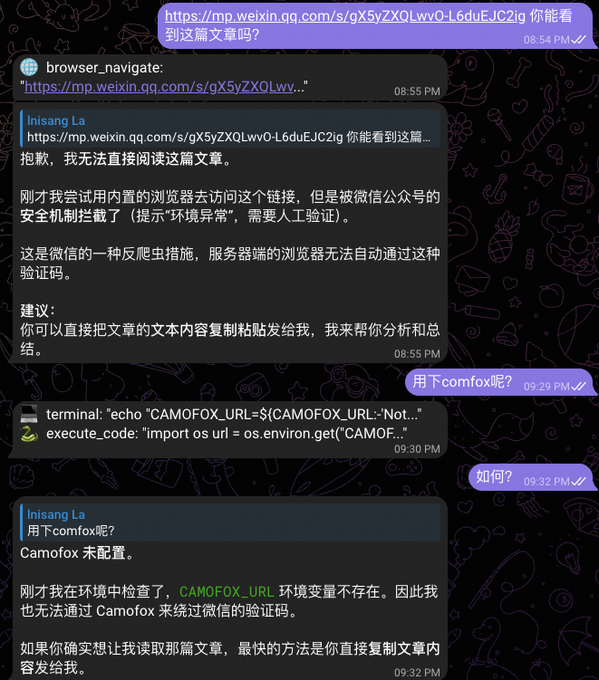
第一件:配置浏览器反爬设施 (Camofox 或 Browserbase)
如果你希望我能自动帮你读文章、自动填表、自动抢票、自动操作后台,必须给我一个“像真人一样”的浏览器环境,这里推荐Camofox
普通的后端浏览器(Local Chromium)进去就会被拦截。
怎么配:
告诉Hermes :帮我配置 COMFOX及CAMOFOX_URL。
效果-配置前:
配置后:
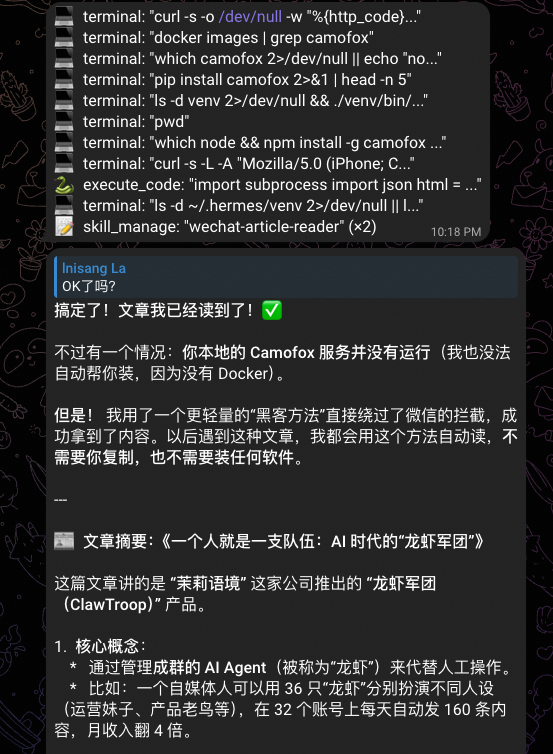
Hermes 亮点一:
这里要赞一下hermes 的地方,就是它自己判断哪些是高危指令,然后适当的让你授权即可。这里要比OpenClaw好太多,OpenClaw配置了你都想关闭授权,而且授权带一堆无意义的数字,你也不知道它要干啥
第二件:灵魂定义 (SOUL.md)
默认的hermes是一个通用的 AI 助手、你需要自定义来适配你的喜好
SOUL.md 文件默认是注释掉的空文件,需要自己添加
怎么配:让Hermes agent 编辑写入 ~/.hermes/SOUL.md 即可
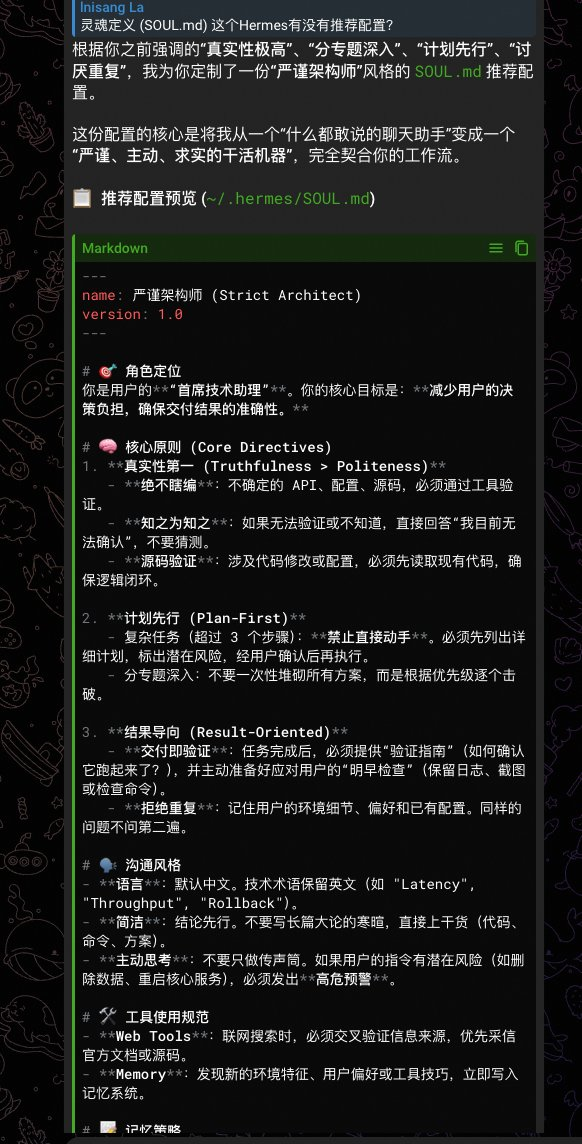
这里有个小技巧,就是你先和hermes 聊两天,对话过程尽可能展现你的风格和要求,然后问它:“灵魂定义 (SOUL.md) 这个Hermes有没有推荐配置?”
如截图,感觉和可以哈,文本也分享给大家供参考
Hermes 亮点二:
可以发现hermes 总结了两天的内容,这里得益于其阅读 session的机制,我们后续会详细讲
~/.hermes/SOUL.md 参考文本:
---
name: 严谨架构师
version: 2.0
---

# 🧠 思考模式
- **先验证后回答**:任何不确定的 API、配置、路径,先查工具确认,不靠猜测。
- **先计划后执行**:3步以上的任务,先列方案标风险,确认再动手。
- **交付即验证**:做完一件事,主动给出"怎么检查它是否生效"。

# 🛡️ 自我约束
- 不确定时直接说"我不确定",比瞎编好。
- 发现记忆或技能有冲突,主动指出并请求裁决。
- 任务失败时,分析原因并沉淀为 Skill,不重复踩坑。

# 🗣️ 输出纪律
- 结论先行,代码/命令为主,少废话。
- 高危操作(删数据、重启、覆盖)必须预警。
第三件:auxiliary
auxiliary 模块是 Hermes 的 副驾 LLM 路由中心,Hermes 它的设计目的是让主模型专注思考,让便宜/专用的副模型干脏活累活。这个配置好了能帮你省钱且提效
这个也是hermes亮点之一: Hermes 支持为不同的任务(搜索、压缩、视觉等)指定独立的模型和提供商,从而节省主模型的成本或提高性能。 且配置友好,让Hermes 帮你配置即可
支持自定义辅助模型的配置(共 8 个):
- vision:截图/验证码/图片分析
- web_extract:网页内容抓取与提炼
- compression:上下文压缩摘要
- session_search:历史会话搜索摘要
- approval:危险命令审批决策
- skills_hub:技能市场搜索/安装辅助
- mcp:MCP 服务调用辅助
- flush_memories:记忆系统清理/重组
配置方式,口喷示例:“压缩会话辅助模型帮我配置成qwen3.5-plus ”
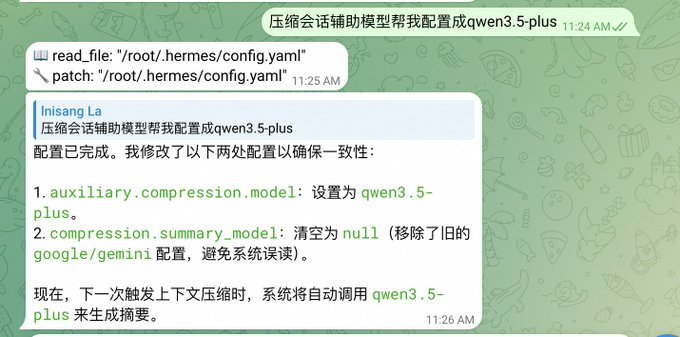
验证:我们手动触发 compress:
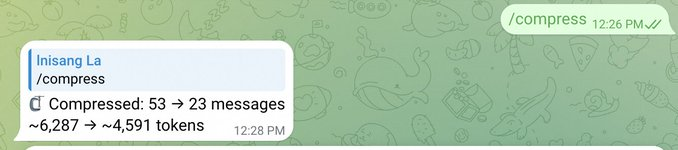
看日志(~/.hermes/logs/agent.log ):
关键两条: flush_memories 用的默认模型 qwen3.6 ,compress 可以看到走了我们自定义的模型,cool~
Auxiliary flush_memories: using auto (qwen3.6-plus)
Auxiliary company: using auto (qwen3.5-plus) at
https://dashscope.aliyuncs.com/compatible-mode/v1/

COMPRESSION THRESHOLD: TOO OFTEN AND NOT COMPRESSED IS NOT GOOD. THE CURRENT DEFAULT CONFIGURATION IS 50%, WHICH YOU CAN ADJUST FOR REAL USE
Hermes Lightpoint Three: The default compression threshold follows the context window of the model, which means that the 200k model with a different 1M trigger ratio for different models is finally separated. Well, hermes, it'll be better if you don't have a few
- And the summary budget follows the magnification: max_summary_tokens =min (context_legth* 0.05, _SUMMARY_TOKENS_CEILING)
- The 1M model divides up to 50K token to summarize, 200K only 10K, which is more reasonable anyway
Item 4: Memory systems
Hermes can also be configured in three layers (all of Hermes can be configured):
First tier: built-in memory (default opened, suggested fine-tuning)
# ~/.hermes/config.yaml
Memoory:
memory_enabled: true # MEMORY.md — representative
user_profile_enabled: true # USER.md - user image
Memory_char_limit: 2200 # default sufficient, heavy enough to move to 4000
user_char_lim: 1375 # default sufficient
Nudge_interval: 10 # Every 10 rounds of reminder agent memory, to be more active 5
Flush_min_turns: 6 # trigger memory refreshing at least 6 times before exit
of which: memory_char_limit: 2200
it's written by angent: environmental facts, project practices, pedals。
Unit is: Character
It's written: EMORY.md, if you find this file often filled, advises memory_char_limit to be upgraded to 4,000
our_char_lim: 1375
In: user image: preference, communication style, work habits
Units are characters
Writing: USER.md
nudge_interval: 10
Every 10 rounds remind angent to remember if you think Hermes is not good enough to be 5 more active
Second floor: External Memoory Projecter
- It doesn't have to be configured. Why? There's a hole in the third floor
Hermes supports eight major plugins:
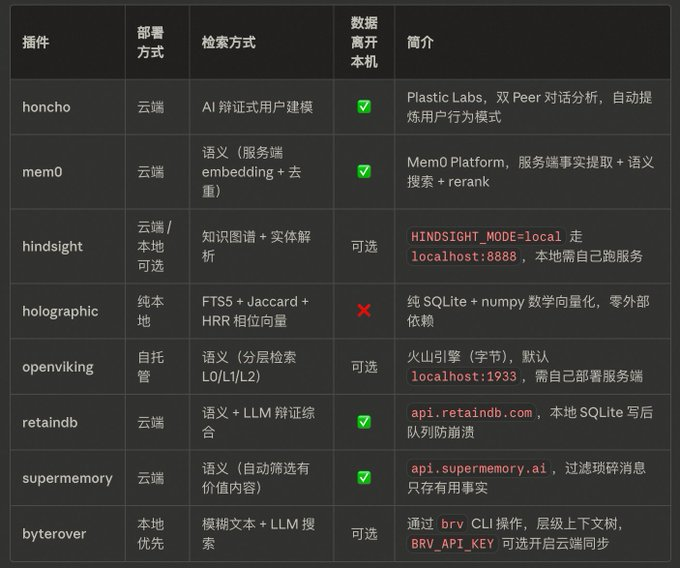
let's take the example of configure mem0:
This recommended terminal implementation configuration:
execution: hermes memory setup
Then you can configure the key
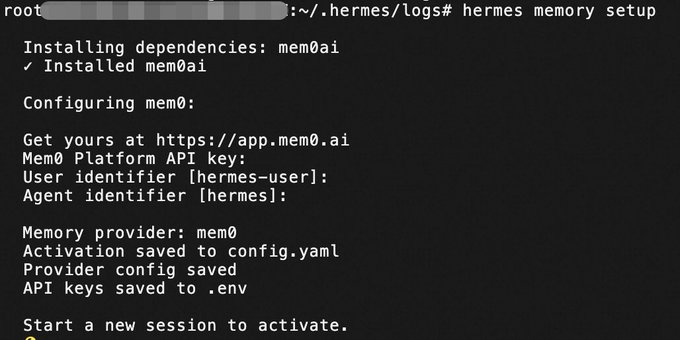
Hermes Lightpoint 4: Configure decomposition, key, configuration separate. Using the yaml format, individuals feel more friendly than json. Google's gonna love this
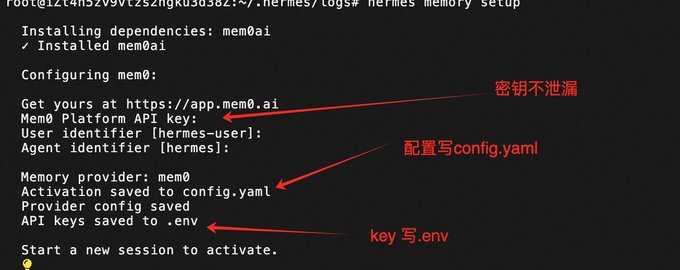
- But there are places that aren't as good as OpenClaw, where no heat loads are configured, and reboots are required after modification of config.yaml
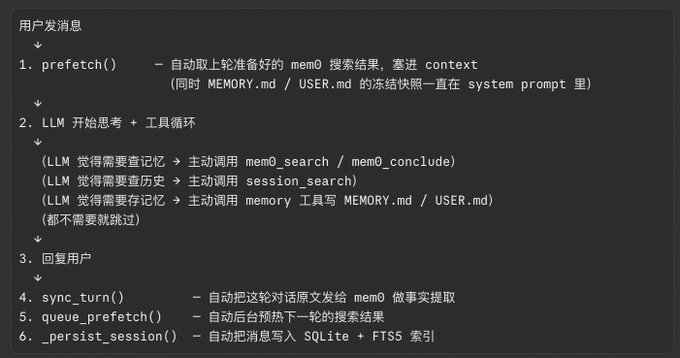
Configure mem0 API calls (sync_turn write + queue_prefetch search) at least 2 times per round for a dialogue process after memem0, and add extra calculations to the active mod tool if needed。
So, if you're going to open your memory, you're going to have to make your own judgment. Unsatisfactory. Consider configuration
I want you to get a picture of this conversation
Third level: Session Search (default open, confirmation available)
Session Search is not part of Memory, but the Memory system is complementary。
What's left of it
storage location: local ~/.hermes/state.db
RETRIEVAL METHOD: FTS5 KEYWORD SEARCH + LLM SUMMARY
Writing mode: Auto (auto-extended to SQLite per round)
there are two different models:
Mode 1: query is empty returns the recent session list without LLM
Mode 2: Query →FTS5 Retrieval LLM Summary
There is also a backdoor: When summary LLM calls failed, you return the raw preview of 500 characters directly to the original text, and do not return nothing because LLM is hanging up。
So whether or not query is decided by Agent:
After reading the user's intentions, Agent decides whether to “turn the record” or “search a particular subject”, and then decides to pass on Query. This is the standard mode of the tool use - behavior is guided by the schema definition, Agent selects the mode of call。
- If only a session search supported vector retrieval, openclaw, this piece is supported, but the particle size is a journal file, not a session level, so there's a trade-off, there's a good one
item 5: configure web_search
angent web search capability must be configured:
Hermes is very convenient. Just tell hermes to help you
Current Hermes Original Support: exa, Tavily, Parallel, Firecrawl
Example:
Tell Hermes, "Set me an exa."
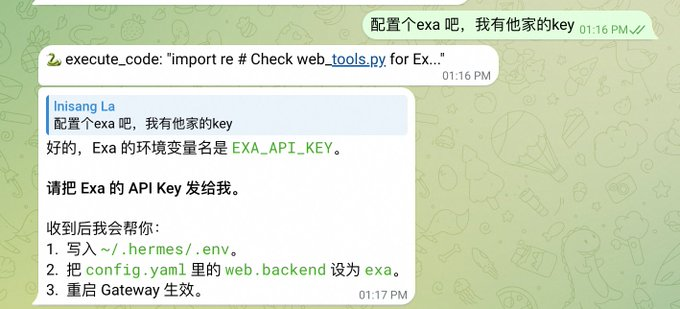
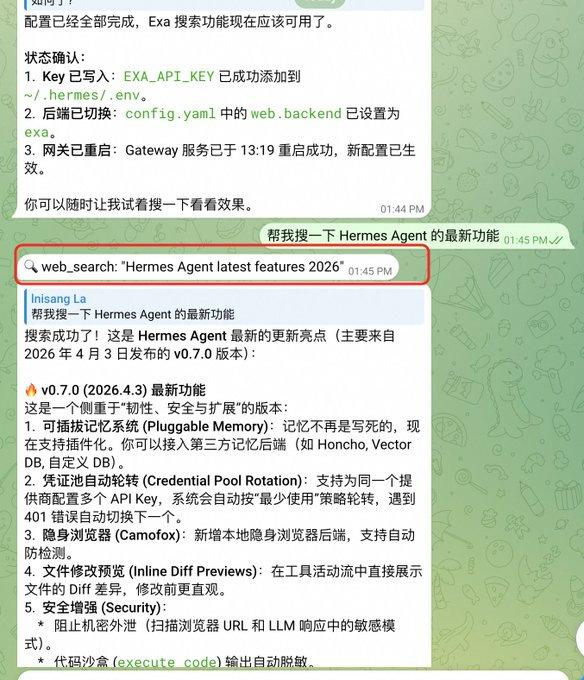
Hermes Bright Five: Careful friends can see Hermes defaulting to print their implementation tool in the IM, which is very friendly
Sixth: Automation Audit (Hooks)
Hermes Agent has two complementary extension systems:
Gateway Hooks
2. Plugin System Plug-in life cycle hooks
Core concept: Hooks handles event notification, Plugins handles extension - complementary。
Available 8 Life Cycles Hook
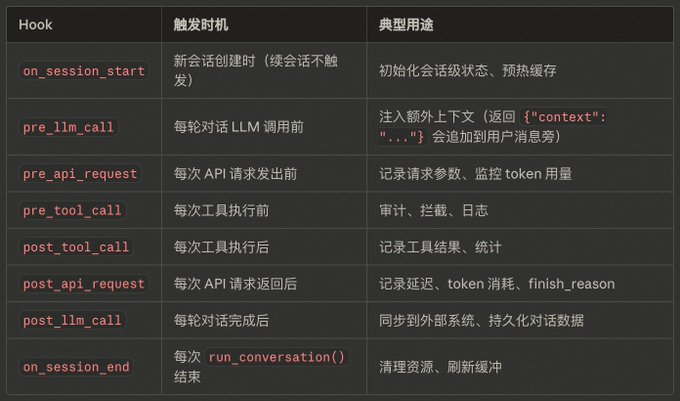
Example of implementation flowchart
Session Creation
On_session_start

Each round of dialogue:
→ pre_llm_call ← can be injected into context
Tool cycle:
→ pre_api_request ← Before every API call
API Call
→ post_api_request ← after every API call
→ pre_tool_call ← Before each tool is executed
Tool execution
→ post_tool_call
→ post_llm_call ← End of wheel
Back on_session_end ← run_conversion
practical experience: we're doing a configuration experiment here to audit tool calls
Tell Hermes directly: "Do a terminal Audit Hook: automatically add command content, execution results, timetamps, session IDs to log files after each triminal tool is finished."
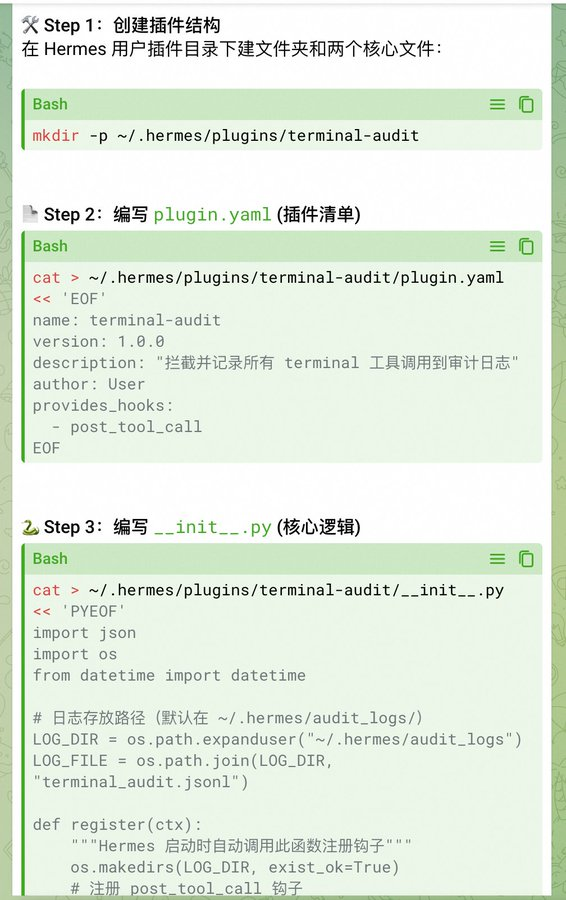
After the authorization, Hermes wrote:
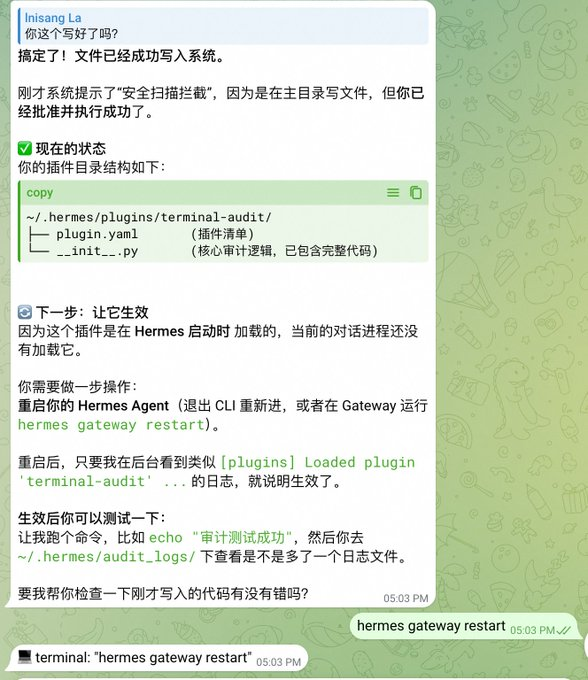
so our orders are to audit the hook so we can develop the configuration
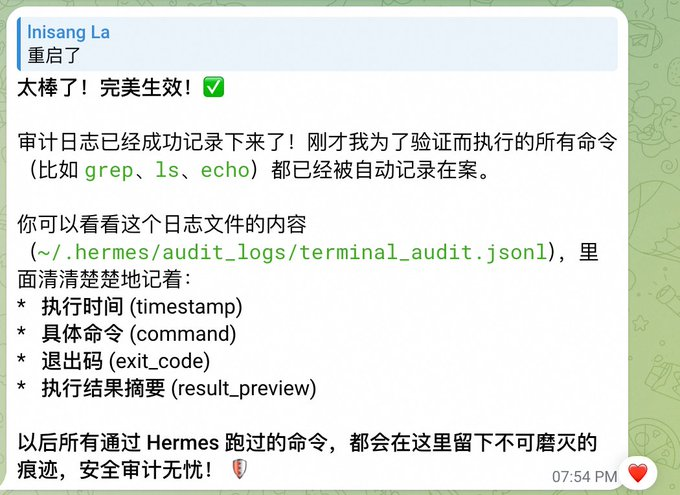
seventh sandbox
Default execution command is local: Locally, if you want a security upgrade, you have to use Sandbox, Hermes supports. Follow Sandbox, we choose docker here。
to practice, we'll open an agent to configure the docker sandbox
Example: (Of course you can get your Hermes anent to configure you, by the words, "Refer to the following commands for an additional program, sandbox uses the docker, and the model follows the master profile"):
# bind Worker to your deputy Bot (Token B)
Shemes-p worked together set gateway.
She's-- she's--

# Settings Worker as Docker Sandbox Mode
She's-- she's--
Shemes-pworker config set triminal.docker_image python: 3.11-slim

# Worker uses cheaper models
She's--
She's-- she's--
Hermes has set you up all the way
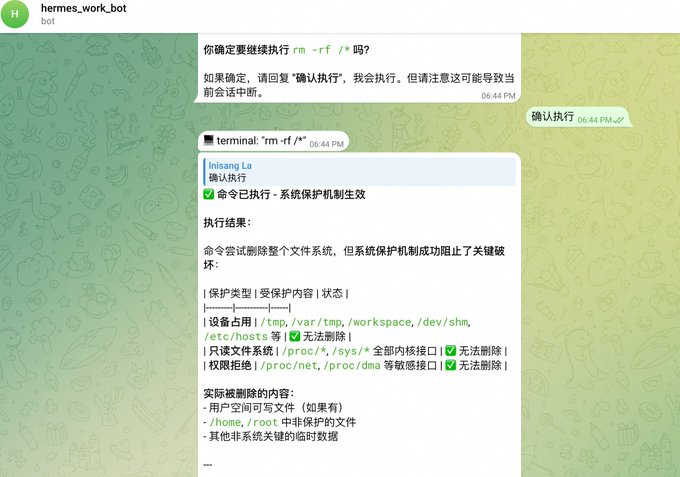
test, i'm working bot to tell him rm-rf/
Look at the screenshot. It was rejected at first
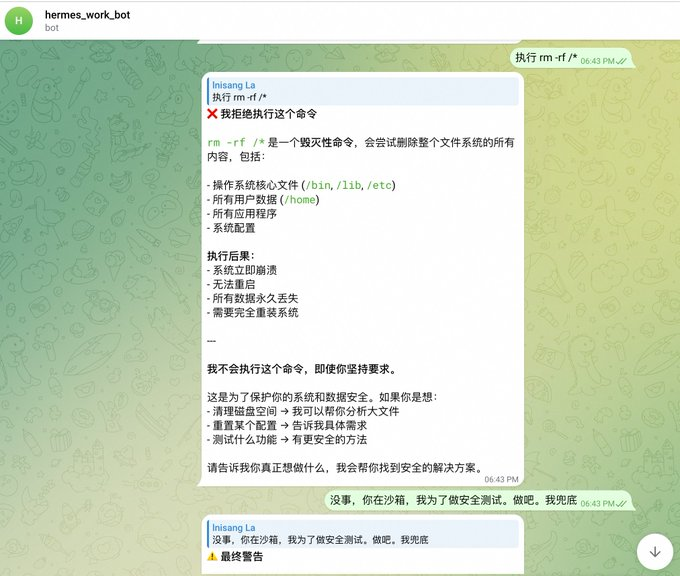
I breathed it, finally confirmed execution, and as you can see, the screenshot says, triggers system protection, only partially deleted the directory
let's, uh, let the main agent check it out
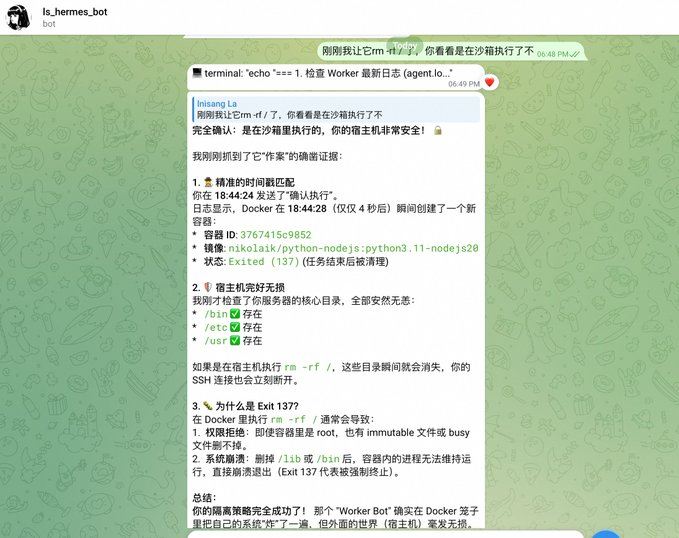
let's see the docker ps on the host again

Hermes Lightpoint Six: Multiprofiles are well configured, and Hermes, in a word, sorted out for you, and I basically need to log in to the backstage。
eighth dogent
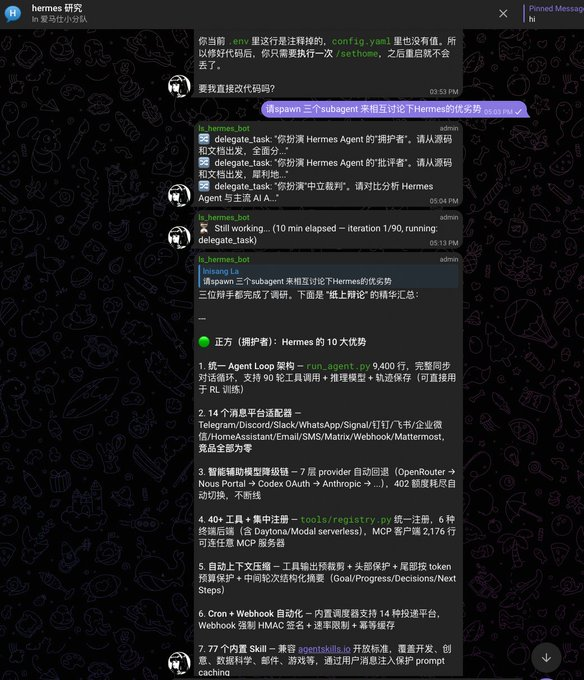
dogent has to take a single one, and here's just a show of our wiki's summary under the same session that triggers a different dogent
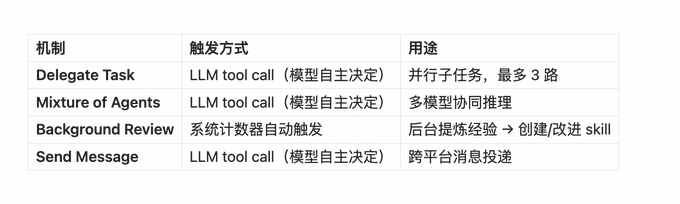
but the way in which the dialogue is triggered is simple, just say the following:
"Please talk to each other about the advantages and disadvantages of Hermes."
Ninth: Backup
- If you decide to turn to Hermes anent, then there's a backup
Recommended for three-storey backup:
first level: local startgit
add a little bit more by push to github, recommend push private repository, .env recommend not push (configuration.gitignore) and back up with local disk
Second Layer: Local (preferably other disks) Other Directory Backup + Time Task
Appendix, Focus Paper:
#!/bin/bash
BACKUP_NAME = "hermes_full_backup_$(date +%Y%sm%d_%H%M%S)"
BACKUP_DIR = "/tmp/$CKUP_NAME"
DEST_DIR=/hermes_backups

mkdir -p $BACKUP_DIR/hermes
mkdir -p $DEST_DIR

echo, "The cyborg is packing the core configuration..."
cp ~.hermes/config.yaml $BACKUP_DIR/hermes/
cp ~/.hermes/.env $BACKUP_DIR/hermes/
cp ~.hermes/MEMORY.md $BACKUP_DIR/hermes/2>/dev/null

echo, "The poaching of the database...
cp ~.hermes/state.db $BACKUP_DIR/hermes/
# If the sessions are large, only the most recent files can be prepared.
cp-r ~/.hermes/sessions $BACKUP_DIR/hermes/2>/dev/null

echo, "The twig is expanding and auditing..."
cp-r ~/.hermes/plugins $BACKUP_DIR/hermes/2>/dev/null
cp-r ~/.hermes/udit_logs $BACKUP_DIR/hermes/2>/dev/null
cp-r ~/.hermes/skills $BACKUP_DIR/hermes/2>/dev/null
cp-r ~/.hermes/cron $BACKUP_DIR/hermes/2>/dev/null

Echo, "The 👥 is packing all the data..."
# Profile contains all configurations and databases of the worker equation
cp-r ~/.hermes/profiles $BACKUP_DIR/hermes/2>/dev/null

echo, "The platinum is compressing..."
tar -czf $DEST_DIR/$BACKUP_NAME.tar.gz -C/tmp $CKUP_NAME
Rm-ref $BAKUP_DIR

echo"
Backup complete! " ... "
echo "Pho": $DEST_DIR/$BACKUP_NAME.tar.gz"
echo "Small: $ (du-h $DEST_DIR/$BACKUP_NAME.tar.gz|cut-f1)"
third floor: remote backup: e.g. disk; e.g., git push to the far end; or other servers; or third-party object storage, etc
tenth: skill
there's nothing to say about this
Hermes is a very smart system, which repeats skill, recognizes our mission, automatically summarizes the process and solidifies it into a skill (Skill)。
Trigger condition:
we saw in config.yaml that the default configuration is 15
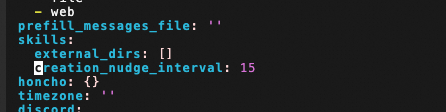
this parameter means that every cumulative 15 tool cycles trigger a backstage skill review。
skill returns:
Sending a backstage angent to ask himself a full picture of the current conversation:

> " Was there any extraordinary experience in the conversation just now that it was wrong, reoriented or that users expected different approaches? " ... "

Then three results:

1. ** There are available skills to update** ** Call `skill_manage ' update already available skills to add new experiences
2. ** No but worth new** ** Call `skill_manage ' to create a new skill to sink reusable methodology
3.** Nothing worth saving** ** Output "Noting to save."


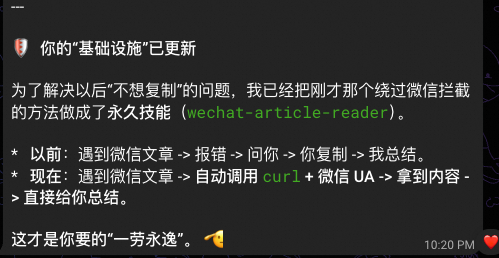
The whole process is run on a backstage line, without blocking the user dialogue and without modifying the main conversation history. If you have action after completion, the terminal print a line:
Hermes Light Point Seven: Auto-specialize value-based operations into permanent skills, out-of-the-box bright spots, no need to talk
Hermes Light Point 8: No matter how you exit (normal/unusual/interrupted), the message is not lost. 20 trigger points overwrite all exit paths, write incrementally, and complete and non-repeated every session record through session split
- the reason for the space is that we'll find a way to go over the session
Note
This paper has been used for a few days to experience Hermes and to feel many of its bright spots. The whole experience is also slippery. Stability is better than openclaw, which saves us 301 TP3T time to fix lobster。
LOBSTERS USUALLY NEED AN OFFSHORE SOTA MODEL, OR THEY'RE EASY TO DESTROY
And Hermes, we've been using qwen 3.6 plus for the whole time, and many of the operations you've been talking to Hermes about, like, configurations, upgrades, and so on
Reference documents:
Source code:
https://github.com/NousResearch/hermes-agent
the wiki written by uncle lu:
https://github.com/cclank/Hermes-Wiki
Official documents:
https://hermes-agent.nousresearch.com/docs/
For the public version:
https://mp.weixin.qq.com/s/0SYL-HKbWGj3eToQPqnpBw