



Today we're going to explore in depthMidjourneys predecessor directive/settings, and parses in detail how these parameters affect the images we ultimately generate.
By the end of this section, you will be able to get a better grasp of Midjourney's parameter configurations to generate images that are more in line with expectations.
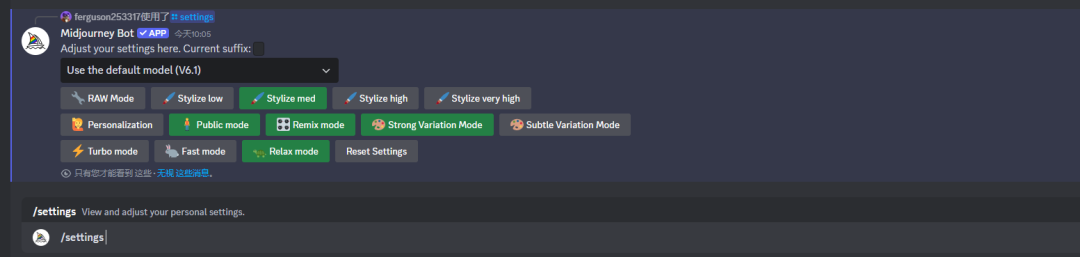
I. Midjourney Large Model Setups
Each of Midjourney's Big Models is equivalent to an AI painter, whose painting ability depends on the images it has learned. As versions are updated, the painting ability of the big models is improved. For example, Midjourney version V6.1 far surpasses earlier versions in terms of detail and realism.
1. Practical comparison
We can visualize the differences by comparing the images generated by different versions of the Big Model. Take "a cat sitting next to a book" as an example, the image quality of V6.1 is the highest, while V5.2 and V5.1 are obviously inferior.


2. Niji model
In addition to the Midjourney model, there is also the Niji model, which focuses on secondary style image generation.
The Niji model is also available in V6, V5 and V4 versions, with the V6 being superior in terms of effectiveness.


ii. raw model
The raw mode is similar to the raw mode in photography, which allows Midjourney to reduce associations and produce more realistic images.
When raw mode is turned on, the resulting picture effect is closer to the original image taken by the camera.


III. Degree of stylization (stylize)
The degree of stylization controls the artistry of the images generated by Midjourney.
The higher the value, the more artistic the picture is and the lower the relevance to the cue word; the lower the value, the less artistic it is and the higher the relevance to the cue word.
In general, a medium or high degree of stylization produces better results.


IV. Remix mode
Remix mode allows us to change the image from its original state and add a new cue word. With Remix mode turned on, we can iterate on the image by editing the cue word to mix the existing image with new elements.


V. Patterns of change
The change mode affects how much we can change from the original image.
High Variation Mode (Strong Variation Mode) produces large variations, while Subtle Variation Mode (Low Variation Mode) produces only small variations.


VI. Raw map speed model
Midjourney offers three modes of map generation speed: Turbo Mode, Fast Mode and Relax Mode. Turbo Mode generates the fastest, but consumes double the amount of account credits; Fast Mode consumes normal credits; Relax Mode does not consume credits from paid accounts, but generates the slowest.

VII. Style settings for the Niji model
Niji V5 model has five style settings: default style, expressive style, cute style, landscape style and original style. These style settings help us to generate different styles of secondary images.


The Niji V6 model no longer has these style setting parameters.

VIII. Reset Settings (Reset Settings)
By clicking "Reset Settings", we can restore Midjourney's settings to their default state.

IX. Conclusion
In this section, we have learned in detail about the effect of Midjourney's setup parameters on the generated images.
You can try using different large models and style settings to experience for yourself how these parameters change the effect of the image.
I hope this knowledge will help you get better at Midjourney and create even better work. We'll see you in the next installment!