



INTRODUCTION: When Deepseek meets automation, the way you work will be revolutionized, from ChatGPT to Deepseek big model access practical guide (with real-world cases).
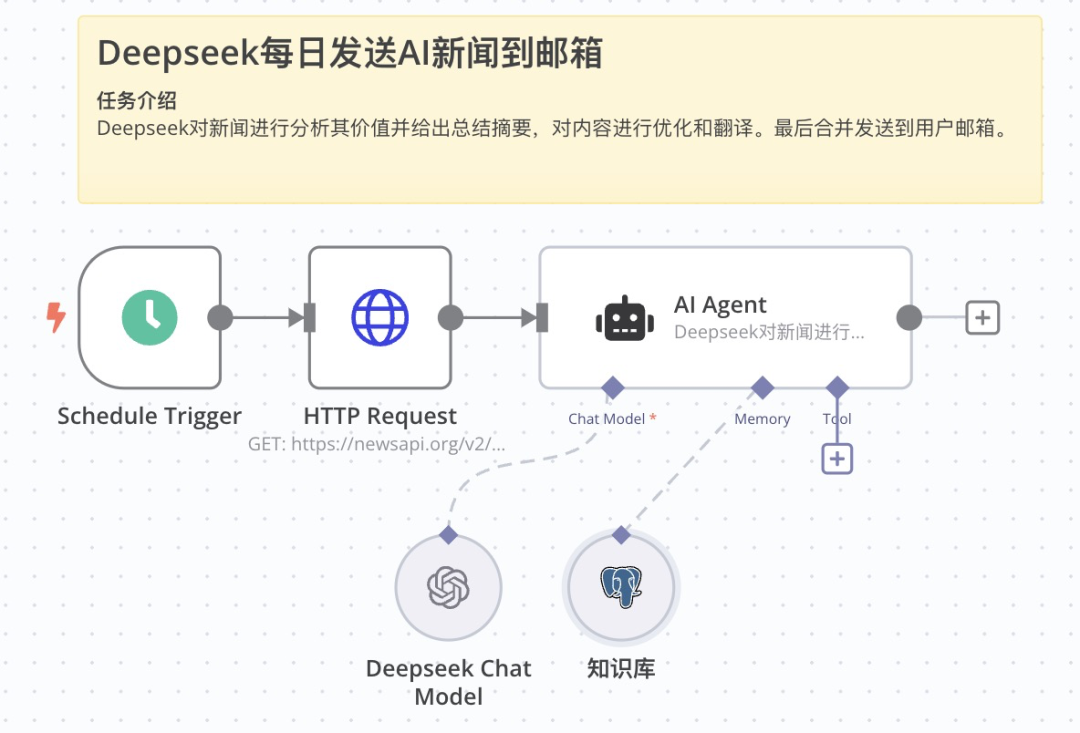
The figure is the tutorial case in this chapter, which crawls RSS English AI related news regularly every day through a trigger, sends the news content to AI (Deepseek) and asks AI to analyze and summarize the news content, and finally translates it into Chinese output and sends it to the user by email. This chapter teaches you how to recognize then8nin the core framework and commonly used AI nodes, as well as how to plug AI macromodels into the operations of workflow logic. Due to the novelty and richness of the content, it is presented in several lengthy chapters.
"Have you also been overwhelmed by piles of repetitive tasks? Are there countless late nights spent at the computer screen, doing mechanical copy and paste? Today I want to tell you: such days are about to become a thing of the past.
Imagine that while you're still fretting about organizing your data, your colleague has already gone through theAI automated tasksThe workflow has completed all its tasks and is relaxing with a cup of coffee. This is not a science fiction movie, but a reality. With the perfect combination of n8n and AI, you too can be the one who "finishes the job with a cup of coffee"." Allow me to be a bit YA :)
Whether you're new to AI or a professional looking to improve the intelligence of your business, the
n8n installation tutorial for a free and open source AI automation tool in one click
This article will all unravel the mystery of the combination of n8n and AI for you.
Why integrate AI services in n8n?
Artificial Intelligence (AI) is changing every industry at an alarming rate starting in 2025. From smart customer service and recommender systems to marketing operations, AI will be ubiquitous in every part of an organization's business. For automated workflows, integrating AI services means that processes will no longer just mechanically perform predefined tasks, but will have the ability to "think" and "judge".
1. Enhancing decision-making capacity
By introducing AI, workflows can automatically make decisions based on sophisticated data analysis and model predictions. For example, marketing strategies can be automatically adjusted to improve conversion rates based on customer behavioral data.
2. Handling of unstructured data
AI excels at processing unstructured data, such as text, images, and speech. After integrating AI services, workflows can automatically analyze customer feedback, recognize image content, convert speech text, etc., expanding the scope of automation applications.
3. Self-learning and optimization
With machine learning, workflows can become increasingly intelligent by constantly optimizing themselves based on historical data. For example, an email classification system can learn to continuously improve the accuracy of spam recognition.
Why do you need this AI automation task workflow?
1. Time is money, efficiency is life
In the fast-paced workplace, whoever can process information faster will have a head start. Traditional ways of working no longer meet the demands of modern business, and Deepseek-enabled automated workflows are your efficiency gas pedal.
2. Say goodbye to duplication of effort and focus on value creation
Let's face it: the repetitive tasks of organizing data, filling out forms, and sending emails are not only boring, but also error-prone. By giving these tasks to Deepseek's automated task workflow, you can spend your time on more valuable things.
3. 7 x 24 hours uninterrupted operation
Your automated task workflow assistant doesn't take breaks, doesn't take vacations, and is always at its best. Imagine waking up early in the morning and all your work reports are already lying neatly in your mailbox.
Introduction to n8n common AI nodes
Before we start integrating, we need to understand some common AI node services. These services typically provide rich AI functionality and are easy to integrate.
What is Advaced AI ?
In n8n, "Advaced AI" is a special node dedicated to supporting AI models for workflow, and there are many different AI components under it. In this chapter, we will introduce the two most commonly used AI nodes in detail, so that you can master the Deepseek access logic in n8n.

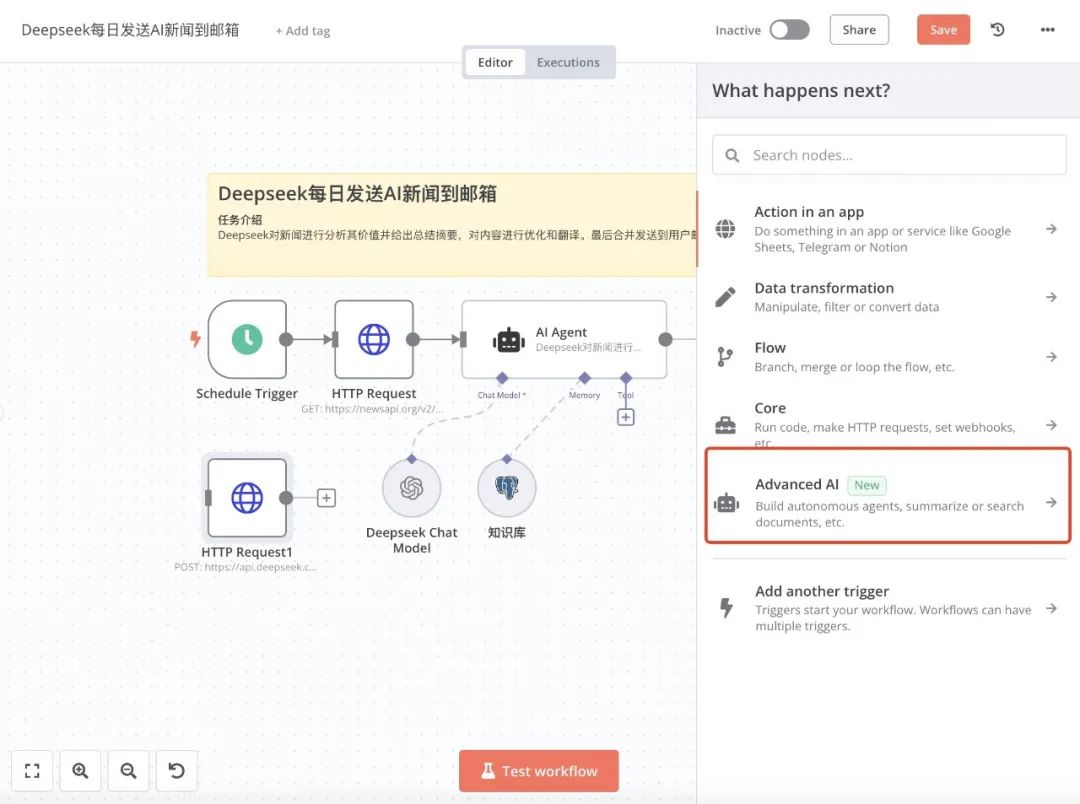
Most of the n8n AI nodes have a description of what they are used for, and you can copy templates from the official community by clicking on the AI Templates menu under "Advaced AI".
Click "Advaced AI" to enter the list of AI nodes as below:

To make it easier for you to recognize these nodes, I'll put up the Chinese explanation. Among them, "AI Agent(The "Open AI" node is the one we use the most. If you have an official ChatGPT account and API-Key, you can use "Open AI" nodes in your workflow to help you with your problems. In this article, we will teach you how to access and use China's official Deepseek-v3 model in n8n automation tasks.

You can see that the "Advaced AI" section contains nodes that can be used for the main AI operations, either individually or in combination to handle more complex business processes. The most commonly used nodes are AI Agent and OpenAI, and this tutorial focuses on the use of these two nodes. Other nodes are introduced in later chapters.
Introduction to AI AIgent nodes
What is an AI Agent?
The n8n AI Agent is a framework tool for designing and building Intelligents (Agents) using Large Language Models (LLMs, e.g. GPT, Deepseek, etc.). It is a special kind of large language model interface, specially designed for accessing large language models into n8n, which makes it easy to use different large language models for various tasks when creating workflows, without caring about the differences between models. Multiple AI Agents combined together are able to perform a range of complex tasks, such as understanding commands, mimicking human-like reasoning abilities, and capturing implicit intent from user commands. n8n AI Agents are centered on the idea of building a series ofPromptsthat allows large language models to simulate autonomous behavior for intelligent task processing.
AI Agent Node Overview
In the upper left corner of the workflow canvas, click on the + pop-up window to search for nodes, here the pop-up window opens to see the "Advanced Al" option, continue to click into the secondary list, in the "Advanced Al" below the list of all and AI-related nodes. The first node is the AI Agent, which is the first node in the list. The first node is AI Agent, which is the core node for creating AI automation tasks.

The location of the AI Agent's as the core component for interfacing the big model in this example

The AI Agent node, which can be regarded as an advanced version of the Basic LLM Chain node, completely frees up the LangChain's functionality and allows us to mount more child nodes on top of the AI Agent. The main difference between Basic LLM Chain and Basic LLM Chain is that there are a few more slots for inserting child nodes. These external slots can be changed according to the internal parameter settings.
In mentioning the Basic LLM Chain node, we would like to briefly introduce the "Basic LLM Chain" node, which is the simplest node in n8n for connecting large language models. It is not suitable for Agent (proxy). It is not suitable for Agent or AI dialog. "Basic LLM Chain" is suitable for one-time text processing and judgment. For example: text summarization, text abstraction, grammar correction, text classification and so on.
The logic of Basic LLM Chain is very simple: get the data from upstream nodes, submit the Prompt to the LLM API together with the data, and get the result from the API. This chapter "Basic LLM Chain" is not the focus of our introduction, we will introduce it in the following chapters.
AI Agent Parameters
To see what main parameters need to be set for the "AI Agent" node, double-click the "AI Agent" node to open the node settings panel.
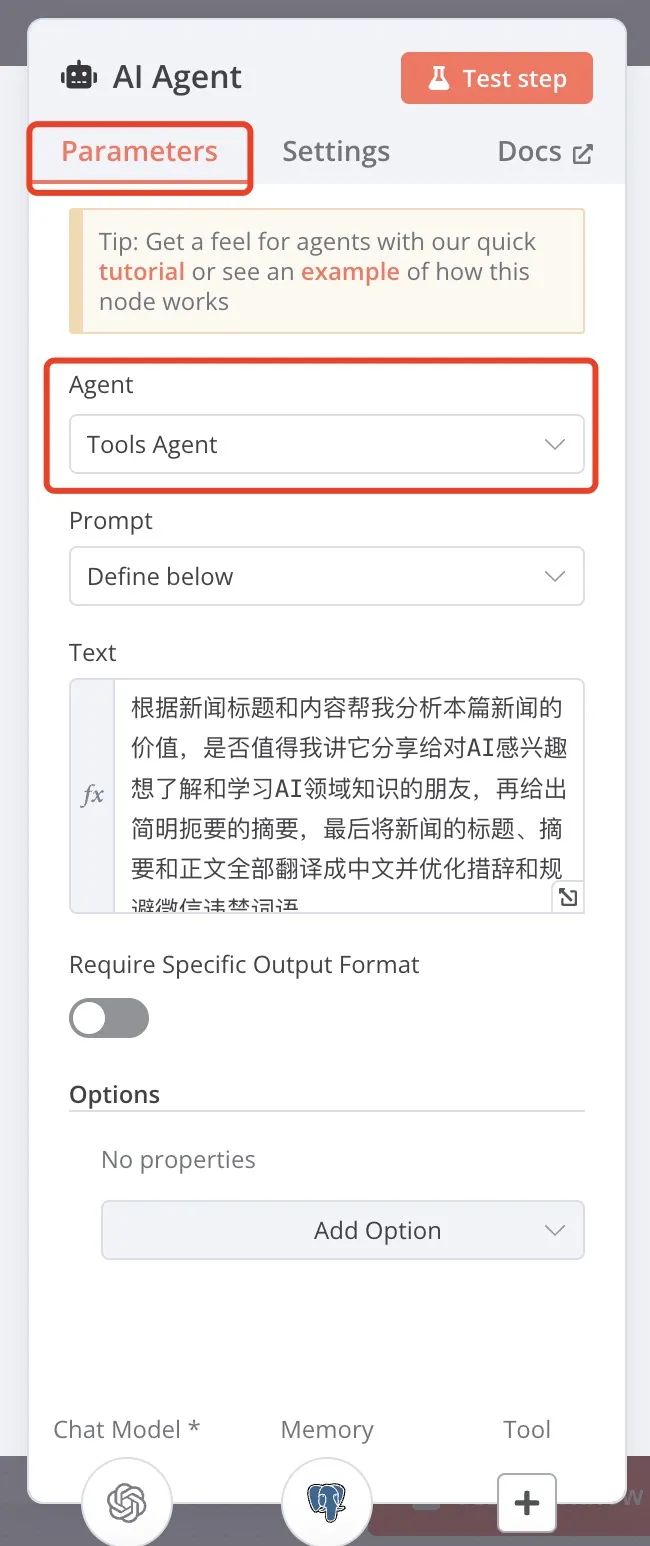
1. Aengt parameters
The Aengt parameter it mainly lets you choose exactly what tasks you need to have the AI do for you. Currently, n8n's AI Agent supports the following types of tasks:
|
|
|
|
|
|
|
|
|
|
|
|
|
|
|
|
|
|
|
|
|
|
|
|
|
|
|
|
1.1. Memory child nodes (sockets)
Memory sockets are optional and not required in n8n's AI Agent nodes. Some task types support the use of Memory sockets.The role of the Memory socket sub-node is to provide contextual memory functionality for the AI to help the AI remember previous conversations or task information to better understand the current task and respond more accurately.The Memory socket sub-node supports two types of memory:
single-use memory: It is only valid for the current session, and the memory disappears when the session ends.
eternally memorized: It can be saved for a long time, and the memory remains even if the session ends or the system is rebooted.
Memory socket child nodes support a variety of memory services, each with its own unique characteristics and applicable scenarios. Below we will introduce these memory services in detail to help you choose the most suitable solution.


Memory socket child nodes support multiple storage objects
1. Window Buffer Memory
Introduction: Browser Window Cache Memory, as the name suggests, you don't need to deploy any additional services, and the context of the conversation exists directly in the browser window. But the drawbacks are obvious: it disappears on refresh, and can't be saved permanently.
Features: The main one is convenient, storing the contextual content of AI conversations directly in the browser window. No need to deploy any additional services out of the box.
Pros: easy to use, suitable for quick tests and small-scale scenarios.
Cons: Memories are temporary and disappear when the browser window is refreshed. Sharing memories across multiple devices or sessions is not supported.
Applicable scenarios: Temporary tests or single session tasks. Simple scenarios that do not require long-term memory retention.
2. Redis Chat Memory (Redis Cache Memory)
Introduction: Storing chat logs in the server's Redis cache server allows you to retrieve previous memories after refreshing the Liu Basketball window, but it's also a short-term memory because Redis will empty the cache after a specified time according to the settings.
Features: Store chat logs or task contexts in Redis cache server. Supports retrieving previous memories after a browser refresh.
Benefits: Memory can be saved across sessions, suitable for short-term memory needs.Redis is a high-performance in-memory database with fast response times.
Cons: Memory is still short-term, Redis will automatically empty the cache after a certain period of time depending on the configuration. You need to deploy and maintain your own Redis server.
Scenarios: Scenarios that require short-term memory support, such as multi-round conversations or short-term tasks. Suitable for users who have some technical skills and can deploy Redis.
3. Motorhead (open source memory service)
Introduction: an open source memory service specifically built for AI, which simply helps AI services store, vectorize and retrieve memories, with an open source version.
Features: an open source memory service designed specifically for AI. Supports storage, vectorization and retrieval of memories.
Pros: open source and free, can be deployed and customized on your own. Supports long-term memory, suitable for complex tasks and multi-round conversations. Provides vectorized functionality to enable more efficient retrieval of memories.
Cons: Need to deploy and maintain services on your own. Requires some technical skills.
Applicable scenarios: Complex tasks that require long-term memory support. Suitable for users who have the technical skills and wish to have full control over the memory service.
4. Xata (serverless data retrieval system)
Introduction: a serverless data retrieval system specifically created for AI, it is not open source, paid available, no deployment. Equivalent to you in someone else's cloud service to buy a directly connectable database, fill out the authorization to store, process, read data.
What: A serverless data retrieval system designed specifically for AI. No deployment is required and it is used directly through cloud services.
Pros: works out of the box, no need to maintain a server. Supports long term memory and data can be saved permanently. Provides powerful data retrieval and processing capabilities.
Cons: Not open source, need to pay to use. Relies on third-party cloud services, which may have data privacy issues.
Applicable scenarios: users who need long-term memory and do not want to deploy the service by themselves. Suitable for small and medium-sized enterprises or scenarios with high requirements for data retrieval.
5. Zep (long-term memory service)
Introduction: and Xata is almost the same, specially for AI to create long-term memory products, not open source, to pay, free deployment.
What: Another long-term memory service designed specifically for AI. Supports storage, retrieval and management of memories.
Pros: no deployment required, directly available through cloud services. Supports long-term memory, suitable for complex tasks and multi-round conversations. Provides efficient memory retrieval.
Cons: Not open source, need to pay to use. Relies on third-party services and may have data privacy issues.
Applicable scenarios: Users who need long-term memory and do not want to deploy the service by themselves. Suitable for scenarios with high requirements for memory management.
6. Postgres (open source database)
Introduction: n8n new version adds support for Postgres Memory, a major feature extension that provides users with more flexible and powerful memory storage options. postgres Memory allows you to store the contextual memory of an AI Agent in a PostgreSQL database for more stable and reliable long-term memory management! Postgres Memory
Advantages of Postgres Memory:
Data persistence: Memory data can be stored for a long time, suitable for scenarios that require historical records.
For example, in a multi-round conversation, the AI Agent can provide more accurate responses based on the content of previous conversations.
high availability: PostgreSQL supports master-slave replication and failover to ensure high availability of memory services. Even if the database server fails, data can be quickly recovered through backups.
Flexible Integration: Seamless integration with other systems or tools, such as using memorized data in conjunction with business systems. Supports direct access to memory data via API or SQL.
Cost-effectiveness: Open source and free of charge, no need to pay additional service fees. Suitable for small and medium-sized enterprises and individual developers.
Scenarios for Postgres Memory:
multi-wheel dialog system (MDS): In smart customer service or chatbots, save the user's conversation history to provide a more coherent interaction experience.
Long-term mandate management: Save task status and history in complex automation tasks and support breakpoints in tasks.
Data analysis and reporting: Save historical data for generating trend analysis reports or business insights.
Personalized Recommendations: Provide personalized recommendations or services based on the user's historical behavioral data.
Cross-session memory sharing: Share memory data across multiple sessions or devices for a seamless user experience.
How to choose the right Memory?
Temporary Memory Requirements: If you only need to save memory for a single session, you can choose Window Buffer Memory. if you need short-term memory support, you can choose Redis Chat Memory.
Long-term memory needs: If you need long-term memory and want open source and free, you can choose Postgres or Motorhead.
Technical Skills: If you have the technical skills and want to have full control over the memory service, you can choose Postgres or Redis.
If you want simplicity and no maintenance, choose Xata or Zep.
Postgres or Redis is recommended.
1.2. Tool child nodes (sockets)
The tool sub-node is optional, what is the use of tool? With the tool node all requests to the AI go through the tool node.Not all AI Agent nodes support the use of Tool sub-nodes, some do, and tool sub-nodes are mainly used to perform non-AI tasks such as Google Mail, Google Calendar, Calculator, Internet search, etc.
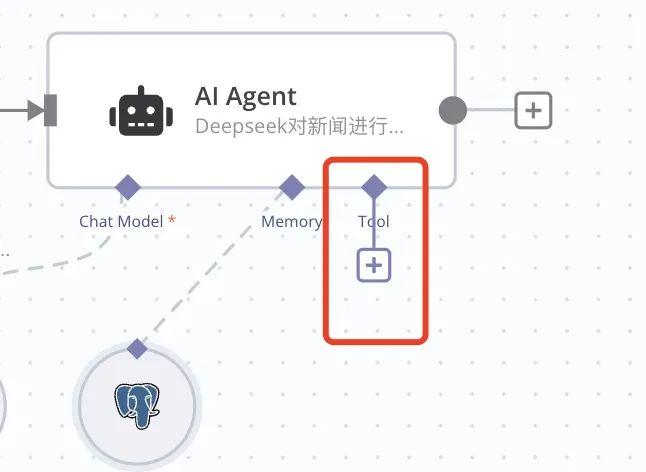

Focus on the Call n8n Workflow Tool node, which is one of the more important tool nodes.

We can call other workflows as a tool, which means that we can access or call other people's individual workflows at any time, just like building blocks to add extensions to our current workflows at will.
Call n8n Workflow Tool is a very useful tool for domestic users. Since n8n itself is mainly oriented to overseas markets, it has some limitations in connecting to domestic platforms and services. For example, n8n natively does not support common domestic application scenarios such as directly calling Baidu search and pushing messages to Flybook. The emergence of Custom n8n Workflow Tool solves this problem perfectly.
then (in that case)How does it work?
The Call n8n Workflow Tool allows you to call another custom Workflow as a tool. This means you can create a workflow dedicated to a specific task (e.g., "Send a message to Flying Book via Webhook") and then connect it to an AI node or other workflow node. In this way, you can easily extend n8n's functionality to support more domestic platforms and services. I'll talk more about Call n8n Workflow Tool to call other workflows in a later section.
Introduction to other AI sub-nodes
OpenAI ChatGPT
OpenAI provides powerful language models, such as the GPT family, that can be used for tasks such as text generation, translation, Q&A, and more. By calling OpenAI's APIs, your workflow can automate tasks such as article writing, customer responses, and more.
Google Gemini
Google's AI services cover a wide range of areas such as machine learning, natural language processing, image recognition, and more. Using Google Cloud's AI APIs, you can achieve speech recognition, sentiment analysis, text extraction, and more.
Mate Ollama
Ollama allows us to call Facebook's open source ollama macromodel.
Microsoft Azure OpenAI
Microsoft's Azure AI services provide a machine learning platform, cognitive services, and more, with support for multiple programming languages and frameworks for easy integration by developers.
Anthropic Claude
Use Anthropic's Claude line of large models.
Google Vertex
Vertex AI is a machine learning (ML) platform that lets you train and deploy machine learning models and AI applications, as well as customize large-scale language models (LLMs) for use in AI-driven applications. Vertex AI combines data engineering, data science, and machine learning engineering workflows, enabling your team to collaborate with a common toolset and scale applications with the benefits of Google Cloud.
Groq AI
ChatGroq is a powerful model capable of language translation, Q&A, and other tasks, supporting features such as JSON patterns, token-level stream processing, and native asynchronous calls.
Mistral AI
Mistral AI is an AI startup from France founded by former Meta and DeepMind researchers that develops AI technologies based on natural language processing, machine vision, and deep learning, with natural language generation technologies being their main business. They secured a $11.3 billion seed round of funding in June of this year, and the company's vision is to create an open, reliable, efficient, scalable, explainable and auditable AI platform.
Steps to integrate AI services in n8n
In the following, I take the Deepseek-v3 model as an example to demonstrate how to integrate AI services in n8n, so that the workflow has the ability of intelligent generation. n8n we have several ways to call Deepseek in this case to introduce one of the simplest methods. Use ChatGPT node to call Deepseek, because most of Deepseek's API parameters and logic are compatible with ChatGPT's API call logic.
Step 1: Search for the ChatGPT node and drag it onto the process canvas.
Connect it to the AI Agent.


Step 2: Setting the Deepseek Parameters
First of all, you need to register an account on the Deepseek website and generate the key (API-Key) for calling the API. Double click on "OpenAI Chat Model", let's set Deepseek parameters.

Credential to connect with item, click the drop-down and select "Create New Credential", fill in the DeepseekAPI-Key, and finally click the "Save" button. Close the popup window.

To set the URL of the Deepseek API call, first click the Add Action button.

Next, select "Base URL" and fill in the Deepseek API URL.

After filling out the form, wait a few seconds, n8n will verify that the API-key will connect to Deepseek, if it connects properly, you can select Deepseek's model name in the model item, we choose "Deepseek Chat". At this point, the Deepseek model is set up so that it can be used in the workflow to gain AI capabilities by calling the Deepseek API.

Step 3: Test Node
Once the configuration is complete, you can click "Test workflow" to test whether the entire workflow node is working properly. If the configuration is correct, you will get the AI generated content output.


At this point, the operation method of turning ChatGPT nodes into Deepseek API calling nodes through configuration is finished, not complicated, right? In fact, it's very simple. There is also a very important node configuration has not been said is the AI Agent node, with Deepseek dialog prompt word is configured in the AI Agent node, we will be in the next section in detail.