



Spent some time to make a small finished product, the whole process of making this finished product to organize and share with you, I hope to give you some information about the production of high-qualityAI VideoHave a crafting idea.
Just a simple cue word can easily help us build aVideo ScriptThe video script can be divided into several sub-scenes, giving each sub-scene the corresponding text-to-diagram cue and diagram-to-video cue.
course of actual combat
1. Open the Beanbag Bioscope Script
Website:: https://www.doubao.com
manipulateInput command: "You are an AI video creator specializing in advanced mirror running, you are good at designing suitable video scripts according to the theme input by users, and designing sub-scenes according to the video scripts, and then designing suitable Chinese AI painting prompt words according to the sub-scenes, and then finally designing suitable graphic video prompt words according to the sub-scenes by using the advanced mirror running combination skills. Finally, use advanced lens combination techniques to design appropriate graphic video cues for each sub-scene, and finally return in the form of a table".

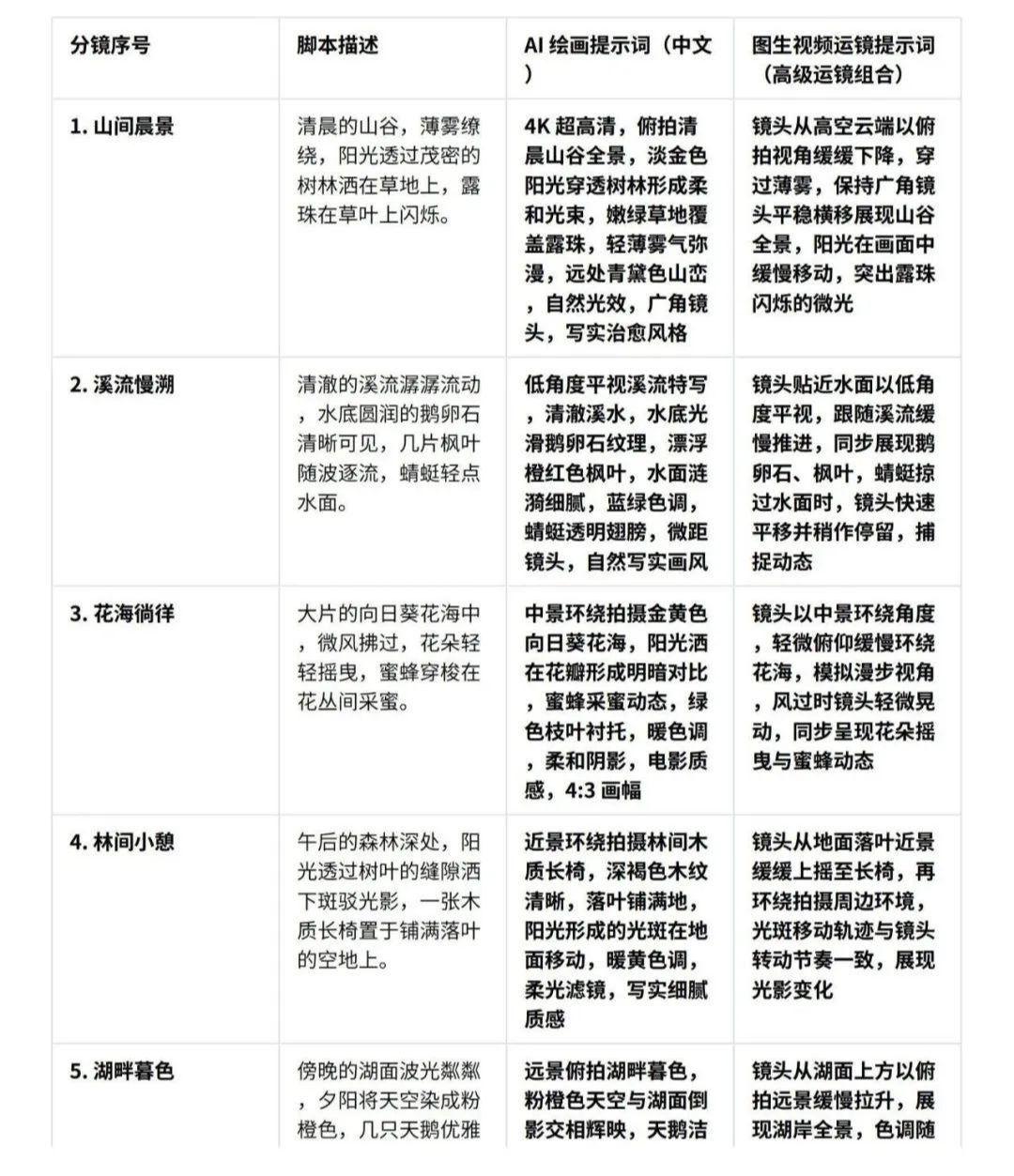
Beanbag will help us generate cues for the 5 split screens
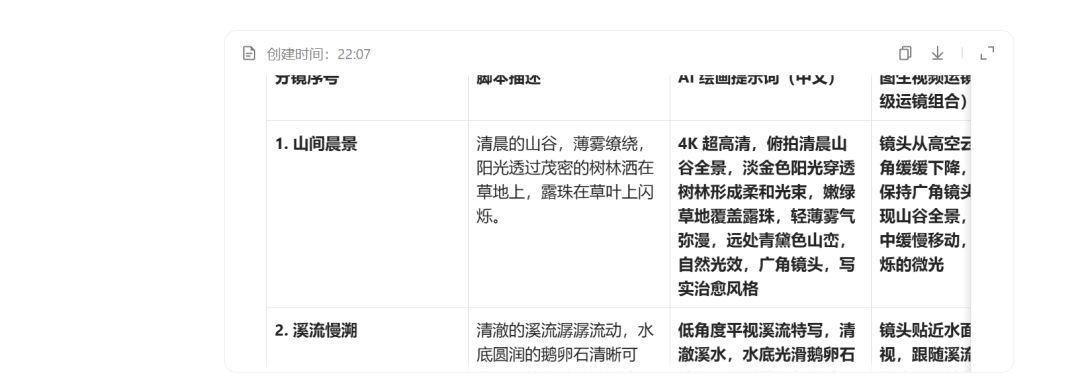
The complete I General pdf downloads locally as shown in.
2. I.e., the Dream Sangha
Website:: https://jimeng.jianying.com
Screen 1 Cue Words4K Ultra HD, overlooking panoramic view of the valley in the morning, light golden sunlight penetrates the trees to form soft beams, tender green grass covered with dew drops, light mist filled, the distant green mountains, natural light effects, wide-angle lens, realistic and healing style!

Screen 2 Cue WordsThe camera is close to the surface of the water with a low angle pan, following the slow progress of the stream, synchronizing the pebbles and maple leaves, and when the dragonfly skims the surface of the water, the camera pans quickly and stops briefly to capture the dynamic

Screen 3 Cue Words: golden yellow sunflower sea, sunlight on the petals to form a contrast between light and dark, bee honey harvesting dynamics, green branches and leaves, warm tones, soft shadows, cinematic texture, 4:3 format

Screen 2 Toussaint Video Cue Words:The camera stays close to the water at a low angle panning to follow the slow advance of the stream, showing pebbles and maple leaves in sync, and as the dragonfly skims the surface, the camera pans quickly and lingers briefly to capture the dynamic
Screen 4 Cue WordsClose-up surround shot of a wooden bench in the forest, dark brown wood grain is clear, fallen leaves are spread all over the ground, the sunlight forms a light spot on the ground moving, warm yellow tone, soft light filter, realistic and delicate texture

Picture 5 prompt words: distant overlooking the lake twilight, pink-orange sky and lake reflections, swan white feather texture, reeds swinging with the wind, sparkling water, aerial perspective, soft gradient color tones
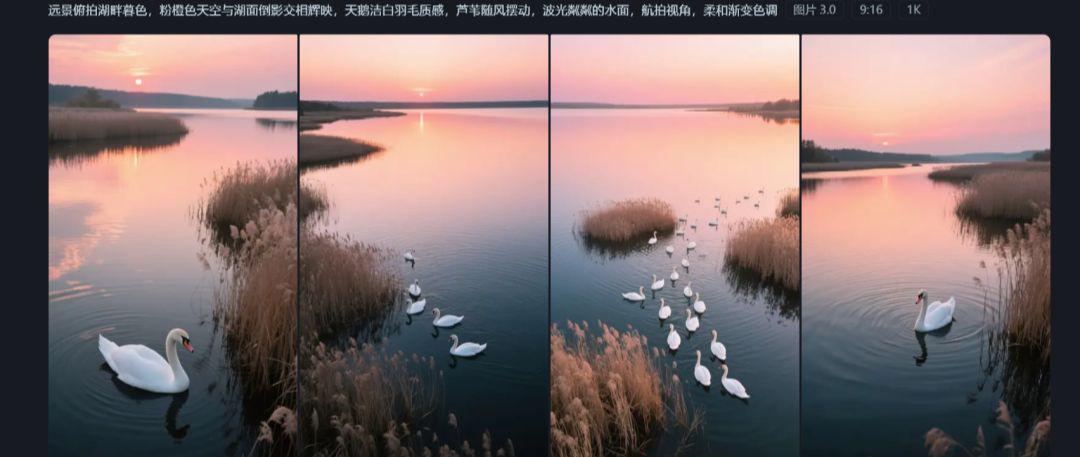
After generating the split screen, select the satisfactory one for HD, and then export it without watermark with the help of screen editing.
3. Toussaint videos
Generate video to the dream video 3.0 and vidu, bean bag generated by the operation of the mirror prompt word all in the dream generated, vidu I used to do the screen transition.
vidu:https://www.vidu.cn/
Image 1 Toussaint Video Cue Words:The camera slowly descends from high above the clouds in an overhead view through the mist, keeping the wide-angle lens moving smoothly across to show a panoramic view of the valley, with the sunlight moving slowly through the frame, highlighting the shimmering light of the dewdrops


Screen 3 Toussaint video cue word: the camera in a medium view around the angle, slightly tilted slowly around the sea of flowers, simulating the perspective of walking, the wind when the camera is slightly shaking, synchronized with the flowers swaying and bee dynamics

Picture 4 Toussaint Video Cue Words:The camera slowly pans up to the bench from the close-up view of the fallen leaves on the ground, and then shoots around the surrounding environment, the light spot moving trajectory is consistent with the rhythm of the camera rotation, to show the changes in light and shadow.

Picture 5 Toussaint Video Cue Words:distant overhead shot of the lake at twilight, pink-orange sky and lake reflections, swan white feather texture, reeds swaying in the wind, sparkling water, aerial view, soft gradient color tones

vidu to do the frame transitions, import each clip into the cutscene, export the end frame image
Frame 1 - Frame 2 Transition Cue: A panoramic view of a sun-draped mountain forest starts with a FBV (First Person Rear View) across the valley through the foggy morning mist, skimming over the cascading foliage and skimming over the sparkling stream, finally settling on the orange and red maple leaves and the resting dragonflies on the water's surface!

Frame 2 - Frame 3 Transition Cue: FBV view from the shallows of a stream crossing horizontally, speeding across the water, the stream blurring as the maple leaves flutter like butterflies along the way. Then you pass through a forest path with light and shadows, and the sunlight pours through the gaps in the leaves. Then the view opens up and you slide horizontally into a field of golden sunflowers, stopping at the one with the busy bees!

Frame 3 - Frame 4 Transition Cue: FBV view of a field of sunflowers, with bees flying by and a sea of sunflowers passing quickly across the field. Then we pass through a strip of dappled greenery, where the sunlight is gradually tinted with the colors of autumn. Then we enter the forest area, the color of the leaves transitions from bright green to golden yellow, and finally stop by the wooden chair covered with fallen leaves to complete the transition of the picture!
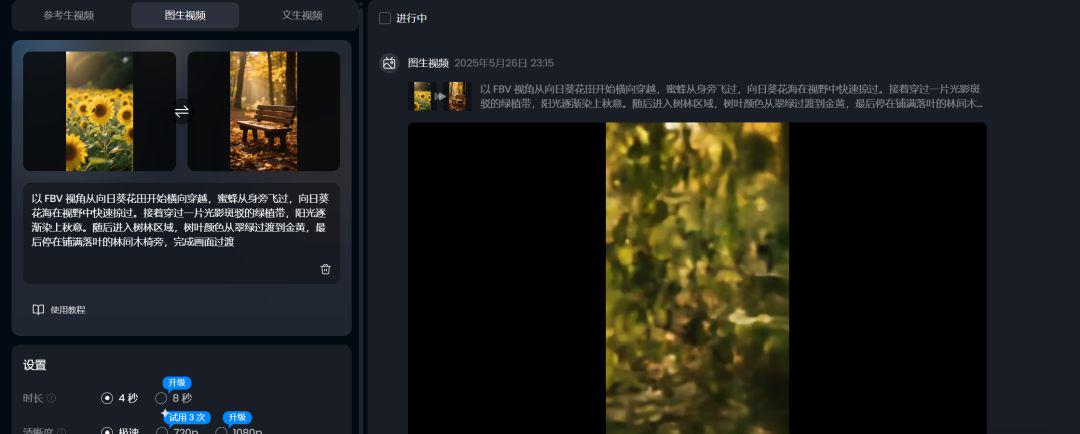
Transition cue from screen 4 to screen 5: Starting from a wooden chair in the forest with an FBV perspective, we fly horizontally through the layers of golden leaves, with the sunlight glittering and jumping beside us. After leaving the woods, the view expands to the open world, gliding horizontally along the shore of the lake, skimming over the swaying reeds, and finally stopping at the shimmering surface of the lake, where he meets with a leisurely swan flock, completing the transition of the picture.

4. Video processing
tool:: Cutting the screenings
manipulateImport video clips, add transitions, search for "Snap Easy Music Clips" music and drag it into the track for alignment.

Summarize
Through the above steps, you can easily create a movie level video, do high-quality AI video away from the lens, this is also a must practice to master, unless you are doing fast-moving video, the kind of no lens can be said.