



Recently, the drama "Lychee in Chang'an" caught fire, and Lei Jiayin's character Li Shande's line "Even if I fail, I want to know how far I fell from the finish line."What a poke in the heart of countless people.
Watching the drama as Lee Sun-deuk tries to accomplish this "Mission Impossible"- Delivering fresh lychees from Lingnan to Chang'an, thinking of every possible way to preserve freshness and optimize the route.

Nowadays, doing short videos is quite like delivering lychees in ancient times. You need to deliver the best "content" to the viewers in a limited time, and still keep the freshness.
It just so happens that with the title "Lychee in Chang'an", a new creation with AI has been tried out.
Step 1: Write the prompt
1、Open the beanbag for writing a split-screen script
Beanbag AI:
https://www.doubao.com/chat/
Steps:
Open the beanbag AI
Dialog box input
- Open Beanbag AI and enter the prompt in the text box
- As an experienced and top-notch short video creator, please refer to the drama "Lychee in Chang'an" for inspiration to produce an AI creative short film on lychee picking, transportation and transporting, please give a detailed split-scene script (10 sub-scenes in total (including mirror number, scene, transportation, text-to-digraph cue words, graph-to-digraph video cue words, narration, and voice-over). When creating the 10 sub-shot scripts, the scene should accurately use professional terms such as close-up (focusing on the texture of lychee), close-up (showing the hand movements of the picker), medium shot (presenting a partial scene of the picking), and panorama (showing the whole lychee forest), etc.; the camera movement should clearly explain the ways and speeds of pushing the camera (pushing the lychee slowly), pulling the camera (pulling the camera from the characters to the panoramic view), panning the camera (sweeping the transportation team left and right), and shifting the camera (moving after the transportation team), etc. The cue words for the text are "scene + description of subject (e.g. 'Lychees covered in morning dew') + description of scene composition (e.g. 'strewn in bamboo baskets') + colorful gilt-ink painting style + subtle light and shadow (e.g. 'morning light sprinkles the lychees') (e.g. 'morning light on lychee skin') + texture (e.g. 'gold leaf') + Chinese style elements (e.g. 'mountains in the distance') + film-grade 4K resolution. " and other technical parameters of the structure of the writing; Tusheng video prompt words according to the operation of the camera + screen action description "; voice-over to maintain the poetic style of the ancient style, into the tension, anticipation and other emotional tones, the number of words does not exceed 30 words; voice-over according to the footage screen to provide; the output in the form of a table, the form of the first line of the table in the order of the header (the mirror number, the scenery, the operation of the mirror, the text of the Tusheng video prompt words, the words of the Tusheng video prompt (Mirror number, scene, operation of the camera, text and video cue words, narration, dubbing). Finally, the background music will be provided with guzheng and chimes as the main melody, and the rhythm will follow the ups and downs of the plot, and the three most suitable music will be recommended.
Click to send

Getting the Conversation

Select Image Generation
The dialog box continues the entry:
According to the content of the script, output the corresponding screen: the characters are required to conform to the historical background of the Tang Dynasty, the image to maintain consistency, and the painting style to maintain consistency, all of which are colorful ink paintings, cool illustration style, national style aesthetics, gold foil color, rock color painting, masters' award-winning masterpieces, gilding process, brush strokes, with a strong sense of depth. The camera corresponds to the picture one by one, picture ratio 9:16


Get batch generated images

Check whether the batch-generated screen is consistent with the content of the screen, how inconsistent, you can carry out again to generate pictures, or increase or decrease the footage of the screen, until it meets the expectations of the picture
Finally, download them in order to get all the split-screen images

Step 2, i.e. Dream AI Tupelo Video
I.e. Dream AI:
https://jimeng.jianying.com/ai-tool/home
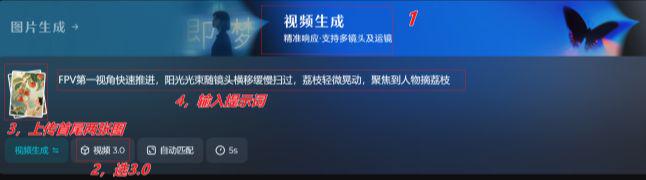
Open Dream AI
Select Video Generation
Upload a picture
Dialog box to enter cue word: FPV first view advancing quickly, sunlight beam sweeping slowly with camera traverse, lychee shaking slightly, focus on character picking lychee
Model 3.0
Duration 5S
Generate Now
Waiting for generation
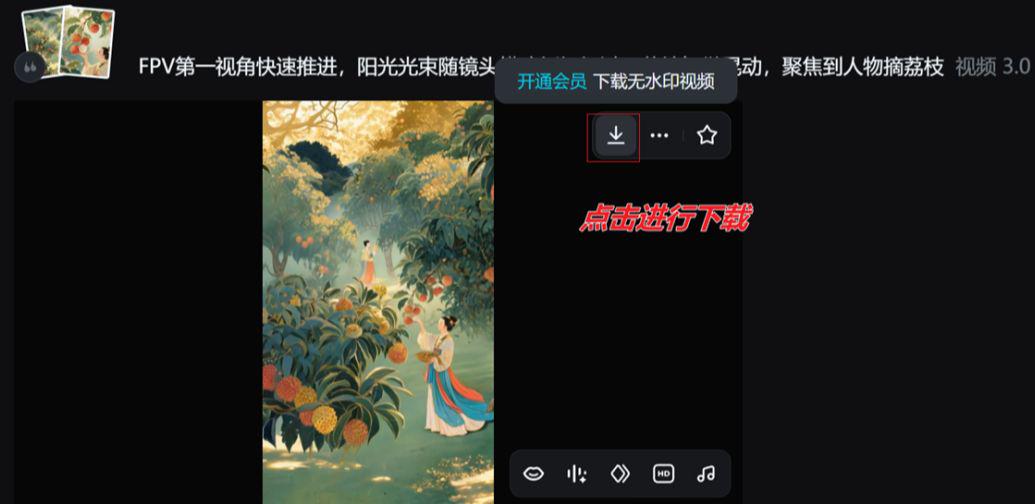
Use the same method to make a graphic video of the other subscopes and download and save them.
Step 3: Cut the movie. Cut the movie.
Import all the generated video clips into Cutscreen.
Add background music and other elements according to the content of the screen
Finally adjust the details and export

Space is limited to a snippet demo, so go ahead and polish the details on your own.