



In the past, the AI-generated video we remember was at best an awkward collage at the "motion picture level", with no sound, no atmosphere, no emotion, like a puppet show.
And now,GoogleA new video generation model released -Veo 3 This set of standards is directly broken and rebuilt. Now what you see is no longer cold footage, but real "talking" and "emotional" anthropomorphic video generation.
In this post, I'm going to take you on a deep dive into how to use Veo 3. At the same time, at the end of the post, I'll also show you by hand: how to use AI to write video-generated cues that will help you improve the quality of your cues and create video content that better meets expectations.
Currently, there are two paths in Google's existing product matrix that support the Veo 3 model, namely:Google Flow and Google Gemini, we'll start with Flow:
What is Google Flow?
1.Products
Simply put, Google Flow is a new AI video creation tools. All you need to do is type in a sentence or upload an image and it automatically generates a video clip with a cinematic quality, and even has built-in video editing capabilities.
The three core engines behind the Flow tool are the Veo 3 video model, the Imagen 4 image model, and the Gemini 2.5 family of models.
These are the same new models that Google unveiled at I/O last week, summarizing Flow's position in a single sentence: "One sentence / one picture, one short film".

The official Flow address is here: https://labs.google/flow/about
However, two thresholds for use should be noted:
1, the login area must be the United States (other areas basically can not open).
2. A subscription to the Google AI Pro or Ultra package is required to unlock the latest Veo 3 models.
The first threshold is for everyone to work out on their own. I show you how to whittle down the Pro subscription program, two ways:
① The first month is free, provided you need an overseas payment card (e.g., a virtual card for the U.S. region), and you can cancel your subscription at any time at https://one.google.com/about/google-ai-plans/
② Apply for the Student Free Plan and get up to 15 months of free Pro membership, which you can apply for yourselves here: https://gemini.google/students/
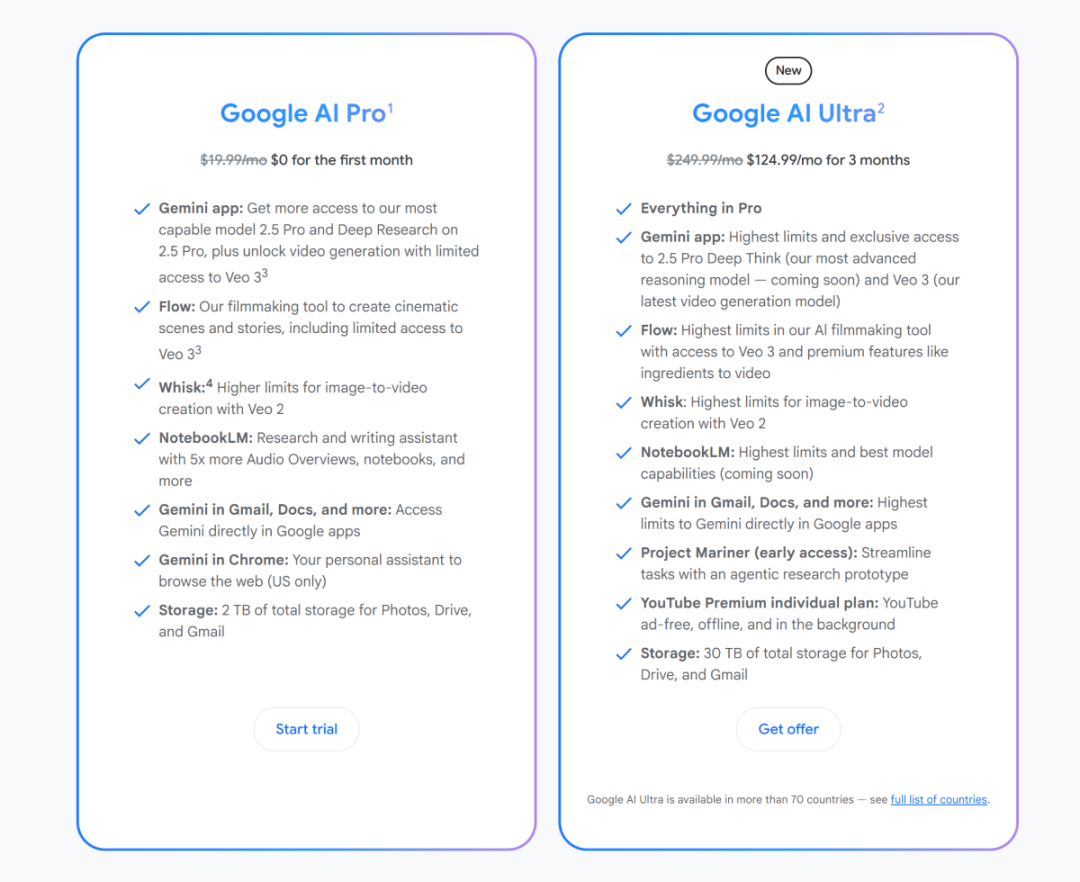
My own test is the first: the first month free trial Pro membership, the system will give 1000 points after the opening of the membership, Veo 3 video model generation consumes 100 points, that is, up to 10 videos can be generated.
2. Instructions for use
2.1 Model setup
First up is the model setup section. Currently Flow offers a total of three modeling options: Fast, Quality, and Highest Quality.
The first two of these actually use the previous generation of the Veo 2 model, while it's the third option, Highest Quality, which is the latest Veo 3 model, that really supports audio generation + emotional detail control.

2.2 Generation mode
Flow currently supports three generation modes: text-to-video, frame-to-video and clip-to-video.

- Text to Video: This is the most recommended and mainstream use. Simply type in a sentence or a description and Flow generates an 8-second video.
Cue word: olympic skateboarder being interviewed by a reporter with a gold medal hanging around her neck. the reporter asks "and what are you doing next? The reporter asks "and what are you doing next?" the skateboarder says "I'm going to sell enterprise software in SF!"

Veo 3's commands are so well followed that the characters in the video talk exactly to the prompted words, and even their mouths are highly synchronized with their voices.
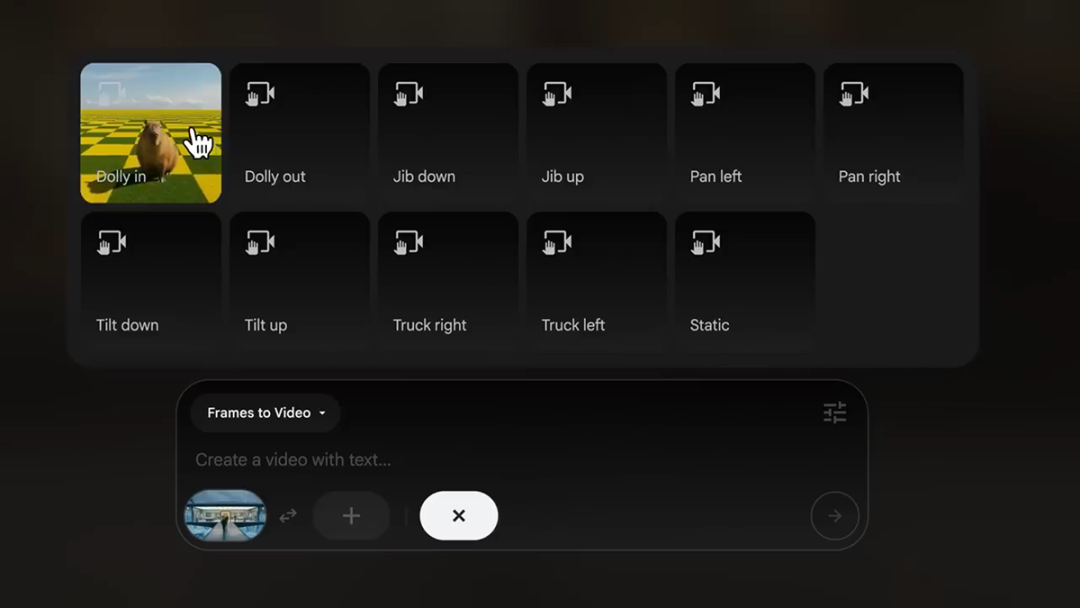
Frame to Video: Upload 1~2 images, Flow can generate intermediate video frames based on the image content to realize the effect of first and last frames. Currently, the first and last frame function only supports Veo 2 model.

This mode supports preset camera trajectories, letting you control how the frame transitions, but is still only available for the Veo 2 model.
- Clip to Video: This mode focuses on "style migration" and "video extension", you can upload multiple images and Flow will automatically fill in the missing picture logic or even rebuild the style.
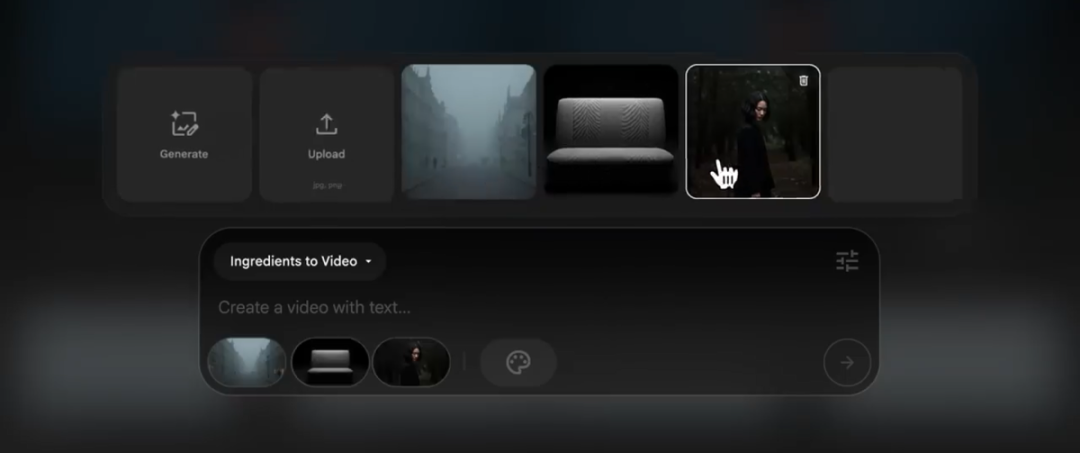
However, this feature is currently only available to Ultra members.

2.3 Video editing
Finally, there's Flow's Scene Builder feature. It's like a timeline for storytelling, letting you assemble multiple short video clips like a puzzle into a coherent, well-plotted movie. You can find it at the top of Flow.

Or, after generating a video, click the "Add to scene" function to quickly add the video to the Scene Builder.
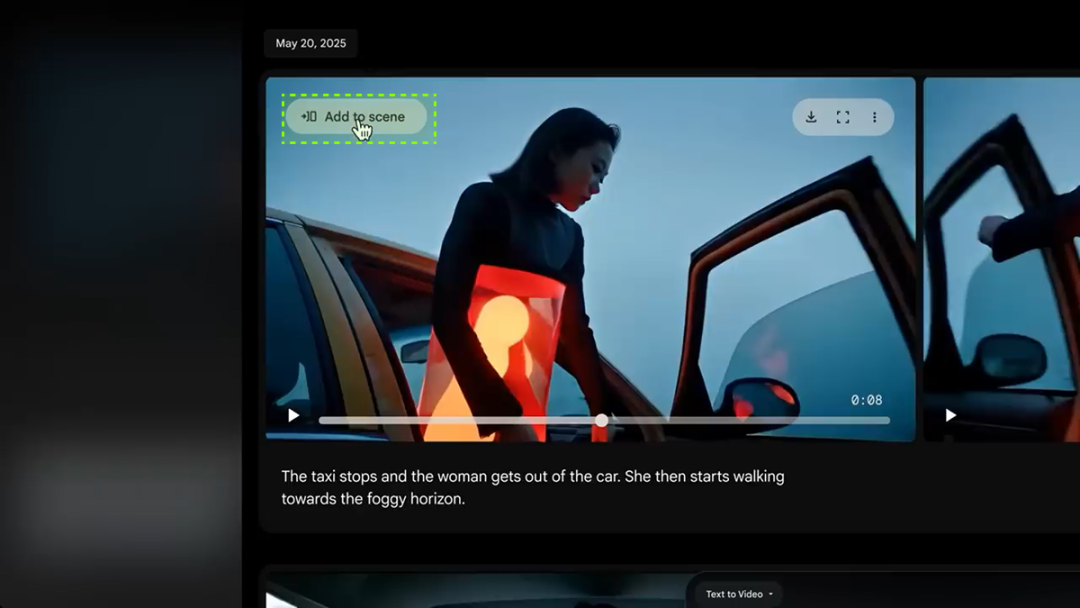
Once added in, you can make subsequent editorial changes to that video clip.

When editing video clips, there are two functions: Jump to and Extend.

- Jump to: regenerates the later part of the selected clip, e.g. have the girl get out of the car and run to the forest.
Cue word: She runs through the forest.

- Extend: extends the selected video clip, such as a girl arriving home for a street celebration.
Prompt word: She arrives home to a celebration in the street

After completing multiple clips, use the "Arrange" function to reorder the video clips.

Finally, you can export it with one click. The reason why this video doesn't have a voiceover is that Flow's video editing feature only supports Veo 2 model editing.
To summarize, Flow is fundamentally different from previous AI video tools in that it not only generates high-quality video, but also allows for structured editing of the video.
Leveraging Veo 3's multimodal capabilities, Flow not only generates video clips with sound, emotion, and interaction, but also maintains character consistency and frame-by-frame modifications with Scene Builder, realizing a true one-stop shop for AI video creation. "AI video creation in the true sense of the word.
Second, Gemini generate video
In addition to Flow, Veo 3 is now integrated into Google's own multimodal conversation platform, Gemini.
You can type the prompts directly into the dialog box as you would in a normal chat, and with Gemini's "Video" feature, you can generate video content with a single click.
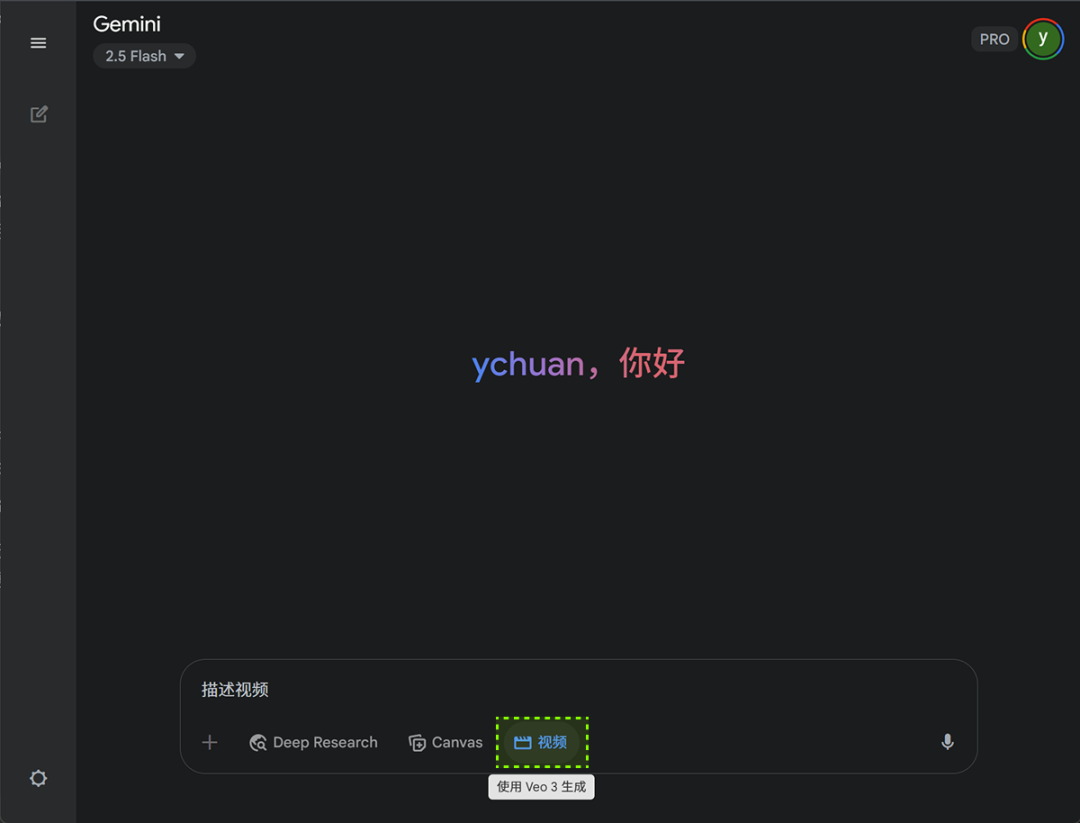
The address is here: https://gemini.google.com
Currently, Gemini Pro users are entitled to 10 free generation quotas, and generating Veo 3 videos does not consume points. For those of you who want to get something for nothing, you can review the Pro membership setup mentioned above.
Let's look at a real-world example of typing prompt words directly into a dialog box:
Cue word: A beautiful young woman ASMR creator, sitting in a cozy, softly lit room. She types on a noisy mechanical keyboard, then looks up with a playful smile and gently blows into the microphone. She types on a noisy mechanical keyboard, then looks up with a playful smile and gently blows into the microphone. As she whispers sweetly into the mic, she says, "Brother Yanchuan is really so handsome! "

Translation: A beautiful young ASMR creator sits in a cozy, softly lit room. She taps on a mechanical keyboard that makes a clicking sound, then looks up with a playful smile and gently blows into the microphone. She whispered softly into the microphone, "Brother Yanchuan is really handsome!"
When generating a video using the Veo 3 model, you are able to specify what the character in the video is talking about, such as "Brother Yanchuan is really handsome!"

III. Cue word template
Next, the part that everyone is clamoring for the most: how do you write a video cue for Veo 3?
Let's start by breaking down a standard set of cue word structures:
Cue word core constituents:
- Subject : The main object, person, animal or scene in the video.
- Action : What the subject is doing. This is the core dynamic of the video.
- Background/Environment : The location and surroundings where the video takes place.
- Style: the visual aesthetic or artistic style of the video. This can be generic or very specific.
- Camera movement: how the camera moves and how the shot is framed. This can greatly affect the atmosphere and narrative of the video.
- Atmosphere/Lighting: the overall mood, tone and lighting conditions of the video.
- Audio: Veo 3 supports audio generation, including ambient sound effects, background noise and even dialog. Please specify the audio you want explicitly.
Disclaimer: This is just a set of specifications for the structure of the cues, you can also pick and choose some of the key points and combine them to describe them, or even just one sentence can generate a high quality video, after all, the Veo 3 model has a very strong understanding of semantics. But if you want to control AI generation more accurately, the more detailed the cues, the better.
When the structure of the cue words comes out, you may still not know how to describe the picture you want, or you may think it's too much trouble. Then I recommend you to use the Big Language Model to generate the cue words, and you only need to provide a few core keywords.
The command template is as follows, and what's in the [ ] is the subject keyword that you can modify.
I need to generate a [movie-quality gunfight] video using Google's Veo 3 model, so please help me with the complete video cues following the cue structure I've provided you.
Cue word structure:
- Subject : The main object, person, animal or scene in the video.
- Action : What the subject is doing. This is the core dynamic of the video.
- Background/Environment : The location and surroundings where the video takes place.
- Style: the visual aesthetic or artistic style of the video. This can be generic or very specific.
- Camera movement: how the camera moves and how the shot is framed. This can greatly affect the atmosphere and narrative of the video.
- Atmosphere/Lighting: the overall mood, tone and lighting conditions of the video.
- Audio: Veo 3 supports audio generation, including ambient sound effects, background noise and even dialog. Please specify the audio you want explicitly.
Note the following:
1, the final output needs to be a whole paragraph without classification labels (such as the subject, action, etc.) of the prompt words.
2. Provide two sets of prompt words in English and Chinese respectively.
You can use ChatGPT, Gemini, Deepseek and other AI chat tools, but it is recommended that you turn on the "search" function, in which case the AI can automatically search for relevant information based on the subject keywords you provide, and the prompts you write will be more effective.

You may ask: why even write a copy of the Chinese prompt?
The reason is simple: currently Flow only supports English input, but the Chinese prompts make it easier for English speakers like me to understand the screen before translating it to confirm - so, dual prompts in English and Chinese = more efficiency + less trial and error.
War Movie Scene - Cue word: On a war-torn urban street, two special forces soldiers in tactical gear engage in an intense firefight amidst the rubble, bullets whizzing through the air, sparks flying, and deafening explosions. bullets whizzing through the air, sparks flying, and deafening explosions. The street is lined with burning vehicles and collapsed buildings, with thick smoke billowing and flames lighting up the night sky. The street is lined with burning vehicles and collapsed buildings, with thick smoke billowing and flames lighting up the night sky. The camera employs handheld tracking, weaving through the combat scene to create an immersive sense of urgency. The overall color tone is cool, highlighting the brutality and tension of the battlefield, with lighting primarily from explosions and muzzle flashes. The overall color tone is cool, highlighting the brutality and tension of the battlefield, with lighting primarily from explosions and muzzle flashes. Audio includes intense gunfire, explosions, soldiers' shouts, and background sirens, enhancing the realism and urgency of the scene.
Changing the subject, you can continue to give commands to the AI:
Conversation directive: change of subject case, stand-up comedian
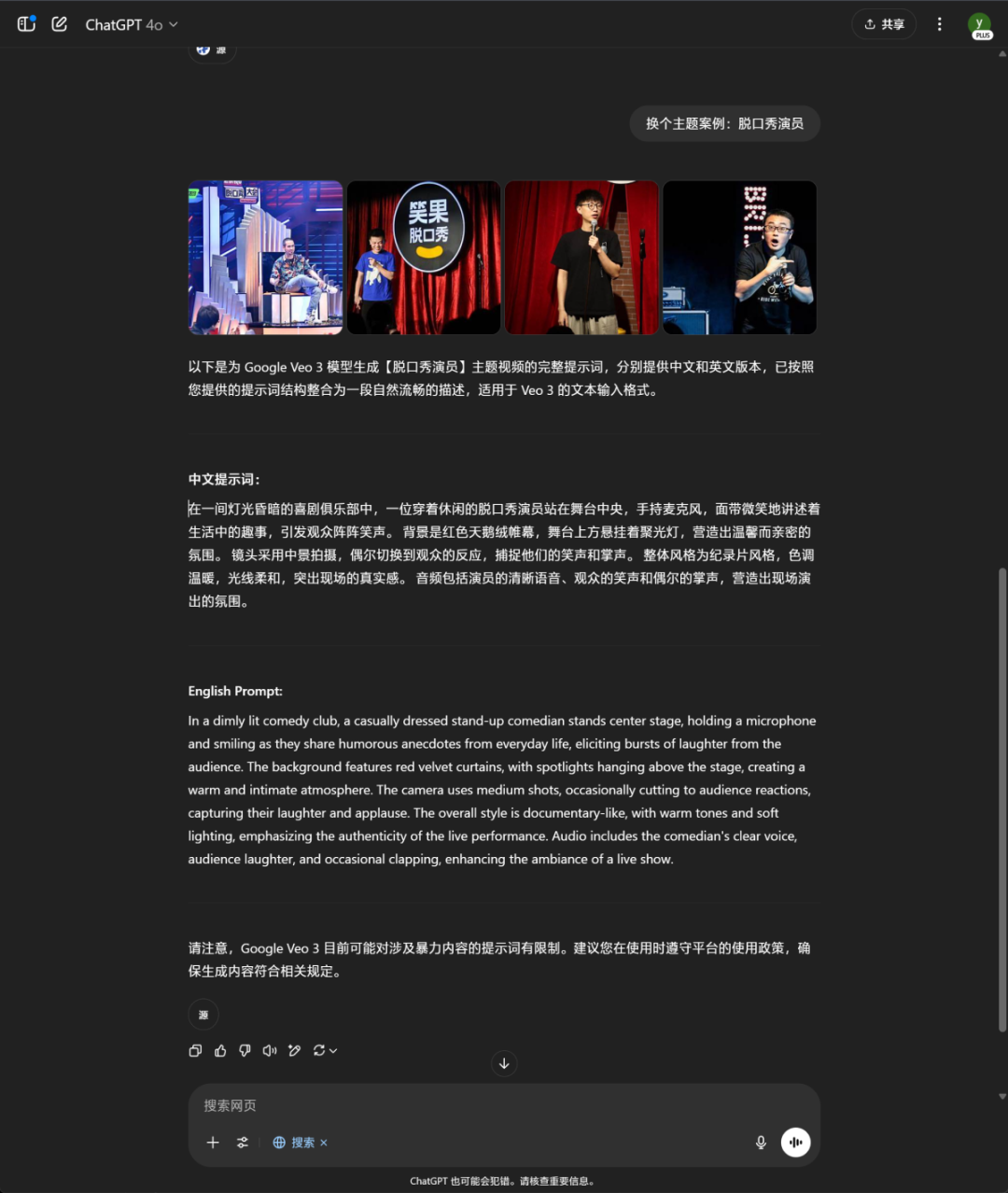
Stand-up comedy club - Cue word: In a dimly lit comedy club, a casually dressed stand-up comedian stands center stage, holding a microphone and smiling as they In a dimly lit comedy club, a casually dressed stand-up comedian stands center stage, holding a microphone and smiling as they share humorous anecdotes from everyday life, eliciting bursts of laughter from the audience. The background features red velvet curtains, with spotlights hanging above the stage, creating a warm and intimate atmosphere. The camera uses medium shots, occasionally cutting to audience reactions, capturing their laughter and applause. The overall style is documentary-like, with warm tones and soft lighting, emphasizing the authenticity of the live performance. The overall style is documentary-like, with warm tones and soft lighting, emphasizing the authenticity of the live performance. Audio includes the comedian's clear voice, audience laughter, and occasional clapping, enhancing the ambiance of a live show.
That's all there is to this cue writing. This time around, with the launch of Flow, I've made a full cue word tutorial centered around Veo 3, which I hope will help you generate videos with fewer detours and burn fewer points.
As I write this, there is only one feeling in my head: AI is turning the matter of "creation" into a lighter and lighter thing, but the requirements for creators are actually becoming heavier and heavier.
Light, because the threshold is really lowered: you do not need to know how to shoot, do not need to know how to edit, do not need to post-color, you only need to enter a sentence, you can get a "decent" film-level short film.
Heavy, because how to write "that sentence" has become a new barrier - is the prompt clear? Is it logical? Have the details been left out? These determine whether the AI can understand you.
And that, in turn, is the watershed for our future creative power.
AI won't replace anyone, but it is forcing everyone to "express themselves more accurately and think more concretely".
So don't think of it as the end of inspiration, but as an amplifier of expression: the clearer you make it, the more extreme it does.
And all you have to do is be the one to make the AI understand what you're thinking.