



Have you all been swiping on major online platforms a lot lately?cultural relicinteractiveAI VideoToday, we will explain to you how to make these static display artifacts "move" with the help of the text-to-map and map-to-video functions of IMO AI. Today we will explain to you with the help of the text-to-diagram and diagram-to-video functions of Dream AI to make these static display of cultural relics "move" toAnimated VideoThe form shows its unique charm.
I. Preparatory work
Define the theme of the creation:
Pick your favorite artifacts, such as the Thousand Miles of Rivers and Mountains from the Palace Museum or the Bronze God Tree from the Sanxingdui Museum.
Collection of relevant information:
To find out detailed information about the selected museum artifacts, including their dates, materials, stylistic features, historical background, and related historical events and figures.
For example, learn about Wang Ximeng, the author of Thousand Miles of Rivers and Mountains, the date of its creation, the painting techniques, and the scenery depicted in the painting; and know the height, structure, and symbolism of the Bronze God Tree.
At the same time, high-resolution images of the artifacts are collected to provide a reference for generating accurate AI images.
Second, the use of Dream AI to generate artifact images
Sign up for the Dream AI platform:
Open the official website of Instant Dream AI, complete the registration and log in. Utilize the free credits provided by the platform and start creating.

Go to the text-to-graph function:
Find the "Image Generation" module on the homepage of the platform and click on it.
Enter the precise cue word:
To generate a bronze god tree picture as an example, the prompt word can be "the bronze god tree of the Sanxingdui Museum, composed of the base, trunk, branches and god bird, the trunk is high, the branches stretch out in all directions, the god bird stands on the branches, the overall modeling is mysterious and ancient, the details are clear, the background is the museum's display case, the lighting is soft, highlighting the texture of the artifacts".
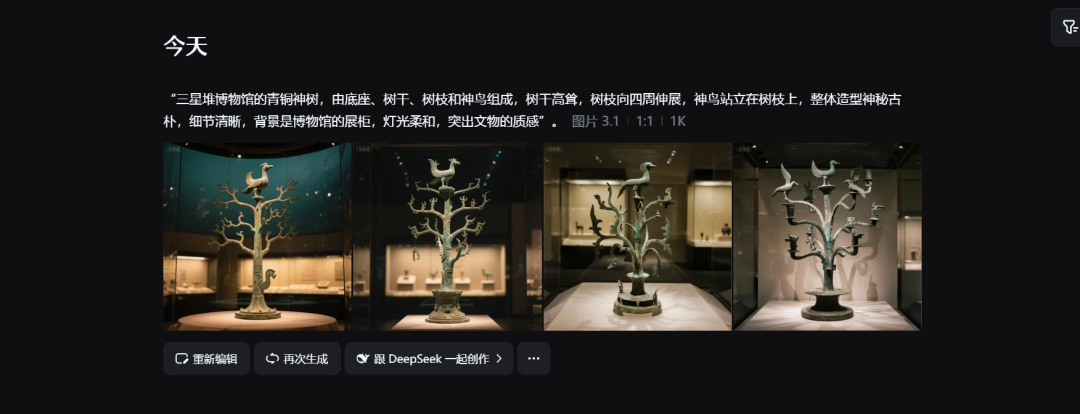
Adjust the screen size according to the characteristics of the artifacts, for example, if the bronze sacred tree is taller, you can choose the vertical ratio of 9:16 and generate 4-8 pictures for selection.
Generate and filter images:
Click "Generate Now" and wait for the image to be generated, from which you can select the one that best matches the real look and expected effect of the museum artifacts. If the generated pictures have deviation in details, such as inaccurate modeling of the god bird of the bronze god tree, you can modify the prompt words to regenerate.
Third, the picture will be converted into an animated video
Go to the Toussaint video feature:
Find the "Graphic Video" feature in the platform and click on it.
Upload selected images:
Upload filtered images of museum artifacts to this functional module.
Enter the video cue word:
To make the Thousand Miles of Rivers and Mountains move, the cue word could be
"A Thousand Miles of Rivers and Mountains" slowly unfolds in the museum's display case, the landscape, villages, bridges, boats and other elements on the scroll gradually come alive, the river flows, boats sail, villagers work in the fields, and the transporting mirror moves slowly from the beginning to the end of the scroll, revealing the magnificent scenery of the entire painting".
For the Bronze God Tree, the cue word can be set to
"samsungdui bronze god tree in the museum, branches gently swaying, god bird as if to spread wings and fly, surrounded by a mysterious light effect, transport mirror from the bottom upward shooting, show the god tree's tall and majestic".
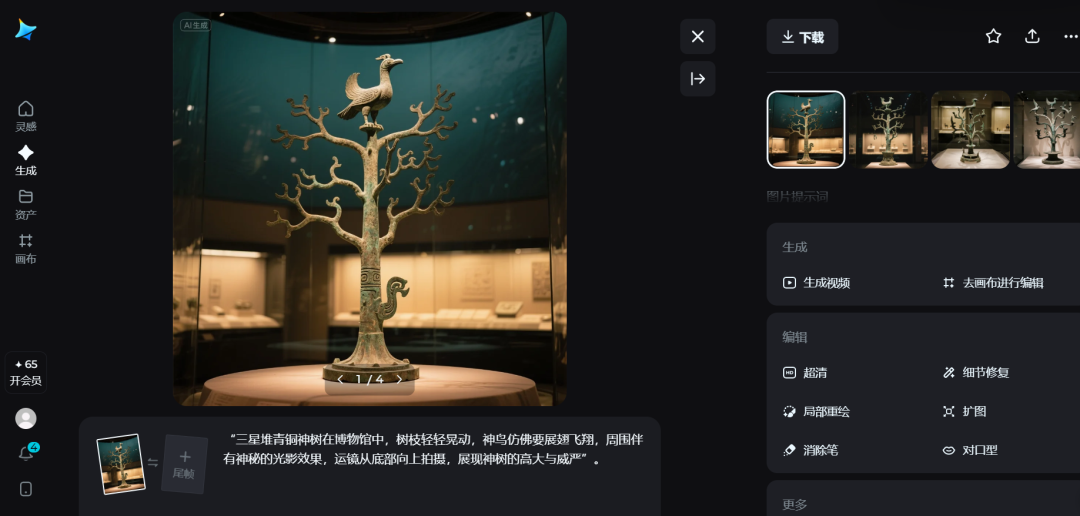
Adjust the video duration and resolution as needed, generally choosing parameters that clearly demonstrate the dynamics of the artifact.
Generate and optimize videos:
Click "Generate Video" to preview the effect after generation.
If you find that the Thousand Miles of Rivers and Mountains unfolds at an inappropriate speed, or that the Bronze God Tree doesn't sway naturally enough, modify the cue word to regenerate it until you are satisfied.
IV. Video editing and post-production
Finally in the cut and screen edit video:
Import the generated animated video into editing software such as Cutscreen, cut out the extra frames and adjust the tempo.
Add subtitles and dubbing:
Captions label the artifacts with information such as name, date, and location of the collection.
For example, "Thousand Miles of Rivers and Mountains, a masterpiece by Wang Ximeng of the Northern Song Dynasty, is painted with mineral pigments such as Shiqing and Shiqing green, with brilliant colors, and is one of the top ten most famous heirloom paintings in China".
Add music and sound effects:
Pair the Thousand Miles of Rivers and Mountains with mellifluous classical music, such as "High Mountains and Flowing Water"; and the Bronze Divine Tree with mysterious, ethereal music.
At the same time, add appropriate sound effects, such as the rustling sound of the scroll unfolding and the slight sound of the sacred tree swaying, to enhance the infectiousness of the video.