



I'll tell you all about it today.Beauty Dancing VideoHow is it made? Recently, the "Water Bomb Goddess" Kwon Eun-phee has exploded in popularity, such a beautiful woman.Dance VideoWasn't seeing particularly much.
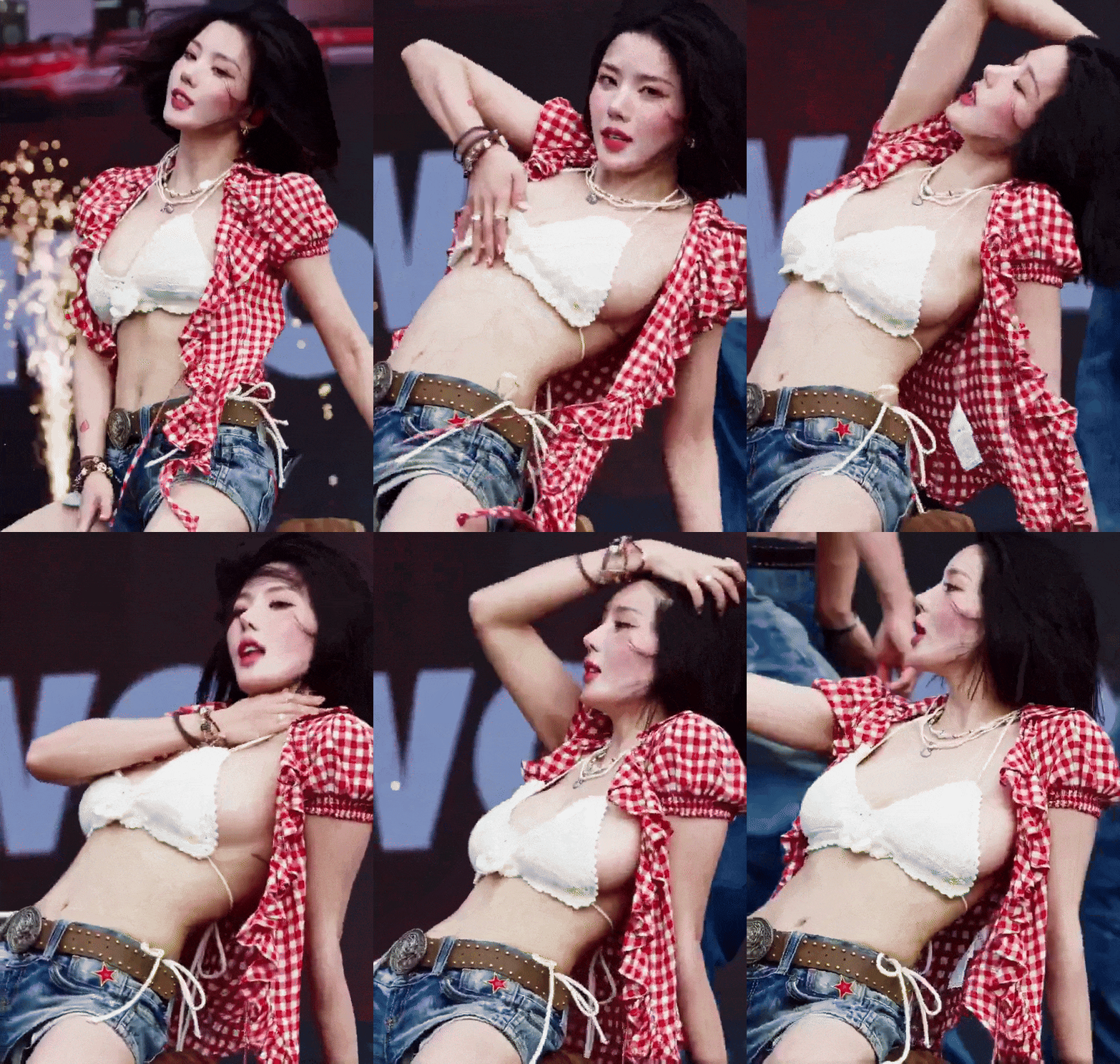
You guys go to Jitterbug and Youtube, you don't need me to tell you how much the dancing ladies are blowing up the traffic, do you?
The following picture of this Youtube account, specifically on YouTube with AI to do Latin dance beauty video, there is no innovation, on this one way, 50 days, fans "whoosh" on the rise of more than 60,000 people!
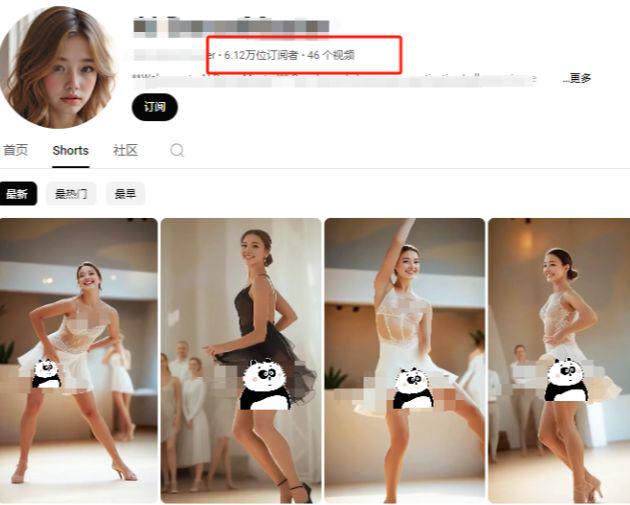
How can I put up with this? It has to be arranged! Come on, come on, move your little benches and I'll show you, hand in hand, how to make a dance video like the one below that you can't take your eyes off of (with headphones on)!
I. International AI Chapter: Google Veo 3
Let's start by sharing with you the latest technology from around the world.
The most powerful video AI on the planet right now is none other than Google Veo 3. What's so awesome about this guy? You give it a sentence, and it spits out a video with sound and a soundtrack, all in one step!
In order to use it, you have to apply for Google Gemini Pro, which I've previously written a tutorial on how to do.Hands down, the easiest Google Veo whoring trick ever!", turn it over and find out.
Once that's done, dash over to the Gemini Pro website and drop the following mantra (cue word) in with your eyes closed:
{
"shot": {
"composition": "Medium tracking shot, 50mm lens, shot on RED V-Raptor 8K with Netflix-approved HDR setup, shallow depth of field", "composition": "Medium tracking shot, 50mm lens, shot on RED V-Raptor 8K with shallow depth of field".
"camera_motion": "smooth Steadicam walk-along, slight handheld bounce for naturalistic rhythm ",
"frame_rate": "24fps",
"film_grain": "clean digital with film-emulated LUT for warmth and vibrancy"
},
"subject": {
"description": "A striking young woman with flawless dewy skin and a sleek V-line jaw. Her long black hair is styled in a side-parted soft wave, falling over one shoulder. She has large monolid eyes framed by delicate winged eyeliner and pearlescent shimmer, glossy gradient lips in cherry rose, and glass-like skin. She has large monolid eyes framed by delicate winged eyeliner and pearlescent shimmer, glossy gradient lips in cherry rose, and glass-like skin. She performs with idol-like precision - expressive facial control, hand gestures timed to rhythm, eyes occasionally darting to camera."," she says.
"wardrobe": "Pearl-trimmed white crochet halter top, structured high-waisted denim shorts with a slim Pearl-trimmed white crochet halter top, structured high-waisted denim shorts with a slim studded tan belt and red lacquered star buckle, oversized red gingham shirt slipped off the shoulder, sheer nude tights, white chunky platform sneakers, silver chain earring on left ear, and metallic rose gold nail polish. silver chain earring on left ear, and metallic rose gold nail polish."
},
"scene": {
"location": "a quiet urban street bathed in early morning sunlight".
"time_of_day": "early morning",
"environment": "empty sidewalks, golden sunlight reflecting off puddles and windows, occasional birds fluttering by, street slightly wet from overnight rain". fluttering by, street slightly wet from overnight rain".
},
"visual_details": {
"action": "she sings directly to camera with confident rhythm, her mouth clearly articulating Korean lyrics in perfect sync, smiling and gesturing in time with the beat, walking with bounce in her step". "she sings directly to camera with confident rhythm, her mouth clearly articulating Korean lyrics in perfect sync, smiling and gesturing in time with the beat, walking with bounce in her step".
"props": "morning mist, traffic light turning green in the distance, reflective puddles, subtle sun flare "
},
"cinematography": {
"lighting": "natural golden-hour lighting with soft HDR bounce, gentle lens flare through morning haze ",
"tone": "playful, stylish, vibrant".
"notes": "STRICTLY NO on-screen subtitles, lyrics, captions, or text overlays. Final render must clearly show active vocal performance, not background track mimicry."
},
"audio": {
"ambient": "city birds chirping, distant traffic hum, her boots tapping pavement".
"voice": {
"tone": "bright, teasing, confident".
"style": "K-pop vocal phrasing with flirtatious intonation, crisp Korean diction, playful swagger "
},
"lyrics": "I'm not NJ Red, I'm a beautiful woman from Korea, let's have fun together!"
},
"color_palette": "sun-warmed pastels with vibrant reds and denim blues, soft contrast with warm film LUT ",
"dialogue": {
"character": "Woman (singing in Mandarin)".
"line": "I'm not NJ Red, I'm a beautiful woman from Korea, let's have fun together!" ,
"subtitles": false
},
"visual_rules": {
"prohibited_elements": [
"subtitles".
"captions".
"karaoke-style lyrics".
"text overlays".
"lower thirds".
"any written language appearing on screen"
]
}
}
Then you can make a cup of tea, or go to the bathroom, and in a few minutes, a video of a living, breathing, singing young lady is out!
And slow! There are surprises!
Just today while I was primping this thing, I suddenly realized that Google had actually quietly given Gemini a new feature - theFigure videoOh, my God! My goodness, it's almost like a thought!
Still using the same mantra as above, but this time, let's throw in a picture of a beautiful woman we made ourselves.
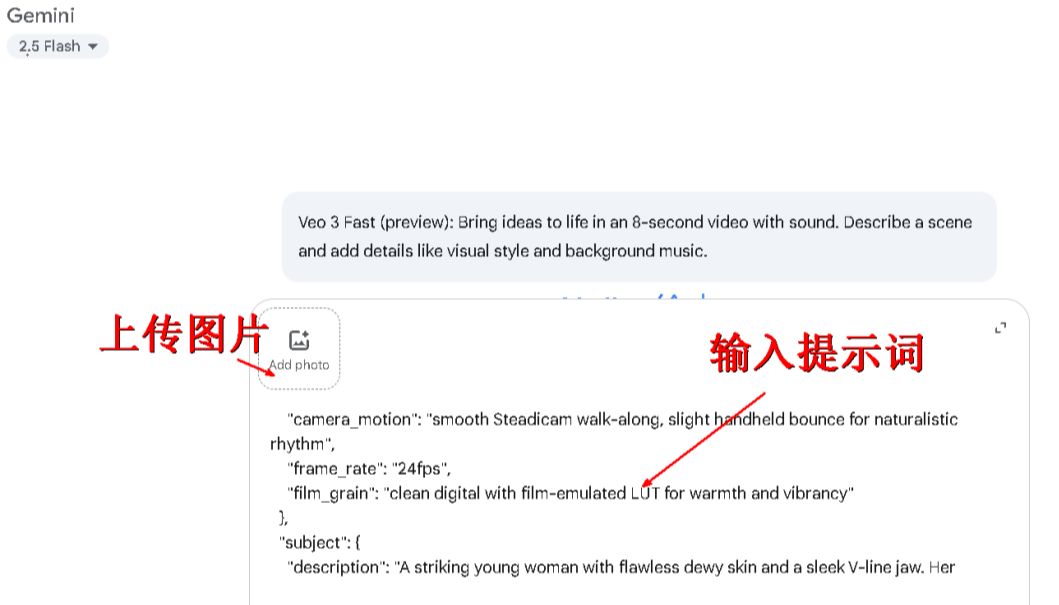
Look again and see what effect the video comes out with!
Second, China's AI chapter: the curve to save the country, the effect of the top as usual!
After talking about foreign "foreign guns", let's take a look at the domestic "local guns", the same can fight!
I would recommend these three more:
Korin: https://app.klingai.com
i.e. Dream: https://jimeng.jianying.com
Vidu: https://www.vidu.cn
Keling is the best, but slightly more expensive (these days there is a campaign to charge members AI to do the map does not consume points) .
The result is not bad, but the words "sexy", "voluptuous", "big X" and so on are included in the sensitive words, which can not be used in the prompt words.
Vidu has newly launched Q1's "Reference Graphics", which allows you to merge multiple graphs together, making it very playable.
However, no matter which domestic AI you choose, to be honest, at this stage, the domestic AI just rely on typing to do video, compared with Google Veo is still a bit of a gap. Therefore, we have to "curve to save the country", take a more stable road:First you draw the perfect picture in AI, then you make the picture into a video!
Step 1: Draw a "dream girl".
You have to have a mantra (cue word) to draw, right? Don't panic, with three paths, there's one for you.
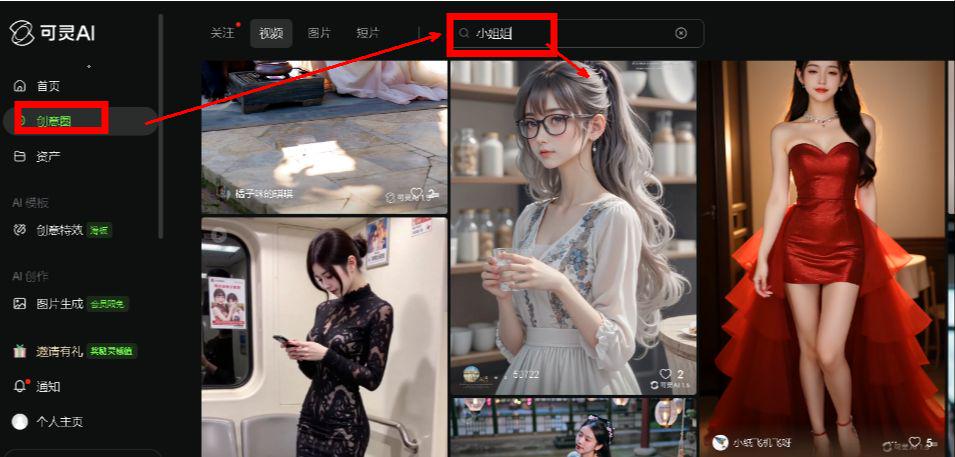
methodologies1 (the lazy method)The first thing you need to do is to go to the plaza of Yumemon or Korin, search for "beautiful woman" or "young lady", and see how the gods write, and then copy the work directly!
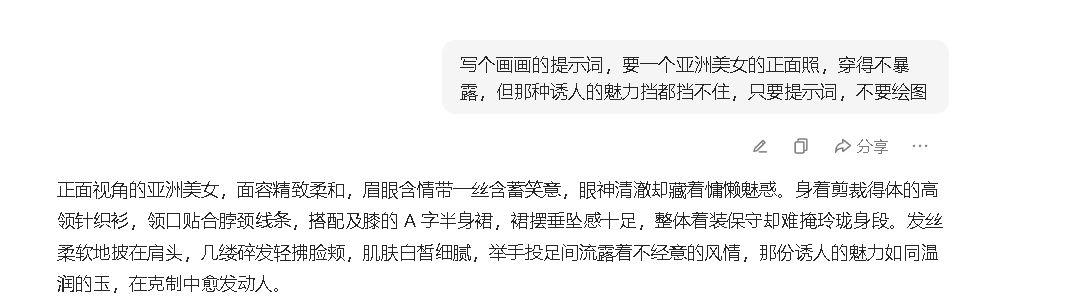
methodologies2 (AI writes for you): Open your beanbag or DeepSeek and just tell it, "Write a prompt for a drawing, ask for a frontal shot of a beautiful Asian woman, not dressed revealingly, but with that seductive charm that can't be blocked, just the prompt, not the drawing."
Look at what it writes for you, it's definitely faster than trying to do it on your own.
methodologies3 (trick - reverse derivation): Kerin now has a new feature where you throw it a picture you like and it can in turn analyze the cue words for you for that picture!
Knowing that some of you are trying to be lazy, I'm going to feed the meal into your mouths! I'm going to share with you a couple of mantras I have in my back pocket that you can change on your own based on this:
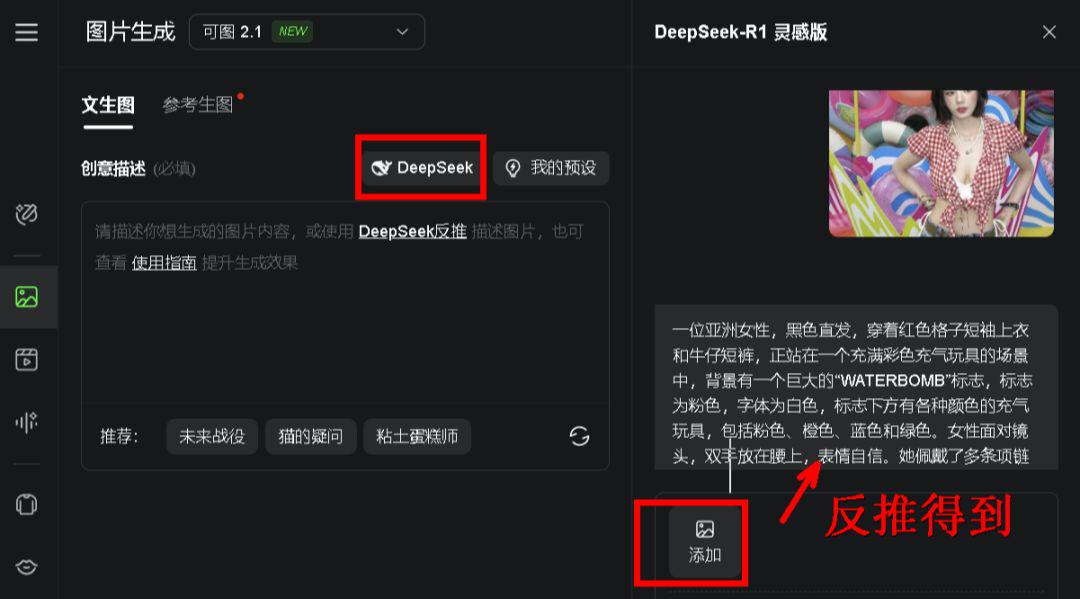
Mantra 1: "Real life photography, Hancock Empress, Korean woman, wearing a red and white plaid open-necked short-sleeved top, blue jean shorts, full body, deserted street, real photography, portrait of a beautiful woman."
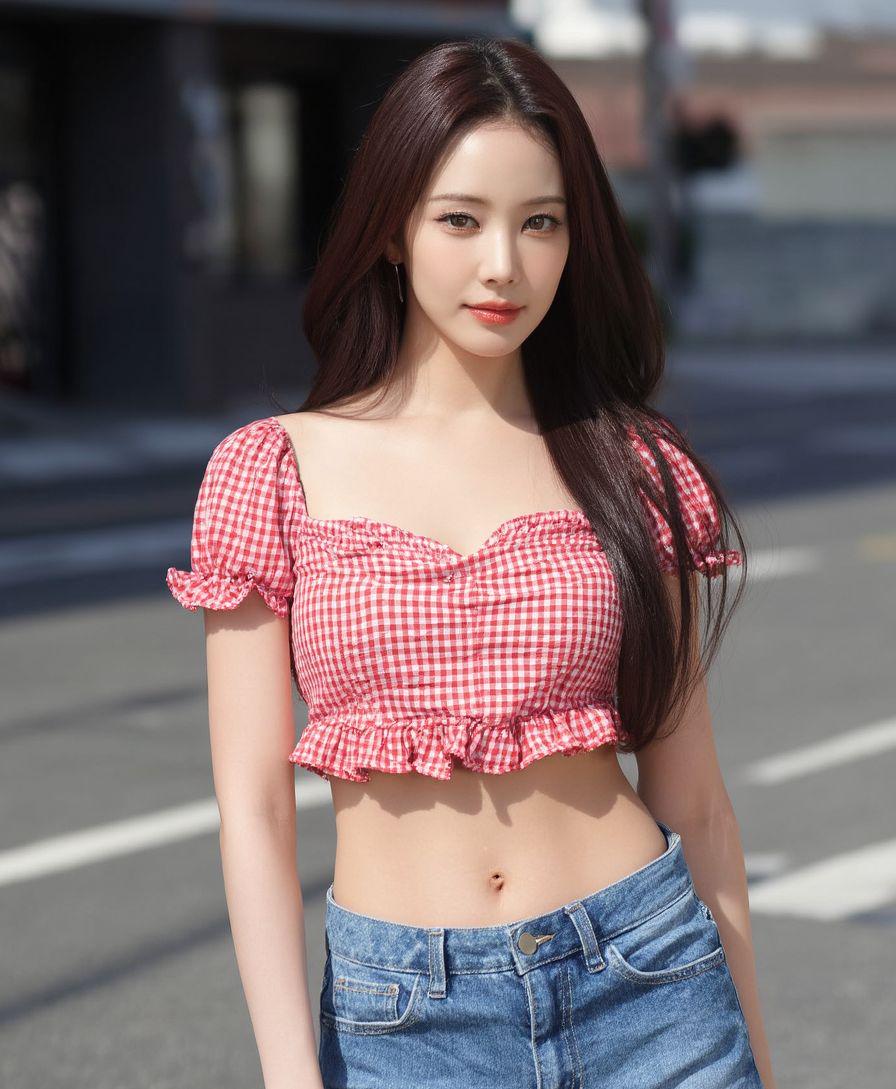
Spell 2: "Young woman with long black hair, burgundy v-neck long-sleeved top, big breast, wide hips, beige split leather skirt, beige high heels with studs, holding black object, walking on city street with cars, greenery and railings in background. Fashion style, medium view"
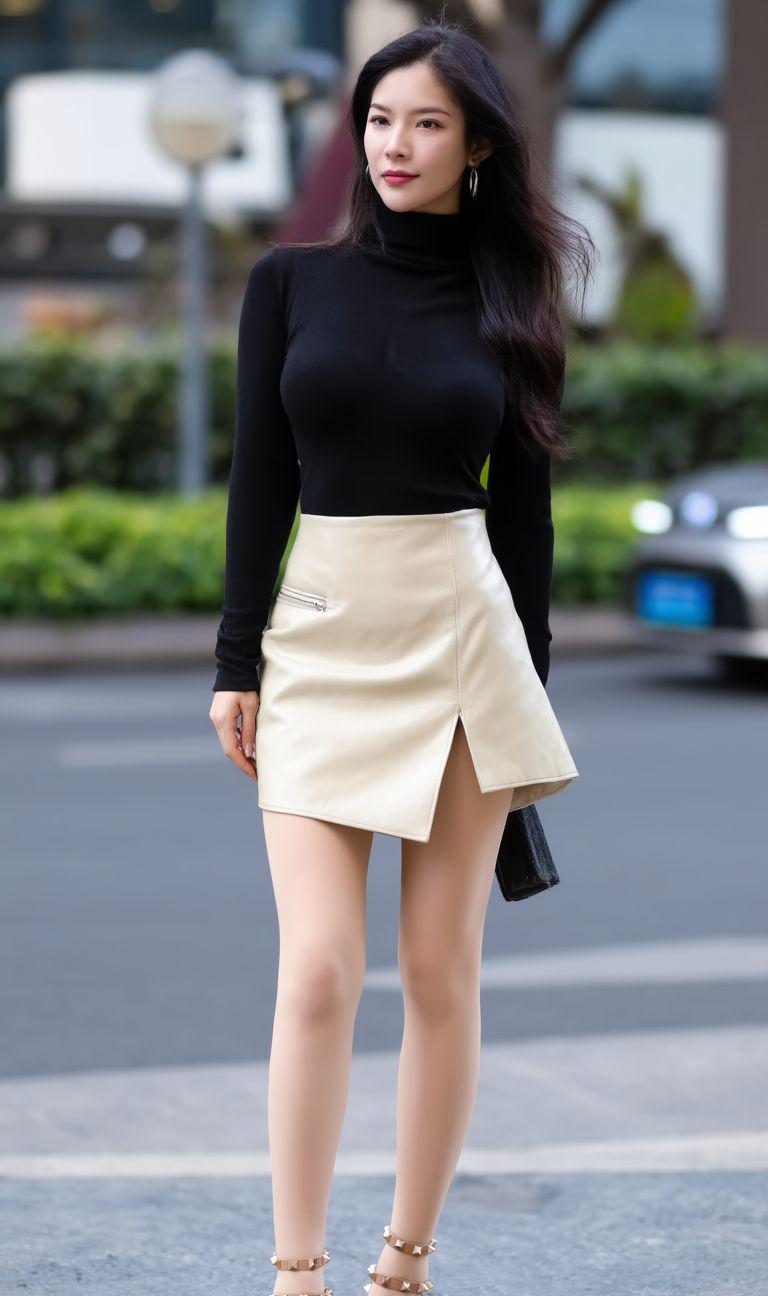
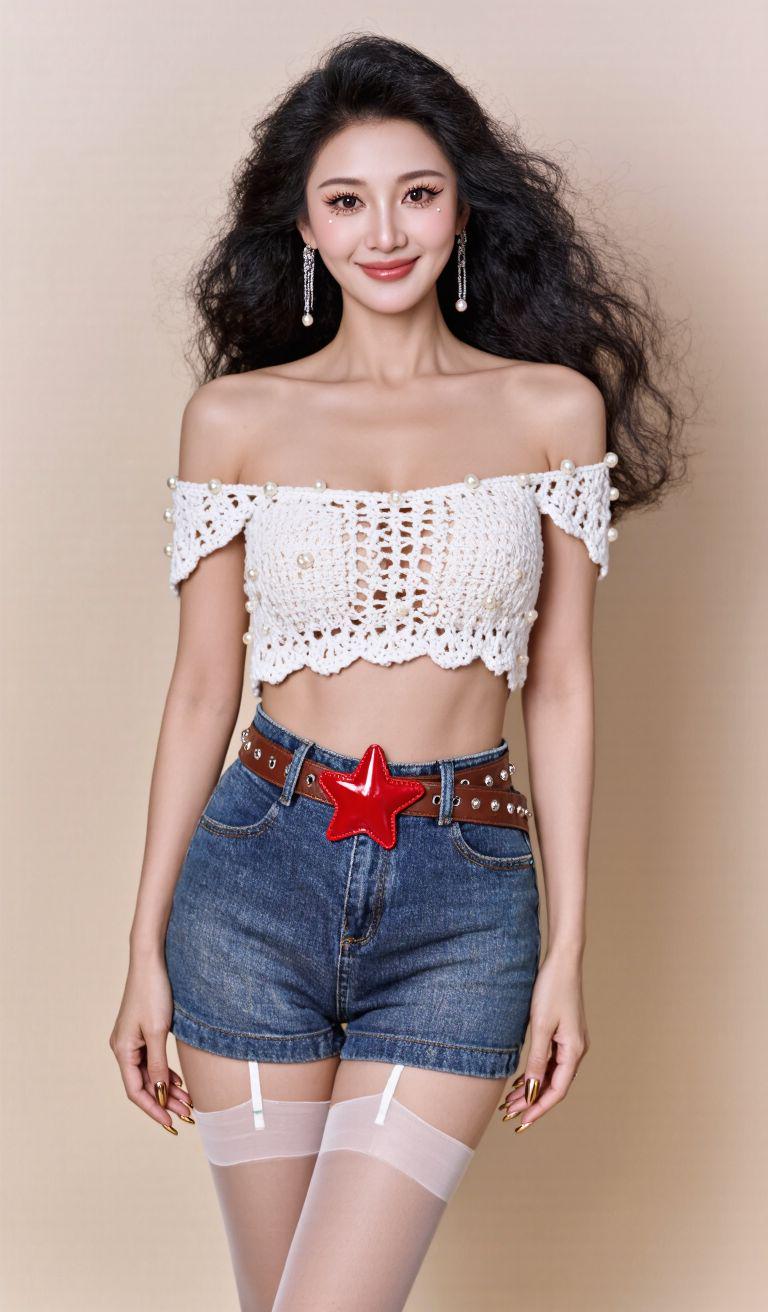
Mantra 3 (I got it by backpropagation and worked on it a bit):: "A photo taken in a studio. The background is beige. The light is soft. Chinese beauty, standing, facing the camera, fair skinned, frontal view, large eyes, framed by delicate winged eyeliner and pearly luster, lips a cherry-rose gradient luster, skin as clear as glass. Her eyes look into the camera, white crocheted strapless top adorned with pearls; high-waisted structured denim shorts with a thin, narrow, brown studded belt and red patent leather star buckle; sheer nude pantyhose, silver chain earrings in her left ear, nails are metallic rose gold. Hair flowing, hair tousled, sexy, voluptuous, fairytale, smiling, body proportioned"
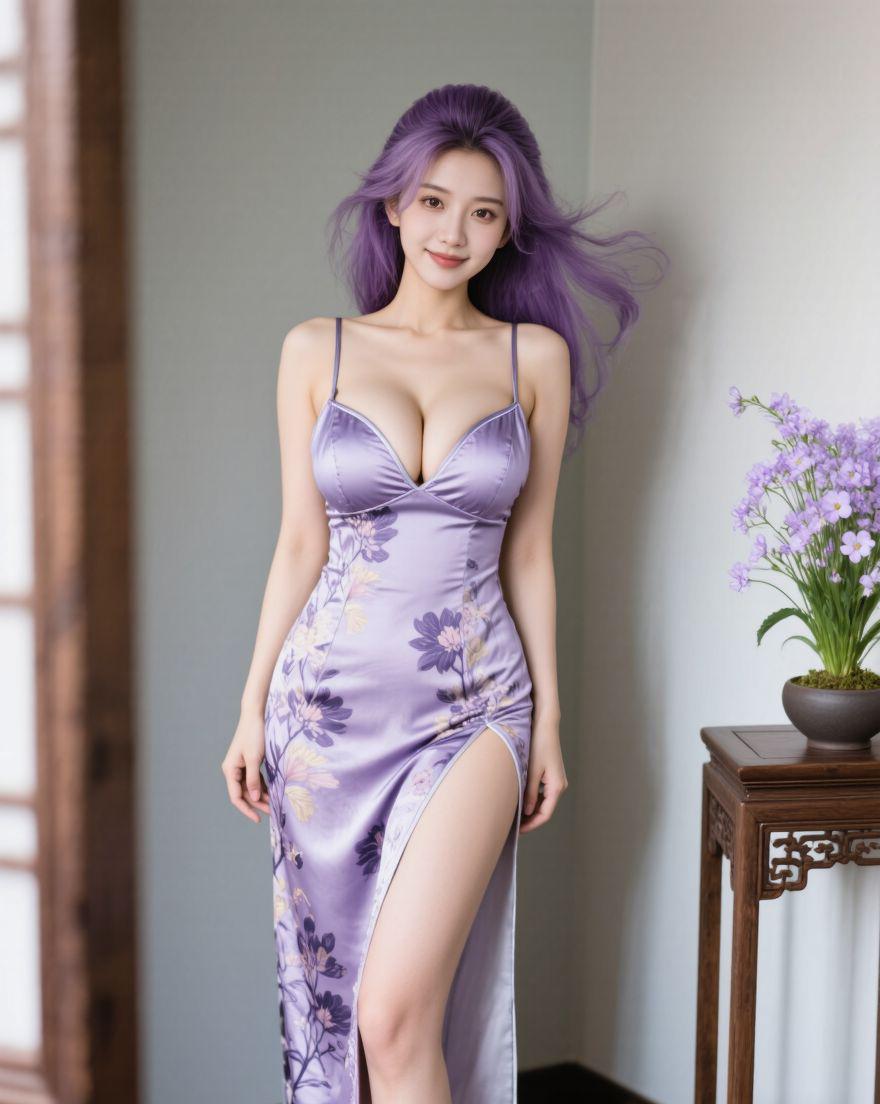
Mantra 4:"Chinese beauty, fair skin, front view, long floral cheongsam, left side of cheongsam is open, cheongsam is lavender, standing in the corner of a room with half a table showing next to her, on the table there is a pot of lavender flowers, long purple hair, high cranial vault, flowing hair, tousled hair, sensual, voluptuous, fairy-like, smiling, proportions of her body are harmonized"
It can be sweet or savory, so everyone just copy your homework.
The greedy among you might ask again, "Eh? But what if I just want the person I draw to look like my goddess?"
It's so easy! It's called "padding" and it works just like a cheat sheet! When you generate a picture, you upload a picture of your goddess as a "reference". For example, I threw in a picture of the "Waterbomb Goddess" ......

Step 2: Infuse the soul and make her dance!
With the diagram in hand, here comes the heavy lifting! I'm using the Korin AI as a demonstration here.
Open Korin, upload the picture we just made, and type in the cue words for the dance moves.
You can be very simple and brutal and just type a few words, "Girl Sexy Wiggle." See, move it!
Want her to dance with more vigor? You can describe it a little more finely:"The young lady stood still and twisted her body rhythmically to the dynamic music”.
Even, you can have AI be your choreography teacher! I had AI write this paragraph for me:
"The girl stands in the center of the street ...... starting with a slow lift of her arms across her collarbone ...... her body swings slightly from side to side with the rhythm, her hips make small drawing circles, and her eyes look into the camera with a sense of seduction ......"
It's a bit spooky, you can try it a few more times and it should be even better
There's also Ultimate Play!
"The Dream" has a name.action figure"The feature is nothing short of black and white! You tap in and upload a picture of your young lady on one side and a video of a real person you found dancing on the other.

Then click "Generate" ...... A miracle happened! I didn't write a single word about the movement prompts, and the girl in the newly generated video will mimic all the movements in that video! Some day I'll put my mom's full set of eight-duanjin videos up, and let the lady dance all over again.
Third, advanced play: dress up, pick up pieces, do whatever you want!
1. Change of scene
Want Missy to change the scene? I tried Vidu and Korin.
Look at the vidu first.
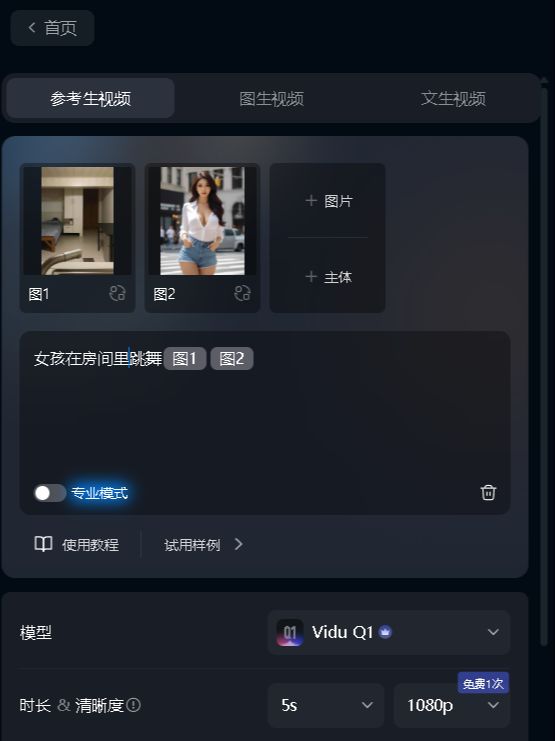
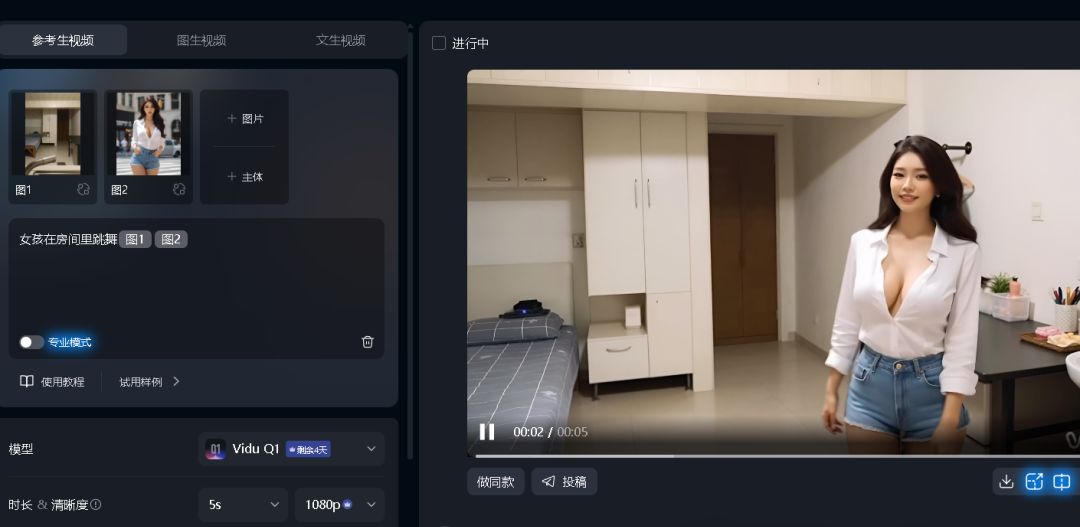
After the fusion of the video is as follows, with the Q1, Vidu's "reference video" effect is very capable of playing!
Seriously, Vidu has a better blend of effects, but the scene it trespassed to make a few mods
2、Video extension
A few seconds generated by AI just isn't enough! What if you want the video to be longer? Some students may say that the video made by AI can be extended. This is only one thing, do not know the other. Whether it's Dream or Spirit, the videos made with the latest models don't support extension.
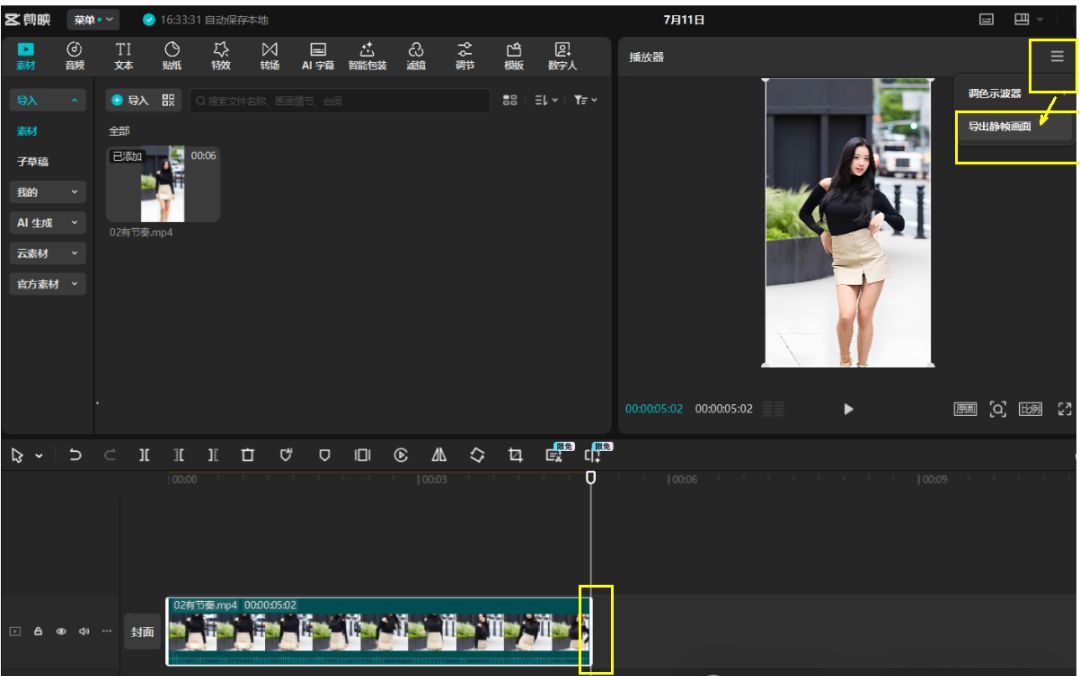
Don't panic! We can use the "tail frame method" to take out the tail frame image, then upload the AI as the first of the next video to generate a new video, and then finally put the video together!
Tool 1: Cutting and Mapping
Some people use clipping, drag the video into the clipping, pull it to the last frame, tap "Export Still Frame", and you'll have a new picture that fits seamlessly into the video.
Tool 2: Online websites
It's okay if you don't know how to cut a movie, use some online frame-cutting tools like
https://ezgif.com/video-to-jpg
Go to the website, upload the video, choose the start and end time of the screenshot, for example, a 10-second video, you intercept the last 1 second on it

Take a screenshot of the last second of the video as a new image
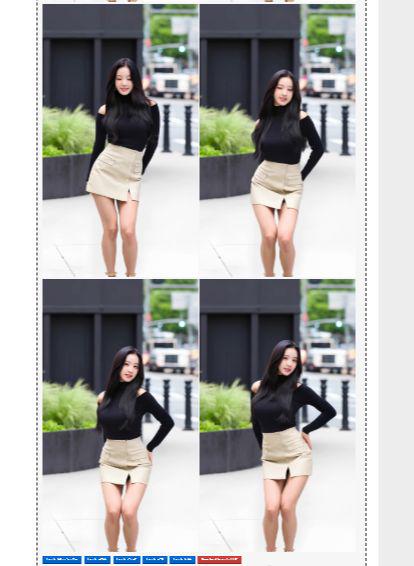
Once you've got the "Ending Chart", throw it back into the Korin as the "Beginning Chart" for the next video, and type in a new cue. Then you can enter a new cue word. This will make a complete dance video!
You can even get Beanbag or DeepSeek to "choreograph" for you:"Write me a sexy 30-second dance routine broken up into six 5-second segments with silky smooth connecting moves, and give me the cue words for all six segments.”
Then you take the 6 cue words, do them one paragraph at a time, and finally put them together with a cutout ......
Well, that's it for today's sharing.