



take a picture of a setdescribe sth accuratelyIf you don't move, you'll have to pay thousands of dollars for styling, makeup, and retouching, and then your wallet will be deflated, and you won't necessarily be satisfied with the results.
Since I have AI, I can use AI to "shoot" my own portrait, I can design all kinds of beautiful portrait, not only to save time but also look good! Just use your own selfie to realize.
Today I will teach you this method.
It doesn't matter if you're a white person who can't write a prompt, I'll teach you step by step so you can easily learn to do your own portraits.
Step 1: Beanbag Generation Cue Words
Save nice photos you see online and send them to the beanbag to backtrack the prompt words.
Beanbag URL:
https://www.doubao.com/chat/
Go to the Beanbag homepage, click on "New Conversation", click on the Upload Attachment icon, and then click on "Upload File or Image". Then you can upload a picture of the prompt you want to push back.
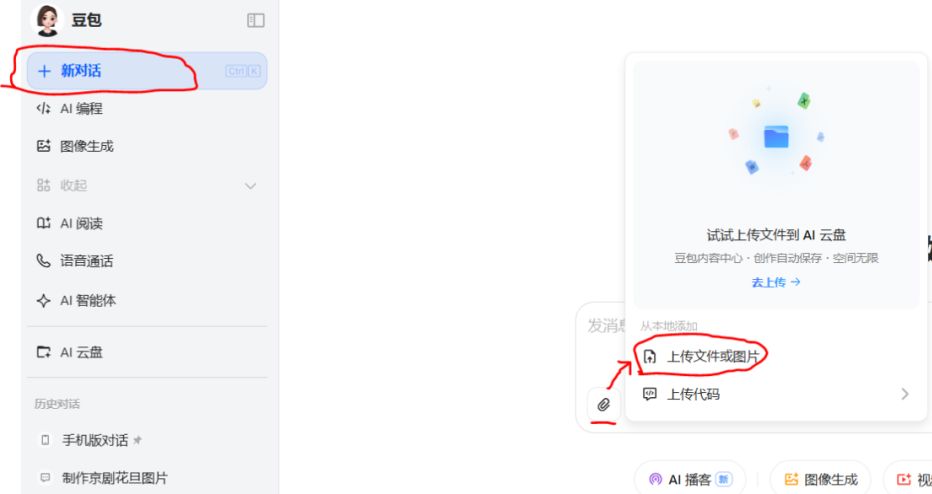
After the image is uploaded, enter "Help me push back the prompt word, request Chinese display" in the input box as follows:


Step 2: i.e. Dream Generation Picture
Open AI, select "Picture Generation", click the "+" sign, add a reference picture and upload a selfie.

Select "Portrait", choose the ratio, for example, I chose 3:4, and then click "Save".

Then type in the prompt word in the prompt word box of the beanbag rebound and click on the Generate button. It will generate 4 images, if you don't have your favorite among these 4 images, you can continue to generate until you are satisfied.
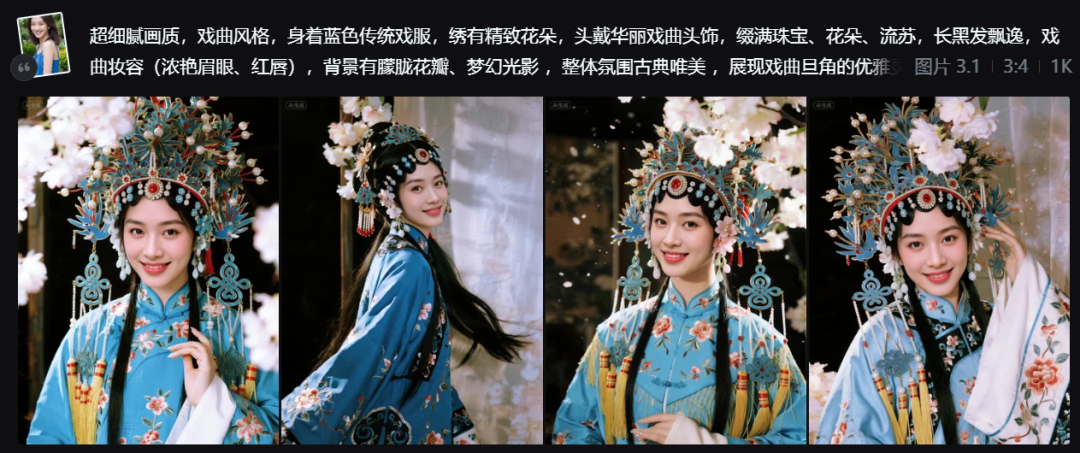
Next, you can also modify the prompts to your liking, for example, I modified the prompts as follows:
Drawing a Peking Opera flower girl, dressed in pink costume, skirt flowing, posing for singing, showing the flavor of the national style. Real light to create a sense of cinema, head decorated with beads and flowers, decorated with gorgeous and shining light effects of the phoenix crown, the classic opera makeup, clothing and props show smooth gloss, light and shadow colorful, with internal luminescence effect. The background has falling petals, hazy light and shadow to create a dreamy atmosphere, the picture is high definition and delicate, highlighting the beauty of the fusion of opera flavor and modern art.

We can also choose the background as needed, for example, I modified the prompt as follows:
Drawing a Peking Opera flower girl, dressed in pink costume, skirt flowing, posing for singing, showing the flavor of the national style. Real light to create a sense of cinema, head decorated with beads and flowers, decorated with gorgeous and shining light effects of the phoenix crown, the classic opera makeup, clothing and props show smooth gloss, light and shadow dazzling, with internal luminescence effect. The background is blue neon background, the picture is high definition and delicate, highlighting the beauty of the fusion of opera flavor and modern art.

Finally, I'll give you a reference cue word about the Peking Opera flower girl, and you can also just use this reference cue word for your own portrait.
Tips:
Panoramic view, Peking Opera flower girl. Facing the camera, wearing a delicate headdress decorated with wreaths and diamonds, with tassels swaying and fancy earrings. White skin with fine texture, deep soulful eyes and flowing hair. Dressed in a blue costume with a flowing skirt, she strikes a singing pose, showing the flavor of the national style. Real light to create a sense of movie, rich and soft light, creating a beautiful dreamy mood. Ultra-detailed lines outline the ancient style image. Bright colors, high saturation, smooth glossy costumes and props, dazzling light and shadow, with internal luminescence effect. Master composition, high resolution, both light and shadow dynamics, soft color tones, ultra-clear details.
The effect of the Peking Opera flower girl character generated by this cue word is as follows:

Have you learned it yet? Go ahead and try it!