



AI GraphicsThe core of the program is not "randomly generated", but through accuratePrompt word(PromptThe AI is guided to understand the design requirements, and finally outputs visual works that meet the expectations. Whether you are a novice or an advanced user, mastering the whole process of "demand disassembly → cue word writing → tool selection → optimization → results landing" can greatly improve the efficiency and quality of AI graphics. In this article, we will take the "rabbit IP image in commercial posters" as an example, and explain the complete steps from 0 to 1.
I. Pre-preparation: identifying needs and resource reserves
Before writing the cue word, you need to clarify the design goal first to avoid the direction of AI generation being deviated. The core of this stage is "transforming fuzzy requirements into specific parameters", which mainly contains 2 key steps:
1. Breaking down the design requirements (take "Rabbit IP Poster Image" as an example)
Clarify the core elements using the "5W1H" method to ensure that no requirements are missed:
What (content): IP image of a rabbit in a commercial poster (not illustration, not realistic photo);
Style: Hip and cool street style (avoid cute style, national style, etc. to deviate from the direction);
Scene: A3-size poster, with the IP subject highlighted (reserved for copy);
Color: Primary color is Rose (brand VI color), secondary color is Black + Silver (to enhance texture);
Detail (detail required): the rabbit needs to be wearing a baseball cap and overalls, in a "one-handed skateboard" pose with clear edges (for subsequent keying);
2. Preparation of reference material (optional but recommended)
If you don't have a clear idea about the details such as "cool street style" and "work pants style", you can first collect 1-2 reference images (e.g. Little Red Book), which can be uploaded to the AI tool as "image reference". "to help the AI match the style more accurately.
II. Core link: writing high-quality prompts (Prompt)
Cue word is the "instruction manual" of the AI generation, low-quality cue word (such as "draw a hip cool rabbit") will lead to AI to generate random, cluttered works, and accurate cue word needs to contain "body + style + details + technical parameters" 4 layers of information, clear structure and logical coherence. Precise prompts need to contain "subject + style + details + technical parameters" 4 layers of information, clear structure, logical coherence.
1. Formula for the structure of cue words (generic version)
Basic information (body) + style positioning + detailed description + technical requirements = high quality prompts
2. Prompt writing with the example of "rabbit IP image".
(1) Basic version of the cue word (to satisfy novice beginners)
Suitable for scenarios that do not require a high level of detail and need to produce a quick image, the core of which is to "cover the core elements without redundant information":
"Hip and cool street style bunny IP image with rosy red hair, black baseball cap, black overalls, silver skateboard in one hand, standing position, transparent background with clear edges, suitable for poster printing,"
(2) Advanced version of the cue word (to satisfy commercial design)
Need to add details such as "texture, light and shadow, proportion", to avoid AI to generate "blurred, disproportionate" work, can add "reference style" to enhance the direction:
"IP image of a rabbit for commercial posters, cool street style (referencing Supreme brand illustration texture), rosy red short-haired rabbit, head 1/3 of the body, black embroidered baseball cap (with silver logo on the brim), multi-pocketed black overalls (with rolled hems), silver graffiti skateboard in one hand, standing posture (center of gravity is to the right, limbs are spread out), lighting is sidelight (top left lighting creates slight shadows to enhance three-dimensionality), sharp edges, no blurring, high-definition details, no unnecessary elements Sidelighting (light from the upper left, creating slight shadows to enhance three-dimensionality), sharp edges without blurring, high-definition details, no unnecessary elements"
Tool selection: matching the needs of the AI generation platform operation
Different AI platforms have different "style focus" and "operation difficulty", so you need to choose according to your needs. Below are three types of mainstream tools recommended, and the specific operation steps are broken down:
1. Beginner-friendly: i.e., Dream (focusing on fast mapping and support for image referencing)
Suitable for users who have no basic design knowledge and need to combine "Text Tip + Reference Image" to generate works, take "Rabbit IP Image" as an example:
Open the tool: Login to the website or APP, and enter the "AI Graphics" module;
Enter the prompt: Paste the prompt in the "Text Box".
Upload reference image (optional): Click "Add reference image" to upload the street style IP reference image prepared in advance;
Set the ratio parameter: choose the ratio size you want, common such as vertical screen 9:16
Generate and Preview: Click "Start Generate", wait for 30 seconds - 1 minute, after generating, preview 4 drawings, filter the works with "harmonious proportion and details" (if none of them meets the standard, go to the next step of optimization).
2. Efficiency tools: Beanbag + Dream (cue generation + graphic linkage)
Suitable for users who "can't write cue words", after using beanbag to generate cue words, directly docking that dream birth chart:
-Generate prompt words: Open Doubao, enter the demand "Help me write a commercial poster with a hip cool street style rabbit IP image prompt words, the requirements of rosy red hair, wearing a baseball cap, wearing overalls, transparent background, 300 dpi, and then add negative prompt words", get the prompt words generated by Doubao;
One-click graph generation:
First, click the "Generate Image" button in the beanbag dialog box to generate an image
The second, copying the cue words to "i.e. Dreams" as a graphing tool.
IV. Raw chart optimization: from "unsatisfactory" to "up to standard" adjustment techniques
If the generated image is "out of proportion and missing details", there is no need to rewrite the cue word, it can be solved by "local adjustment and parameter optimization", and the coreIt's "locate the problem→targeted modifications".
1. Frequently asked questions and solutions

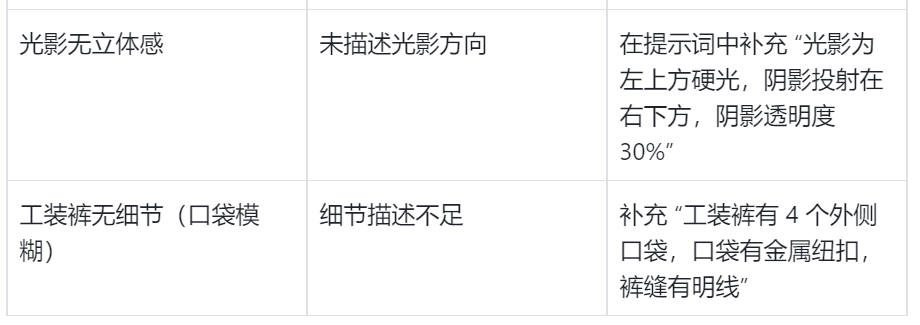
2. Advanced optimization: partial redraw (for "partially met" images)
If only "skateboard details are blurred", you don't need to redraw the whole thing, you can use the "partial redraw" function of Instant Dreams:
Open the generated rabbit IP map and click on "Local Redraw";
Circle the "Skateboard Area" with the "Paintbrush" (select only the portion to be modified);
Enter "Silver graffiti skateboard with black street graffiti pattern (including stars and arrows elements) on the top of the board and metal wrapped edges with clear details" in the "Localized Prompt Words" section;
Click "Repaint" to save time by updating only the skateboard area and keeping the rest of the reach.
V. Results on the ground: processing and application after the birth of the map
After generating the standardized image, it needs to be post-processed according to the "application scenario" to ensure that it meets the actual usage requirements:
1. Post-processing (2 core steps)
Keying (if the background is not transparent): Keying with the finalized design, select "Edge Preserve" mode to avoid missing the rabbit's fur and skateboard's edges;
Advanced Thinking: 3 Key Habits to Enhance AI Graphics Efficiency
-Create a prompt word bank: Categorize and archive the "prompt words" according to "style (cool/cute/country style)" and "type (IP/poster/font)", so that you can directly modify the details (e.g. change "rabbit" to "cat") for the next time, saving time for writing. The next time you have similar needs, you can directly modify the details (e.g. change "rabbit" to "cat"), which saves writing time;
Record the "optimization log": after each adjustment of the cue word, record the "modification point + effect" (e.g. "After adding 'side light', the three-dimensional sense is enhanced "), to avoid repeating pitfalls;
Through the above full-process operation, from "demand disassembly" to "landing application" to form a closed loop, not only can avoid the "randomness" of AI graphic generation, but also greatly improve the design efficiency. Whether it is a commercial poster, IP image, or daily illustration, mastering this method will make AI an "efficient assistant" in design.