



Clawdbot One night of fire。
Yesterday, this Clawdbot was on several platforms, and as an open-source project, GitHub's Stars surged by more than 9000 in one day, adding over 200 PRs overnight, and the founders themselves said it blew up, and it was crazy。
In short, Clawdbot is a personal AI assistant, fully localized, working on Claude for 7 hours。
Why is it on fire
NOT BECAUSE 7*24 HOURS, NOT BECAUSE IT CAN ACCESS FILES, BROWSERS, E-MAILS, BUT BECAUSE THIS THING SUPPORTS YOUR INTERACTION ON THE APP。
For example, you're playing a game and you're putting him on an iMessage mission, and it's dry, and when you get back, you're done. The whole process was like sending a message to a friend in a tweet。
Support for almost all mainstream communication platforms: WhatsApp, Telegram, Slack, Discord, Google Chat, Signal, iMessage, Microsoft Teams, Matrix, Zalo, WebChat。
Second: it runs on your own equipment, Mac, PC, strawberry pie, cloud servers。
This point is also timely, and now AI bot is largely in the browser, and of course there is also a desktop end, such as Minimax, which introduced desktop-end APPs at the previous time, to operate the browser itself, and Claude Cowork to access local folder operations files。
But Clawdbot can be deployed in any terminal device, computers, watches, berry pies, even smart glasses, like, imagine that the space just opened。
However, if you deploy the equipment, it has to be on-line。
It's just a server application, the core of the Clawdbot architecture is Gateway, the brain of the entire system, the only central node through which all the messages go. If it's offline, the whole system is paralysed。
Because it's on the line, it's able to contact you on its own, send the weather, the agenda, the news, the mission schedule, and become an active assistant, unlike passive chat robots. If you just have to answer passively, you can use ChatGPT。
The Clawdbot fire also triggered a rush by Mac Mini, but it was not necessary at all, because I thought it would be most convenient to deploy on a cloud server, and I recommended it most。
Because it has access to your local equipment, and although I have not yet figured out how it was obtained, it is a very big one, and it is not deployed on your laptop to protect your local documents。
And your computer couldn't have been there 24 hours before it shut down. So choosing a cloud server is the best that can run for 24 hours。
I spent 30 bucks renting a VPS, Mac Mini the cheapest $599 (about $4300), a VPS 30 a month and 10 years to $3,600. And the VPS is broken and re-opened。
I see a lot of people who can't handle this. A lot of people are stuck in the deployment。
So this article, I put the deployment course at the topHands on your hands and hands from zero to working, so white can read。
Directly deploy from zero to service only 7 steps
Friends of Claude Code:
If you think the manual configuration is too complicated, I'm readySkillIt's smart enough to fit your configuration. It's automatic。
However, I would suggest that we take a look at the curriculum and understand the rationale for deployment. We'll find out how。
Manual deployment: You need three things
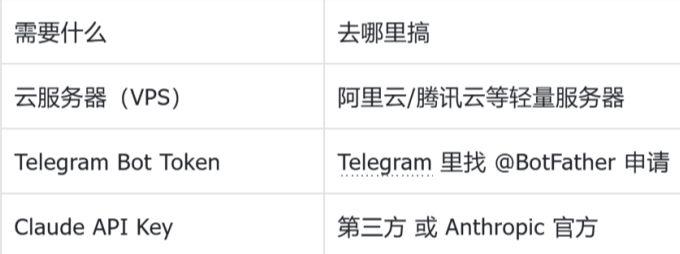
First step: Buying a cloud server (10 minutes)
For example: Ariyun/Ting Clouds/Wan Yun/Nonameless Cloud ServerFreshman friendly。
- open https://www.aliyun.com/product/swas (for example only, every cloud server)
- Registered login (cell phone number only)
- Select Configuration:
Geographical: Hong Kong (complex domestic filing required, not required in Hong Kong)
Mirror:Ubuntu 22.04 LTS
Package: 2 NUCLEAR 2G, 30GB SSD
length of time: Buy first 1 month
Pay complete, access console, open port。
Reset Passwordand set for themselves a good note。
Write down three messages:
IP address: xxxx.xxx.xxxxx
user name: root
password: xxx
- This server is the Lobster's Home, and it's going to run around here for seven times 24 hours。
Step 2: Create Telegram robot (5 minutes)
It can be done on the phone without a server。这是你和 Clawdbot 交互的入口。
Procedure:
1. 打开 Telegram,搜索 @BotFather(有蓝勾认证的官方账号)
2. 点击 START,发送命令:
/newbot
这一步是创建一个机器人,BotFather 会让你给机器人起个名字,随便敲个名字“qq 机器人”即可。(可以用中文,类似昵称)
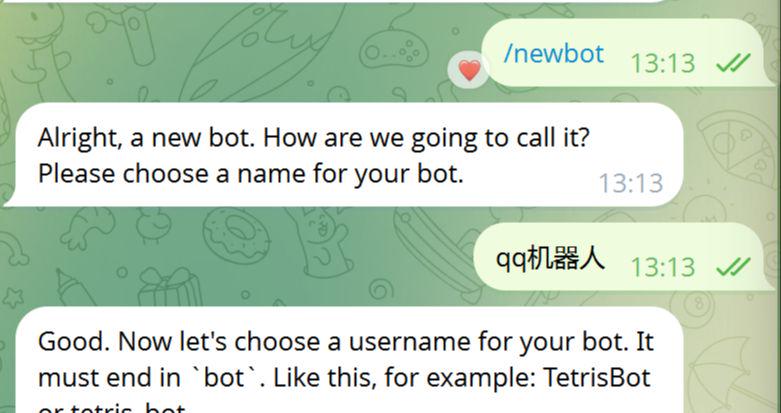
然后再取一个用户名,我的叫 MadscBot(必须英文,必须以 bot 结尾)。用户名类似 QQ 号,不能重复。
3. 成功后,BotFather 会发给你一个 token。
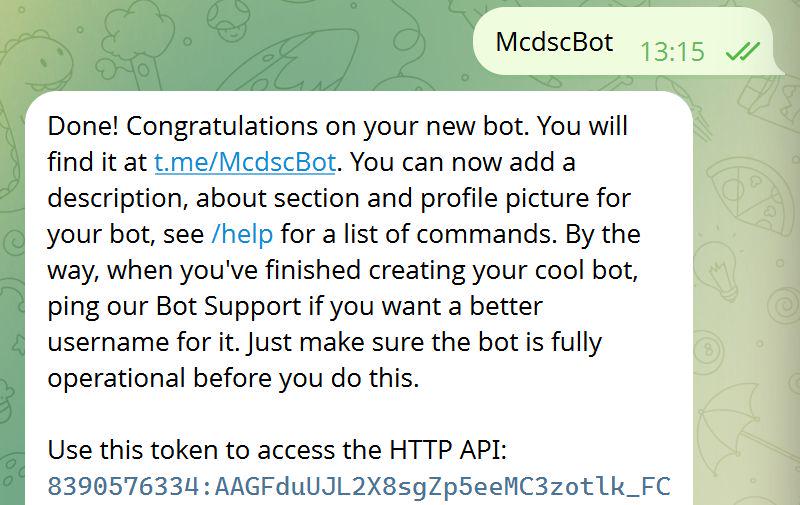
4. 复制token,保存好。这个 token 很关键,因为要把它给到Clawdbot,Clawdbot 才能连接上这个 bot。
5. 点击t.me/McdscBot 提前添加机器人好友备用。
📌 第三步:获取 Claude API Key(5 分钟)
有两个选择,推荐国内用户用第三方 API。
方案 A:支持 Claude 模型的三方中转 API
- 手机号注册,支付宝/微信充值
- 充值 50 元能用很久
- 创建 API Key,复制保存
- 格式:sk-xxxxxxxxxxxxxxxx
方案 B:官方 Anthropic API
- 访问 https://console.anthropic.com
- 需要国外手机号
- 按量付费,约 $15/百万 tokens
记下你的 API Key,下一步要用。
(此处省略了一万字)
📌 第四步:登录服务器(3 分钟)
登陆第一步购买的云服务器。
Windows 用户:
1. 按 Win+R,输入 cmd,回车
2. 输入:ssh root@你的服务器IP
3. 输入密码(不会显示,直接粘贴回车)
4. 看到 root@xxxxx:~# 就连上了
Mac/Linux 用户:
1. 打开终端
2. 输入:ssh root@你的服务器IP
3. 输入密码
📌 第五步:安装 Clawdbot(10 分钟)
连上服务器后,复制粘贴执行以下命令:
_# 1. 更新__apt_
apt update && apt upgrade -y
_# 2. 一键安装Clawdbot_
curl -fsSL https://clawd.bot/install.sh | bash
_# 3. 等待安装完成,看到 “Installation complete!” 就成功了_
如果报错,重新执行第 2 步。
📌 第六步:配置 Clawdbot(重点!)
这是最容易出错的一步,跟着我一字不差地操作。
- 编辑配置文件:nano /root/.clawdbot/clawdbot.json
- Delete all content: Delete the original text by Ctrl+K line until the document is completely blank。
- Modify configuration: Copy the following code as it is。
IF YOU'RE USING A THIRD PARTY, API, copy this:
{“models”: {“presses”: {xxx”: {baseUrl”: “https://xx.xx”, “apikey”: “API Key”: “anthropic-messages”, “models”: [id]: “claude-opus-4-5-202511 },” “name”: “Claude Opus 4.5”; “ressoning”: “true”, “input”: [“text”, “intertext”; “intertextWindow”: 200000, “xmaTokens”: 4096},}, “channels”: {telegram”: {enabled”: , “toke”: “Tuket”: “Buket”: “Bkitmail”; intertextWindow: 200000, “xTokens: 4096} }, {telegrams”: “telegram”: {: {: {enabled_: {: {: {: { ♪ I'll be back ♪
If you're using official Anthropic API, copy this:
{ “Models”: {“providers”: {“antropic”: {“apikey”: “Press your Anthropic API Key”}}, “channels”: {“telegram”: {“enabled”: true,” “botToken”: “Press your Bot Token”, “profiles”: [“default”)}, “gents”: {“defaults”: {model”: {“primary”: “anthropic/claude-opus-4-5-20251101”} ♪ I'll be back ♪
And then we change three places。
- Replace "apikey" with "apikey" with "apikey" in quotation marks that paste your API Key here
- Replace "https//xxx.xx" with "Play your own" quote with "Base URL"
- Replace "bottoken" with "bottoken" in the quote "put your bottoken here"
Save exit:
- Press Ctrl+O to save (indicate file name, go straight back)
- Press Ctrl+X to exit
Step 7: Start service (5 minutes)
_# 1. ENABLE DURABILITY (TO KEEP SERVICES RUNNING) _
this post is part of our special coverage global voices 2011
_#2. Set up the environment variable_export XDG_RUNTIME_DIR=/run/user/0
_# 3. START-UP SERVICES_
-steml-user start codebot-gateway
_#4 CHECK STATUS_
-we're going to have to go back to work
It's working
If you see a red error, execute this view log:
i'm sorry, i'm sorry
Step 8: Match your Telegram account (3 minutes)
- Open Telegram, find your robot
- Send any message, like, hello
- Robot response:
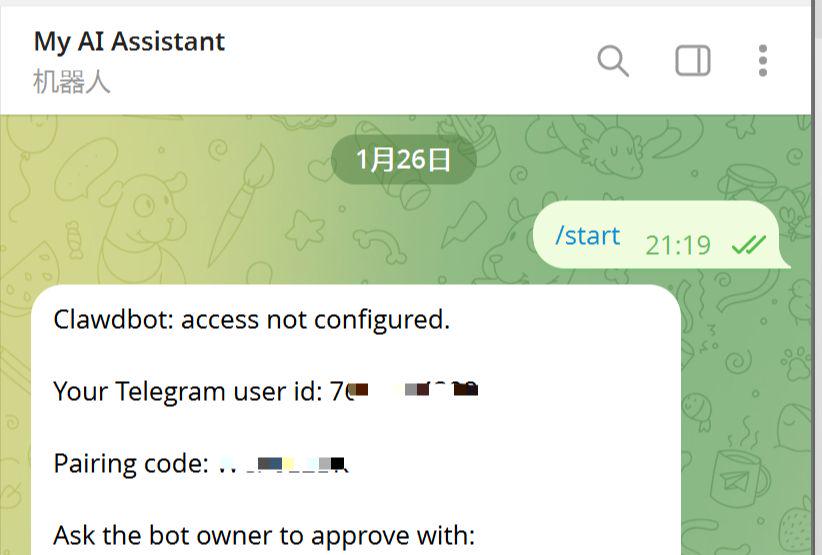
4. Copy pairing
RETURN TO SERVER SSH WINDOW TO EXECUTE:
i'm not sure I'm going to do this
6 (REPLACE ABC 123 WITH YOUR PAIR)
Go back to Telegram and send another hi
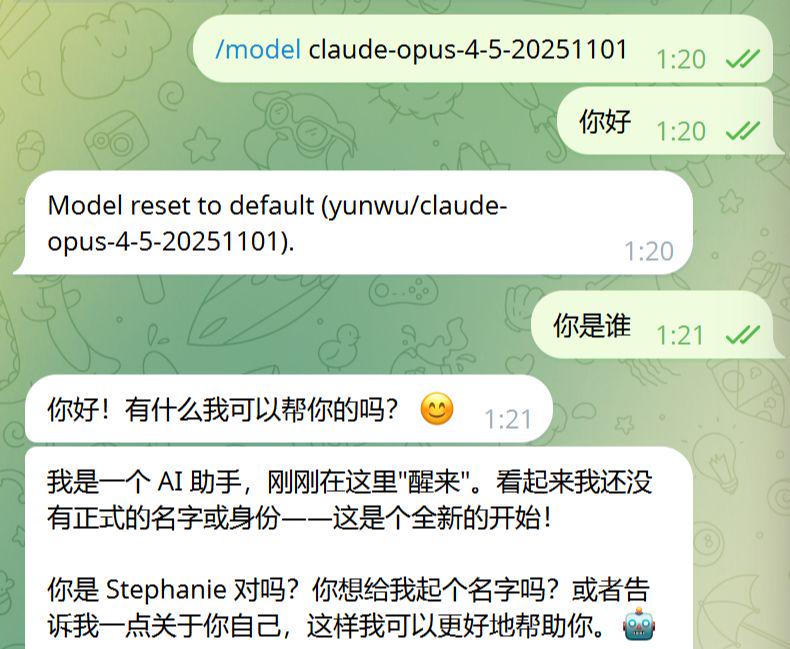
If the robot returns, congratulations on the successful deployment! Zenium
III. The easiest pit to step on
When I deployed, I stepped on three major pits and shared them with you. Many people are stuck in these places。
TUNNEL 1: THIRD PARTY API CONFIGURATION POSITION
The third party Claude API's configuration has two hidden rulesIt's not in the official fileI tried all night to find out:
Example of error:
"api": "anthropic", error! a lot of people write this
"baseUrl": "https://xxx.xx/v1" More/v1
Correct Example:
"api": "antropic-messages", yes! it has to be written like this
"baseUrl": "https://xxx.xx" Do not bring/v1
Pocket 2: Reconfiguration must be cleared
This pit stuck me for half an hour. After each change of profile, the cache must be cleaned and restarted, otherwise the new configuration is not effective:
_# Cleanup Cache_rm-ref / root/.clawdbot/agendas/main/agent/sessions/*
_# 重启服务_export XDG_RUNTIME_DIR=/run/user/0
systemctl –user restart clawdbot-gateway.service
Symptom:明明改了配置,但日志里还是显示旧的模型/API。你怀疑配置没生效,反复改,越改越乱。
reason:Clawdbot 会缓存会话状态,包括模型配置、API 连接等。不清缓存,它继续用旧的。
❌ 坑 3:服务不断重启(最难排查)
如果你发现服务每隔 10-15 秒就自动重启一次,日志里有fetch failed或ERR_SERVER_CLOSED错误,原因通常是:
- Linger 没启用 – SSH 断开后服务被杀死
- 会话缓存损坏 – 旧的 session 文件导致启动失败
完整解决方案:
_# 1. 启用linger(让服务持续运行)_
this post is part of our special coverage global voices 2011
loginctl show-user root | grep Linger _# 确认显示 Linger=yes# 2. 清理会话缓存_rm -rf /root/.clawdbot/agents/main/agent/sessions/*
_# 3. 重启服务_export XDG_RUNTIME_DIR=/run/user/0
systemctl –user restart clawdbot-gateway.service
_# 4. 监控日志,确认不再重启_
journalctl –user -u clawdbot-gateway.service -f
为什么 Linger 这么重要?
因为 Clawdbot 使用“用户级 systemd ”服务,默认情况下用户登出(SSH 断开)后服务会停止。启用 Linger 后,服务变成“持久化”,即使你关掉终端也继续运行。
记住这些,能少走很多弯路。
四、实测效果:它到底能干啥?(让你看完教程有动力)
部署完成后,我在 Telegram 里让它装了我的选题 skill。
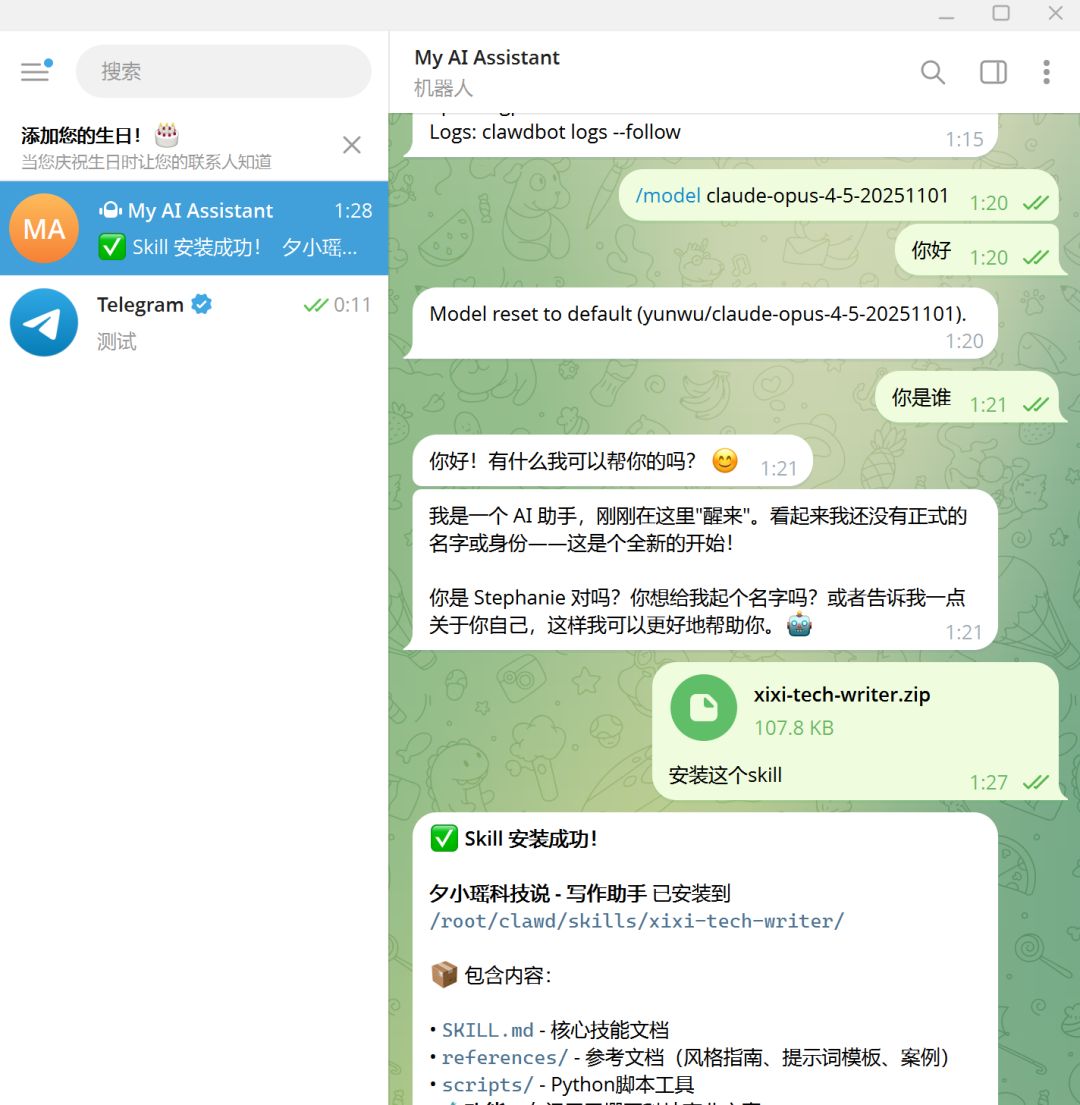
接着,对 Bot 说了一句“抓一下今天的选题”。3 秒钟后,它给我吐出来一个完整的选题表,包含今日 AI 科技热点 TOP 5,每条新闻都标注了价值评分和适合的文章类型,分得清清楚楚。
跟 Claude Code 的体验一模一样,只不过是在 Telegram 里完成的。我还测试了文档整理,让它把 10 篇论文摘要整理成表格,它会自动解析文档提取关键信息生成结构化表格。
甚至可以让它写个 Python 脚本,每天早上 8 点抓取 Hacker News 前 10 条发给我。如果你用的是 Mac,它还能控制浏览器自动登录网站、填写表单、批量下载文件…
总之,Claude Code 能干的事它基本都能干,区别只是你在手机上发消息它在服务器上执行。