



OpenClaw Full User Guide: From 0 to Stable Permanent (Equip Configuration + Channel Access + Error)
- Read the proposal: Run through "Equip - > First Access - > First Job Validation" and then make a step configuration。
catalogs
- 01|OpenClaw What is it? It's different from the normal AI chat tool
- 02 pre-installation preparation: system, account number, model source
- 03:20 minutes running through the minimum closed ring: installation - > start - > first available
- 04 + Telegram, two available routes
- 05 | model configuration: run through a provider, then optimize
- 06: NEXT STEP: GIVE AN AI ASSISTANT A SOUL (SOUL / USER / AGENTS)
- 07 |Skills Progress: from the session to the management
- 08 Common pits and miscalculation (installation, access, models, Skills)
01|OpenClaw What is it? It's different from the normal AI chat tool
One sentence summary:OpenClaw is the local-first personal AI assistant framework.
IT IS NOT A SIMPLE CHAT PAGE, BUT A SELF-HOSTED AI HUB THAT CAN BE RUN OVER TIME。
The core pattern is:
- You run a Gateway on your own device
We need to get the chat channels, equipment capabilities and models together
CREATE A SCALABLE AND SUSTAINABLE PERSONAL AI WORKSTATION。
Suitable for such scenarios:
- Trying to get AI access to Telegram / WhatsApp / Flying Book
- TRYING TO GET AI TO HANDLE SOME OF THE DUPLICATE PROCESSES, NOT JUST QUESTIONS AND ANSWERS
- You want to put the data and the implementation environment on your own control
02 pre-installation preparation: system, account number, model source
The basic environment is confirmed:
- Node.js > = 22
- macOS / Linux / Windows
- pnpm (only for construction from source code)
Model source preparation:
OpenClaw supports multiple projects. Pick the one you're most stable to use, then expand。
- OpenAI (API + Codex) [1]
- Anthropic (API + Claude Code CLI) [2]
- Qwen (OAuth) [3]
- OpenRouter [4]
- Vercel AI Gateway [5]
- Moonshot AI (Ki + Kimi Coding) [6]
- OpenCode Zen [7]
- Amazon Bedrock [8]
- Z.AI [9]
- Xiaoomi [10]
- GLM MODEL [11]
- Mini Max [12]
- Venice AI [13]
- Ollama (local model) [14]
Channel prepares recommendations:
- Let's start with a new source. Don't start all over
- This is an example of using the Flying Book (Feishu), which runs and then extends to Telegram/WhatsApp/Discord
03:20 minutes running through the minimum closed ring: installation - > start - > first available
Recommended default deployment (most users):
- Small Linux VPS: Fits to Gateway Resident, Low Cost
REFERENCE VPS TRUSTEESHIP [15]
- Special hardware (Mac Mini / Linux machine): suitable for local capacity or long-term stable operation
- Mixed scheme: Gateway release VPS, local UI/browser automating with local nodes
Reference Node [16] and Gateway Remote [17]
macOS/Linux installation:
curl -fsSL https://openclaw.ai/install.sh | bash
Windows 建议先安装 WSL2,详细步骤见 微软 WSL 安装文档[18]。
安装过程的一些截图:
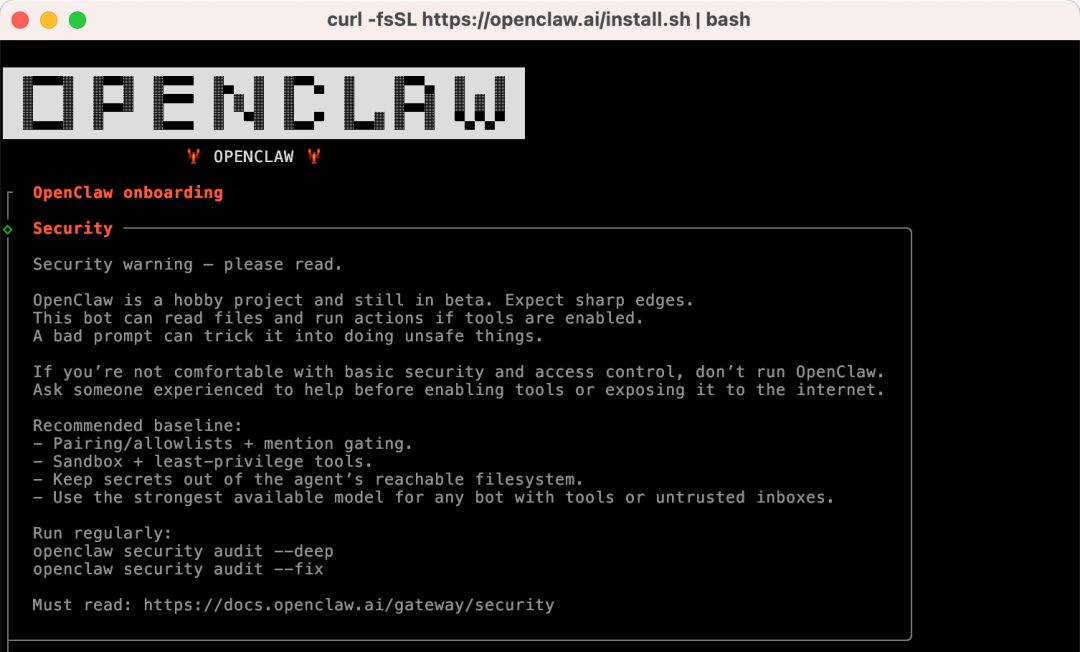
这一步是安全提醒。建议先看一遍官方安全文档,再继续安装流程:
https://docs.openclaw.ai/zh-CN/gateway/security[19]
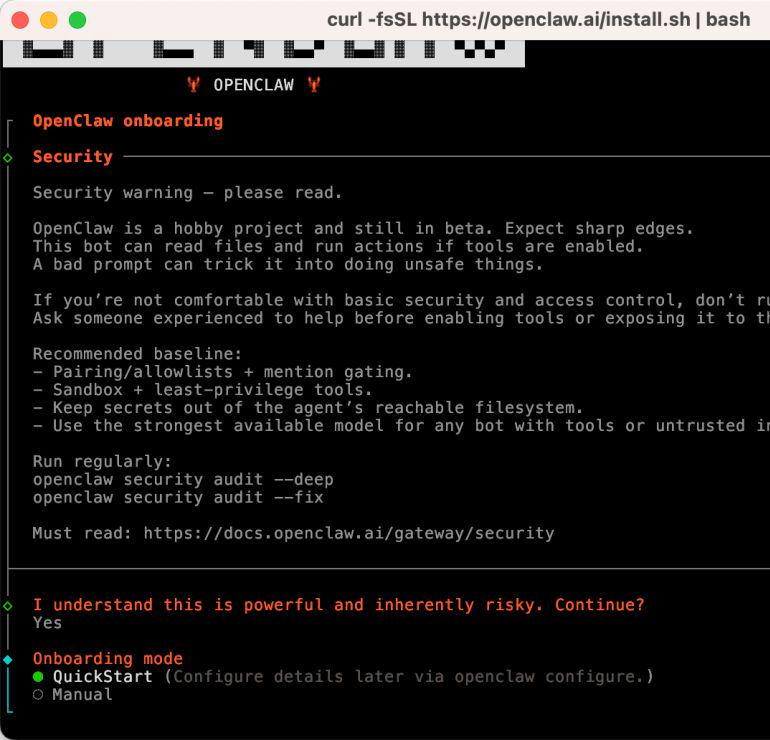
如果你是新手,建议先选QuickStart ,先把最小闭环跑通。
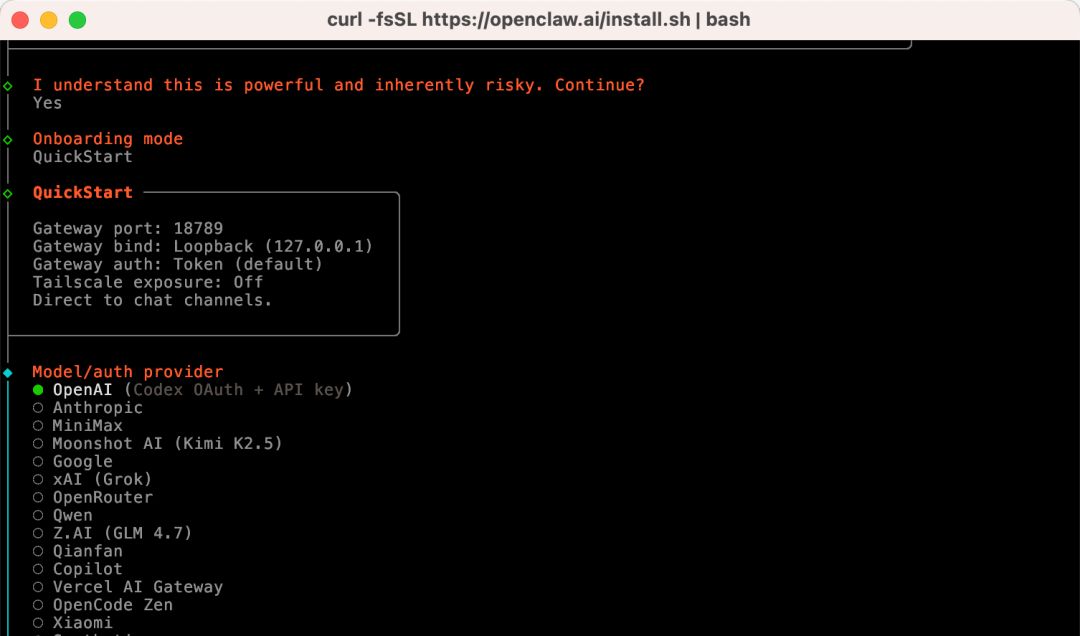
这一步是选择模型供应商。本文演示使用 OpenAI Codex (ChatGPT OAuth),后文也会补充自定义baseURL和apiKey的配置方式。
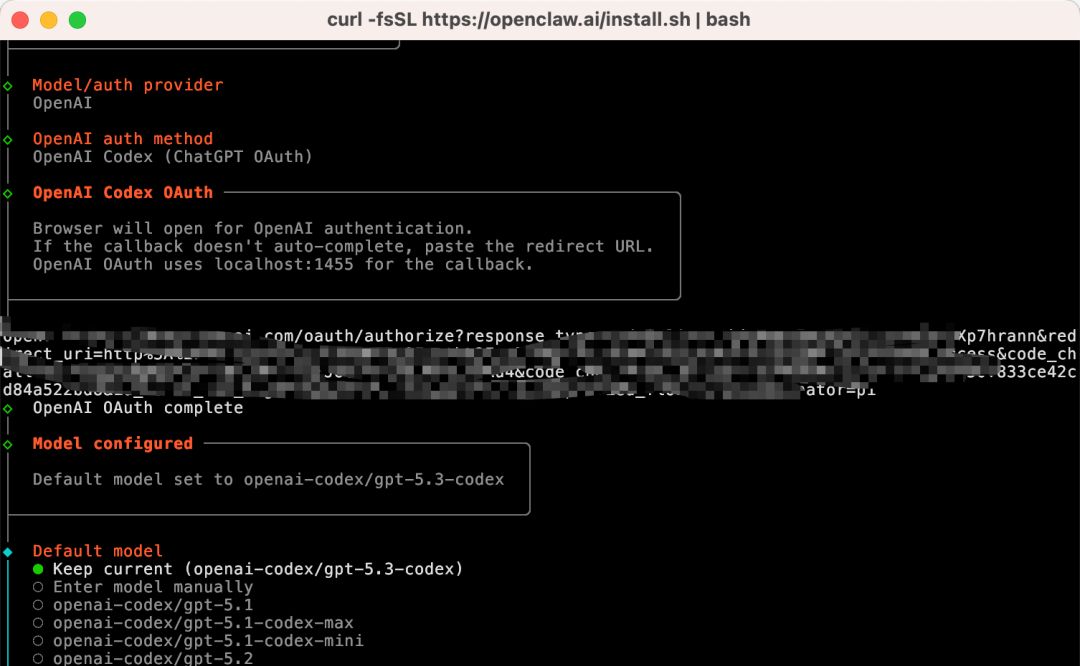
完成 OAuth 认证后选择模型。这里我直接使用Keep current。
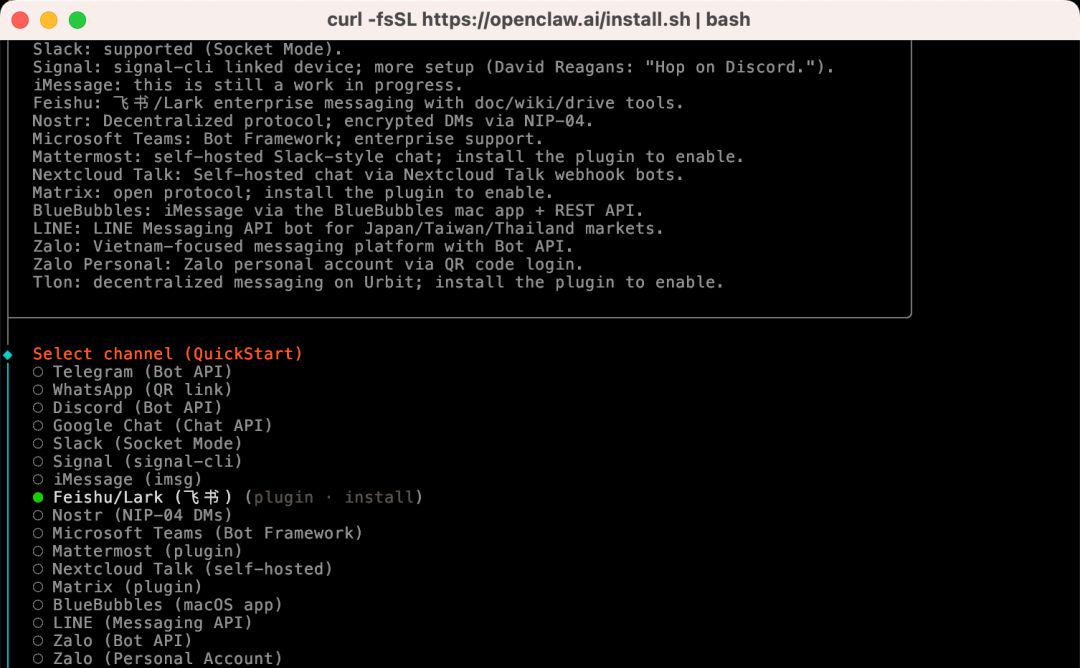
这一步是选择消息渠道。本文先演示飞书,所以这里先选 skip for now,等下面渠道章节再完整配置。
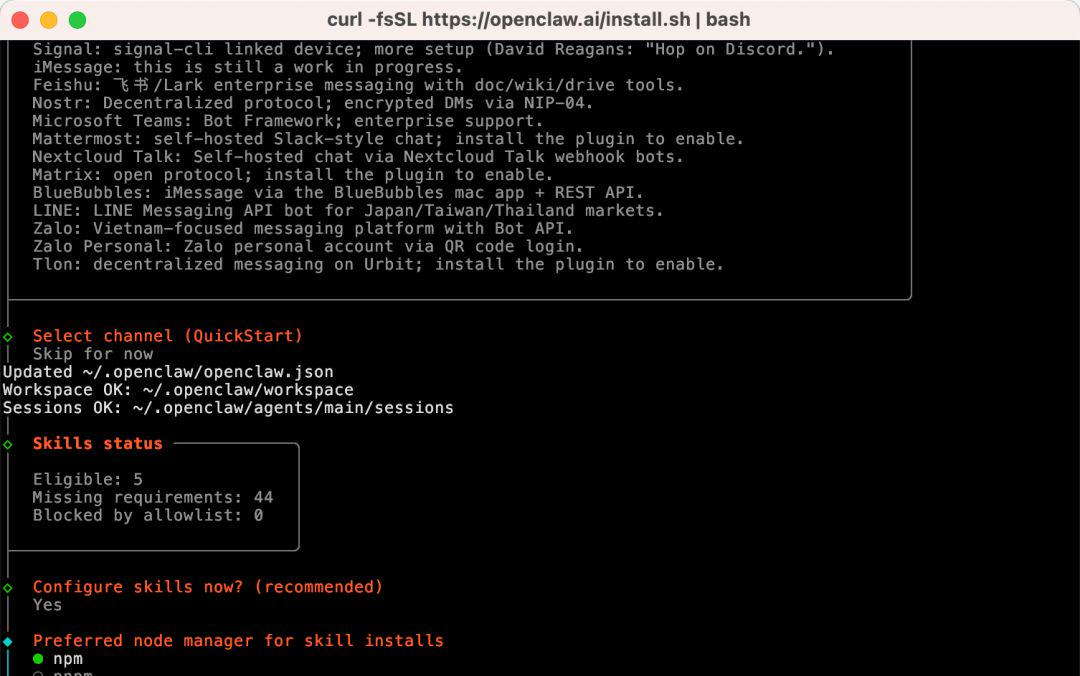
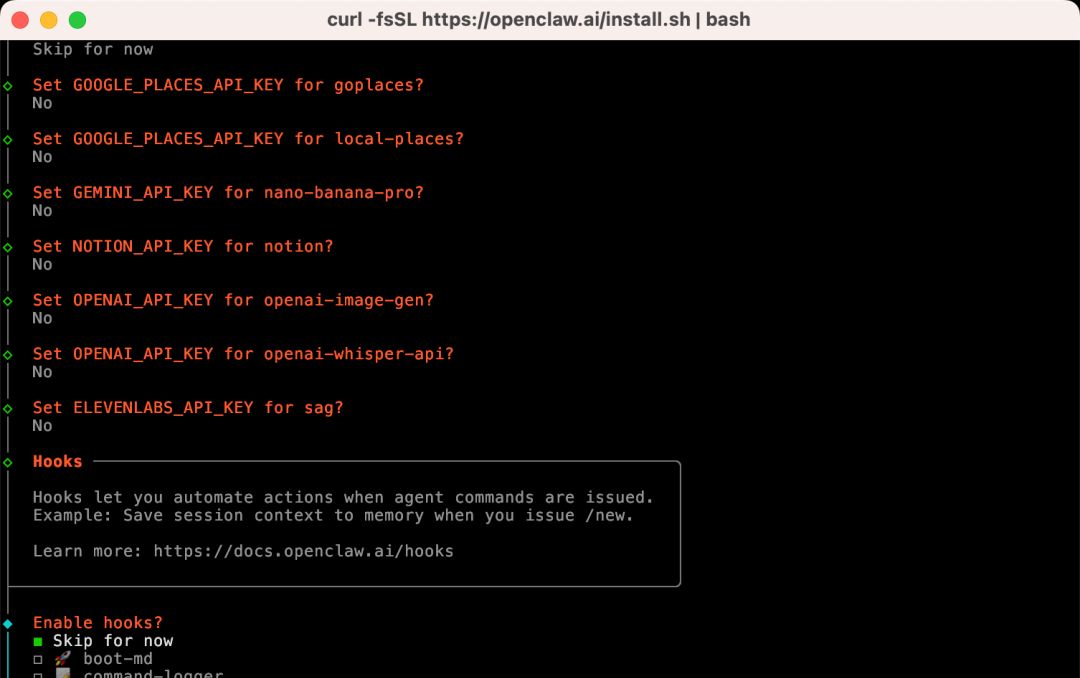
这一步会问你用哪个 Node 包管理器安装 Skills。默认npm就可以。其余步骤我先选了Skip/No,后续有需要再在配置文件里补上。
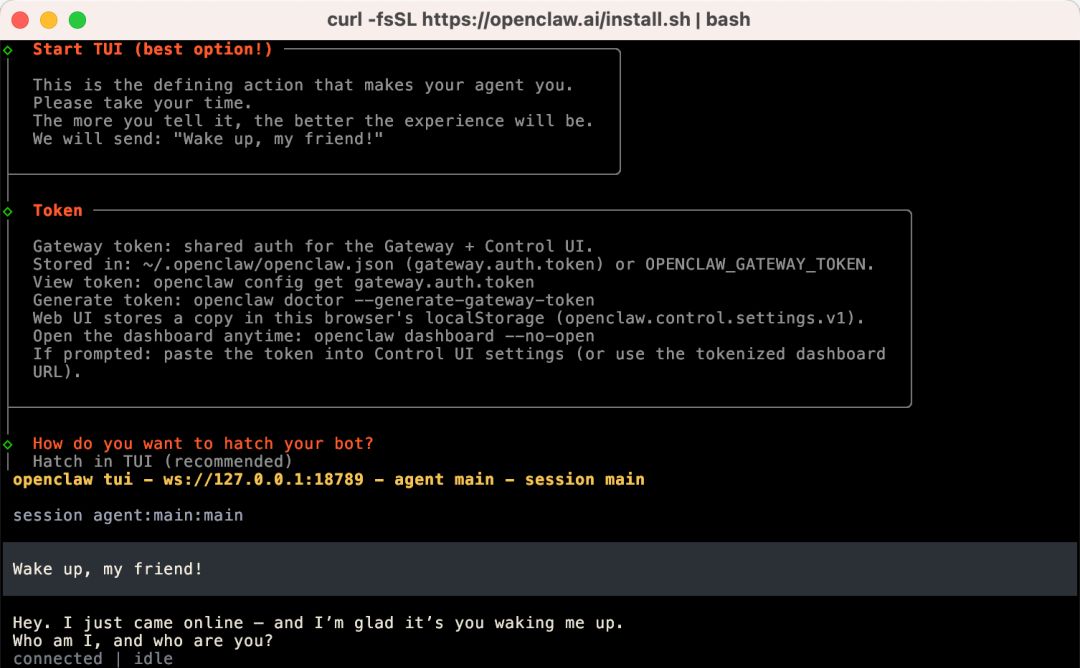
访问127.0.0.1:18789时如果出现报错,可按下面步骤处理:
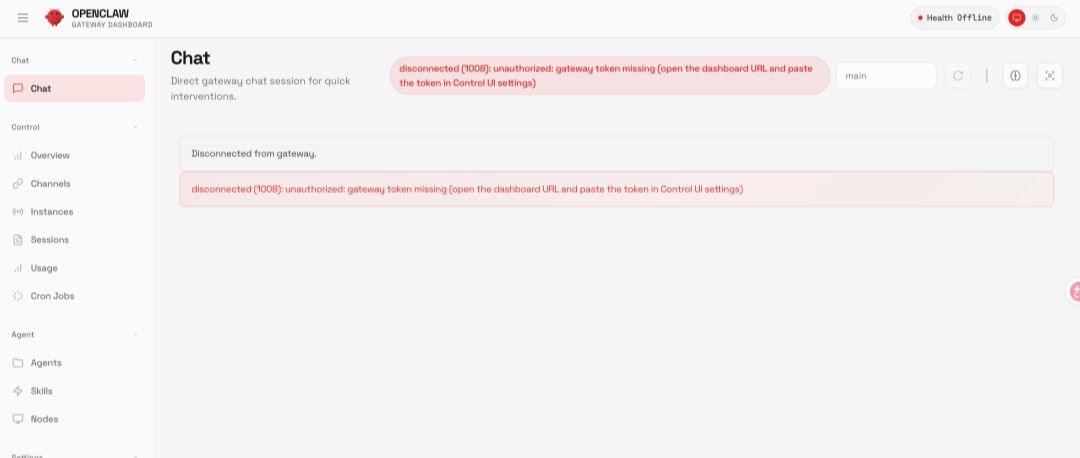
- 执行 cat ~/.openclaw/openclaw.json
- 复制 gateway.auth.token
- 在/overview > Gateway Access > Gateway Token中粘贴
- 点击 Connect
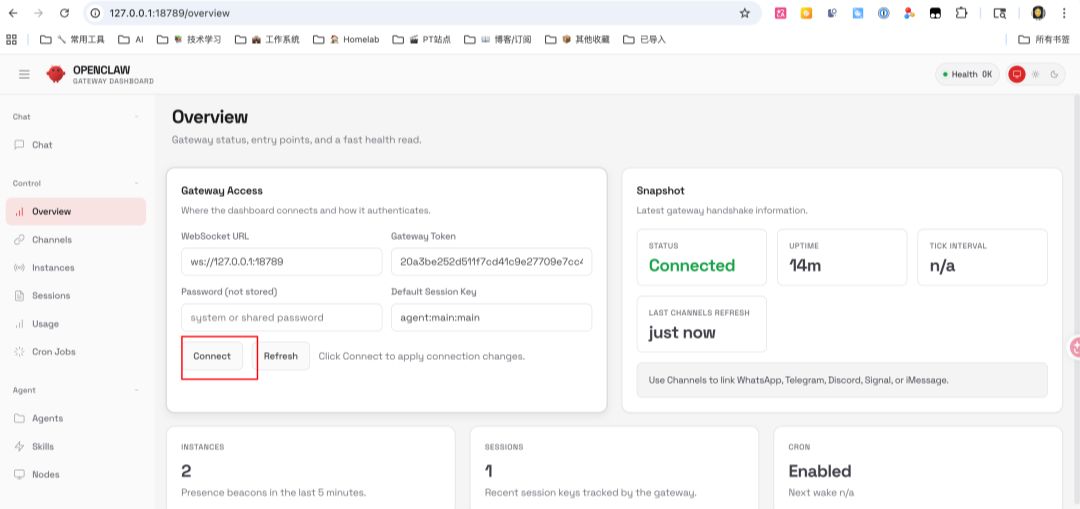
完成后页面就能正常连接。
安装常用状态与运维命令:
openclaw status # 查看整体状态
openclaw gateway status # 查看 Gateway 运行状态
openclaw health # 健康检查
openclaw configure # 重新配置(修改模型、渠道等)
openclaw daemon restart # 重启后台服务
openclaw daemon logs # 查看运行日志
验证方法(满足这 3 条即可):
- openclaw status和openclaw health无关键错误
- Gateway 状态为运行中
- 在目标消息渠道里能收到机器人回复
04 + Telegram, two available routes
新手路线建议:先接一个渠道.
这里先给飞书流程,再补一条 Telegram 流程。你可以先跑通其中一条,再扩展其他渠道。
1. 打开飞书开放平台
访问 飞书开放平台[20] 并登录。
如果你用的是 Lark(国际版),使用 open.larksuite.com/app[21]。
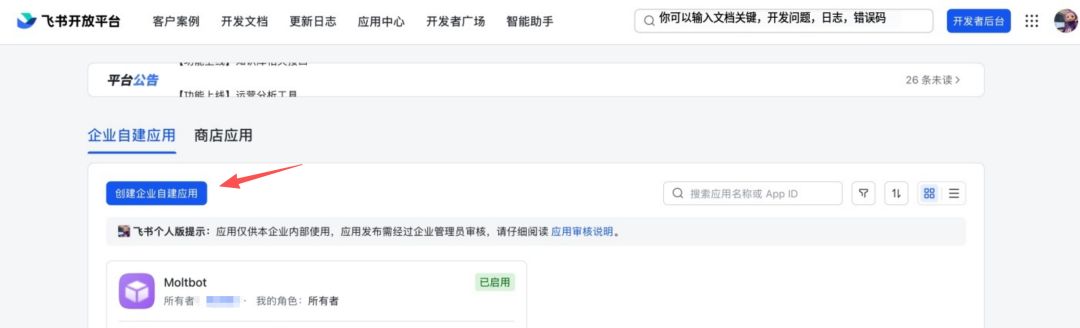
2. 创建应用
- 点击“创建企业自建应用”
- 填写应用名称和描述
- 选择应用图标
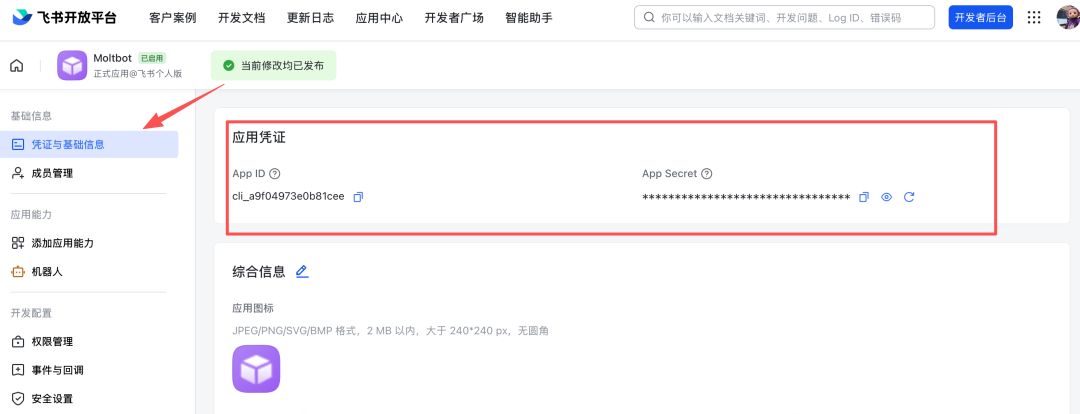
3. 获取应用凭证
在“凭证与基础信息”页面复制:
- App ID(格式类似 cli_xxx)
- App Secret
请妥善保管App Secret,不要外泄。
4. 配置应用权限
在“权限管理”页面,使用“批量导入”导入所需权限:
{
"scopes":
“tenant”:
“aily:file:read”,
“aily:file:write”,
“application:application.app_message_stats.overview:readonly”,
“application:application:self_manage”,
“application:bot.menu:write”,
“cardkit:card:write”,
“contact:user.employee_id:readonly”,
"corehr:file:download.",
“docs: document.content:read”,
"event:ip_list",
"im:chat.",
“im:chat.access_event.bot_p2p_chat:read”,
"im:chat.members:bot_access.",
"im:message.",
"im: message.group_at_msg:readonly",
"im:message.group_msg.",
"im:message.p2p_msg:readonly",
"im:message:readonly.",
"im: message: send_as_bot",
"im:resource.",
"sheeets: spreadsheet.",
"wiki:wiki:readonly"
],
“user”:
“aily:file:read”,
“aily:file:write”,
“im:chat.access_event.bot_p2p_chat:read”
]
}
}
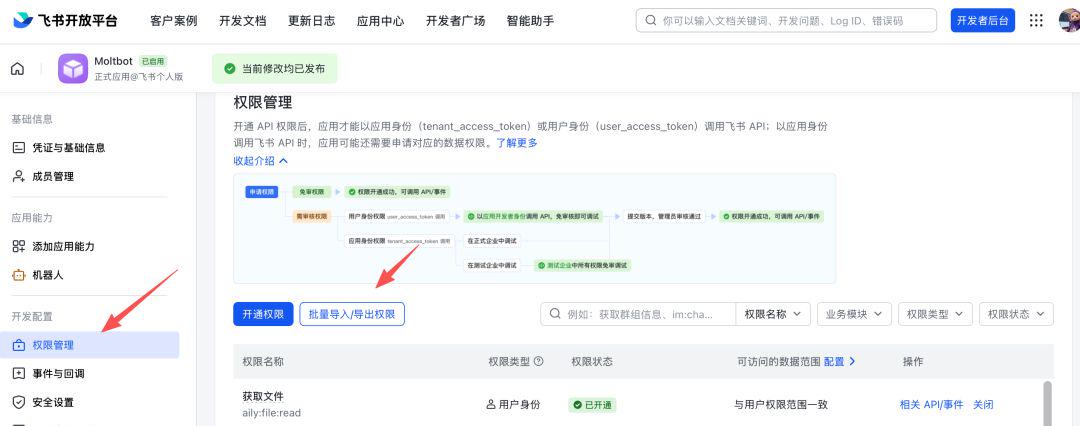
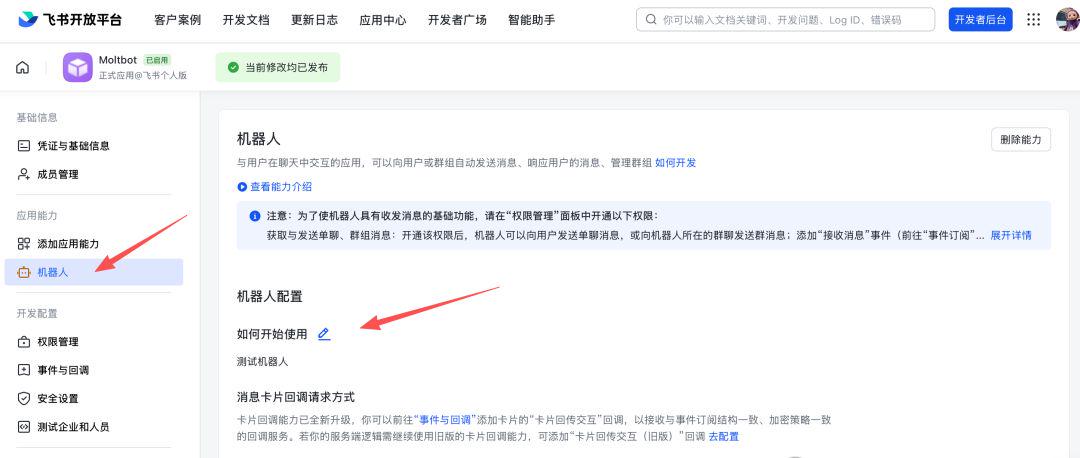
5. Introduction of robotic capabilities
In Applied Capacity > Robots:
- Turn on robotics
- Configure Robot Name
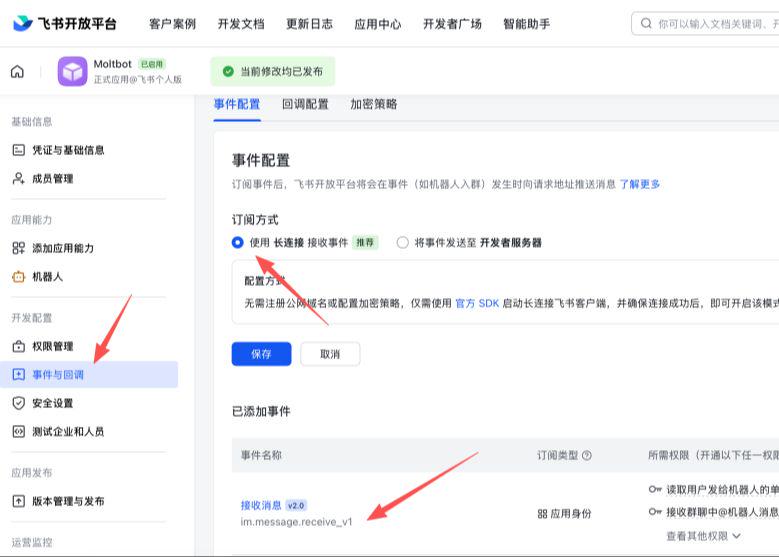
Configure event subscriptions
Confirm before configuration:
- Openclaw channels add Feishu channel
- Gateway started (openclaw gateway status)
Then on the Event Subscription page:
- Select "WebSocket with long connection "
- add event im.message.receive_v1
7. Publication applications (Flying Books)
- Create version in Version Management and Release
- Submitted for review and release
- Pending admin approval
Flying Book Accessed: Configure Channels in OpenClaw
Through Wizard Configuration (Recommended):
i don't know, openclaw channels add
Select Feishu, paste App ID and App Secret。
Configure via profile (example):
{
"channels":
"feishu":
"enabled": true,
“dmpolicy”: “pairing”,
“accounts”:
"main":
"appId": "cli_xx",
"appSecret": "xx",
'botName ': "My AI Assistant"
}
}
}
}
}
Configure through environment variables (example):
= = x "cli_xx"
export FISHU_APP_SECRET=x
Lark (international) domain name configuration:
{
"channels":
"feishu":
"domain": "lark.",
“accounts”:
"main":
"appId": "cli_xx",
"appSecret": "xx"
}
}
}
}
}
After access: Start and test
Start Gateway:
openclaw gateway
Send a message to the robot in the flying book. For the first time, you usually return the pairing
openclaw
Once adopted, there will be a normal dialogue。
Telegram channel access
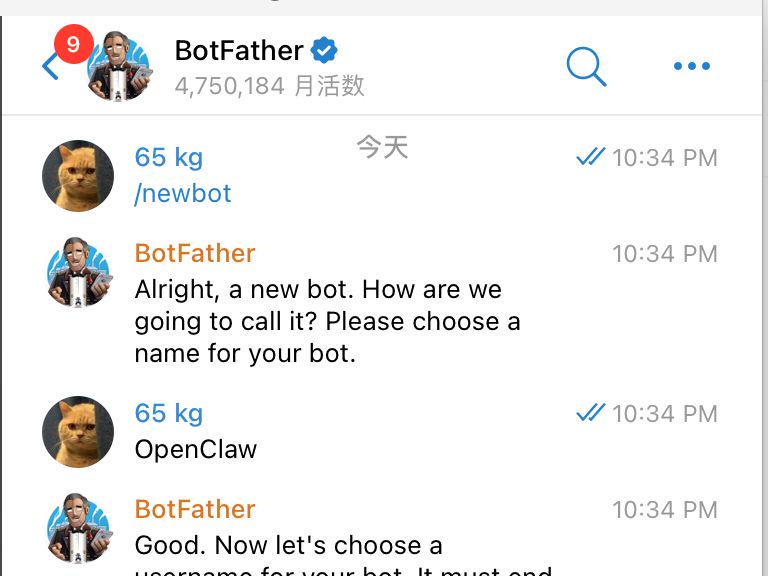
- pass @BotFather(up to link [22]) Create robotics that confirm the correct account number and copy Token。
- Configure Token:
- ENVIRONMENTAL VARIABLE: TELEGRAM_BOT_TOKEN=..
- or configuration file: channels.telegram.botToken: "..."
- If both are set, the configuration file gives priority。
- Starts the Gateway gateway。
- For the first time, the robot will return to the pairing code and execute the pairing authorization by hint。
Minimum configuration example:
{
"channels":
"telegram":
"enabled": true,
"BotToken": 123:abc,
"dmpolicy": "pairing"
}
}
}
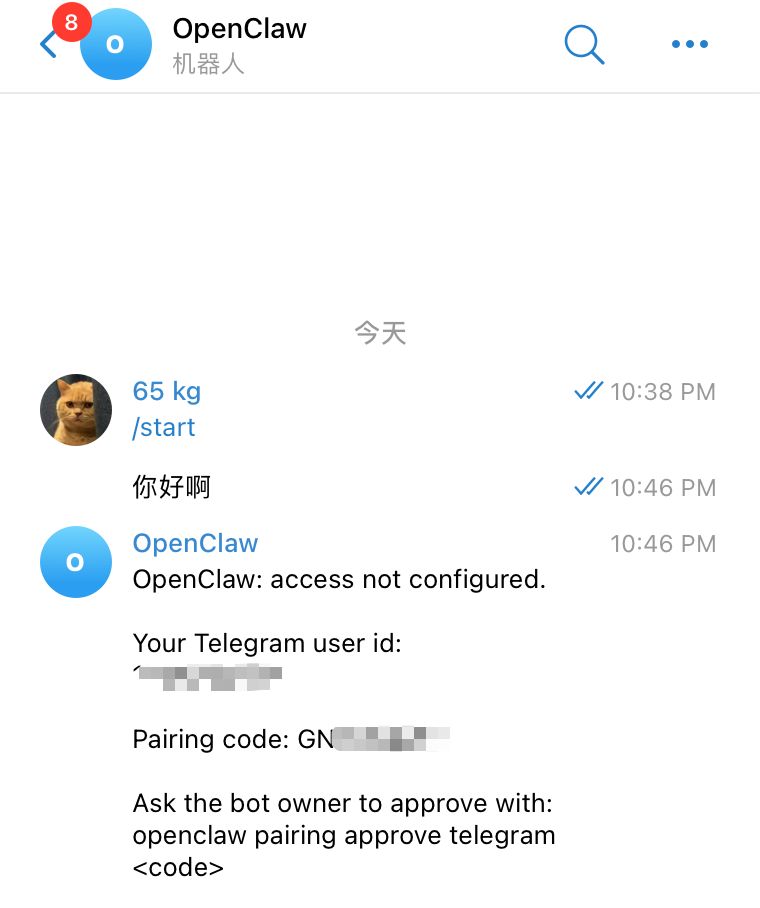
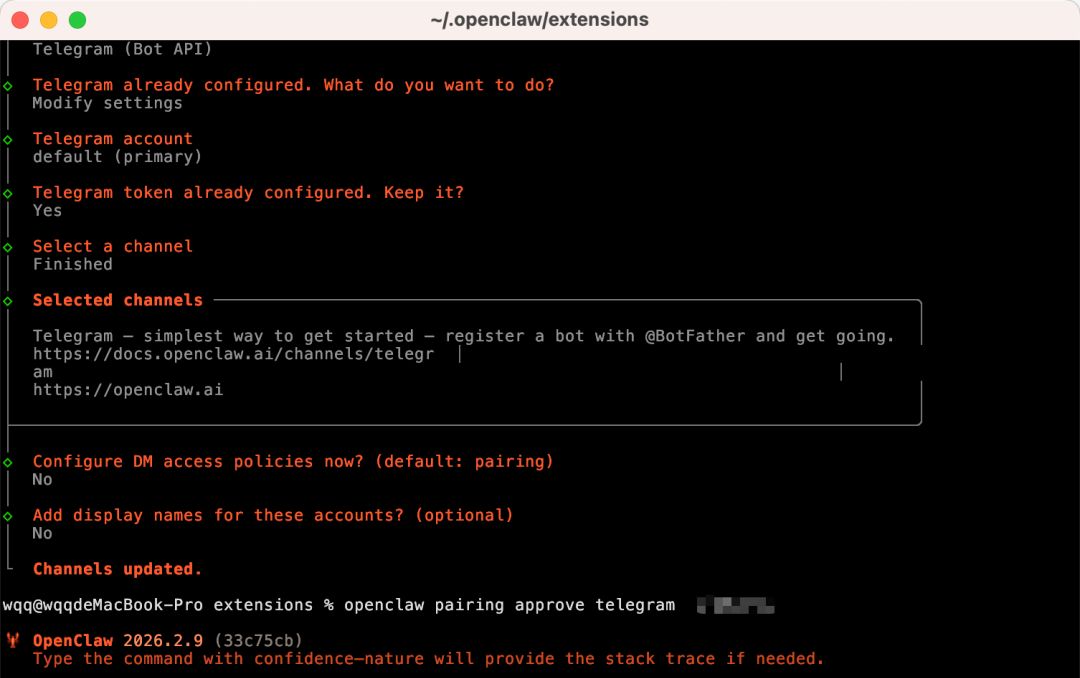
And then text the robot in Telegram, get the pair and do it:
openclaw paiing approve telegram ABC123
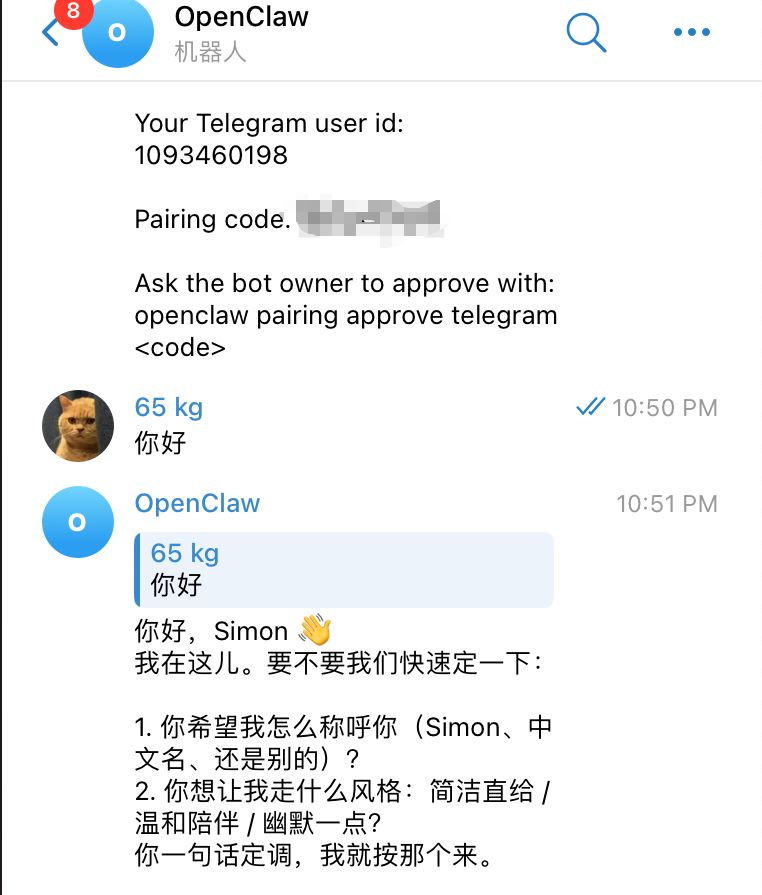
When the authorization succeeds, you can start normal interaction with the robot。
If there is a normal return to the dialogue, the Telegram channel has been successfully accessed。
05 | model configuration: run through a provider, then optimize
The previous presentation used ChatGPT — OpenAI Codex。
This one starts with a minimum available configuration。
First, look at a model access road map, then choose a first run at your current stage:
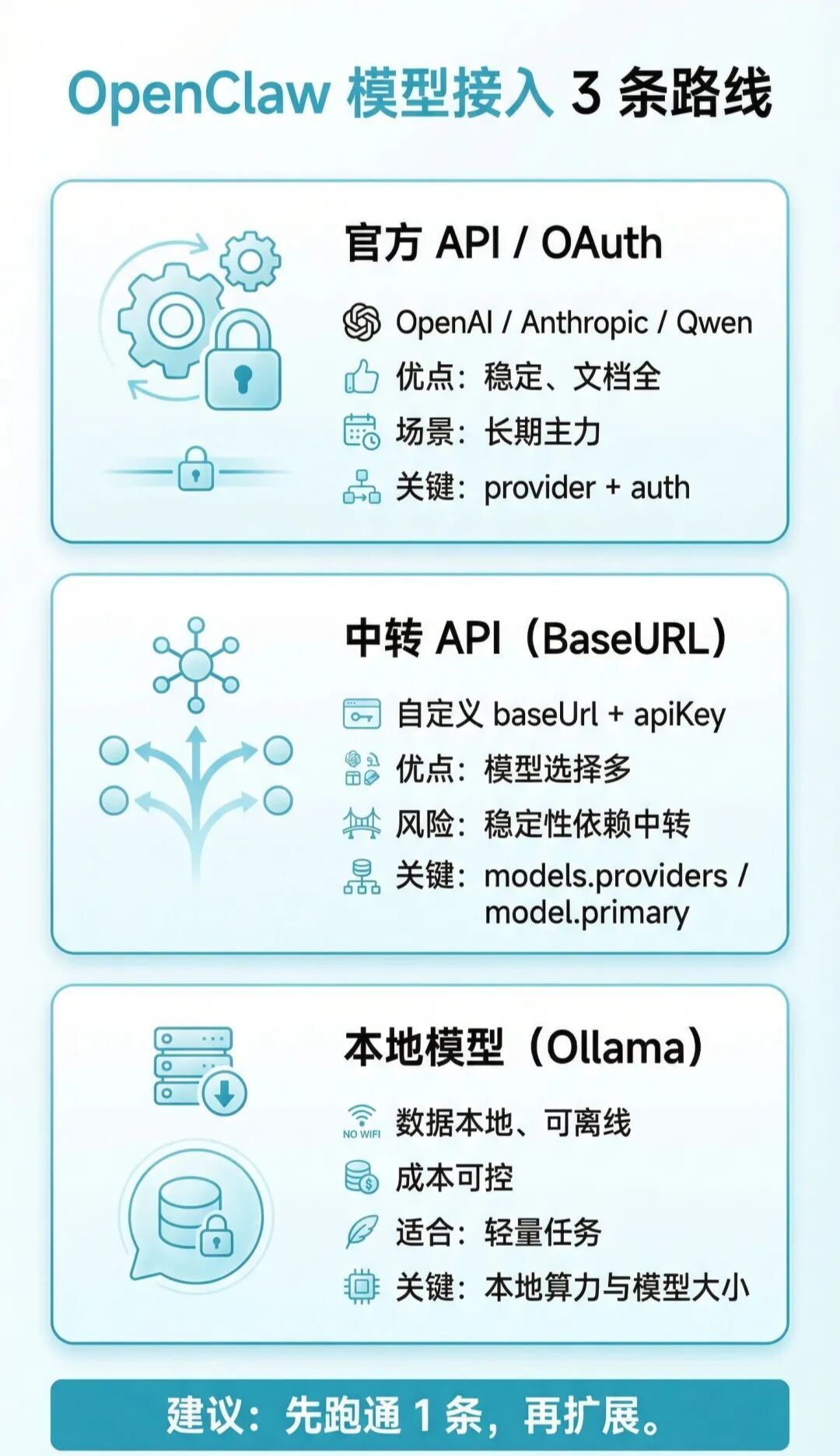
If you use a transit service, refer to the following minimum available configuration:
{
"models":
"providers":
"my-api":
"baseUrl": https:// your transit address/v1",
"ApiKey": "Your-api-key",
"api": "openai-complications",
“models”:
{
"id": model id,
"name": shows the name,
“ressoning”: false,
“input”: [“text”),
“contextWindow”: 200000,
“maxTokens”: 8192
}
]
}
}
},
"agents":
"defaults":
"model": {
"primary": "my-api/modelid"
}
}
},
"gateway":
“port” 18789,
"bind": "loopback",
“auth”:
"mode": token,
Token: Your-Gateway-Token
}
}
}
Replace the focus with the following:
- baseUrl: Transit Services Address (usually https://xxx.com/v1)
- apiKey: Transfer services assigned to you
- models[.id: model for transit service support id
- format provider/modelid
- gateway.auth.token: available openclaw configure/sectiongateway
Two additional points:
- name under providers (e.g. my-api) can be customised, but consistent with model.primary prefixes
- Run through one model and add a second
06: NEXT STEP: GIVE AN AI ASSISTANT A SOUL (SOUL / USER / AGENTS)
Here you have completed the first phase: installation, access, modeling, first question and answer validation。
The next step is to move from “can talk” to “know you, work and style”。
Seeing this three-package set first, we can understand more intuitively how the three documents work together:
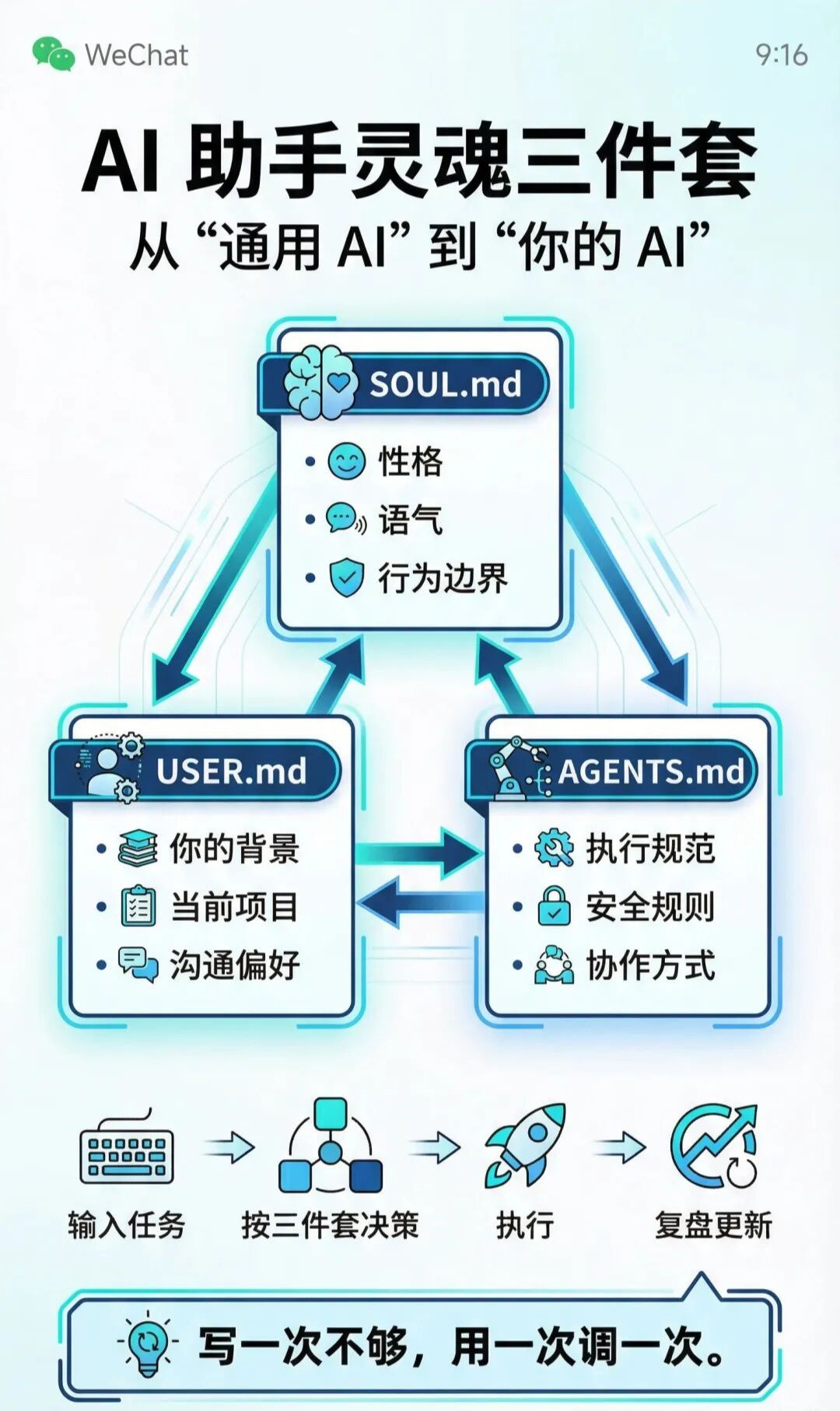
At the heart of this step are three sets of souls:
| Documentation | corresponds English -ity, -ism, -ization | Similarity |
|---|---|---|
SOUL.md |
Define assistant character, tone, behavioral boundaries | Genetic + Corrections |
USER.md |
Define who you are, what you're doing, what you prefer | Curricula vitae + diary |
AGENTS.md |
Definition of implementing norms, modalities of collaboration, security rules | Staff Manual |
WHEN THESE THREE FILES ARE COMPLETED, THE ASSISTANT CHANGES FROM GENERAL AI TO YOUR AI。
In the future, it will assist you more steadily in processing mail, managing the schedule, summarizing files, looking at the code and gradually evolving to the desktop end of Jarvis。
6.1 SOUL.md: Clarify character and boundaries
It is suggested to write by these four pieces:
- Character: Direct, pragmatic, proactive or moderate, companionship
- speech style: brevity/detail, use emoji, usage of terminology
- Code of conduct: what can be done directly and what must be identified
- Absolutely not: privacy leaks, destructive operations, ultra vires
Key principles:
- Be specific. Don't write "friendly, helpful."
- Nothing is more important than what you do
- The rules do not conflict with each other and avoid the contradiction of being “involved and not disturbed”
6.2 Write again USER.md: Make your assistant really know you
USER.md contains at least:
- Basic information: name, occupation, time zone
- Current projects: 1-3 projects under way
- TOOLBAR: IDE, DOCUMENTATION, DESIGN AND COLLABORATION TOOLS COMMONLY USED
- Communication preferences: brevity or detail, Chinese-British ratio, alarm mode
- Current focus: Recent research content, immediate objectives, key context
The more specific you write, the less the assistant cross-examines, the more you go straight to execution。
6.3 Finally, AGENTS.md: Fixed working rules
Focus on these three types of configuration:
- Memory management: what to read and what to record at the end of each start
- Secure boundaries: rules for the confirmation of reading and writing documents, execution of orders, external messages
- Interactive rule: Group presentation strategy, quiet time, heart beat task trigger
The default AGENTS.md is generally already available。
6.4 Restart and validate after modification
openclaw daemon restart
AND THEN YOU COMPARE A/B WITH THE SAME QUESTION (E.G., "BOOK ME A PROJECT UPDATE"), AND YOU CLEARLY SEE THAT TONE, STRUCTURE AND IMPLEMENTATION STRATEGIES ARE GETTING CLOSER TO YOUR HABITS。
6.5. Continuous training will make you more and more like you
The three sets of the soul do not end at once, but with a little bit。
Every time you show up, "It should do this, but it doesn't do it," it's the time to update SOUL.md/USER.md/AGENTS.md。
You can use this as a long-term project: run through, stabilize, personalize, and eventually sink into your own work-flow assets。
If you're doing this, you're welcome to look at me and share your experience in the field。
07 |Skills Progress: from the session to the management
SOUL.md / USER.md /
AGENTS.md decides who the assistant is, and Skills decides what the assistant is。
The Skylls system of OpenClaw is compatible with AgentSkills, and the core document is SKILL.md under each skill catalogue。
Official documents suggest looking at the general index before going deep as required:
https://docs.openclaw.ai/llms.txt[23]
7.1 Skills Who gives priority to where to load
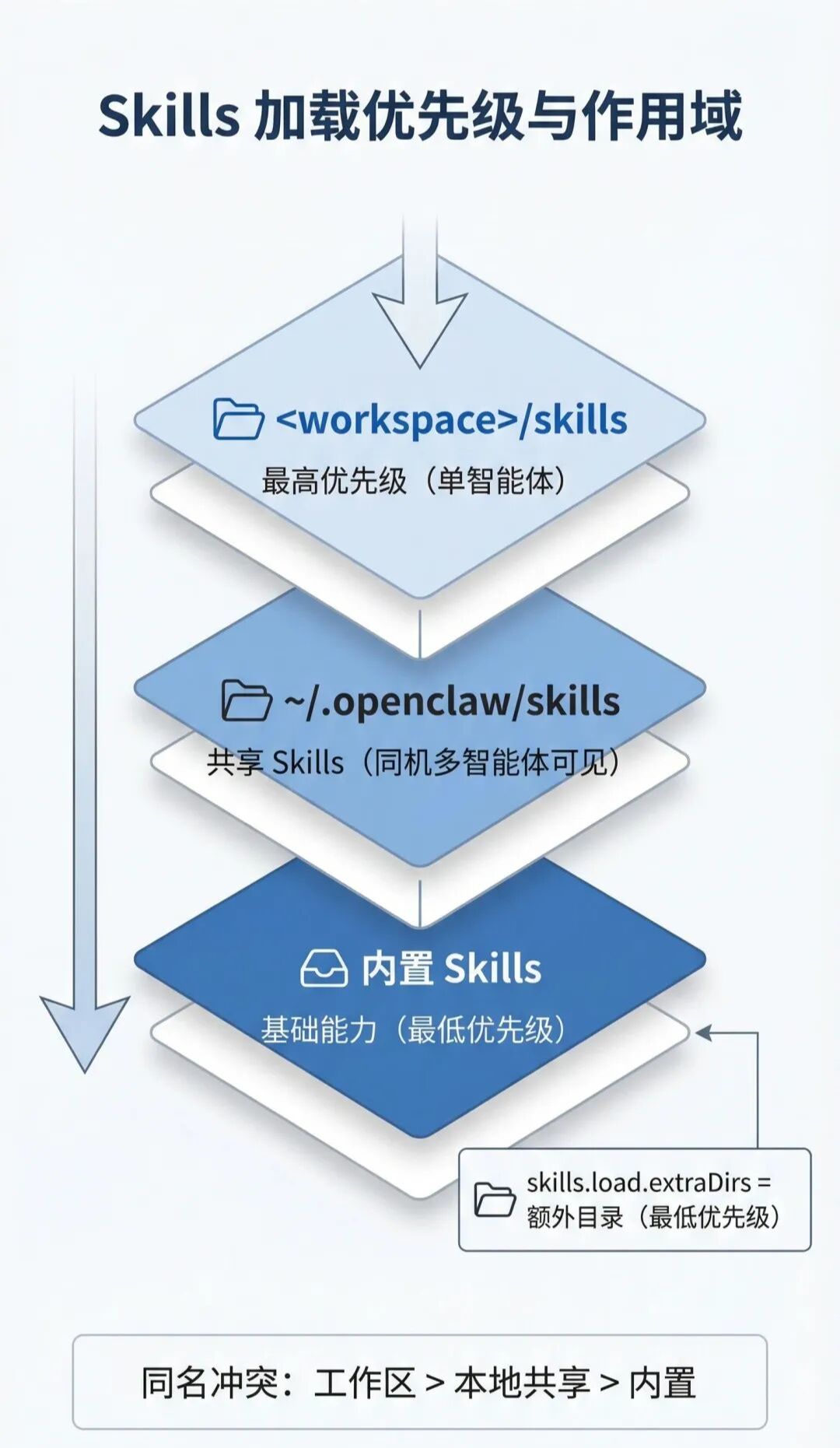
OpenClaw defaults to load Skills from three locations:
- Internal Skills (issued with installation package)
- ~/.openclaw/skills (local/host Skills)
- /skills
in case of conflict with the same name: /skills
/skills > ~ .openclaw/skills > Inline Skills
Additional catalogues (lowest priority) can also be added at ~/.openclaw/openclaw.json for skills.load.extraDirs。
This map quickly remembers the loading of priorities and fields:
7.2 Distinction between single intelligence and shared Skills
In a multi-smart context, it is understood that:
- mono-intelligence special: /skills in the smart body area
- global sharing: in ~/.openclaw/skills, com-intelligence works
- Team Sharing Directory: Mounting Public Paths Through Skills.load.extraDirs
if you want to use a different skill set for different smarts, give priority to a workspace directory; if you want to use a "all smarts reset", give priority to ~/.openclaw/ skills。
7.3 Installation, updating, synchronization (ClawHub)
OpenClaw is officially recommended by ClawHub to manage Skills:
no, no, no, no
no, no, no, no
i'm sorry
default will be installed in the current directory./ skills (or back to the configured workspace) and the next new session will be automatically recognized as / skills。
7.4 find-skills: install this "skill search" first
find-skills is positioned to help you discover and install skills。
README ORIGINAL:
This seems to help you discover and instantly skills from the open antskills ecstasy.
Link:
- https://github.com/vercel-labs/skills/blob/main/skills/find-skills/SKILL.md[24]
- https://skills.sh/[25]
Common command:
[query]
i'm sorry
i'm sorry
no, no, no, no
No interactive installation:
no, no, no, no
7.5 What should a qualified SKILL.md look like
Minimal format (YAML frontmatter required):
—
name: your-skill-name
what this skill does
—
Two things should be borne in mind:
- frontmotter keys keep single lines as far as possible
- metadata proposes to write as a single line of JSON objects to avoid resolving ambiguities
7.6 Door control mechanisms: Why Skills can't see
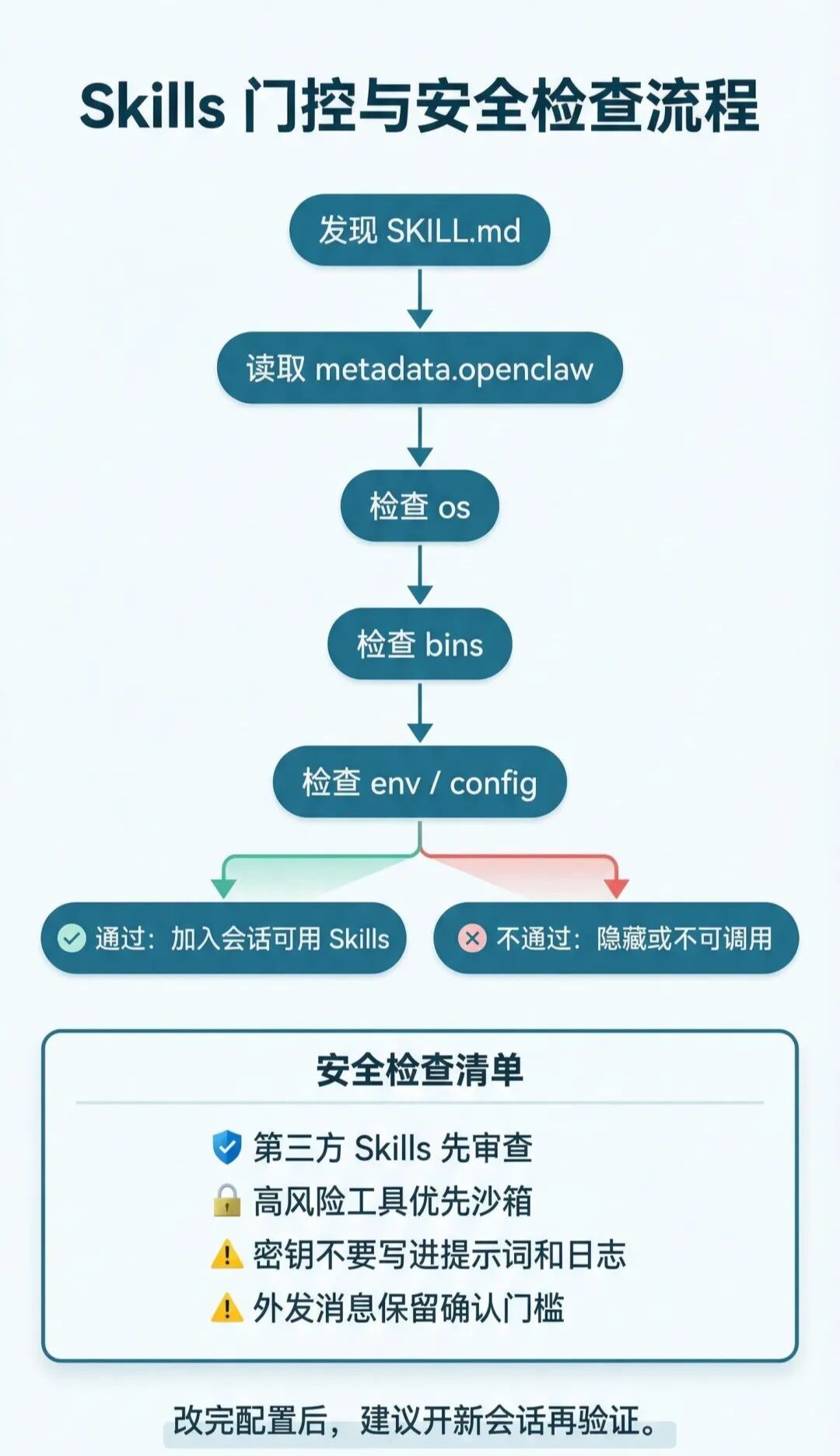
OpenClaw filters when loading based on metadata.openclaw
- requires.bins:依赖的二进制必须在PATH 里
- requires.env:必须有环境变量或配置值
- requires.config:openclaw.json指定路径必须为真值
- os:仅在指定系统加载
这也是很多人“明明装了却没生效”的核心原因。
如果你想从“能看到”走到“能安全用”,先过一遍这张门控与安全流程图:
7.7 配置覆盖与密钥注入
你可以在~/.openclaw/openclaw.json里做 Skills 级配置:
- skills.entries.<name>.enabled:开关技能
- apiKey:给声明了 primaryEnv的技能注入密钥
- env:注入环境变量(仅当进程中不存在时)
- config:该技能的自定义配置
这类注入是“智能体运行期注入”,不是写进你全局 shell。
7.8 安全边界:把第三方 Skills 当不受信任代码
重点建议:
- 先读SKILL.md再启用
- 高风险工具优先放到沙箱里跑
- 不要把密钥写进提示词和日志
- 对外发消息、文件删除、系统命令执行保留确认门槛
7.9 插件也可以发布 Skills
如果你在用插件体系,插件可通过openclaw.plugin.json 声明skills目录来发布技能。
这些插件 Skills 会参与同一套优先级和门控规则,也可以通过 metadata.openclaw.requires.config 做条件启用。
7.10 会话快照与热刷新(为什么改完不立刻生效)
OpenClaw 通常会在会话开始时对可用 Skills 做快照,后续轮次复用该列表。
所以改了 Skills 或配置后,最稳妥的做法是开一个新会话再测。
如果开启了 Skills 监视器(skills.load.watch),SKILL.md 变更会触发刷新,下一轮调用会拿到新列表。
08 Common pits and miscalculation (installation, access, models, Skills)
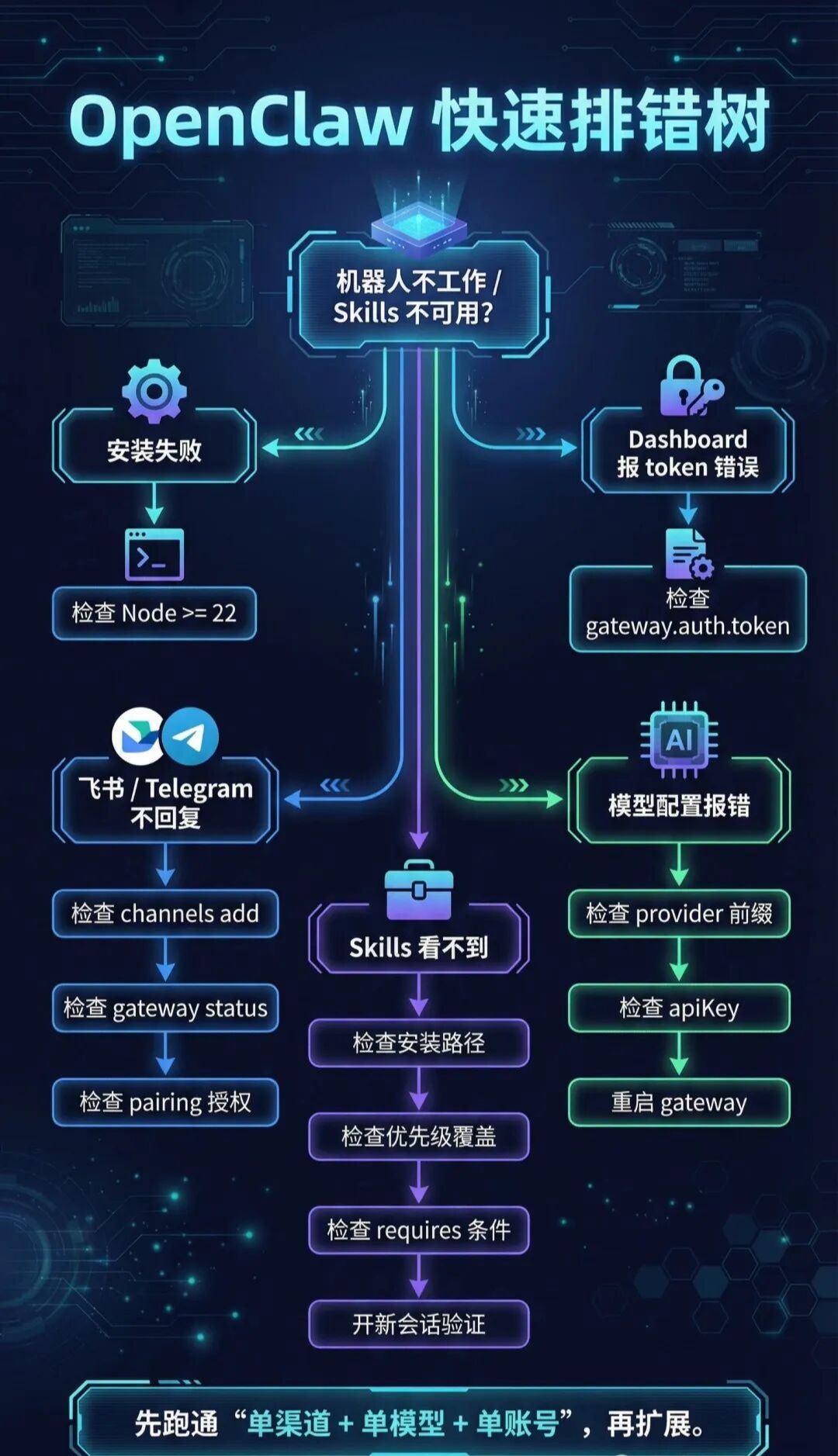
先看这张排错决策树,按分支一路排查会更快:
1) Node 版本不够
现象:安装或启动时报版本不兼容。
原因:OpenClaw 要求 Node 22+。
修法:升级 Node 后重新执行安装。
2) Dashboard 连不上或提示 token 错误
现象:页面报 token 缺失、请求失败。
原因:访问地址没带 token,或配置里未生成 token。
修法:
cat ~/.openclaw/openclaw.json | grep token
openclaw configure –section gateway
3) 模型配置报错
常见原因:
- API Key 格式不正确
- 模型 ID 写错或缺少 provider 前缀
- 改了环境变量后未重启 Gateway
修法:
openclawgaterestart
4) 渠道接入后机器人不回消息(以飞书为例)
优先检查:
- Feishu 渠道是否已添加
- Gateway 是否在运行
- event subscriptions added
- Fulfilling twinning authorizations
Final proposal: Ensure that "single-channel + single model + single account" runs, then expands, so that the problem of positioning can be most rapid。
5) Skills cannot be seen or called after installation
优先检查:
- Whether the workspace directory for the current session is installed
- Whether Skills is covered by a higher priority directory
- data.openclaw.requires.*
- Test in old session (Skills list usually snapshots at start of session)
Search path proposal:
- confirm the installation directory /skills (or ~/.openlaw/skills)
- confirm the skills.entries switch and configuration of openclaw.json
- Last reopen new session to verify