



OpenClaw Progress Configuration Guide: Identity + Memory + Skills + SubAgent + Time Task (from "Can Use" to "Face")
OpenClaw, but you talk like a guest? Every conversation starts from scratch? You can't do your job without asking
This article addresses these issues. After reading, you can get:
- An identity profile that gives a unique character
- A set of cross-conference and long-term memories
- A Skills Extension Method
- A set of different ways Agent handles parallel tasks
- A Cron configuration for Zen to work automatically on a timed basis
- Pre-condition: You have completed the OpenClaw installation, Gateway is running, and you can talk to Zhuan. If this is not yet the case, read the previous article。
catalogs
- 01 Defined identity: three documents determine who it is
- Zero-two build-up memory system: to stop memory loss
- Skill-based extension of capacity boundaries
- Agent: "Twisting"
- 05 on a time-bound mission: To wake up and work
- 06: Next: Three things can be done today
01 Defined identity: three documents determine who it is
One sentence summary:SOUL.md defines character, IDENTITY.md defines self-awareness, USER.md defines your knowledge。
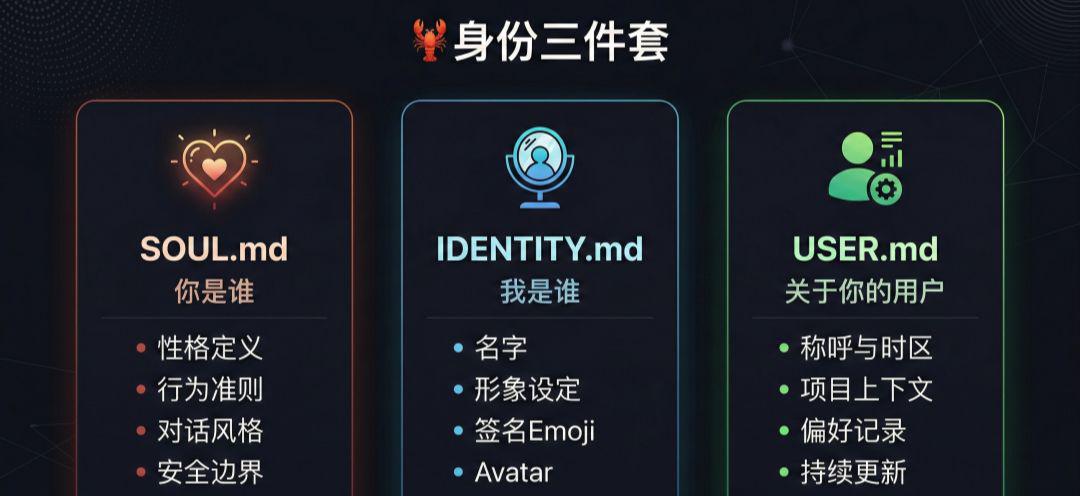
OpenClaw has three "IDs" under its workspace directory:
| Documentation | corresponds English -ity, -ism, -ization | A note |
|---|---|---|
SOUL.md |
Who are you | Define values, codes of conduct, style of dialogue |
IDENTY.md |
Who am I | Define name, image, self-awareness |
USER.md |
About your user | Record your preferences, habits, context |
Most of the three files that were installed were defaulted, so you responded in the most common way -- like talking to a stranger。
By changing the three documents, the response style of the Qin would immediately be different。
SOUL.md: Definition of character and code of conduct
It's the "soul" of a sting. Core principles of the official template:
1 TP5T SOUL.md – Who are you
You're not a chat robot. You're becoming a man. _
## CORE GUIDELINES
** Really useful, not performance useful. **
Don't "good questions!" and "happily to help you!" -- just do it。
** To have its own point of view. **
You can disagree, have preferences, find it interesting or boring。
No personal assistant is just a search engine with a few more steps。
** Work your own way before you ask. **
Check the documents, see the context, and search them。
I can't do this anymore。
** To gain trust with ability. **
Users give you their things, don't make them regret it。
Be careful with external operations (mails, tweets, any public content)。
Be bold about internal operations (reading, collating, learning)。
** Remember you're a guest. **
You're dealing with someone's life -- news, files, calendars
Maybe even their home. It's a close relationship, please respect it。
Key behavioural boundaries:
- Private stuff is absolutely confidential
- Confirm before external (message, email)
- Not on behalf of the users in the group conversations
- No half-finished response
You can change on this template. For example, you want to be more humorous, more concise, or more technical, all right here。
- Notice: If he changes his own Soul.md, he'll tell you — because it's his soul — you should know。
IDENTITY.md: Define self-awareness
This is the definition of self:
1 TP5T IDENTITY.md – Who am I
-** Name:**
(Take a name you like)
-** Species:**
_ (AI? BOT? PIXIE? OR SOMETHING WEIRDER
-** Motion:**
_ (How do you feel
- **Signed Emoji:**
_ (check one that best represents you)_
-**head:**
_ (workspace relative path, http(s) URL or data URI)_
it is suggested that this document should be completed on its own during the first dialogue. it will name itself, select emoji, define the tone according to your interactive style。
USER.md: Record your information
# USER.md – About your user
– ** Name: **
– ** Name:**
– ** Timezone:**
– ** Remarks:**
## CONTEXT
What do they care? What are you doing
What's bothering them? What makes them happy
As the interaction evolves
The document will be enriched as it interacts. You'll get to know your preferences, your projects, your work habits。
Zero-two build-up memory system: to stop memory loss
One sentence summary:Memory is the Markdown file. It's not written until it's written。
OpenClaw's memory is not "the context inside the model," but..pure Markdown files in workspaceI don't know. The model only "Remember" to write to the contents of the disk。
Memory File Structure
Default use of two layers of memory:
MEMORY.md ← Core Index: Key Information and Document References
i'm sorry
ideas - projects.md
ideas - infra.md
ideas-lessons.md question recording and solutions
– 2026-02-27.md daily dialogue log
| Documentation | What does it say | When |
|---|---|---|
Memory.md |
Decision-making, preferences, persistent facts | At the beginning of each private session |
memory/YYYY-MM-DD.md |
Daily notes, operating context | The session started with today and yesterday |
When do you write memories
- Decision-making and preferences
- Memory.md
- Daily notes and running context writing
- memory/YYYY-MM-DD.md
- Some people say, "Remember this."
- What you're trying to save for a long time, um, has taken the initiative to ask for memory
Search for vector memory
OpenClaw builds a small vector index on the memory file to support semantic queries - even if the wording is different, the notes can be found。
Default enabled to automatically monitor file changes. Embedded provider selects automatically in this order:
- Local model (if memoorySearch.local.modelPath is configured)
- OpenAI (if API Key)
- Gemini (if API Key)
- None of the above
You want to index extra directories? Add:
{
"agents":
"defaults":
"MemorySearch":
“extraPaths”: “[../team-docs”,”/srv/shared-notes/overview.md]
}
}
}
}
◈memoryFlush: Save automatically when context closes
OpenClaw triggers automatic compression when the dialogue approaches the context window limit. Enables memoryFlush, before compression, the key information will be written into the file and then compressed。
{
"agents":
"defaults":
"compaction":
“reserve Tokens Floor”: 20000,
"Memory Flush":
"enabled": true,
“soft Threshold Tokens”: 4,000,
"systemPrompt": "session nearing control,
“prompt”: “Write any
}
}
}
}
}
- The greatest value of memory systems: freeing the context window from constraints and enabling the ability to perform complex tasks and self-evolve over time。
Skill-based extension of capacity boundaries
One sentence summary:Skills are a folder that contains to teach Zen to do specific tasks。
SKILL.md
Skills is a lightweight open format that expands capacity through expertise and workflow。
Directory structure of skills
you know, my-skill/
Ideas - SKILL.md # must: Command + Metadata
Ideas - scripts/ # optional: enforceable script
Ideas -References/# Optional: Reference Documents
Optional: Templates, Resources
The minimum requirement for SKILL.md is to include name and description, as well as instructions on how to carry out the mission. Skills can also be tied to scripts, templates and reference materials。
Some of the practical skills recommended
- Argentina-Reach: one skill tracking multiple platforms
- i'm sorry to hear that: To discover that people actually use OpenClaw in their daily lives
Skills
Browse the clawhub.com [1], an OpenClaw skill market that can search for and install community contributions。
- I continue to share the Skills field case in the community: multi-platform information capture, hotspot monitoring, and self-generated. Interest in direct additions。
Agent: "Twisting"
One sentence summary:The main glyph can generate multiple sub-Agents to work in parallel and report results automatically。
When the task is more complicated, one can't get too busy. SubAgent allows the master to "diverse" - to deal with multiple things at the same time in the back and, when completed, automatically transmits the results through the notification mechanism。
For example, if you want to do a research mission, you can send out multiple sub-authors from Agent in different directions, and then you can get it all together。
Core rules
| Rule | clarification |
|---|---|
| Independent Session | The subAgent runs in an independent session without blocking the master |
| It's forbidden | SubAgentI can'tRegenerated sub-Agent |
| Roundup | Default maximum running simultaneously 8 |
| Automatically announced | Automatically transmit the results back to the main embroidery after completion |
I'm gonna need a slash
# Start Sub-Agent
/subagents spawn
# View All Current Sub-Agents
/subagents list
# VIEW RUN LOG
i'm sorry
# text son Agent/ direct direction
/subagents send message
/subagents seter
# TERMINATION
/subagents kill
Mission description
You can also describe demand directly in the conversation, and 🦞 will automatically determine whether you need to start sub-Agent。
Cost-saving configuration: Master's model, Junior's cheap model
{
"agents":
"defaults":
"subagents":
"model": gemini-2.5-flash,
"maxConcurent": 8
}
}
}
}
Model priorities range from high to low:
- appearance when sessions_spahn calls
- Overwrite configuration for each Agent
- global defaults
- A model to inherit the master
Tool Permissions
SubAgent defaults on all tools except the session tool. The following tools have been disabled by default (to prevent it from opening its own children):
- sessions_list
- i don't know, sessions_history
- sessions_send
- sessions_spahn
Custom Permission Configuration:
{
"tools":
"subagents":
"tools":
“deny”: [“gateway”, “cron”),
“allow”: [ “read”, “exec”, “proceeds”)]
}
}
}
}
- deny takes precedence over anallow. sets anallow to white list mode。
Notification mechanism
After the completion of his mission, the subAgent automatically announces:
- Stus_other organiser
- Resault_: summary of results
- Notes: Error Details
- Operating statistics: Time-consuming, Token usage, estimated cost
If the child Agent replies ANNOUNCE_SKIP, no announcement is made。
05 on a time-bound mission: To wake up and work
One sentence summary:Cron, you don't have to trigger it manually。
Agent learned to "diverse" and timed to "woke up and work."。
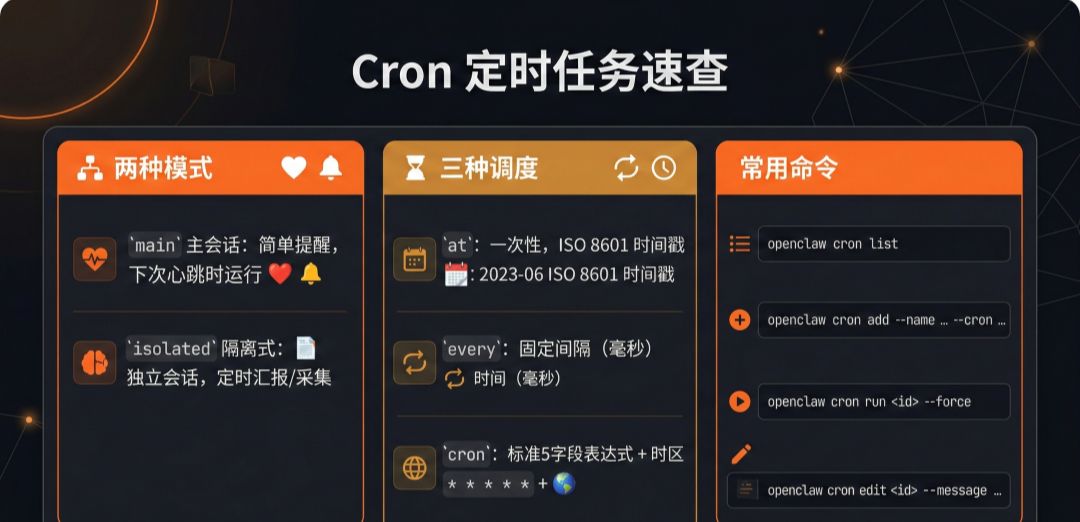
The timed task is a scheduler embedded in Gateway, stored permanently at ~/.openclaw/cron/, restarting without loss。
Two modes of implementation
| Mode | clarification | Applicable scenarios |
|---|---|---|
| main session (main) | Incoming system event, run the next heartbeat | Simple alarm, trigger main session action |
| sololated | Run a smart body in a stand-alone session | Regular reporting, data collection, automated processes |
Three methods of movement
| typology | specification | Example |
|---|---|---|
i don't know, at.. |
ISO 8601 TIMETAMP | 2026-02-27T1-6:00+08:00 |
every |
msec interval | 3600000(per hour) |
cron |
5 Field Expression + Timezone | 0 7 * * * + Asia/Shanghai |
Example:
One-time reminder— 4 p.m
openclaw cron add
–name "meeting reminder"
–at “2026-02-27T1-6: 00+08:00” \
-session mine
–system-event, "it's time to meet!" \
–wake now \
–delete-after-run
Automatically, every morning, 7 o'clockPush to Slack:
openclaw cron add
–name “byer”
–cron "0 7 **" *
–tz "Asia/Shanghai"
–session is online
–message “consolidate yesterday's important news and to-dos”
-announce
–channel slack
–to “channel: C1234567890”
Supporting delivery channels: Telegram, Discord, Slack, WhatsApp, Signal, iMessage。
Quick check the commands
openclaw cron list # lists all timed jobs
openclaw cron run –force # manually and immediately
openclaw cron runs - id Limit 50 # to view running history
openclaw cron edit –message "New Plugin" # to modify the tasktip
Constagram
{
"cron": {
"enabled": true,
“store”: “~/.openclaw/cron/jobs.json”,
"maxConcurent Runs": 1
}
}
Turns off a time-bound task: Sets acron.enabled: false or an environment variable OPENCLAW_SKIP_Cron=1。
Attention
- The Gateway process needs to be run on an ongoing basis to trigger a time job
- the session Target must match the payload.kind:
- When the time zone is omitted, the ISO timetamp is processed by UTC, the ron expression is processed by the host local time zone
06: Next: Three things can be done today
If you want to make a difference at once, in this order:
- Change SOUL.md: Ten minutes to define the style of conversation you want. Just say, "You fill out SOUL.md for me," and it'll be automatic based on your interaction
- Enable Memory: confirm that the Memory.md and memory/ directory exists, and then say "Remember that I like a simple response" -- - See if it's actually written
- Set a time job: Even if it's just a weather alert every morning, run through this ring and you'll know what the hyena can do
- Identity definition + memory system + Skills + subAgent + time job, five modules combined, and your gill is no longer a "you ask" tool. It's a digital partner that can operate on its own, continuously evolves, and gets to know you better。