




Seedance 2.0 makes more and more amazing AI VideoLast issue we talked about seven basic lenses, and many of our friends, in private, said that it helped White so much that they finally understood the relationship between mirrors and emotions。
HOW DOES AI GENERATE FILM-GRADE MIRRORS
BUT IT'S NOT ENOUGH FOR THE MIRROR. HAVE YOU EVER EXPERIENCED A SITUATION WHERE A SINGLE SHOT IS GOOD, BUT WHEN YOU LOOK AT IT TOGETHER, IT'S LIKE IT'S WEIRD, IT'S LIKE A PPT FLIPPING
The problem often arises — a turn-off。
It's the "bridge" between the camera and the camera. The bridge was well repaired, the audience was unsuspecting and immersed in the story; the bridge was badly repaired and the audience stepped on its feet and went straight out。
In today's period, we've systematically dismantled six coresTurn it aroundAND EVERY ONE OF THEM TELLS YOU WHAT IT IS, WHAT IT CONVEYS, WHAT IT USES, AND HOW IT'S WRITTEN IN THE AI TIP. (FIRST, BASIC KNOWLEDGE, LAST PART WITH A REFERENCE VIDEO, FIRST READING IT)
6 Core shifts
Hard Cut / Straight Cut
What is it: the most basic turn-off -- the end of the last shot, the beginning of the next shot, with no transition effect. Just like you flip to the next page。
Passing emotions:
- It's simple, easy, objective
- The normal advance of narrative
- Fast-stringing can create stress, shock
Classic use of scene:
- THE DIALOGUE SCENE IS BACK AND FORTH
- Quickly switch angles in action, create rhythm and power
- Objective narrative advancement in documentaries/news
An example of this: if the two lenses are too close and the angles are too close, it's going to create a "Jump Cut" and it's suddenly shaking, and it's going to make the audience feel a little bumpy. Jumping is sometimes done deliberately (Youtube vlog style), but is usually a mistake in narrative films。
AI PHRASING REFERENCES:
- CAMERA A: MIDVIEW CHARACTER A SPEAKS IN FRONT OF THE CAMERA, SOFT INSIDE, LIGHT, SHALLOW, MOVIE SENSE
- CAMERA B: MIDVIEW CHARACTER B LISTENS AND RESPONDS, SAME INDOOR ENVIRONMENT, POSITIVE PERSPECTIVE
(The two segments are created in a direct fusion, keeping the view and light in line, and avoiding jumping)
Motion signs:
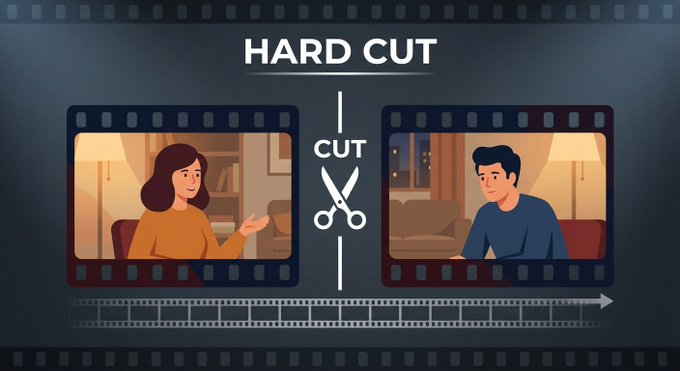
Hard shears: direct switch between two shots, no transition effect
2. Collapse (Dissolve / Cross Dissolve)
What is it: the last shot becomes more transparent, the next one emerges, and the two images overlap. Like two dreams come together。
Passing emotions:
- Time passes, memories, dreams
- Soft transition, tenderness, tenderness
- "There's an intrinsic link between these two images."
Classic use of scene:
- Time leaps
- The entry and exit of memories/slides
- Montaic paragraphs
- The tail is slowly folded to the black screen, the elegant "Story End"
A specific example: the older Rose's face in the Titanic folds into the younger Rose's face -- It's not just a journey of time, it's a blend of memory and reality, and it's very emotional。
Inverse warning: Collapse is not suitable for fast-paced action scenes. In pursuit, folding makes the rhythm "soft" at once, like a sudden brake。
AI PHRASING REFERENCES:
- The images slowly fold from young women's faces to old ones from the same angle, soft light, movie sense
Motion signs:
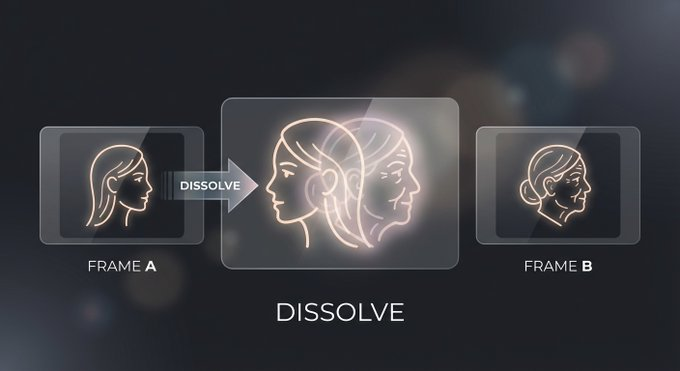
Collapse diagram: two images overlap and achieve a soft transition
3. Fade In / Fade Out
What is it: faded — the picture emerges from pure black (or white); faded out — the picture gradually melts to pure black (or white). It's more "complete" than superstition, because there's a completely blank moment in the middle。
Passing emotions:
- It's the beginning, the awakening, the beginning of a new chapter
- Fade out: end, sleep, farewell, death
- Fade into black screens between fades, suggesting larger time/space leaps
- Fade to White is often used to express death, transcend, and rise
Classic use of scene:
- The beginning (black screen to first image) and end (blackscreen to last image)
- Partition between chapters (end of first act fades out of second act)
- The character's unconscious: the image fades out of the dark, and it fades into the "Wake Up" image
One concrete example: Space Rover 2001 slowly faded from pure black at the beginning, along with music — a dilution itself says, “A epic is about to begin.”。
AI PHRASING REFERENCES:
- The images slowly fade from darkness to reveal the full view of the valley in the morning fog, soft and natural light
- The image fades out to the black screen, and the main character's back fades into the dark
Motion signs:
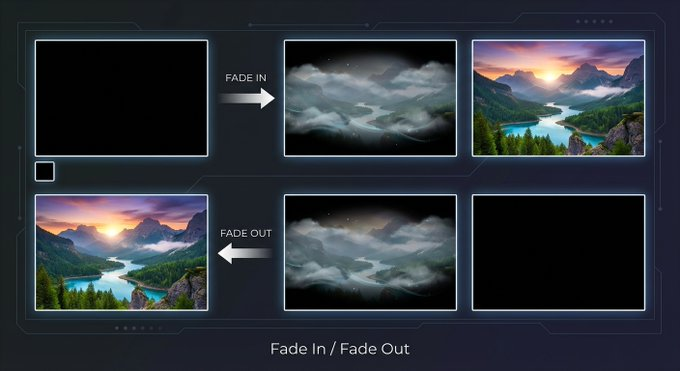
Diluted presentation intent: images emerge or melt from the black screen to the black screen
4. Transfers (Wipe)
And what is it: the next one, like a door, "slows off" from one direction. It can be left-to-right, top-to-bottom, or even round wiping, star wiping, etc。
Passing emotions:
- Clear scene transition, space transfer
- It's kind of fun and retrograde
- "We're going to a different place/time."
Classic use of scene:
- The Star Wars series was heavily used to draw it out -- it's George Lucas' landmark style, to pay tribute to the early adventure series
- THE TRANSITION BETWEEN PARALLEL NARRATIVES
- add fun and rhythm to the overall/vlog
The use of dazzling drawings (stars, hearts, etc.) in serious, written narratives makes the image a "wedding video" of the moment. The style to be drawn must match the overall tone of the film。
AI PHRASING REFERENCES:
- CAMERA A: THE ROLE MOVES RIGHT OUT OF THE PICTURE, CITY STREET BACKGROUND, NATURAL LIGHT, FILM SENSE
- CAMERA B: THE CHARACTER MOVES FROM THE LEFT SIDE OF THE PICTURE INTO A BRAND-NEW COUNTRY FIELD, BRIGHT SUN, WIDE ANGLE
(Summary of the effect of the main movement 's alignment; it is also possible to describe the directional sense of the changing scene in tools such as Seedance)
Motion signs:
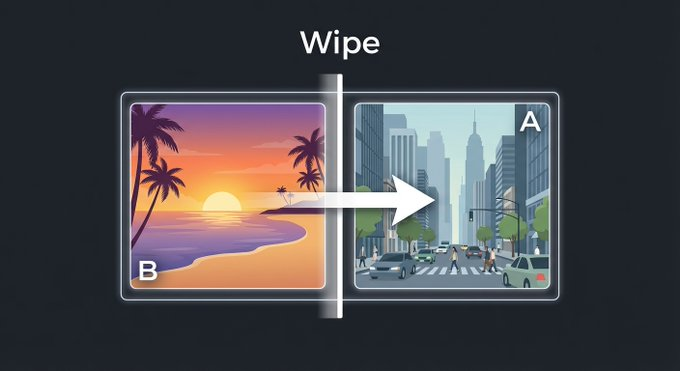
Draw in and show intent: the next one is pushed from the side
Match Cut
What: There are visual or movemental similarities between the two lenses, which are used to achieve a silk transition. It's not an effect, it's a editing logic。
Matches two types of clip:
- Graphic Match: Both images have similar elements in shape, colour and image. For example, a round moon
- Action Match: Actions in the previous lens continue in the next. For example, the character pushes the door in "A."
Passing emotions:
- It's amazing. It's so clever
- Insinuating the hidden connection between the two things
- Flowing time and space makes the audience feel like there's no trace of it
Classic use of scene:
- The apes of Space Rover 2001 threw their bones into the sky and cut into a spaceship that floated into space -- the most classic matching clip in film history, cutting across millions of years
- The character throws out one ball, twirls, cuts to the other
- The reflection in the water, poaching into the mirror image (figure matching)
One idea: if you want to connect two seemingly irrelevant scenes, find their vision in common -- the same shape, color, movement direction -- and then switch on that common point。
AI PHRASING REFERENCES:
- A circle watch rotates in the hand, and the light hits the surface to form a circle
- Top view, round stairway down from the top, matching the graph with the graph
(The two lenses are generated separately, and a matching clip is achieved by using a circle of visual consistency)
Motion signs:
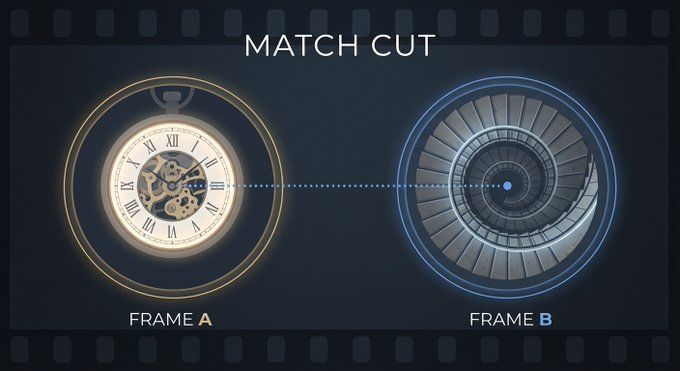
Matches the clip map: Unmarked transition using the visual similarity of the circle chart with the rotating stairs
6. J-Cut and L-Cut (sound first/ image first)
What's at the heart of these two circuits is that the sound and the image are not synchronized。
- J-Cut (sound first): The next scene starts with the sound, and the scene remains in the previous scene. It'll be a few seconds before we cut through。
- L-Cut (Image first): The image has been cut to the next scene, but the sound is still in the last scene, and it lasts for a few seconds。
Name by name: On the time line of the editing software, the J-Cut sound track looks like the letter J, L-Cut like the letter L。
Passing emotions:
- J-Cut: Expectation, suspense
- L-Cut: Persistence, resonance
- Both make the transition more natural and avoid synchronous switching of hard-on stereos
Classic use of scene:
- J-Cut: The character at home suddenly hears the waves, and the image goes to the sea -- the sound takes the audience to the next scene
- L-Cut: The teacher speaks in class, and the image cuts to the student's way home, but the teacher's voice continues -- highlighting the impact of this on the student
- Almost all the conversations are on J-Cut and L-Cut, but you don't usually notice
One concrete example is the frequent use of J-Cut in Dreamspace, where the voice of the dream has already entered when you have not seen the picture of the next dream — a "sound first" that strengthens the feeling of dream-level penetration。
AI PHRASING REFERENCES:
- Camera A (J-Cut image): The character sits alone in his study, warms the light, quiets, movies
- Camera B (J-Cut image): Waves shoot the whole picture of rocks, morning natural light, sea winds blow grass
(As a result of generating two stand-alone cameras, the sound of the waves in camera B is shown on camera A in late clips, so that the J-Cut effect of the sound first)
Motion signs:
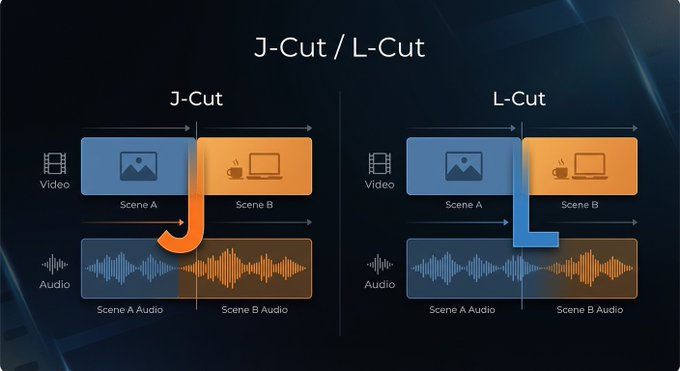
J-Cut and L-Cut diagrams: audio and video staggered over time lines
What kind of scene? Quick check guide
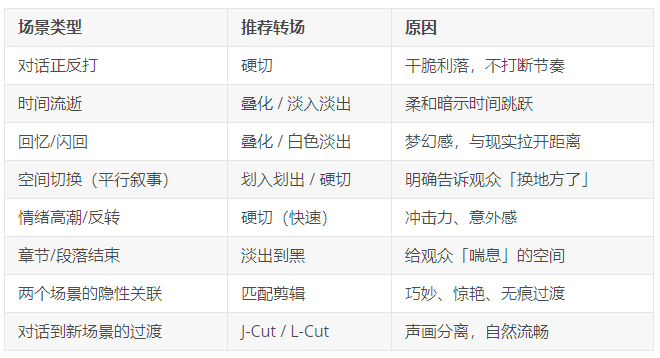
AI VIDEO TRANSFER FIELD SKILLS
With the emergence of a new generation of AI video tools such as Seedance 2.0, AI has been able to complete a multi-photogram sequence with a transposition in a single generation. But to be able to do so, some skills are required。
Trick one: Clearly describe the type of diversion in the hint
Instead of just writing "to the next scene", you write exactly what you want to do:
- Fuzzy: Switch to seaside
- ✅ Precise: slow and superstitious, from city street view to seaside sunset landscape
THE MORE PRECISE, THE MORE AI UNDERSTANDS THE RHYTHM AND STYLE YOU WANT。
Skill two: Write a hint in the lens sequence
Use your hint as a microscopy script, describing the transition between each lens and them in order:
- First paragraph: specialized cup of coffee with a warm, soft light; slow folding to the second part: overlaying the traffic on city streets, cold-colored night view, speed up
Tactic III: Control the rhythm and timing of the transition
THE TIMING OF THE CONVERSION OF AI TOOLS MAY NOT BE ACCURATE. YOU CAN DIRECT AI BY DESCRIBING EMOTIONAL CHANGES AND GRASPING THE RHYTHM:
- "THE SLOW TRANSITION FROM QUIET TO TENSE"
- "SUDDENLY SWITCH TO BLAST SCENE."
Tactic IV: Use the word "scrambling"
THE BLOCKING FIELD IS ONE OF THE BEST DIVERSION TECHNIQUES IN AI. - LET THE OBJECTS IN THE IMAGE NATURALLY COVER THE CAMERA AND CHANGE THE SCENE IN THE INSTANT:
- The character walks in front of the camera, has a short body covering the entire picture, and when it closes, reveals a new outdoor environment
Skills five: Simulation of the transition with a mirror
Some of the transitions can be achieved through a single lens of mirrors, which need not be switched:
- Whip Pan
- The lens pushes into a pure black object
- The camera goes through the foreground
Strategic Six: It's perfect for later
EVEN THOUGH AI GENERATED A ONE-TIME VIDEO WITH A TRANSFER, IT WAS IMPORTANT TO FINE-TUNE LATER:
- Adjust the exact time point of the transfer with a ClipCut/DaVinci Research
- Add J-Cut/ L-Cut sound misplace effect
- increase transition perception by supersing sound effects (e. g. whoosh sound) on the switch
💡
THE AI TOOL IS YOUR CREATIVE PARTNER, NOT YOUR SUBSTITUTE. "TECHNOLOGY" CAN BE GIVEN TO THE TOOLS, BUT THE "MOTIVE" OF THE SWITCH — WHY IT IS HERE — ALWAYS REQUIRES YOUR OWN JUDGMENT。
It's a common turnover mistake of a rookie
1. There is no "motive" for the transfer
As with mirrors, there is a need for a reason. Don't use it all because there are 50 transects in the editing software. Each turn of events should serve narratives or emotions。
2. Overlapping abuse
Collapsing is the favorite turn-off for many newcomers, because it "looks good." But if each shot is folded, the picture becomes sticky and drags, like a slow-action slide。
3. Whistle-backing as a panacea
Rotation, scaling, Jell-O effects ... These troupes can be used in a given scenario, but in serious narratives, like fireworks at funerals. It's not the right tone, it's the coolest technology。
4. The power to ignore voices
A lot of rookies focus only on the scene, completely forgetting their voices. A simple J-Cut would actually raise your professional sense of diversion to a level. The sound is the invisible bridge of the scene. Don't waste it。
5. AI TRANSFER OF TRANSMITTING TRANSFER
IN THE AI VIDEO TOOL, ONLY "THE CAMERA GOES TO THE NEXT SCENE" -- THIS VAGUE HINT PROBABLY CONFUSES AI AND CREATES AN INDISCREET IMAGE. WRITE EXACTLY WHAT KIND OF TRANSITION, WHAT SPEED, WHAT IMAGE TO WHAT, THE MORE ACCURATE IT IS。
Next Issue
The switch is the bridge, but both ends of the bridge — each shot itself — need to be carefully designed. The scenery and the image determine what the audience sees, how much, from what perspective in each shot。
Vision/middle/prompt/circular, each with a narrative task; trio/directive/foreground fissure is the basic weapon in the design. We'll break it down next time。
In order to avoid a lack of understanding of the specific rollover effects, a very intuitive version of the session is recommended, covering all the types of rollovers mentioned here, as follows:
https://www.youtube.com/watch?v=TKXBAaQB03U
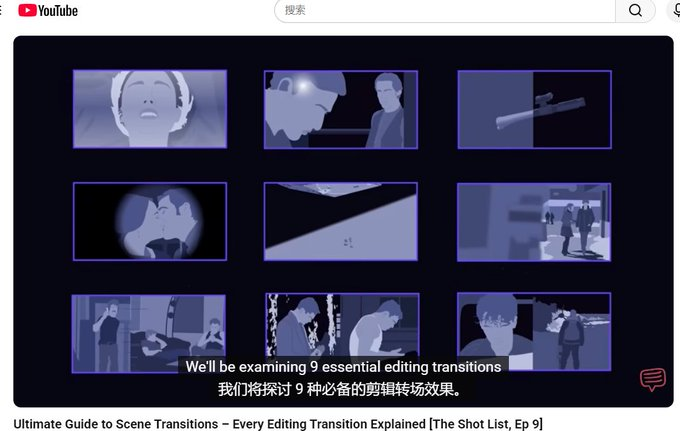
When you watch a movie or make a short video, think about it: How did the two shots go between? Why don't you fold it with a hard cut? Does it feel different if you change the scene? You can also use a cut or any clip, the same material, to try to be hard and fold, and to feel rhythm differences。