




Seriously, I've had enough
I've used it all this timeTransit stationNOT TO MENTION THERE ARE 78 OF THEM, AND NONE OF THEM SAVES ME. CHEAP FEAR OF PITS — USING GLM TO IMPERSONATE GPT-4 GILLS. THE EXPENSIVE ONES DON'T LOOK GOOD EITHER. THEY'RE OFTEN BROKEN. THE MOST RIDICULOUS THING IS THAT IT TOOK A FAMILY THREE MONTHS TO MAKE A SUDDEN RUN, THAT MONEY WENT STRAIGHT TO THE WATER AND THAT IT WAS IMPOSSIBLE TO FIND A PASSENGER。
- I took the table up: Isn't that the stop? I'll do it myself
Today I'm going to clean up the whole process of building a stop from zero and stop looking at the poor merchants
Contents
- Possible risk of third-party transit
- Environmental readiness
- Claudflare WRP Configuration
- Cloudflare configuration domain name, server configuration domain parsing
- Intranet penetration Cloudflare Tunnel Configuration
- Server Docker Installation and Sub2Api Configuration
- Install Sub2Api
- Finish the account pool
- Configure configured Sub2Api to OpenClaw, codex, Claudecode...
I. Potential risk of third-party transit
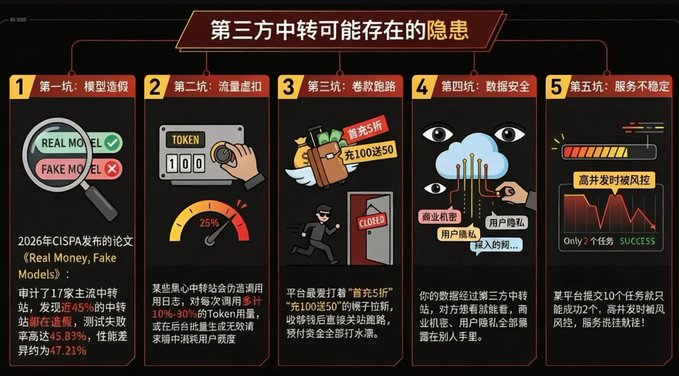
A large number of third-party trans-blast risks were investigated online, summing up five pits:
First pit: Model forgery - The paper published by CISPA in 2026, Real Money, Fake Models, which directly ripped the trunks of the transhipment industry, audited 17 mainstream transhipment stations and found that nearly 451 TP3T had been defunct, with a test failure rate of 45,831 TP3T, with performance differences of approximately 47,211 TP3T
Second pit: Flow default - some black-heart transfer stations will falsify call logs, token usage of 10%-30% per call, or the invisibility of the request to generate invalid batches
Third pit: Volkswagen Runway - The platform's favorite thing is to be refreshed under the guise of “Five-Four-Four-Five-Five-Five-Five”, to close the road as soon as it is paid for, and to spend all the money in advance。
The fourth pit: Data security -- your data is passing through a third-party transit station, and the other side can see it if it wants to, and it's all in the hands of others。
The fifth pit: services are unstable — only two of the 10 missions submitted by a platform are successful, high and medium, and services are hung up
II. Environmental readiness for the construction of transit stations
- Server VPS (Ubuntu 24.04 LTS)
- domain name (domain name registered purchase _domain registered purchase _ telecommunication cloud _ select the cheapest 10r)
- Free fish buys Business account numbers
- Cloudflare account (Google account)
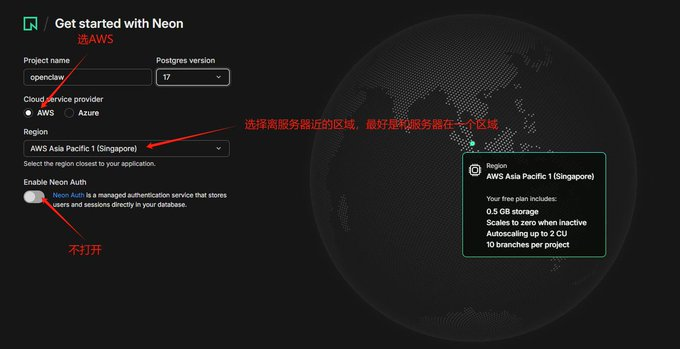
- Neon PostgreSQ L- Free of charge (Registration Link:neon registration link , select the same area of the server Vps, otherwise the transmission will be subject to high delay)
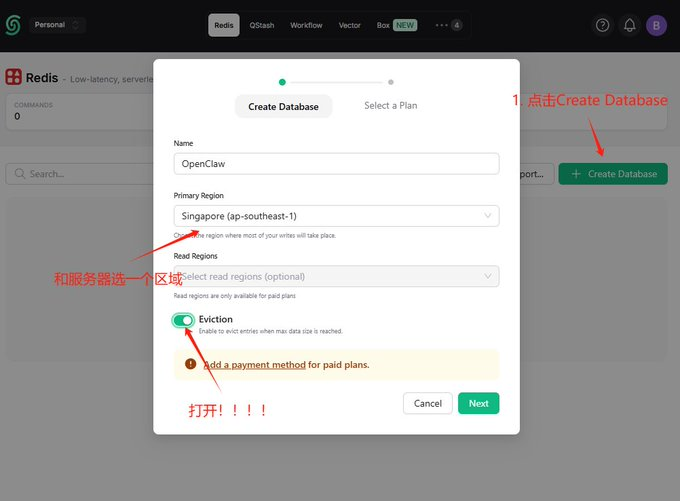
Uplash Redis – Free of charge (Registration Link:Upstash registration link ,Select server Vps in the same area)
- Get the neon and upstairs token, as follows:
# neon
# in Project Dashboard interface, click "Connect string"
# Click "Copy Snippet" to see the following link
Postgresql://neondb_owner:npg_9rHtzxb4NdSY@ep-plain-term-a15dqyl2-poler.ap-southeast-1.aws.neon.tech/neondb?sslmode=require&channel_binding=require

# upstash home page 'Endpoint' click Copy
Retis-cli-tls-u redis://default:gQAAAAAAAAAAAIAAIncdizZDixMmRWKOWI0ODMxOdg1YTg5Yte4MzRkOTZjZnAyNzE4MDg@concise-locust-71808.upstash.io:6379
Claudflare WARP configuration
- Server installation and configuration
# 1. Update the system and install the necessary relying tools
I don't know what you're talking about.

# 2. Get and add the official GPG key for Cloudflare ()
curl-fsSL https://pkg.cloudflaricient.com/pubkey.gpg |gpg-yes-earm-output/usr/share/keyrings/cloudflare-warp-archive-keyring.gpg

# 3. Add corresponding software sources to the system list
echo "deb" [signed-by=/usr/share/keyrings/cloudflare-warp-archive-keyring.gpg] https://pkg.cloudlareclit.com $ (lsb_release-cs)main"

#4 Update software list and install WARP client
I don't know what you're talking about.

# 5. Set up WARP service start-up to prevent server rebooting and offline
It's a very, very, very, very, very, very, very, very, very, very good
- 2. REGISTRATION, START-UP AND TESTING WARP AGENTS
1. Register free equipment account number
Wapp-cli-accept-tos review new

# 2. Switching run mode to Proxy Mode
I don't know what I'm talking about.

# 3. Set up local SOCKS5 proxy listening port (in 40000)
Warp-cli process port 40000

#4 Connect to Cloudflare WARP Network
Wapp-cli condition

#5 Validation of local port listening success
Wapp-cli status

# 6. Test: Validate whether the exit traffic has been taken over using the curl mounted agent request probe
# If the text returned contains "warp=on" which means the agent's disguise is successful!
Curl-socks5-hostname 127.0.01: 40,000 https://1.1.1.1/cdn-cgi/trace
IV. Claudflare Configuration Domain Name, Server Configuration Domain Parsing
Compared to the normal domain name resolution, the hosting of the domain name to Cloudflare is the addition of bodyguards to your server. The traditional DNS will expose your real server IP directly on the public web, easily leading to DDoS attacks and malicious scans; Cloudflare completely hides your real IP through its global nodes, and will automatically and free-of-charge configuration of HTTPS encryption certificates for you
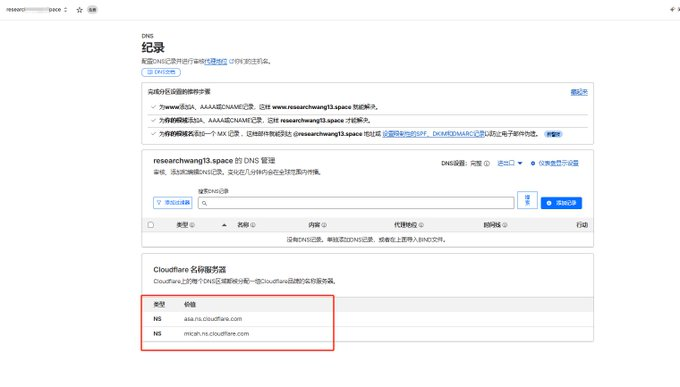
- Enter Cloudflare Domain, search for "Domains", click "Onboard adomain" (note: without www or http://)
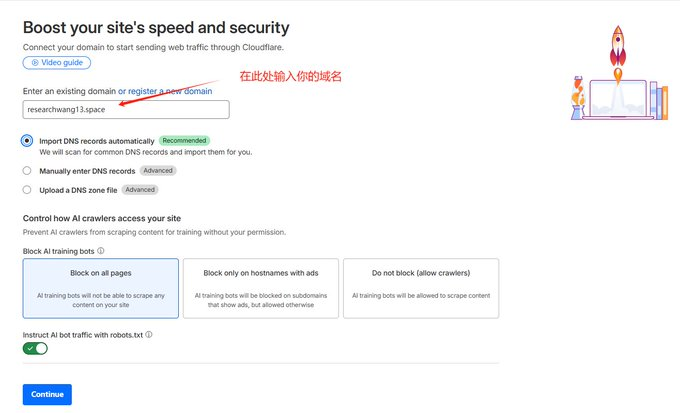
- Choose free plan, Cloudflare will automatically scan your domain name for other IP clicks until it appears
- xxxx.ns.cloudflare.com
- i don't know, yyyyyy.ns.cloudflare.com
- This page does not close
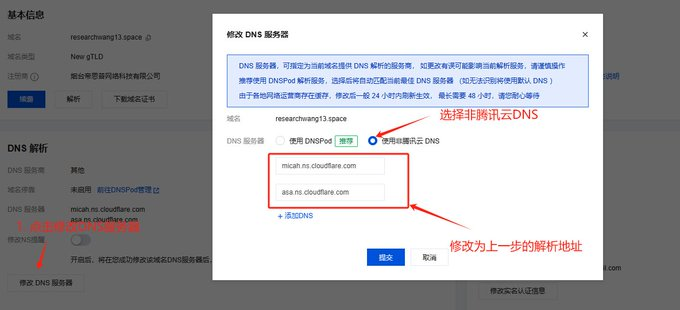
- GO TO THE QUERY CLOUD MANAGEMENT PAGE AND FIX THE ADDRESS BY CLICKING ON "MODIFY DNS SERVER"
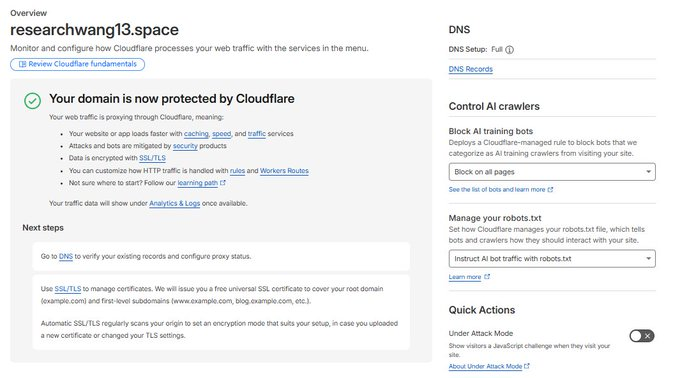
- The test is successful
V. Intranet penetration Cloudflare Tunnel Configuration
TargetedAPITransit operations, network penetrator (Claudflare Tunnel), which enables you to provide services in a state where the cloud server does not need to open any public portal (e.g. 80 or 443), from attack prevention, wind control to full automatic encryption
- Enter the Zero Trust page of the CF by clicking on the Manage Tunnels button, clicking on Add a Tunnel and taking a username at random
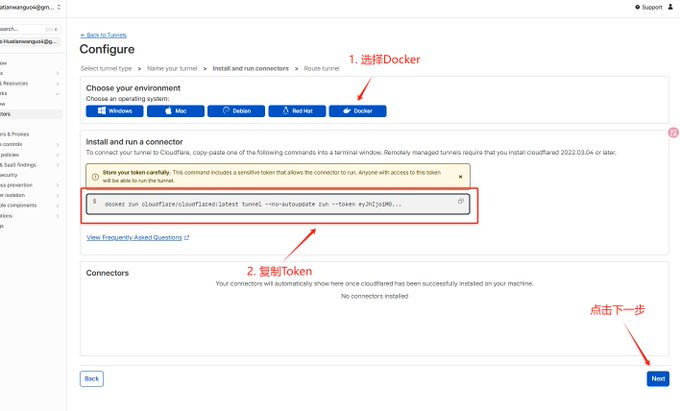
- save token
# Copy Command Ripping Token
Docker run cloudflare/claudflare:latest tunnel --no-autoupdate run-token yJIjoi MGUZJYNDQ4YJU4NthlZTcyYzNkM2UwM2NiYWM0YWILCJIjoNkRKMUZUZYY2M2M2 MtMzkzNy00ODk4LTHiZWETOTODViZDI5YMI0MjAziwicyI6I6Ikt1NV0TnPFdFl6SXhNaTawTurreXSmLA1WpFN4YWXMQMQUURSaJ9

# token
yJhIjoiMguzZjYwNDQ4YjU4NthlZTcyYkM2UwM2NiYWWM0YWILCJ0IjoiNmRkMUzY2MzNy00ODk4LThiZWEtODViZDI5YWI0MjAziIwicyI6Ik5tm1NV0kyTnpFdFl6SXhNaTawTawTurreXSmlarR1lWpFN4yWXOMKPURSACJ9
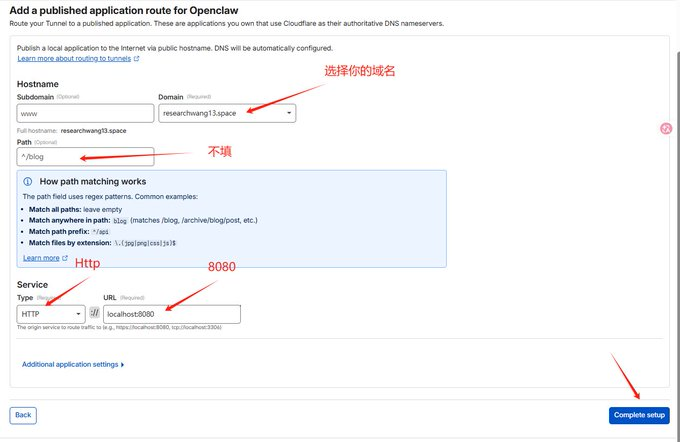
- Subdomain remains empty
- Domain: Select your researchwang13.space
- Path: Keep it empty. Don't fill anything in
- Type: Drop Down HTTP Selection
- URL: localhost: 443 (I fill out researchwang 13:443, following the next Dock-composr.yml servicename)
VI. Server Docker installation and configuration
- Install Docker
# 1. Update local package index
I don't know, apt update

# 2. Download and run official Docker installation scripts
It's just that, uh, curl-fssSL https://get.docker.com-o get-docker.sh
I don't know.

# 3. Check to verify whether Docker and Docker Company were installed successfully
Docker-version
♪ Docker company ♪
- Configure Docker-compose.yml files
# Create an exclusive project directory and enter
mkdir-p ~/ResearchWang13
cd ~/ResearchWang13

# Create and open docker-compose.yml files with nano
No, nano docker-compose.yml

# Paste the following complete configuration to the file (saved by Ctrl+O after pasting, returned for confirmation, then exited by Ctrl+X):

Fire: '3.8'

Documents:
Researchwang13:
Image: weishaw/sub2api:latest
Contact_name: sub2api_core
Now: always
network_mode: "host" # container shared host network
_Other Organiser
- TZ=Asia/Shanghai
GIN_MODE=release
- SUB2API_ENV=protection
- SERVER_PORT = 8080
- SERVER_HOST=0.0.0.0 # listening to all network interfaces
- SERVER_HTTPS=false

# = = = = = = = = = = = = = = = = = = = = = = = = = = = = = = = = = = = = * * * * * * * * * * * * * * * * * * * * = * * * = * = * * * = = = = = = = = = = = = * = = = = = = = = = = = = = = = = = =
# 1. Neon Database Configuration
# = = = = = = = = = = = = = = = = = = = = = = = = = = = = = = = = = = = = * * * * * * * * * * * * * * * * * * * * = * * * = * = * * * = = = = = = = = = = = = * = = = = = = = = = = = = = = = = = =
- DATABASE_HOST=ep- plain-term-a15dqyl2.ap-southeast-1.aws.neon.tech
- DATABASE_PORT=5432
- DATABASE_USER=neondb_owner
- DATABASE_PASSWORD=npg_9rHtzxb4NdSY
- DATABASE_DBNAME=neondb
- DATABASE_SSL_MODE=require

# = = = = = = = = = = = = = = = = = = = = = = = = = = = = = = = = = = = = * * * * * * * * * * * * * * * * * * * * = * * * = * = * * * = = = = = = = = = = = = * = = = = = = = = = = = = = = = = = =
# 2. Uplash Redis Configuration
# = = = = = = = = = = = = = = = = = = = = = = = = = = = = = = = = = = = = * * * * * * * * * * * * * * * * * * * * = * * * = * = * * * = = = = = = = = = = = = * = = = = = = = = = = = = = = = = = =
- REDIS_HOST=
- REDIS_PORT=6379
- REDIS_PASSWORD=gQAAAAAAAAIAAIncdizZDcxMmRMWDFKOWIOODMxODg1YTTE4MzRkotZjZnAyNZE4MDg
- REDIS_USE_TLS=true

# = = = = = = = = = = = = = = = = = = = = = = = = = = = = = = = = = = = = * * * * * * * * * * * * * * * * * * * * = * * * = * = * * * = = = = = = = = = = = = * = = = = = = = = = = = = = = = = = =
# 3. WARP SONKS5 Optional Configuration
# = = = = = = = = = = = = = = = = = = = = = = = = = = = = = = = = = = = = * * * * * * * * * * * * * * * * * * * * = * * * = * = * * * = = = = = = = = = = = = * = = = = = = = = = = = = = = = = = =
# - HTTP_PROXY=socks5h://127.0.01:40,000
# - HTTPS_PROXY=socks5h://127.0.01:40,000
# - All_PROXY = socks5h
# - NO_PROXY=localhost, 127.0.0.1:1

Claudflared:
Image: claudflare/claudflare:latest
Container_name: claudflared_tunnel
Now: always
Network_mode: "host" # to access Sub2Api
It's not like you're in trouble.
_Other Organiser
- TUNNEL_TOKEN=eyJIjoiMGuzZjYNDQ4YJU4NthlZTcyYNkM2UwM2NiYWWM0YMILCJ0IjoiNmRkYY2MtMzkzNy00ODk4LTHIZWEDVIZDI5YWI0MjAziIwicyI6Ik5tm1NV0kyTnpFddFl6SXhNaTawTurreExXSmlR1l0WpFNE4YWXOMKPURSACJ9
Depends_on:
- Researchwang13
- Start Sub2Api
1. Start-up project
Docker copose up-d

# 2. Validation of operational status
Docker logs-f sub2api_core
VII. Installation of Sub2Api
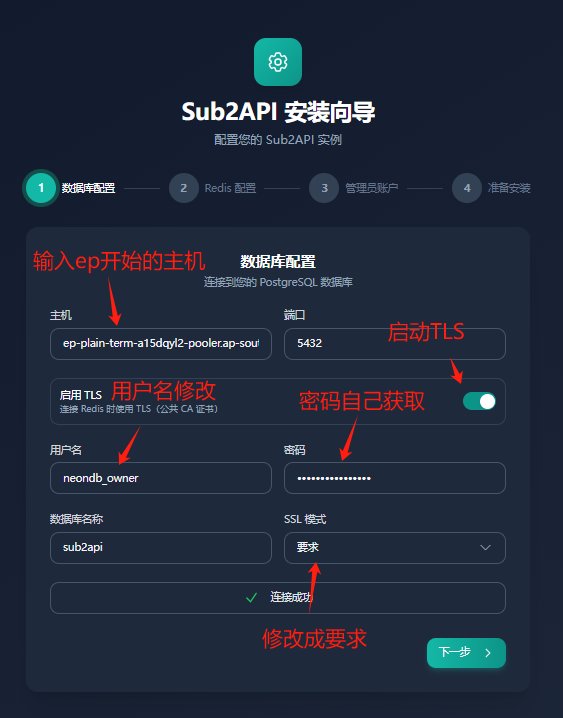
- enter your domain name, configure the account code for the database, and configure according to postgresql
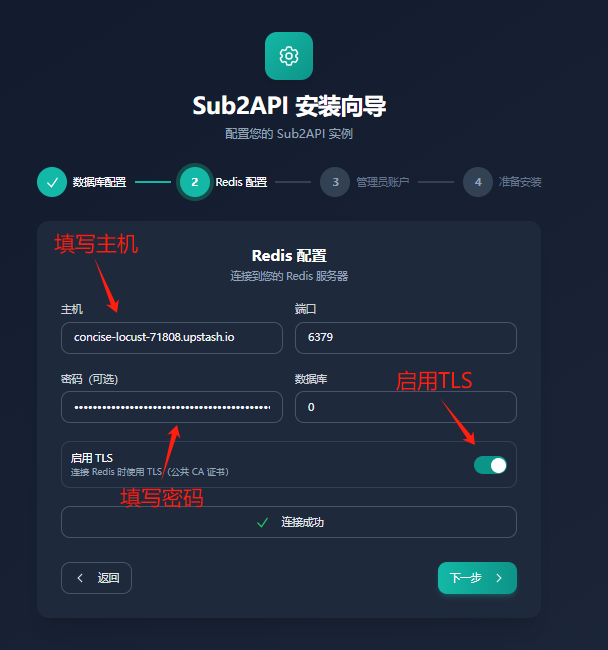
- configure caches, configure according to uplash
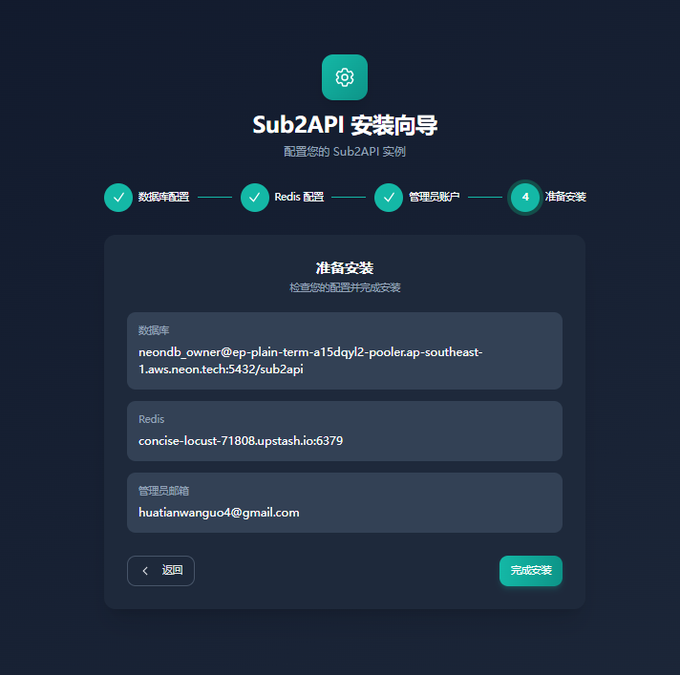
- Configure Administrator Mailbox (self-configuration), install Sub2Api
VIII. Completion of the account pool
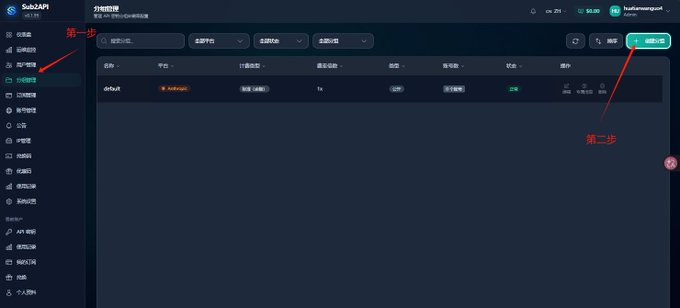
- Enter web pages, create groups
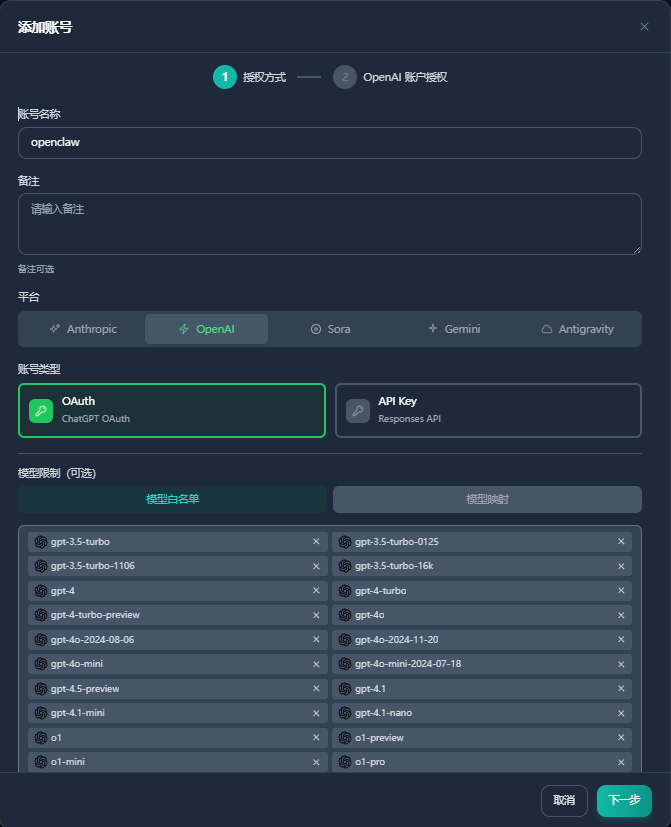
- Add Account
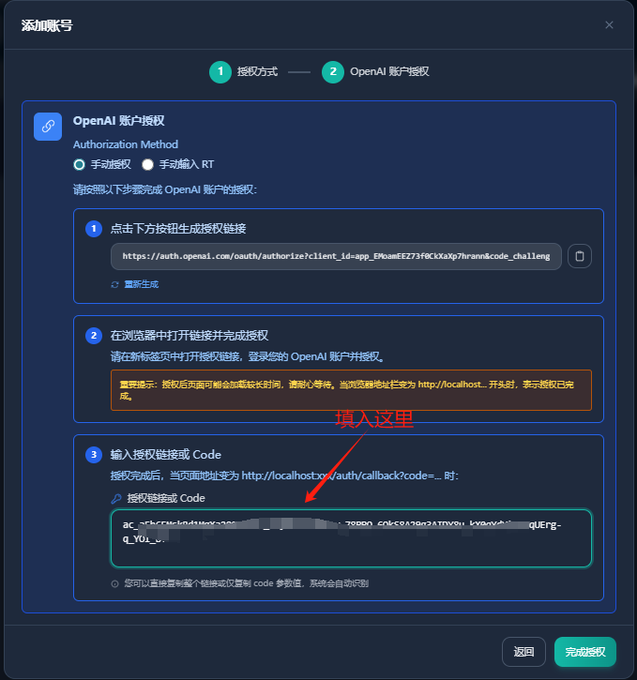
- CLICK TO GENERATE CONNECTIONS, NEW OPEN WINDOWS ENTER LINKS, LOG IN GPT ACCOUNTS, AND ENTER THE FINAL WEB SITE INTO A BOX
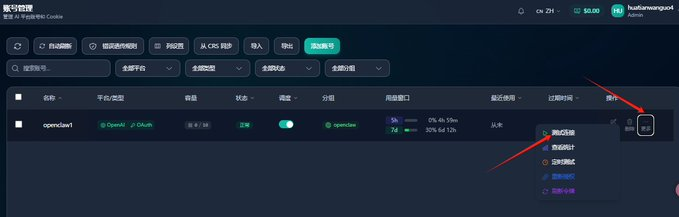
- Account Link Test, Test Gpt-5.3-codex
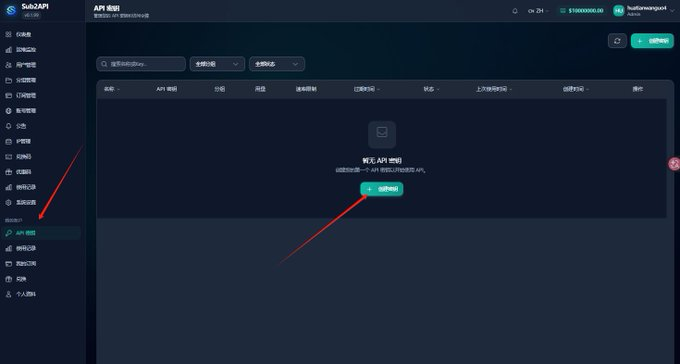
- Generate account pool Api
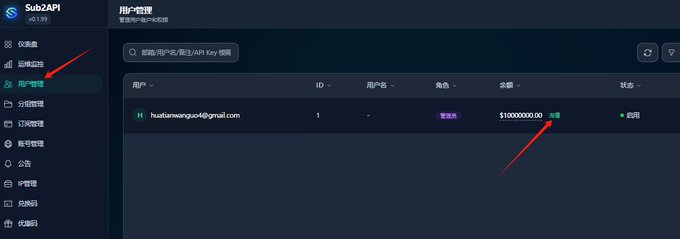
- Enter user management to charge the current account
IX. Configure the configured Sub2Api to OpenClaw, codex, Claudecode..